CS 6262 Fall 02 Firewalls
Firewall Technologies Julie Schneider
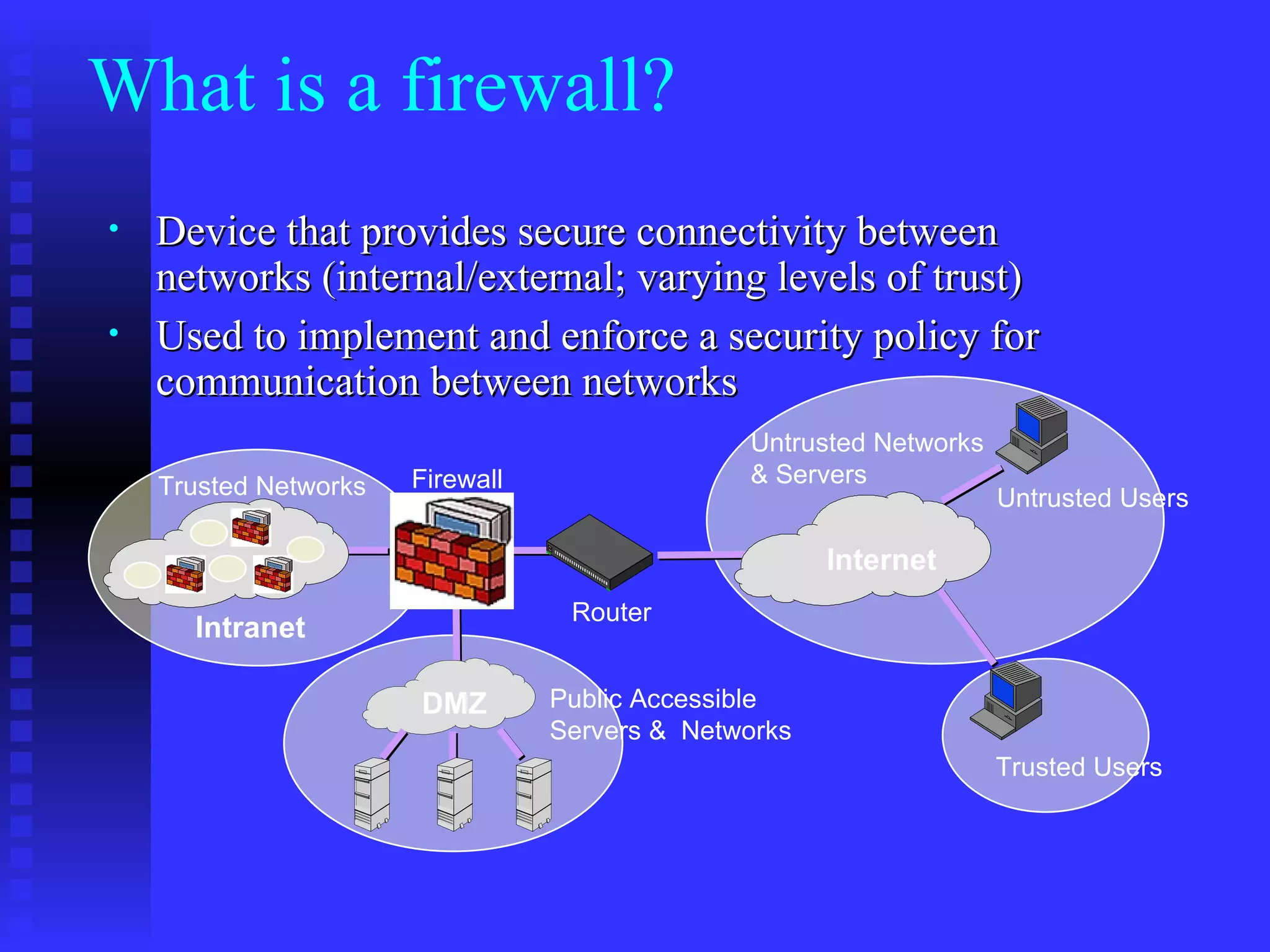
What is a firewall? Device that provides secure connectivity between networks (internal/external; varying levels of trust) Used to implement and enforce a security policy for communication between networks Trusted Networks Untrusted Networks & Servers Firewall Router Internet Intranet DMZ Public Accessible Servers &  Networks Trusted Users Untrusted Users
Firewalls From Webster’s Dictionary:  a wall constructed to prevent the spread of fire Internet firewalls are more the moat around a castle than a building firewall Controlled access point
Firewalls can: Restrict incoming and outgoing traffic by IP address, ports, or users Block invalid packets
Convenient Give insight into traffic mix via logging Network Address Translation Encryption
Firewalls Cannot Protect… Traffic that does not cross it routing around  Internal traffic When misconfigured
Access Control DMZ Net Web Server Pool Corporate Network Security Requirement Control access to network information and resources Protect the network from attacks Internet ALERT!! ALERT!! ALERT!!
Filtering Packets checked then passed Inbound & outbound affect when policy is checked
Filtering Packet filtering  Access Control Lists Session filtering Dynamic Packet Filtering Stateful Inspection Context Based Access Control
Filtering Fragmentation/reassembly Sequence number checking ICMP
Packet Filtering Decisions made on a per-packet basis No state information saved
Typical Configuration Ports > 1024 left open If dynamic protocols are in use,  entire ranges of ports must be allowed  for the protocol to work .
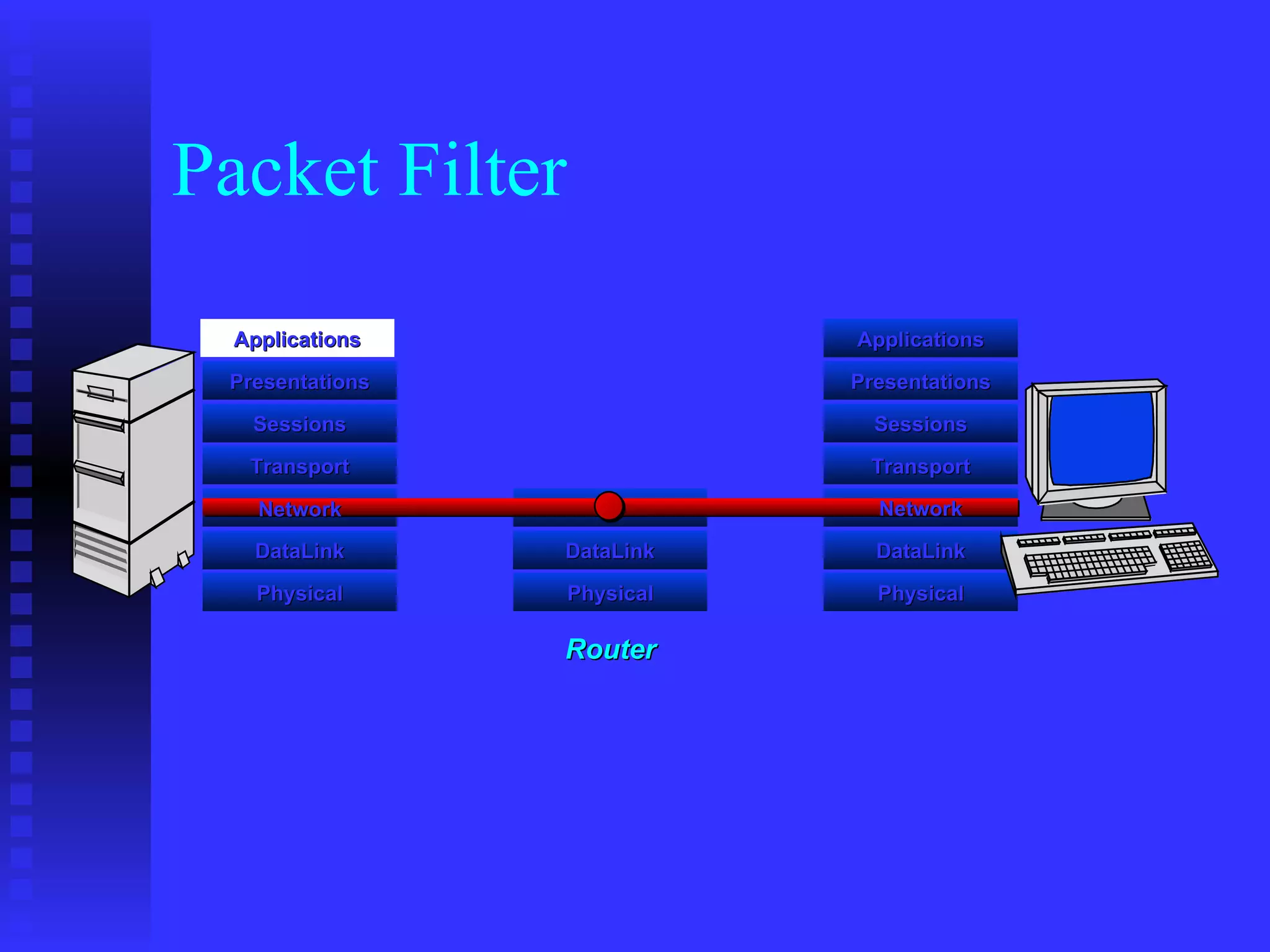
Packet Filter Applications Presentations Sessions Transport DataLink Physical DataLink Physical Router Applications Presentations Sessions Transport DataLink Physical Network Network
Session Filtering Packet decision made in the context of a connection  If packet is a new connection, check against security policy If packet is part of an existing connection, match it up in the state table & update table
Typical Configuration All denied unless specifically allowed Dynamic protocols (FTP, H323, RealAudio, etc.) allowed only if supported
Session Filtering Applications Presentations Sessions Transport DataLink Physical DataLink Physical Applications Presentations Sessions Transport DataLink Physical Network Network Network Presentations Sessions Transport Applications Screens  ALL attempts,  Protects  All applications Extracts  &  maintains  ‘state’ information Makes  an intelligent  security  /  traffic  decision Dynamic State Tables Dynamic State Tables Dynamic State Tables
Telnet “ PORT 1234”   “ ACK” Telnet Client Telnet Server 23 1234    Client opens channel to server; tells server its port number.  The ACK bit is not set while establishing the connection but will be set on the remaining packets.     Server acknowleges.
Example: Telnet Format: access-list  <rule number> <permit|deny> <protocol> <SOURCE host with IP address| any|IP address and mask> [<gt|eq port number>] <DEST host with IP address| any|IP address and mask> [<gt|eq port number>] The following allows user to telnet from an IP address (172.168.10.11) to any destination, but not vice-versa: access-list 100 permit tcp host 172.168.10.11 gt 1023 any eq 23 ! Allows packets out to remote Telnet servers access-list 101 permit tcp any eq 23 host 172.168.10.11 established ! Allows returning packets to come back in.  It verifies that the ACK bit is set interface Ethernet 0 access-list 100 out  ! Apply the first rule to outbound traffic access-list 101 in  ! Apply the second rule to inbound traffic ! Note :  anything not explicitly permitted in an access-list is denied.
FTP “ PORT 5151”   “ OK”  DATA CHANNEL  TCP ACK FTP Client FTP Server 20 Data 21 Command 5150 5151    Client opens command channel to server; tells server second port number.    Server acknowleges.    Server opens data channel to client’s second port.    Client Acknowledges.
Example FTP – Packet Filter Format: access-list  <rule number> <permit|deny> <protocol> <SOURCE host with IP address| any|IP address and mask> [<gt|eq port number>] <DEST host with IP address| any|IP address and mask> [<gt|eq port number>] The following allows a user to FTP (not passive FTP) from any IP address to the FTP server (172.168.10.12) : access-list 100 permit tcp any gt 1023 host 172.168.10.12 eq 21 access-list 100 permit tcp any gt 1023 host 172.168.10.12 eq 20 ! Allows packets from any client to the FTP control and data ports  access-list 101 permit tcp host 172.168.10.12 eq 21 any gt 1023 access-list 101 permit tcp host 172.168.10.12 eq 20 any gt 1023 ! Allows the FTP server to send packets back to any IP address with TCP ports > 1023 interface Ethernet 0 access-list 100 in  ! Apply the first rule to inbound traffic access-list 101 out  ! Apply the second rule to outbound traffic !
FTP – Passive Mode “ PASV”   “ OK 3267”  TCP ACK  DATA CHANNEL FTP Client FTP Server 20 Data 21 Command 5150 5151    Client opens command channel to server; requests passive mode.    Server allocates port for data channel; tells client port number.    Client opens data channel to server’s second port.    Server Acknowledges.
Example FTP : Session Filter
Proxy Firewalls Relay for connections Client   Proxy   Server Two flavors Application level  Circuit level
Application Gateways Understands specific applications Limited proxies available Proxy ‘impersonates’ both sides of connection Resource intensive process per connection HTTP proxies may cache web pages
Application Gateways More appropriate to TCP ICMP difficult Block all unless specifically allowed Must write a new proxy application to support new protocols Not trivial!
Application Gateways Clients configured for proxy communication Transparent Proxies
Application Layer GW/proxy Applications Presentations Sessions Transport DataLink Physical Network DataLink Physical Applications Presentations Sessions Transport DataLink Physical Application Gateway Applications Presentations Sessions Transport Network Network Telnet HTTP FTP
Circuit-Level Gateways Support more services than Application-level Gateway less control over data Hard to handle protocols like FTP Clients must be aware they are using a circuit-level proxy Protect against fragmentation problem
SOCKS Circuit level Gateway Support TCP  SOCKS v5 supports UDP, earlier versions did not See  http:// www.socks.nec.com
Comparison Lower is better for security & performance Typically < 20  Dependent on vendor for dynamic support No dynamic w/o holes Service Support 4 1 App. GW 3 2 Circuit GW 2 2 Session Filter 1 3 Packet Filter Performance Security
Comparison Unless transparent, client application must be proxy-aware & configured App. GW Typical, SOCKS-ify client applications Circuit GW No Session Filter No Packet Filter Modify Client Applications?
Comparison yes No App. GW Yes (SOCKS v5) Circuit GW Maybe Yes Session Filter No Yes Packet Filter Fragmen-tation ICMP
Proxying UDP/ICMP Why isn’t UDP or ICMP proxied as much as TCP? TCP’s connection-oriented nature easier to proxy UDP & ICMP harder (but not impossible) since each packet is a separate transaction Session filters determine which packets appear to be replies
Circuit Level GW Operate at user level in OS Have circuit program ‘route’ packets between interfaces instead of OS routing code
NAT Useful if organization does not have enough real IP addresses Extra security measure if internal hosts do not have valid IP addresses (harder to trick firewall) Only really need real IP addresses for services outside networks will originate connections to
NAT Many-to-1 (n-to-m) mapping 1-to-1 (n-to-n) mapping Proxies provide many-to-1 NAT not required on filtering firewalls
Encryption (VPNs) Allows trusted users to access sensitive information while traversing untrusted networks Useful for remote users/sites IPSec
Encrypted Tunnels What kind of traffic allowed? Only IP? Can the tunnel traffic be examined? Or are firewalls blind to internal tunnel traffic? Can services and users be limited in their tunnel traffic?
Attacks Take advantage of allowed client-server communications Get around connections
IP Spoofing Intruder attempts to gain access by altering a packet’s IP address to make it appear as though the packet originated in a part of the network with higher access privileges
Anti-Spoofing Must have network level access to packets Match up packets with allowed addresses per interface With proxies, the IP headers are lost and never reach the application level
Anti-Spoofing Internet 130.207.5.0 130.207.3.0 130.207.4.0 e1 e2 e3 e4 Allowed Networks: E1: 130207.4.0/24 E2: 130.207.3.0/24 E3: 130.207.5.0/24 E4: All except E1,E2,E3
Mitnick & Shimomura IP spoofing  Sequence number prediction See http://www.takedown.com
  Telnet Client Telnet Server 23 1234 Allow only if ACK bit set  ,     Send 2 fragments with the ACK bit set; when the server re-assembles the packet, the fragment offset are chosen so the full datagram forms a packet with the SYN bit set (the fragment offset of the second packet overlaps into the space of the first packet)     All following packets will have the ACK bit set  FRAG1 (with ACK) FRAG2 (with ACK) SYN packet (no ACK) ACK Fragmentation: The 1 st  Wave
IP Datagram IP Header TCP Header Fragmentation Data Link Layer Trailer Data Options + Padding Urgent Pointer Checksum Window U  A  P R S F Offset/Reserved Acknowledgement Number Sequence Number Destination Port Source Port Options + Padding Destination Address Source Address Header Checksum Protocol Time To Live Fragment Offset Flags Identifier Total Length Type of Service Ver/IHL Data Link Layer Header
Fragemtation: 2 nd  Wave Instead fragmenting TCP header, fragment data portion or ICMP to attack OS of clients OS – not all do bounds checking ‘early Friday bug’  oversized ICMP reassembled on client too large, caused buffer overrun and BSOD Fragment a URL or ftp put command Proxy would catch
Chargen Service Character Generation, debugging tool Make a connection & receive a stream of data Trick machine into making a connection to itself  CPU locks Anti-spoofing will catch
Sendmail Typically handled by a proxy Almost never want the outside world to have direct access to sendmail

Firewall

  • 1.
    CS 6262 Fall02 Firewalls
  • 2.
  • 3.
    What is afirewall? Device that provides secure connectivity between networks (internal/external; varying levels of trust) Used to implement and enforce a security policy for communication between networks Trusted Networks Untrusted Networks & Servers Firewall Router Internet Intranet DMZ Public Accessible Servers & Networks Trusted Users Untrusted Users
  • 4.
    Firewalls From Webster’sDictionary: a wall constructed to prevent the spread of fire Internet firewalls are more the moat around a castle than a building firewall Controlled access point
  • 5.
    Firewalls can: Restrictincoming and outgoing traffic by IP address, ports, or users Block invalid packets
  • 6.
    Convenient Give insightinto traffic mix via logging Network Address Translation Encryption
  • 7.
    Firewalls Cannot Protect…Traffic that does not cross it routing around Internal traffic When misconfigured
  • 8.
    Access Control DMZNet Web Server Pool Corporate Network Security Requirement Control access to network information and resources Protect the network from attacks Internet ALERT!! ALERT!! ALERT!!
  • 9.
    Filtering Packets checkedthen passed Inbound & outbound affect when policy is checked
  • 10.
    Filtering Packet filtering Access Control Lists Session filtering Dynamic Packet Filtering Stateful Inspection Context Based Access Control
  • 11.
  • 12.
    Packet Filtering Decisionsmade on a per-packet basis No state information saved
  • 13.
    Typical Configuration Ports> 1024 left open If dynamic protocols are in use, entire ranges of ports must be allowed for the protocol to work .
  • 14.
    Packet Filter ApplicationsPresentations Sessions Transport DataLink Physical DataLink Physical Router Applications Presentations Sessions Transport DataLink Physical Network Network
  • 15.
    Session Filtering Packetdecision made in the context of a connection If packet is a new connection, check against security policy If packet is part of an existing connection, match it up in the state table & update table
  • 16.
    Typical Configuration Alldenied unless specifically allowed Dynamic protocols (FTP, H323, RealAudio, etc.) allowed only if supported
  • 17.
    Session Filtering ApplicationsPresentations Sessions Transport DataLink Physical DataLink Physical Applications Presentations Sessions Transport DataLink Physical Network Network Network Presentations Sessions Transport Applications Screens ALL attempts, Protects All applications Extracts & maintains ‘state’ information Makes an intelligent security / traffic decision Dynamic State Tables Dynamic State Tables Dynamic State Tables
  • 18.
    Telnet “ PORT1234”   “ ACK” Telnet Client Telnet Server 23 1234  Client opens channel to server; tells server its port number. The ACK bit is not set while establishing the connection but will be set on the remaining packets.  Server acknowleges.
  • 19.
    Example: Telnet Format:access-list <rule number> <permit|deny> <protocol> <SOURCE host with IP address| any|IP address and mask> [<gt|eq port number>] <DEST host with IP address| any|IP address and mask> [<gt|eq port number>] The following allows user to telnet from an IP address (172.168.10.11) to any destination, but not vice-versa: access-list 100 permit tcp host 172.168.10.11 gt 1023 any eq 23 ! Allows packets out to remote Telnet servers access-list 101 permit tcp any eq 23 host 172.168.10.11 established ! Allows returning packets to come back in. It verifies that the ACK bit is set interface Ethernet 0 access-list 100 out ! Apply the first rule to outbound traffic access-list 101 in ! Apply the second rule to inbound traffic ! Note : anything not explicitly permitted in an access-list is denied.
  • 20.
    FTP “ PORT5151”   “ OK”  DATA CHANNEL  TCP ACK FTP Client FTP Server 20 Data 21 Command 5150 5151  Client opens command channel to server; tells server second port number.  Server acknowleges.  Server opens data channel to client’s second port.  Client Acknowledges.
  • 21.
    Example FTP –Packet Filter Format: access-list <rule number> <permit|deny> <protocol> <SOURCE host with IP address| any|IP address and mask> [<gt|eq port number>] <DEST host with IP address| any|IP address and mask> [<gt|eq port number>] The following allows a user to FTP (not passive FTP) from any IP address to the FTP server (172.168.10.12) : access-list 100 permit tcp any gt 1023 host 172.168.10.12 eq 21 access-list 100 permit tcp any gt 1023 host 172.168.10.12 eq 20 ! Allows packets from any client to the FTP control and data ports access-list 101 permit tcp host 172.168.10.12 eq 21 any gt 1023 access-list 101 permit tcp host 172.168.10.12 eq 20 any gt 1023 ! Allows the FTP server to send packets back to any IP address with TCP ports > 1023 interface Ethernet 0 access-list 100 in ! Apply the first rule to inbound traffic access-list 101 out ! Apply the second rule to outbound traffic !
  • 22.
    FTP – PassiveMode “ PASV”   “ OK 3267”  TCP ACK  DATA CHANNEL FTP Client FTP Server 20 Data 21 Command 5150 5151  Client opens command channel to server; requests passive mode.  Server allocates port for data channel; tells client port number.  Client opens data channel to server’s second port.  Server Acknowledges.
  • 23.
    Example FTP :Session Filter
  • 24.
    Proxy Firewalls Relayfor connections Client  Proxy  Server Two flavors Application level Circuit level
  • 25.
    Application Gateways Understandsspecific applications Limited proxies available Proxy ‘impersonates’ both sides of connection Resource intensive process per connection HTTP proxies may cache web pages
  • 26.
    Application Gateways Moreappropriate to TCP ICMP difficult Block all unless specifically allowed Must write a new proxy application to support new protocols Not trivial!
  • 27.
    Application Gateways Clientsconfigured for proxy communication Transparent Proxies
  • 28.
    Application Layer GW/proxyApplications Presentations Sessions Transport DataLink Physical Network DataLink Physical Applications Presentations Sessions Transport DataLink Physical Application Gateway Applications Presentations Sessions Transport Network Network Telnet HTTP FTP
  • 29.
    Circuit-Level Gateways Supportmore services than Application-level Gateway less control over data Hard to handle protocols like FTP Clients must be aware they are using a circuit-level proxy Protect against fragmentation problem
  • 30.
    SOCKS Circuit levelGateway Support TCP SOCKS v5 supports UDP, earlier versions did not See http:// www.socks.nec.com
  • 31.
    Comparison Lower isbetter for security & performance Typically < 20 Dependent on vendor for dynamic support No dynamic w/o holes Service Support 4 1 App. GW 3 2 Circuit GW 2 2 Session Filter 1 3 Packet Filter Performance Security
  • 32.
    Comparison Unless transparent,client application must be proxy-aware & configured App. GW Typical, SOCKS-ify client applications Circuit GW No Session Filter No Packet Filter Modify Client Applications?
  • 33.
    Comparison yes NoApp. GW Yes (SOCKS v5) Circuit GW Maybe Yes Session Filter No Yes Packet Filter Fragmen-tation ICMP
  • 34.
    Proxying UDP/ICMP Whyisn’t UDP or ICMP proxied as much as TCP? TCP’s connection-oriented nature easier to proxy UDP & ICMP harder (but not impossible) since each packet is a separate transaction Session filters determine which packets appear to be replies
  • 35.
    Circuit Level GWOperate at user level in OS Have circuit program ‘route’ packets between interfaces instead of OS routing code
  • 36.
    NAT Useful iforganization does not have enough real IP addresses Extra security measure if internal hosts do not have valid IP addresses (harder to trick firewall) Only really need real IP addresses for services outside networks will originate connections to
  • 37.
    NAT Many-to-1 (n-to-m)mapping 1-to-1 (n-to-n) mapping Proxies provide many-to-1 NAT not required on filtering firewalls
  • 38.
    Encryption (VPNs) Allowstrusted users to access sensitive information while traversing untrusted networks Useful for remote users/sites IPSec
  • 39.
    Encrypted Tunnels Whatkind of traffic allowed? Only IP? Can the tunnel traffic be examined? Or are firewalls blind to internal tunnel traffic? Can services and users be limited in their tunnel traffic?
  • 40.
    Attacks Take advantageof allowed client-server communications Get around connections
  • 41.
    IP Spoofing Intruderattempts to gain access by altering a packet’s IP address to make it appear as though the packet originated in a part of the network with higher access privileges
  • 42.
    Anti-Spoofing Must havenetwork level access to packets Match up packets with allowed addresses per interface With proxies, the IP headers are lost and never reach the application level
  • 43.
    Anti-Spoofing Internet 130.207.5.0130.207.3.0 130.207.4.0 e1 e2 e3 e4 Allowed Networks: E1: 130207.4.0/24 E2: 130.207.3.0/24 E3: 130.207.5.0/24 E4: All except E1,E2,E3
  • 44.
    Mitnick & ShimomuraIP spoofing Sequence number prediction See http://www.takedown.com
  • 45.
      TelnetClient Telnet Server 23 1234 Allow only if ACK bit set  ,  Send 2 fragments with the ACK bit set; when the server re-assembles the packet, the fragment offset are chosen so the full datagram forms a packet with the SYN bit set (the fragment offset of the second packet overlaps into the space of the first packet)  All following packets will have the ACK bit set  FRAG1 (with ACK) FRAG2 (with ACK) SYN packet (no ACK) ACK Fragmentation: The 1 st Wave
  • 46.
    IP Datagram IPHeader TCP Header Fragmentation Data Link Layer Trailer Data Options + Padding Urgent Pointer Checksum Window U A P R S F Offset/Reserved Acknowledgement Number Sequence Number Destination Port Source Port Options + Padding Destination Address Source Address Header Checksum Protocol Time To Live Fragment Offset Flags Identifier Total Length Type of Service Ver/IHL Data Link Layer Header
  • 47.
    Fragemtation: 2 nd Wave Instead fragmenting TCP header, fragment data portion or ICMP to attack OS of clients OS – not all do bounds checking ‘early Friday bug’ oversized ICMP reassembled on client too large, caused buffer overrun and BSOD Fragment a URL or ftp put command Proxy would catch
  • 48.
    Chargen Service CharacterGeneration, debugging tool Make a connection & receive a stream of data Trick machine into making a connection to itself CPU locks Anti-spoofing will catch
  • 49.
    Sendmail Typically handledby a proxy Almost never want the outside world to have direct access to sendmail