Learning Outcomes
On successful completion of this course,
students will be able to:
•Identify various types of firewalls and their functions,
including which firewalls operate at which OSI protocol
layer, and the basic variations of firewall architectures
•Describe risk mitigation techniques to varying threats
with the use of different firewall architectures
•Demonstrate the ability to design and deploy policies on
a firewall
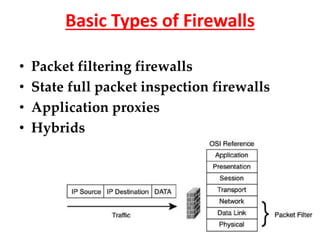
Basic Types of Firewalls
• Packet filtering firewalls
• State full packet inspection firewalls
• Application proxies
• Hybrids
Packet filter
A packet filter firewall is the simplest type of firewall.
Dealing with each individual packet, the firewall applies
its rule set to determine which packet to allow or disallow.
The firewall examines each packet based on the following
criteria:
• Source IP address
• Destination IP address
• TCP/UDP source port
• TCP/UDP destination port
Packet Filter - Pros
•They are fast because they operate on IP
addresses and TCP/UDP port numbers alone,
ignoring the data contents (payload) of packets.
•Due to the fact that packet payload is ignored,
application independence exists.
•Least expensive of the three types of firewalls.
•Packet filtering rules are relatively easy to
configure.
•There are no configuration changes necessary
to the protected workstations.
Packet filters - Cons
•Allow a direct connection between endpoints through
the firewall. This leaves the potential for a
vulnerability to be exploited.
•There is no screening of packet payload available. It is
impossible to block users from visiting web sites
deemed off limits, for example.
•Logging of network traffic includes only IP addresses
and TCP/UDP port numbers, no packet payload
information is available.
Packet filters – Cons
• Complex firewall policies are difficult to implement
using filtering rules alone.
• There is a reliance on the IP address for authentication
rather than user authentication.
• Dynamic IP addressing schemes such as DHCP may
complicate filtering rules involving IP addresses.
Application proxies
An application proxy is a program running
on the firewall that emulates both ends of a
network connection. One can think of it as a
sort of "translator" in-between the two
computers communicating.
Application proxies - Pros
• Firewall does not let end points communicate directly with
one another. Thus a vulnerability in a protocol which could
slip by a packet filter or stateful packet inspection firewall
could be overcome by the proxy program.
• Has the best content filtering capability.
• Can hide private systems.
• Robust user authentication.
• Offers the best logging of activities.
• Policy rules are usually easier than packet filtering rules.
Application proxies - Cons
• Performance problems; much slower than the other two
• Must have a proxy for every protocol. Failure to have a proxy
may prevent a protocol from being handled correctly by the
firewall.
• TCP is the preferred transport. UDP may not be supported.
• Limited transparency, clients may need to be modified.
Setting up the proxy server in a browser, for example.
• No protection from all protocol weaknesses.
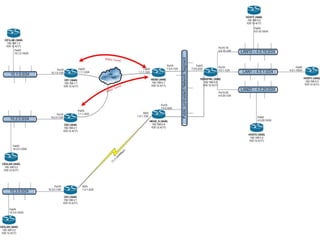
OSI – Open System Interconnect
TCP/IP Protocol Architecture
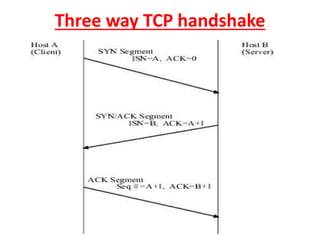
Three way TCP handshake
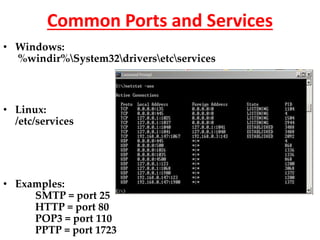
Common Ports and Services
• Windows:
%windir%System32driversetcservices
• Linux:
/etc/services
• Examples:
SMTP = port 25
HTTP = port 80
POP3 = port 110
PPTP = port 1723
The STRIDE Threat Model
• Spoofing identity
– Attacker obtains something that enables authentication
• Tampering with data
– Unauthorized change made to stored or in-transit information
• Repudiation
– Performing an illegal operation in a system that lacks the ability
to trace such operations
• Information disclosure
– Exposing critical information to unauthorized individuals
• Denial of Service (DoS)
– Denies service to others
• Elevation of privileges
– Attacker exploits a weakness to gain greater privileges on a
system than were intended
How to Respond to Threats
1. Do nothing.
2. Inform the user of the threat.
3. Remove the problem.
4. Fix the problem.
Building a firewall port matrix
• Determine trust zones
• Determine ports that need opening
• Determine packet type (tcp/udp)
• Determines direction of packet flow
• Determine any limitations you can set on src/dst
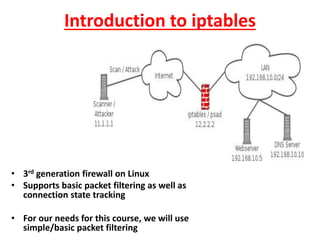
Introduction to iptables
• 3rd generation firewall on Linux
• Supports basic packet filtering as well as
connection state tracking
• For our needs for this course, we will use
simple/basic packet filtering
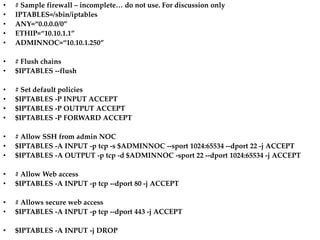
• # Sample firewall – incomplete… do not use. For discussion only
• IPTABLES=/sbin/iptables
• ANY=“0.0.0.0/0”
• ETHIP=“10.10.1.1”
• ADMINNOC=“10.10.1.250”
• # Flush chains
• $IPTABLES --flush
• # Set default policies
• $IPTABLES -P INPUT ACCEPT
• $IPTABLES -P OUTPUT ACCEPT
• $IPTABLES -P FORWARD ACCEPT
• # Allow SSH from admin NOC
• $IPTABLES -A INPUT -p tcp -s $ADMINNOC --sport 1024:65534 --dport 22 -j ACCEPT
• $IPTABLES -A OUTPUT -p tcp -d $ADMINNOC -sport 22 --dport 1024:65534 -j ACCEPT
• # Allow Web access
• $IPTABLES -A INPUT -p tcp --dport 80 -j ACCEPT
• # Allows secure web access
• $IPTABLES -A INPUT -p tcp --dport 443 -j ACCEPT
• $IPTABLES -A INPUT -j DROP
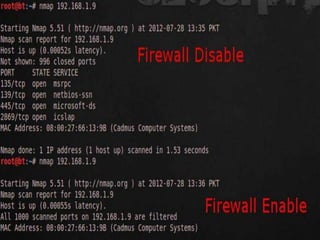
Introduction to NMAP
• Can scan networks to find active (online) hosts
• Can scan hosts to find open ports
• Can send crafted packets to fingerprint the operating
system
• Can be used defensively to identify weaknesses that need
to be corrected, or offensively by an attacker to probe for
vulnerabilities to exploit.
Interesting NMAP options
• -v = Verbose logging
• -O = OS fingerprinting
• -sS = SYN stealth scan
• -P0 = Scan without ping probes
• nmap –v –O –sS your.host.com
Reference
Dana Epp, January 2005
dana@scorpionsoft.com
http://silverstr.ufies.org/blog/

Linux and firewall

  • 1.
    Learning Outcomes On successfulcompletion of this course, students will be able to: •Identify various types of firewalls and their functions, including which firewalls operate at which OSI protocol layer, and the basic variations of firewall architectures •Describe risk mitigation techniques to varying threats with the use of different firewall architectures •Demonstrate the ability to design and deploy policies on a firewall
  • 2.
    Basic Types ofFirewalls • Packet filtering firewalls • State full packet inspection firewalls • Application proxies • Hybrids
  • 3.
    Packet filter A packetfilter firewall is the simplest type of firewall. Dealing with each individual packet, the firewall applies its rule set to determine which packet to allow or disallow. The firewall examines each packet based on the following criteria: • Source IP address • Destination IP address • TCP/UDP source port • TCP/UDP destination port
  • 4.
    Packet Filter -Pros •They are fast because they operate on IP addresses and TCP/UDP port numbers alone, ignoring the data contents (payload) of packets. •Due to the fact that packet payload is ignored, application independence exists. •Least expensive of the three types of firewalls. •Packet filtering rules are relatively easy to configure. •There are no configuration changes necessary to the protected workstations.
  • 5.
    Packet filters -Cons •Allow a direct connection between endpoints through the firewall. This leaves the potential for a vulnerability to be exploited. •There is no screening of packet payload available. It is impossible to block users from visiting web sites deemed off limits, for example. •Logging of network traffic includes only IP addresses and TCP/UDP port numbers, no packet payload information is available.
  • 6.
    Packet filters –Cons • Complex firewall policies are difficult to implement using filtering rules alone. • There is a reliance on the IP address for authentication rather than user authentication. • Dynamic IP addressing schemes such as DHCP may complicate filtering rules involving IP addresses.
  • 8.
    Application proxies An applicationproxy is a program running on the firewall that emulates both ends of a network connection. One can think of it as a sort of "translator" in-between the two computers communicating.
  • 9.
    Application proxies -Pros • Firewall does not let end points communicate directly with one another. Thus a vulnerability in a protocol which could slip by a packet filter or stateful packet inspection firewall could be overcome by the proxy program. • Has the best content filtering capability. • Can hide private systems. • Robust user authentication. • Offers the best logging of activities. • Policy rules are usually easier than packet filtering rules.
  • 10.
    Application proxies -Cons • Performance problems; much slower than the other two • Must have a proxy for every protocol. Failure to have a proxy may prevent a protocol from being handled correctly by the firewall. • TCP is the preferred transport. UDP may not be supported. • Limited transparency, clients may need to be modified. Setting up the proxy server in a browser, for example. • No protection from all protocol weaknesses.
  • 11.
    OSI – OpenSystem Interconnect
  • 12.
  • 13.
    Three way TCPhandshake
  • 14.
    Common Ports andServices • Windows: %windir%System32driversetcservices • Linux: /etc/services • Examples: SMTP = port 25 HTTP = port 80 POP3 = port 110 PPTP = port 1723
  • 15.
    The STRIDE ThreatModel • Spoofing identity – Attacker obtains something that enables authentication • Tampering with data – Unauthorized change made to stored or in-transit information • Repudiation – Performing an illegal operation in a system that lacks the ability to trace such operations • Information disclosure – Exposing critical information to unauthorized individuals • Denial of Service (DoS) – Denies service to others • Elevation of privileges – Attacker exploits a weakness to gain greater privileges on a system than were intended
  • 16.
    How to Respondto Threats 1. Do nothing. 2. Inform the user of the threat. 3. Remove the problem. 4. Fix the problem.
  • 17.
    Building a firewallport matrix • Determine trust zones • Determine ports that need opening • Determine packet type (tcp/udp) • Determines direction of packet flow • Determine any limitations you can set on src/dst
  • 18.
    Introduction to iptables •3rd generation firewall on Linux • Supports basic packet filtering as well as connection state tracking • For our needs for this course, we will use simple/basic packet filtering
  • 19.
    • # Samplefirewall – incomplete… do not use. For discussion only • IPTABLES=/sbin/iptables • ANY=“0.0.0.0/0” • ETHIP=“10.10.1.1” • ADMINNOC=“10.10.1.250” • # Flush chains • $IPTABLES --flush • # Set default policies • $IPTABLES -P INPUT ACCEPT • $IPTABLES -P OUTPUT ACCEPT • $IPTABLES -P FORWARD ACCEPT • # Allow SSH from admin NOC • $IPTABLES -A INPUT -p tcp -s $ADMINNOC --sport 1024:65534 --dport 22 -j ACCEPT • $IPTABLES -A OUTPUT -p tcp -d $ADMINNOC -sport 22 --dport 1024:65534 -j ACCEPT • # Allow Web access • $IPTABLES -A INPUT -p tcp --dport 80 -j ACCEPT • # Allows secure web access • $IPTABLES -A INPUT -p tcp --dport 443 -j ACCEPT • $IPTABLES -A INPUT -j DROP
  • 20.
    Introduction to NMAP •Can scan networks to find active (online) hosts • Can scan hosts to find open ports • Can send crafted packets to fingerprint the operating system • Can be used defensively to identify weaknesses that need to be corrected, or offensively by an attacker to probe for vulnerabilities to exploit.
  • 22.
    Interesting NMAP options •-v = Verbose logging • -O = OS fingerprinting • -sS = SYN stealth scan • -P0 = Scan without ping probes • nmap –v –O –sS your.host.com
  • 23.
    Reference Dana Epp, January2005 dana@scorpionsoft.com http://silverstr.ufies.org/blog/