Computer Viruses
OBJECTIVES
 Introduction
 What Is Virus?
 Why Virus Are Called “Virus”?
 How Do Virus Spread?
 Virus Operation
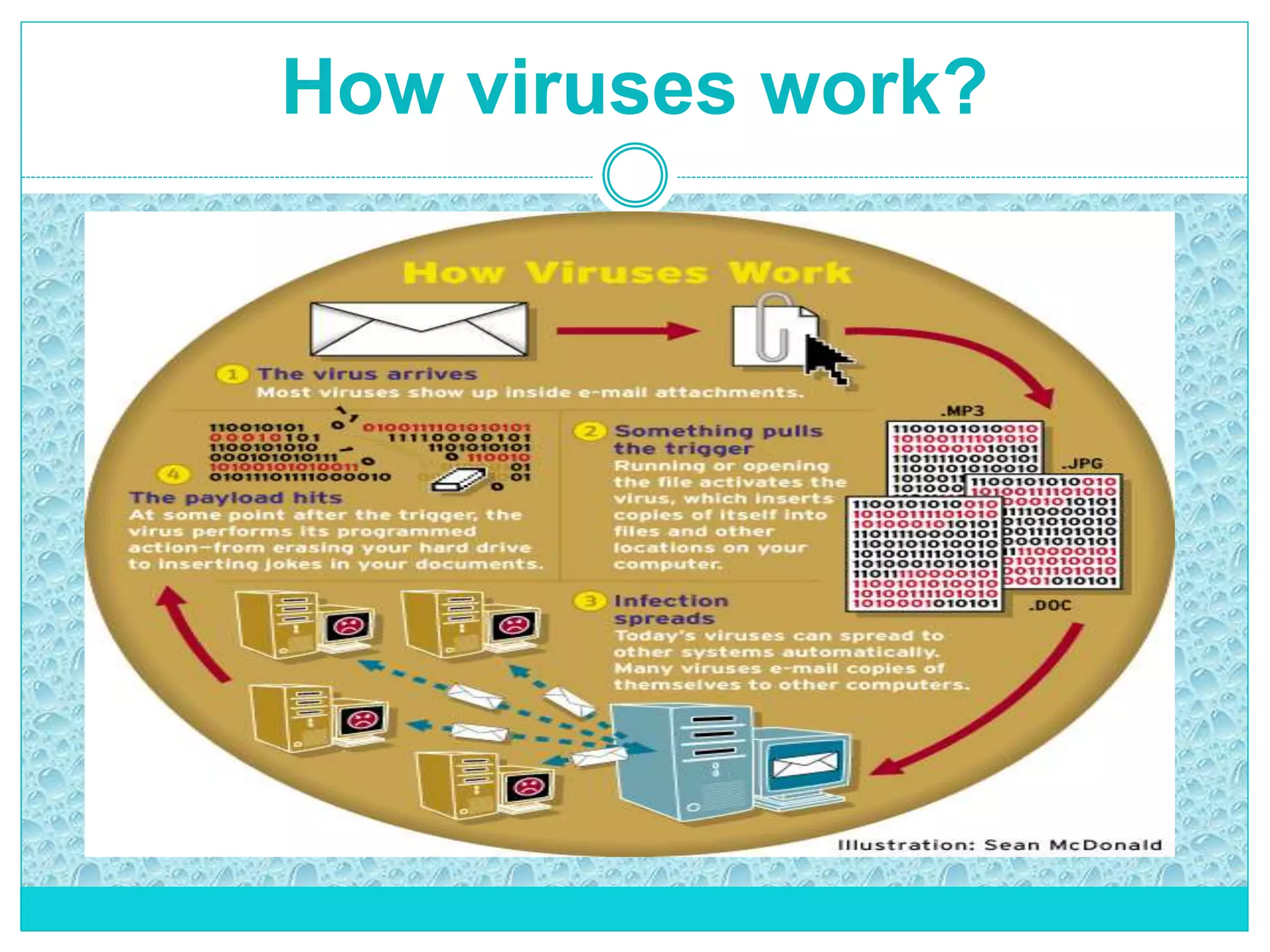
 How Virus work?
 Common Virus Entry Points
 Symptoms Of Virus Attack
 Types of Computer Virus
 Techniques used by Viruses
 Anti-Virus Software
 Methods used by Antivirus Software
 Actions to Prevent Virus Infection
 Conclusion
INTRODUCTION
 Computer virus have become today’s headline news
 With the increasing use of the Internet, it has become easier
for virus to spread
 one of a family of malicious software
 Virus show us loopholes in software
 Most virus are targeted at the MS Windows OS
 There are estimated 90,000 computer viruses in existence
 Over 300 new ones are created each month
 First virus was created to show loopholes in software
What is a virus?
 A true virus is capable of self replication on a machine
 It may spread between files or disks
 It is a program that can enter a computer in many different ways
 It can recreate itself on it’s own with out traveling to a new host
 A virus will not act until it has been run or until certain pre-established
conditions have been met, called the "trigger" condition
A computer virus is a malware program that, when executed, replicates by
inserting copies of itself into other computer programs, data files, or the boot
sector of the hard drive; when this replication succeeds, the affected areas
are then said to be "infected".
Why are they called "viruses"?
 Computer viruses are called viruses due to their similarities with
biological viruses.
In the same way as biological viruses enter the body and infect the cells,
computer viruses get into the computer and infect files.
 In addition, both types of virus can reproduce themselves and spread,
passing the infection from one infected system to others.
 They can damage or delete data stored in a computer, cause the infected
computer to crash, display on-screen messages, etc.
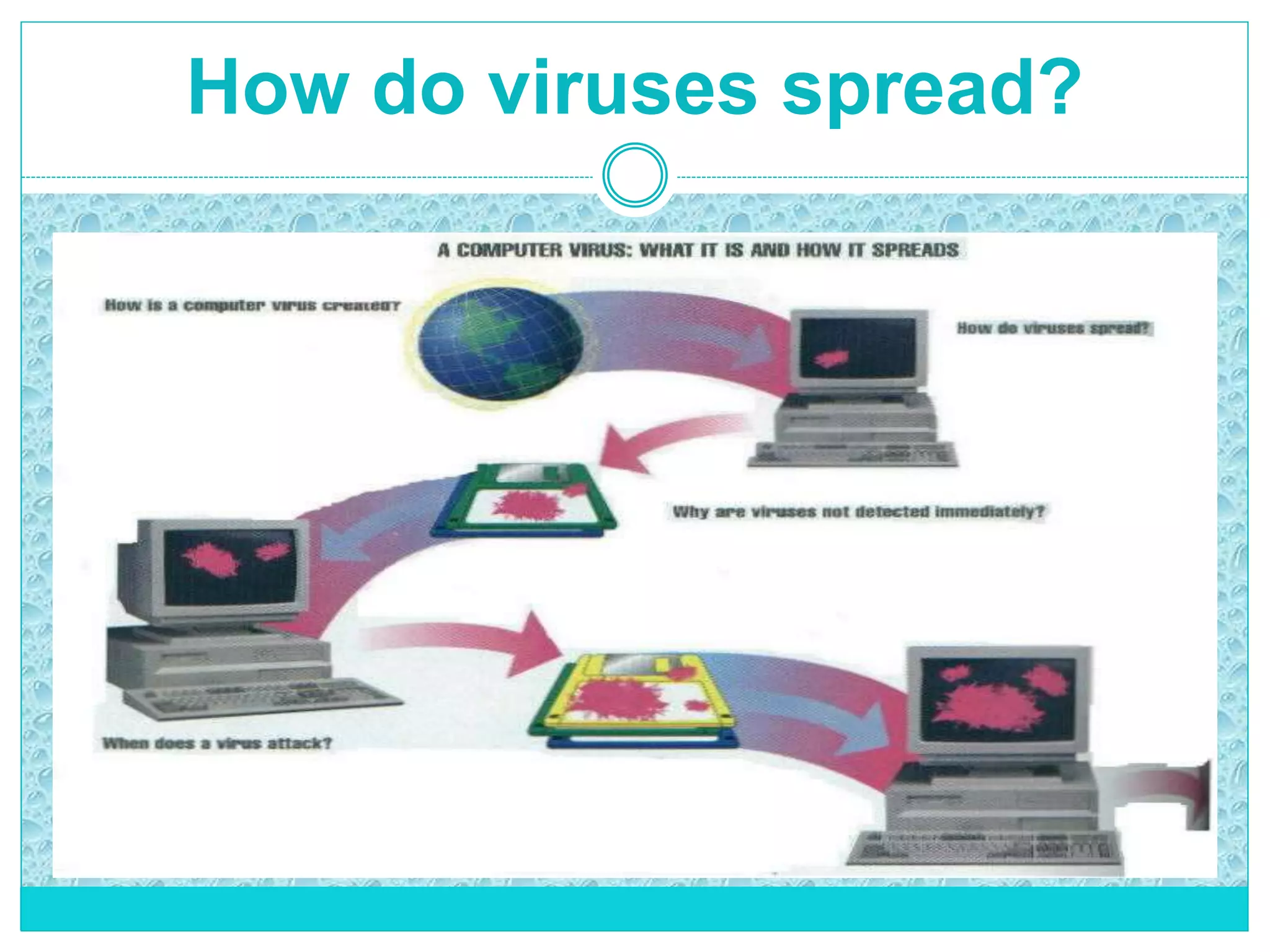
How do viruses spread?
 A piece of software that has a virus
attached to it is called a host program.
 Usually the virus is spread when the host
program is shared.
 If the host program is copied, the virus
also is copied.
 It infects software with which it comes
into contact.
How do viruses spread?
Virus Operation
 VIRUS PHASES:
 DORMANT – Virus is idle and waiting on trigger event
 PROPAGATION – replicating to programs/disks
 TRIGGERING – Virus is activated to perform a function
 EXECUTION – The function is performed. Function may be
harmless
How viruses work?
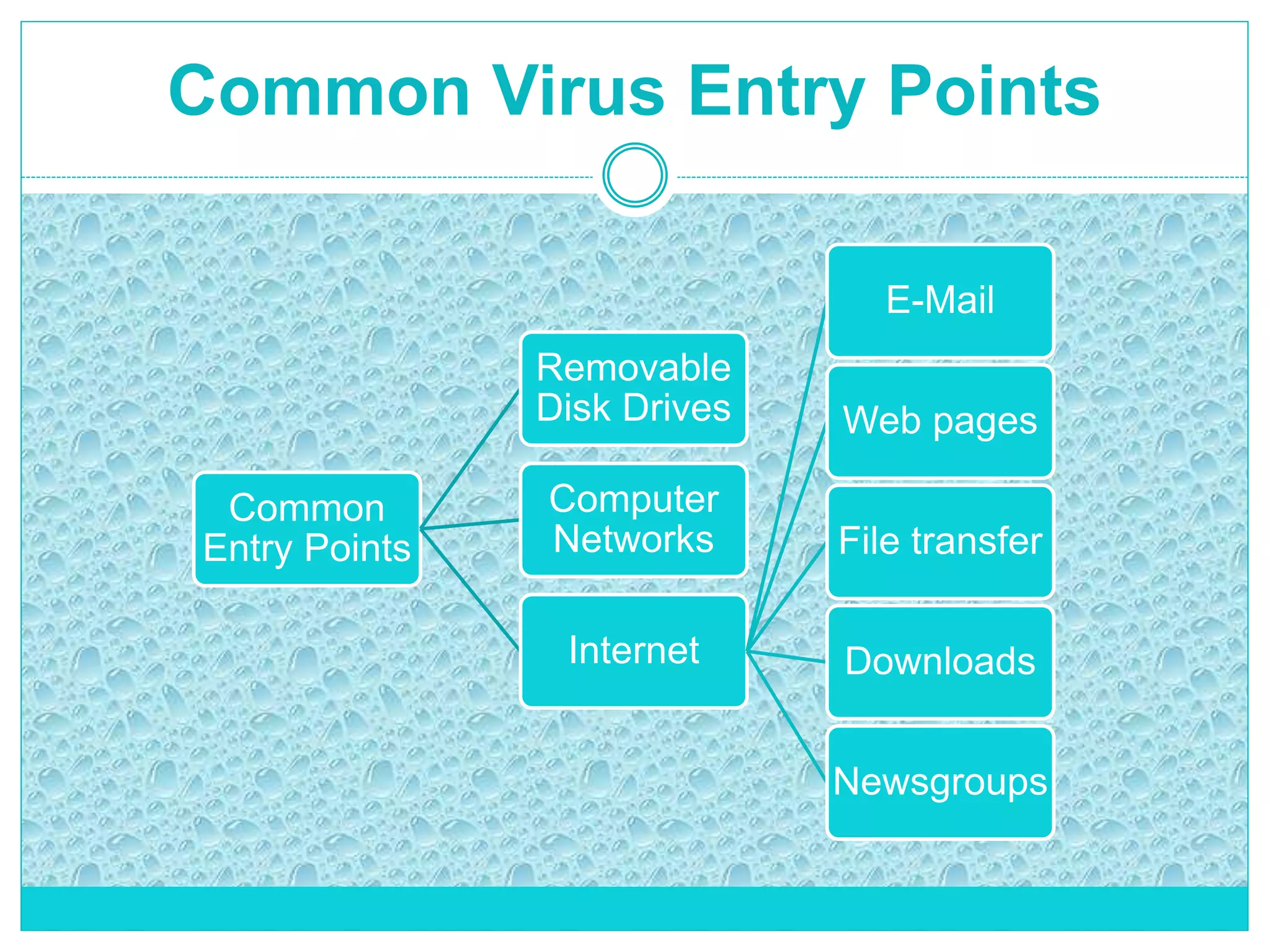
Common Virus Entry Points
Common
Entry Points
Removable
Disk Drives
Internet
E-Mail
Web pages
File transfer
Downloads
Newsgroups
Computer
Networks
Common Virus Entry Points
1. Removable Disk Drives:
Disk drives are storage devices on which data is stored in the form of files or
documents. These disk drives enable documents to be created on one computer and
then used on another. Among these types of storage devices are: floppy disks, CD-
ROMs etc. If any of these are infected, the other computers on which they are used
will be infected.
2. Computer Networks:
A network is a group of interconnected computers that makes it easier for groups of
people to work together. Each computer that forms part of the network can connect to
all other networked machines. If the information that is accessed or transferred from
one computer to another are infected, the computers that accessed this computer, or
those involved in the transfer, could also be infected.
Common Virus Entry Points
3. Internet:
The Internet is becoming an increasingly popular means of obtaining information,
sending and receiving files, sending and receiving news, or downloading files. All of
these operations are based on transferring information and the interconnection of
millions of computers all over the world. This means that as well as data, you may
well be receiving a hidden virus.
Infection via Internet produced through a number of different means.
E- mail:
Documents and files can be sent and received via e-mail in the form of attachments.
These files could be infected. When an e-mail message is opened and the file it
contains is run or opened, the computer that has received the message will become
infected.
Common Virus Entry Points
Web Pages:
The majority of pages visited in Internet are text files or images written in a language
known as HTML. However, they may also contain programs known as ActiveX
controls and Java Applets. These may be infected and therefore infect the visitor to
that page.
File Transfers (FTP):
The term FTP stands for File Transfer Protocol . Through this protocol it is possible to
place documents (upload) on any computer in the world or copy files from any
computer to your own (download). When a file is downloaded, it is copied directly
from a certain place to your computer. The downloaded files could, of course, contain
a virus that would infect your computer. For this reason, it is very important that you
only download files from sites that offer guarantees.
Common Virus Entry Points
Downloads:
Although downloading files from Internet is similar to file transfer (FTP), it is not the
same. Through FTP you can upload as well as download files, whereas through
downloads you can only obtain files. Although in general, these downloads are safe
and virus free, it is possible that the downloaded file could be infected. There are
some sites that are specially prepared for downloading software or IT utilities.
Newsgroups:
These newsgroups work in a similar way to a notice board. Users post their
comments, doubts, or notes about certain topics and other users can respond, give
their opinion, clear up doubts, etc. These messages could contain an infected
document that could install a virus in your system. With newsgroups you run the
same risk of virus infection as you do with e-mail.
Symptoms of Virus Attack
 Computer runs slower then usual
 Computer no longer boots up
 Screen sometimes flicker
 PC speaker beeps periodically
 System crashes for no reason
 Files/directories sometimes disappear
 Denial of Service (DoS)
 Programs take longer to load than normal
 Computer’s hard drive constantly runs out of free space
 The hard drive runs when you are not using it
 New files keep appearing on the system and you don’t know where it
come from
 Strange graphics are displayed on your computer monitor
 Unable to access the hard drive when booting
 Program sizes keep changing
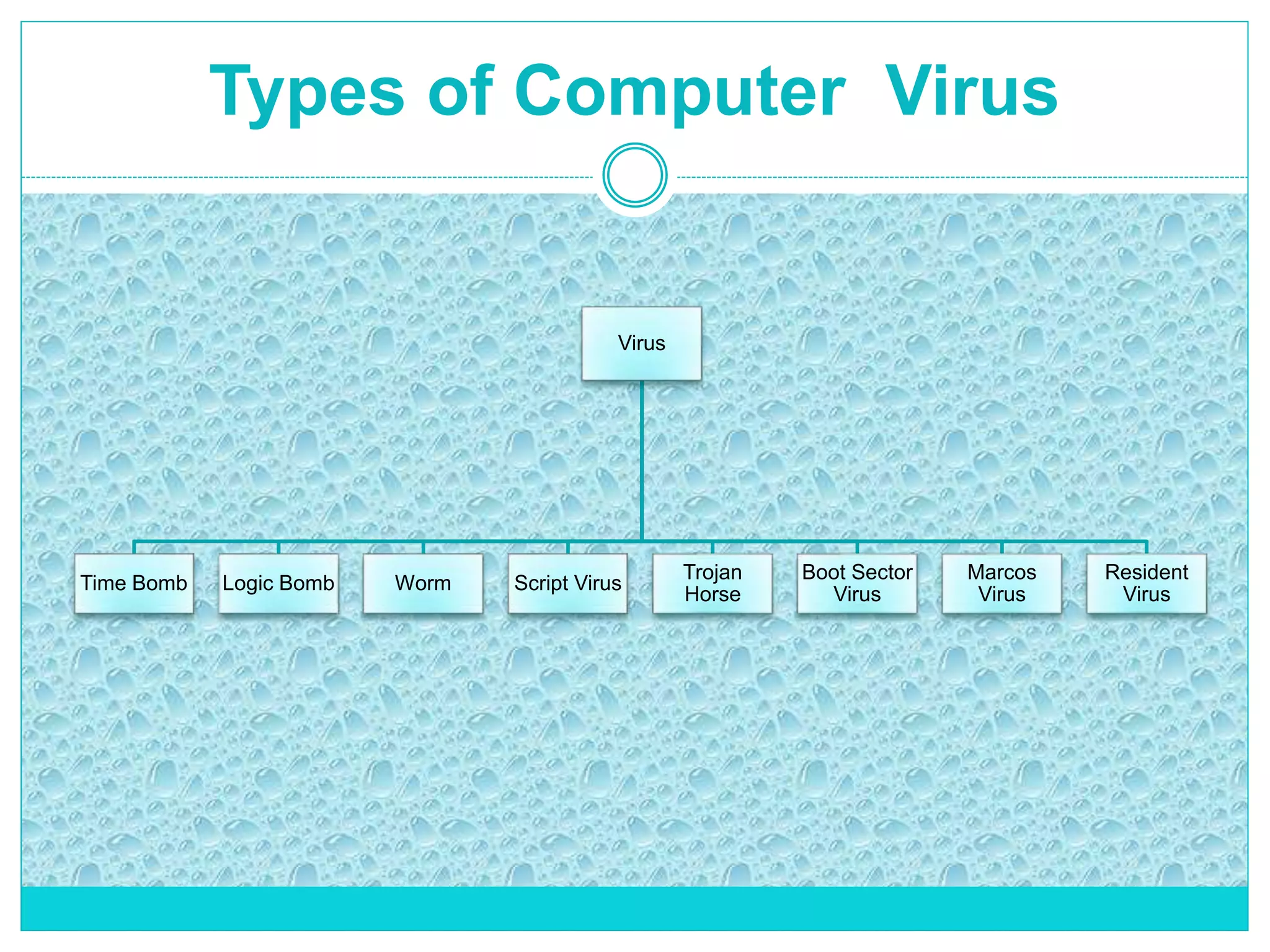
Types of Computer Virus
Virus
Time Bomb Logic Bomb Worm Script Virus
Trojan
Horse
Boot Sector
Virus
Marcos
Virus
Resident
Virus
Types of Computer Virus
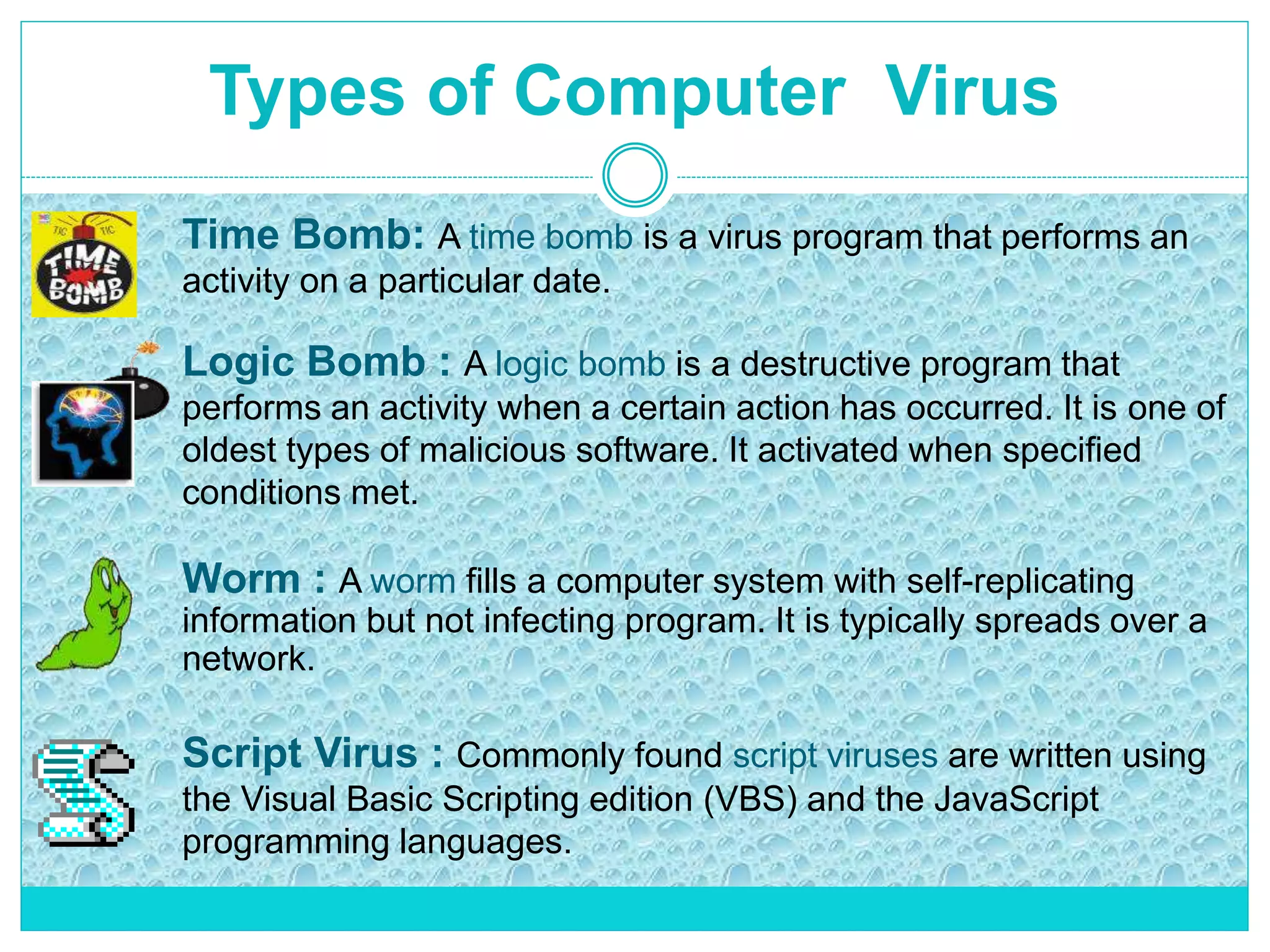
Time Bomb: A time bomb is a virus program that performs an
activity on a particular date.
Logic Bomb : A logic bomb is a destructive program that
performs an activity when a certain action has occurred. It is one of
oldest types of malicious software. It activated when specified
conditions met.
Worm : A worm fills a computer system with self-replicating
information but not infecting program. It is typically spreads over a
network.
Script Virus : Commonly found script viruses are written using
the Visual Basic Scripting edition (VBS) and the JavaScript
programming languages.
Types of Computer Virus
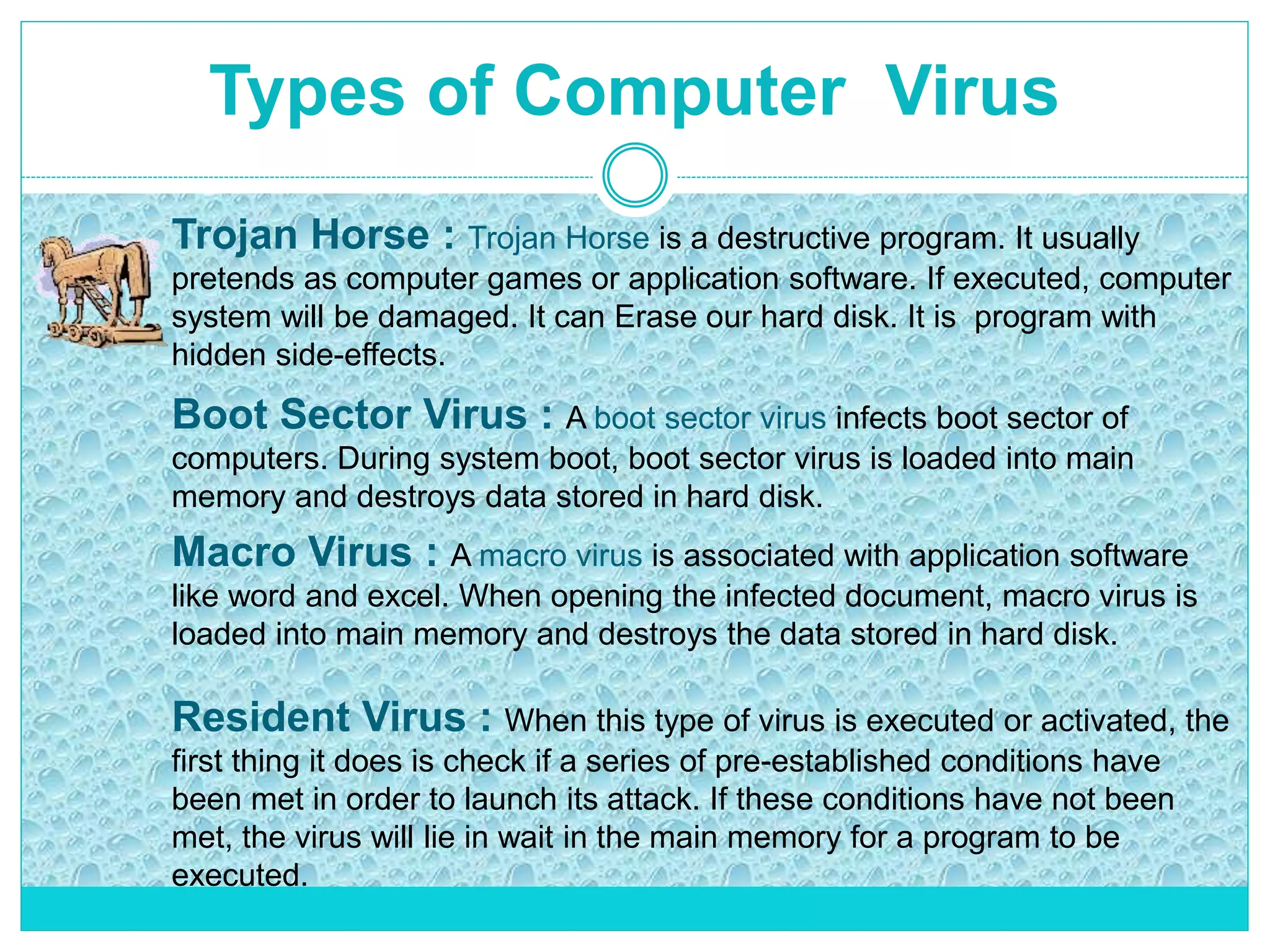
Boot Sector Virus : A boot sector virus infects boot sector of
computers. During system boot, boot sector virus is loaded into main
memory and destroys data stored in hard disk.
Macro Virus : A macro virus is associated with application software
like word and excel. When opening the infected document, macro virus is
loaded into main memory and destroys the data stored in hard disk.
Resident Virus : When this type of virus is executed or activated, the
first thing it does is check if a series of pre-established conditions have
been met in order to launch its attack. If these conditions have not been
met, the virus will lie in wait in the main memory for a program to be
executed.
Trojan Horse : Trojan Horse is a destructive program. It usually
pretends as computer games or application software. If executed, computer
system will be damaged. It can Erase our hard disk. It is program with
hidden side-effects.
Techniques used by Viruses
Each one of the many thousands of existing viruses uses different
techniques both to carry out their infection routine and to conceal their
presence from the eyes of users. These techniques change and evolve over
time, as do the techniques used by antivirus programs to detect them.
The most common mechanisms used by viruses:
• Stealth
• Tunneling
• Self-encryption
• Polymorphism
STEALTH
 Viruses that use this method in order to conceal their presence from the
eyes of users.
 This technique is mostly used by resident viruses.
 Antivirus programs also use special anti-stealth techniques in order to
detect this type of virus.
 This virus infect the boot sector in storage.
 The viruses that use stealth techniques usually carry out certain actions
so that their effects are not evident.
These actions include the following:
 The size of the file will increase when it is infected, as the virus is
inserted inside it.
 When they infect a file, they do not modify the date or the time.
TUNNELING
 This is a technique specifically designed to prevent the correct use of the
permanent antivirus protection installed on a computer.
 While the permanent antivirus protection works to detect the presence of
viruses in the system, this type of virus works against it.
 The antivirus analyzes all file operations performed on the computer by
intercepting the actions the operating system carries out.
 However, if the virus intercepts these requests first, the antivirus will
not detect the presence of the malicious code.
 Tunneling system is quite complicated, as the microprocessor must be
put in step-by-step mode and work with interrupts.
 This type of virus is capable of obtaining the memory address in which
the operating system services are originally located.
SELF-ENCRYPTION
 Antivirus programs search for strings of characters (known as the virus signatures)
which all viruses have.
 Viruses therefore use a technique known as self-encryption, which enables them
to take on a different appearance each time they infect (polymorphic).
 This means that the virus will use a specific string to carry out one infection and a
different one in the next.
 In addition, they encode or encrypt their strings to make it more difficult for the
antivirus program to detect them.
 The viruses that use this technique always use the same encryption algorithm
which makes it possible for antivirus programs to detect them.
 Using an encryption key and a series of mathematical operations , the virus can
encrypt itself.
 This makes it difficult for the virus to be decrypted in order to be scanned and/or
detected. The virus can also decrypt itself.
 In general they use the same key for encryption and decryption.
POLYMORPHISM
 Based on the self-encryption technique, polymorphic viruses encrypt their code in
a different way with each infection they carry out.
 Polymorphic virus is capable of creating different variants of itself from one
infection to the next, changing its "shape" with each infection.
 In order to detect this type of virus, antivirus programs use decryption
simulation techniques.
 The antivirus programs try to locate the viruses by searching for their signature or
pattern .
 If the virus is encrypted and its encryption changes every time it infects, it will be
very difficult to detect.
 However, the virus cannot completely encrypt itself, as it needs to keep part of its
code (not encrypted) in order to decrypt itself.
 This section is used by antivirus programs to detect polymorphic viruses.
 In order to do this, the antivirus program will try to locate the routine or algorithm
that allows the virus to automatically decrypt itself.
Anti-Virus Software
 first-generation
 scanner uses virus signature to identify virus
 or change in length of programs
 second-generation
 uses crypto hash of program to spot changes
 third-generation
 memory-resident programs identify virus by actions
 fourth-generation
 packages with a variety of antivirus techniques
 eg scanning & activity traps, access-controls
Antivirus or anti-virus software sometimes known as anti-malware software,
is computer software used to prevent, detect and remove malicious software.
Methods used by antivirus engine to identify
malware
 SIGNATURE-BASED DETECTION: It is the most common method. To identify viruses
and other malware, the antivirus engine compares the contents of a file to its database of
known malware signatures.
 HEURISTIC-BASED DETECTION: It is generally used together with signature-based
detection. It detects malware based on characteristics typically used in known malware
code.
 BEHAVIOURAL-BASED DETECTION: It is similar to heuristic-based detection. The
main difference is that, instead of characteristics hardcoded in the malware code itself, it
is based on the behavioral fingerprint of the malware at run-time.
 SANDBOX DETECTION: It is a particular Behavioural-based detection techniques that,
instead of detecting the behavioral fingerprint at run time, it executes the programs in
a virtual environment, logging what actions the program performs. Depending on the
actions logged, the antivirus engine can determine if the program is malicious or not.
 DATA MINING TECHNIQUES: These are one of the latest approach applied in malware
detection. Data mining and machine learning algorithms are used to try to classify the
behavior of a file given a series of file features, that are extracted from the file itself.
 Always update your anti-virus software at least weekly.
 Back up your important files and ensure that they can be restored.
 Change the computer's boot sequence to always start the PC from its hard
drive.
 Don't share Drive C: without a password and without read-only restrictions.
 Empty floppy drives of diskettes before turning on computers, especially
laptops.
 Forget opening unexpected e-mail attachments, even if they're from friends.
 Get trained on your computer's anti-virus software and use it.
 Have multiple backups of important files. This lowers the chance that all
are infected.
 Install security updates for your operating system and programs as soon
as possible.
 Jump at the chance to learn more about your computer. This will help you
spot viruses.
Actions to Prevent Virus Infection
 Be Aware Of The New Infections Out There.
 Take Precaution Measures.
 Always Backup Your Data.
 Keep Up-to-date On New Anti Virus Software.
 Simply Avoid Programs From Unknown Sources.
Conclusion
By – Ravinder Kaur
M.Tech CSE 2 nd Sem
2014CSB2130
THANKS

Computer viruses

  • 1.
  • 2.
    OBJECTIVES  Introduction  WhatIs Virus?  Why Virus Are Called “Virus”?  How Do Virus Spread?  Virus Operation  How Virus work?  Common Virus Entry Points  Symptoms Of Virus Attack  Types of Computer Virus  Techniques used by Viruses  Anti-Virus Software  Methods used by Antivirus Software  Actions to Prevent Virus Infection  Conclusion
  • 3.
    INTRODUCTION  Computer virushave become today’s headline news  With the increasing use of the Internet, it has become easier for virus to spread  one of a family of malicious software  Virus show us loopholes in software  Most virus are targeted at the MS Windows OS  There are estimated 90,000 computer viruses in existence  Over 300 new ones are created each month  First virus was created to show loopholes in software
  • 4.
    What is avirus?  A true virus is capable of self replication on a machine  It may spread between files or disks  It is a program that can enter a computer in many different ways  It can recreate itself on it’s own with out traveling to a new host  A virus will not act until it has been run or until certain pre-established conditions have been met, called the "trigger" condition A computer virus is a malware program that, when executed, replicates by inserting copies of itself into other computer programs, data files, or the boot sector of the hard drive; when this replication succeeds, the affected areas are then said to be "infected".
  • 5.
    Why are theycalled "viruses"?  Computer viruses are called viruses due to their similarities with biological viruses. In the same way as biological viruses enter the body and infect the cells, computer viruses get into the computer and infect files.  In addition, both types of virus can reproduce themselves and spread, passing the infection from one infected system to others.  They can damage or delete data stored in a computer, cause the infected computer to crash, display on-screen messages, etc.
  • 6.
    How do virusesspread?  A piece of software that has a virus attached to it is called a host program.  Usually the virus is spread when the host program is shared.  If the host program is copied, the virus also is copied.  It infects software with which it comes into contact.
  • 7.
  • 8.
    Virus Operation  VIRUSPHASES:  DORMANT – Virus is idle and waiting on trigger event  PROPAGATION – replicating to programs/disks  TRIGGERING – Virus is activated to perform a function  EXECUTION – The function is performed. Function may be harmless
  • 9.
  • 10.
    Common Virus EntryPoints Common Entry Points Removable Disk Drives Internet E-Mail Web pages File transfer Downloads Newsgroups Computer Networks
  • 11.
    Common Virus EntryPoints 1. Removable Disk Drives: Disk drives are storage devices on which data is stored in the form of files or documents. These disk drives enable documents to be created on one computer and then used on another. Among these types of storage devices are: floppy disks, CD- ROMs etc. If any of these are infected, the other computers on which they are used will be infected. 2. Computer Networks: A network is a group of interconnected computers that makes it easier for groups of people to work together. Each computer that forms part of the network can connect to all other networked machines. If the information that is accessed or transferred from one computer to another are infected, the computers that accessed this computer, or those involved in the transfer, could also be infected.
  • 12.
    Common Virus EntryPoints 3. Internet: The Internet is becoming an increasingly popular means of obtaining information, sending and receiving files, sending and receiving news, or downloading files. All of these operations are based on transferring information and the interconnection of millions of computers all over the world. This means that as well as data, you may well be receiving a hidden virus. Infection via Internet produced through a number of different means. E- mail: Documents and files can be sent and received via e-mail in the form of attachments. These files could be infected. When an e-mail message is opened and the file it contains is run or opened, the computer that has received the message will become infected.
  • 13.
    Common Virus EntryPoints Web Pages: The majority of pages visited in Internet are text files or images written in a language known as HTML. However, they may also contain programs known as ActiveX controls and Java Applets. These may be infected and therefore infect the visitor to that page. File Transfers (FTP): The term FTP stands for File Transfer Protocol . Through this protocol it is possible to place documents (upload) on any computer in the world or copy files from any computer to your own (download). When a file is downloaded, it is copied directly from a certain place to your computer. The downloaded files could, of course, contain a virus that would infect your computer. For this reason, it is very important that you only download files from sites that offer guarantees.
  • 14.
    Common Virus EntryPoints Downloads: Although downloading files from Internet is similar to file transfer (FTP), it is not the same. Through FTP you can upload as well as download files, whereas through downloads you can only obtain files. Although in general, these downloads are safe and virus free, it is possible that the downloaded file could be infected. There are some sites that are specially prepared for downloading software or IT utilities. Newsgroups: These newsgroups work in a similar way to a notice board. Users post their comments, doubts, or notes about certain topics and other users can respond, give their opinion, clear up doubts, etc. These messages could contain an infected document that could install a virus in your system. With newsgroups you run the same risk of virus infection as you do with e-mail.
  • 15.
    Symptoms of VirusAttack  Computer runs slower then usual  Computer no longer boots up  Screen sometimes flicker  PC speaker beeps periodically  System crashes for no reason  Files/directories sometimes disappear  Denial of Service (DoS)  Programs take longer to load than normal  Computer’s hard drive constantly runs out of free space  The hard drive runs when you are not using it  New files keep appearing on the system and you don’t know where it come from  Strange graphics are displayed on your computer monitor  Unable to access the hard drive when booting  Program sizes keep changing
  • 16.
    Types of ComputerVirus Virus Time Bomb Logic Bomb Worm Script Virus Trojan Horse Boot Sector Virus Marcos Virus Resident Virus
  • 17.
    Types of ComputerVirus Time Bomb: A time bomb is a virus program that performs an activity on a particular date. Logic Bomb : A logic bomb is a destructive program that performs an activity when a certain action has occurred. It is one of oldest types of malicious software. It activated when specified conditions met. Worm : A worm fills a computer system with self-replicating information but not infecting program. It is typically spreads over a network. Script Virus : Commonly found script viruses are written using the Visual Basic Scripting edition (VBS) and the JavaScript programming languages.
  • 18.
    Types of ComputerVirus Boot Sector Virus : A boot sector virus infects boot sector of computers. During system boot, boot sector virus is loaded into main memory and destroys data stored in hard disk. Macro Virus : A macro virus is associated with application software like word and excel. When opening the infected document, macro virus is loaded into main memory and destroys the data stored in hard disk. Resident Virus : When this type of virus is executed or activated, the first thing it does is check if a series of pre-established conditions have been met in order to launch its attack. If these conditions have not been met, the virus will lie in wait in the main memory for a program to be executed. Trojan Horse : Trojan Horse is a destructive program. It usually pretends as computer games or application software. If executed, computer system will be damaged. It can Erase our hard disk. It is program with hidden side-effects.
  • 19.
    Techniques used byViruses Each one of the many thousands of existing viruses uses different techniques both to carry out their infection routine and to conceal their presence from the eyes of users. These techniques change and evolve over time, as do the techniques used by antivirus programs to detect them. The most common mechanisms used by viruses: • Stealth • Tunneling • Self-encryption • Polymorphism
  • 20.
    STEALTH  Viruses thatuse this method in order to conceal their presence from the eyes of users.  This technique is mostly used by resident viruses.  Antivirus programs also use special anti-stealth techniques in order to detect this type of virus.  This virus infect the boot sector in storage.  The viruses that use stealth techniques usually carry out certain actions so that their effects are not evident. These actions include the following:  The size of the file will increase when it is infected, as the virus is inserted inside it.  When they infect a file, they do not modify the date or the time.
  • 21.
    TUNNELING  This isa technique specifically designed to prevent the correct use of the permanent antivirus protection installed on a computer.  While the permanent antivirus protection works to detect the presence of viruses in the system, this type of virus works against it.  The antivirus analyzes all file operations performed on the computer by intercepting the actions the operating system carries out.  However, if the virus intercepts these requests first, the antivirus will not detect the presence of the malicious code.  Tunneling system is quite complicated, as the microprocessor must be put in step-by-step mode and work with interrupts.  This type of virus is capable of obtaining the memory address in which the operating system services are originally located.
  • 22.
    SELF-ENCRYPTION  Antivirus programssearch for strings of characters (known as the virus signatures) which all viruses have.  Viruses therefore use a technique known as self-encryption, which enables them to take on a different appearance each time they infect (polymorphic).  This means that the virus will use a specific string to carry out one infection and a different one in the next.  In addition, they encode or encrypt their strings to make it more difficult for the antivirus program to detect them.  The viruses that use this technique always use the same encryption algorithm which makes it possible for antivirus programs to detect them.  Using an encryption key and a series of mathematical operations , the virus can encrypt itself.  This makes it difficult for the virus to be decrypted in order to be scanned and/or detected. The virus can also decrypt itself.  In general they use the same key for encryption and decryption.
  • 23.
    POLYMORPHISM  Based onthe self-encryption technique, polymorphic viruses encrypt their code in a different way with each infection they carry out.  Polymorphic virus is capable of creating different variants of itself from one infection to the next, changing its "shape" with each infection.  In order to detect this type of virus, antivirus programs use decryption simulation techniques.  The antivirus programs try to locate the viruses by searching for their signature or pattern .  If the virus is encrypted and its encryption changes every time it infects, it will be very difficult to detect.  However, the virus cannot completely encrypt itself, as it needs to keep part of its code (not encrypted) in order to decrypt itself.  This section is used by antivirus programs to detect polymorphic viruses.  In order to do this, the antivirus program will try to locate the routine or algorithm that allows the virus to automatically decrypt itself.
  • 24.
    Anti-Virus Software  first-generation scanner uses virus signature to identify virus  or change in length of programs  second-generation  uses crypto hash of program to spot changes  third-generation  memory-resident programs identify virus by actions  fourth-generation  packages with a variety of antivirus techniques  eg scanning & activity traps, access-controls Antivirus or anti-virus software sometimes known as anti-malware software, is computer software used to prevent, detect and remove malicious software.
  • 25.
    Methods used byantivirus engine to identify malware  SIGNATURE-BASED DETECTION: It is the most common method. To identify viruses and other malware, the antivirus engine compares the contents of a file to its database of known malware signatures.  HEURISTIC-BASED DETECTION: It is generally used together with signature-based detection. It detects malware based on characteristics typically used in known malware code.  BEHAVIOURAL-BASED DETECTION: It is similar to heuristic-based detection. The main difference is that, instead of characteristics hardcoded in the malware code itself, it is based on the behavioral fingerprint of the malware at run-time.  SANDBOX DETECTION: It is a particular Behavioural-based detection techniques that, instead of detecting the behavioral fingerprint at run time, it executes the programs in a virtual environment, logging what actions the program performs. Depending on the actions logged, the antivirus engine can determine if the program is malicious or not.  DATA MINING TECHNIQUES: These are one of the latest approach applied in malware detection. Data mining and machine learning algorithms are used to try to classify the behavior of a file given a series of file features, that are extracted from the file itself.
  • 26.
     Always updateyour anti-virus software at least weekly.  Back up your important files and ensure that they can be restored.  Change the computer's boot sequence to always start the PC from its hard drive.  Don't share Drive C: without a password and without read-only restrictions.  Empty floppy drives of diskettes before turning on computers, especially laptops.  Forget opening unexpected e-mail attachments, even if they're from friends.  Get trained on your computer's anti-virus software and use it.  Have multiple backups of important files. This lowers the chance that all are infected.  Install security updates for your operating system and programs as soon as possible.  Jump at the chance to learn more about your computer. This will help you spot viruses. Actions to Prevent Virus Infection
  • 27.
     Be AwareOf The New Infections Out There.  Take Precaution Measures.  Always Backup Your Data.  Keep Up-to-date On New Anti Virus Software.  Simply Avoid Programs From Unknown Sources. Conclusion
  • 28.
    By – RavinderKaur M.Tech CSE 2 nd Sem 2014CSB2130 THANKS