Wi-Fi Protected Access 2 (WPA2)Eng. MshariAlabdulkarim
Wi-Fi Protected Access 2 (WPA2)Outline: Introduction.
 WPA2 Process.
 WPA2 Authentication.
 WPA2 Encryption.
 WPA2 Pros and Cons.
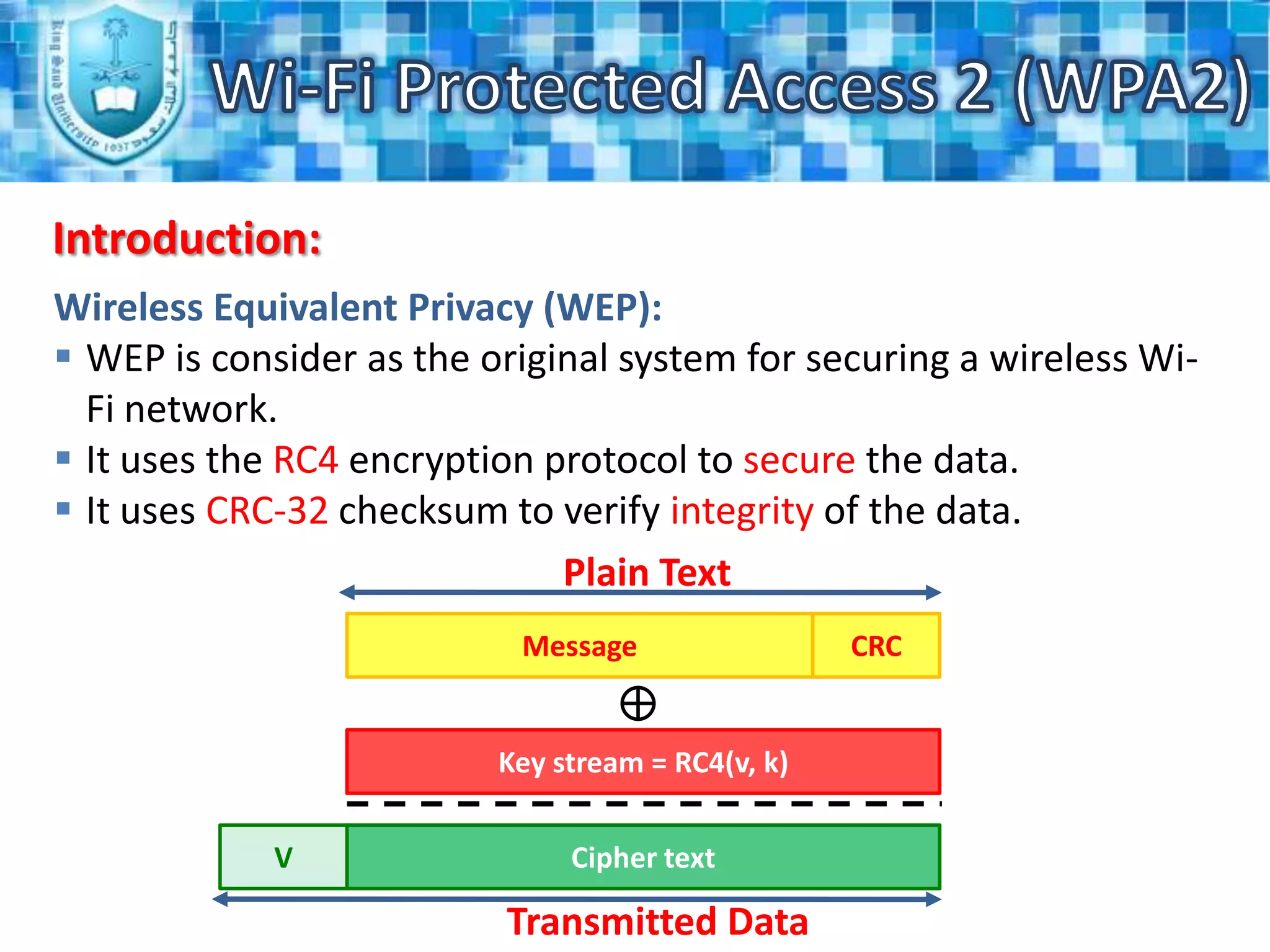
 Procedures to improve the Wi-Fi security.Wi-Fi Protected Access 2 (WPA2)Introduction:Wireless Equivalent Privacy (WEP):WEP is consider as the original system for securing a wireless Wi-Fi network.
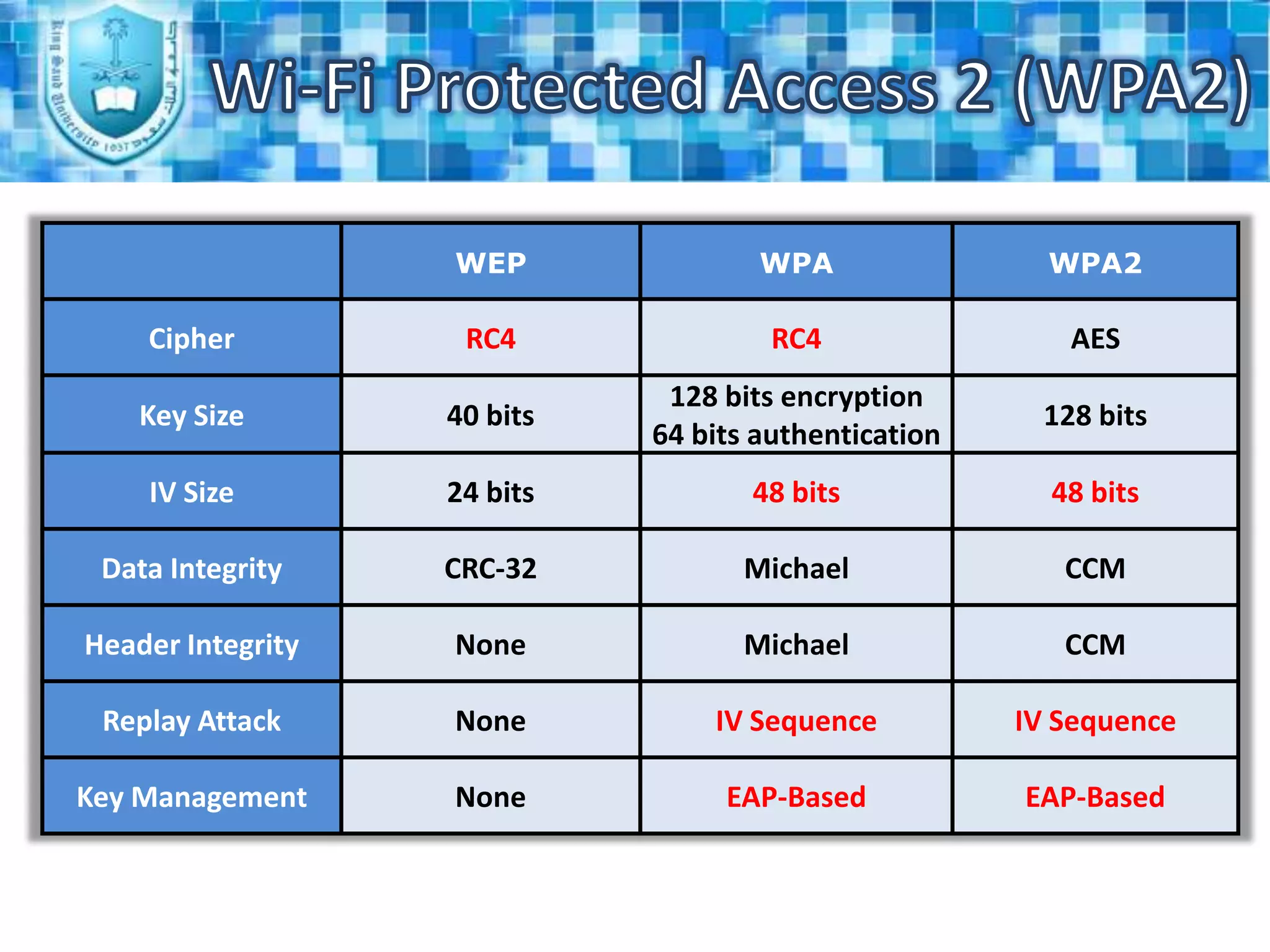
It uses the RC4 encryption protocol to secure the data.
It uses CRC-32 checksum to verify integrity of the data.Plain TextMessageCRCKey stream = RC4(v, k)Cipher textVTransmitted Data
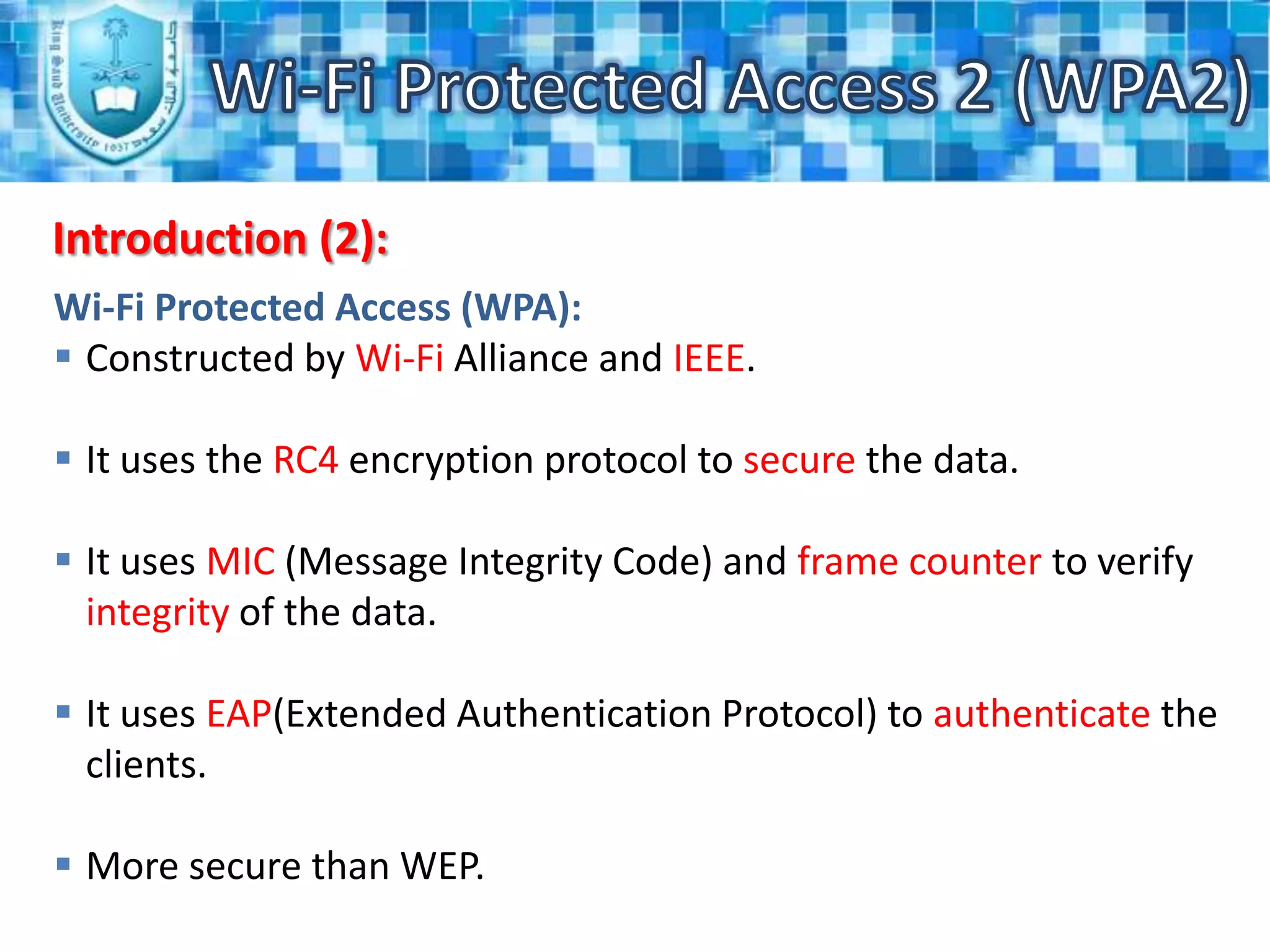
Wi-Fi Protected Access 2 (WPA2)Introduction (2):Wi-Fi Protected Access (WPA):Constructed by Wi-Fi Alliance and IEEE.
It uses the RC4 encryption protocol to secure the data.
It uses MIC (Message Integrity Code) and frame counter to verify integrity of the data.
It uses EAP(Extended Authentication Protocol) to authenticate the clients.
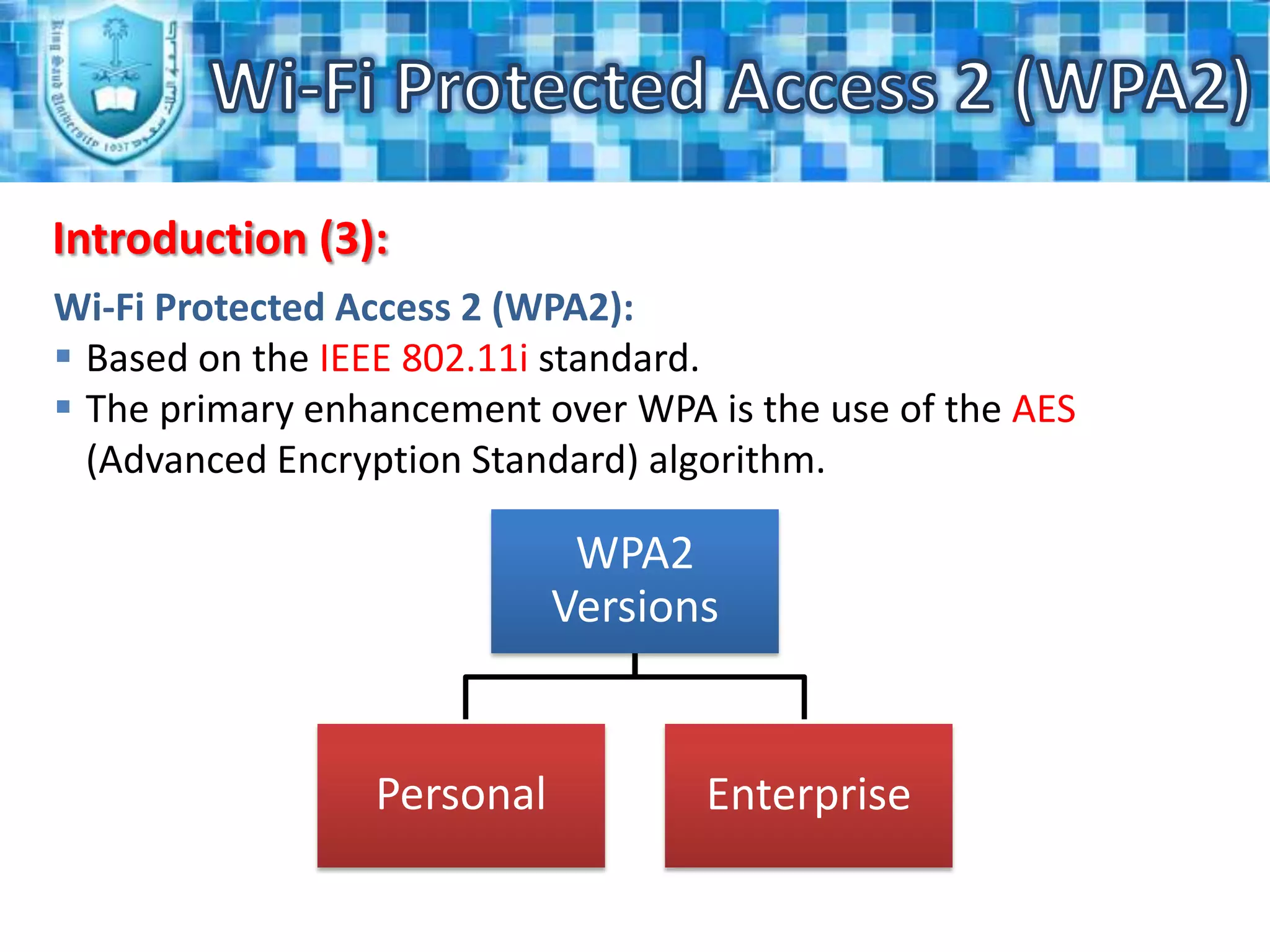
More secure than WEP.WPA2 VersionsWi-Fi Protected Access 2 (WPA2)Introduction (3):EnterpriseWi-Fi Protected Access 2 (WPA2):Based on the IEEE 802.11i standard.
The primary enhancement over WPA is the use of the AES (Advanced Encryption Standard) algorithm.Personal
Wi-Fi Protected Access 2 (WPA2)Introduction (4):The encryption in WPA2 is done by utilizing one of two methods, either by using the AES or TKIP (Temporal Key Integrity Protocol).
The Personal mode uses a PSK (Pre-Shared Key) and doesn't require a separate authentication of users.
The Enterprise mode requires the users to be separately authenticated by using the Extended EAP (Extensible Authentication Protocol). EAP-TLSEAP-Transport Layer SecurityWi-Fi Protected Access 2 (WPA2)EAP-TTLSEAP-Tunneled Transport Layer SecurityExtensible Authentication Protocol StandardsPEAPv0/EAP-MSCHAPv2Protected EAP vo/EAPMicrosoft’s Challenge Handshake Authentication Protocol v2PEAPv1/EAPGTCProtected EAP v1/EAP-Generic Token CardEAPSIMEAP-Subscriber Identity Module of the Global System of Mobile CommunicationsWi-Fi Protected Access 2 (WPA2)802.11 Security Solutions
Wi-Fi Protected Access 2 (WPA2)
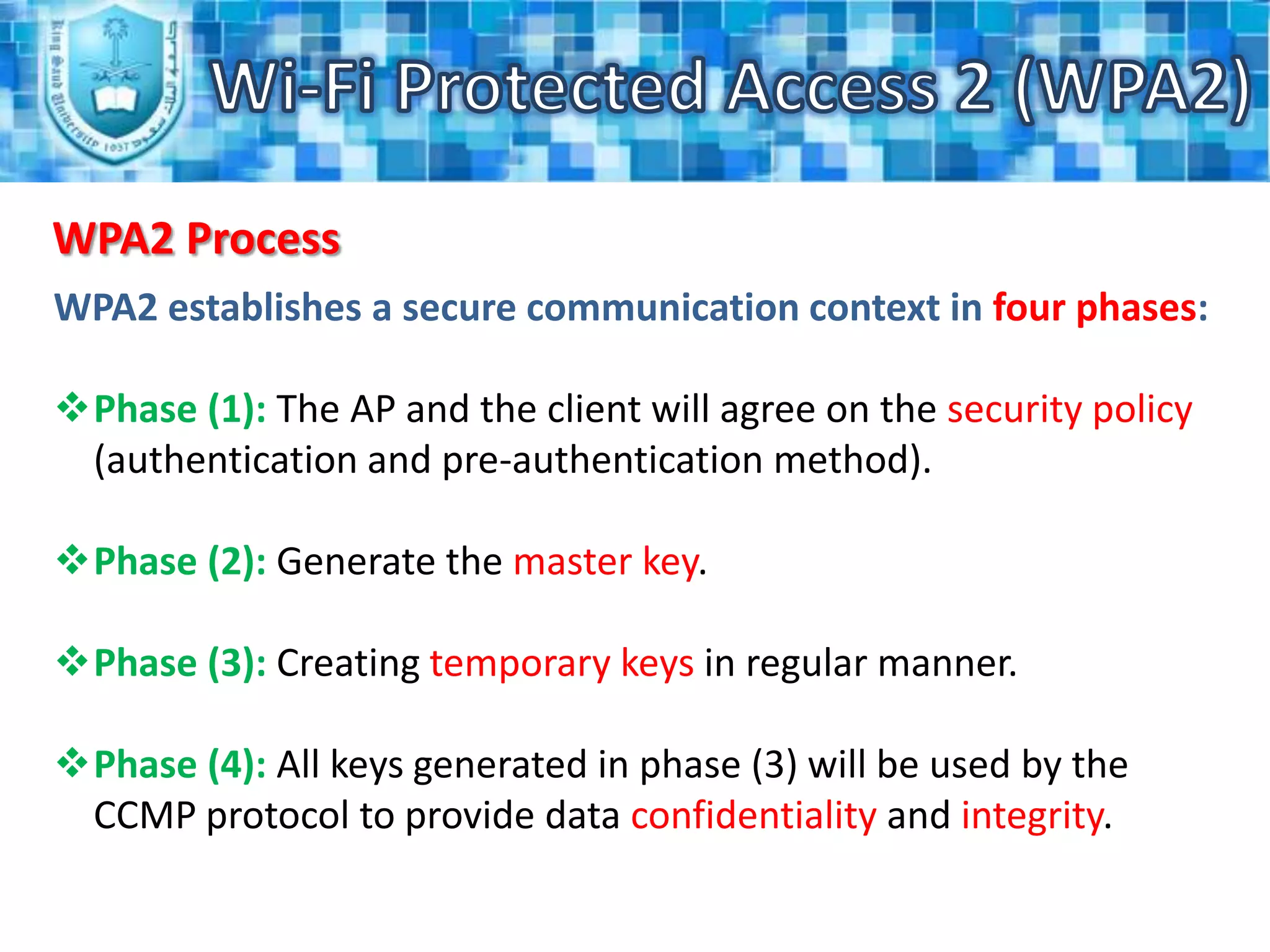
Wi-Fi Protected Access 2 (WPA2)WPA2 ProcessWPA2 establishes a secure communication context in four phases:Phase (1):The AP and the client will agree on the security policy (authentication and pre-authentication method).
Phase (2):Generate the master key.
Phase (3):Creating temporary keys in regular manner.
Phase (4):All keys generated in phase (3) will be used by the CCMP protocol to provide data confidentiality and integrity.Wi-Fi Protected Access 2 (WPA2)WPA2 Process (2)Phase (1):The access point advertises the security policies which it supports through the Beacon or through the probe respond message.
After the standard open authentication, the client will send his response in the association request message which will be validated by an association response from the access point.Wi-Fi Protected Access 2 (WPA2)Agreeing on the security policy (Phase (1))Prop RequestProp Response + RSN IECCMP Mcast, CCMP Ucast, 802.1x auth802.11 Open system authentication802.11 Open system authentication - SuccessAssociation Request + RSN IESTA Request CCMP Mcast, CCMP Ucast, 802.1x authAssociation Response - Success
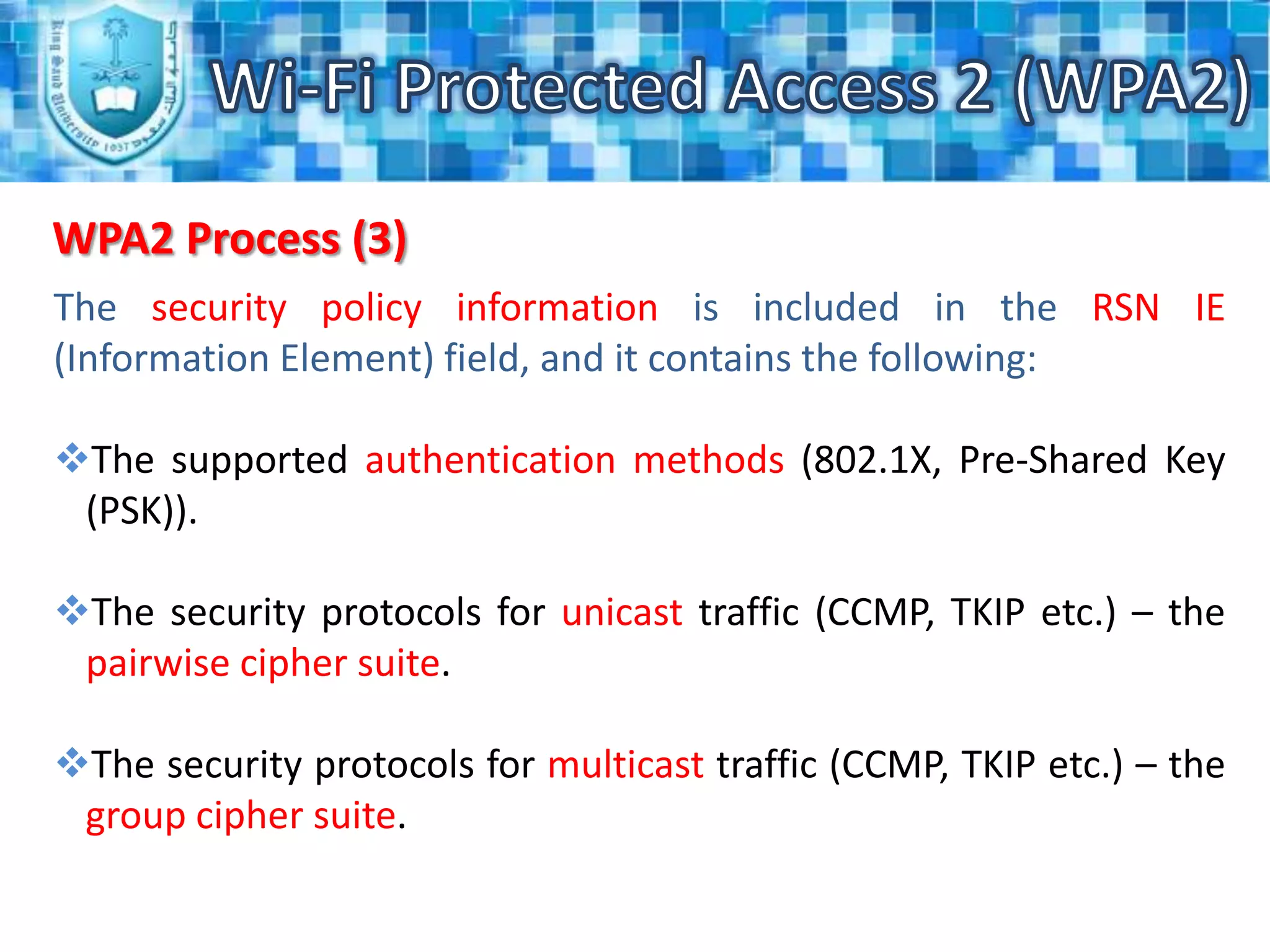
Wi-Fi Protected Access 2 (WPA2)WPA2 Process (3)The security policy information is included in the RSN IE (Information Element) field, and it contains the following:The supported authentication methods (802.1X, Pre-Shared Key (PSK)).
The security protocols for unicast traffic (CCMP, TKIP etc.) – the pairwise cipher suite.
The security protocols for multicast traffic (CCMP, TKIP etc.) – the group cipher suite.Wi-Fi Protected Access 2 (WPA2)WPA2 Process (4)Phase (2):This phase is based on EAP and the authentication method which has been agreed on in phase 1.
The access point will send "request identity" message to the client, then he will response with a message containing the preferred authentication method. Wi-Fi Protected Access 2 (WPA2)WPA2 Process (5)Phase (2):After that, few messages will be exchanged between the client and the authentication server to generate a common master key (MK).
At the end of this phase, the authentication server will send a "Radius Accept" message to the access point, containing the MK and a final EAP Success message for the client.Wi-Fi Protected Access 2 (WPA2)802.1x authentication (Phase (2))802.1X/EAP – Request Identity802.1X/EAP – Response IdentityRadius AccessRequest IdentityMK derivationMK derivationEAP messages specific to the chosen methodRadius AcceptMK distribution802.1X/EAP success
Wi-Fi Protected Access 2 (WPA2)WPA2 Process (6)Phase (3):In this phase there are two handshakes:4-Way Handshake for PTK (Pairwise Transient Key) and GTK (Group Transient Key) derivation.
Group Key Handshake for GTK renewal.Wi-Fi Protected Access 2 (WPA2)WPA2 Process (7)Phase (3):The PMK (Pairwise Master Key) derivation depends on what we have used on the authentication method:If we used PSK (Pre-Shared Key), then the PMK will be equal to PSK.
If we used an authentication server, then the PMK will be derived from the 802.1X authentication MK.Wi-Fi Protected Access 2 (WPA2)Key derivation and distributionStep1: MK transmission from AS to APStep2: 4 way handshakePTK and GTK derivation and distributionStep3: Group key handshakeGTK derivation and distribution(for GTK renewal)
Wi-Fi Protected Access 2 (WPA2)WPA2 AuthenticationWPA2 separates the user authentication from the message integrity and privacy, which makes it provide more flexibility.
The authentication in the WPA2 Personal mode does not require having an authentication server.
WPA2 Enterprise mode consists of the following components:
Supplicant (client).
Authenticator (access point).
Authentication server (RADIUS).Wi-Fi Protected Access 2 (WPA2)WPA2 Authentication (2)The access point makes the PAE (Port Access Entity) by dividing each virtual port into two logical ports:

WPA2

  • 1.
    Wi-Fi Protected Access2 (WPA2)Eng. MshariAlabdulkarim
  • 2.
    Wi-Fi Protected Access2 (WPA2)Outline: Introduction.
  • 3.
  • 4.
  • 5.
  • 6.
    WPA2 Prosand Cons.
  • 7.
    Procedures toimprove the Wi-Fi security.Wi-Fi Protected Access 2 (WPA2)Introduction:Wireless Equivalent Privacy (WEP):WEP is consider as the original system for securing a wireless Wi-Fi network.
  • 8.
    It uses theRC4 encryption protocol to secure the data.
  • 9.
    It uses CRC-32checksum to verify integrity of the data.Plain TextMessageCRCKey stream = RC4(v, k)Cipher textVTransmitted Data
  • 10.
    Wi-Fi Protected Access2 (WPA2)Introduction (2):Wi-Fi Protected Access (WPA):Constructed by Wi-Fi Alliance and IEEE.
  • 11.
    It uses theRC4 encryption protocol to secure the data.
  • 12.
    It uses MIC(Message Integrity Code) and frame counter to verify integrity of the data.
  • 13.
    It uses EAP(ExtendedAuthentication Protocol) to authenticate the clients.
  • 14.
    More secure thanWEP.WPA2 VersionsWi-Fi Protected Access 2 (WPA2)Introduction (3):EnterpriseWi-Fi Protected Access 2 (WPA2):Based on the IEEE 802.11i standard.
  • 15.
    The primary enhancementover WPA is the use of the AES (Advanced Encryption Standard) algorithm.Personal
  • 16.
    Wi-Fi Protected Access2 (WPA2)Introduction (4):The encryption in WPA2 is done by utilizing one of two methods, either by using the AES or TKIP (Temporal Key Integrity Protocol).
  • 17.
    The Personal modeuses a PSK (Pre-Shared Key) and doesn't require a separate authentication of users.
  • 18.
    The Enterprise moderequires the users to be separately authenticated by using the Extended EAP (Extensible Authentication Protocol). EAP-TLSEAP-Transport Layer SecurityWi-Fi Protected Access 2 (WPA2)EAP-TTLSEAP-Tunneled Transport Layer SecurityExtensible Authentication Protocol StandardsPEAPv0/EAP-MSCHAPv2Protected EAP vo/EAPMicrosoft’s Challenge Handshake Authentication Protocol v2PEAPv1/EAPGTCProtected EAP v1/EAP-Generic Token CardEAPSIMEAP-Subscriber Identity Module of the Global System of Mobile CommunicationsWi-Fi Protected Access 2 (WPA2)802.11 Security Solutions
  • 19.
  • 20.
    Wi-Fi Protected Access2 (WPA2)WPA2 ProcessWPA2 establishes a secure communication context in four phases:Phase (1):The AP and the client will agree on the security policy (authentication and pre-authentication method).
  • 21.
  • 22.
    Phase (3):Creating temporarykeys in regular manner.
  • 23.
    Phase (4):All keysgenerated in phase (3) will be used by the CCMP protocol to provide data confidentiality and integrity.Wi-Fi Protected Access 2 (WPA2)WPA2 Process (2)Phase (1):The access point advertises the security policies which it supports through the Beacon or through the probe respond message.
  • 24.
    After the standardopen authentication, the client will send his response in the association request message which will be validated by an association response from the access point.Wi-Fi Protected Access 2 (WPA2)Agreeing on the security policy (Phase (1))Prop RequestProp Response + RSN IECCMP Mcast, CCMP Ucast, 802.1x auth802.11 Open system authentication802.11 Open system authentication - SuccessAssociation Request + RSN IESTA Request CCMP Mcast, CCMP Ucast, 802.1x authAssociation Response - Success
  • 25.
    Wi-Fi Protected Access2 (WPA2)WPA2 Process (3)The security policy information is included in the RSN IE (Information Element) field, and it contains the following:The supported authentication methods (802.1X, Pre-Shared Key (PSK)).
  • 26.
    The security protocolsfor unicast traffic (CCMP, TKIP etc.) – the pairwise cipher suite.
  • 27.
    The security protocolsfor multicast traffic (CCMP, TKIP etc.) – the group cipher suite.Wi-Fi Protected Access 2 (WPA2)WPA2 Process (4)Phase (2):This phase is based on EAP and the authentication method which has been agreed on in phase 1.
  • 28.
    The access pointwill send "request identity" message to the client, then he will response with a message containing the preferred authentication method. Wi-Fi Protected Access 2 (WPA2)WPA2 Process (5)Phase (2):After that, few messages will be exchanged between the client and the authentication server to generate a common master key (MK).
  • 29.
    At the endof this phase, the authentication server will send a "Radius Accept" message to the access point, containing the MK and a final EAP Success message for the client.Wi-Fi Protected Access 2 (WPA2)802.1x authentication (Phase (2))802.1X/EAP – Request Identity802.1X/EAP – Response IdentityRadius AccessRequest IdentityMK derivationMK derivationEAP messages specific to the chosen methodRadius AcceptMK distribution802.1X/EAP success
  • 30.
    Wi-Fi Protected Access2 (WPA2)WPA2 Process (6)Phase (3):In this phase there are two handshakes:4-Way Handshake for PTK (Pairwise Transient Key) and GTK (Group Transient Key) derivation.
  • 31.
    Group Key Handshakefor GTK renewal.Wi-Fi Protected Access 2 (WPA2)WPA2 Process (7)Phase (3):The PMK (Pairwise Master Key) derivation depends on what we have used on the authentication method:If we used PSK (Pre-Shared Key), then the PMK will be equal to PSK.
  • 32.
    If we usedan authentication server, then the PMK will be derived from the 802.1X authentication MK.Wi-Fi Protected Access 2 (WPA2)Key derivation and distributionStep1: MK transmission from AS to APStep2: 4 way handshakePTK and GTK derivation and distributionStep3: Group key handshakeGTK derivation and distribution(for GTK renewal)
  • 33.
    Wi-Fi Protected Access2 (WPA2)WPA2 AuthenticationWPA2 separates the user authentication from the message integrity and privacy, which makes it provide more flexibility.
  • 34.
    The authentication inthe WPA2 Personal mode does not require having an authentication server.
  • 35.
    WPA2 Enterprise modeconsists of the following components:
  • 36.
  • 37.
  • 38.
    Authentication server (RADIUS).Wi-FiProtected Access 2 (WPA2)WPA2 Authentication (2)The access point makes the PAE (Port Access Entity) by dividing each virtual port into two logical ports:
  • 39.
    One for service“only open to allow the successful authentications”.
  • 40.
    One for authentication“open to allow any authentication frames”.Communications:Layer 2 EAPoL (EAP over LAN)RADIUS messageRADIUSClientAccess point
  • 41.
    Wi-Fi Protected Access2 (WPA2)WPA2 Authentication (3)As we mentioned before, the key generation in WPA2 is done by using two handshakes: a 4-Way Handshake and a Group Key Handshake.
  • 42.
    The 4-Way Handshakeis initiated by the access point and it performs many tasks like:
  • 43.
    Verify that theclient knows about the PMK.
  • 44.
  • 45.
    Install encryption andintegrity keys.
  • 46.
  • 47.
    Make sure thatthe cipher suite the selection.
  • 48.
    The Group KeyHandshake is used to disassociate a host, renew the GTK or encrypt the GTK by using the KEK.Wi-Fi Protected Access 2 (WPA2)Master Key (MK)Pair-wise Transient Key (PTK)Pair-wise Master Key (PMK)Key Conformation Key (KCK)Key Encryption Key (KEK)Temporal Key (TK)PTK bits 0 - 127PTK bits 128 - 255PTK bits 256 - 383
  • 49.
    Wi-Fi Protected Access2 (WPA2)Authentication process (Summary)StartIdentity ?IdentityIdentityAcceptForwarding
  • 50.
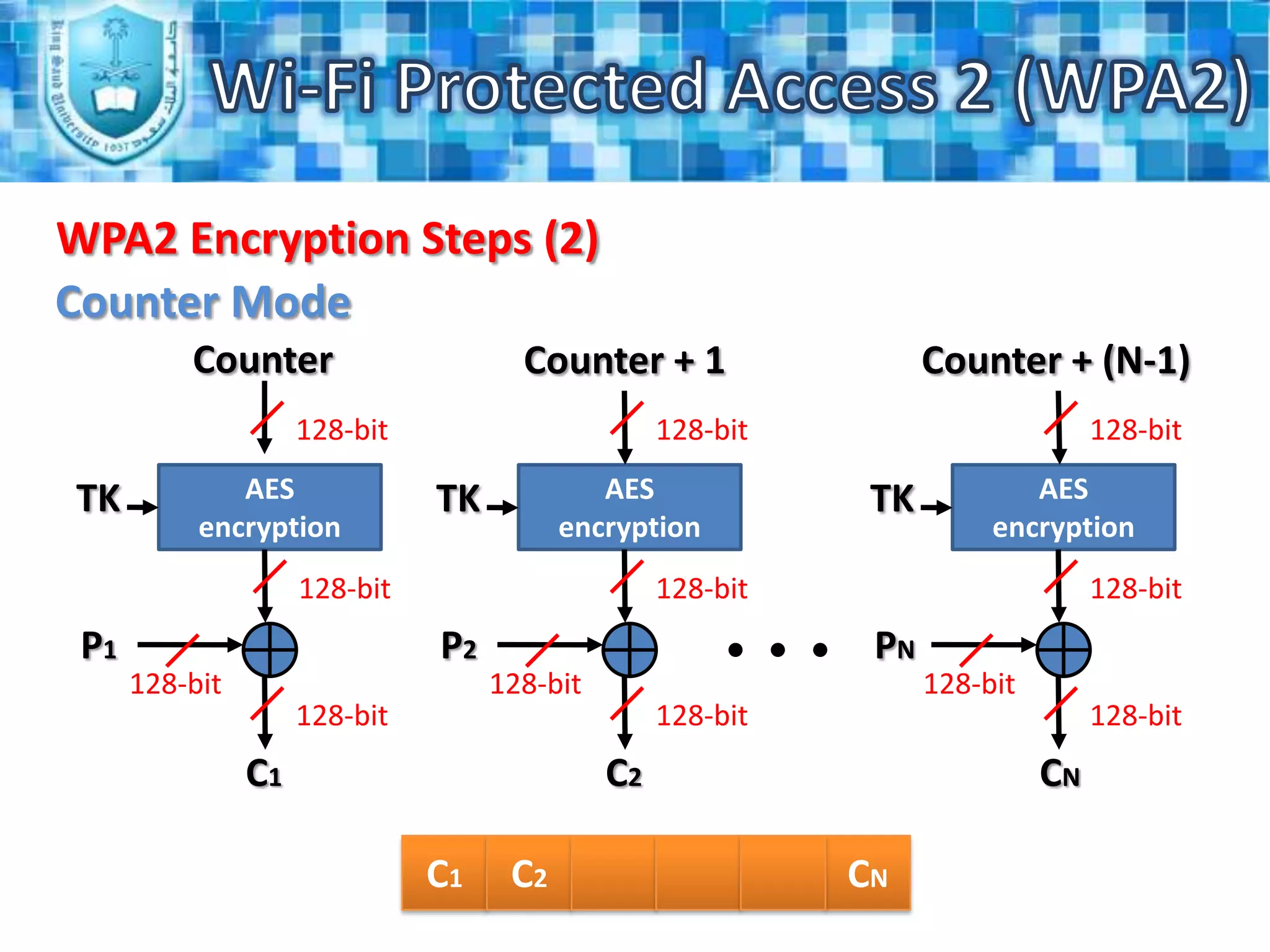
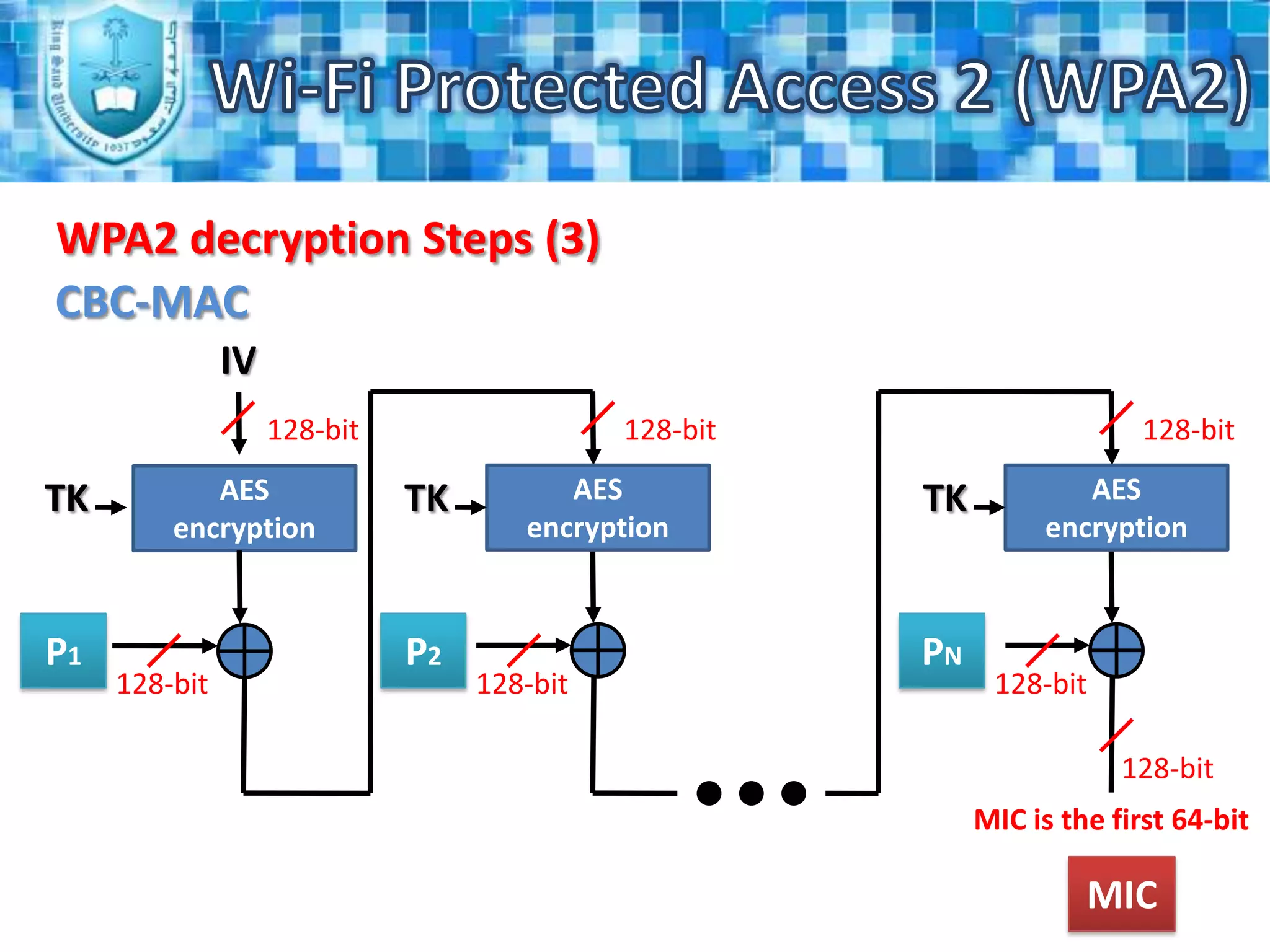
    CCMPWi-Fi Protected Access2 (WPA2)WPA2 EncryptionCBC-MACCTRWPA2 uses AES with a key length of 128 bit to encrypt the data.
  • 51.
    The AES usesthe Counter-Mode/CBC-MAC Protocol (CCMP).
  • 52.
    The CCMP usesthe same key for both encryption and authentication, but with different initialization vectors.Wi-Fi Protected Access 2 (WPA2)WPA2 Encryption StepsCBC-MACIV128-bit128-bit128-bitTKAES encryptionTKAES encryptionTKAES encryptionP2PNP1128-bit128-bit128-bit128-bitMIC is the first 64-bit
  • 53.
    Wi-Fi Protected Access2 (WPA2)WPA2 Encryption Steps (2)Counter ModeCounterCounter + 1Counter + (N-1)128-bit128-bit128-bitAES encryptionAES encryptionAES encryptionTKTKTK128-bit128-bit128-bitP2PNP1128-bit128-bit128-bit128-bit128-bit128-bitC2CNC1C1C2CN
  • 54.
    Wi-Fi Protected Access2 (WPA2)WPA2 Encryption Steps (3)Counter ModeCounter128-bitAES encryptionTKC1C2CNC0128-bitMIC128-bit128-bitC0C0
  • 55.
    Wi-Fi Protected Access2 (WPA2)WPA2 decryption StepsCounter ModeCounterCounter + 1Counter + (N-1)128-bit128-bit128-bitAES encryptionAES encryptionAES encryptionTKTKTK128-bit128-bit128-bitC1C2CN128-bit128-bit128-bit128-bit128-bit128-bitP1P2PNP1P2PN
  • 56.
    Wi-Fi Protected Access2 (WPA2)WPA2 decryption Steps (2)Counter ModeCounter128-bitAES encryptionTK128-bitC0128-bit128-bitMICMIC
  • 57.
    Wi-Fi Protected Access2 (WPA2)WPA2 decryption Steps (3)CBC-MACIV128-bit128-bit128-bitTKAES encryptionTKAES encryptionTKAES encryptionP1P2PN128-bit128-bit128-bit128-bitMIC is the first 64-bitMIC
  • 58.
    Wi-Fi Protected Access2 (WPA2)WPA2 ProsThe WPA2 has immunity against many types of hacker attacks, like:
  • 59.
  • 60.
  • 61.
  • 62.
  • 63.
  • 64.
  • 65.
    Brute–force/dictionary attacks.Wi-Fi ProtectedAccess 2 (WPA2)WPA2 Pros (2)WPA2 adds two enhancements to support fast roaming as follow:
  • 66.
    Allow the clientto reconnect to the access points which he has recently been connected to without needing to re-authenticate because of the PMK caching feature.
  • 67.
    Allow the clientto pre-authenticate himself with the access point which he is moving toward while he is still connected to the access point which he is moving away from.Wi-Fi Protected Access 2 (WPA2)WPA2 Pros (3)WPA2 is based on the Robust Security Network (RSN) which makes it support all the features available in WPA and the following extra features:
  • 68.
    It supports strongencryption and authentication for both infrastructure and an ad-hoc network; in contrast WPA just supports the infrastructure networks.
  • 69.
    It reduced theoverhead of the key derivation process.Wi-Fi Protected Access 2 (WPA2)WPA2 ConsLike all Wi-Fi security standard, the WPA2 can't stand in front of the physical layer attacks like:
  • 70.
  • 71.
  • 72.
  • 73.
    Also, it can’tprotect against layer 2 session hijacking.Wi-Fi Protected Access 2 (WPA2)WPA2 Cons (2)The attacker can get and discover lots of network information by analyzing the unprotected control and management frames.
  • 74.
    It is vulnerablefor the DoS attack.
  • 75.
    It is vulnerableto the MAC addresses spoofing and the mass de-authentication attacks.Wi-Fi Protected Access 2 (WPA2)Procedures to improve the Wi-Fi securityManage the access point from central source to protect the information which relate to client roaming.
  • 76.
    Good planning forthe Wi-Fi coverage will improve the availability and reduce the risk of RF jamming attacks.
  • 77.
    Use wireless intrusionprevention system (WIPS).Wi-Fi Protected Access 2 (WPA2)?Questions