Genome browsing,
Genomic data mining and
Genome data visualization
with Ensembl, Biomart and IGV
Alex Sánchez
August 2005
2
What is Ensembl
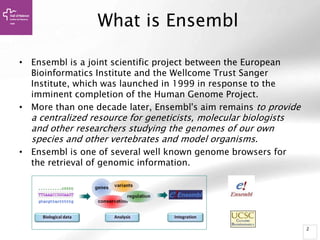
• Ensembl is a joint scientific project between the European
Bioinformatics Institute and the Wellcome Trust Sanger
Institute, which was launched in 1999 in response to the
imminent completion of the Human Genome Project.
• More than one decade later, Ensembl's aim remains to provide
a centralized resource for geneticists, molecular biologists
and other researchers studying the genomes of our own
species and other vertebrates and model organisms.
• Ensembl is one of several well known genome browsers for
the retrieval of genomic information.
3
“Ensembl” is a genome browser
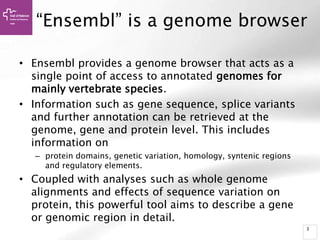
• Ensembl provides a genome browser that acts as a
single point of access to annotated genomes for
mainly vertebrate species.
• Information such as gene sequence, splice variants
and further annotation can be retrieved at the
genome, gene and protein level. This includes
information on
– protein domains, genetic variation, homology, syntenic regions
and regulatory elements.
• Coupled with analyses such as whole genome
alignments and effects of sequence variation on
protein, this powerful tool aims to describe a gene
or genomic region in detail.
4
Basic Genome Annotation
• Genes
– Genomic location
– Gene model structures
• Exons
• Introns
• UTRs
– Transcript(s)
• Pseudogenes
• Non-coding RNA
– Protein(s)
– Links to other sources of information
5
Advanced Genome Annotation
• Cytogenetic bands
• Polymorphic markers
– Sequence Tagged Sites (STS)
• Genetic variation
– Single Nucleotide Polymorphisms (SNPs)
– Deletion-Insertion Polymorphisms (DIPs)
– Short Tandem Repeats (STRs)
• Repetitive sequences
• Expressed Sequence Tags (ESTs)
• cDNAs or mRNAs from related species
• Regions of sequence homology
6
Use ensembl if you:
• have a gene of interest, and you would like to know if there are
homologues in other species, or any sequence variations in the gene;
• would like to know what the sequence is for your gene of interest,
and what the sequences of the splice variants (transcripts) are;
• want to explore the region around a gene of interest, and find
neighbouring genes;
• want to find sequences that may be involved in gene regulation
(open chromatin signatures, transcription factor binding sites, etc.);
• are interested in how conserved a gene or region is across species;
• want to know a selection of sequence variants that have been
associated with a disease, for example, diabetes;
• have questions about a gene, variant, or chromosomal region;
7
Don’t use it if:
• you want to submit sequence files (see the course
on ENA);
• you are looking for metabolic pathways (learn
more about Reactome);
• your species of interest is not a chordate (see a
sister project, Ensembl Genomes);
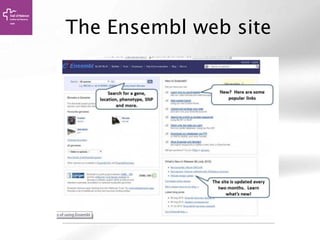
The Ensembl web site
Ensembl … …
takes genomic sequence assemblies
human build 35, mouse, rat, mosquito…
adds annotation and links
automated process
presents all the data on a web site
9
How to search Ensembl
• Search www.ensembl.org using:
– a gene name (for example, BRCA2);
– a UniProtaccession number (for example, P51587);
– a disease name (for example, coronary heart disease);
– a variation (for example, rs1223);
– a location - a genomic region (for example, rat
X:100000..200000);
– a PDBe ID or a Gene Ontology (GO) term
• Most search results will take you to the appropriate Ensembl
view through a results page.
• If you search using a location you will be directed straight to
the location tab (this tab provides a view of a region of a
genome).
10
Example 1
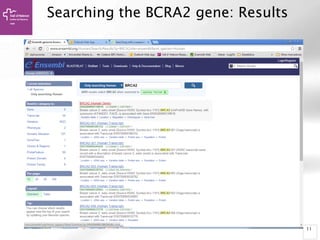
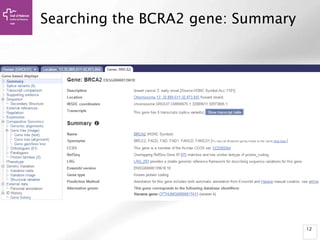
Searching the BCRA2 gene
• Open the at www.ensembl.org
• Choose your species of interest (Human) using the
pull-down menu to the left of the search box.
• Type in your search term of interest into the search
box. In our example we are using the gene name
'BRCA2'.
– You could also use a UniProtKB accession number, for
example 'P51587'.
• Click 'Go' to obtain the search results
• You should see the BRCA2 gene at the top of the
list.
11
Searching the BCRA2 gene: Results
12
Searching the BCRA2 gene: Summary
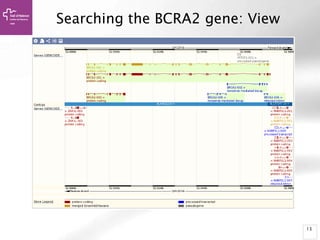
13
Searching the BCRA2 gene: View
14
Searching sequences:
BLAT/BLAST
• f you have a sequence, but you are not sure
what the gene name or ID in Ensembl is,
you can align it to the genome
with BLAST or BLAT
• BLAT (The BLAST-Like Alignment Tool) is
fast, but it demands more exact
matches. BLAST will allow lower-scoring
hits, and allows more gaps in
alignments. You'll get more hits with BLAST
(but it may be slower)
Searching Sequences Example:
The MTAP4 gene
• CTCCGCACTGCTCA
CTCCCGCGCAGTG
AGGTTGGCACAGC
CACCGCTCTG
TGGCTCGCTTGGTT
CCCTTAGTCCCGA
GCGCTCGCCCACT
GCAGATTCCTT
TCCCGTGCAGACA
TGGCCT
• Click on the BLAST/BLAT link at
the top of the page (circled in
red in figure).
• Paste your sequence into the
box.
• Check the options are correct.
For example, we have selected
Homo sapiens as the species to
search against and the BLAT
search tool because we're
looking for an identical match.
• Click 'Run'
Searching sequences: Results
• Alignment Locations vs.
Karyotype. The alignment [A] shows
all hits on the genome. The best hit
is boxed. In this case, BLAT shows
one hit.
• Alignment Locations vs. Query. The
alignment [B] shows hits, or High
Scoring Pairs (HSPs), as a red bar
along the query sequence (the black
and white bar below).
• Alignment Summary. The
summary [C] shows a table of hits,
with customisable columns. Links
are provided from the table. The
link 'A' shows an alignment of the
query and target sequence. 'G'
shows the hit on the genome. 'C'
brings you to the location tab,
where you can see the BLAT hit in
context of genes in that region.
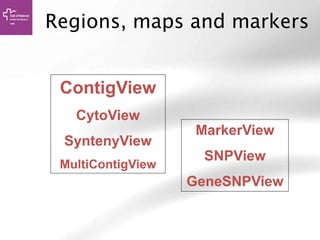
Regions, maps and markers
MarkerView
SNPView
GeneSNPView
ContigView
CytoView
SyntenyView
MultiContigView
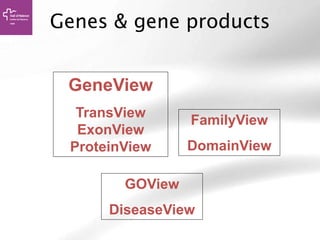
Genes & gene products
GeneView
TransView
ExonView
ProteinView
FamilyView
DomainView
GOView
DiseaseView
Ensembl exercises
Type the name of your favorite gene (i.e. BRCA2) and explore
all the sections of ensembl for this gene.
•Has this gene an ortholog in mouse?
•How many different transcript do we know of this gene?
•How many exons has the longest transcript?
•Which functional annotations has this gene? (hint: check at
GO annotations
•Can you find SNPs in this gene?
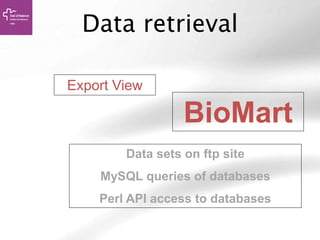
Data retrieval
BioMart
Data sets on ftp site
MySQL queries of databases
Perl API access to databases
Export View
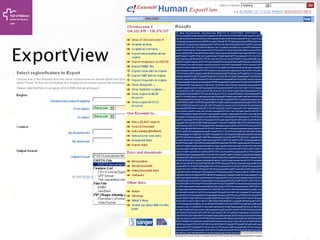
35
ExportView
Data Mining in Ensembl
with Biomart
August 2005
www.biomart.org/biomart/martview
37
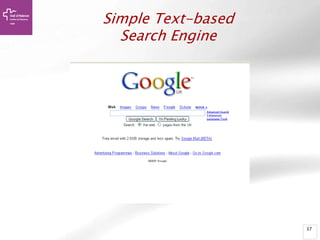
Simple Text-based
Search Engine
38
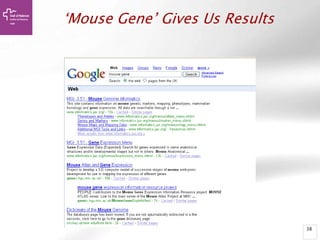
‘Mouse Gene’ Gives Us Results
39
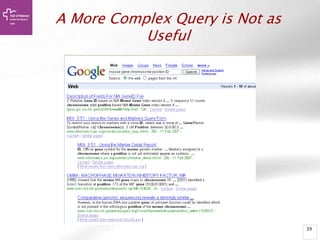
A More Complex Query is Not as
Useful
40
BioMart- Data mining
• BioMart is a search engine that can find
multiple terms and put them into a table
format.
• Such as: human gene (IDs), chromosome
and base pair position
• No programming required!
41
General or Specific Data-Tables
• All the genes for one species
• Or… only genes on one specific region of a
chromosome
• Or… genes on one region of a chromosome
associated with a disease
42
BioMart Data Sets
• Ensembl genes
• Vega genes
• SNPs
• Markers
• Phenotypes
• Gene expression information
• Gene ontology
• Homology predictions
• Protein annotation
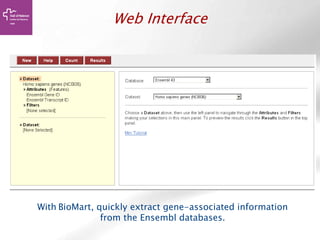
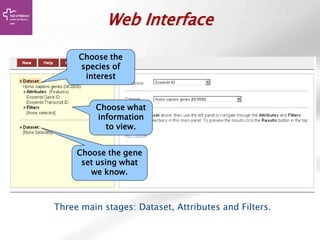
Web Interface
With BioMart, quickly extract gene-associated information
from the Ensembl databases.
44
Information Flow
• Choose the species of interest (Dataset)
• Decide what you would like to know about
the genes (Attributes)
(sequences, IDs, description…)
• Decide on a smaller geneset using Filters.
(enter IDs, choose a region …)
Web Interface
Three main stages: Dataset, Attributes and Filters.
Choose the
species of
interest
Choose what
information
to view.
Choose the gene
set using what
we know.
46
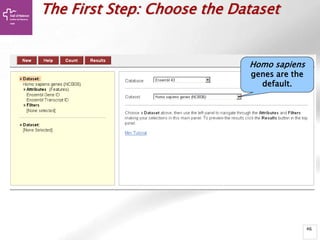
The First Step: Choose the Dataset
Homo sapiens
genes are the
default.
47
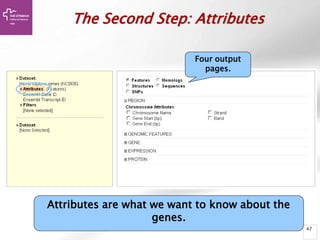
The Second Step: Attributes
Attributes are what we want to know about the
genes.
Four output
pages.
48
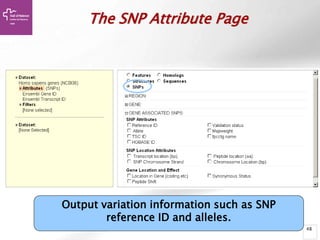
The SNP Attribute Page
Output variation information such as SNP
reference ID and alleles.
49
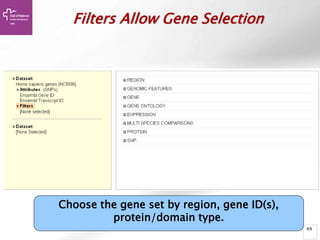
Filters Allow Gene Selection
Choose the gene set by region, gene ID(s),
protein/domain type.
50
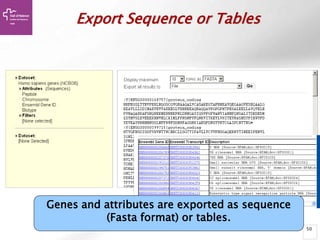
Export Sequence or Tables
Genes and attributes are exported as sequence
(Fasta format) or tables.
51
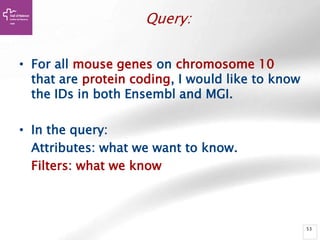
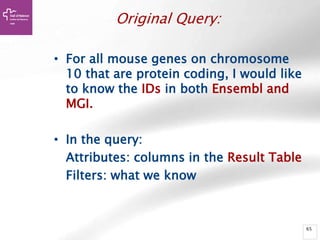
Query:
• For all mouse genes on chromosome 10
that are protein coding, I would like to know
the IDs in both Ensembl and MGI.
• In the query:
Attributes: what we want to know.
Filters: what we know
52
Query:
• For all mouse genes on chromosome 10
that are protein coding, I would like to know
the IDs in both Ensembl and MGI.
• In the query:
Attributes: what we want to know.
Filters: what we know
53
Query:
• For all mouse genes on chromosome 10
that are protein coding, I would like to know
the IDs in both Ensembl and MGI.
• In the query:
Attributes: what we want to know.
Filters: what we know
54
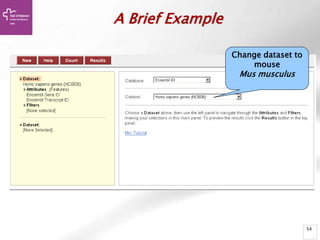
A Brief Example
Change dataset to
mouse
Mus musculus
55
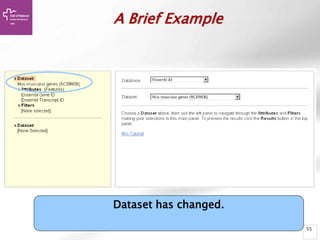
A Brief Example
Dataset has changed.
56
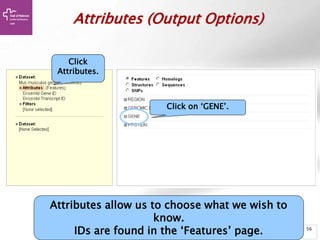
Attributes (Output Options)
Click
Attributes.
Attributes allow us to choose what we wish to
know.
IDs are found in the ‘Features’ page.
Click on ‘GENE’.
57
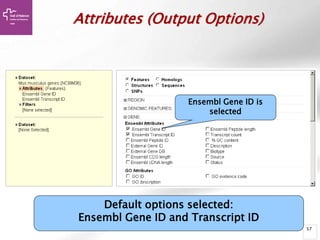
Default options selected:
Ensembl Gene ID and Transcript ID
Attributes (Output Options)
Ensembl Gene ID is
selected
58
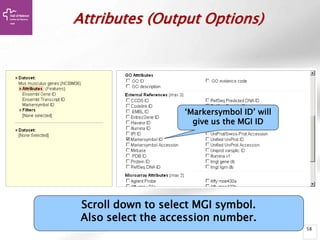
Scroll down to select MGI symbol.
Also select the accession number.
Attributes (Output Options)
‘Markersymbol ID’ will
give us the MGI ID
59
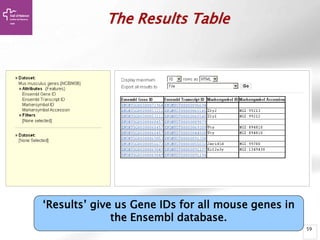
‘Results’ give us Gene IDs for all mouse genes in
the Ensembl database.
The Results Table
60
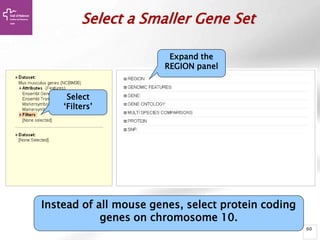
Select a Smaller Gene Set
Select
‘Filters’
Expand the
REGION panel
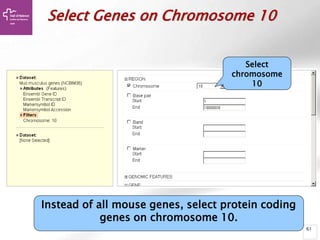
Instead of all mouse genes, select protein coding
genes on chromosome 10.
61
Select Genes on Chromosome 10
Select
chromosome
10
Instead of all mouse genes, select protein coding
genes on chromosome 10.
62
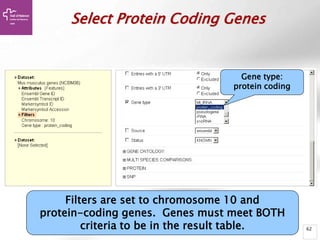
Select Protein Coding Genes
Filters are set to chromosome 10 and
protein-coding genes. Genes must meet BOTH
criteria to be in the result table.
Gene type:
protein coding
63
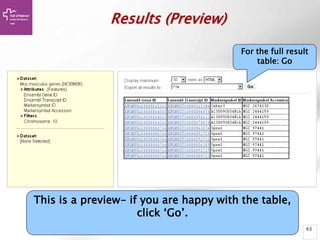
Results (Preview)
This is a preview- if you are happy with the table,
click ‘Go’.
For the full result
table: Go
64
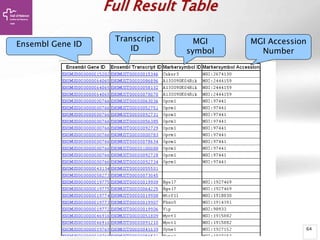
Full Result Table
Ensembl Gene ID
Transcript
ID
MGI
symbol
MGI Accession
Number
65
Original Query:
• For all mouse genes on chromosome
10 that are protein coding, I would like
to know the IDs in both Ensembl and
MGI.
• In the query:
Attributes: columns in the Result Table
Filters: what we know
66
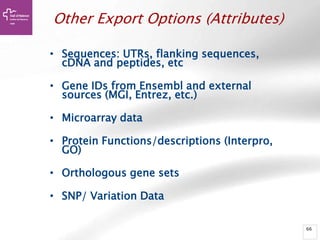
Other Export Options (Attributes)
• Sequences: UTRs, flanking sequences,
cDNA and peptides, etc
• Gene IDs from Ensembl and external
sources (MGI, Entrez, etc.)
• Microarray data
• Protein Functions/descriptions (Interpro,
GO)
• Orthologous gene sets
• SNP/ Variation Data
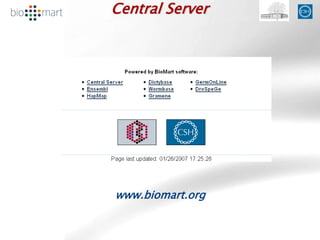
Central Server
www.biomart.org
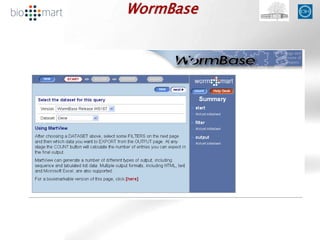
WormBase
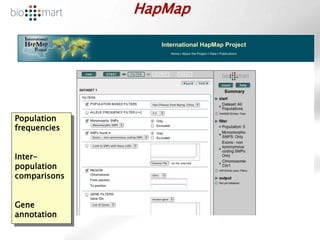
HapMap
Population
frequencies
Inter-
population
comparisons
Gene
annotation
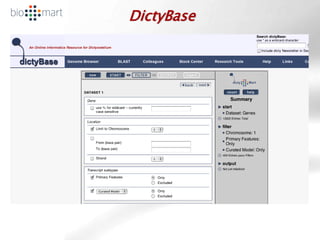
DictyBase
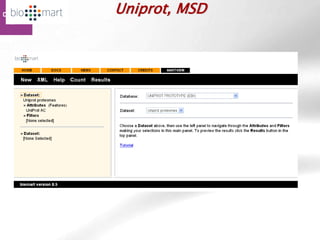
Uniprot, MSD
72
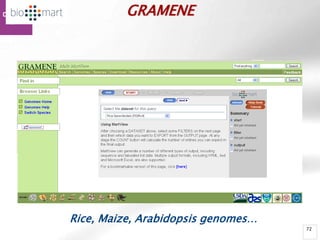
GRAMENE
Rice, Maize, Arabidopsis genomes…
73
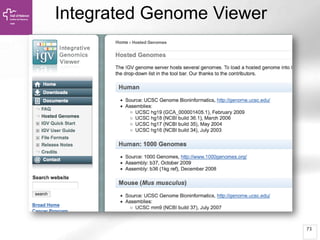
Integrated Genome Viewer
74
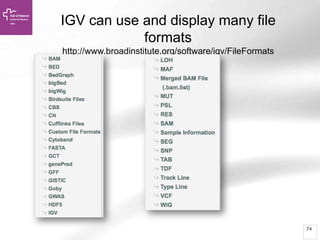
IGV can use and display many file
formats
http://www.broadinstitute.org/software/igv/FileFormats
75
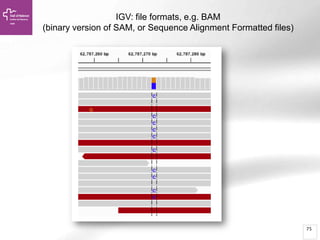
IGV: file formats, e.g. BAM
(binary version of SAM, or Sequence Alignment Formatted files)
76
77
Ask your question, and then gather the
data, the tools and hardware you need
• Data and Databases: you will take
workshops, you will read papers, and you
will go on-line: SeqAnswers & maybe the
bioinformatics.ca Links Directory
• Tools: you will take workshops, you will
read papers, and you will go on-line:
SeqAnswers & maybe the
bioinformatics.ca Links Directory
• Hardware: you need to decide?
What can you do with IGV?
Visualization of different genomic data types:
 aligned sequence reads
 mutations
 copy number
 RNA interference screens
 gene expression
 methylation and genomic annotations
List of supported data formats:
http://www.broadinstitute.org/software/igv/FileFormats
For this example:
 *.bam for the alignment file
 *.gtf for the genome annotation data
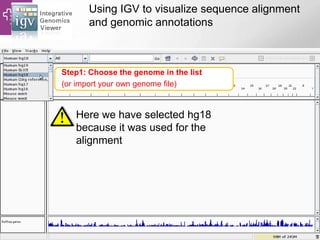
Using IGV to visualize sequence alignment
and genomic annotations
Here we have selected hg18
because it was used for the
alignment
Step1: Choose the genome in the list
(or import your own genome file)
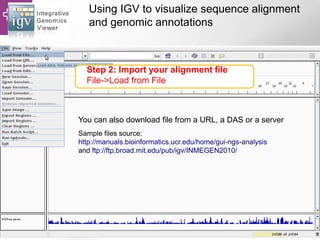
Using IGV to visualize sequence alignment
and genomic annotations
Sample files source:
http://manuals.bioinformatics.ucr.edu/home/gui-ngs-analysis
and ftp://ftp.broad.mit.edu/pub/igv/INMEGEN2010/
Step 2: Import your alignment file
File->Load from File
You can also download file from a URL, a DAS or a server
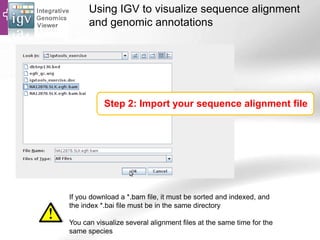
Using IGV to visualize sequence alignment
and genomic annotations
Step 2: Import your sequence alignment file
If you download a *.bam file, it must be sorted and indexed, and
the index *.bai file must be in the same directory
You can visualize several alignment files at the same time for the
same species
Using IGV to visualize sequence alignment
and genomic annotations
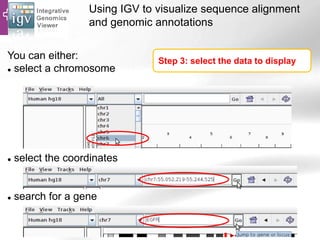
Step 3: select the data to display
You can either:
 select a chromosome
 select the coordinates
 search for a gene
Using IGV to visualize sequence alignment
and genomic annotations
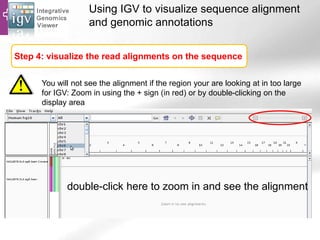
Step 4: visualize the read alignments on the sequence
You will not see the alignment if the region your are looking at in too large
for IGV: Zoom in using the + sign (in red) or by double-clicking on the
display area
double-click here to zoom in and see the alignment
Using IGV to visualize sequence alignment
and genomic annotations
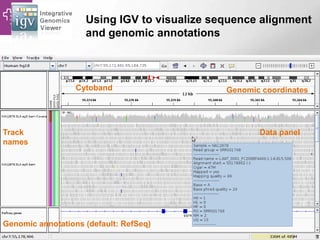
Track
names
Genomic annotations (default: RefSeq)
Cytoband Genomic coordinates
Data panel
Using IGV to visualize sequence alignment
and genomic annotations
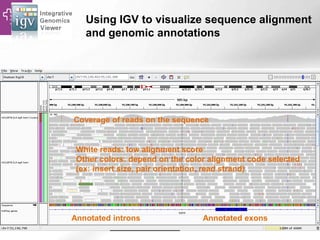
White reads: low alignment score
Other colors: depend on the color alignment code selected
(ex: insert size, pair orientation, read strand)
Annotated exonsAnnotated introns
Coverage of reads on the sequence
Using IGV to visualize sequence alignment
and genomic annotations
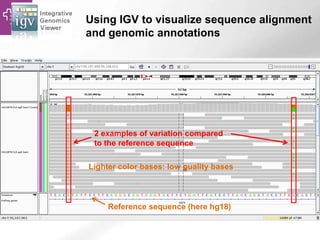
Reference sequence (here hg18)
2 examples of variation compared
to the reference sequence
Lighter color bases: low quality bases
Using IGV to visualize sequence alignment
and genomic annotations
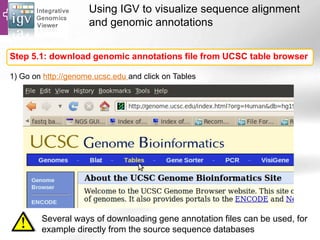
Step 5.1: download genomic annotations file from UCSC table browser
Several ways of downloading gene annotation files can be used, for
example directly from the source sequence databases
1) Go on http://genome.ucsc.edu and click on Tables
Using IGV to visualize sequence alignment
and genomic annotations
Select the genome (here hg18)
Select the gene annotations
(here Ensembl)
Choose your file name and click on the “get output” button
Select the file format (here GTF)
Using IGV to visualize sequence alignment
and genomic annotations
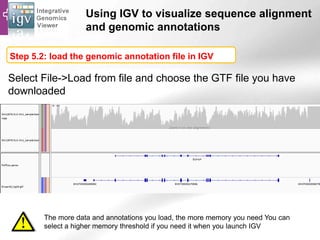
Select File->Load from file and choose the GTF file you have
downloaded
You have know access to RefSeq and Ensembl gene
annotations:
Step 5.2: load the genomic annotation file in IGV
The more data and annotations you load, the more memory you need You can
select a higher memory threshold if you need it when you launch IGV
Using IGV to visualize sequence alignment
and genomic annotations
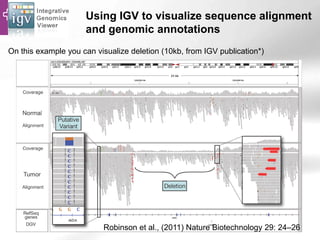
On this example you can visualize deletion (10kb, from IGV publication*)
Robinson et al., (2011) Nature Biotechnology 29: 24–26
Using IGV to visualize sequence alignment
and genomic annotations
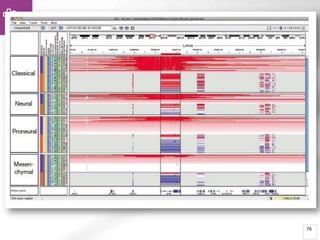
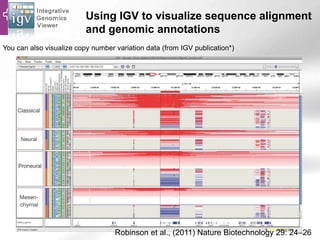
You can also visualize copy number variation data (from IGV publication*)
Robinson et al., (2011) Nature Biotechnology 29: 24–26
92
Following OpenHelix, UCSC, & SeqAnswers
• OpenHelix
– http://www.openhelix.com/
– Twitter: @openhelix
– Blog: http://blog.openhelix.com/
• UCSC
– http://genome.ucsc.edu/
– Twitter: @GenomeBrowser
– More tutorials: http://genome.ucsc.edu/training.html
• SEQanswers
– Forum for NGS technologies
http://seqanswers.com/

Genome Browsing, Genomic Data Mining and Genome Data Visualization with Ensembl, Biomart and IGV (UEB-UAT Bioinformatics Course - Session 1.3 - VHIR, Barcelona)

  • 1.
    Genome browsing, Genomic datamining and Genome data visualization with Ensembl, Biomart and IGV Alex Sánchez August 2005
  • 2.
    2 What is Ensembl •Ensembl is a joint scientific project between the European Bioinformatics Institute and the Wellcome Trust Sanger Institute, which was launched in 1999 in response to the imminent completion of the Human Genome Project. • More than one decade later, Ensembl's aim remains to provide a centralized resource for geneticists, molecular biologists and other researchers studying the genomes of our own species and other vertebrates and model organisms. • Ensembl is one of several well known genome browsers for the retrieval of genomic information.
  • 3.
    3 “Ensembl” is agenome browser • Ensembl provides a genome browser that acts as a single point of access to annotated genomes for mainly vertebrate species. • Information such as gene sequence, splice variants and further annotation can be retrieved at the genome, gene and protein level. This includes information on – protein domains, genetic variation, homology, syntenic regions and regulatory elements. • Coupled with analyses such as whole genome alignments and effects of sequence variation on protein, this powerful tool aims to describe a gene or genomic region in detail.
  • 4.
    4 Basic Genome Annotation •Genes – Genomic location – Gene model structures • Exons • Introns • UTRs – Transcript(s) • Pseudogenes • Non-coding RNA – Protein(s) – Links to other sources of information
  • 5.
    5 Advanced Genome Annotation •Cytogenetic bands • Polymorphic markers – Sequence Tagged Sites (STS) • Genetic variation – Single Nucleotide Polymorphisms (SNPs) – Deletion-Insertion Polymorphisms (DIPs) – Short Tandem Repeats (STRs) • Repetitive sequences • Expressed Sequence Tags (ESTs) • cDNAs or mRNAs from related species • Regions of sequence homology
  • 6.
    6 Use ensembl ifyou: • have a gene of interest, and you would like to know if there are homologues in other species, or any sequence variations in the gene; • would like to know what the sequence is for your gene of interest, and what the sequences of the splice variants (transcripts) are; • want to explore the region around a gene of interest, and find neighbouring genes; • want to find sequences that may be involved in gene regulation (open chromatin signatures, transcription factor binding sites, etc.); • are interested in how conserved a gene or region is across species; • want to know a selection of sequence variants that have been associated with a disease, for example, diabetes; • have questions about a gene, variant, or chromosomal region;
  • 7.
    7 Don’t use itif: • you want to submit sequence files (see the course on ENA); • you are looking for metabolic pathways (learn more about Reactome); • your species of interest is not a chordate (see a sister project, Ensembl Genomes);
  • 8.
    The Ensembl website Ensembl … … takes genomic sequence assemblies human build 35, mouse, rat, mosquito… adds annotation and links automated process presents all the data on a web site
  • 9.
    9 How to searchEnsembl • Search www.ensembl.org using: – a gene name (for example, BRCA2); – a UniProtaccession number (for example, P51587); – a disease name (for example, coronary heart disease); – a variation (for example, rs1223); – a location - a genomic region (for example, rat X:100000..200000); – a PDBe ID or a Gene Ontology (GO) term • Most search results will take you to the appropriate Ensembl view through a results page. • If you search using a location you will be directed straight to the location tab (this tab provides a view of a region of a genome).
  • 10.
    10 Example 1 Searching theBCRA2 gene • Open the at www.ensembl.org • Choose your species of interest (Human) using the pull-down menu to the left of the search box. • Type in your search term of interest into the search box. In our example we are using the gene name 'BRCA2'. – You could also use a UniProtKB accession number, for example 'P51587'. • Click 'Go' to obtain the search results • You should see the BRCA2 gene at the top of the list.
  • 11.
  • 12.
  • 13.
  • 14.
    14 Searching sequences: BLAT/BLAST • fyou have a sequence, but you are not sure what the gene name or ID in Ensembl is, you can align it to the genome with BLAST or BLAT • BLAT (The BLAST-Like Alignment Tool) is fast, but it demands more exact matches. BLAST will allow lower-scoring hits, and allows more gaps in alignments. You'll get more hits with BLAST (but it may be slower)
  • 15.
    Searching Sequences Example: TheMTAP4 gene • CTCCGCACTGCTCA CTCCCGCGCAGTG AGGTTGGCACAGC CACCGCTCTG TGGCTCGCTTGGTT CCCTTAGTCCCGA GCGCTCGCCCACT GCAGATTCCTT TCCCGTGCAGACA TGGCCT • Click on the BLAST/BLAT link at the top of the page (circled in red in figure). • Paste your sequence into the box. • Check the options are correct. For example, we have selected Homo sapiens as the species to search against and the BLAT search tool because we're looking for an identical match. • Click 'Run'
  • 16.
    Searching sequences: Results •Alignment Locations vs. Karyotype. The alignment [A] shows all hits on the genome. The best hit is boxed. In this case, BLAT shows one hit. • Alignment Locations vs. Query. The alignment [B] shows hits, or High Scoring Pairs (HSPs), as a red bar along the query sequence (the black and white bar below). • Alignment Summary. The summary [C] shows a table of hits, with customisable columns. Links are provided from the table. The link 'A' shows an alignment of the query and target sequence. 'G' shows the hit on the genome. 'C' brings you to the location tab, where you can see the BLAT hit in context of genes in that region.
  • 17.
    Regions, maps andmarkers MarkerView SNPView GeneSNPView ContigView CytoView SyntenyView MultiContigView
  • 18.
    Genes & geneproducts GeneView TransView ExonView ProteinView FamilyView DomainView GOView DiseaseView
  • 19.
    Ensembl exercises Type thename of your favorite gene (i.e. BRCA2) and explore all the sections of ensembl for this gene. •Has this gene an ortholog in mouse? •How many different transcript do we know of this gene? •How many exons has the longest transcript? •Which functional annotations has this gene? (hint: check at GO annotations •Can you find SNPs in this gene?
  • 20.
    Data retrieval BioMart Data setson ftp site MySQL queries of databases Perl API access to databases Export View
  • 21.
  • 22.
    Data Mining inEnsembl with Biomart August 2005 www.biomart.org/biomart/martview
  • 23.
  • 24.
  • 25.
    39 A More ComplexQuery is Not as Useful
  • 26.
    40 BioMart- Data mining •BioMart is a search engine that can find multiple terms and put them into a table format. • Such as: human gene (IDs), chromosome and base pair position • No programming required!
  • 27.
    41 General or SpecificData-Tables • All the genes for one species • Or… only genes on one specific region of a chromosome • Or… genes on one region of a chromosome associated with a disease
  • 28.
    42 BioMart Data Sets •Ensembl genes • Vega genes • SNPs • Markers • Phenotypes • Gene expression information • Gene ontology • Homology predictions • Protein annotation
  • 29.
    Web Interface With BioMart,quickly extract gene-associated information from the Ensembl databases.
  • 30.
    44 Information Flow • Choosethe species of interest (Dataset) • Decide what you would like to know about the genes (Attributes) (sequences, IDs, description…) • Decide on a smaller geneset using Filters. (enter IDs, choose a region …)
  • 31.
    Web Interface Three mainstages: Dataset, Attributes and Filters. Choose the species of interest Choose what information to view. Choose the gene set using what we know.
  • 32.
    46 The First Step:Choose the Dataset Homo sapiens genes are the default.
  • 33.
    47 The Second Step:Attributes Attributes are what we want to know about the genes. Four output pages.
  • 34.
    48 The SNP AttributePage Output variation information such as SNP reference ID and alleles.
  • 35.
    49 Filters Allow GeneSelection Choose the gene set by region, gene ID(s), protein/domain type.
  • 36.
    50 Export Sequence orTables Genes and attributes are exported as sequence (Fasta format) or tables.
  • 37.
    51 Query: • For allmouse genes on chromosome 10 that are protein coding, I would like to know the IDs in both Ensembl and MGI. • In the query: Attributes: what we want to know. Filters: what we know
  • 38.
    52 Query: • For allmouse genes on chromosome 10 that are protein coding, I would like to know the IDs in both Ensembl and MGI. • In the query: Attributes: what we want to know. Filters: what we know
  • 39.
    53 Query: • For allmouse genes on chromosome 10 that are protein coding, I would like to know the IDs in both Ensembl and MGI. • In the query: Attributes: what we want to know. Filters: what we know
  • 40.
    54 A Brief Example Changedataset to mouse Mus musculus
  • 41.
  • 42.
    56 Attributes (Output Options) Click Attributes. Attributesallow us to choose what we wish to know. IDs are found in the ‘Features’ page. Click on ‘GENE’.
  • 43.
    57 Default options selected: EnsemblGene ID and Transcript ID Attributes (Output Options) Ensembl Gene ID is selected
  • 44.
    58 Scroll down toselect MGI symbol. Also select the accession number. Attributes (Output Options) ‘Markersymbol ID’ will give us the MGI ID
  • 45.
    59 ‘Results’ give usGene IDs for all mouse genes in the Ensembl database. The Results Table
  • 46.
    60 Select a SmallerGene Set Select ‘Filters’ Expand the REGION panel Instead of all mouse genes, select protein coding genes on chromosome 10.
  • 47.
    61 Select Genes onChromosome 10 Select chromosome 10 Instead of all mouse genes, select protein coding genes on chromosome 10.
  • 48.
    62 Select Protein CodingGenes Filters are set to chromosome 10 and protein-coding genes. Genes must meet BOTH criteria to be in the result table. Gene type: protein coding
  • 49.
    63 Results (Preview) This isa preview- if you are happy with the table, click ‘Go’. For the full result table: Go
  • 50.
    64 Full Result Table EnsemblGene ID Transcript ID MGI symbol MGI Accession Number
  • 51.
    65 Original Query: • Forall mouse genes on chromosome 10 that are protein coding, I would like to know the IDs in both Ensembl and MGI. • In the query: Attributes: columns in the Result Table Filters: what we know
  • 52.
    66 Other Export Options(Attributes) • Sequences: UTRs, flanking sequences, cDNA and peptides, etc • Gene IDs from Ensembl and external sources (MGI, Entrez, etc.) • Microarray data • Protein Functions/descriptions (Interpro, GO) • Orthologous gene sets • SNP/ Variation Data
  • 53.
  • 54.
  • 55.
  • 56.
  • 57.
  • 58.
  • 59.
  • 60.
    74 IGV can useand display many file formats http://www.broadinstitute.org/software/igv/FileFormats
  • 61.
    75 IGV: file formats,e.g. BAM (binary version of SAM, or Sequence Alignment Formatted files)
  • 62.
  • 63.
    77 Ask your question,and then gather the data, the tools and hardware you need • Data and Databases: you will take workshops, you will read papers, and you will go on-line: SeqAnswers & maybe the bioinformatics.ca Links Directory • Tools: you will take workshops, you will read papers, and you will go on-line: SeqAnswers & maybe the bioinformatics.ca Links Directory • Hardware: you need to decide?
  • 64.
    What can youdo with IGV? Visualization of different genomic data types:  aligned sequence reads  mutations  copy number  RNA interference screens  gene expression  methylation and genomic annotations List of supported data formats: http://www.broadinstitute.org/software/igv/FileFormats For this example:  *.bam for the alignment file  *.gtf for the genome annotation data
  • 65.
    Using IGV tovisualize sequence alignment and genomic annotations Here we have selected hg18 because it was used for the alignment Step1: Choose the genome in the list (or import your own genome file)
  • 66.
    Using IGV tovisualize sequence alignment and genomic annotations Sample files source: http://manuals.bioinformatics.ucr.edu/home/gui-ngs-analysis and ftp://ftp.broad.mit.edu/pub/igv/INMEGEN2010/ Step 2: Import your alignment file File->Load from File You can also download file from a URL, a DAS or a server
  • 67.
    Using IGV tovisualize sequence alignment and genomic annotations Step 2: Import your sequence alignment file If you download a *.bam file, it must be sorted and indexed, and the index *.bai file must be in the same directory You can visualize several alignment files at the same time for the same species
  • 68.
    Using IGV tovisualize sequence alignment and genomic annotations Step 3: select the data to display You can either:  select a chromosome  select the coordinates  search for a gene
  • 69.
    Using IGV tovisualize sequence alignment and genomic annotations Step 4: visualize the read alignments on the sequence You will not see the alignment if the region your are looking at in too large for IGV: Zoom in using the + sign (in red) or by double-clicking on the display area double-click here to zoom in and see the alignment
  • 70.
    Using IGV tovisualize sequence alignment and genomic annotations Track names Genomic annotations (default: RefSeq) Cytoband Genomic coordinates Data panel
  • 71.
    Using IGV tovisualize sequence alignment and genomic annotations White reads: low alignment score Other colors: depend on the color alignment code selected (ex: insert size, pair orientation, read strand) Annotated exonsAnnotated introns Coverage of reads on the sequence
  • 72.
    Using IGV tovisualize sequence alignment and genomic annotations Reference sequence (here hg18) 2 examples of variation compared to the reference sequence Lighter color bases: low quality bases
  • 73.
    Using IGV tovisualize sequence alignment and genomic annotations Step 5.1: download genomic annotations file from UCSC table browser Several ways of downloading gene annotation files can be used, for example directly from the source sequence databases 1) Go on http://genome.ucsc.edu and click on Tables
  • 74.
    Using IGV tovisualize sequence alignment and genomic annotations Select the genome (here hg18) Select the gene annotations (here Ensembl) Choose your file name and click on the “get output” button Select the file format (here GTF)
  • 75.
    Using IGV tovisualize sequence alignment and genomic annotations Select File->Load from file and choose the GTF file you have downloaded You have know access to RefSeq and Ensembl gene annotations: Step 5.2: load the genomic annotation file in IGV The more data and annotations you load, the more memory you need You can select a higher memory threshold if you need it when you launch IGV
  • 76.
    Using IGV tovisualize sequence alignment and genomic annotations On this example you can visualize deletion (10kb, from IGV publication*) Robinson et al., (2011) Nature Biotechnology 29: 24–26
  • 77.
    Using IGV tovisualize sequence alignment and genomic annotations You can also visualize copy number variation data (from IGV publication*) Robinson et al., (2011) Nature Biotechnology 29: 24–26
  • 78.
    92 Following OpenHelix, UCSC,& SeqAnswers • OpenHelix – http://www.openhelix.com/ – Twitter: @openhelix – Blog: http://blog.openhelix.com/ • UCSC – http://genome.ucsc.edu/ – Twitter: @GenomeBrowser – More tutorials: http://genome.ucsc.edu/training.html • SEQanswers – Forum for NGS technologies http://seqanswers.com/