1
Vall d’Hebron Institut de Recerca (VHIR)
Alex Sánchez
15/05/2014
Institut d’Investigació Sanitària acreditat per l’Instituto de Salud Carlos III (ISCIII)
Introduction to Galaxy
A web-based genome analysis platform
BIOINFORMATICS FOR
BIOMEDICAL RESEARCH
2
• Galaxy overview and Interface
• Getting Data in Galaxy
• Analyzing Data in Galaxy
– Quality Control
– Mapping Data
• History and workflow
• Galaxy Exercises
NGS Analysis Using Galaxy
3
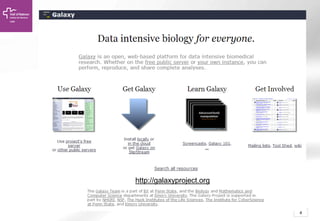
What is Galaxy
• Galaxy is an open-source framework for
integrating various computational tools and
databases into a cohesive workspace.
But it can also be seen as
• A web-based service, integrating many popular
tools and resources for comparative genomics.
And also
• A completely self-contained application for
building your own Galaxy style sites.
4
http://galaxyproject.org
5
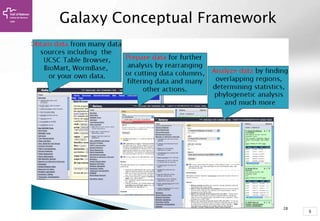
Galaxy Conceptual Framework
66
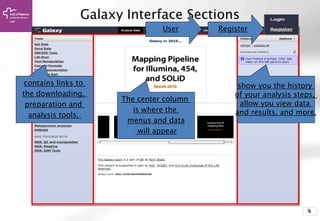
Galaxy Interface Sections
contains links to
the downloading,
preparation and
analysis tools.
The center column
is where the
menus and data
will appear
show you the history
of your analysis steps,
allow you view data
and results, and more.
RegisterUser
77
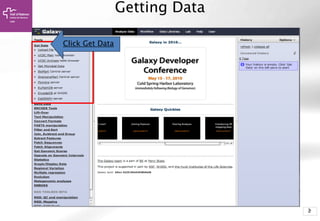
Getting Data
Click Get Data
88
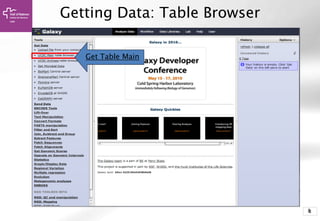
Getting Data: Table Browser
Get Table Main
99
Getting Data: UCSC Table Browser
Get Output
clade: Mammal
genome: Human
assmbly: [current]
group: Genes and…
track: UCSC Genes
table: knownGene
region: position, chrX
Output format:
BED, and check
Send output to
Galaxy
1010
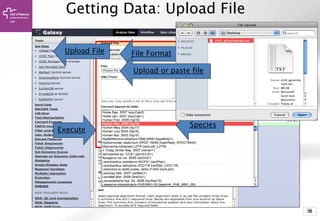
Getting Data: Upload File
Upload File
Execute
File Format
Species
Upload or paste file
11
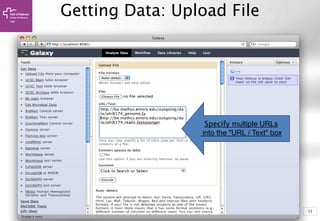
Getting Data: Upload File
Specify multiple URLs
into the "URL / Text" box
12
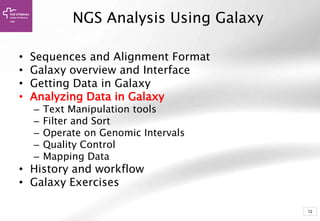
• Sequences and Alignment Format
• Galaxy overview and Interface
• Getting Data in Galaxy
• Analyzing Data in Galaxy
– Text Manipulation tools
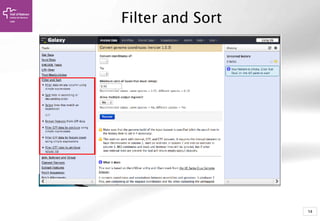
– Filter and Sort
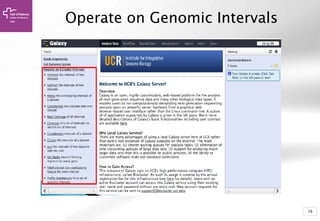
– Operate on Genomic Intervals
– Quality Control
– Mapping Data
• History and workflow
• Galaxy Exercises
NGS Analysis Using Galaxy
13
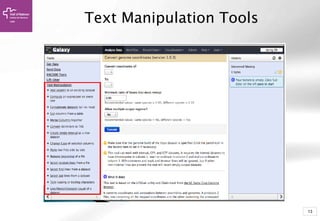
Text Manipulation Tools
14
Filter and Sort
15
Operate on Genomic Intervals
16
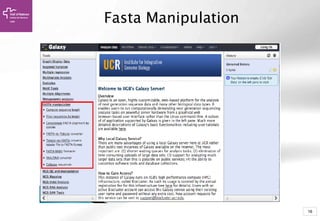
Fasta Manipulation
1717
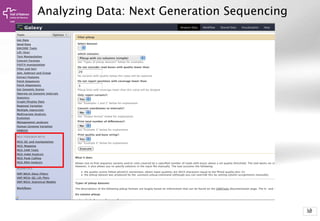
Analyzing Data: Next Generation Sequencing
18
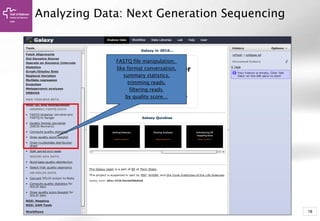
Analyzing Data: Next Generation Sequencing
FASTQ file manipulation,
like format conversation,
summary statistics,
trimming reads,
filtering reads
by quality score…
19
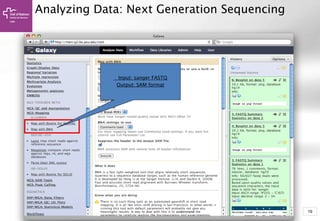
Analyzing Data: Next Generation Sequencing
Input: sanger FASTQ
Output: SAM format
20
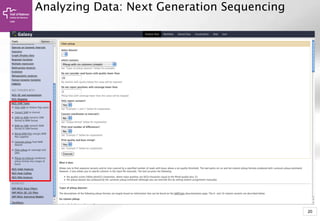
Analyzing Data: Next Generation Sequencing
21
• Sequences and Alignment Format
• Galaxy overview and Interface
• Getting Data in Galaxy
• Analyzing Data in Galaxy
– Quality Control
– Mapping Data
• History and workflow
• Galaxy Exercises
NGS Analysis Using Galaxy
22Copyright OpenHelix. No use or
reproduction without express written
22
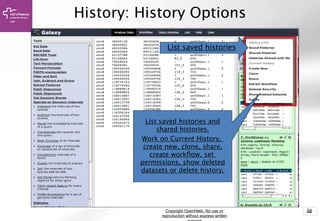
History: History Options
List saved histories and
shared histories.
Work on Current History,
create new, clone, share,
create workflow, set
permissions, show deleted
datasets or delete history.
List saved histories
23
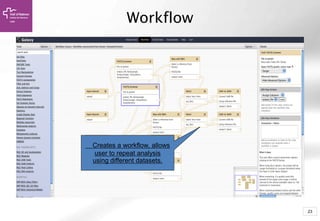
Workflow
Creates a workflow, allows
user to repeat analysis
using different datasets.
24
• Sequences and Alignment Format
• Galaxy overview and Interface
• Getting Data in Galaxy
• Analyzing Data in Galaxy
– Quality Control
– Mapping Data
• History and workflow
• Galaxy Exercises
NGS Analysis Using Galaxy

Introduction to Galaxy (UEB-UAT Bioinformatics Course - Session 2.2 - VHIR, Barcelona)

  • 1.
    1 Vall d’Hebron Institutde Recerca (VHIR) Alex Sánchez 15/05/2014 Institut d’Investigació Sanitària acreditat per l’Instituto de Salud Carlos III (ISCIII) Introduction to Galaxy A web-based genome analysis platform BIOINFORMATICS FOR BIOMEDICAL RESEARCH
  • 2.
    2 • Galaxy overviewand Interface • Getting Data in Galaxy • Analyzing Data in Galaxy – Quality Control – Mapping Data • History and workflow • Galaxy Exercises NGS Analysis Using Galaxy
  • 3.
    3 What is Galaxy •Galaxy is an open-source framework for integrating various computational tools and databases into a cohesive workspace. But it can also be seen as • A web-based service, integrating many popular tools and resources for comparative genomics. And also • A completely self-contained application for building your own Galaxy style sites.
  • 4.
  • 5.
  • 6.
    66 Galaxy Interface Sections containslinks to the downloading, preparation and analysis tools. The center column is where the menus and data will appear show you the history of your analysis steps, allow you view data and results, and more. RegisterUser
  • 7.
  • 8.
    88 Getting Data: TableBrowser Get Table Main
  • 9.
    99 Getting Data: UCSCTable Browser Get Output clade: Mammal genome: Human assmbly: [current] group: Genes and… track: UCSC Genes table: knownGene region: position, chrX Output format: BED, and check Send output to Galaxy
  • 10.
    1010 Getting Data: UploadFile Upload File Execute File Format Species Upload or paste file
  • 11.
    11 Getting Data: UploadFile Specify multiple URLs into the "URL / Text" box
  • 12.
    12 • Sequences andAlignment Format • Galaxy overview and Interface • Getting Data in Galaxy • Analyzing Data in Galaxy – Text Manipulation tools – Filter and Sort – Operate on Genomic Intervals – Quality Control – Mapping Data • History and workflow • Galaxy Exercises NGS Analysis Using Galaxy
  • 13.
  • 14.
  • 15.
  • 16.
  • 17.
    1717 Analyzing Data: NextGeneration Sequencing
  • 18.
    18 Analyzing Data: NextGeneration Sequencing FASTQ file manipulation, like format conversation, summary statistics, trimming reads, filtering reads by quality score…
  • 19.
    19 Analyzing Data: NextGeneration Sequencing Input: sanger FASTQ Output: SAM format
  • 20.
    20 Analyzing Data: NextGeneration Sequencing
  • 21.
    21 • Sequences andAlignment Format • Galaxy overview and Interface • Getting Data in Galaxy • Analyzing Data in Galaxy – Quality Control – Mapping Data • History and workflow • Galaxy Exercises NGS Analysis Using Galaxy
  • 22.
    22Copyright OpenHelix. Nouse or reproduction without express written 22 History: History Options List saved histories and shared histories. Work on Current History, create new, clone, share, create workflow, set permissions, show deleted datasets or delete history. List saved histories
  • 23.
    23 Workflow Creates a workflow,allows user to repeat analysis using different datasets.
  • 24.
    24 • Sequences andAlignment Format • Galaxy overview and Interface • Getting Data in Galaxy • Analyzing Data in Galaxy – Quality Control – Mapping Data • History and workflow • Galaxy Exercises NGS Analysis Using Galaxy