Trading volume mapping
in recent environment
Global Tokyo. 1
@teramonagi
Motivation of this Talk
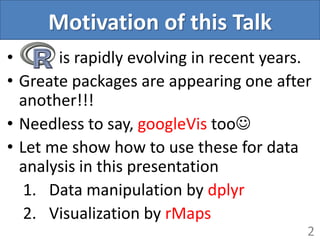
• is rapidly evolving in recent years.
• Greate packages are appearing one after
another!!!
• Needless to say, googleVis too
• Let me show how to use these for data
analysis in this presentation
1. Data manipulation by dplyr
2. Visualization by rMaps
2
Libraries to be needed
3
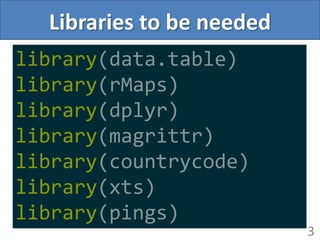
library(data.table)
library(rMaps)
library(dplyr)
library(magrittr)
library(countrycode)
library(xts)
library(pings)
4
I forgot to use googleVis
Sorry!!!
5
Before we get on
the main subject
Fantastic collaboration -dplyr, magrittr, pings-
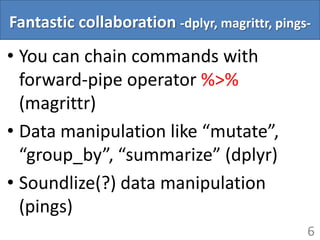
• You can chain commands with
forward-pipe operator %>%
(magrittr)
• Data manipulation like “mutate”,
“group_by”, “summarize” (dplyr)
• Soundlize(?) data manipulation
(pings)
6
Fantastic collaboration -dplyr, magrittr, pings-
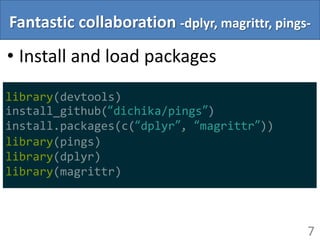
• Install and load packages
7
library(devtools)
install_github(“dichika/pings”)
install.packages(c(“dplyr”, “magrittr”))
library(pings)
library(dplyr)
library(magrittr)
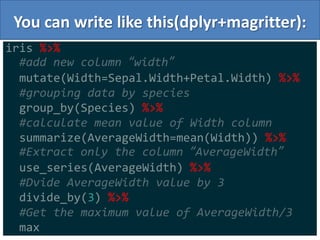
You can write like this(dplyr+magritter):
8
iris %>%
#add new column “width”
mutate(Width=Sepal.Width+Petal.Width) %>%
#grouping data by species
group_by(Species) %>%
#calculate mean value of Width column
summarize(AverageWidth=mean(Width)) %>%
#Extract only the column “AverageWidth”
use_series(AverageWidth) %>%
#Dvide AverageWidth value by 3
divide_by(3) %>%
#Get the maximum value of AverageWidth/3
max
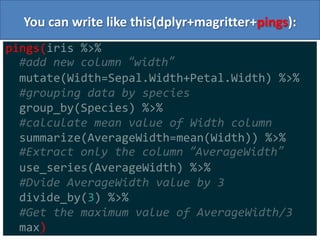
You can write like this(dplyr+magritter+pings):
9
pings(iris %>%
#add new column “width”
mutate(Width=Sepal.Width+Petal.Width) %>%
#grouping data by species
group_by(Species) %>%
#calculate mean value of Width column
summarize(AverageWidth=mean(Width)) %>%
#Extract only the column “AverageWidth”
use_series(AverageWidth) %>%
#Dvide AverageWidth value by 3
divide_by(3) %>%
#Get the maximum value of AverageWidth/3
max)
10
You will be hooked on this sound
11
Get back to
the main subject
Data for analysis….
• I prepared trading volume data
• It is already formed
• I used “data.table” package which
gives us the function to fast speed
data loading(fread function)
12
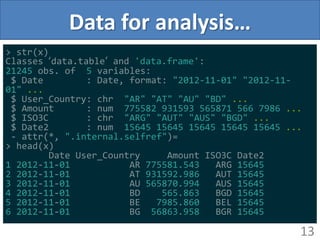
Data for analysis…
13
> str(x)
Classes ‘data.table’ and 'data.frame':
21245 obs. of 5 variables:
$ Date : Date, format: "2012-11-01" "2012-11-
01" ...
$ User_Country: chr "AR" "AT" "AU" "BD" ...
$ Amount : num 775582 931593 565871 566 7986 ...
$ ISO3C : chr "ARG" "AUT" "AUS" "BGD" ...
$ Date2 : num 15645 15645 15645 15645 15645 ...
- attr(*, ".internal.selfref")=
> head(x)
Date User_Country Amount ISO3C Date2
1 2012-11-01 AR 775581.543 ARG 15645
2 2012-11-01 AT 931592.986 AUT 15645
3 2012-11-01 AU 565870.994 AUS 15645
4 2012-11-01 BD 565.863 BGD 15645
5 2012-11-01 BE 7985.860 BEL 15645
6 2012-11-01 BG 56863.958 BGR 15645
Data processing by dplyr
14
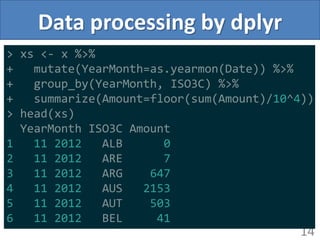
> xs <- x %>%
+ mutate(YearMonth=as.yearmon(Date)) %>%
+ group_by(YearMonth, ISO3C) %>%
+ summarize(Amount=floor(sum(Amount)/10^4))
> head(xs)
YearMonth ISO3C Amount
1 11 2012 ALB 0
2 11 2012 ARE 7
3 11 2012 ARG 647
4 11 2012 AUS 2153
5 11 2012 AUT 503
6 11 2012 BEL 41
Data processing by dplyr
15
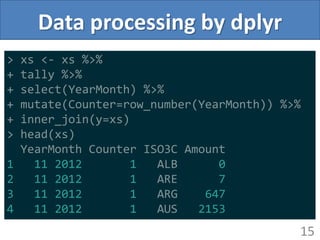
> xs <- xs %>%
+ tally %>%
+ select(YearMonth) %>%
+ mutate(Counter=row_number(YearMonth)) %>%
+ inner_join(y=xs)
> head(xs)
YearMonth Counter ISO3C Amount
1 11 2012 1 ALB 0
2 11 2012 1 ARE 7
3 11 2012 1 ARG 647
4 11 2012 1 AUS 2153
Data processing by dplyr
• Define some variables we use later
16
> min.date <- xs %>%
+ use_series(YearMonth) %>%
+ as.Date %>% min %>% as.character
> max.counter <- xs %>%
+ use_series(Counter) %>% max
> min.date
[1] "2012-11-01"
> max.counter
[1] 12
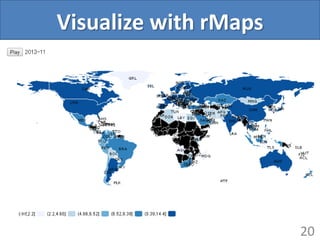
Visualize with rMaps
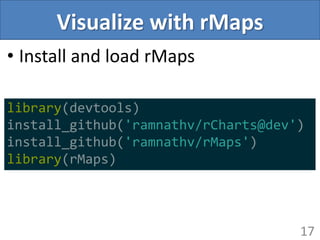
• Install and load rMaps
17
library(devtools)
install_github('ramnathv/rCharts@dev')
install_github('ramnathv/rMaps')
library(rMaps)
Visualize with rMaps
• Easy to visualize yearly data
• But, we have monthly data
• We need to customize template
HTML and javascript code
• Little bit long code…
18
Visualize with rMaps
19
d <- ichoropleth(log(Amount) ~ ISO3C, data=as.data.frame(xs), animate="Counter", map="world")
d$setTemplate(chartDiv = sprintf("
<div class='container'>
<button ng-click='animateMap()'>Play</button>
<span ng-bind='date_show'></span>
<div id='{{chartId}}' class='rChart datamaps'></div>
</div>
<script src='http://ajax.googleapis.com/ajax/libs/jquery/1/jquery.min.js'></script>
<script src='http://ajax.googleapis.com/ajax/libs/jqueryui/1/jquery-ui.min.js'></script>
<script>
function rChartsCtrl($scope, $timeout){
$scope.counter = 1;
$scope.date = new Date('%s');
$scope.date_show = $.datepicker.formatDate('yy-mm', $scope.date);
$scope.animateMap = function(){
if ($scope.counter > %s){
return;
}
map{{chartId}}.updateChoropleth(chartParams.newData[$scope.counter]);
$scope.counter += 1;
$scope.date.setMonth($scope.date.getMonth()+1);
$scope.date_show = $.datepicker.formatDate('yy-mm', $scope.date);
$timeout($scope.animateMap, 1000)
}
}
</script>", min.date, max.counter)
)
d
Visualize with rMaps
20
All Codes in this presentation:
21
github.com/teramonagi/GlobalTokyoR1
Enjoy!!!
22

Trading volume mapping R in recent environment

  • 1.
    Trading volume mapping inrecent environment Global Tokyo. 1 @teramonagi
  • 2.
    Motivation of thisTalk • is rapidly evolving in recent years. • Greate packages are appearing one after another!!! • Needless to say, googleVis too • Let me show how to use these for data analysis in this presentation 1. Data manipulation by dplyr 2. Visualization by rMaps 2
  • 3.
    Libraries to beneeded 3 library(data.table) library(rMaps) library(dplyr) library(magrittr) library(countrycode) library(xts) library(pings)
  • 4.
    4 I forgot touse googleVis Sorry!!!
  • 5.
    5 Before we geton the main subject
  • 6.
    Fantastic collaboration -dplyr,magrittr, pings- • You can chain commands with forward-pipe operator %>% (magrittr) • Data manipulation like “mutate”, “group_by”, “summarize” (dplyr) • Soundlize(?) data manipulation (pings) 6
  • 7.
    Fantastic collaboration -dplyr,magrittr, pings- • Install and load packages 7 library(devtools) install_github(“dichika/pings”) install.packages(c(“dplyr”, “magrittr”)) library(pings) library(dplyr) library(magrittr)
  • 8.
    You can writelike this(dplyr+magritter): 8 iris %>% #add new column “width” mutate(Width=Sepal.Width+Petal.Width) %>% #grouping data by species group_by(Species) %>% #calculate mean value of Width column summarize(AverageWidth=mean(Width)) %>% #Extract only the column “AverageWidth” use_series(AverageWidth) %>% #Dvide AverageWidth value by 3 divide_by(3) %>% #Get the maximum value of AverageWidth/3 max
  • 9.
    You can writelike this(dplyr+magritter+pings): 9 pings(iris %>% #add new column “width” mutate(Width=Sepal.Width+Petal.Width) %>% #grouping data by species group_by(Species) %>% #calculate mean value of Width column summarize(AverageWidth=mean(Width)) %>% #Extract only the column “AverageWidth” use_series(AverageWidth) %>% #Dvide AverageWidth value by 3 divide_by(3) %>% #Get the maximum value of AverageWidth/3 max)
  • 10.
    10 You will behooked on this sound
  • 11.
    11 Get back to themain subject
  • 12.
    Data for analysis…. •I prepared trading volume data • It is already formed • I used “data.table” package which gives us the function to fast speed data loading(fread function) 12
  • 13.
    Data for analysis… 13 >str(x) Classes ‘data.table’ and 'data.frame': 21245 obs. of 5 variables: $ Date : Date, format: "2012-11-01" "2012-11- 01" ... $ User_Country: chr "AR" "AT" "AU" "BD" ... $ Amount : num 775582 931593 565871 566 7986 ... $ ISO3C : chr "ARG" "AUT" "AUS" "BGD" ... $ Date2 : num 15645 15645 15645 15645 15645 ... - attr(*, ".internal.selfref")= > head(x) Date User_Country Amount ISO3C Date2 1 2012-11-01 AR 775581.543 ARG 15645 2 2012-11-01 AT 931592.986 AUT 15645 3 2012-11-01 AU 565870.994 AUS 15645 4 2012-11-01 BD 565.863 BGD 15645 5 2012-11-01 BE 7985.860 BEL 15645 6 2012-11-01 BG 56863.958 BGR 15645
  • 14.
    Data processing bydplyr 14 > xs <- x %>% + mutate(YearMonth=as.yearmon(Date)) %>% + group_by(YearMonth, ISO3C) %>% + summarize(Amount=floor(sum(Amount)/10^4)) > head(xs) YearMonth ISO3C Amount 1 11 2012 ALB 0 2 11 2012 ARE 7 3 11 2012 ARG 647 4 11 2012 AUS 2153 5 11 2012 AUT 503 6 11 2012 BEL 41
  • 15.
    Data processing bydplyr 15 > xs <- xs %>% + tally %>% + select(YearMonth) %>% + mutate(Counter=row_number(YearMonth)) %>% + inner_join(y=xs) > head(xs) YearMonth Counter ISO3C Amount 1 11 2012 1 ALB 0 2 11 2012 1 ARE 7 3 11 2012 1 ARG 647 4 11 2012 1 AUS 2153
  • 16.
    Data processing bydplyr • Define some variables we use later 16 > min.date <- xs %>% + use_series(YearMonth) %>% + as.Date %>% min %>% as.character > max.counter <- xs %>% + use_series(Counter) %>% max > min.date [1] "2012-11-01" > max.counter [1] 12
  • 17.
    Visualize with rMaps •Install and load rMaps 17 library(devtools) install_github('ramnathv/rCharts@dev') install_github('ramnathv/rMaps') library(rMaps)
  • 18.
    Visualize with rMaps •Easy to visualize yearly data • But, we have monthly data • We need to customize template HTML and javascript code • Little bit long code… 18
  • 19.
    Visualize with rMaps 19 d<- ichoropleth(log(Amount) ~ ISO3C, data=as.data.frame(xs), animate="Counter", map="world") d$setTemplate(chartDiv = sprintf(" <div class='container'> <button ng-click='animateMap()'>Play</button> <span ng-bind='date_show'></span> <div id='{{chartId}}' class='rChart datamaps'></div> </div> <script src='http://ajax.googleapis.com/ajax/libs/jquery/1/jquery.min.js'></script> <script src='http://ajax.googleapis.com/ajax/libs/jqueryui/1/jquery-ui.min.js'></script> <script> function rChartsCtrl($scope, $timeout){ $scope.counter = 1; $scope.date = new Date('%s'); $scope.date_show = $.datepicker.formatDate('yy-mm', $scope.date); $scope.animateMap = function(){ if ($scope.counter > %s){ return; } map{{chartId}}.updateChoropleth(chartParams.newData[$scope.counter]); $scope.counter += 1; $scope.date.setMonth($scope.date.getMonth()+1); $scope.date_show = $.datepicker.formatDate('yy-mm', $scope.date); $timeout($scope.animateMap, 1000) } } </script>", min.date, max.counter) ) d
  • 20.
  • 21.
    All Codes inthis presentation: 21 github.com/teramonagi/GlobalTokyoR1
  • 22.