You might be paying too much
for BigQuery
Ryuji Tamagawa @ Osaka, Japan
Agenda
about me
about BigQuery
Basics
Advanced
Tips & Tricks
Agenda
about me
about BigQuery
Basics
Advanced
Tips & Tricks
What you pay for when
using BigQuery
How BigQuery runs your
queries
Agenda
about me
about BigQuery
Basics
Advanced
Tips & Tricks
Selecting columns
Table decorators
Dividing tables
How query cache works
Agenda
about me
about BigQuery
Basics
Advanced
Tips & Tricks
CPUs & Network are
FOR FREE
Sub query optimesed
Repeated Fields
About me
Software engineer working for
ISV, from architecture design to
troubleshooting in the field
Translator working with O’Reilly
Japan
‘Google BigQuery Analytics’ is
the 25th book
Active in GCPUG, especially in
#bq_sushi
A bed for 6 cats
About BigQuery 

(for those who don’t know yet)
Full-managed structured data
store queryable with SQL
Very easy to use
Fast, in that almost no
slowdown with Big Data
Cost-effective
Built on Google’s
infrastructure components
About BigQuery 

(for those who don’t know yet)
Basic operations are available
within Web UI
You can ‘dryrun’ from Web
UI to check the amount of
data to be scanned
You can use the command line
interface (bq) to integrate
BigQuery into your workflow
API are provided for Python,
Java
BigQuery is for analytics
Essentially, data model is same as relational databases with
some extension
BigQuery is for analytics, not for transaction processing
You can insert rows(batch or streaming), but can not update
or delete them.
There’s no index - tables are always read by ‘fullscan’
You can insert rows from GCS or via HTTP in CSV or JSON
format.
Basics
You might be paying too much for BigQuery
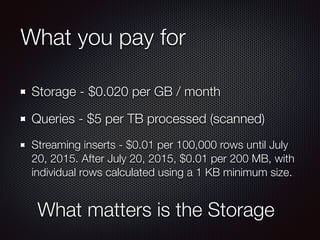
What you pay for
Storage - $0.020 per GB / month
Queries - $5 per TB processed (scanned)
Streaming inserts - $0.01 per 100,000 rows until July
20, 2015. After July 20, 2015, $0.01 per 200 MB, with
individual rows calculated using a 1 KB minimum size.
What matters is the Storage
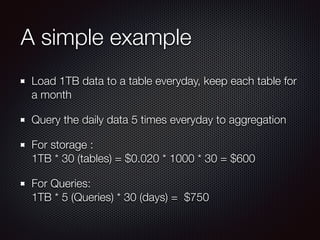
A simple example
Load 1TB data to a table everyday, keep each table for
a month
Query the daily data 5 times everyday to aggregation
For storage : 

1TB * 30 (tables) = $0.020 * 1000 * 30 = $600
For Queries:

1TB * 5 (Queries) * 30 (days) = $750
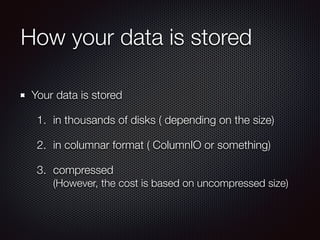
How your data is stored
Your data is stored
1. in thousands of disks ( depending on the size)
2. in columnar format ( ColumnIO or something)
3. compressed

(However, the cost is based on uncompressed size)
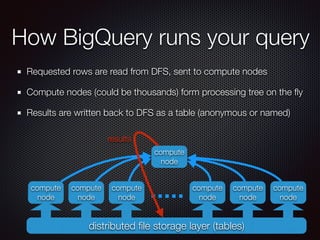
How BigQuery runs your query
Requested rows are read from DFS, sent to compute nodes
Compute nodes (could be thousands) form processing tree on the fly
Results are written back to DFS as a table (anonymous or named)
distributed file storage layer (tables)
compute
node
compute
node
compute
node
compute
node
compute
node
compute
node
compute
node
results
How BigQuery runs your query
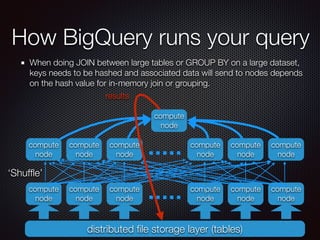
When doing JOIN between large tables or GROUP BY on a large dataset,
keys needs to be hashed and associated data will send to nodes depends
on the hash value for in-memory join or grouping.
distributed file storage layer (tables)
compute
node
compute
node
compute
node
compute
node
compute
node
compute
node
compute
node
results
compute
node
compute
node
compute
node
compute
node
compute
node
compute
node
‘Shuffle’
Advanced
You might be paying too much for BigQuery
Narrowing your scan is the key
BigQuery does not have
indexes - always do fullscan
BigQuery uses columnar
storage. Selecting least
columns you need makes the
cost lower
C1 C2 C3 C4
R1
R2
R3
R4
R5
R6
R7
R8
R8
Narrowing your scan is the key
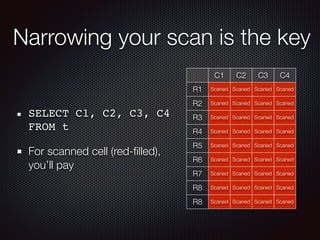
SELECT C1, C2, C3, C4
FROM t
For scanned cell (red-filled),
you’ll pay
C1 C2 C3 C4
R1 Scaned Scaned Scaned Scaned
R2 Scaned Scaned Scaned Scaned
R3 Scaned Scaned Scaned Scaned
R4 Scaned Scaned Scaned Scaned
R5 Scaned Scaned Scaned Scaned
R6 Scaned Scaned Scaned Scaned
R7 Scaned Scaned Scaned Scaned
R8 Scaned Scaned Scaned Scaned
Narrowing your scan is the key
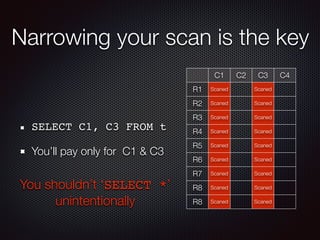
SELECT C1, C3 FROM t
You’ll pay only for C1 & C3
C1 C2 C3 C4
R1 Scaned Scaned
R2 Scaned Scaned
R3 Scaned Scaned
R4 Scaned Scaned
R5 Scaned Scaned
R6 Scaned Scaned
R7 Scaned Scaned
R8 Scaned Scaned
R8 Scaned Scaned
You shouldn’t ‘SELECT *’
unintentionally
Narrowing your scan is the key
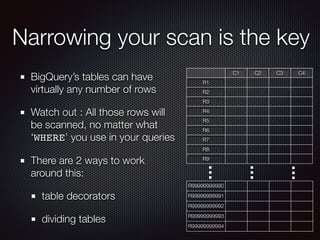
BigQuery’s tables can have
virtually any number of rows
Watch out : All those rows will
be scanned, no matter what
‘WHERE’ you use in your queries
There are 2 ways to work
around this:
table decorators
dividing tables
C1 C2 C3 C4
R1
R2
R3
R4
R5
R6
R7
R8
R9
R99999999990
R99999999991
R99999999992
R99999999993
R99999999994
Narrowing your scan is the key
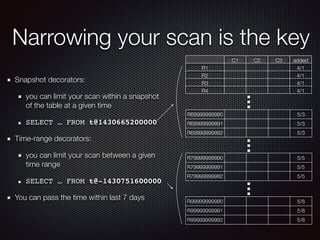
Snapshot decorators:
you can limit your scan within a snapshot
of the table at a given time
SELECT … FROM t@1430665200000
Time-range decorators:
you can limit your scan between a given
time range
SELECT … FROM t@-1430751600000
You can pass the time within last 7 days
C1 C2 C3 added
R1 4/1
R2 4/1
R3 4/1
R4 4/1
R99999999990 5/8
R99999999991 5/8
R99999999992 5/8
R69999999990 5/3
R69999999991 5/3
R69999999992 5/3
R79999999990 5/5
R79999999991 5/5
R79999999992 5/5
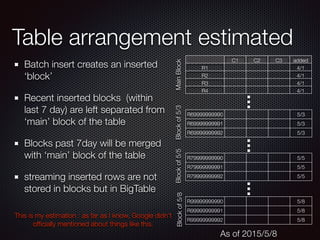
Table arrangement estimated
Batch insert creates an inserted
‘block’
Recent inserted blocks (within
last 7 day) are left separated from
‘main’ block of the table
Blocks past 7day will be merged
with ‘main’ block of the table
streaming inserted rows are not
stored in blocks but in BigTable
C1 C2 C3 added
R1 4/1
R2 4/1
R3 4/1
R4 4/1
R99999999990 5/8
R99999999991 5/8
R99999999992 5/8
R69999999990 5/3
R69999999991 5/3
R69999999992 5/3
R79999999990 5/5
R79999999991 5/5
R79999999992 5/5
This is my estimation : as far as I know, Google didn’t
officially mentioned about things like this.
MainBlockBlockof5/3Blockof5/5Blockof5/8
As of 2015/5/8
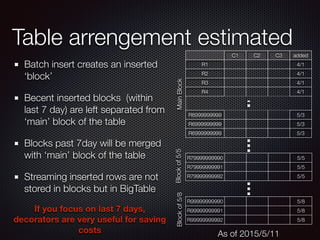
Table arrengement estimated
Batch insert creates an inserted
‘block’
Becent inserted blocks (within
last 7 day) are left separated from
‘main’ block of the table
Blocks past 7day will be merged
with ‘main’ block of the table
Streaming inserted rows are not
stored in blocks but in BigTable
C1 C2 C3 added
R1 4/1
R2 4/1
R3 4/1
R4 4/1
R6999999999
0
5/3
R6999999999
1
5/3
R6999999999
2
5/3
R99999999990 5/8
R99999999991 5/8
R99999999992 5/8
R79999999990 5/5
R79999999991 5/5
R79999999992 5/5
MainBlockBlockof5/5Blockof5/8
As of 2015/5/11
If you focus on last 7 days,
decorators are very useful for saving
costs
Narrowing your scan is the key
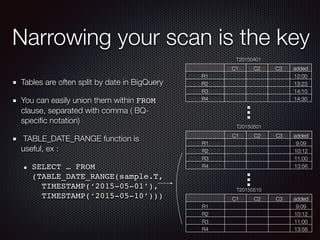
Tables are often split by date in BigQuery
You can easily union them within FROM
clause, separated with comma ( BQ-
specific notation)
TABLE_DATE_RANGE function is
useful, ex :
SELECT … FROM
(TABLE_DATE_RANGE(sample.T,

TIMESTAMP(‘2015-05-01’),

TIMESTAMP(‘2015-05-10’)))
T20150401
C1 C2 C3 added
R1 12:00
R2 13:23
R3 14:10
R4 14:30
T20150501
C1 C2 C3 added
R1 9:09
R2 10:12
R3 11:00
R4 13:56
T20150510
C1 C2 C3 added
R1 9:09
R2 10:12
R3 11:00
R4 13:56
Narrowing your scan is the key
With traditional RDB, usually you
don’t split tables like this : Expensive
‘Enterprise’ editions support features
like this, but it takes your time for
design, operation, and maintenance
In BigQuery, splitting tables like this
sometimes even makes your query
faster
The difference comes from the
architectural difference: BigQuery is
designed from ground to reads and
processes data from many disks
with many compute nodes
T20150401
C1 C2 C3 added
R1 12:00
R2 13:23
R3 14:10
R4 14:30
T20150503
C1 C2 C3 added
R1 9:09
R2 10:12
R3 11:00
R4 13:56
T20150503-1
C1 C2 C3 added
R1 9:09
R2 10:12
R3 11:00
R4 13:56
Narrowing your scan is the key
DFS Layer
compute
node
compute
node
compute
node
compute
node
compute
node
compute
node
compute
node
results
T2015
0501
T2015
0502
T2015
0503
T2015
0508
T2015
0509
T2015
0510
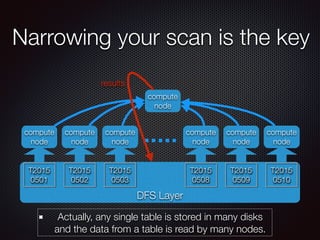
Actually, any single table is stored in many disks
and the data from a table is read by many nodes.
Using query cache
Result of a query will sent to anonymous dataset,
with a name generated from name of the tables and
their last update timestamp and the query.
When a query is executed, BigQuery checks if the
cached result exists at first.
If the query returns the cached result, it costs
nothing.
Query cache is free
Applications like dashboards, which runs almost same
queries again and again, can save costs by utilizing
query cache
You can write code that save query results somewhere
for later use and avoid running same query, but
sometimes you don’t have to worry about it - query
cache does same for you
Query cache is enabled when:
The query is deterministic (e.g. without NOW() )
The table does NOT have a streaming buffer
The result of the query was not saved to a named table
Actually a large result (>128MB) can not be cached
because in such case you have to specify
‘allowLargeResult’ and thus the result must be saved
to a named table.
Tips & Tricks
You might be paying too much for BigQuery
Trade offs - time & cost
Generally, normalizing your data model makes:
the size of the data small, which means in BigQuery,
you pay less
may use more CPU time and network traffic,
especially when you run complex queries between
large tables
Trade offs - time & cost
You think ‘cost’ in terms of CPU, network, storage in on-
premise way
When using BigQuery:
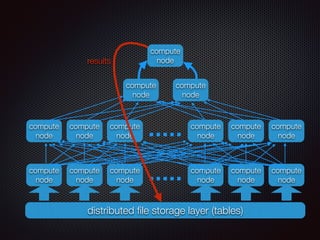
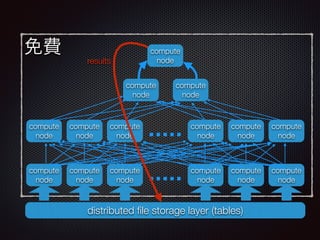
You don’t pay money for CPU nor network
It takes time to run queries that consume much CPU
and/or network - queries using EACH keyword
If you don’t have to run queries interactively, they could
be run in batch mode with less cost, with an ‘appropriate’
schema.
distributed file storage layer (tables)
compute
node
compute
node
compute
node
compute
node
compute
node
compute
node
compute
noderesults
compute
node
compute
node
compute
node
compute
node
compute
node
compute
node
compute
node
compute
node
免費
distributed file storage layer (tables)
compute
node
compute
node
compute
node
compute
node
compute
node
compute
node
compute
noderesults
compute
node
compute
node
compute
node
compute
node
compute
node
compute
node
compute
node
compute
node
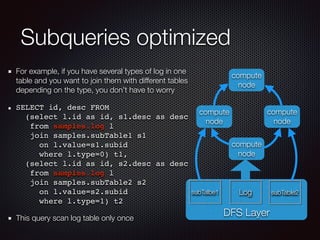
Subqueries optimized
For example, if you have several types of log in one
table and you want to join them with different tables
depending on the type, you don’t have to worry
SELECT id, desc FROM 

(select l.id as id, s1.desc as desc

from samples.log l 

join samples.subTable1 s1 

on l.value=s1.subid 

where l.type=0) t1,

(select l.id as id, s2.desc as desc 

from samples.log l 

join samples.subTable2 s2 

on l.value=s2.subid 

where l.type=1) t2
This query scan log table only once
DFS Layer
compute
node
compute
node
compute
node
subTalbe1 Log subTable2
compute
node
Repeated fields
You can store array-like data in a row
This is not standardized feature of SQL
It’s like ‘materialized view’ or pre-joined table - could be compact to
store & fast to query
You should have a good understanding of the logic, or you will get
unexpected result
Do not use too complex schema (e.g. deeply nested repeated field)
The functions for repeated fields are useful, but watch out for
combinational explosion (e.g. FLATTEN)
Thank you for listening.
Questions?

You might be paying too much for BigQuery

  • 1.
    You might bepaying too much for BigQuery Ryuji Tamagawa @ Osaka, Japan
  • 2.
  • 3.
    Agenda about me about BigQuery Basics Advanced Tips& Tricks What you pay for when using BigQuery How BigQuery runs your queries
  • 4.
    Agenda about me about BigQuery Basics Advanced Tips& Tricks Selecting columns Table decorators Dividing tables How query cache works
  • 5.
    Agenda about me about BigQuery Basics Advanced Tips& Tricks CPUs & Network are FOR FREE Sub query optimesed Repeated Fields
  • 6.
    About me Software engineerworking for ISV, from architecture design to troubleshooting in the field Translator working with O’Reilly Japan ‘Google BigQuery Analytics’ is the 25th book Active in GCPUG, especially in #bq_sushi A bed for 6 cats
  • 8.
    About BigQuery 
 (forthose who don’t know yet) Full-managed structured data store queryable with SQL Very easy to use Fast, in that almost no slowdown with Big Data Cost-effective Built on Google’s infrastructure components
  • 9.
    About BigQuery 
 (forthose who don’t know yet) Basic operations are available within Web UI You can ‘dryrun’ from Web UI to check the amount of data to be scanned You can use the command line interface (bq) to integrate BigQuery into your workflow API are provided for Python, Java
  • 10.
    BigQuery is foranalytics Essentially, data model is same as relational databases with some extension BigQuery is for analytics, not for transaction processing You can insert rows(batch or streaming), but can not update or delete them. There’s no index - tables are always read by ‘fullscan’ You can insert rows from GCS or via HTTP in CSV or JSON format.
  • 11.
    Basics You might bepaying too much for BigQuery
  • 12.
    What you payfor Storage - $0.020 per GB / month Queries - $5 per TB processed (scanned) Streaming inserts - $0.01 per 100,000 rows until July 20, 2015. After July 20, 2015, $0.01 per 200 MB, with individual rows calculated using a 1 KB minimum size. What matters is the Storage
  • 13.
    A simple example Load1TB data to a table everyday, keep each table for a month Query the daily data 5 times everyday to aggregation For storage : 
 1TB * 30 (tables) = $0.020 * 1000 * 30 = $600 For Queries:
 1TB * 5 (Queries) * 30 (days) = $750
  • 14.
    How your datais stored Your data is stored 1. in thousands of disks ( depending on the size) 2. in columnar format ( ColumnIO or something) 3. compressed
 (However, the cost is based on uncompressed size)
  • 15.
    How BigQuery runsyour query Requested rows are read from DFS, sent to compute nodes Compute nodes (could be thousands) form processing tree on the fly Results are written back to DFS as a table (anonymous or named) distributed file storage layer (tables) compute node compute node compute node compute node compute node compute node compute node results
  • 16.
    How BigQuery runsyour query When doing JOIN between large tables or GROUP BY on a large dataset, keys needs to be hashed and associated data will send to nodes depends on the hash value for in-memory join or grouping. distributed file storage layer (tables) compute node compute node compute node compute node compute node compute node compute node results compute node compute node compute node compute node compute node compute node ‘Shuffle’
  • 17.
    Advanced You might bepaying too much for BigQuery
  • 18.
    Narrowing your scanis the key BigQuery does not have indexes - always do fullscan BigQuery uses columnar storage. Selecting least columns you need makes the cost lower C1 C2 C3 C4 R1 R2 R3 R4 R5 R6 R7 R8 R8
  • 19.
    Narrowing your scanis the key SELECT C1, C2, C3, C4 FROM t For scanned cell (red-filled), you’ll pay C1 C2 C3 C4 R1 Scaned Scaned Scaned Scaned R2 Scaned Scaned Scaned Scaned R3 Scaned Scaned Scaned Scaned R4 Scaned Scaned Scaned Scaned R5 Scaned Scaned Scaned Scaned R6 Scaned Scaned Scaned Scaned R7 Scaned Scaned Scaned Scaned R8 Scaned Scaned Scaned Scaned R8 Scaned Scaned Scaned Scaned
  • 20.
    Narrowing your scanis the key SELECT C1, C3 FROM t You’ll pay only for C1 & C3 C1 C2 C3 C4 R1 Scaned Scaned R2 Scaned Scaned R3 Scaned Scaned R4 Scaned Scaned R5 Scaned Scaned R6 Scaned Scaned R7 Scaned Scaned R8 Scaned Scaned R8 Scaned Scaned You shouldn’t ‘SELECT *’ unintentionally
  • 21.
    Narrowing your scanis the key BigQuery’s tables can have virtually any number of rows Watch out : All those rows will be scanned, no matter what ‘WHERE’ you use in your queries There are 2 ways to work around this: table decorators dividing tables C1 C2 C3 C4 R1 R2 R3 R4 R5 R6 R7 R8 R9 R99999999990 R99999999991 R99999999992 R99999999993 R99999999994
  • 22.
    Narrowing your scanis the key Snapshot decorators: you can limit your scan within a snapshot of the table at a given time SELECT … FROM t@1430665200000 Time-range decorators: you can limit your scan between a given time range SELECT … FROM t@-1430751600000 You can pass the time within last 7 days C1 C2 C3 added R1 4/1 R2 4/1 R3 4/1 R4 4/1 R99999999990 5/8 R99999999991 5/8 R99999999992 5/8 R69999999990 5/3 R69999999991 5/3 R69999999992 5/3 R79999999990 5/5 R79999999991 5/5 R79999999992 5/5
  • 23.
    Table arrangement estimated Batchinsert creates an inserted ‘block’ Recent inserted blocks (within last 7 day) are left separated from ‘main’ block of the table Blocks past 7day will be merged with ‘main’ block of the table streaming inserted rows are not stored in blocks but in BigTable C1 C2 C3 added R1 4/1 R2 4/1 R3 4/1 R4 4/1 R99999999990 5/8 R99999999991 5/8 R99999999992 5/8 R69999999990 5/3 R69999999991 5/3 R69999999992 5/3 R79999999990 5/5 R79999999991 5/5 R79999999992 5/5 This is my estimation : as far as I know, Google didn’t officially mentioned about things like this. MainBlockBlockof5/3Blockof5/5Blockof5/8 As of 2015/5/8
  • 24.
    Table arrengement estimated Batchinsert creates an inserted ‘block’ Becent inserted blocks (within last 7 day) are left separated from ‘main’ block of the table Blocks past 7day will be merged with ‘main’ block of the table Streaming inserted rows are not stored in blocks but in BigTable C1 C2 C3 added R1 4/1 R2 4/1 R3 4/1 R4 4/1 R6999999999 0 5/3 R6999999999 1 5/3 R6999999999 2 5/3 R99999999990 5/8 R99999999991 5/8 R99999999992 5/8 R79999999990 5/5 R79999999991 5/5 R79999999992 5/5 MainBlockBlockof5/5Blockof5/8 As of 2015/5/11 If you focus on last 7 days, decorators are very useful for saving costs
  • 25.
    Narrowing your scanis the key Tables are often split by date in BigQuery You can easily union them within FROM clause, separated with comma ( BQ- specific notation) TABLE_DATE_RANGE function is useful, ex : SELECT … FROM (TABLE_DATE_RANGE(sample.T,
 TIMESTAMP(‘2015-05-01’),
 TIMESTAMP(‘2015-05-10’))) T20150401 C1 C2 C3 added R1 12:00 R2 13:23 R3 14:10 R4 14:30 T20150501 C1 C2 C3 added R1 9:09 R2 10:12 R3 11:00 R4 13:56 T20150510 C1 C2 C3 added R1 9:09 R2 10:12 R3 11:00 R4 13:56
  • 26.
    Narrowing your scanis the key With traditional RDB, usually you don’t split tables like this : Expensive ‘Enterprise’ editions support features like this, but it takes your time for design, operation, and maintenance In BigQuery, splitting tables like this sometimes even makes your query faster The difference comes from the architectural difference: BigQuery is designed from ground to reads and processes data from many disks with many compute nodes T20150401 C1 C2 C3 added R1 12:00 R2 13:23 R3 14:10 R4 14:30 T20150503 C1 C2 C3 added R1 9:09 R2 10:12 R3 11:00 R4 13:56 T20150503-1 C1 C2 C3 added R1 9:09 R2 10:12 R3 11:00 R4 13:56
  • 27.
    Narrowing your scanis the key DFS Layer compute node compute node compute node compute node compute node compute node compute node results T2015 0501 T2015 0502 T2015 0503 T2015 0508 T2015 0509 T2015 0510 Actually, any single table is stored in many disks and the data from a table is read by many nodes.
  • 28.
    Using query cache Resultof a query will sent to anonymous dataset, with a name generated from name of the tables and their last update timestamp and the query. When a query is executed, BigQuery checks if the cached result exists at first. If the query returns the cached result, it costs nothing.
  • 29.
    Query cache isfree Applications like dashboards, which runs almost same queries again and again, can save costs by utilizing query cache You can write code that save query results somewhere for later use and avoid running same query, but sometimes you don’t have to worry about it - query cache does same for you
  • 30.
    Query cache isenabled when: The query is deterministic (e.g. without NOW() ) The table does NOT have a streaming buffer The result of the query was not saved to a named table Actually a large result (>128MB) can not be cached because in such case you have to specify ‘allowLargeResult’ and thus the result must be saved to a named table.
  • 31.
    Tips & Tricks Youmight be paying too much for BigQuery
  • 32.
    Trade offs -time & cost Generally, normalizing your data model makes: the size of the data small, which means in BigQuery, you pay less may use more CPU time and network traffic, especially when you run complex queries between large tables
  • 33.
    Trade offs -time & cost You think ‘cost’ in terms of CPU, network, storage in on- premise way When using BigQuery: You don’t pay money for CPU nor network It takes time to run queries that consume much CPU and/or network - queries using EACH keyword If you don’t have to run queries interactively, they could be run in batch mode with less cost, with an ‘appropriate’ schema.
  • 34.
    distributed file storagelayer (tables) compute node compute node compute node compute node compute node compute node compute noderesults compute node compute node compute node compute node compute node compute node compute node compute node
  • 35.
    免費 distributed file storagelayer (tables) compute node compute node compute node compute node compute node compute node compute noderesults compute node compute node compute node compute node compute node compute node compute node compute node
  • 36.
    Subqueries optimized For example,if you have several types of log in one table and you want to join them with different tables depending on the type, you don’t have to worry SELECT id, desc FROM 
 (select l.id as id, s1.desc as desc
 from samples.log l 
 join samples.subTable1 s1 
 on l.value=s1.subid 
 where l.type=0) t1,
 (select l.id as id, s2.desc as desc 
 from samples.log l 
 join samples.subTable2 s2 
 on l.value=s2.subid 
 where l.type=1) t2 This query scan log table only once DFS Layer compute node compute node compute node subTalbe1 Log subTable2 compute node
  • 37.
    Repeated fields You canstore array-like data in a row This is not standardized feature of SQL It’s like ‘materialized view’ or pre-joined table - could be compact to store & fast to query You should have a good understanding of the logic, or you will get unexpected result Do not use too complex schema (e.g. deeply nested repeated field) The functions for repeated fields are useful, but watch out for combinational explosion (e.g. FLATTEN)
  • 38.
    Thank you forlistening. Questions?