Cloud Storage Migration, Backup, and
Archive

Feb 2014
Google Cloud Storage Backup and Archive

Who? Why?
Ido Green
Solutions Architect
plus.google.com/greenido

greenido.wordpress.com
Google Cloud Storage Migration, Backup, and Archive

Topics We Cover in This Lesson
● Copying/Migrating Data to GCS
● Object Composition
● Durable Reduced Availability Storage
Google Cloud Storage Backup and Archive

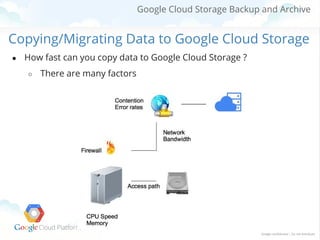
Copying/Migrating Data to Google Cloud Storage
●

How fast can you copy data to Google Cloud Storage ?
○

There are many factors
Exercise
Google Cloud Storage Backup and Archive

Using gsutil 101
●

Installation

○

developers.google.com/storage/docs/gsutil_install

○ gsutil update
●

Set Up Credentials to Access Protected Data

○ gsutil config
● Test
○ Create a new bucket: cloud.google.com/console/project/YourID/storage
○ Upload a file: gsutil cp rand_10m.txt gs://paris1
○

List the bucket: gsutil ls gs://paris1
Google Cloud Storage Backup and Archive

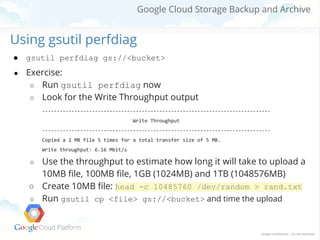
Using gsutil perfdiag
●

gsutil perfdiag gs://<bucket>

●

Exercise:
○ Run gsutil perfdiag now
○ Look for the Write Throughput output
-----------------------------------------------------------------------------Write Throughput
-----------------------------------------------------------------------------Copied a 1 MB file 5 times for a total transfer size of 5 MB.
Write throughput: 6.16 Mbit/s

Use the throughput to estimate how long it will take to upload a
10MB file, 100MB file, 1GB (1024MB) and 1TB (1048576MB)
○ Create 10MB file: head -c 10485760 /dev/random > rand.txt
○ Run gsutil cp <file> gs://<bucket> and time the upload
○
Google Cloud Storage Backup and Archive

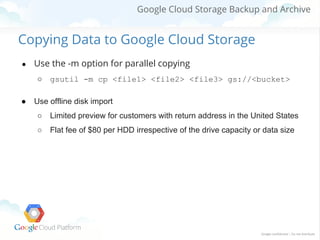
Copying Data to Google Cloud Storage
●

Use the -m option for parallel copying
○

●

gsutil -m cp <file1> <file2> <file3> gs://<bucket>

Use offline disk import
○

Limited preview for customers with return address in the United States

○

Flat fee of $80 per HDD irrespective of the drive capacity or data size
Google Cloud Storage Backup and Archive

Migrating Data to Google Cloud Storage
What if you have petabytes of data to move to
Google Cloud Storage? While maintaining your
production system running?
○ Need to minimize the migration window
○ No impact to production system
○ Need to minimize storage cost
Google Cloud Storage Backup and Archive

Migrating Data to Google Cloud Storage
●

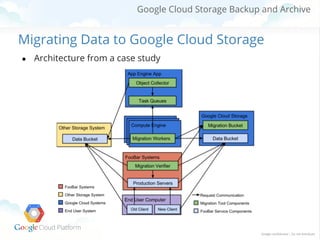
Architecture from a case study
Google Cloud Storage Backup and Archive

Object Composition
Google Cloud Storage Backup and Archive

Object Composition
●

Allow parallel uploads, followed by
○

●

gsutil compose <file1> .. <file32> <final_object>

Can append to an existing object
○

gsutil compose <final_object> <file_to_append>
<final_object>

●

Can do limited editing by replacing one of the components
○

gsutil compose <file1> <edited file n> ...
<final_object>

●

Note: ETag value is not the MD5 hash of the object for composite
object.
Google Cloud Storage Backup and Archive

Object Composition
To upload in parallel, split your file into smaller pieces, upload them using
“gsutil -m cp”, compose the results, and delete the pieces:
$ split -b 1000000 rand-splity.txt rand-s-part$ gsutil -m cp rand-s-part-* gs://bucket/dir/
$ rm rand-s-part-*
$ gsutil compose gs://bucket/rand-s-part-* gs://bucket/big-file
$ gsutil -m rm gs://bucket/dir/rand-s-part-*
Exercise
Google Cloud Storage Backup and Archive

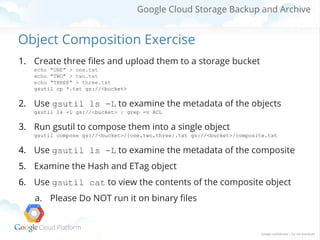
Object Composition Exercise
1. Create three files and upload them to a storage bucket
echo "ONE" > one.txt
echo "TWO" > two.txt
echo "THREE" > three.txt
gsutil cp *.txt gs://<bucket>

2. Use gsutil ls -L to examine the metadata of the objects
gsutil ls -L gs://<bucket> | grep -v ACL

3. Run gsutil to compose them into a single object
gsutil compose gs://<bucket>/{one,two,three}.txt gs://<bucket>/composite.txt

4. Use gsutil ls -L to examine the metadata of the composite
5. Examine the Hash and ETag object
6. Use gsutil cat to view the contents of the composite object
a. Please Do NOT run it on binary files
Google Cloud Storage Backup and Archive

Durable Reduced Availability (DRA) Buckets
Google Cloud Storage Backup and Archive

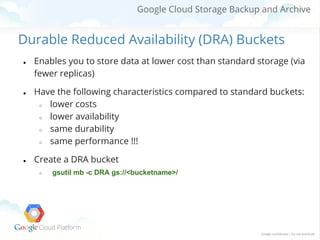
Durable Reduced Availability (DRA) Buckets
●

●

●

Enables you to store data at lower cost than standard storage (via
fewer replicas)
Have the following characteristics compared to standard buckets:
○
lower costs
○
lower availability
○
same durability
○
same performance !!!
Create a DRA bucket
○

gsutil mb -c DRA gs://<bucketname>/
Google Cloud Storage Backup and Archive

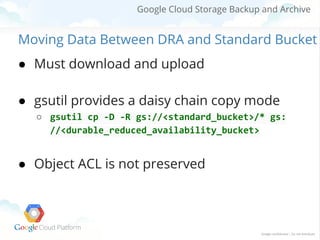
Moving Data Between DRA and Standard Bucket
● Must download and upload
● gsutil provides a daisy chain copy mode
○ gsutil cp -D -R gs://<standard_bucket>/* gs:
//<durable_reduced_availability_bucket>

● Object ACL is not preserved
Google Cloud Storage Backup and Archive

Thank you!
Questions?

Google Cloud Storage backup and archive

  • 1.
    Cloud Storage Migration,Backup, and Archive Feb 2014
  • 2.
    Google Cloud StorageBackup and Archive Who? Why? Ido Green Solutions Architect plus.google.com/greenido greenido.wordpress.com
  • 3.
    Google Cloud StorageMigration, Backup, and Archive Topics We Cover in This Lesson ● Copying/Migrating Data to GCS ● Object Composition ● Durable Reduced Availability Storage
  • 4.
    Google Cloud StorageBackup and Archive Copying/Migrating Data to Google Cloud Storage ● How fast can you copy data to Google Cloud Storage ? ○ There are many factors
  • 5.
  • 6.
    Google Cloud StorageBackup and Archive Using gsutil 101 ● Installation ○ developers.google.com/storage/docs/gsutil_install ○ gsutil update ● Set Up Credentials to Access Protected Data ○ gsutil config ● Test ○ Create a new bucket: cloud.google.com/console/project/YourID/storage ○ Upload a file: gsutil cp rand_10m.txt gs://paris1 ○ List the bucket: gsutil ls gs://paris1
  • 7.
    Google Cloud StorageBackup and Archive Using gsutil perfdiag ● gsutil perfdiag gs://<bucket> ● Exercise: ○ Run gsutil perfdiag now ○ Look for the Write Throughput output -----------------------------------------------------------------------------Write Throughput -----------------------------------------------------------------------------Copied a 1 MB file 5 times for a total transfer size of 5 MB. Write throughput: 6.16 Mbit/s Use the throughput to estimate how long it will take to upload a 10MB file, 100MB file, 1GB (1024MB) and 1TB (1048576MB) ○ Create 10MB file: head -c 10485760 /dev/random > rand.txt ○ Run gsutil cp <file> gs://<bucket> and time the upload ○
  • 8.
    Google Cloud StorageBackup and Archive Copying Data to Google Cloud Storage ● Use the -m option for parallel copying ○ ● gsutil -m cp <file1> <file2> <file3> gs://<bucket> Use offline disk import ○ Limited preview for customers with return address in the United States ○ Flat fee of $80 per HDD irrespective of the drive capacity or data size
  • 9.
    Google Cloud StorageBackup and Archive Migrating Data to Google Cloud Storage What if you have petabytes of data to move to Google Cloud Storage? While maintaining your production system running? ○ Need to minimize the migration window ○ No impact to production system ○ Need to minimize storage cost
  • 10.
    Google Cloud StorageBackup and Archive Migrating Data to Google Cloud Storage ● Architecture from a case study
  • 11.
    Google Cloud StorageBackup and Archive Object Composition
  • 12.
    Google Cloud StorageBackup and Archive Object Composition ● Allow parallel uploads, followed by ○ ● gsutil compose <file1> .. <file32> <final_object> Can append to an existing object ○ gsutil compose <final_object> <file_to_append> <final_object> ● Can do limited editing by replacing one of the components ○ gsutil compose <file1> <edited file n> ... <final_object> ● Note: ETag value is not the MD5 hash of the object for composite object.
  • 13.
    Google Cloud StorageBackup and Archive Object Composition To upload in parallel, split your file into smaller pieces, upload them using “gsutil -m cp”, compose the results, and delete the pieces: $ split -b 1000000 rand-splity.txt rand-s-part$ gsutil -m cp rand-s-part-* gs://bucket/dir/ $ rm rand-s-part-* $ gsutil compose gs://bucket/rand-s-part-* gs://bucket/big-file $ gsutil -m rm gs://bucket/dir/rand-s-part-*
  • 14.
  • 15.
    Google Cloud StorageBackup and Archive Object Composition Exercise 1. Create three files and upload them to a storage bucket echo "ONE" > one.txt echo "TWO" > two.txt echo "THREE" > three.txt gsutil cp *.txt gs://<bucket> 2. Use gsutil ls -L to examine the metadata of the objects gsutil ls -L gs://<bucket> | grep -v ACL 3. Run gsutil to compose them into a single object gsutil compose gs://<bucket>/{one,two,three}.txt gs://<bucket>/composite.txt 4. Use gsutil ls -L to examine the metadata of the composite 5. Examine the Hash and ETag object 6. Use gsutil cat to view the contents of the composite object a. Please Do NOT run it on binary files
  • 16.
    Google Cloud StorageBackup and Archive Durable Reduced Availability (DRA) Buckets
  • 17.
    Google Cloud StorageBackup and Archive Durable Reduced Availability (DRA) Buckets ● ● ● Enables you to store data at lower cost than standard storage (via fewer replicas) Have the following characteristics compared to standard buckets: ○ lower costs ○ lower availability ○ same durability ○ same performance !!! Create a DRA bucket ○ gsutil mb -c DRA gs://<bucketname>/
  • 18.
    Google Cloud StorageBackup and Archive Moving Data Between DRA and Standard Bucket ● Must download and upload ● gsutil provides a daisy chain copy mode ○ gsutil cp -D -R gs://<standard_bucket>/* gs: //<durable_reduced_availability_bucket> ● Object ACL is not preserved
  • 19.
    Google Cloud StorageBackup and Archive Thank you! Questions?