Bringing C# nullability into
existing code
Maarten Balliauw
https://mastodon.online/@maartenballiauw
Agenda
• Nullable reference types in C#
• Internals of C# nullable reference types
• Annotating your C# code
• Techniques and tools to update your project
Nullable reference types in C#
Reference types, value types,
and null
What will be the output of this code?
string s = GetValue();
Console.WriteLine($"Length of '{s}': {s.Length}");
string GetValue() => null;
Unhandled exception. System.NullReferenceException: Object reference
not set to an instance of an object.
at Program.<Main>$(String[] args) in Program.cs:line 2
Add a check for null
string s = GetValue();
Console.WriteLine(s != null
? $"Length of '{s}': {s.Length}"
: "String is null.");
string GetValue() => null;
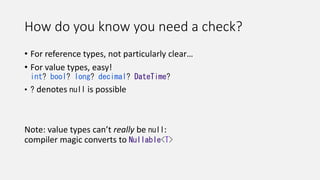
How do you know you need a check?
• For reference types, not particularly clear…
• For value types, easy!
int? bool? long? decimal? DateTime?
• ? denotes null is possible
Note: value types can’t really be null:
compiler magic converts to Nullable<T>
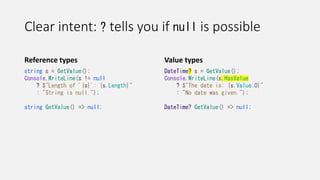
Clear intent: ? tells you if null is possible
Reference types
string s = GetValue();
Console.WriteLine(s != null
? $"Length of '{s}': {s.Length}"
: "String is null.");
string GetValue() => null;
Value types
DateTime? s = GetValue();
Console.WriteLine(s.HasValue
? $"The date is: {s.Value:O}"
: "No date was given.");
DateTime? GetValue() => null;
What are nullable reference
types (NRT)?
Nullable reference types (NRT)
• Have always been a part of C#: every reference type is nullable
• C#8+ nullable reference types flip the idea:
• Non-nullable by default
• Syntax to annotate a reference type as nullable
• What will be the output of this code?
string s = GetValue();
Console.WriteLine($"Length of '{s}': {s.Length}");
string? GetValue() => null;
Unhandled exception. System.NullReferenceException: Object reference
not set to an instance of an object.
at Program.<Main>$(String[] args) in Program.cs:line 2
Nullable reference types (NRT)
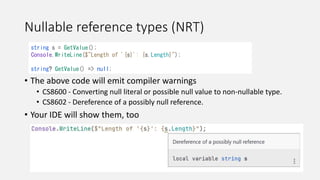
• The above code will emit compiler warnings
• CS8600 - Converting null literal or possible null value to non-nullable type.
• CS8602 - Dereference of a possibly null reference.
• Your IDE will show them, too
string s = GetValue();
Console.WriteLine($"Length of '{s}': {s.Length}");
string? GetValue() => null;
Nullable reference types (NRT)
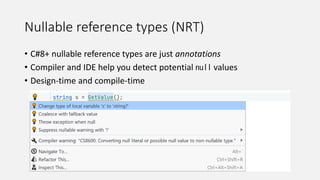
• C#8+ nullable reference types are just annotations
• Compiler and IDE help you detect potential null values
• Design-time and compile-time
Flow analysis
Flow analysis
Demo
Flow analysis
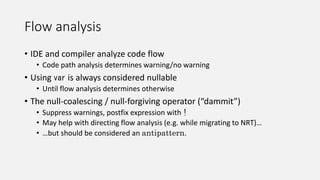
• IDE and compiler analyze code flow
• Code path analysis determines warning/no warning
• Using var is always considered nullable
• Until flow analysis determines otherwise
• The null-coalescing / null-forgiving operator (“dammit”)
• Suppress warnings, postfix expression with !
• May help with directing flow analysis (e.g. while migrating to NRT)…
• …but should be considered an antipattern.
Summary: Nullable reference types in C#
• No runtime safety
• Design-time and compile-time help
to determine if a variable may be null before dereferencing it
• Give better static flow analysis on your code
• Your null checks will help flow analysis
• Null-forgiving operator may help if really needed
• But it is an antipattern!
Under the hood
Reference types vs. value types
• Value type: compiler magic to Nullable<T>
• Reference type: always nullable
• How do compiler and IDE know about reference type nullability?
Pre-C#8 code
#nullable disable
string GetString1() => "";
.method private hidebysig instance string
GetString1() cil managed
{
.maxstack 8
IL_0000: ldstr ""
IL_0005: ret
}
Pre-C#8 code
#nullable disable
string GetString1() => "";
.method private hidebysig instance string
GetString1() cil managed
{
.maxstack 8
IL_0000: ldstr ""
IL_0005: ret
}
C#8+
#nullable enable
string? GetString2() => "";
.method private hidebysig instance string
GetString2() cil managed
{
.custom instance void System.Runtime.CompilerServices.NullableContextAttribute::.ctor([in] unsigned
int8)
= (01 00 02 00 00 ) // .....
// unsigned int8(2) // 0x02
.maxstack 8
IL_0000: ldstr ""
IL_0005: ret
}
C#8+
#nullable enable
string? GetString2() => "";
.method private hidebysig instance string
GetString2() cil managed
{
.custom instance void System.Runtime.CompilerServices.NullableContextAttribute::.ctor([in] unsigned
int8)
= (01 00 02 00 00 ) // .....
// unsigned int8(2) // 0x02
.maxstack 8
IL_0000: ldstr ""
IL_0005: ret
}
Information for flow analysis
• Oblivious: 0
• Default, pre-C#8 behaviour (everything is maybe null)
• Not annotated: 1
• Every reference type is non-nullable by default
• Annotated: 2
• Every reference type has an implicit ?
.custom instance void System.Runtime.CompilerServices.NullableContextAttribute::.ctor([in] unsigned
int8)
= (01 00 02 00 00 ) // .....
// unsigned int8(2) // 0x02
More attributes!
#nullable enable
public string GetString3(string? a, string b, string? c) => "";
.method public hidebysig instance string GetString3(string a, string b, string c) cil managed
{
.custom instance void NullableContextAttribute::.ctor([in] unsigned int8)
= (01 00 01 00 00 ) // int8(1) – by default treat ref. types as not annotated
.param [1]
.custom instance void NullableAttribute::.ctor([in] unsigned int8)
= (01 00 02 00 00 ) // int8(2) – treat param[1] as annotated
.param [3]
.custom instance void NullableAttribute::.ctor([in] unsigned int8)
= (01 00 02 00 00 ) // int8(2) – treat param[3] as annotated
.maxstack 8
More attributes!
#nullable enable
public string GetString3(string? a, string b, string? c) => "";
.method public hidebysig instance string GetString3(string a, string b, string c) cil managed
{
.custom instance void NullableContextAttribute::.ctor([in] unsigned int8)
= (01 00 01 00 00 ) // int8(1) – by default treat ref. types as not annotated
.param [1]
.custom instance void NullableAttribute::.ctor([in] unsigned int8)
= (01 00 02 00 00 ) // int8(2) – treat param[1] as annotated
.param [3]
.custom instance void NullableAttribute::.ctor([in] unsigned int8)
= (01 00 02 00 00 ) // int8(2) – treat param[3] as annotated
.maxstack 8
More attributes!
#nullable enable
public string GetString3(string? a, string b, string? c) => "";
.method public hidebysig instance string GetString3(string a, string b, string c) cil managed
{
.custom instance void NullableContextAttribute::.ctor([in] unsigned int8)
= (01 00 01 00 00 ) // int8(1) – by default treat ref. types as not annotated
.param [1]
.custom instance void NullableAttribute::.ctor([in] unsigned int8)
= (01 00 02 00 00 ) // int8(2) – treat param[1] as annotated
.param [3]
.custom instance void NullableAttribute::.ctor([in] unsigned int8)
= (01 00 02 00 00 ) // int8(2) – treat param[3] as annotated
.maxstack 8
Information for flow analysis
• Default for method: NullableContextAttribute
• Per-parameter overrides: NullableAttribute
• C# compiler tries to emit as few attributes as possible
• Default that applies to most parameters
• Overrides to that default where needed
• Reduce overhead when analyzing code during compilation or in IDE
How do you want to surface NRT?
• Nullable annotation context
• In code, using #nullable value
• In project file <Nullable>value</Nullable>
• Possible values:
• disable - pre-C# 8.0 behavior (no NRT)
• enable - all analysis and language features
• warnings - all analysis, and warnings when code might dereference null
• annotations - no analysis, but lets you use ?
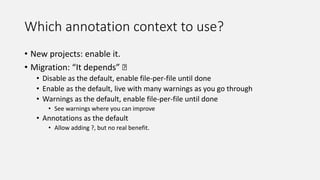
Which annotation context to use?
• New projects: enable it.
• Migration: “It depends” 🤷
• Disable as the default, enable file-per-file until done
• Enable as the default, live with many warnings as you go through
• Warnings as the default, enable file-per-file until done
• See warnings where you can improve
• Annotations as the default
• Allow adding ?, but no real benefit.
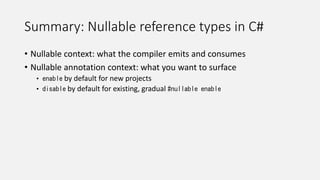
Summary: Nullable reference types in C#
• Nullable context: what the compiler emits and consumes
• Nullable annotation context: what you want to surface
• enable by default for new projects
• disable by default for existing, gradual #nullable enable
Annotating your C# code
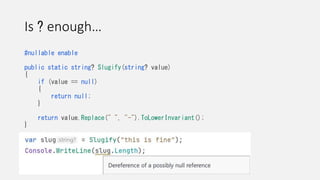
Is ? enough…
#nullable enable
public static string? Slugify(string? value)
{
if (value == null)
{
return null;
}
return value.Replace(" ", "-").ToLowerInvariant();
}
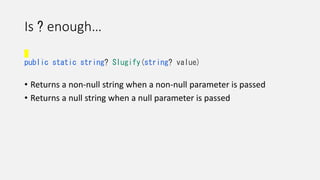
Is ? enough…
public static string? Slugify(string? value)
• Returns a non-null string when a non-null parameter is passed
• Returns a null string when a null parameter is passed
Fine-grained annotations!
[return: NotNullIfNotNull("value")]
public static string? Slugify(string? value)
• Returns a non-null string when a non-null parameter is passed
• Returns a null string when a null parameter is passed
Fine-grained annotations!
public static bool IsNullOrEmpty(
[NotNullWhen(false)] string? value)
{
return value == null || 0 == value.Length;
}
Fine-grained annotations!
• Preconditions
• When writing to a parameter, field, or property setter
• Postconditions
• When reading from a field, property or return value
• Conditional postconditions
• Make arguments dependent on return value
• Failure conditions
• Further analysis is not needed
https://docs.microsoft.com/en-us/dotnet/csharp/language-reference/attributes/nullable-analysis
Annotations
Demo
JetBrains.Annotations
• Many libraries ship them, can help with migration
• Entity Framework Core, Unity, Hangfire, …
• More powerful, but only in ReSharper and JetBrains Rider
• [CanBeNull], [NotNull]
• [ItemNotNull], [ItemCanBeNull]
• [ContractAnnotation]
https://www.jetbrains.com/help/resharper/Reference__Code_Annotation_Attributes.html
[ContractAnnotation("json:null => false,person:null")]
public bool TryDeserialize(string? json, out Person? person)
{
// ...
}
Nullability and generics
• Use ? where needed
List<string>
List<string?>
List<string?>?
• Use annotations
[return: MaybeNull]
public T Find<T>(IEnumerable<T> sequence, Func<T, bool> predicate)
• Use notnull constraint
public static void WriteToConsole<T>(T item) where T : notnull
WriteToConsole(null); // CS8714 doesn't match 'notnull' constraint
Referenced code, libraries & frameworks
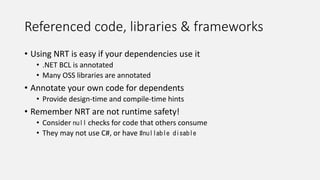
• Using NRT is easy if your dependencies use it
• .NET BCL is annotated
• Many OSS libraries are annotated
• Annotate your own code for dependents
• Provide design-time and compile-time hints
• Remember NRT are not runtime safety!
• Consider null checks for code that others consume
• They may not use C#, or have #nullable disable
Summary: Annotating your C# code
• There are more annotations than ?
• Clearly communicates intent with flow analyzer
• Compiler annotations and JetBrains.Annotations
• You may still need null checks for your libraries
Techniques and tools
to update your C# project
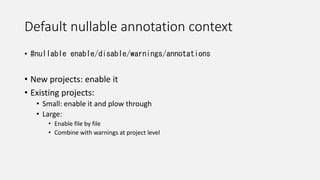
Default nullable annotation context
• #nullable enable/disable/warnings/annotations
• New projects: enable it
• Existing projects:
• Small: enable it and plow through
• Large:
• Enable file by file
• Combine with warnings at project level
Start at the center and work outwards
• Classes with few or zero dependencies on others
• Often: DTOs / POCOs
• Typically used by many dependents
• Small change flows to many places
Start at the center and work outwards
ReSharper Type Hierarchy Diagram
Visual Studio architecture tools
NDepend
…
Start at the edges and work inwards
ReSharper Type Hierarchy Diagram
Per class…
• Enable NRT (#nullable enable)
• For every property and constructor parameter
• Find all write usages
• If potentially set to null, annotating with ? is needed
Adding #nullable enable
Demo
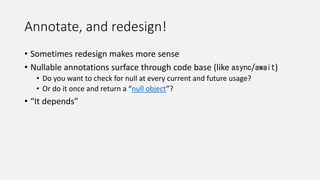
Annotate, and redesign!
• Sometimes redesign makes more sense
• Nullable annotations surface through code base (like async/await)
• Do you want to check for null at every current and future usage?
• Or do it once and return a “null object”?
• “It depends”
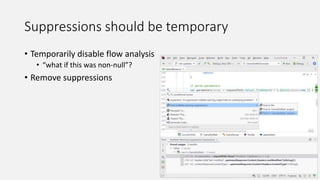
Suppressions should be temporary
• Temporarily disable flow analysis
• “what if this was non-null”?
• Remove suppressions
Don’t be afraid of null
• ✅ Gain more confidence in compiler/IDE flow analysis
• ⛔ Completely get rid of all null usages in code
• Build a safety net!
• Annotate, suppress, redesign – passing null is totally fine
• Know where it is potentially passed
• Reduce chance of NullReferenceException
Summary: Techniques
• Always enable NRT for new projects
• Start at the center and work outwards
• Annotate, and redesign
• Suppressions should be temporary
• Don’t be afraid of null
Tools that can help
Value tracking (origin/destination)
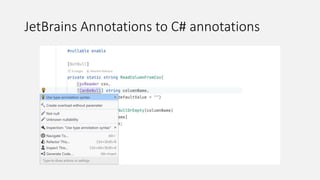
JetBrains Annotations to C# annotations
Automatic migration*
• Inserts [NotNull] and
[CanBeNull] from base classes
• Infers annotations by looking at
usages
• If null anywhere, gets annotated
*Not a silver bullet, but a great help
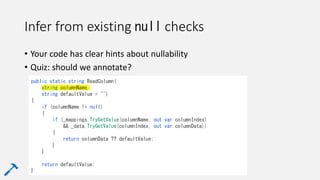
Infer from existing null checks
• Your code has clear hints about nullability
• Quiz: should we annotate?
public static string ReadColumn(
string columnName,
string defaultValue = "")
{
if (columnName != null)
{
if (_mappings.TryGetValue(columnName, out var columnIndex)
&& _data.TryGetValue(columnIndex, out var columnData))
{
return columnData ?? defaultValue;
}
}
return defaultValue;
}
Third-party libraries
• .NET BCL and some libraries are annotated – great!
• Some libraries use JetBrains.Annotations – great!
• Many (most 😔) are not annotated
• Have to assume null everywhere
• R#/Rider – try pessimistic analysis
https://www.jetbrains.com/help/resharper/Code_Analysis__Value_Analysis.html#modes_
(De)serializing JSON
How do you go about this warning?
(De)serializing JSON
• // 1
[JsonProperty("name")]
public string? Name { get; set; }
• // 2
[JsonProperty("name")]
public string Name { get; set; } = default!;
• // 3
[JsonProperty("name")]
public string Name { get; set; } = "Unknown";
• // 4
private readonly string _name;
[AllowNull]
[JsonProperty("name")]
public string Name
{
get => _name;
init => _name = value ?? "Unknown";
}
Loses nullability information
antipattern (incorrect information)
Good alternative
Good (cumbersome) alternative
(De)serializing JSON
• // 5
[JsonProperty("name")]
public required string Name { get; set; } Personal recommendation*
*Your JSON data may still be null…
Checking input in the property or using
IJsonOnDeserialized may be helpful.
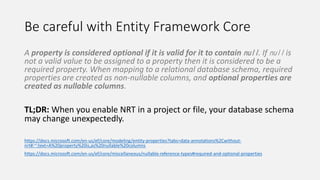
Be careful with Entity Framework Core
A property is considered optional if it is valid for it to contain null. If null is
not a valid value to be assigned to a property then it is considered to be a
required property. When mapping to a relational database schema, required
properties are created as non-nullable columns, and optional properties are
created as nullable columns.
TL;DR: When you enable NRT in a project or file, your database schema
may change unexpectedly.
https://docs.microsoft.com/en-us/ef/core/modeling/entity-properties?tabs=data-annotations%2Cwithout-
nrt#:~:text=A%20property%20is,as%20nullable%20columns
https://docs.microsoft.com/en-us/ef/core/miscellaneous/nullable-reference-types#required-and-optional-properties
Summary: Tools
• Value tracking (value origin/destination)
• Convert JetBrains Annotations to C# nullable annotations
• Automatic migration
• Infer from existing null checks
• Third-party libraries…
• JSON
• Entity Framework Core
Summary
Nullable reference types in C#
• Design-time and compile-time safety net. Not runtime!
• Nullable annotation context to determine level of help
• Annotations to communicate intent
(null is fine if you know where)
• Null-forgiving operator is an antipattern
• Tools and techniques to migrate
Thank you!
https://mastodon.online/@maartenballiauw

Bringing nullability into existing code - dammit is not the answer.pptx

  • 1.
    Bringing C# nullabilityinto existing code Maarten Balliauw https://mastodon.online/@maartenballiauw
  • 2.
    Agenda • Nullable referencetypes in C# • Internals of C# nullable reference types • Annotating your C# code • Techniques and tools to update your project
  • 3.
  • 4.
    Reference types, valuetypes, and null
  • 5.
    What will bethe output of this code? string s = GetValue(); Console.WriteLine($"Length of '{s}': {s.Length}"); string GetValue() => null; Unhandled exception. System.NullReferenceException: Object reference not set to an instance of an object. at Program.<Main>$(String[] args) in Program.cs:line 2
  • 6.
    Add a checkfor null string s = GetValue(); Console.WriteLine(s != null ? $"Length of '{s}': {s.Length}" : "String is null."); string GetValue() => null;
  • 7.
    How do youknow you need a check? • For reference types, not particularly clear… • For value types, easy! int? bool? long? decimal? DateTime? • ? denotes null is possible Note: value types can’t really be null: compiler magic converts to Nullable<T>
  • 8.
    Clear intent: ?tells you if null is possible Reference types string s = GetValue(); Console.WriteLine(s != null ? $"Length of '{s}': {s.Length}" : "String is null."); string GetValue() => null; Value types DateTime? s = GetValue(); Console.WriteLine(s.HasValue ? $"The date is: {s.Value:O}" : "No date was given."); DateTime? GetValue() => null;
  • 9.
    What are nullablereference types (NRT)?
  • 10.
    Nullable reference types(NRT) • Have always been a part of C#: every reference type is nullable • C#8+ nullable reference types flip the idea: • Non-nullable by default • Syntax to annotate a reference type as nullable • What will be the output of this code? string s = GetValue(); Console.WriteLine($"Length of '{s}': {s.Length}"); string? GetValue() => null; Unhandled exception. System.NullReferenceException: Object reference not set to an instance of an object. at Program.<Main>$(String[] args) in Program.cs:line 2
  • 11.
    Nullable reference types(NRT) • The above code will emit compiler warnings • CS8600 - Converting null literal or possible null value to non-nullable type. • CS8602 - Dereference of a possibly null reference. • Your IDE will show them, too string s = GetValue(); Console.WriteLine($"Length of '{s}': {s.Length}"); string? GetValue() => null;
  • 12.
    Nullable reference types(NRT) • C#8+ nullable reference types are just annotations • Compiler and IDE help you detect potential null values • Design-time and compile-time
  • 13.
  • 14.
  • 15.
    Flow analysis • IDEand compiler analyze code flow • Code path analysis determines warning/no warning • Using var is always considered nullable • Until flow analysis determines otherwise • The null-coalescing / null-forgiving operator (“dammit”) • Suppress warnings, postfix expression with ! • May help with directing flow analysis (e.g. while migrating to NRT)… • …but should be considered an antipattern.
  • 16.
    Summary: Nullable referencetypes in C# • No runtime safety • Design-time and compile-time help to determine if a variable may be null before dereferencing it • Give better static flow analysis on your code • Your null checks will help flow analysis • Null-forgiving operator may help if really needed • But it is an antipattern!
  • 17.
  • 18.
    Reference types vs.value types • Value type: compiler magic to Nullable<T> • Reference type: always nullable • How do compiler and IDE know about reference type nullability?
  • 19.
    Pre-C#8 code #nullable disable stringGetString1() => ""; .method private hidebysig instance string GetString1() cil managed { .maxstack 8 IL_0000: ldstr "" IL_0005: ret }
  • 20.
    Pre-C#8 code #nullable disable stringGetString1() => ""; .method private hidebysig instance string GetString1() cil managed { .maxstack 8 IL_0000: ldstr "" IL_0005: ret }
  • 21.
    C#8+ #nullable enable string? GetString2()=> ""; .method private hidebysig instance string GetString2() cil managed { .custom instance void System.Runtime.CompilerServices.NullableContextAttribute::.ctor([in] unsigned int8) = (01 00 02 00 00 ) // ..... // unsigned int8(2) // 0x02 .maxstack 8 IL_0000: ldstr "" IL_0005: ret }
  • 22.
    C#8+ #nullable enable string? GetString2()=> ""; .method private hidebysig instance string GetString2() cil managed { .custom instance void System.Runtime.CompilerServices.NullableContextAttribute::.ctor([in] unsigned int8) = (01 00 02 00 00 ) // ..... // unsigned int8(2) // 0x02 .maxstack 8 IL_0000: ldstr "" IL_0005: ret }
  • 23.
    Information for flowanalysis • Oblivious: 0 • Default, pre-C#8 behaviour (everything is maybe null) • Not annotated: 1 • Every reference type is non-nullable by default • Annotated: 2 • Every reference type has an implicit ? .custom instance void System.Runtime.CompilerServices.NullableContextAttribute::.ctor([in] unsigned int8) = (01 00 02 00 00 ) // ..... // unsigned int8(2) // 0x02
  • 24.
    More attributes! #nullable enable publicstring GetString3(string? a, string b, string? c) => ""; .method public hidebysig instance string GetString3(string a, string b, string c) cil managed { .custom instance void NullableContextAttribute::.ctor([in] unsigned int8) = (01 00 01 00 00 ) // int8(1) – by default treat ref. types as not annotated .param [1] .custom instance void NullableAttribute::.ctor([in] unsigned int8) = (01 00 02 00 00 ) // int8(2) – treat param[1] as annotated .param [3] .custom instance void NullableAttribute::.ctor([in] unsigned int8) = (01 00 02 00 00 ) // int8(2) – treat param[3] as annotated .maxstack 8
  • 25.
    More attributes! #nullable enable publicstring GetString3(string? a, string b, string? c) => ""; .method public hidebysig instance string GetString3(string a, string b, string c) cil managed { .custom instance void NullableContextAttribute::.ctor([in] unsigned int8) = (01 00 01 00 00 ) // int8(1) – by default treat ref. types as not annotated .param [1] .custom instance void NullableAttribute::.ctor([in] unsigned int8) = (01 00 02 00 00 ) // int8(2) – treat param[1] as annotated .param [3] .custom instance void NullableAttribute::.ctor([in] unsigned int8) = (01 00 02 00 00 ) // int8(2) – treat param[3] as annotated .maxstack 8
  • 26.
    More attributes! #nullable enable publicstring GetString3(string? a, string b, string? c) => ""; .method public hidebysig instance string GetString3(string a, string b, string c) cil managed { .custom instance void NullableContextAttribute::.ctor([in] unsigned int8) = (01 00 01 00 00 ) // int8(1) – by default treat ref. types as not annotated .param [1] .custom instance void NullableAttribute::.ctor([in] unsigned int8) = (01 00 02 00 00 ) // int8(2) – treat param[1] as annotated .param [3] .custom instance void NullableAttribute::.ctor([in] unsigned int8) = (01 00 02 00 00 ) // int8(2) – treat param[3] as annotated .maxstack 8
  • 27.
    Information for flowanalysis • Default for method: NullableContextAttribute • Per-parameter overrides: NullableAttribute • C# compiler tries to emit as few attributes as possible • Default that applies to most parameters • Overrides to that default where needed • Reduce overhead when analyzing code during compilation or in IDE
  • 28.
    How do youwant to surface NRT? • Nullable annotation context • In code, using #nullable value • In project file <Nullable>value</Nullable> • Possible values: • disable - pre-C# 8.0 behavior (no NRT) • enable - all analysis and language features • warnings - all analysis, and warnings when code might dereference null • annotations - no analysis, but lets you use ?
  • 29.
    Which annotation contextto use? • New projects: enable it. • Migration: “It depends” 🤷 • Disable as the default, enable file-per-file until done • Enable as the default, live with many warnings as you go through • Warnings as the default, enable file-per-file until done • See warnings where you can improve • Annotations as the default • Allow adding ?, but no real benefit.
  • 30.
    Summary: Nullable referencetypes in C# • Nullable context: what the compiler emits and consumes • Nullable annotation context: what you want to surface • enable by default for new projects • disable by default for existing, gradual #nullable enable
  • 31.
  • 32.
    Is ? enough… #nullableenable public static string? Slugify(string? value) { if (value == null) { return null; } return value.Replace(" ", "-").ToLowerInvariant(); }
  • 33.
    Is ? enough… publicstatic string? Slugify(string? value) • Returns a non-null string when a non-null parameter is passed • Returns a null string when a null parameter is passed
  • 34.
    Fine-grained annotations! [return: NotNullIfNotNull("value")] publicstatic string? Slugify(string? value) • Returns a non-null string when a non-null parameter is passed • Returns a null string when a null parameter is passed
  • 35.
    Fine-grained annotations! public staticbool IsNullOrEmpty( [NotNullWhen(false)] string? value) { return value == null || 0 == value.Length; }
  • 36.
    Fine-grained annotations! • Preconditions •When writing to a parameter, field, or property setter • Postconditions • When reading from a field, property or return value • Conditional postconditions • Make arguments dependent on return value • Failure conditions • Further analysis is not needed https://docs.microsoft.com/en-us/dotnet/csharp/language-reference/attributes/nullable-analysis
  • 37.
  • 38.
    JetBrains.Annotations • Many librariesship them, can help with migration • Entity Framework Core, Unity, Hangfire, … • More powerful, but only in ReSharper and JetBrains Rider • [CanBeNull], [NotNull] • [ItemNotNull], [ItemCanBeNull] • [ContractAnnotation] https://www.jetbrains.com/help/resharper/Reference__Code_Annotation_Attributes.html [ContractAnnotation("json:null => false,person:null")] public bool TryDeserialize(string? json, out Person? person) { // ... }
  • 39.
    Nullability and generics •Use ? where needed List<string> List<string?> List<string?>? • Use annotations [return: MaybeNull] public T Find<T>(IEnumerable<T> sequence, Func<T, bool> predicate) • Use notnull constraint public static void WriteToConsole<T>(T item) where T : notnull WriteToConsole(null); // CS8714 doesn't match 'notnull' constraint
  • 40.
    Referenced code, libraries& frameworks • Using NRT is easy if your dependencies use it • .NET BCL is annotated • Many OSS libraries are annotated • Annotate your own code for dependents • Provide design-time and compile-time hints • Remember NRT are not runtime safety! • Consider null checks for code that others consume • They may not use C#, or have #nullable disable
  • 41.
    Summary: Annotating yourC# code • There are more annotations than ? • Clearly communicates intent with flow analyzer • Compiler annotations and JetBrains.Annotations • You may still need null checks for your libraries
  • 42.
    Techniques and tools toupdate your C# project
  • 43.
    Default nullable annotationcontext • #nullable enable/disable/warnings/annotations • New projects: enable it • Existing projects: • Small: enable it and plow through • Large: • Enable file by file • Combine with warnings at project level
  • 44.
    Start at thecenter and work outwards • Classes with few or zero dependencies on others • Often: DTOs / POCOs • Typically used by many dependents • Small change flows to many places
  • 45.
    Start at thecenter and work outwards ReSharper Type Hierarchy Diagram Visual Studio architecture tools NDepend …
  • 46.
    Start at theedges and work inwards ReSharper Type Hierarchy Diagram
  • 47.
    Per class… • EnableNRT (#nullable enable) • For every property and constructor parameter • Find all write usages • If potentially set to null, annotating with ? is needed
  • 48.
  • 49.
    Annotate, and redesign! •Sometimes redesign makes more sense • Nullable annotations surface through code base (like async/await) • Do you want to check for null at every current and future usage? • Or do it once and return a “null object”? • “It depends”
  • 50.
    Suppressions should betemporary • Temporarily disable flow analysis • “what if this was non-null”? • Remove suppressions
  • 51.
    Don’t be afraidof null • ✅ Gain more confidence in compiler/IDE flow analysis • ⛔ Completely get rid of all null usages in code • Build a safety net! • Annotate, suppress, redesign – passing null is totally fine • Know where it is potentially passed • Reduce chance of NullReferenceException
  • 52.
    Summary: Techniques • Alwaysenable NRT for new projects • Start at the center and work outwards • Annotate, and redesign • Suppressions should be temporary • Don’t be afraid of null
  • 53.
  • 54.
  • 55.
  • 56.
    Automatic migration* • Inserts[NotNull] and [CanBeNull] from base classes • Infers annotations by looking at usages • If null anywhere, gets annotated *Not a silver bullet, but a great help
  • 57.
    Infer from existingnull checks • Your code has clear hints about nullability • Quiz: should we annotate? public static string ReadColumn( string columnName, string defaultValue = "") { if (columnName != null) { if (_mappings.TryGetValue(columnName, out var columnIndex) && _data.TryGetValue(columnIndex, out var columnData)) { return columnData ?? defaultValue; } } return defaultValue; }
  • 58.
    Third-party libraries • .NETBCL and some libraries are annotated – great! • Some libraries use JetBrains.Annotations – great! • Many (most 😔) are not annotated • Have to assume null everywhere • R#/Rider – try pessimistic analysis https://www.jetbrains.com/help/resharper/Code_Analysis__Value_Analysis.html#modes_
  • 59.
    (De)serializing JSON How doyou go about this warning?
  • 60.
    (De)serializing JSON • //1 [JsonProperty("name")] public string? Name { get; set; } • // 2 [JsonProperty("name")] public string Name { get; set; } = default!; • // 3 [JsonProperty("name")] public string Name { get; set; } = "Unknown"; • // 4 private readonly string _name; [AllowNull] [JsonProperty("name")] public string Name { get => _name; init => _name = value ?? "Unknown"; } Loses nullability information antipattern (incorrect information) Good alternative Good (cumbersome) alternative
  • 61.
    (De)serializing JSON • //5 [JsonProperty("name")] public required string Name { get; set; } Personal recommendation* *Your JSON data may still be null… Checking input in the property or using IJsonOnDeserialized may be helpful.
  • 62.
    Be careful withEntity Framework Core A property is considered optional if it is valid for it to contain null. If null is not a valid value to be assigned to a property then it is considered to be a required property. When mapping to a relational database schema, required properties are created as non-nullable columns, and optional properties are created as nullable columns. TL;DR: When you enable NRT in a project or file, your database schema may change unexpectedly. https://docs.microsoft.com/en-us/ef/core/modeling/entity-properties?tabs=data-annotations%2Cwithout- nrt#:~:text=A%20property%20is,as%20nullable%20columns https://docs.microsoft.com/en-us/ef/core/miscellaneous/nullable-reference-types#required-and-optional-properties
  • 63.
    Summary: Tools • Valuetracking (value origin/destination) • Convert JetBrains Annotations to C# nullable annotations • Automatic migration • Infer from existing null checks • Third-party libraries… • JSON • Entity Framework Core
  • 64.
  • 65.
    Nullable reference typesin C# • Design-time and compile-time safety net. Not runtime! • Nullable annotation context to determine level of help • Annotations to communicate intent (null is fine if you know where) • Null-forgiving operator is an antipattern • Tools and techniques to migrate
  • 66.

Editor's Notes

  • #2 Own photo
  • #5 Own photo
  • #8 Explain this with the previous slide
  • #17 Play around with ?
  • #21 Own photo
  • #35 Own photo
  • #46 Own photo
  • #52 In LocationInfo, set #nullable enable Find Usages on properties for potential null, there should be none Same for constructor. Call site has potential null reference! Should the property be updated to accommodate for this one? Or should we do a null check and return “Unknown” instead?
  • #59 In many cases, Find Usages will be sufficient to get an idea of the direct usages of a class, constructor, method, or property. In other cases, you may need more information. ReSharper (R#) and JetBrains Rider come with value tracking and call tracking to help you out here. Visual Studio 2022 also has a Track Value Source command, but your mileage with it will vary. With value tracking, you can follow the entire flow of a specific value and determine where it is originating from and where it is being used. Not sure if this TrackingAccount property should be annotated? The Inspect | Value Origin action will track all places where a value for this property can be assigned, and provides a tool window to jump to every location.
  • #66 JSON.NET allows you to use constructor as well, might be useful.
  • #67 JSON.NET allows you to use constructor as well, might be useful.
  • #70 Own photo
  • #72 Own photo