
Migration to ClickHouse
Practical Guide
Altinity
Who am I
• Graduated Moscow State University in 1999
• Software engineer since 1997
• Developed distributed systems since 2002
• Focused on high performance analytics since 2007
• Director of Engineering in LifeStreet
• Co-founder of Altinity
• AdTech company (ad exchange, ad server, RTB, DMP etc.)
since 2006
• 10,000,000,000+ events/day
• 2K/event
• 3 months retention (90-120 days)
10B * 2K * [90-120] = [1.8-2.4]PB
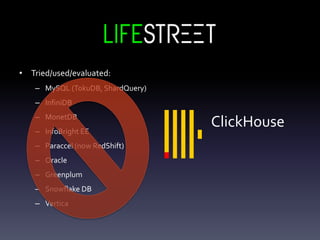
• Tried/used/evaluated:
– MySQL (TokuDB, ShardQuery)
– InfiniDB
– MonetDB
– InfoBright EE
– Paraccel (now RedShift)
– Oracle
– Greenplum
– Snowflake DB
– Vertica
ClickHouse
Before you go:
Confirm your use case
Check benchmarks
Run your own
Consider limitations, not features
Make a POC
LifeStreet Use Case
• Event Stream analysis
• Publisher/Advertiser performance
• Campaign/Creative performance
optimization/prediction
• Realtime programmatic bidding
• DMP
LifeStreet Requirements
• Load 10B events/day, 500 dimensions/event
• Ad-hoc reports on 3 months of detail data
• Low data and query latency
• High Availability
ClickHouse
limitations:
• NoTransactions
• No Constraints
• Eventual Consistency
• No UPDATE/DELETE
• No NULLs (added few months ago)
• No milliseconds
• No Implicit type conversions
• Non-standard SQL
• No partitioning by any column
(monthly only)
• No Enterprise operation tools
SQL developers reaction:
Main Challenges
• Efficient schema
– Use ClickHouse bests
– Workaround limitations
• Reliable data ingestion
• Sharding and replication
• Client interfaces
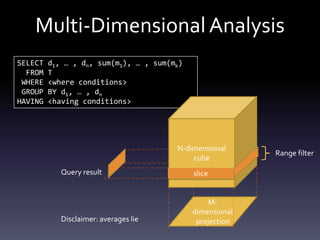
SELECT d1, … , dn, sum(m1), … , sum(mk)
FROM T
WHERE <where conditions>
GROUP BY d1, … , dn
HAVING <having conditions>
Multi-DimensionalAnalysis
N-dimensional
cube
M-
dimensional
projection
slice
Range filter
Query result
Disclaimer: averages lie
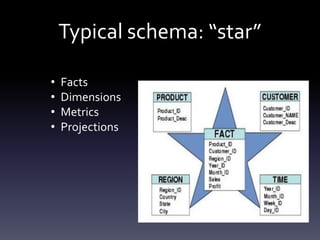
Typical schema: “star”
• Facts
• Dimensions
• Metrics
• Projections
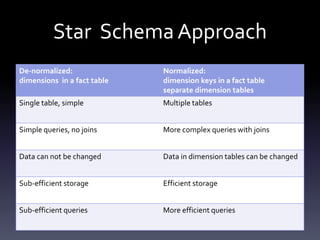
Star Schema Approach
De-normalized:
dimensions in a fact table
Normalized:
dimension keys in a fact table
separate dimension tables
Single table, simple Multiple tables
Simple queries, no joins More complex queries with joins
Data can not be changed Data in dimension tables can be changed
Sub-efficient storage Efficient storage
Sub-efficient queries More efficient queries
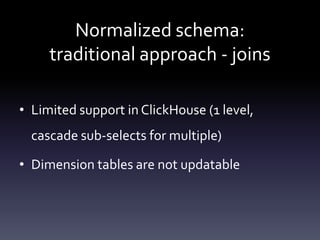
Normalized schema:
traditional approach - joins
• Limited support in ClickHouse (1 level,
cascade sub-selects for multiple)
• Dimension tables are not updatable
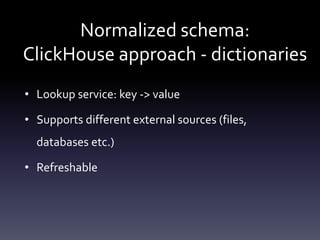
Normalized schema:
ClickHouse approach - dictionaries
• Lookup service: key -> value
• Supports different external sources (files,
databases etc.)
• Refreshable
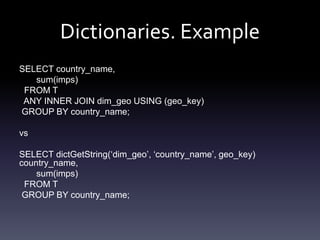
Dictionaries. Example
SELECT country_name,
sum(imps)
FROM T
ANY INNER JOIN dim_geo USING (geo_key)
GROUP BY country_name;
vs
SELECT dictGetString(‘dim_geo’, ‘country_name’, geo_key)
country_name,
sum(imps)
FROM T
GROUP BY country_name;
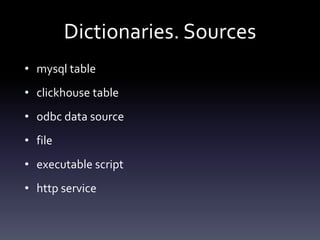
Dictionaries. Sources
• mysql table
• clickhouse table
• odbc data source
• file
• executable script
• http service
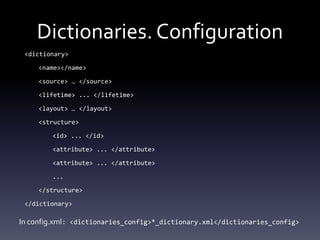
Dictionaries. Configuration
<dictionary>
<name></name>
<source> … </source>
<lifetime> ... </lifetime>
<layout> … </layout>
<structure>
<id> ... </id>
<attribute> ... </attribute>
...
</structure>
</dictionary>
In config.xml: <dictionaries_config>*_dictionary.xml</dictionaries_config>
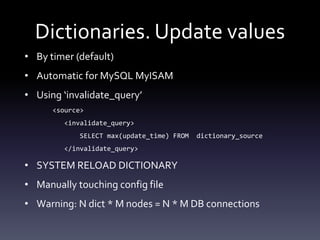
Dictionaries. Update values
• By timer (default)
• Automatic for MySQL MyISAM
• Using ‘invalidate_query’
<source>
<invalidate_query>
SELECT max(update_time) FROM dictionary_source
</invalidate_query>
• SYSTEM RELOAD DICTIONARY
• Manually touching config file
• Warning: N dict * M nodes = N * M DB connections
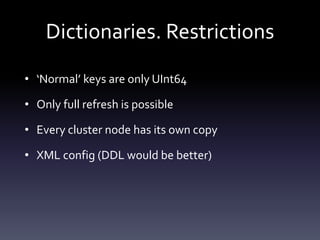
Dictionaries. Restrictions
• ‘Normal’ keys are only UInt64
• Only full refresh is possible
• Every cluster node has its own copy
• XML config (DDL would be better)
Dictionaries Pros-and-Cons
+ No JOINs
+ Updatable
+ Always in memory for flat/hash (faster)
- Not a part of the schema
- Somewhat inconvenient syntax
Tables
• Engines
• Sharding/Distribution
• Replication
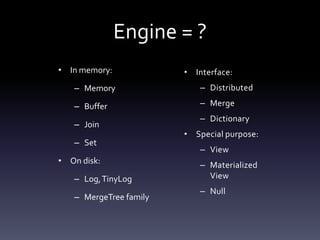
Engine = ?
• In memory:
– Memory
– Buffer
– Join
– Set
• On disk:
– Log,TinyLog
– MergeTree family
• Interface:
– Distributed
– Merge
– Dictionary
• Special purpose:
– View
– Materialized
View
– Null
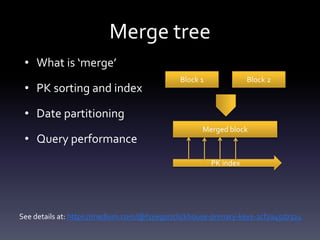
Merge tree
• What is ‘merge’
• PK sorting and index
• Date partitioning
• Query performance
Block 1 Block 2
Merged block
PK index
See details at: https://medium.com/@f1yegor/clickhouse-primary-keys-2cf2a45d7324
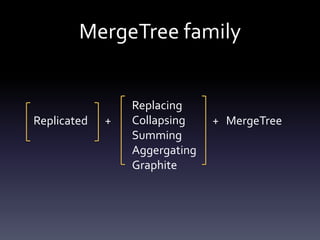
MergeTree family
Replicated
Replacing
Collapsing
Summing
Aggergating
Graphite
MergeTree+ +
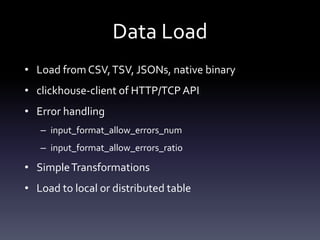
Data Load
• Load from CSV,TSV, JSONs, native binary
• clickhouse-client of HTTP/TCPAPI
• Error handling
– input_format_allow_errors_num
– input_format_allow_errors_ratio
• SimpleTransformations
• Load to local or distributed table
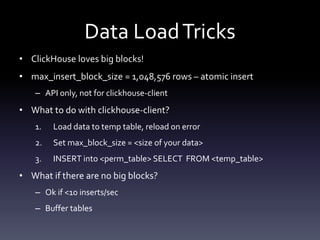
Data LoadTricks
• ClickHouse loves big blocks!
• max_insert_block_size = 1,048,576 rows – atomic insert
– API only, not for clickhouse-client
• What to do with clickhouse-client?
1. Load data to temp table, reload on error
2. Set max_block_size = <size of your data>
3. INSERT into <perm_table> SELECT FROM <temp_table>
• What if there are no big blocks?
– Ok if <10 inserts/sec
– Buffer tables
The power of MaterializedViews
• MV is a table, i.e. engine, replication etc.
• Updated synchronously
• Summing/AggregatingMergeTree – consistent
aggregation
• Alters are problematic
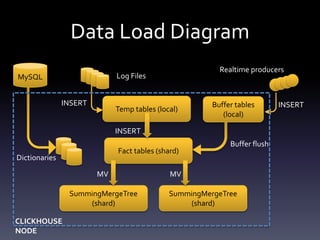
Data Load Diagram
Temp tables (local)
Fact tables (shard)
SummingMergeTree
(shard)
SummingMergeTree
(shard)
Log Files
INSERT
MV MV
INSERT Buffer tables
(local)
Realtime producers
INSERT
Buffer flush
MySQL
Dictionaries
CLICKHOUSE
NODE
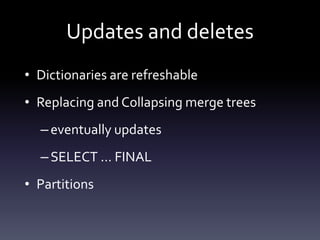
Updates and deletes
• Dictionaries are refreshable
• Replacing and Collapsing merge trees
–eventually updates
–SELECT … FINAL
• Partitions
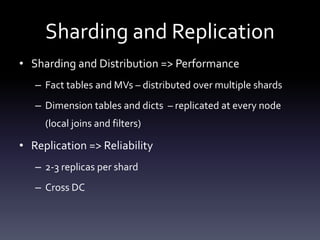
Sharding and Replication
• Sharding and Distribution => Performance
– Fact tables and MVs – distributed over multiple shards
– Dimension tables and dicts – replicated at every node
(local joins and filters)
• Replication => Reliability
– 2-3 replicas per shard
– Cross DC
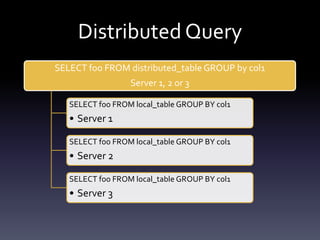
Distributed Query
SELECT foo FROM distributed_table GROUP by col1
Server 1, 2 or 3
SELECT foo FROM local_table GROUP BY col1
• Server 1
SELECT foo FROM local_table GROUP BY col1
• Server 2
SELECT foo FROM local_table GROUP BY col1
• Server 3
Replication
• Per table topology configuration:
– Dimension tables – replicate to any node
– Fact tables – replicate to mirror replica
• Zookeeper to communicate the state
– State: what blocks/parts to replicate
• Asynchronous => faster and reliable enough
• Synchronous => slower
• Isolate query to replica
• Replication queues
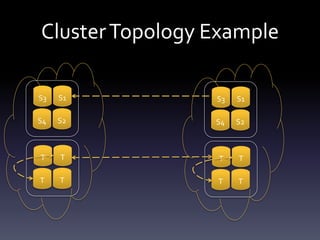
ClusterTopology Example
S1
S2
S3
S4
T
T
T
T
S1
S2
S3
S4
T
T
T
T
SQL
• Supports basic SQL syntax
• Supports JOINs with non-standard syntax
• Aliasing everywhere
• Array and nested data types, lambda-expressions,ARRAY
JOIN
• GLOBAL IN, GLOBAL JOIN
• Approximate queries
• A lot of domain specific functions
• Basic analytic functions (e.g. runningDifference)
SQL Limitations
• JOIN syntax is different:
– ANY|ALL
– only 'USING' is supported, no ON
– multiple joins using nesting
• dictionaries are not supported by BI tools
• strict data types for inserts, function calls etc.
• no windowed analytic functions
• No transaction statements, update, delete
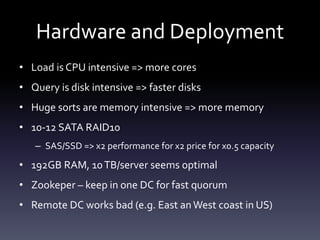
Hardware and Deployment
• Load is CPU intensive => more cores
• Query is disk intensive => faster disks
• Huge sorts are memory intensive => more memory
• 10-12 SATA RAID10
– SAS/SSD => x2 performance for x2 price for x0.5 capacity
• 192GB RAM, 10TB/server seems optimal
• Zookeper – keep in one DC for fast quorum
• Remote DC works bad (e.g. East anWest coast in US)
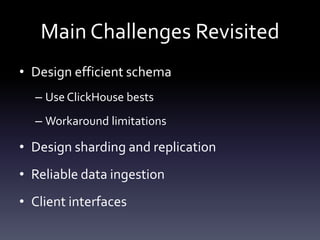
Main Challenges Revisited
• Design efficient schema
– Use ClickHouse bests
– Workaround limitations
• Design sharding and replication
• Reliable data ingestion
• Client interfaces
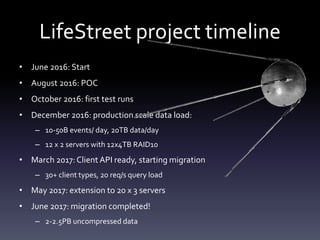
LifeStreet project timeline
• June 2016: Start
• August 2016: POC
• October 2016: first test runs
• December 2016: production scale data load:
– 10-50B events/ day, 20TB data/day
– 12 x 2 servers with 12x4TB RAID10
• March 2017:Client API ready, starting migration
– 30+ client types, 20 req/s query load
• May 2017: extension to 20 x 3 servers
• June 2017: migration completed!
– 2-2.5PB uncompressed data
Few examples
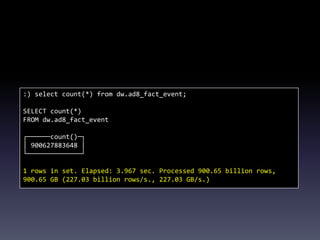
:) select count(*) from dw.ad8_fact_event;
SELECT count(*)
FROM dw.ad8_fact_event
┌──────count()─┐
│ 900627883648 │
└──────────────┘
1 rows in set. Elapsed: 3.967 sec. Processed 900.65 billion rows,
900.65 GB (227.03 billion rows/s., 227.03 GB/s.)
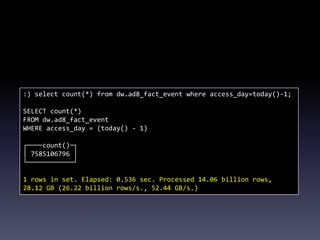
:) select count(*) from dw.ad8_fact_event where access_day=today()-1;
SELECT count(*)
FROM dw.ad8_fact_event
WHERE access_day = (today() - 1)
┌────count()─┐
│ 7585106796 │
└────────────┘
1 rows in set. Elapsed: 0.536 sec. Processed 14.06 billion rows,
28.12 GB (26.22 billion rows/s., 52.44 GB/s.)
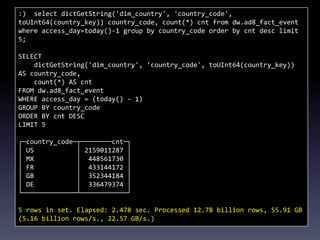
:) select dictGetString('dim_country', 'country_code',
toUInt64(country_key)) country_code, count(*) cnt from dw.ad8_fact_event
where access_day=today()-1 group by country_code order by cnt desc limit
5;
SELECT
dictGetString('dim_country', 'country_code', toUInt64(country_key))
AS country_code,
count(*) AS cnt
FROM dw.ad8_fact_event
WHERE access_day = (today() - 1)
GROUP BY country_code
ORDER BY cnt DESC
LIMIT 5
┌─country_code─┬────────cnt─┐
│ US │ 2159011287 │
│ MX │ 448561730 │
│ FR │ 433144172 │
│ GB │ 352344184 │
│ DE │ 336479374 │
└──────────────┴────────────┘
5 rows in set. Elapsed: 2.478 sec. Processed 12.78 billion rows, 55.91 GB
(5.16 billion rows/s., 22.57 GB/s.)
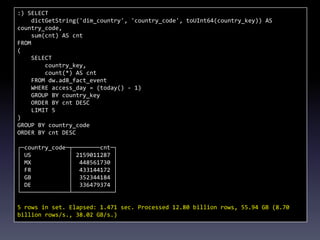
:) SELECT
dictGetString('dim_country', 'country_code', toUInt64(country_key)) AS
country_code,
sum(cnt) AS cnt
FROM
(
SELECT
country_key,
count(*) AS cnt
FROM dw.ad8_fact_event
WHERE access_day = (today() - 1)
GROUP BY country_key
ORDER BY cnt DESC
LIMIT 5
)
GROUP BY country_code
ORDER BY cnt DESC
┌─country_code─┬────────cnt─┐
│ US │ 2159011287 │
│ MX │ 448561730 │
│ FR │ 433144172 │
│ GB │ 352344184 │
│ DE │ 336479374 │
└──────────────┴────────────┘
5 rows in set. Elapsed: 1.471 sec. Processed 12.80 billion rows, 55.94 GB (8.70
billion rows/s., 38.02 GB/s.)
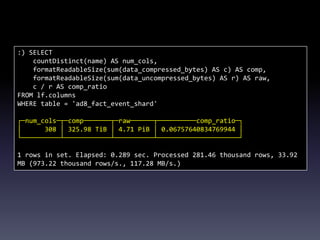
:) SELECT
countDistinct(name) AS num_cols,
formatReadableSize(sum(data_compressed_bytes) AS c) AS comp,
formatReadableSize(sum(data_uncompressed_bytes) AS r) AS raw,
c / r AS comp_ratio
FROM lf.columns
WHERE table = 'ad8_fact_event_shard'
┌─num_cols─┬─comp───────┬─raw──────┬──────────comp_ratio─┐
│ 308 │ 325.98 TiB │ 4.71 PiB │ 0.06757640834769944 │
└──────────┴────────────┴──────────┴─────────────────────┘
1 rows in set. Elapsed: 0.289 sec. Processed 281.46 thousand rows, 33.92
MB (973.22 thousand rows/s., 117.28 MB/s.)
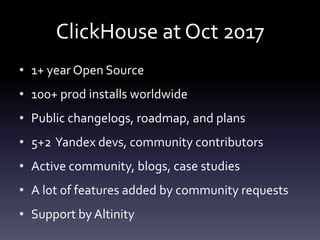
ClickHouse at Oct 2017
• 1+ year Open Source
• 100+ prod installs worldwide
• Public changelogs, roadmap, and plans
• 5+2 Yandex devs, community contributors
• Active community, blogs, case studies
• A lot of features added by community requests
• Support by Altinity
FinalWords
• Try ClickHouse for your Big Data case – it is easy now
• Need more info - http://clickhouse.yandex
• Need fast take off - Altinity Demo Appliance
• Need help for the safe ClickHouse journey:
– http://www.altinity.com
– @AltinityDB twitter
Questions?
Contact me:
alexander.zaitsev@lifestreet.com
alz@altinity.com
skype: alex.zaitsev
Altinity
ClickHouse and MySQL
• MySQL is widespread but weak for analytics
– TokuDB, InfiniDB somewhat help
• ClickHouse is best in analytics
How to combine?
Imagine
MySQL flexibility at ClickHouse speed?
Dreams….
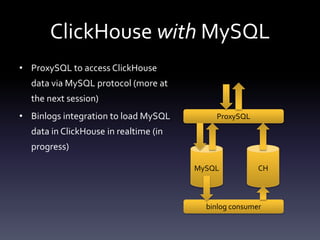
ClickHouse with MySQL
• ProxySQL to access ClickHouse
data via MySQL protocol (more at
the next session)
• Binlogs integration to load MySQL
data in ClickHouse in realtime (in
progress)
MySQL CH
ProxySQL
binlog consumer
ClickHouse instead of MySQL
• Web logs analytics
• Monitoring data collection and analysis
– Percona’s PMM
– Infinidat InfiniMetrics
• Other time series apps
• .. and more!

Migration to ClickHouse. Practical guide, by Alexander Zaitsev

  • 1.
  • 2.
    Who am I •Graduated Moscow State University in 1999 • Software engineer since 1997 • Developed distributed systems since 2002 • Focused on high performance analytics since 2007 • Director of Engineering in LifeStreet • Co-founder of Altinity
  • 4.
    • AdTech company(ad exchange, ad server, RTB, DMP etc.) since 2006 • 10,000,000,000+ events/day • 2K/event • 3 months retention (90-120 days) 10B * 2K * [90-120] = [1.8-2.4]PB
  • 5.
    • Tried/used/evaluated: – MySQL(TokuDB, ShardQuery) – InfiniDB – MonetDB – InfoBright EE – Paraccel (now RedShift) – Oracle – Greenplum – Snowflake DB – Vertica ClickHouse
  • 6.
    Before you go: Confirmyour use case Check benchmarks Run your own Consider limitations, not features Make a POC
  • 7.
    LifeStreet Use Case •Event Stream analysis • Publisher/Advertiser performance • Campaign/Creative performance optimization/prediction • Realtime programmatic bidding • DMP
  • 8.
    LifeStreet Requirements • Load10B events/day, 500 dimensions/event • Ad-hoc reports on 3 months of detail data • Low data and query latency • High Availability
  • 9.
    ClickHouse limitations: • NoTransactions • NoConstraints • Eventual Consistency • No UPDATE/DELETE • No NULLs (added few months ago) • No milliseconds • No Implicit type conversions • Non-standard SQL • No partitioning by any column (monthly only) • No Enterprise operation tools
  • 10.
  • 11.
    Main Challenges • Efficientschema – Use ClickHouse bests – Workaround limitations • Reliable data ingestion • Sharding and replication • Client interfaces
  • 12.
    SELECT d1, …, dn, sum(m1), … , sum(mk) FROM T WHERE <where conditions> GROUP BY d1, … , dn HAVING <having conditions> Multi-DimensionalAnalysis N-dimensional cube M- dimensional projection slice Range filter Query result Disclaimer: averages lie
  • 13.
    Typical schema: “star” •Facts • Dimensions • Metrics • Projections
  • 14.
    Star Schema Approach De-normalized: dimensionsin a fact table Normalized: dimension keys in a fact table separate dimension tables Single table, simple Multiple tables Simple queries, no joins More complex queries with joins Data can not be changed Data in dimension tables can be changed Sub-efficient storage Efficient storage Sub-efficient queries More efficient queries
  • 15.
    Normalized schema: traditional approach- joins • Limited support in ClickHouse (1 level, cascade sub-selects for multiple) • Dimension tables are not updatable
  • 16.
    Normalized schema: ClickHouse approach- dictionaries • Lookup service: key -> value • Supports different external sources (files, databases etc.) • Refreshable
  • 17.
    Dictionaries. Example SELECT country_name, sum(imps) FROMT ANY INNER JOIN dim_geo USING (geo_key) GROUP BY country_name; vs SELECT dictGetString(‘dim_geo’, ‘country_name’, geo_key) country_name, sum(imps) FROM T GROUP BY country_name;
  • 18.
    Dictionaries. Sources • mysqltable • clickhouse table • odbc data source • file • executable script • http service
  • 19.
    Dictionaries. Configuration <dictionary> <name></name> <source> …</source> <lifetime> ... </lifetime> <layout> … </layout> <structure> <id> ... </id> <attribute> ... </attribute> <attribute> ... </attribute> ... </structure> </dictionary> In config.xml: <dictionaries_config>*_dictionary.xml</dictionaries_config>
  • 20.
    Dictionaries. Update values •By timer (default) • Automatic for MySQL MyISAM • Using ‘invalidate_query’ <source> <invalidate_query> SELECT max(update_time) FROM dictionary_source </invalidate_query> • SYSTEM RELOAD DICTIONARY • Manually touching config file • Warning: N dict * M nodes = N * M DB connections
  • 21.
    Dictionaries. Restrictions • ‘Normal’keys are only UInt64 • Only full refresh is possible • Every cluster node has its own copy • XML config (DDL would be better)
  • 22.
    Dictionaries Pros-and-Cons + NoJOINs + Updatable + Always in memory for flat/hash (faster) - Not a part of the schema - Somewhat inconvenient syntax
  • 23.
  • 24.
    Engine = ? •In memory: – Memory – Buffer – Join – Set • On disk: – Log,TinyLog – MergeTree family • Interface: – Distributed – Merge – Dictionary • Special purpose: – View – Materialized View – Null
  • 25.
    Merge tree • Whatis ‘merge’ • PK sorting and index • Date partitioning • Query performance Block 1 Block 2 Merged block PK index See details at: https://medium.com/@f1yegor/clickhouse-primary-keys-2cf2a45d7324
  • 26.
  • 27.
    Data Load • Loadfrom CSV,TSV, JSONs, native binary • clickhouse-client of HTTP/TCPAPI • Error handling – input_format_allow_errors_num – input_format_allow_errors_ratio • SimpleTransformations • Load to local or distributed table
  • 28.
    Data LoadTricks • ClickHouseloves big blocks! • max_insert_block_size = 1,048,576 rows – atomic insert – API only, not for clickhouse-client • What to do with clickhouse-client? 1. Load data to temp table, reload on error 2. Set max_block_size = <size of your data> 3. INSERT into <perm_table> SELECT FROM <temp_table> • What if there are no big blocks? – Ok if <10 inserts/sec – Buffer tables
  • 29.
    The power ofMaterializedViews • MV is a table, i.e. engine, replication etc. • Updated synchronously • Summing/AggregatingMergeTree – consistent aggregation • Alters are problematic
  • 30.
    Data Load Diagram Temptables (local) Fact tables (shard) SummingMergeTree (shard) SummingMergeTree (shard) Log Files INSERT MV MV INSERT Buffer tables (local) Realtime producers INSERT Buffer flush MySQL Dictionaries CLICKHOUSE NODE
  • 31.
    Updates and deletes •Dictionaries are refreshable • Replacing and Collapsing merge trees –eventually updates –SELECT … FINAL • Partitions
  • 32.
    Sharding and Replication •Sharding and Distribution => Performance – Fact tables and MVs – distributed over multiple shards – Dimension tables and dicts – replicated at every node (local joins and filters) • Replication => Reliability – 2-3 replicas per shard – Cross DC
  • 33.
    Distributed Query SELECT fooFROM distributed_table GROUP by col1 Server 1, 2 or 3 SELECT foo FROM local_table GROUP BY col1 • Server 1 SELECT foo FROM local_table GROUP BY col1 • Server 2 SELECT foo FROM local_table GROUP BY col1 • Server 3
  • 34.
    Replication • Per tabletopology configuration: – Dimension tables – replicate to any node – Fact tables – replicate to mirror replica • Zookeeper to communicate the state – State: what blocks/parts to replicate • Asynchronous => faster and reliable enough • Synchronous => slower • Isolate query to replica • Replication queues
  • 35.
  • 36.
    SQL • Supports basicSQL syntax • Supports JOINs with non-standard syntax • Aliasing everywhere • Array and nested data types, lambda-expressions,ARRAY JOIN • GLOBAL IN, GLOBAL JOIN • Approximate queries • A lot of domain specific functions • Basic analytic functions (e.g. runningDifference)
  • 37.
    SQL Limitations • JOINsyntax is different: – ANY|ALL – only 'USING' is supported, no ON – multiple joins using nesting • dictionaries are not supported by BI tools • strict data types for inserts, function calls etc. • no windowed analytic functions • No transaction statements, update, delete
  • 38.
    Hardware and Deployment •Load is CPU intensive => more cores • Query is disk intensive => faster disks • Huge sorts are memory intensive => more memory • 10-12 SATA RAID10 – SAS/SSD => x2 performance for x2 price for x0.5 capacity • 192GB RAM, 10TB/server seems optimal • Zookeper – keep in one DC for fast quorum • Remote DC works bad (e.g. East anWest coast in US)
  • 39.
    Main Challenges Revisited •Design efficient schema – Use ClickHouse bests – Workaround limitations • Design sharding and replication • Reliable data ingestion • Client interfaces
  • 40.
    LifeStreet project timeline •June 2016: Start • August 2016: POC • October 2016: first test runs • December 2016: production scale data load: – 10-50B events/ day, 20TB data/day – 12 x 2 servers with 12x4TB RAID10 • March 2017:Client API ready, starting migration – 30+ client types, 20 req/s query load • May 2017: extension to 20 x 3 servers • June 2017: migration completed! – 2-2.5PB uncompressed data
  • 41.
  • 42.
    :) select count(*)from dw.ad8_fact_event; SELECT count(*) FROM dw.ad8_fact_event ┌──────count()─┐ │ 900627883648 │ └──────────────┘ 1 rows in set. Elapsed: 3.967 sec. Processed 900.65 billion rows, 900.65 GB (227.03 billion rows/s., 227.03 GB/s.)
  • 43.
    :) select count(*)from dw.ad8_fact_event where access_day=today()-1; SELECT count(*) FROM dw.ad8_fact_event WHERE access_day = (today() - 1) ┌────count()─┐ │ 7585106796 │ └────────────┘ 1 rows in set. Elapsed: 0.536 sec. Processed 14.06 billion rows, 28.12 GB (26.22 billion rows/s., 52.44 GB/s.)
  • 44.
    :) select dictGetString('dim_country','country_code', toUInt64(country_key)) country_code, count(*) cnt from dw.ad8_fact_event where access_day=today()-1 group by country_code order by cnt desc limit 5; SELECT dictGetString('dim_country', 'country_code', toUInt64(country_key)) AS country_code, count(*) AS cnt FROM dw.ad8_fact_event WHERE access_day = (today() - 1) GROUP BY country_code ORDER BY cnt DESC LIMIT 5 ┌─country_code─┬────────cnt─┐ │ US │ 2159011287 │ │ MX │ 448561730 │ │ FR │ 433144172 │ │ GB │ 352344184 │ │ DE │ 336479374 │ └──────────────┴────────────┘ 5 rows in set. Elapsed: 2.478 sec. Processed 12.78 billion rows, 55.91 GB (5.16 billion rows/s., 22.57 GB/s.)
  • 45.
    :) SELECT dictGetString('dim_country', 'country_code',toUInt64(country_key)) AS country_code, sum(cnt) AS cnt FROM ( SELECT country_key, count(*) AS cnt FROM dw.ad8_fact_event WHERE access_day = (today() - 1) GROUP BY country_key ORDER BY cnt DESC LIMIT 5 ) GROUP BY country_code ORDER BY cnt DESC ┌─country_code─┬────────cnt─┐ │ US │ 2159011287 │ │ MX │ 448561730 │ │ FR │ 433144172 │ │ GB │ 352344184 │ │ DE │ 336479374 │ └──────────────┴────────────┘ 5 rows in set. Elapsed: 1.471 sec. Processed 12.80 billion rows, 55.94 GB (8.70 billion rows/s., 38.02 GB/s.)
  • 46.
    :) SELECT countDistinct(name) ASnum_cols, formatReadableSize(sum(data_compressed_bytes) AS c) AS comp, formatReadableSize(sum(data_uncompressed_bytes) AS r) AS raw, c / r AS comp_ratio FROM lf.columns WHERE table = 'ad8_fact_event_shard' ┌─num_cols─┬─comp───────┬─raw──────┬──────────comp_ratio─┐ │ 308 │ 325.98 TiB │ 4.71 PiB │ 0.06757640834769944 │ └──────────┴────────────┴──────────┴─────────────────────┘ 1 rows in set. Elapsed: 0.289 sec. Processed 281.46 thousand rows, 33.92 MB (973.22 thousand rows/s., 117.28 MB/s.)
  • 47.
    ClickHouse at Oct2017 • 1+ year Open Source • 100+ prod installs worldwide • Public changelogs, roadmap, and plans • 5+2 Yandex devs, community contributors • Active community, blogs, case studies • A lot of features added by community requests • Support by Altinity
  • 48.
    FinalWords • Try ClickHousefor your Big Data case – it is easy now • Need more info - http://clickhouse.yandex • Need fast take off - Altinity Demo Appliance • Need help for the safe ClickHouse journey: – http://www.altinity.com – @AltinityDB twitter
  • 49.
  • 50.
    ClickHouse and MySQL •MySQL is widespread but weak for analytics – TokuDB, InfiniDB somewhat help • ClickHouse is best in analytics How to combine?
  • 51.
  • 52.
  • 53.
    ClickHouse with MySQL •ProxySQL to access ClickHouse data via MySQL protocol (more at the next session) • Binlogs integration to load MySQL data in ClickHouse in realtime (in progress) MySQL CH ProxySQL binlog consumer
  • 54.
    ClickHouse instead ofMySQL • Web logs analytics • Monitoring data collection and analysis – Percona’s PMM – Infinidat InfiniMetrics • Other time series apps • .. and more!

Editor's Notes

  • #10 Конечно, в КХ есть много всего другого