Using Pathways for Navigating
       and Personalised Access to
       Cultural Heritage Materials
                                       Paul Clough
                                    The Information School
                                     University of Sheffield


Presentation at York University, 2nd June 2011
The Information School
              • Formerly known as the Department of
                Information Studies
                   – Formed in 1963 (PG School of Librarianship)
                   – Now in the faculty of social science
                   – http://www.shef.ac.uk/is/
              • Leading researchers past and present include
                   –   Tom Wilson
                   –   Micheline Beaulieu
                   –   Steve Whittaker
                   –   Mark Sanderson
                   –   Peter Willett
                   –   Nigel Ford
              • Now part of the emerging iSchool movement
Presentation at York University, 2nd June 2011
Sheffield IR group
• Four academics
     –   Prof. Nigel Ford (group leader)
     –   Dr. Paul Clough
     –   Dr. Robert Villa
     –   Prof. Elaine Toms (currently Dalhousie University)
•    Four RAs
     – Paula Goodale and Mark Hall (PATHS)
     – Evangelos Kanoulas (EFireEval)
     – Monica Paramita (ACCURAT)
• Currently 6 PhD students
     – Mixture of library and information science and computer science
       backgrounds


Presentation at York University, 2nd June 2011
My areas of research
                                                        http://ir.shef.ac.uk/cloughie/

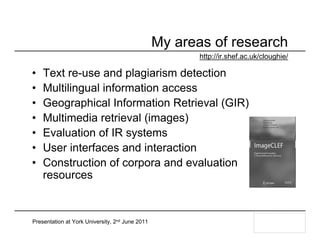
•   Text re-use and plagiarism detection
•   Multilingual information access
•   Geographical Information Retrieval (GIR)
•   Multimedia retrieval (images)
•   Evaluation of IR systems
•   User interfaces and interaction
•   Construction of corpora and evaluation
    resources


Presentation at York University, 2nd June 2011
Recent and current research projects

• Mining imprecise regions from the Web (EPSRC and
  Ordnance Survey)
• Improving Information Finding at the UK National Archives
  (TNA)
• User-Centered Design of a Recommender System for a
  'Universal' Library Catalogue (AHRC and OCLC Inc.)
• Analysis and evaluation of Comparable Corpora for Under
  Resourced Areas of machine Translation (EU FP7)
• Personalised Access to Cultural Heritage Spaces (EU FP7)


Presentation at York University, 2nd June 2011
Providing Personalised Access to
      Cultural Heritage Spaces
                              http://www.paths-project.eu/

        Clough, P. Stevenson, M & Ford, N. (2011) Personalising Access
        to Cultural Heritage Collections using Pathways, In Proceedings
        of Workshop on Personalised Access To Cultural Heritage
        (PATCH ‘11), IUI 2011.

Presentation at York University, 2nd June 2011
Information access in Cultural Heritage
 • Significant amounts of CH material available online
       – Web portals, digital libraries, aggregated portals (e.g.
         Europeana), Wikipedia, …
 • Users may find it difficult to navigate and interpret
   wealth of information
       – keyword-based access provides limited success
       – many users are not domain or subject experts
       – limited support for knowledge exploration and discovery
 • Contrast with traditional mechanisms (e.g. museums)
 • Cultural institutions looking at new ways of providing
   rich user experiences to support lifelong learning
       – user participation (e.g. web2.0), personalisation, …

Presentation at York University, 2nd June 2011
Personalisation in Cultural Heritage
 • Over 20 years of research in using personalisation to
   improve the user experience in cultural heritage
       – adapt the suggestion and presentation of information
         (adaptive hypermedia systems) for physical and virtual worlds
       – well-suited application domain for personalisation
 • Involves modelling users, groups and communities to
   provide appropriate content
       – provides personalised learning experiences
 – Recent emphasis on semantic and social web
       – development of collection-specific ontologies (e.g. CHIP)
       – user-generated content seen as a useful form of metadata
 – Derived from: Ardissono et al. (forthcoming 2011)

Presentation at York University, 2nd June 2011
Typical user groups in cultural heritage
• General user
     – e.g. cultural tourist
• School child
• Academic user
                                                 Derived from Europeana
     – students
                                                 user studies
     – teachers
                                                 http://www.europeana.org
• Expert researcher
     – e.g. museum curators
• Professional user,
     – e.g. librarian, archivist, etc


Presentation at York University, 2nd June 2011
Uses of cultural heritage websites
• For entertainment/leisure
                                                 Derived from
     – general interest, browsing                Europeana user studies
• To gain new knowledge                          http://www.europeana.org
     – specific interest, targeted
• To locate interesting items
     – purposive, pre-visit
• To develop communities of interest
     – sharing – opinions, knowledge, personal artefacts
     – social platform


Presentation at York University, 2nd June 2011
Information seeking behaviours
• Information tasks by professionals (Amin et al., 2008)
     –   information gathering (63.0%)             • Topic search
     –   information exchange (13.0%)              • Comparison
                                                   • Combination
     –   fact-finding (10.2%)
                                                   • Exploration
     –   keeping-up-to-date (8.3%)                 • Relationship search
     –   information maintenance (5.6%)


• Information seeking by non-experts (Skov & Ingwersen, 2008)
     – focus on virtual museum visitors
                                                 • Highly visual experience
     – broad coverage of needs/characteristics
                                                 • Meaning making
     – educational purposes including making     • Known-item searching
       sense of items in a collection            • Exploratory behaviour


Presentation at York University, 2nd June 2011
Related projects
 • Steve: the museum social tagging project
       – http://www.steve.museum/
 • The SmartMuseum project
       – http://www.smartmuseum.eu/
 • Personal Experience with Active Cultural Heritage
       – http://peach.fbk.eu/home.html
 • Cultural Heritage Information Personalisation
       – http://www.chip-project.org/
 • Personalisation of the Digital Library Experience
       – http://comminfo.rutgers.edu/imls/poodle/
 • The Ensemble (Walden’s Paths) project
       – http://ensemble.tamu.edu/walden_info

Presentation at York University, 2nd June 2011
Personalised Access To cultural Heritage
                                Spaces (PATHS)
 • STREP funded under the FP7 programme
 • Duration of 36 months
       – 1st January 2011 to 31st December 2013
 • Budget – 3,199,299 euros in total
       – 2,300,000 euros EU grant
 • 6 partners in 5 countries
 • Project management
       – 334 person months
       – 8 work packages
       – 22 deliverables


Presentation at York University, 2nd June 2011
The consortium

 • Two universities
       – Sheffield University
       – Universidad del Pais Vasco
 • Two technology enterprises
       – i-sieve technologies Ltd
       – Asplan Viak Internet Ltd
 • Two cultural heritage enterprises
       – MDR Partners
       – Alinari 24 Ore Spa
 • Additional content provider
       – Europeana


Presentation at York University, 2nd June 2011
Additional user groups

 •    Wiltshire Heritage Museum
 •    Imperial War Museum
 •    The UK National Archives
 •    Archaeology Data Service
 •    Biblioteca Nazionale Centrale di Firenze
 •    Biblioteca Virtual Cervantes
 •    Biblioteca Nacional de España


Presentation at York University, 2nd June 2011
The project vision
• Provide functionality to support user’s knowledge
  discovery and exploration
• The use of pathways/trails to help users navigate and
  explore the information space
• The use of personalisation (e.g. recommender systems)
  to adapt views/paths to specific users, groups or
  communities of users
• Show links to other items within and external to an item
  to help users contextualise and interpret the item


Presentation at York University, 2nd June 2011
Project objectives
• Analysis of users’ requirements for discovering
  knowledge and construction of pathways/trails
• Automated organisation and enrichment of Cultural
  Heritage content for use within a navigation system
• Implementation of a system for navigating Cultural
  Heritage resources applied to multiple data sources
• Techniques for providing personalised access to Cultural
  Heritage content (e.g. recommender systems)
• Versions for use on mobile devices and Facebook
• Evaluation with user groups and field trials


Presentation at York University, 2nd June 2011
Research areas
• Information Access
    – user-driven navigation through collections of information
    – knowledge of users’ requirements for access to cultural heritage
      collections
    – modelling of user preferences and navigational context
• Educational Informatics
    – adapting to individual learners in relation to being directed and
      being allowed the freedom to explore autonomously
• Content Interpretation and Enrichment
    – representation and sharing of information about items in Digital
      Libraries
    – identifying background information related to the items in cultural
      heritage collections (e.g. links to Wikipedia pages)

Presentation at York University, 2nd June 2011
Pathways for navigation and personalisation

• Navigation through the information space is based
  around the metaphor of “paths”
    – flexible model of navigation and exploration onto which various
      levels of personalisation can be added
• Paths can provide the following information
                                                              Which can be
    – a history of where the user has been
                                                              adapted and
    – suggestions of where the user might go next             mapped to an
    – a narrative/story through a set of items                individual’s
                                                              learning styles
• Items in a path can be ordered
    – chronologically
    – thematically                  Can be done manually or
                                    automatically
    – ...


Presentation at York University, 2nd June 2011
Paths/trails have been studied in many fields

• Trails (Memex, 1945)
    – Associative trails explicitly created by users forming links
      between stored materials to help others navigate
• Destinations (search engines and web analytics)
    – Origin/landing page (from query), intermediate pages and
      destination page
• Search strategies (information seeking)
    – Users moving between information sources, perhaps due to
      changes in their information needs (e.g. Berrypicking)
• Guided tours (hypertext)
    – authors create sequence of pages useful to others (manual)
    – automatically generated trails to assist with web navigation
    – used in educational informatics and cultural heritage


Presentation at York University, 2nd June 2011
Existing paths/trails in cultural heritage
• The Ensemble (Walden’s Paths) project
    – http://www.csdl.tamu.edu/walden/
    – allow educators to arrange web pages into a series of sequential
      paths on specific topics
    – educators can add comments at each node
    – highly prescriptive and users cannot deviate from paths
• Thematic trails – Louvre
    – http://www.louvre.fr/llv/activite/liste_parcours.jsp?bmLocale=en
    – selection of works that typify a period, artistic movement or
      theme (routes provide narrative when viewing physical objects)
    – trails can be viewed online or printed prior to visit to museum
    – prescriptive with limited interactivity and personalisation


Presentation at York University, 2nd June 2011
Example produced
by Jillian Griffiths
(MMU)                      Creating paths: an example


               Existing subject knowledge
Aeneas Telling 
                                                          Dido of the 
                                                          Disaster at 
                                                          Troy, 1815
                                                          by Pierre 
                                                          Narcisse Guérin


Dido and Aeneas is an opera in a prologue and three acts by the English
Baroque composer Henry Purcell to a libretto by Nahum Tate. The first known
performance was at Josias Priest's girls' school in London no later than the
summer of 1688. The story is based on Book IV of Virgil's Aeneid
Joh. Heinrich d.Ä. 
      Tischbein "Dido and 
      Aeneas escape to a 
      cave before the 
      thunderstorm"


The opera recounts the love story of Dido, Queen of Carthage and the Trojan
hero Aeneas, and her despair at his abandonment of her.
The Death of Dido, by 
                                                  Andrea Sacchi


Dido, also known as Elissa, was, according to ancient Greek and Roman
sources, the founder and first Queen of Carthage (in modern-day Tunisia). She
is best known from the account given by the Roman poet Virgil in his Aeneid.
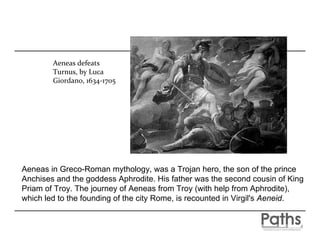
Aeneas defeats 
        Turnus, by Luca 
        Giordano, 1634‐1705


Aeneas in Greco-Roman mythology, was a Trojan hero, the son of the prince
Anchises and the goddess Aphrodite. His father was the second cousin of King
Priam of Troy. The journey of Aeneas from Troy (with help from Aphrodite),
which led to the founding of the city Rome, is recounted in Virgil's Aeneid.
Henry Purcell, by John Closterman
                                       (died 1711)


Dido and Aeneas is a monumental work in Baroque opera, it is remembered as one of
Purcell's foremost theatrical works. It was Purcell's first (and only) all-sung opera and is
among the earliest English operas. It owes much to John Blow's Venus and Adonis, both
in structure and overall effect. It is notable for its use of a Ground bass or basso ostinato
(obstinate bass) - a type of variation form in which a bass line, or harmonic pattern is
repeated as the basis of a piece underneath variations
Nahum Tate (1652, Dublin – July 30, 1715, Liberty of the
Mint) was an Irish poet, hymnist, and lyricist, who became
England's poet laureate in 1692.
http://www.youtube.com/watch?v=D_50zj7J50U Dame Janet 
Baker sings one of the most beautiful arias of all opera, from 
Purcell's Dido and Aeneas.

Glyndebourne, 1966. Conductor: Charles Mackerras

One of the most well known arias is Dido’s Lament, otherwise
known as ‘When I am laid in earth’
Further paths
•   Virgil
•   Virgil's Aeneid, Book IV
•   Dido, Queen of Carthage
•   Carthage - in modern-day Tunisia
•   Aeneas
•   Troy
•   The founding of the city Rome
•   Baroque music
•   Ground bass
•   Henry Purcell
•   John Blow
•   John Blow's Venus and Adonis
•   Nahum Tate
•   Famous performances and recordings
•   ...
•   ...
Our view of pathways
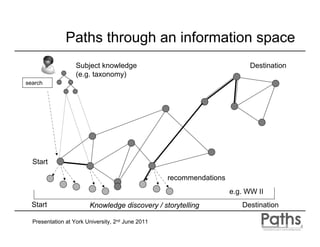
• A path is a ‘route’ through an information space
    – defined as collections of cultural heritage resources
    – consists of nodes and links to connect nodes (graph)
• Nodes can be connected in different ways
    –   pre-computed based on similarity between items
    –   computed on-the-fly (automated) and personalised
    –   defined by system/designers (guided paths)
    –   defined by users (individual or collectively)
• Exist as information objects in their own right
    – can be indexed, organised and shared with others, and will be
      potential learning objects that can be offered to users alongside
      the cultural heritage content


Presentation at York University, 2nd June 2011
Paths through an information space
                   Subject knowledge                                       Destination
                   (e.g. taxonomy)
search


  Start

                                                   recommendations
                                                                     e.g. WW II
  Start                 Knowledge discovery / storytelling              Destination

  Presentation at York University, 2nd June 2011
Independent paths
• Users can construct their own “independent paths”
    – can be saved for future reference, edited or shared with others
    – e.g. “Sheffield steel industry”, “my favourite works by Rembrandt”
      or “items seen during my trip to London on 6th Feb 2010”
• More than a simple list of items in a collection that the
  user has visited (i.e. bookmarks)
    – also contain information about the links between the items
      (relationships)
    – descriptive text (e.g. annotations, tags)
    – details of others items connected to them
    – connections to information both within and outside the collection
      that provides context


Presentation at York University, 2nd June 2011
Guided paths
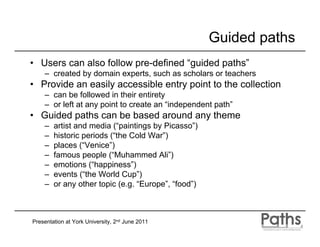
• Users can also follow pre-defined “guided paths”
    – created by domain experts, such as scholars or teachers
• Provide an easily accessible entry point to the collection
    – can be followed in their entirety
    – or left at any point to create an “independent path”
• Guided paths can be based around any theme
    –   artist and media (“paintings by Picasso”)
    –   historic periods (“the Cold War”)
    –   places (“Venice”)
    –   famous people (“Muhammed Ali”)
    –   emotions (“happiness”)
    –   events (“the World Cup”)
    –   or any other topic (e.g. “Europe”, “food”)


Presentation at York University, 2nd June 2011
Collaborative paths

• Groups of users can work collectively to create
  “collaborative paths”
     – adding new routes of discovery and annotations that can build
       upon the contributions made by others
• Could be used to encourage social interaction
     – students working on a group project - the output of which is a
       trail/pathways
     – experts working in collaboration to create exhibitions or trails
• Paths may also help identify individuals interested in the
  same topics and themes
     – identifying where the pathways cross-over


Presentation at York University, 2nd June 2011
Users and their goals
•   Some users may want to create paths as their specific goal (e.g.
    instructors and curators) – producers
     – locate and save nodes related to certain themes or subjects
     – creating learning resources for non-experts by constructing narratives
     – these experts manually create guided paths but may benefit from
       assistance with locating and constructing paths
•   Some users specifically come with the intention of following trails
    (e.g. students and museum visitors) - consumers
     – non-experts following static paths created by experts
     – may deviate from static paths and create individual paths
•   Other users may not intend generate or follow paths per se
     – don’t specifically save nodes during their searching
     – may benefit from paths as a record of interaction for future use
     – generate paths through user-system interaction, allow post-editing

Presentation at York University, 2nd June 2011
User studies
•   Focus on studying the activities of people who create pathways
     – curators, educators, professional historians …
     – currently interviewing subjects from a range of cultural heritage and
       educational organisations (from the user groups)
•   Want to find out the following
     –   Who creates paths and for what purpose(s)?
     –   What processes/tasks are involved in creating paths?
     –   What criteria are used to select items to include in paths?
     –   How are paths adapted to specific audiences?
     –   What tools are used to help create paths and how are they presented?
     –   Where do paths begin and where do they end?
•   Also want to gather the requirements/needs of the consumers
     – based on user characteristics, how do users follow paths?


Presentation at York University, 2nd June 2011
Desk research: 
                       review of previous user studies, comparisons of        Contextual analysis and 
                      published paths and path‐making tools, sentiment          competitor analysis
                                           analysis


                                                                                  Iterative system 
                                              Quantitative: 
                                                user profiles, 
                                                                              development and testing
                                         info needs and behaviour, 
                                               cognitive styles


                                                                                User requirements
                                              Qualitative: 
                                 meanings and uses of paths, task analysis 


Research Literature                        Explicit pathways:                       Prototyping
                                            expert‐generated


                                           Explicit pathways:                   System refinements
                                              user‐generated


                                          Implicit pathways:                    Final  system design
                                             log data analysis


                            User‐based evaluation criteria:                      System evaluation
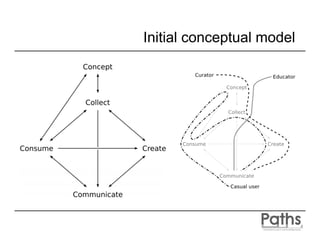
Initial conceptual model
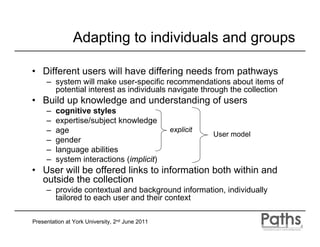
Adapting to individuals and groups

• Different users will have differing needs from pathways
     – system will make user-specific recommendations about items of
       potential interest as individuals navigate through the collection
• Build up knowledge and understanding of users
     –   cognitive styles
     –   expertise/subject knowledge
     –   age                                     explicit
                                                            User model
     –   gender
     –   language abilities
     –   system interactions (implicit)
• User will be offered links to information both within and
  outside the collection
     – provide contextual and background information, individually
       tailored to each user and their context

Presentation at York University, 2nd June 2011
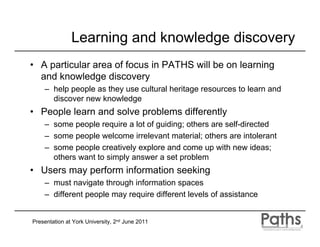
Learning and knowledge discovery
• A particular area of focus in PATHS will be on learning
  and knowledge discovery
    – help people as they use cultural heritage resources to learn and
      discover new knowledge
• People learn and solve problems differently
    – some people require a lot of guiding; others are self-directed
    – some people welcome irrelevant material; others are intolerant
    – some people creatively explore and come up with new ideas;
      others want to simply answer a set problem
• Users may perform information seeking
    – must navigate through information spaces
    – different people may require different levels of assistance


Presentation at York University, 2nd June 2011
Local (analytic)                                                 Global
                    Learning/problem-solving goals
Convergent goals.                  Divergent goals.
“Find an answer”.                  Creatively explore.
Learn pre-defined content.         Come up with new ideas.
                              Process goals
Concerned with procedures          Concerned with conceptual                Adopting a navigation path that
and vertical deep detail           overview and horizontal broad inter-     matches one’s predominant style
(procedure building).              relationships (description building).
                                                                            can influence the effectiveness of
                             Navigation styles
                                                                            the resultant learning.
Serialist navigation style         Holist navigation style
Narrow focus.                      Broad global focus.
One thing at a time.               Many things on the go at the same
Short logical links between        time.                                                    Autonomous
nodes.                             Rich links between nodes.
Intolerance of strictly            Welcoming of enrichment (but
irrelevant material.               strictly irrelevant) material.
Finish with one topic before       Layered approach returning to nodes
going on to the next.              at different level of detail.           Local                                   Global
                                                                           (analytic)
                       Positive learning outcomes
Good grasp of detailed             Well developed conceptual
evidence.                          overview.
Deep understanding of              Broad inter-relationship of ideas.                        Dependent
individual topics.                 Good grasp of the “big picture”.
In-depth understanding of the
                                                                             Key cognitive dimensions (Pask and Witkin)
parts.
                   Characteristic learning pathologies
Poor appreciation of topic         Poor grasp of detail.
inter-relationships.               Over-generalisation.
Failing to see the “big
picture”.
Realising our vision
• Stage 1 leads towards functionality of prototype 1
    – simple functionality for allowing registration of users
    – functionality to allow users to manually generate, organise and
      share static paths
    – visualisations of document space and provision of basic
      functionality for searching and browsing
• Stage 2 leads towards functionality of prototype 2
    – focus on personalisation and recommendation (creating paths
      dynamically and navigating the document space)
    – advanced visualisation and search/browse functionalities
• Stage 3 generates the additional applications
    – adapt functionality for Facebook and mobile devices


Presentation at York University, 2nd June 2011
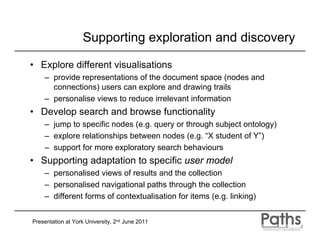
Supporting exploration and discovery

• Explore different visualisations
    – provide representations of the document space (nodes and
      connections) users can explore and drawing trails
    – personalise views to reduce irrelevant information
• Develop search and browse functionality
    – jump to specific nodes (e.g. query or through subject ontology)
    – explore relationships between nodes (e.g. “X student of Y”)
    – support for more exploratory search behaviours
• Supporting adaptation to specific user model
    – personalised views of results and the collection
    – personalised navigational paths through the collection
    – different forms of contextualisation for items (e.g. linking)


Presentation at York University, 2nd June 2011
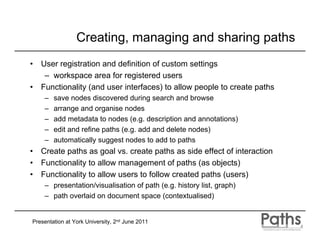
Creating, managing and sharing paths
•   User registration and definition of custom settings
     – workspace area for registered users
•   Functionality (and user interfaces) to allow people to create paths
     –   save nodes discovered during search and browse
     –   arrange and organise nodes
     –   add metadata to nodes (e.g. description and annotations)
     –   edit and refine paths (e.g. add and delete nodes)
     –   automatically suggest nodes to add to paths
•   Create paths as goal vs. create paths as side effect of interaction
•   Functionality to allow management of paths (as objects)
•   Functionality to allow users to follow created paths (users)
     – presentation/visualisation of path (e.g. history list, graph)
     – path overlaid on document space (contextualised)


Presentation at York University, 2nd June 2011
Developing user interfaces
• Advanced visualisations and overviews of info space
    – spatial metaphors for user interface
    – different types of collection overview and browsing
    – document space ordered thematically and hierarchically
• Automatic creation of themed collections and paths
• Encouraging engagement with pathways
    – games/quizzes, surprises and use of images
    – social interaction
    – diversity in recommendations
• Browsing using ostensive relevance feedback models
    – use past items (not one) to guide future direction of navigation
• Approaches for evaluating pathways
Presentation at York University, 2nd June 2011
Summary

• Pathways offer powerful metaphor for navigation onto
  which personalisation can be added
     – main focus and areas of novelty for the project
• Paths can be used to support various styles of cognitive
  information processing
     – surface as different routes taken through information space
• Offering users suggested routes will
     – help them locate information in large collections
     – help encourage information exploration and discovery
     – help them fulfil broader activities (e.g. constructing knowledge)
• Ultimately paths could help enhance user’s information
  access experience of digital library resources
     – but we need to understand users and their specific needs for
       creating, managing and sharing pathways

Presentation at York University, 2nd June 2011
Contact


                          Thanks for listening
                        p.d.clough@sheffield.ac.uk

                    PATHS is being funded from the European Community's
                    Seventh Framework Programme (FP7/2007-2013) under
                    grant agreement n° 270082. We acknowledge the
                    contribution of all project partners involved in PATHS in
                    this presentation (see: http://www.paths-project.eu)


Presentation at York University, 2nd June 2011

PATHS presentation at York University

  • 1.
    Using Pathways forNavigating and Personalised Access to Cultural Heritage Materials Paul Clough The Information School University of Sheffield Presentation at York University, 2nd June 2011
  • 2.
    The Information School • Formerly known as the Department of Information Studies – Formed in 1963 (PG School of Librarianship) – Now in the faculty of social science – http://www.shef.ac.uk/is/ • Leading researchers past and present include – Tom Wilson – Micheline Beaulieu – Steve Whittaker – Mark Sanderson – Peter Willett – Nigel Ford • Now part of the emerging iSchool movement Presentation at York University, 2nd June 2011
  • 3.
    Sheffield IR group •Four academics – Prof. Nigel Ford (group leader) – Dr. Paul Clough – Dr. Robert Villa – Prof. Elaine Toms (currently Dalhousie University) • Four RAs – Paula Goodale and Mark Hall (PATHS) – Evangelos Kanoulas (EFireEval) – Monica Paramita (ACCURAT) • Currently 6 PhD students – Mixture of library and information science and computer science backgrounds Presentation at York University, 2nd June 2011
  • 4.
    My areas ofresearch http://ir.shef.ac.uk/cloughie/ • Text re-use and plagiarism detection • Multilingual information access • Geographical Information Retrieval (GIR) • Multimedia retrieval (images) • Evaluation of IR systems • User interfaces and interaction • Construction of corpora and evaluation resources Presentation at York University, 2nd June 2011
  • 5.
    Recent and currentresearch projects • Mining imprecise regions from the Web (EPSRC and Ordnance Survey) • Improving Information Finding at the UK National Archives (TNA) • User-Centered Design of a Recommender System for a 'Universal' Library Catalogue (AHRC and OCLC Inc.) • Analysis and evaluation of Comparable Corpora for Under Resourced Areas of machine Translation (EU FP7) • Personalised Access to Cultural Heritage Spaces (EU FP7) Presentation at York University, 2nd June 2011
  • 6.
    Providing Personalised Accessto Cultural Heritage Spaces http://www.paths-project.eu/ Clough, P. Stevenson, M & Ford, N. (2011) Personalising Access to Cultural Heritage Collections using Pathways, In Proceedings of Workshop on Personalised Access To Cultural Heritage (PATCH ‘11), IUI 2011. Presentation at York University, 2nd June 2011
  • 7.
    Information access inCultural Heritage • Significant amounts of CH material available online – Web portals, digital libraries, aggregated portals (e.g. Europeana), Wikipedia, … • Users may find it difficult to navigate and interpret wealth of information – keyword-based access provides limited success – many users are not domain or subject experts – limited support for knowledge exploration and discovery • Contrast with traditional mechanisms (e.g. museums) • Cultural institutions looking at new ways of providing rich user experiences to support lifelong learning – user participation (e.g. web2.0), personalisation, … Presentation at York University, 2nd June 2011
  • 8.
    Personalisation in CulturalHeritage • Over 20 years of research in using personalisation to improve the user experience in cultural heritage – adapt the suggestion and presentation of information (adaptive hypermedia systems) for physical and virtual worlds – well-suited application domain for personalisation • Involves modelling users, groups and communities to provide appropriate content – provides personalised learning experiences – Recent emphasis on semantic and social web – development of collection-specific ontologies (e.g. CHIP) – user-generated content seen as a useful form of metadata – Derived from: Ardissono et al. (forthcoming 2011) Presentation at York University, 2nd June 2011
  • 9.
    Typical user groupsin cultural heritage • General user – e.g. cultural tourist • School child • Academic user Derived from Europeana – students user studies – teachers http://www.europeana.org • Expert researcher – e.g. museum curators • Professional user, – e.g. librarian, archivist, etc Presentation at York University, 2nd June 2011
  • 10.
    Uses of culturalheritage websites • For entertainment/leisure Derived from – general interest, browsing Europeana user studies • To gain new knowledge http://www.europeana.org – specific interest, targeted • To locate interesting items – purposive, pre-visit • To develop communities of interest – sharing – opinions, knowledge, personal artefacts – social platform Presentation at York University, 2nd June 2011
  • 11.
    Information seeking behaviours •Information tasks by professionals (Amin et al., 2008) – information gathering (63.0%) • Topic search – information exchange (13.0%) • Comparison • Combination – fact-finding (10.2%) • Exploration – keeping-up-to-date (8.3%) • Relationship search – information maintenance (5.6%) • Information seeking by non-experts (Skov & Ingwersen, 2008) – focus on virtual museum visitors • Highly visual experience – broad coverage of needs/characteristics • Meaning making – educational purposes including making • Known-item searching sense of items in a collection • Exploratory behaviour Presentation at York University, 2nd June 2011
  • 12.
    Related projects •Steve: the museum social tagging project – http://www.steve.museum/ • The SmartMuseum project – http://www.smartmuseum.eu/ • Personal Experience with Active Cultural Heritage – http://peach.fbk.eu/home.html • Cultural Heritage Information Personalisation – http://www.chip-project.org/ • Personalisation of the Digital Library Experience – http://comminfo.rutgers.edu/imls/poodle/ • The Ensemble (Walden’s Paths) project – http://ensemble.tamu.edu/walden_info Presentation at York University, 2nd June 2011
  • 13.
    Personalised Access Tocultural Heritage Spaces (PATHS) • STREP funded under the FP7 programme • Duration of 36 months – 1st January 2011 to 31st December 2013 • Budget – 3,199,299 euros in total – 2,300,000 euros EU grant • 6 partners in 5 countries • Project management – 334 person months – 8 work packages – 22 deliverables Presentation at York University, 2nd June 2011
  • 14.
    The consortium •Two universities – Sheffield University – Universidad del Pais Vasco • Two technology enterprises – i-sieve technologies Ltd – Asplan Viak Internet Ltd • Two cultural heritage enterprises – MDR Partners – Alinari 24 Ore Spa • Additional content provider – Europeana Presentation at York University, 2nd June 2011
  • 15.
    Additional user groups • Wiltshire Heritage Museum • Imperial War Museum • The UK National Archives • Archaeology Data Service • Biblioteca Nazionale Centrale di Firenze • Biblioteca Virtual Cervantes • Biblioteca Nacional de España Presentation at York University, 2nd June 2011
  • 16.
    The project vision •Provide functionality to support user’s knowledge discovery and exploration • The use of pathways/trails to help users navigate and explore the information space • The use of personalisation (e.g. recommender systems) to adapt views/paths to specific users, groups or communities of users • Show links to other items within and external to an item to help users contextualise and interpret the item Presentation at York University, 2nd June 2011
  • 17.
    Project objectives • Analysisof users’ requirements for discovering knowledge and construction of pathways/trails • Automated organisation and enrichment of Cultural Heritage content for use within a navigation system • Implementation of a system for navigating Cultural Heritage resources applied to multiple data sources • Techniques for providing personalised access to Cultural Heritage content (e.g. recommender systems) • Versions for use on mobile devices and Facebook • Evaluation with user groups and field trials Presentation at York University, 2nd June 2011
  • 18.
    Research areas • InformationAccess – user-driven navigation through collections of information – knowledge of users’ requirements for access to cultural heritage collections – modelling of user preferences and navigational context • Educational Informatics – adapting to individual learners in relation to being directed and being allowed the freedom to explore autonomously • Content Interpretation and Enrichment – representation and sharing of information about items in Digital Libraries – identifying background information related to the items in cultural heritage collections (e.g. links to Wikipedia pages) Presentation at York University, 2nd June 2011
  • 19.
    Pathways for navigationand personalisation • Navigation through the information space is based around the metaphor of “paths” – flexible model of navigation and exploration onto which various levels of personalisation can be added • Paths can provide the following information Which can be – a history of where the user has been adapted and – suggestions of where the user might go next mapped to an – a narrative/story through a set of items individual’s learning styles • Items in a path can be ordered – chronologically – thematically Can be done manually or automatically – ... Presentation at York University, 2nd June 2011
  • 20.
    Paths/trails have beenstudied in many fields • Trails (Memex, 1945) – Associative trails explicitly created by users forming links between stored materials to help others navigate • Destinations (search engines and web analytics) – Origin/landing page (from query), intermediate pages and destination page • Search strategies (information seeking) – Users moving between information sources, perhaps due to changes in their information needs (e.g. Berrypicking) • Guided tours (hypertext) – authors create sequence of pages useful to others (manual) – automatically generated trails to assist with web navigation – used in educational informatics and cultural heritage Presentation at York University, 2nd June 2011
  • 21.
    Existing paths/trails incultural heritage • The Ensemble (Walden’s Paths) project – http://www.csdl.tamu.edu/walden/ – allow educators to arrange web pages into a series of sequential paths on specific topics – educators can add comments at each node – highly prescriptive and users cannot deviate from paths • Thematic trails – Louvre – http://www.louvre.fr/llv/activite/liste_parcours.jsp?bmLocale=en – selection of works that typify a period, artistic movement or theme (routes provide narrative when viewing physical objects) – trails can be viewed online or printed prior to visit to museum – prescriptive with limited interactivity and personalisation Presentation at York University, 2nd June 2011
  • 22.
    Example produced by JillianGriffiths (MMU) Creating paths: an example Existing subject knowledge
  • 23.
    Aeneas Telling  Dido of the  Disaster at  Troy, 1815 by Pierre  Narcisse Guérin Dido and Aeneas is an opera in a prologue and three acts by the English Baroque composer Henry Purcell to a libretto by Nahum Tate. The first known performance was at Josias Priest's girls' school in London no later than the summer of 1688. The story is based on Book IV of Virgil's Aeneid
  • 24.
    Joh. Heinrich d.Ä.  Tischbein "Dido and  Aeneas escape to a  cave before the  thunderstorm" The opera recounts the love story of Dido, Queen of Carthage and the Trojan hero Aeneas, and her despair at his abandonment of her.
  • 25.
    The Death of Dido, by  Andrea Sacchi Dido, also known as Elissa, was, according to ancient Greek and Roman sources, the founder and first Queen of Carthage (in modern-day Tunisia). She is best known from the account given by the Roman poet Virgil in his Aeneid.
  • 26.
    Aeneas defeats  Turnus, by Luca  Giordano, 1634‐1705 Aeneas in Greco-Roman mythology, was a Trojan hero, the son of the prince Anchises and the goddess Aphrodite. His father was the second cousin of King Priam of Troy. The journey of Aeneas from Troy (with help from Aphrodite), which led to the founding of the city Rome, is recounted in Virgil's Aeneid.
  • 27.
    Henry Purcell, by John Closterman (died 1711) Dido and Aeneas is a monumental work in Baroque opera, it is remembered as one of Purcell's foremost theatrical works. It was Purcell's first (and only) all-sung opera and is among the earliest English operas. It owes much to John Blow's Venus and Adonis, both in structure and overall effect. It is notable for its use of a Ground bass or basso ostinato (obstinate bass) - a type of variation form in which a bass line, or harmonic pattern is repeated as the basis of a piece underneath variations
  • 28.
    Nahum Tate (1652,Dublin – July 30, 1715, Liberty of the Mint) was an Irish poet, hymnist, and lyricist, who became England's poet laureate in 1692.
  • 29.
  • 30.
    Further paths • Virgil • Virgil's Aeneid, Book IV • Dido, Queen of Carthage • Carthage - in modern-day Tunisia • Aeneas • Troy • The founding of the city Rome • Baroque music • Ground bass • Henry Purcell • John Blow • John Blow's Venus and Adonis • Nahum Tate • Famous performances and recordings • ... • ...
  • 31.
    Our view ofpathways • A path is a ‘route’ through an information space – defined as collections of cultural heritage resources – consists of nodes and links to connect nodes (graph) • Nodes can be connected in different ways – pre-computed based on similarity between items – computed on-the-fly (automated) and personalised – defined by system/designers (guided paths) – defined by users (individual or collectively) • Exist as information objects in their own right – can be indexed, organised and shared with others, and will be potential learning objects that can be offered to users alongside the cultural heritage content Presentation at York University, 2nd June 2011
  • 32.
    Paths through aninformation space Subject knowledge Destination (e.g. taxonomy) search Start recommendations e.g. WW II Start Knowledge discovery / storytelling Destination Presentation at York University, 2nd June 2011
  • 33.
    Independent paths • Userscan construct their own “independent paths” – can be saved for future reference, edited or shared with others – e.g. “Sheffield steel industry”, “my favourite works by Rembrandt” or “items seen during my trip to London on 6th Feb 2010” • More than a simple list of items in a collection that the user has visited (i.e. bookmarks) – also contain information about the links between the items (relationships) – descriptive text (e.g. annotations, tags) – details of others items connected to them – connections to information both within and outside the collection that provides context Presentation at York University, 2nd June 2011
  • 34.
    Guided paths • Userscan also follow pre-defined “guided paths” – created by domain experts, such as scholars or teachers • Provide an easily accessible entry point to the collection – can be followed in their entirety – or left at any point to create an “independent path” • Guided paths can be based around any theme – artist and media (“paintings by Picasso”) – historic periods (“the Cold War”) – places (“Venice”) – famous people (“Muhammed Ali”) – emotions (“happiness”) – events (“the World Cup”) – or any other topic (e.g. “Europe”, “food”) Presentation at York University, 2nd June 2011
  • 35.
    Collaborative paths • Groupsof users can work collectively to create “collaborative paths” – adding new routes of discovery and annotations that can build upon the contributions made by others • Could be used to encourage social interaction – students working on a group project - the output of which is a trail/pathways – experts working in collaboration to create exhibitions or trails • Paths may also help identify individuals interested in the same topics and themes – identifying where the pathways cross-over Presentation at York University, 2nd June 2011
  • 36.
    Users and theirgoals • Some users may want to create paths as their specific goal (e.g. instructors and curators) – producers – locate and save nodes related to certain themes or subjects – creating learning resources for non-experts by constructing narratives – these experts manually create guided paths but may benefit from assistance with locating and constructing paths • Some users specifically come with the intention of following trails (e.g. students and museum visitors) - consumers – non-experts following static paths created by experts – may deviate from static paths and create individual paths • Other users may not intend generate or follow paths per se – don’t specifically save nodes during their searching – may benefit from paths as a record of interaction for future use – generate paths through user-system interaction, allow post-editing Presentation at York University, 2nd June 2011
  • 37.
    User studies • Focus on studying the activities of people who create pathways – curators, educators, professional historians … – currently interviewing subjects from a range of cultural heritage and educational organisations (from the user groups) • Want to find out the following – Who creates paths and for what purpose(s)? – What processes/tasks are involved in creating paths? – What criteria are used to select items to include in paths? – How are paths adapted to specific audiences? – What tools are used to help create paths and how are they presented? – Where do paths begin and where do they end? • Also want to gather the requirements/needs of the consumers – based on user characteristics, how do users follow paths? Presentation at York University, 2nd June 2011
  • 38.
    Desk research:  review of previous user studies, comparisons of  Contextual analysis and  published paths and path‐making tools, sentiment  competitor analysis analysis Iterative system  Quantitative:  user profiles,  development and testing info needs and behaviour,  cognitive styles User requirements Qualitative:  meanings and uses of paths, task analysis  Research Literature Explicit pathways:  Prototyping expert‐generated Explicit pathways:  System refinements user‐generated Implicit pathways:  Final  system design log data analysis User‐based evaluation criteria:  System evaluation
  • 39.
  • 40.
    Adapting to individualsand groups • Different users will have differing needs from pathways – system will make user-specific recommendations about items of potential interest as individuals navigate through the collection • Build up knowledge and understanding of users – cognitive styles – expertise/subject knowledge – age explicit User model – gender – language abilities – system interactions (implicit) • User will be offered links to information both within and outside the collection – provide contextual and background information, individually tailored to each user and their context Presentation at York University, 2nd June 2011
  • 41.
    Learning and knowledgediscovery • A particular area of focus in PATHS will be on learning and knowledge discovery – help people as they use cultural heritage resources to learn and discover new knowledge • People learn and solve problems differently – some people require a lot of guiding; others are self-directed – some people welcome irrelevant material; others are intolerant – some people creatively explore and come up with new ideas; others want to simply answer a set problem • Users may perform information seeking – must navigate through information spaces – different people may require different levels of assistance Presentation at York University, 2nd June 2011
  • 42.
    Local (analytic) Global Learning/problem-solving goals Convergent goals. Divergent goals. “Find an answer”. Creatively explore. Learn pre-defined content. Come up with new ideas. Process goals Concerned with procedures Concerned with conceptual Adopting a navigation path that and vertical deep detail overview and horizontal broad inter- matches one’s predominant style (procedure building). relationships (description building). can influence the effectiveness of Navigation styles the resultant learning. Serialist navigation style Holist navigation style Narrow focus. Broad global focus. One thing at a time. Many things on the go at the same Short logical links between time. Autonomous nodes. Rich links between nodes. Intolerance of strictly Welcoming of enrichment (but irrelevant material. strictly irrelevant) material. Finish with one topic before Layered approach returning to nodes going on to the next. at different level of detail. Local Global (analytic) Positive learning outcomes Good grasp of detailed Well developed conceptual evidence. overview. Deep understanding of Broad inter-relationship of ideas. Dependent individual topics. Good grasp of the “big picture”. In-depth understanding of the Key cognitive dimensions (Pask and Witkin) parts. Characteristic learning pathologies Poor appreciation of topic Poor grasp of detail. inter-relationships. Over-generalisation. Failing to see the “big picture”.
  • 43.
    Realising our vision •Stage 1 leads towards functionality of prototype 1 – simple functionality for allowing registration of users – functionality to allow users to manually generate, organise and share static paths – visualisations of document space and provision of basic functionality for searching and browsing • Stage 2 leads towards functionality of prototype 2 – focus on personalisation and recommendation (creating paths dynamically and navigating the document space) – advanced visualisation and search/browse functionalities • Stage 3 generates the additional applications – adapt functionality for Facebook and mobile devices Presentation at York University, 2nd June 2011
  • 44.
    Supporting exploration anddiscovery • Explore different visualisations – provide representations of the document space (nodes and connections) users can explore and drawing trails – personalise views to reduce irrelevant information • Develop search and browse functionality – jump to specific nodes (e.g. query or through subject ontology) – explore relationships between nodes (e.g. “X student of Y”) – support for more exploratory search behaviours • Supporting adaptation to specific user model – personalised views of results and the collection – personalised navigational paths through the collection – different forms of contextualisation for items (e.g. linking) Presentation at York University, 2nd June 2011
  • 45.
    Creating, managing andsharing paths • User registration and definition of custom settings – workspace area for registered users • Functionality (and user interfaces) to allow people to create paths – save nodes discovered during search and browse – arrange and organise nodes – add metadata to nodes (e.g. description and annotations) – edit and refine paths (e.g. add and delete nodes) – automatically suggest nodes to add to paths • Create paths as goal vs. create paths as side effect of interaction • Functionality to allow management of paths (as objects) • Functionality to allow users to follow created paths (users) – presentation/visualisation of path (e.g. history list, graph) – path overlaid on document space (contextualised) Presentation at York University, 2nd June 2011
  • 46.
    Developing user interfaces •Advanced visualisations and overviews of info space – spatial metaphors for user interface – different types of collection overview and browsing – document space ordered thematically and hierarchically • Automatic creation of themed collections and paths • Encouraging engagement with pathways – games/quizzes, surprises and use of images – social interaction – diversity in recommendations • Browsing using ostensive relevance feedback models – use past items (not one) to guide future direction of navigation • Approaches for evaluating pathways Presentation at York University, 2nd June 2011
  • 47.
    Summary • Pathways offerpowerful metaphor for navigation onto which personalisation can be added – main focus and areas of novelty for the project • Paths can be used to support various styles of cognitive information processing – surface as different routes taken through information space • Offering users suggested routes will – help them locate information in large collections – help encourage information exploration and discovery – help them fulfil broader activities (e.g. constructing knowledge) • Ultimately paths could help enhance user’s information access experience of digital library resources – but we need to understand users and their specific needs for creating, managing and sharing pathways Presentation at York University, 2nd June 2011
  • 48.
    Contact Thanks for listening p.d.clough@sheffield.ac.uk PATHS is being funded from the European Community's Seventh Framework Programme (FP7/2007-2013) under grant agreement n° 270082. We acknowledge the contribution of all project partners involved in PATHS in this presentation (see: http://www.paths-project.eu) Presentation at York University, 2nd June 2011