PATHS: Personalising access to
digital cultural heritage spaces
Kate Fernie
MDR Partners (Consulting) Ltd
UK

Session 8b: 10th October 2013

eChallenges e-2013

Copyright 2013 PATHS
PATHS: project basics
• 
• 
• 

A STREP funded under the FP7 programme
36 month project - 1/1/2011 to 31/12/2013
6 partners in 5 countries
• 
• 
• 
• 
• 
• 

University of Sheffield
Universidad del Pais Vasco
i-sieve technologies Ltd
Asplan Viak Internet Ltd
MDR Partners
(Alinari 24 Ora Spa)

http://www.paths-project.eu

Session 8b: 10th October 2013

eChallenges e-2013

Copyright 2013 PATHS
Motivation
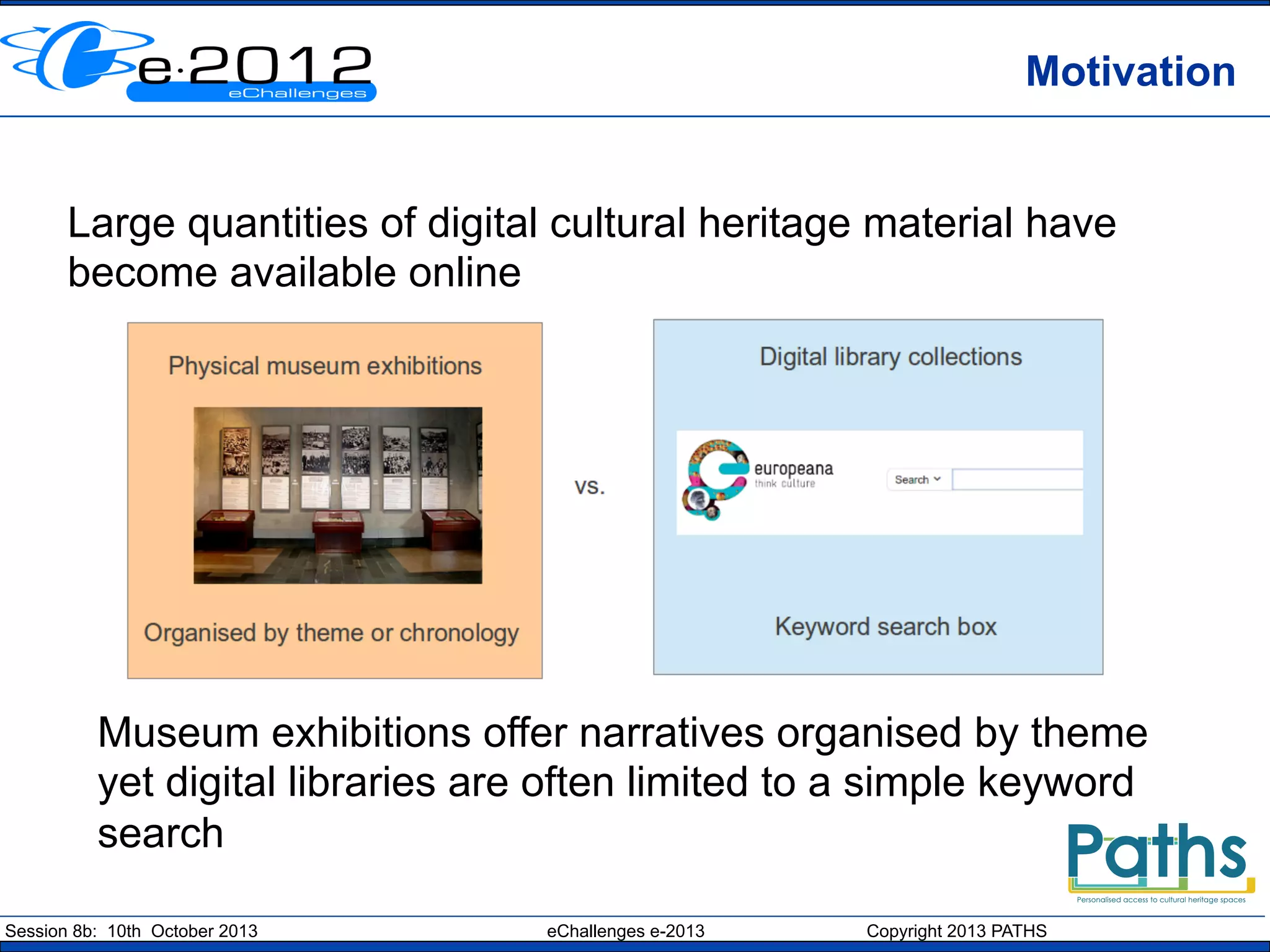
Large quantities of digital cultural heritage material have
become available online

Museum exhibitions offer narratives organised by theme
yet digital libraries are often limited to a simple keyword
search
Session 8b: 10th October 2013

eChallenges e-2013

Copyright 2013 PATHS
Introducing paths
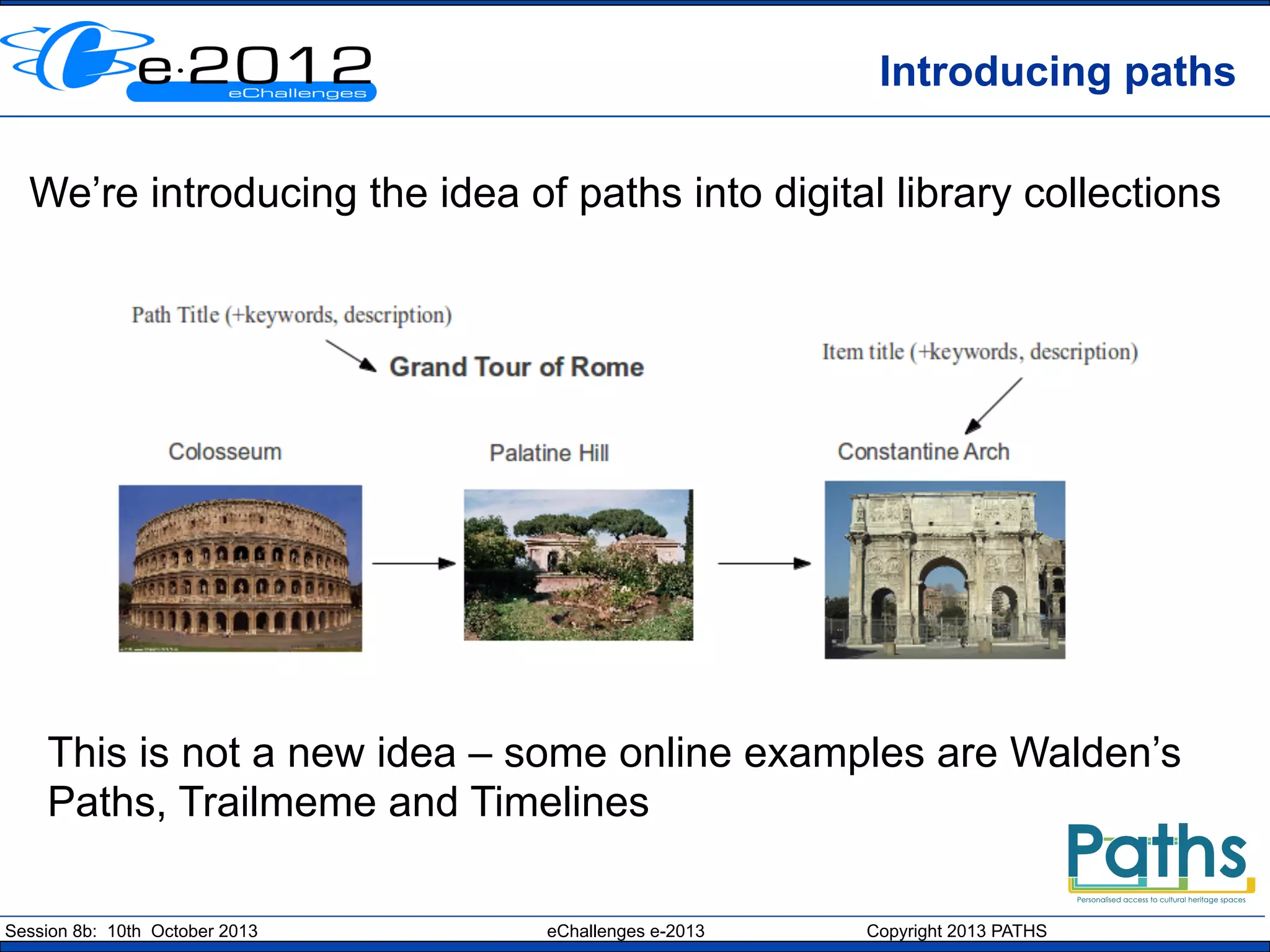
We’re introducing the idea of paths into digital library collections

This is not a new idea – some online examples are Walden’s
Paths, Trailmeme and Timelines
Session 8b: 10th October 2013

eChallenges e-2013

Copyright 2013 PATHS
Research Objectives
•  Information access: Methods for exploring and
navigating digital cultural heritage collections, including
paths, topic maps, tag-clouds, hierarchical concept
structures and recommender services.
•  Natural Language Processing: analysing item metadata
to improve indexing, enable use of ontologies, and
generating links between items in the collection and with
external background material.
•  Educational informatics: adapting to individual learners
in relation to being directed and being allowed the
freedom to explore autonomously

Session 8b: 10th October 2013

eChallenges e-2013

Copyright 2013 PATHS
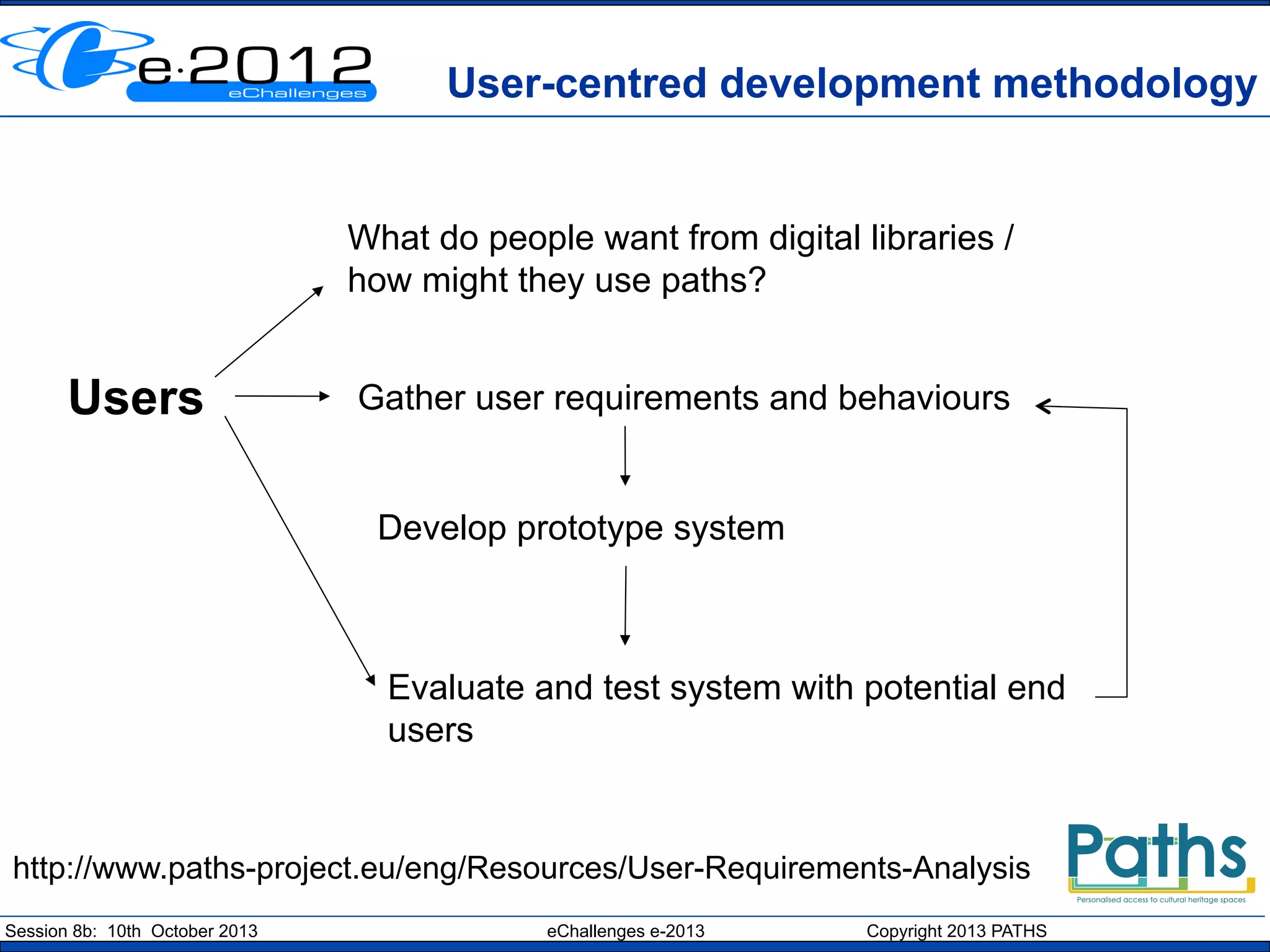
User-centred development methodology

What do people want from digital libraries /
how might they use paths?

Users

Gather user requirements and behaviours

Develop prototype system

Evaluate and test system with potential end
users

http://www.paths-project.eu/eng/Resources/User-Requirements-Analysis
Session 8b: 10th October 2013

eChallenges e-2013

Copyright 2013 PATHS
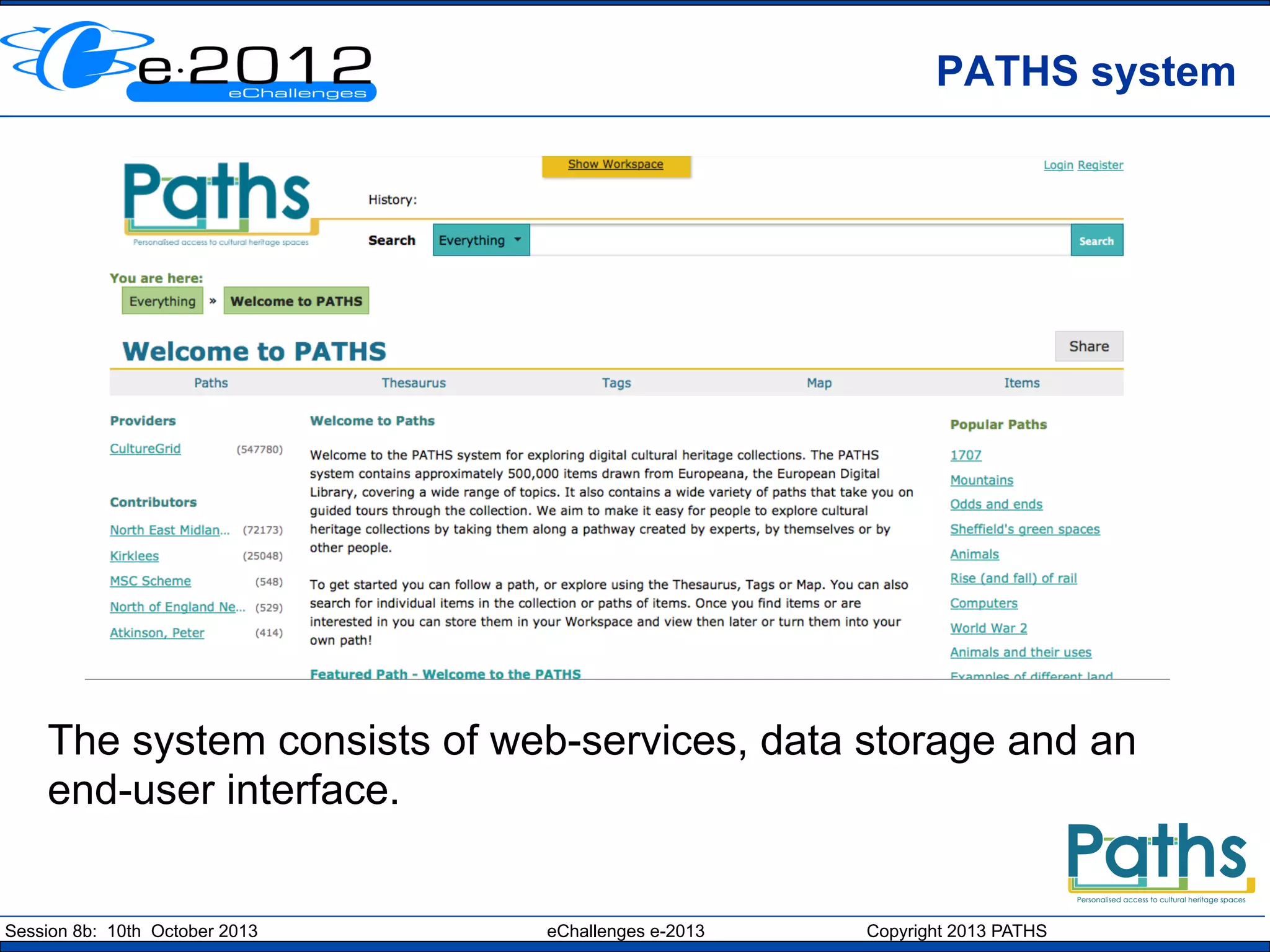
PATHS system

The system consists of web-services, data storage and an
end-user interface.

Session 8b: 10th October 2013

eChallenges e-2013

Copyright 2013 PATHS
Enriched metadata
The PATHS system is based on content from Europeana
that has been processed and enriched. Our aims were to:
•  Linguistic processing – enrich text metadata with
additional keywords and index terms
•  Thematic organisation – find a vocabulary to use to
organise the items in the collection automatically
•  Intra-collection links – to create a network of links
between related items in the collection
•  Links to Wikipedia – create links to contextual
information in Wikipedia
•  Links to websites – use Sentiment Analysis to
establish links to closely related external websites
Session 8b: 10th October 2013

eChallenges e-2013

Copyright 2013 PATHS
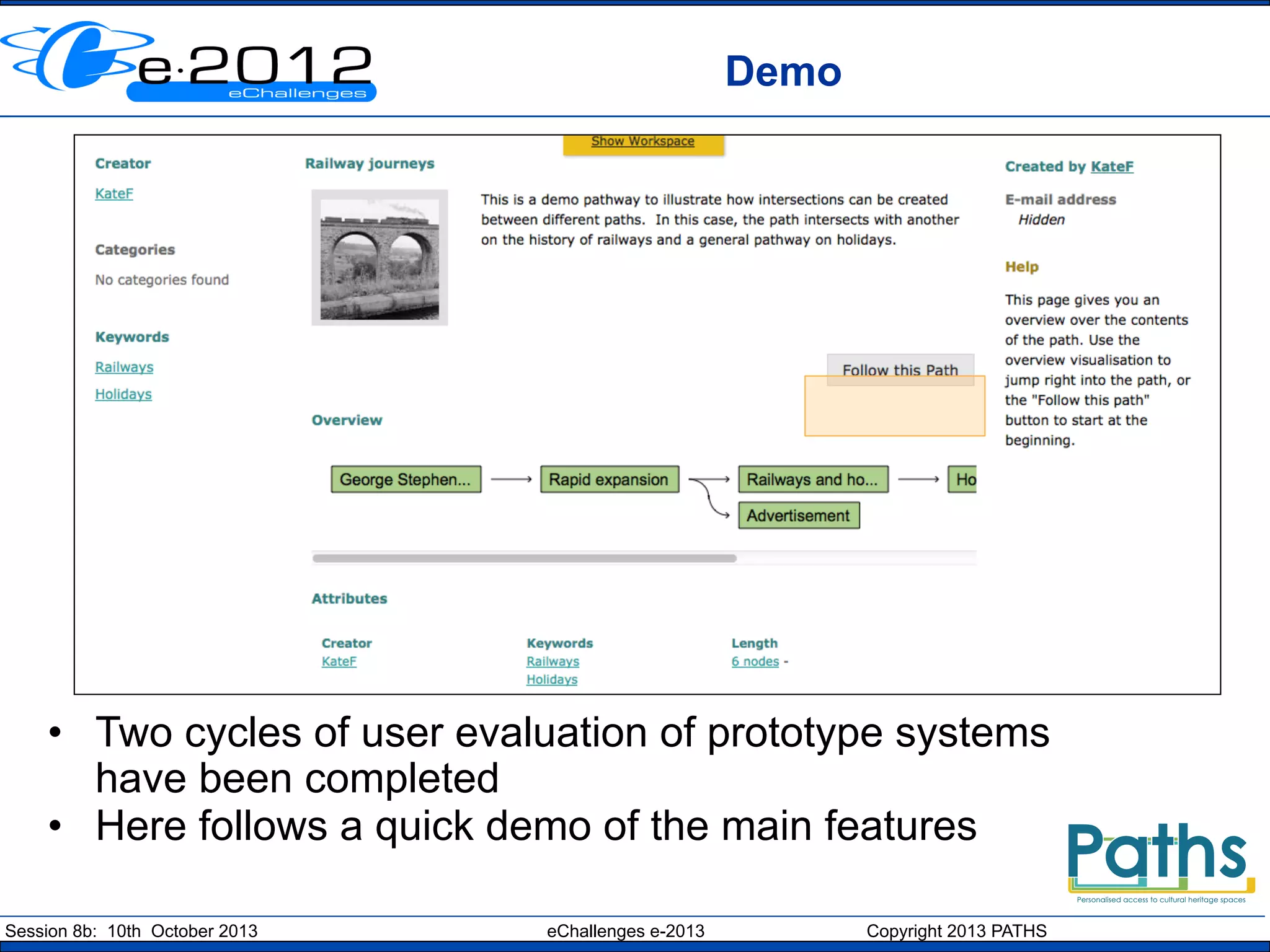
Demo

•  Two cycles of user evaluation of prototype systems
have been completed
•  Here follows a quick demo of the main features
Session 8b: 10th October 2013

eChallenges e-2013

Copyright 2013 PATHS
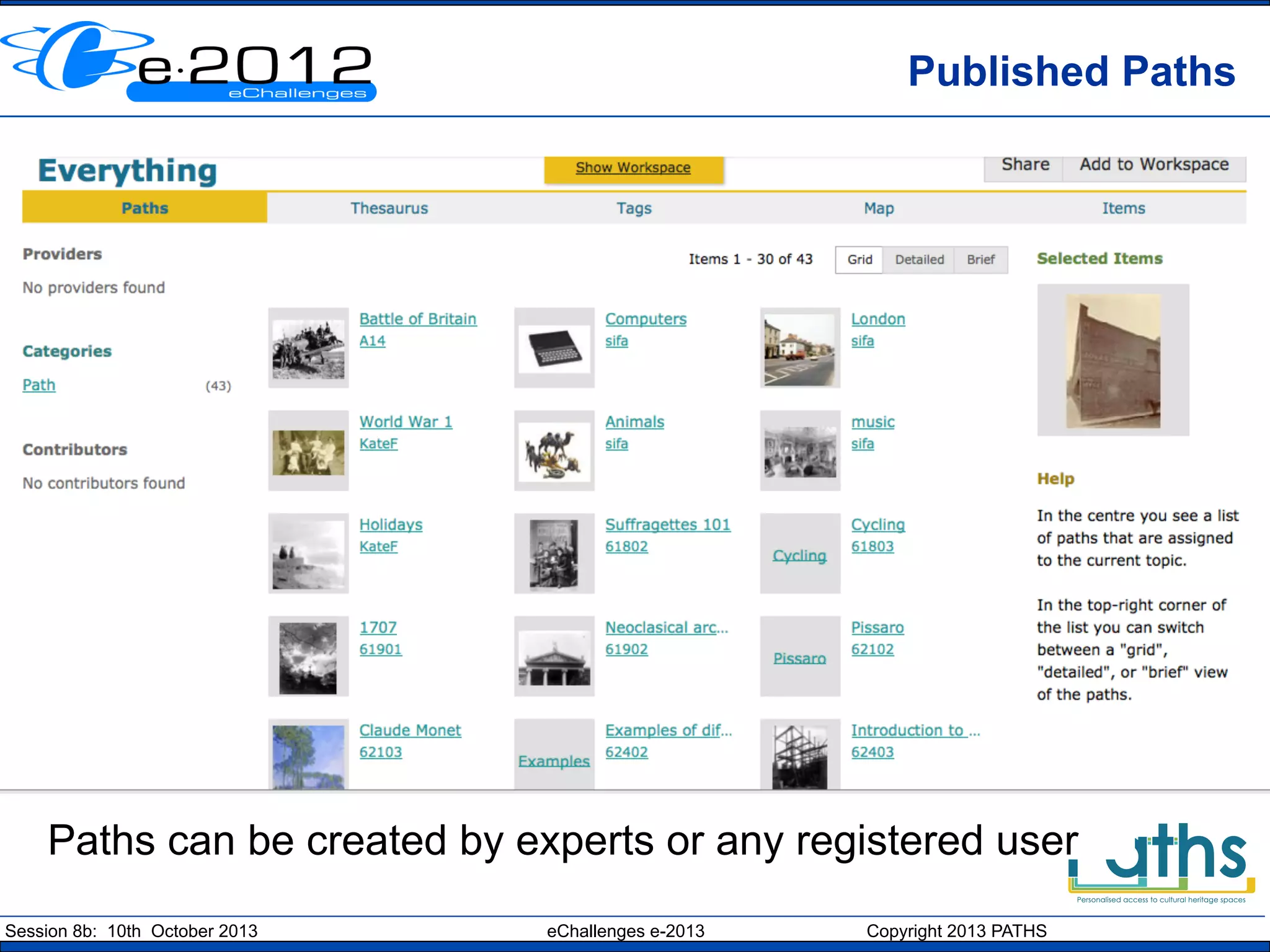
Published Paths

Paths can be created by experts or any registered user
Session 8b: 10th October 2013

eChallenges e-2013

Copyright 2013 PATHS
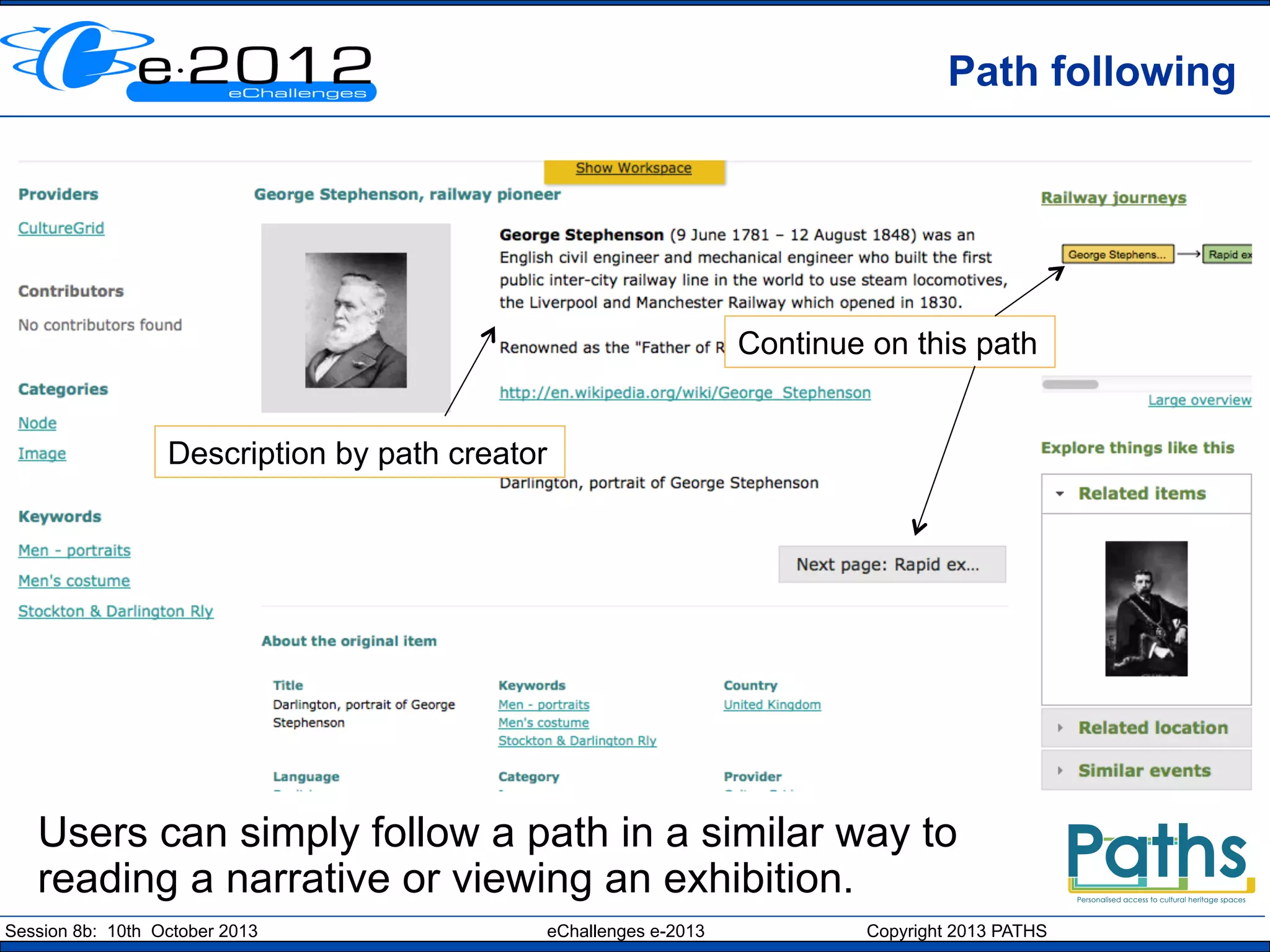
Path following

Continue on this path
Description by path creator

Users can simply follow a path in a similar way to
reading a narrative or viewing an exhibition.
Session 8b: 10th October 2013

eChallenges e-2013

Copyright 2013 PATHS
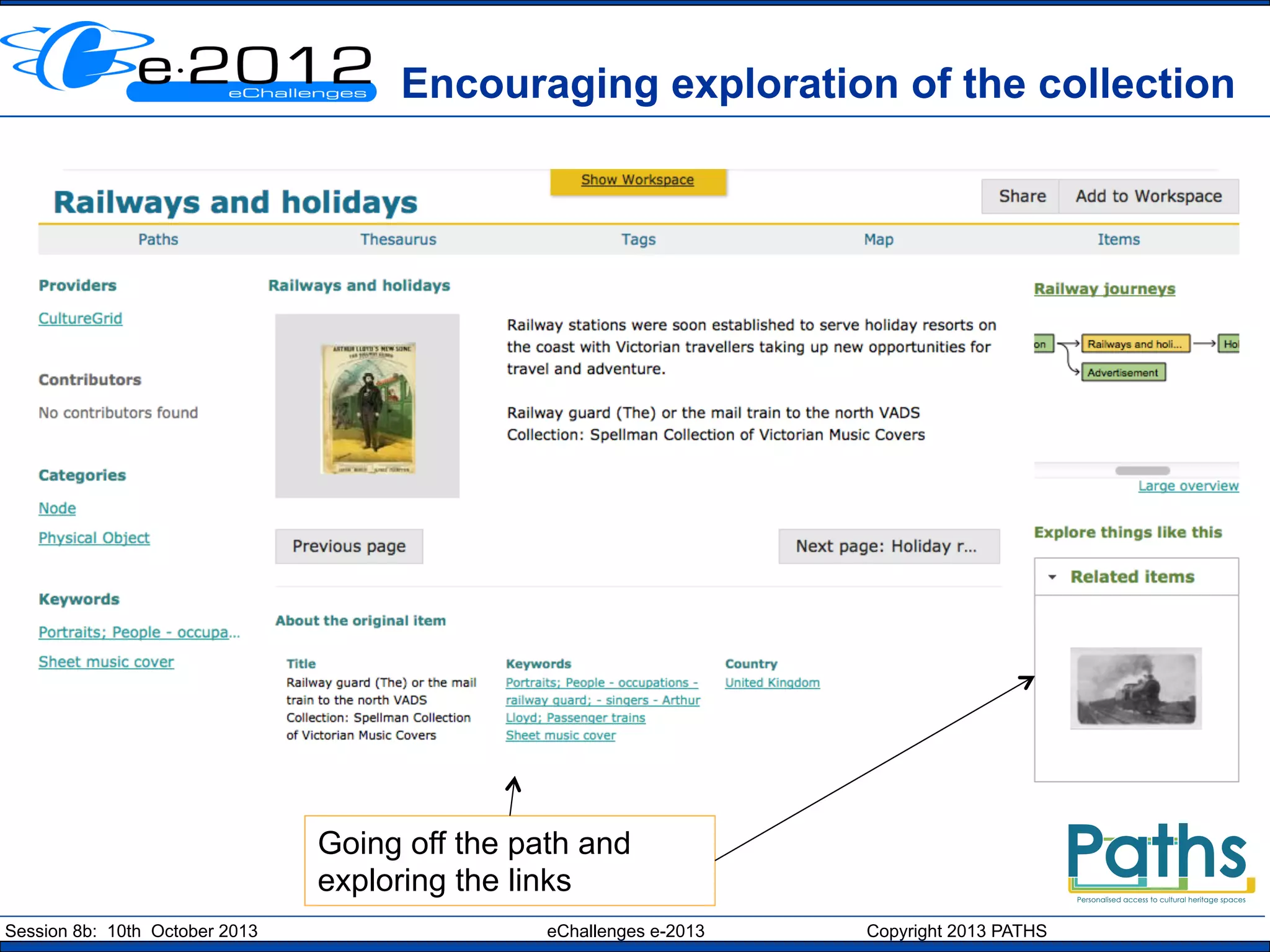
Encouraging exploration of the collection

Going off the path and
exploring the links
Session 8b: 10th October 2013

eChallenges e-2013

Copyright 2013 PATHS
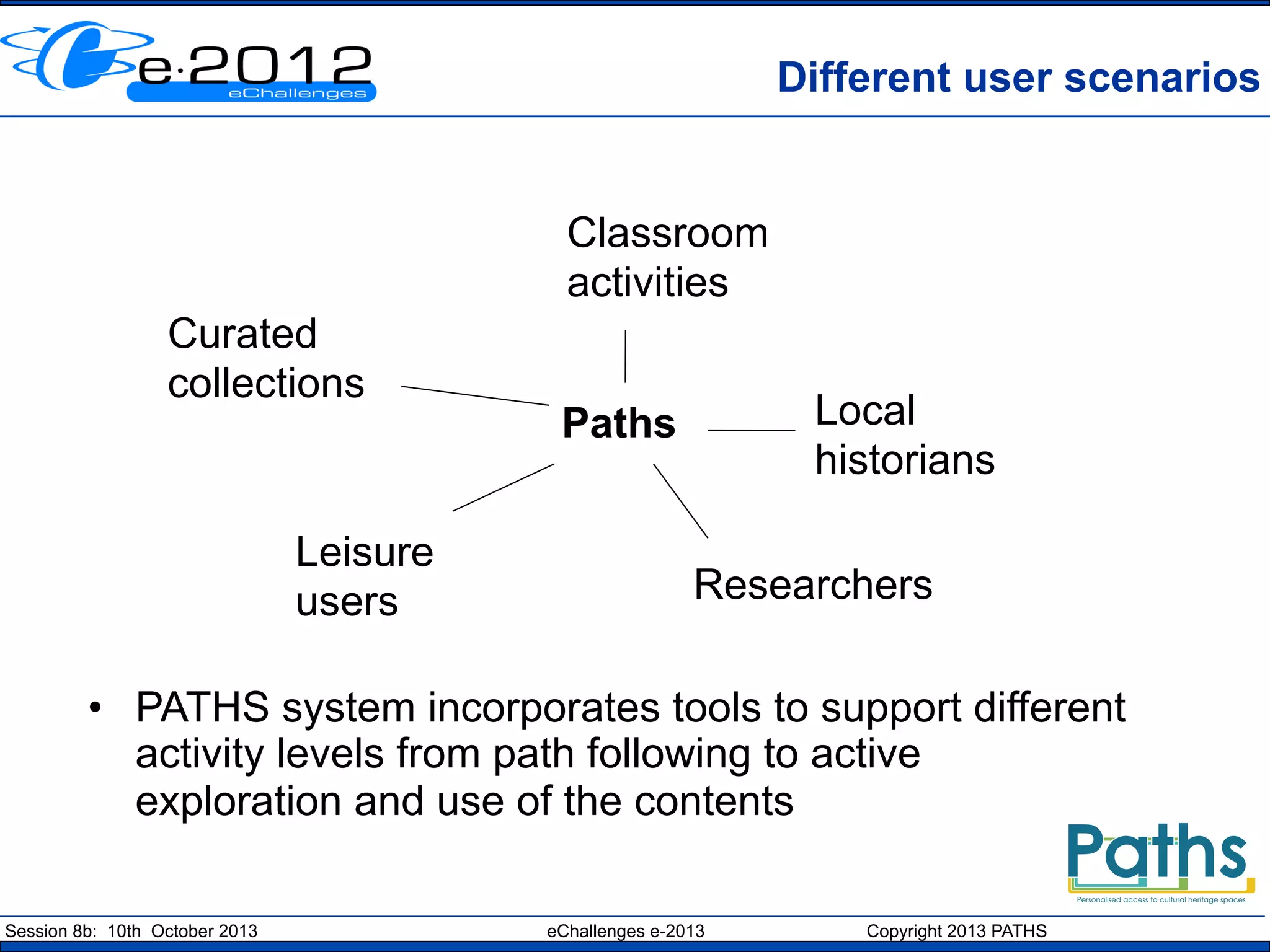
Different user scenarios

Classroom
activities
Curated
collections

Leisure
users

Local
historians

Paths

Researchers

•  PATHS system incorporates tools to support different
activity levels from path following to active
exploration and use of the contents
Session 8b: 10th October 2013

eChallenges e-2013

Copyright 2013 PATHS
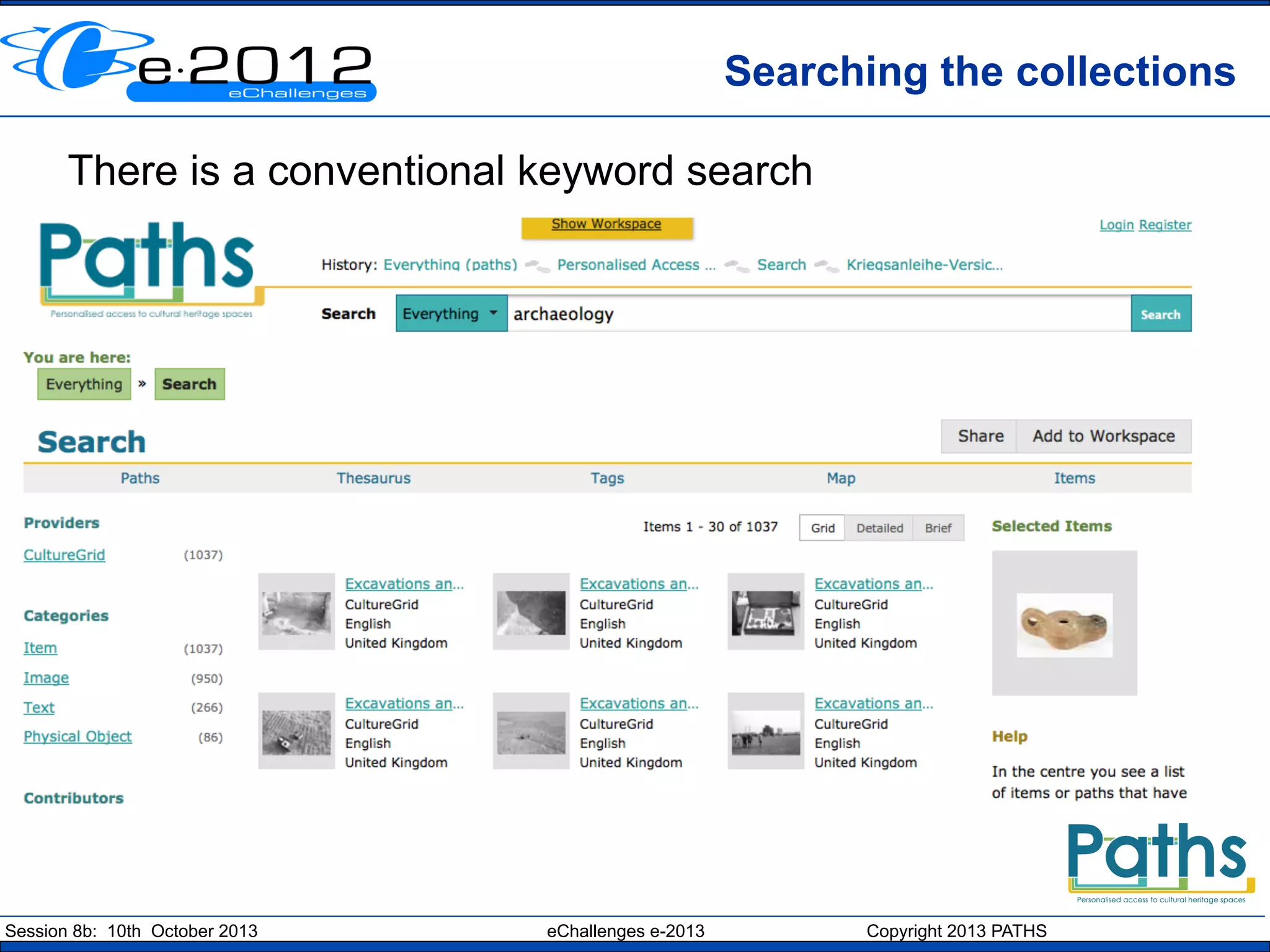
Searching the collections
There is a conventional keyword search

Session 8b: 10th October 2013

eChallenges e-2013

Copyright 2013 PATHS
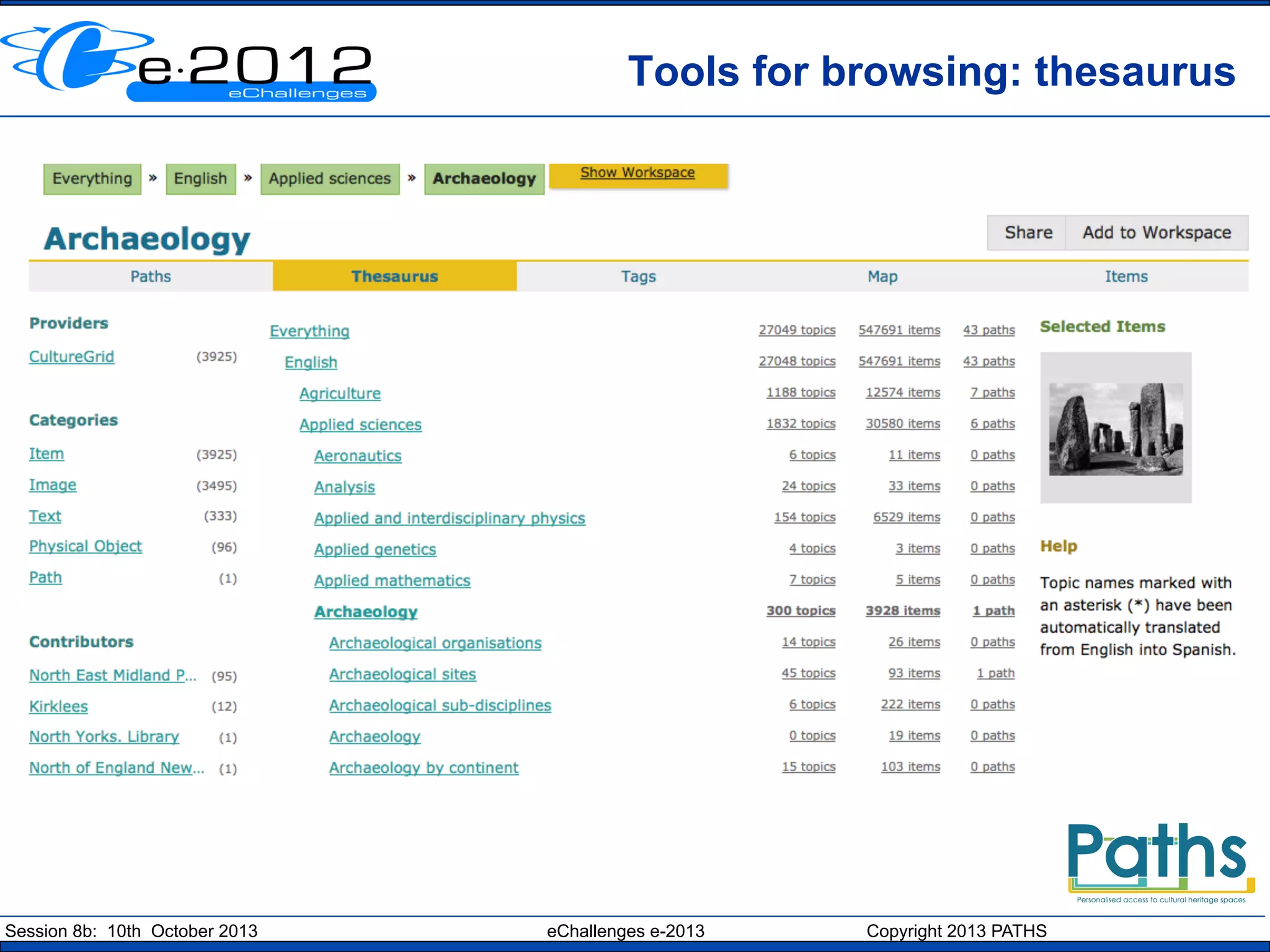
Tools for browsing: thesaurus

Session 8b: 10th October 2013

eChallenges e-2013

Copyright 2013 PATHS
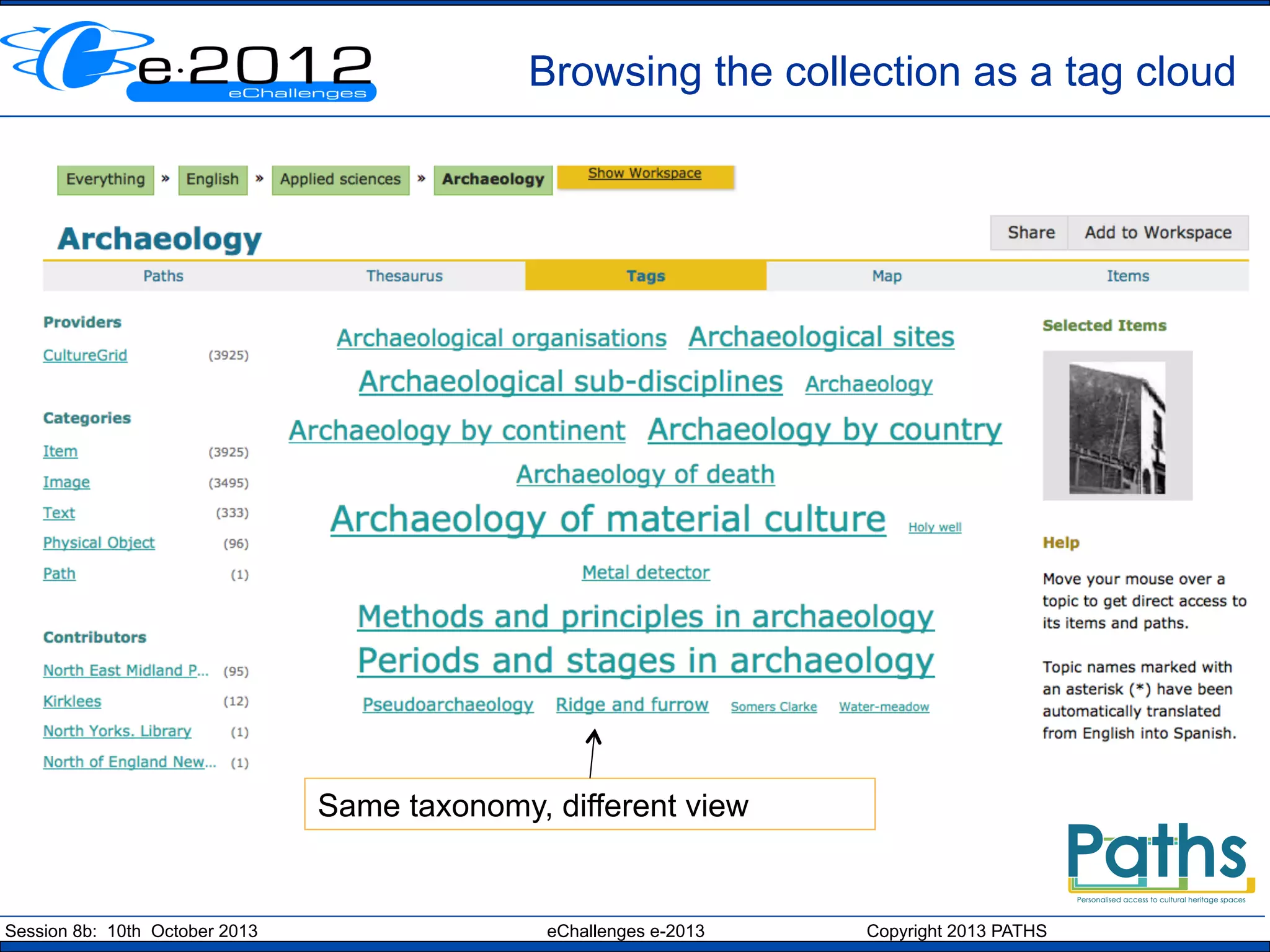
Browsing the collection as a tag cloud

Same taxonomy, different view

Session 8b: 10th October 2013

eChallenges e-2013

Copyright 2013 PATHS
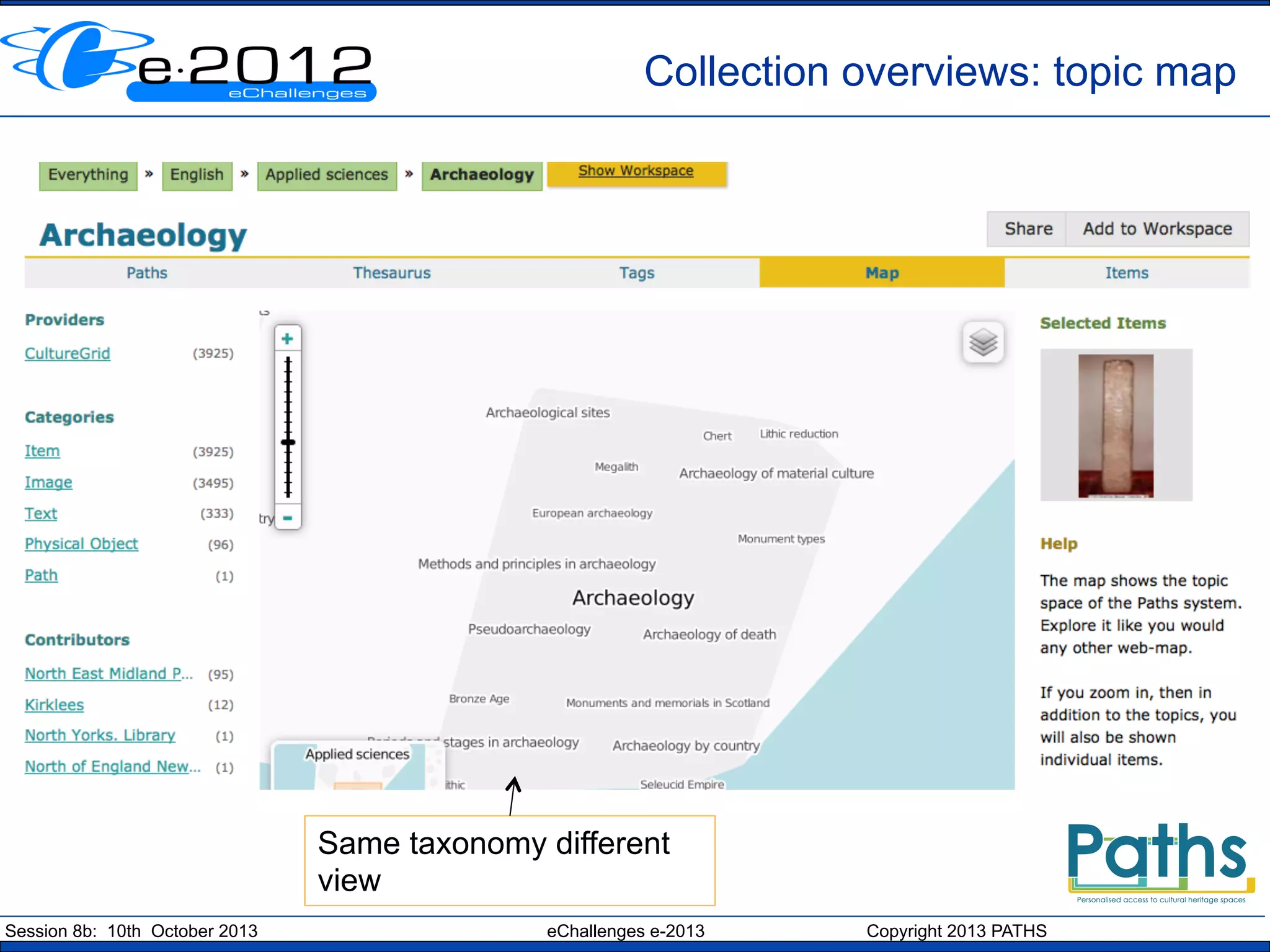
Collection overviews: topic map

Same taxonomy different
view
Session 8b: 10th October 2013

eChallenges e-2013

Copyright 2013 PATHS
Case study

ā€œImagine you are a student who has been asked to
create a path as part of a university assignment.
You have been asked to use primary source
materials to create a mini online exhibition suitable
for a target group within the general public and/or
school visitor categories. Your goal is to introduce
a historical or art-focussed topic in a popular,
accessible way, and to encourage further use and
exploration of cultural heritage resources.ā€

eCult Dialogue Day, 19th September 2013, Dubrovnik
Session 8b: 10th October 2013

eChallenges e-2013

Copyright 2013 PATHS
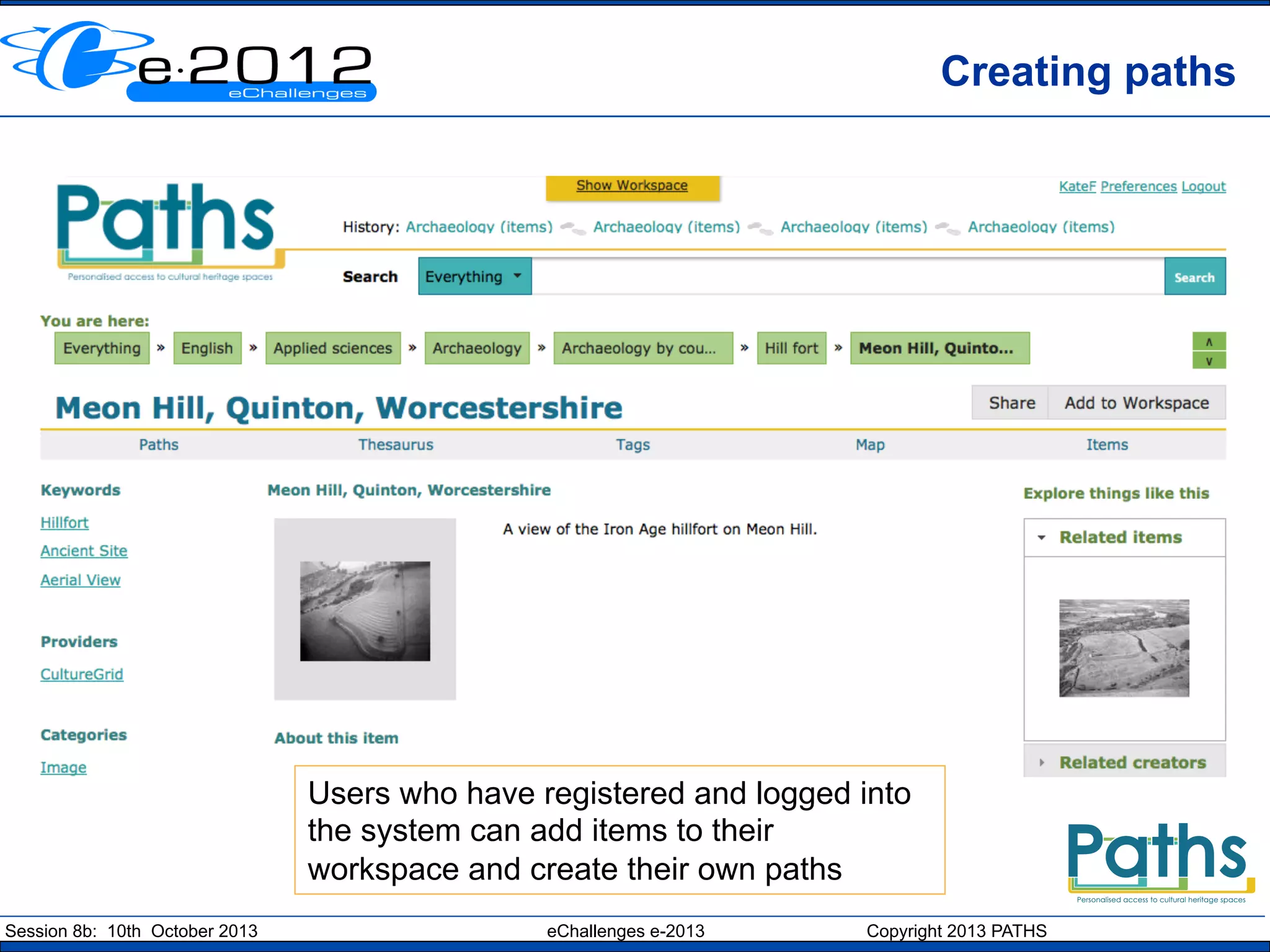
Creating paths

Users who have registered and logged into
the system can add items to their
workspace and create their own paths
Session 8b: 10th October 2013

eChallenges e-2013

Copyright 2013 PATHS
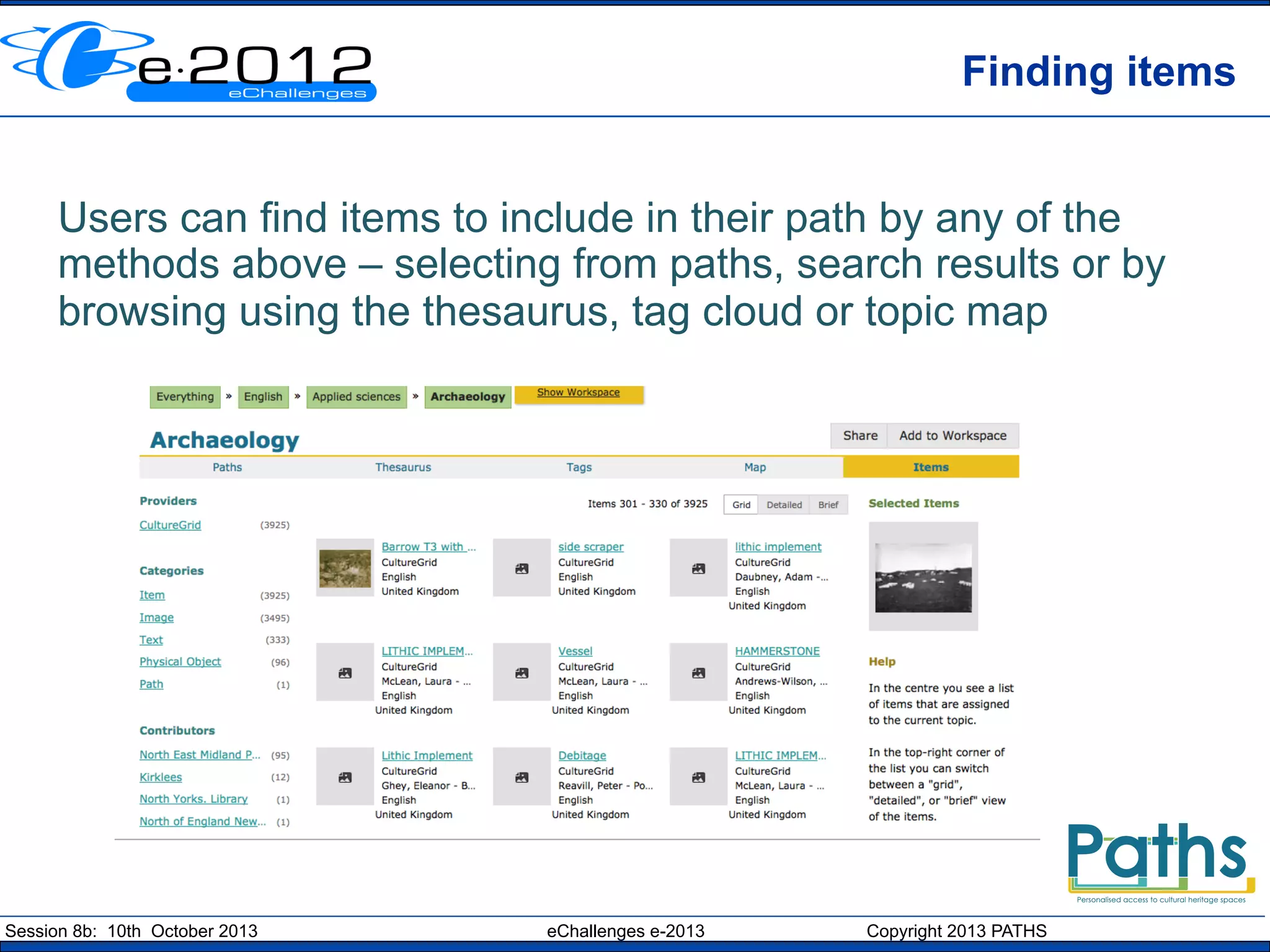
Finding items
Users can find items to include in their path by any of the
methods above – selecting from paths, search results or by
browsing using the thesaurus, tag cloud or topic map

Session 8b: 10th October 2013

eChallenges e-2013

Copyright 2013 PATHS
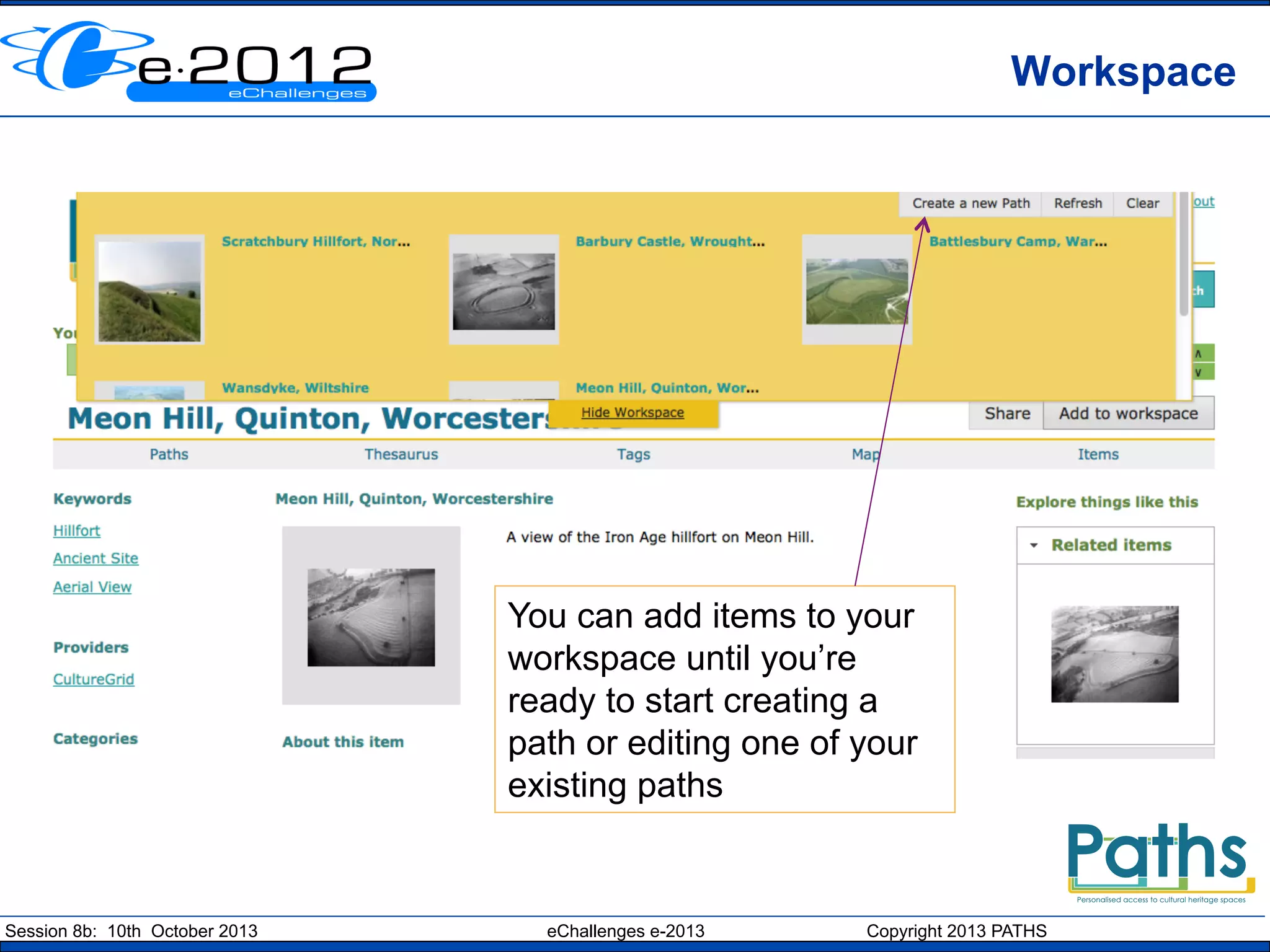
Workspace

You can add items to your
workspace until you’re
ready to start creating a
path or editing one of your
existing paths

Session 8b: 10th October 2013

eChallenges e-2013

Copyright 2013 PATHS
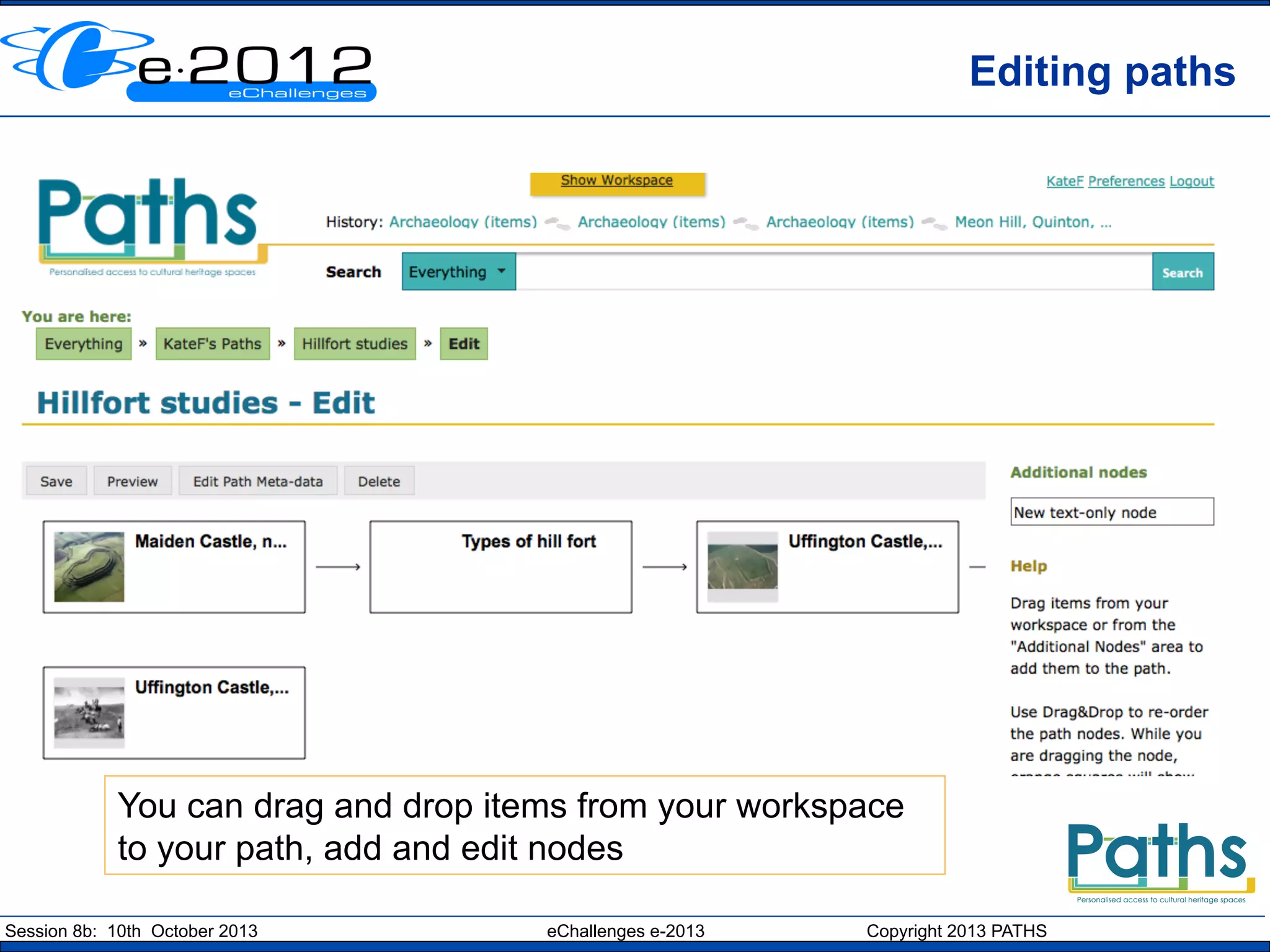
Editing paths

You can drag and drop items from your workspace
to your path, add and edit nodes
Session 8b: 10th October 2013

eChallenges e-2013

Copyright 2013 PATHS
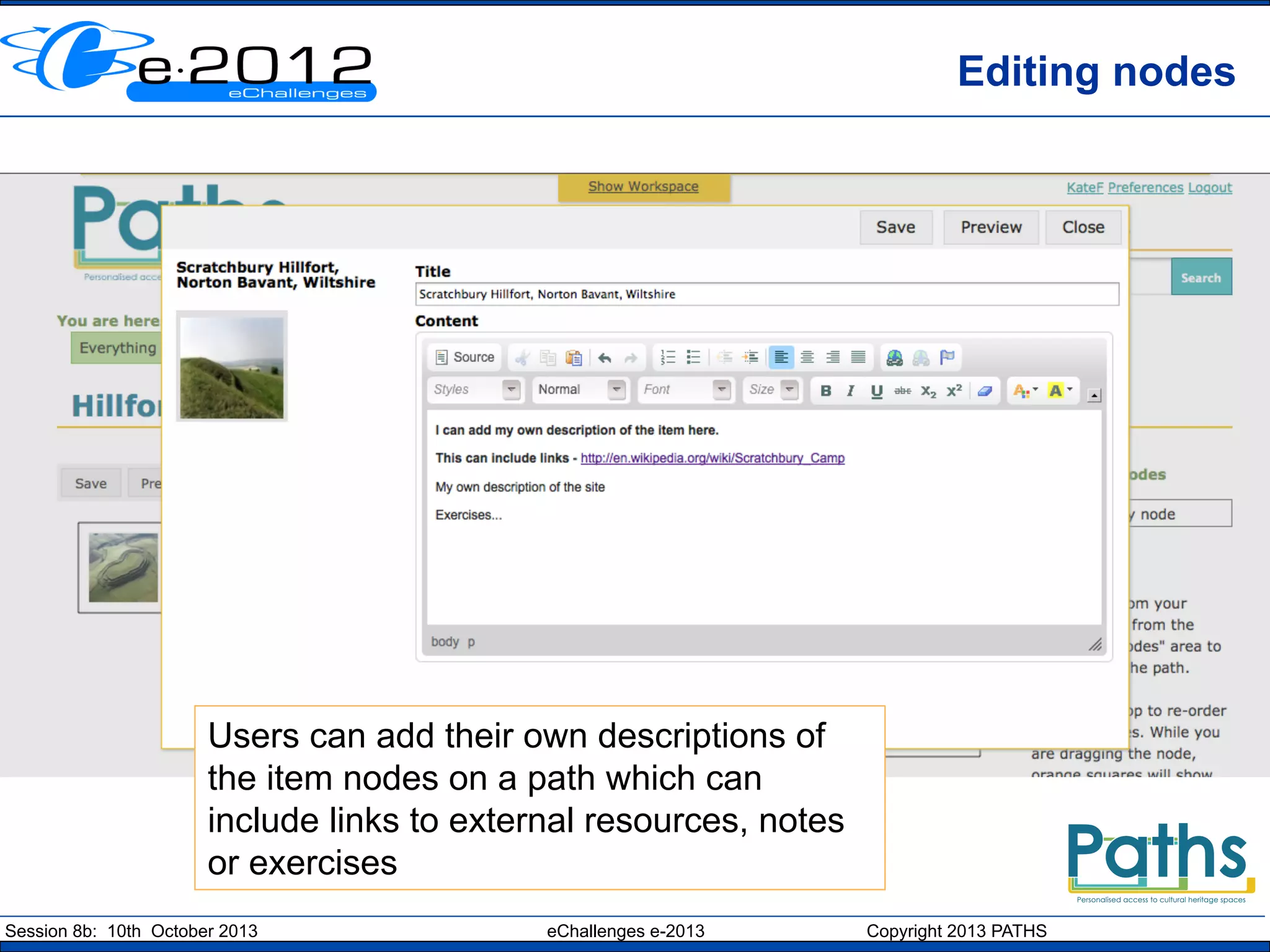
Editing nodes

Users can add their own descriptions of
the item nodes on a path which can
include links to external resources, notes
or exercises
Session 8b: 10th October 2013

eChallenges e-2013

Copyright 2013 PATHS
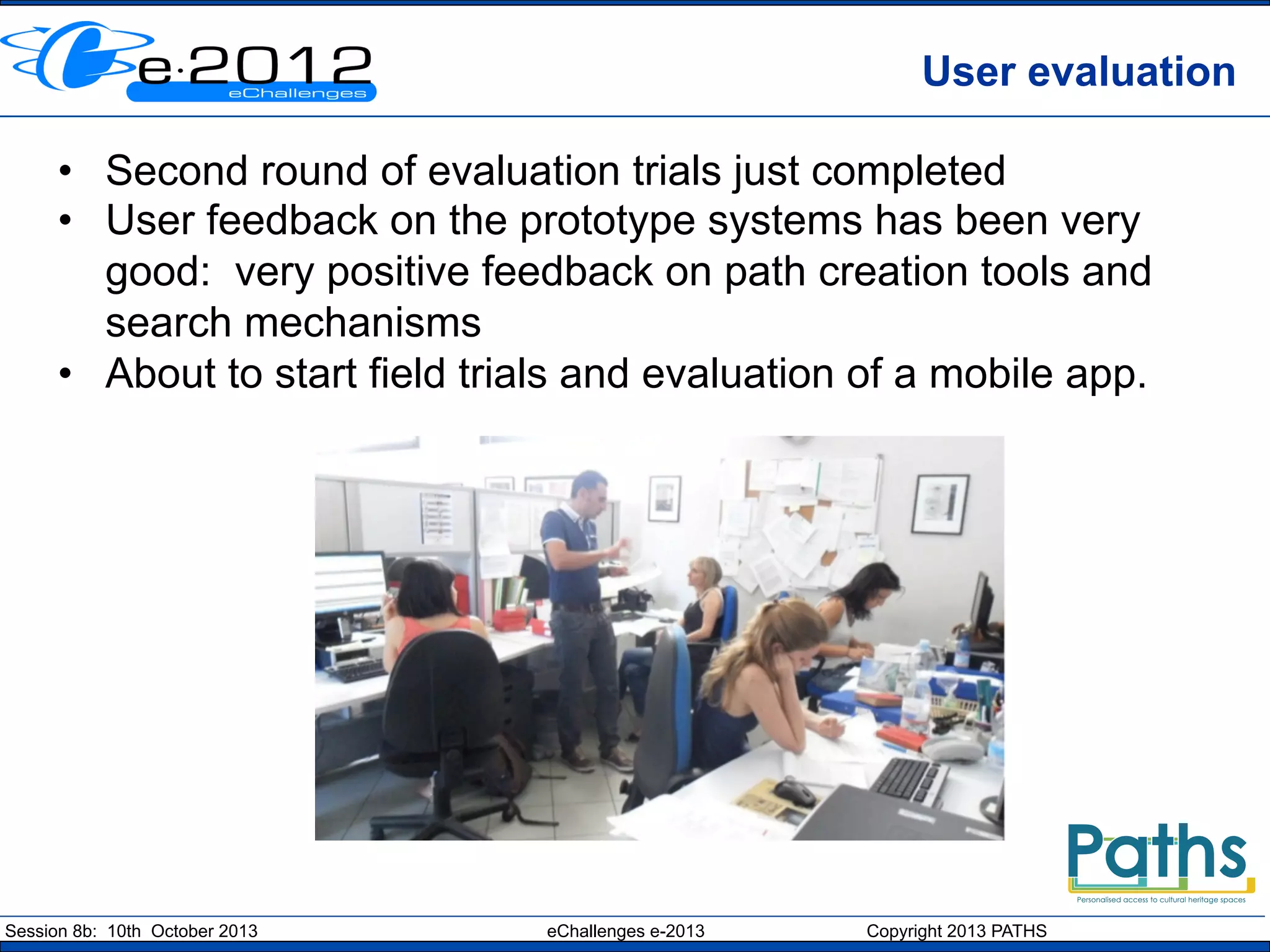
User evaluation
•  Second round of evaluation trials just completed
•  User feedback on the prototype systems has been very
good: very positive feedback on path creation tools and
search mechanisms
•  About to start field trials and evaluation of a mobile app.

Session 8b: 10th October 2013

eChallenges e-2013

Copyright 2013 PATHS
Outcomes
•  PATHS has a flexible modular architecture consisting
of web-services, data storage and end-user interfaces
•  Natural language processing of the metadata
allows search capabilities to be enhanced
•  A hybrid model combines RDF/SPARQL with
RDB/SQL to deliver performance and
robustness
•  Web services support users, path creation and
editing, querying, interacting with topic
hierarchies and a SolrProxy service.
•  Published set of results from the user evaluation trials

Session 8b: 10th October 2013

eChallenges e-2013

Copyright 2013 PATHS
Outcomes
•  Potential business benefits include:
–  Improving user experiences when searching large
collections of data (more than a million items) and to
help users discover content which is more relevant
–  To implement tools which automatically improve and
enrich the quality of the item metadata that is available
–  Provision of tools that enable users to collect content,
annotations and background material to create a story,
trail or exhibition, or to document the sources used in a
piece of research

Session 8b: 10th October 2013

eChallenges e-2013

Copyright 2013 PATHS
Route from research to market
• 

We’re currently in the final stage of our research and
development cycle
•  The PATHS API is available for testing and system
documentation is available
•  Market study is currently underway to understand the
future market potential. Initial findings suggest:
•  Potential demand is for stand-alone components
•  and for consultancy services on NLP and evaluation
studies
•  Suggests that the route to market will be as a suite of tools
for implementation in digital library systems

Session 8b: 10th October 2013

eChallenges e-2013

Copyright 2013 PATHS
Thanks for your attention!

kate.fernie@mdrpartners.com
http://www.paths-project.eu
Twitter @PATHS_project

The research leading to these results was carried out as part of the
PATHS project funded by the European Community’s Seventh
Framework Programme.

Session 8b: 10th October 2013

eChallenges e-2013

Copyright 2013 PATHS

PATHS at the eChallenges conference

  • 1.
    PATHS: Personalising accessto digital cultural heritage spaces Kate Fernie MDR Partners (Consulting) Ltd UK Session 8b: 10th October 2013 eChallenges e-2013 Copyright 2013 PATHS
  • 2.
    PATHS: project basics •  •  •  ASTREP funded under the FP7 programme 36 month project - 1/1/2011 to 31/12/2013 6 partners in 5 countries •  •  •  •  •  •  University of Sheffield Universidad del Pais Vasco i-sieve technologies Ltd Asplan Viak Internet Ltd MDR Partners (Alinari 24 Ora Spa) http://www.paths-project.eu Session 8b: 10th October 2013 eChallenges e-2013 Copyright 2013 PATHS
  • 3.
    Motivation Large quantities ofdigital cultural heritage material have become available online Museum exhibitions offer narratives organised by theme yet digital libraries are often limited to a simple keyword search Session 8b: 10th October 2013 eChallenges e-2013 Copyright 2013 PATHS
  • 4.
    Introducing paths We’re introducingthe idea of paths into digital library collections This is not a new idea – some online examples are Walden’s Paths, Trailmeme and Timelines Session 8b: 10th October 2013 eChallenges e-2013 Copyright 2013 PATHS
  • 5.
    Research Objectives •  Informationaccess: Methods for exploring and navigating digital cultural heritage collections, including paths, topic maps, tag-clouds, hierarchical concept structures and recommender services. •  Natural Language Processing: analysing item metadata to improve indexing, enable use of ontologies, and generating links between items in the collection and with external background material. •  Educational informatics: adapting to individual learners in relation to being directed and being allowed the freedom to explore autonomously Session 8b: 10th October 2013 eChallenges e-2013 Copyright 2013 PATHS
  • 6.
    User-centred development methodology Whatdo people want from digital libraries / how might they use paths? Users Gather user requirements and behaviours Develop prototype system Evaluate and test system with potential end users http://www.paths-project.eu/eng/Resources/User-Requirements-Analysis Session 8b: 10th October 2013 eChallenges e-2013 Copyright 2013 PATHS
  • 7.
    PATHS system The systemconsists of web-services, data storage and an end-user interface. Session 8b: 10th October 2013 eChallenges e-2013 Copyright 2013 PATHS
  • 8.
    Enriched metadata The PATHSsystem is based on content from Europeana that has been processed and enriched. Our aims were to: •  Linguistic processing – enrich text metadata with additional keywords and index terms •  Thematic organisation – find a vocabulary to use to organise the items in the collection automatically •  Intra-collection links – to create a network of links between related items in the collection •  Links to Wikipedia – create links to contextual information in Wikipedia •  Links to websites – use Sentiment Analysis to establish links to closely related external websites Session 8b: 10th October 2013 eChallenges e-2013 Copyright 2013 PATHS
  • 9.
    Demo •  Two cyclesof user evaluation of prototype systems have been completed •  Here follows a quick demo of the main features Session 8b: 10th October 2013 eChallenges e-2013 Copyright 2013 PATHS
  • 10.
    Published Paths Paths canbe created by experts or any registered user Session 8b: 10th October 2013 eChallenges e-2013 Copyright 2013 PATHS
  • 11.
    Path following Continue onthis path Description by path creator Users can simply follow a path in a similar way to reading a narrative or viewing an exhibition. Session 8b: 10th October 2013 eChallenges e-2013 Copyright 2013 PATHS
  • 12.
    Encouraging exploration ofthe collection Going off the path and exploring the links Session 8b: 10th October 2013 eChallenges e-2013 Copyright 2013 PATHS
  • 13.
    Different user scenarios Classroom activities Curated collections Leisure users Local historians Paths Researchers • PATHS system incorporates tools to support different activity levels from path following to active exploration and use of the contents Session 8b: 10th October 2013 eChallenges e-2013 Copyright 2013 PATHS
  • 14.
    Searching the collections Thereis a conventional keyword search Session 8b: 10th October 2013 eChallenges e-2013 Copyright 2013 PATHS
  • 15.
    Tools for browsing:thesaurus Session 8b: 10th October 2013 eChallenges e-2013 Copyright 2013 PATHS
  • 16.
    Browsing the collectionas a tag cloud Same taxonomy, different view Session 8b: 10th October 2013 eChallenges e-2013 Copyright 2013 PATHS
  • 17.
    Collection overviews: topicmap Same taxonomy different view Session 8b: 10th October 2013 eChallenges e-2013 Copyright 2013 PATHS
  • 18.
    Case study ā€œImagine youare a student who has been asked to create a path as part of a university assignment. You have been asked to use primary source materials to create a mini online exhibition suitable for a target group within the general public and/or school visitor categories. Your goal is to introduce a historical or art-focussed topic in a popular, accessible way, and to encourage further use and exploration of cultural heritage resources.ā€ eCult Dialogue Day, 19th September 2013, Dubrovnik Session 8b: 10th October 2013 eChallenges e-2013 Copyright 2013 PATHS
  • 19.
    Creating paths Users whohave registered and logged into the system can add items to their workspace and create their own paths Session 8b: 10th October 2013 eChallenges e-2013 Copyright 2013 PATHS
  • 20.
    Finding items Users canfind items to include in their path by any of the methods above – selecting from paths, search results or by browsing using the thesaurus, tag cloud or topic map Session 8b: 10th October 2013 eChallenges e-2013 Copyright 2013 PATHS
  • 21.
    Workspace You can additems to your workspace until you’re ready to start creating a path or editing one of your existing paths Session 8b: 10th October 2013 eChallenges e-2013 Copyright 2013 PATHS
  • 22.
    Editing paths You candrag and drop items from your workspace to your path, add and edit nodes Session 8b: 10th October 2013 eChallenges e-2013 Copyright 2013 PATHS
  • 23.
    Editing nodes Users canadd their own descriptions of the item nodes on a path which can include links to external resources, notes or exercises Session 8b: 10th October 2013 eChallenges e-2013 Copyright 2013 PATHS
  • 24.
    User evaluation •  Secondround of evaluation trials just completed •  User feedback on the prototype systems has been very good: very positive feedback on path creation tools and search mechanisms •  About to start field trials and evaluation of a mobile app. Session 8b: 10th October 2013 eChallenges e-2013 Copyright 2013 PATHS
  • 25.
    Outcomes •  PATHS hasa flexible modular architecture consisting of web-services, data storage and end-user interfaces •  Natural language processing of the metadata allows search capabilities to be enhanced •  A hybrid model combines RDF/SPARQL with RDB/SQL to deliver performance and robustness •  Web services support users, path creation and editing, querying, interacting with topic hierarchies and a SolrProxy service. •  Published set of results from the user evaluation trials Session 8b: 10th October 2013 eChallenges e-2013 Copyright 2013 PATHS
  • 26.
    Outcomes •  Potential businessbenefits include: –  Improving user experiences when searching large collections of data (more than a million items) and to help users discover content which is more relevant –  To implement tools which automatically improve and enrich the quality of the item metadata that is available –  Provision of tools that enable users to collect content, annotations and background material to create a story, trail or exhibition, or to document the sources used in a piece of research Session 8b: 10th October 2013 eChallenges e-2013 Copyright 2013 PATHS
  • 27.
    Route from researchto market •  We’re currently in the final stage of our research and development cycle •  The PATHS API is available for testing and system documentation is available •  Market study is currently underway to understand the future market potential. Initial findings suggest: •  Potential demand is for stand-alone components •  and for consultancy services on NLP and evaluation studies •  Suggests that the route to market will be as a suite of tools for implementation in digital library systems Session 8b: 10th October 2013 eChallenges e-2013 Copyright 2013 PATHS
  • 28.
    Thanks for yourattention! kate.fernie@mdrpartners.com http://www.paths-project.eu Twitter @PATHS_project The research leading to these results was carried out as part of the PATHS project funded by the European Community’s Seventh Framework Programme. Session 8b: 10th October 2013 eChallenges e-2013 Copyright 2013 PATHS