Wine & Web
Andy Crestodina
@crestodina #wineweb
Google Authorship & Author Stats
What is Authorship?
Why did they create Authorship?
“By seeing the person associated
with the content instead of just a
link, users can have an easier
time engaging with the person
behind the content, while at the
same time more easily
identifying high-quality content
of interest to them.”
Sagar Kamdar, Google Product Manager
July 2012
Digital signature =
Your picture in search results
Look, mom! It’s me!
REVIEW: Google+ Profile Setup
Google+ Jumpstart Guide: http://www.orbitmedia.com/blog/google-plus-guide
Three Methods for Authorship
Email Verification
3-Link Method
2-Link Method!
Authorship: Two Link Method
Author Box …or just a few links
Link 1: from page to profile
Connect with Andy on
<a rel="author"
href="https://plus.google.com/1132729293288121
28697?rel=author”>
Google+</a>.
Link 2: from profile to page
Wait two weeks …it didn’t work?
1. Link directly to the blog post
2. Verify your email address in G+
3. Rich snippets testing tool
Change the “Contributor to” link so it links directly to
the actual post, rather than the general blog address
Enter the URL or HTML here:
http://www.google.com/webmasters/tools/richsnippets
How to measure SEO
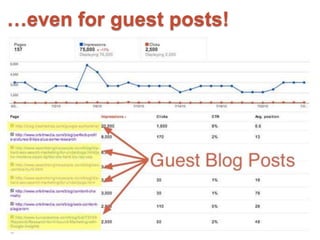
results for ALL your posts
Author Stats
Author Stats / SEO Performance
…even for guest posts!
What’s the point? Higher CTR
Source: http://www.seomoz.org/blog/google-author-photos
“The final number settled down around a 35% increase
in click-through rate.”
SEO Review
No rank, no Authorship…
3 Criteria for Choosing Keyphrases
Text
Search Volume
Resource: Google Keyword Tool
The phrase is highly competitive if all the
sites on the first page of Google…
• Are famous (wikipedia, etc.)
• Have a higher domain authority than you*
• Have title tags that begin with the keyphrase
• Lots of AdWords ads
Competition
*see Open Site Explorer
Text
Relevance
Fun with Authorship
Be the author of your entire site
Your Picture: It’s gotta be you
"Your Profile Picture cannot include
mature or offensive content. For
example, do not use a photo that is
a close-up of a person’s buttocks or
cleavage.”
Source: http://www.google.com/+/policy/content.html
Try different pictures
Solid colored backgrounds work well
Source: Distilled.net
The identity of individual [author] responsible for
content can be used to influence search ratings.
Assuming that a given [author] has a high
reputational score, representing an established
reputation for authoring valuable content, then
additional content authored and signed by that
[author] will be promoted relative to unsigned
content or content from less reputable [authors] in
search results.
The future of search is social.
Source: USPTO Google Agent Rank Patent (patent number 7565358)
Need more help?
Orbit Blog: http://www.orbitmedia.com/blog/google-authorship-author-stats
Wine & Web
Andy Crestodina
@orbiteers #wineweb
Thank you!

Google Authorship and Author Stats

  • 1.
    Wine & Web AndyCrestodina @crestodina #wineweb Google Authorship & Author Stats
  • 2.
  • 3.
    Why did theycreate Authorship? “By seeing the person associated with the content instead of just a link, users can have an easier time engaging with the person behind the content, while at the same time more easily identifying high-quality content of interest to them.” Sagar Kamdar, Google Product Manager July 2012
  • 4.
    Digital signature = Yourpicture in search results Look, mom! It’s me!
  • 5.
    REVIEW: Google+ ProfileSetup Google+ Jumpstart Guide: http://www.orbitmedia.com/blog/google-plus-guide
  • 6.
    Three Methods forAuthorship Email Verification 3-Link Method 2-Link Method!
  • 7.
  • 8.
    Author Box …orjust a few links
  • 9.
    Link 1: frompage to profile Connect with Andy on <a rel="author" href="https://plus.google.com/1132729293288121 28697?rel=author”> Google+</a>.
  • 10.
    Link 2: fromprofile to page
  • 11.
    Wait two weeks…it didn’t work? 1. Link directly to the blog post 2. Verify your email address in G+ 3. Rich snippets testing tool Change the “Contributor to” link so it links directly to the actual post, rather than the general blog address Enter the URL or HTML here: http://www.google.com/webmasters/tools/richsnippets
  • 12.
    How to measureSEO results for ALL your posts Author Stats
  • 13.
    Author Stats /SEO Performance
  • 14.
  • 15.
    What’s the point?Higher CTR Source: http://www.seomoz.org/blog/google-author-photos “The final number settled down around a 35% increase in click-through rate.”
  • 16.
    SEO Review No rank,no Authorship…
  • 17.
    3 Criteria forChoosing Keyphrases
  • 18.
  • 19.
    The phrase ishighly competitive if all the sites on the first page of Google… • Are famous (wikipedia, etc.) • Have a higher domain authority than you* • Have title tags that begin with the keyphrase • Lots of AdWords ads Competition *see Open Site Explorer
  • 20.
  • 21.
  • 22.
    Be the authorof your entire site
  • 23.
    Your Picture: It’sgotta be you "Your Profile Picture cannot include mature or offensive content. For example, do not use a photo that is a close-up of a person’s buttocks or cleavage.” Source: http://www.google.com/+/policy/content.html
  • 24.
  • 25.
    Solid colored backgroundswork well Source: Distilled.net
  • 26.
    The identity ofindividual [author] responsible for content can be used to influence search ratings. Assuming that a given [author] has a high reputational score, representing an established reputation for authoring valuable content, then additional content authored and signed by that [author] will be promoted relative to unsigned content or content from less reputable [authors] in search results. The future of search is social. Source: USPTO Google Agent Rank Patent (patent number 7565358)
  • 27.
    Need more help? OrbitBlog: http://www.orbitmedia.com/blog/google-authorship-author-stats
  • 28.
    Wine & Web AndyCrestodina @orbiteers #wineweb Thank you!

Editor's Notes

  • #4 People all over the world are creating great content on the web, and we work hard to make that content discoverable on Google. But for users to get the best answers to their questions, it’s also important to be able to connect them with the people who are behind the amazing content on the web.   To light up the people behind the webpages, we wanted to start highlighting the people creating this content in Google.com search results. People discovering information on the web often want to learn more about who created it, see other content by them, and even interact with them.