Teaching with Technology

    It’s Easier Than You Think
  Jamie Eddleman & Kim Gates
Teaching
             With Technology
• Why is it important to teach with technology?

  – Many teachers are digital immigrants (or digital
    aliens)
  – Our students are digital natives
             http://youtu.be/gT2E2F0DmyE
Technology Assimilation Gap
Slideshare
The First Five Days Project
• The First Five Days project aims to start an
  international conversation about how to make
  the start of the school year the best it can be.
• While there is general agreement that the first
  five days of school are “absolutely essential”
  for establishing a culture of learning that will
  set the right tone for the rest of the year,
  there is very little research or discussion about
  how to make these first five days the most
  relevant and productive they can be
The First Five Days Project
• Created by November learning - To participate,
  go to http://blc.vxcommunity.com [3], click on
  “Register,” then click on the “Five” tab.
• There is also a new Twitter hashtag, #1st5days,
  that educators can use to share their ideas via
  the popular micro-blogging service.
• What can we do to give our students a great
  first five days and set the tone for the year?
Poll
              Everywhere

http://www.polleverywhere.com/multiple_choi
  ce_polls/MTMyOTM1MjAwNg

http://www.polleverywhere.com/free_text_poll
  s/MjI5NTgxMTA1
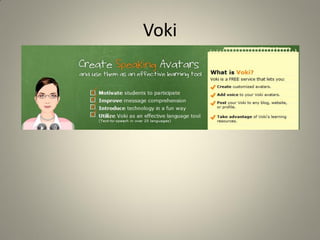
Voki
Voki
• Sample Voki:
          http://vhss-
          a.oddcast.com/vhss_editors/voki_player
          .swf?doc=http%3A%2F%2Fvhss-
          d.oddcast.com%2Fphp%2Fvhss_editors%
          2Fgetvoki%2Fchsm%3D06ee38dd357601
          907fc97fa2c31b43ed%26sc%3D2543585
Wordle
• Wordle is a toy for generating “word clouds”
  from text that you provide. The clouds give
  greater prominence to words that appear more
  frequently in the source text. You can tweak
  your clouds with different fonts, layouts, and
  color schemes. The images you create with
  Wordle are yours to use however you like. You
  can print them out, or save them to the Wordle
  gallery to share with your friends.
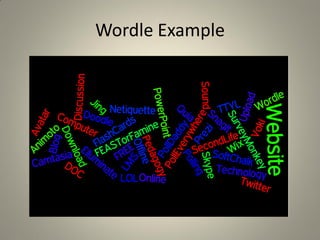
Wordle Example
Animoto
Animoto
Educators can apply for a free Animoto Plus account for use in
the classroom. Its powerful features can be used to creat
  stunning presentations incorporating images, video clips,
  music and textOverview

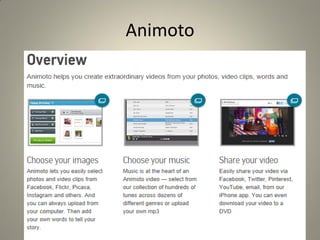
Animoto helps you create extraordinary videos from your photos,
  video clips, words and music

• Choose your images
• Choose your music
• Share your video
Animoto
• Educators can apply for a free Animoto Plus account for use in
  the classroom. Its powerful features can be used to create
  stunning presentations incorporating images, video clips,
  music and text
Share My Lesson

• Share My Lesson is an online network that lets
  teachers around the globe access, review, and
  discuss lesson plans and other learning
  materials.
• This free online portal for teachers, will debut
  debut this summer with more than 100,000
  user-generated lessons
Flickr
http://www.flickr.com/photos/ikkoskinen/53134
  14605
http://www.flickr.com/photos/thomcochrane/3
  215225090
Use Flickr to….

• Creative writing assignment with individual pictures or
  storytelling with multiple pictures…can you imagine the
  possibilities?
• Create Virtual field trips!
• Teach students about intellectual property rights with
  Creative Commons licensing.
• Create various different groups to upload photos to and
  encourage collaboration and commenting from students.
• Explore with Flickr’s map feature to see what is happening all
  over the world.
• SugarSync helps me:
  •work at home
  •access my files from work on any machine (no software needs installing -
  BIG thanks for this)
  •always have the most updated version
  •never have to remember to sync a file
  •share documents
  •not have to worry about taking along my USB drive or losing it (students
  would love this as my exams are on it)
  •edit files via the web and they are saved back ready to be synced at home
  (very handy)
  •use the web interface to launches the needed program to edit the file (E.g.
  MS Word)
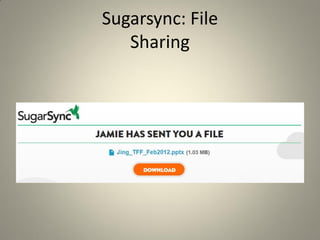
Sugarsync: File
   Sharing
Evaluating Internet Resources
• Considerations
  – Subject
  – Grade / skill level
  – Format of information presented
• Visit this website by Georgetown University
  that gives additional information on what to
  look for when evaluating a website:
  http://www.library.georgetown.edu/tutorials/
  research-guides/evaluating-internet-content
Sample Internet Resources
• http://grammar.quickanddirtytips.com/
• http://grammar.ccc.commnet.edu/grammar/
• http://www.quia.com/shared/

• http://www.merriam-webster.com/
• http://dictionary.reference.com/
• http://www.thefreedictionary.com/
Sample Internet Resources
• http://youtube.com/
• http://schooltube.com/
• http://teachertube.com/
Sample Internet Resource
• http://www.practicalmoneyskills.com/
Sample Internet Resources
• It’s discussion time!
Final Video
• Video: Instructional technology: Where have
  we been & where are we going?

• http://www.youtube.com/watch?v=KdwEIi22Dv8

Workshop Presentation - FACTE2012

  • 1.
    Teaching with Technology It’s Easier Than You Think Jamie Eddleman & Kim Gates
  • 2.
    Teaching With Technology • Why is it important to teach with technology? – Many teachers are digital immigrants (or digital aliens) – Our students are digital natives http://youtu.be/gT2E2F0DmyE
  • 3.
  • 4.
  • 5.
    The First FiveDays Project • The First Five Days project aims to start an international conversation about how to make the start of the school year the best it can be. • While there is general agreement that the first five days of school are “absolutely essential” for establishing a culture of learning that will set the right tone for the rest of the year, there is very little research or discussion about how to make these first five days the most relevant and productive they can be
  • 6.
    The First FiveDays Project • Created by November learning - To participate, go to http://blc.vxcommunity.com [3], click on “Register,” then click on the “Five” tab. • There is also a new Twitter hashtag, #1st5days, that educators can use to share their ideas via the popular micro-blogging service. • What can we do to give our students a great first five days and set the tone for the year?
  • 7.
    Poll Everywhere http://www.polleverywhere.com/multiple_choi ce_polls/MTMyOTM1MjAwNg http://www.polleverywhere.com/free_text_poll s/MjI5NTgxMTA1
  • 8.
  • 9.
    Voki • Sample Voki: http://vhss- a.oddcast.com/vhss_editors/voki_player .swf?doc=http%3A%2F%2Fvhss- d.oddcast.com%2Fphp%2Fvhss_editors% 2Fgetvoki%2Fchsm%3D06ee38dd357601 907fc97fa2c31b43ed%26sc%3D2543585
  • 10.
    Wordle • Wordle isa toy for generating “word clouds” from text that you provide. The clouds give greater prominence to words that appear more frequently in the source text. You can tweak your clouds with different fonts, layouts, and color schemes. The images you create with Wordle are yours to use however you like. You can print them out, or save them to the Wordle gallery to share with your friends.
  • 11.
  • 12.
  • 13.
    Animoto Educators can applyfor a free Animoto Plus account for use in the classroom. Its powerful features can be used to creat stunning presentations incorporating images, video clips, music and textOverview Animoto helps you create extraordinary videos from your photos, video clips, words and music • Choose your images • Choose your music • Share your video
  • 14.
    Animoto • Educators canapply for a free Animoto Plus account for use in the classroom. Its powerful features can be used to create stunning presentations incorporating images, video clips, music and text
  • 15.
    Share My Lesson •Share My Lesson is an online network that lets teachers around the globe access, review, and discuss lesson plans and other learning materials. • This free online portal for teachers, will debut debut this summer with more than 100,000 user-generated lessons
  • 16.
  • 17.
    Use Flickr to…. •Creative writing assignment with individual pictures or storytelling with multiple pictures…can you imagine the possibilities? • Create Virtual field trips! • Teach students about intellectual property rights with Creative Commons licensing. • Create various different groups to upload photos to and encourage collaboration and commenting from students. • Explore with Flickr’s map feature to see what is happening all over the world.
  • 19.
    • SugarSync helpsme: •work at home •access my files from work on any machine (no software needs installing - BIG thanks for this) •always have the most updated version •never have to remember to sync a file •share documents •not have to worry about taking along my USB drive or losing it (students would love this as my exams are on it) •edit files via the web and they are saved back ready to be synced at home (very handy) •use the web interface to launches the needed program to edit the file (E.g. MS Word)
  • 20.
  • 21.
    Evaluating Internet Resources •Considerations – Subject – Grade / skill level – Format of information presented • Visit this website by Georgetown University that gives additional information on what to look for when evaluating a website: http://www.library.georgetown.edu/tutorials/ research-guides/evaluating-internet-content
  • 22.
    Sample Internet Resources •http://grammar.quickanddirtytips.com/ • http://grammar.ccc.commnet.edu/grammar/ • http://www.quia.com/shared/ • http://www.merriam-webster.com/ • http://dictionary.reference.com/ • http://www.thefreedictionary.com/
  • 23.
    Sample Internet Resources •http://youtube.com/ • http://schooltube.com/ • http://teachertube.com/
  • 24.
    Sample Internet Resource •http://www.practicalmoneyskills.com/
  • 25.
    Sample Internet Resources •It’s discussion time!
  • 26.
    Final Video • Video:Instructional technology: Where have we been & where are we going? • http://www.youtube.com/watch?v=KdwEIi22Dv8