Top Ten Internet Uses in Teaching and Learning B. Skelton
					BlogsBlogs are great tools for students and teachers. Teachers can create a bog of sports teams, clubs, student groups or events.  Blogging also enables students to  sharpen their writing skills as well as brainstorm with other students and teachers.
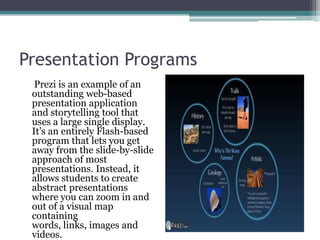
Presentation ProgramsPrezi is an example of an  outstanding web-based presentation application and storytelling tool that uses a large single display. It’s an entirely Flash-based program that lets you get away from the slide-by-slide approach of most presentations. Instead, it allows students to create abstract presentations where you can zoom in and out of a visual map containing words, links, images and videos.
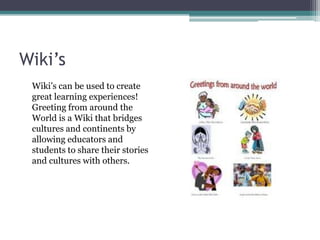
Wiki’s	Wiki’s can be used to create great learning experiences! Greeting from around the World is a Wiki that bridges cultures and continents by allowing educators and students to share their stories and cultures with others.
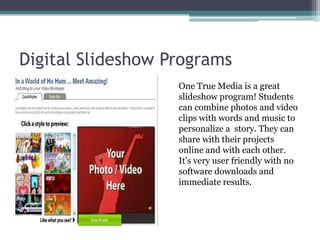
Digital Slideshow Programs	One True Media is a great slideshow program! Students can combine photos and video clips with words and music to personalize a  story. They can share with their projects online and with each other.  It’s very user friendly with no software downloads and immediate results.
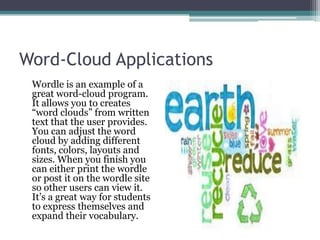
Word-Cloud ApplicationsWordle is an example of a great word-cloud program. It allows you to creates “word clouds” from written text that the user provides. You can adjust the word cloud by adding different fonts, colors, layouts and sizes. When you finish you can either print the wordle or post it on the wordle site so other users can view it. It’s a great way for students to express themselves and expand their vocabulary.
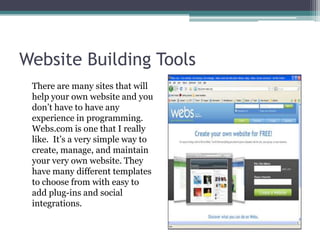
Website Building Tools	There are many sites that will help your own website and you don’t have to have any experience in programming. Webs.com is one that I really like.  It’s a very simple way to create, manage, and maintain your very own website. They have many different templates to choose from with easy to add plug-ins and social integrations.
Cloud-Based Applications	Applications such as Dropbox allows you to save documents, photos and videos “in the cloud”.  Students can now can take their files anywhere! This is a great tool for students who always seem to lose their flash drive!
Social Networking SitesSites such as Schoolology functions simultaneously as a learning management system for teachers and a social network tool for students and teachers. Teachers can post their syllabus  and assignments. They can also provide students  with resources and links, and organize materials into folders for better organization. Students can use the facebook style posting tool which allows them to comment, thread and link with other classes and students.
Web Videos	The ability to download and stream videos on the web is a great teaching tool. You no longer have to order Tapes or DVD's.  It’s much cheaper and can you find just about anything on any subject!
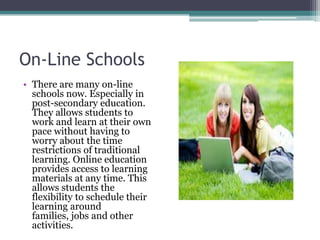
On-Line SchoolsThere are many on-line schools now. Especially in post-secondary education. They allows students to work and learn at their own pace without having to  worry about the time restrictions of traditional learning. Online education provides access to learning materials at any time. This allows students the flexibility to schedule their learning around families, jobs and other activities.

Top ten internet uses in teaching and learning

  • 1.
    Top Ten InternetUses in Teaching and Learning B. Skelton
  • 2.
    BlogsBlogs are greattools for students and teachers. Teachers can create a bog of sports teams, clubs, student groups or events. Blogging also enables students to sharpen their writing skills as well as brainstorm with other students and teachers.
  • 3.
    Presentation ProgramsPrezi isan example of an outstanding web-based presentation application and storytelling tool that uses a large single display. It’s an entirely Flash-based program that lets you get away from the slide-by-slide approach of most presentations. Instead, it allows students to create abstract presentations where you can zoom in and out of a visual map containing words, links, images and videos.
  • 4.
    Wiki’s Wiki’s can beused to create great learning experiences! Greeting from around the World is a Wiki that bridges cultures and continents by allowing educators and students to share their stories and cultures with others.
  • 5.
    Digital Slideshow Programs OneTrue Media is a great slideshow program! Students can combine photos and video clips with words and music to personalize a story. They can share with their projects online and with each other. It’s very user friendly with no software downloads and immediate results.
  • 6.
    Word-Cloud ApplicationsWordle isan example of a great word-cloud program. It allows you to creates “word clouds” from written text that the user provides. You can adjust the word cloud by adding different fonts, colors, layouts and sizes. When you finish you can either print the wordle or post it on the wordle site so other users can view it. It’s a great way for students to express themselves and expand their vocabulary.
  • 7.
    Website Building Tools Thereare many sites that will help your own website and you don’t have to have any experience in programming. Webs.com is one that I really like. It’s a very simple way to create, manage, and maintain your very own website. They have many different templates to choose from with easy to add plug-ins and social integrations.
  • 8.
    Cloud-Based Applications Applications suchas Dropbox allows you to save documents, photos and videos “in the cloud”. Students can now can take their files anywhere! This is a great tool for students who always seem to lose their flash drive!
  • 9.
    Social Networking SitesSitessuch as Schoolology functions simultaneously as a learning management system for teachers and a social network tool for students and teachers. Teachers can post their syllabus and assignments. They can also provide students with resources and links, and organize materials into folders for better organization. Students can use the facebook style posting tool which allows them to comment, thread and link with other classes and students.
  • 10.
    Web Videos The abilityto download and stream videos on the web is a great teaching tool. You no longer have to order Tapes or DVD's. It’s much cheaper and can you find just about anything on any subject!
  • 11.
    On-Line SchoolsThere aremany on-line schools now. Especially in post-secondary education. They allows students to work and learn at their own pace without having to worry about the time restrictions of traditional learning. Online education provides access to learning materials at any time. This allows students the flexibility to schedule their learning around families, jobs and other activities.