WordPress Optimization
      40 tips in 40 minutes


                        Joost de Valk, OrangeValley - WordCamp Ireland 2010
Open Source
Open Source
              Apple
Open Source
WordPress          Apple
Open Source
WordPress          Apple


     CSS
Open Source
WordPress          Apple


     CSS           SEO
Open Source
WordPress          Apple
            Geek
     CSS           SEO
Open Source           Theology

WordPress          Apple
            Geek
     CSS           SEO
Open Source                  Theology
                           IBMS
WordPress          Apple
            Geek
     CSS           SEO
Open Source                  Theology
                           IBMS
WordPress          Apple
            Geek
     CSS           SEO
                                       Blogger
Open Source                        Theology
                           IBMS
WordPress          Apple
            Geek
     CSS           SEO        Speaker        Blogger
Open Source                        Theology
                           IBMS
WordPress          Apple
            Geek              Marketer
     CSS           SEO        Speaker        Blogger
Open Source                        Theology
                           IBMS
WordPress          Apple
            Geek              Marketer
     CSS           SEO        Speaker        Blogger
Open Source                        Theology
                           IBMS
WordPress          Apple
            Geek              Marketer
     CSS           SEO        Speaker        Blogger
Open Source                        Theology
                           IBMS
WordPress          Apple
            Geek              Marketer
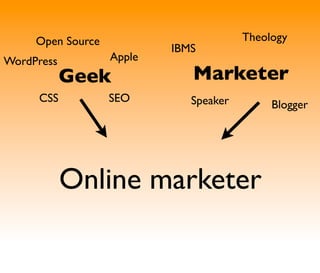
     CSS           SEO        Speaker        Blogger


            Online marketer
I work for OrangeValley, a company that develops WordPress websites, does Analytics and
Conversion Rate Optimization and SEO but mostly helps it’s customers make more money.
http://yoast.com/


I blog on http://yoast.com/
http://yoast.com/


I blog on http://yoast.com/
http://quixapp.com/
                                                 Joost de Valk, OrangeValley - WordCamp Ireland 2010


And recently created Quix: http://quixapp.com/
So even though I’m from Holland, I’m not going to tell you about windmills and wooden
shoes.
So usually, I’d copy paste some slides...
Be an obnoxious bastard and present it
Go and do what I do best
There’s an issue though.
http://yoast.com/articles/wordpress-seo/
                                         Joost de Valk, OrangeValley - WordCamp Ireland 2010


You’ve all probably read this article.
Please do ask your questions!


Don’t be afraid to ask questions
42
                      I’ll try to answer all of them
                                                            Joost de Valk, OrangeValley - WordCamp Ireland 2010


I’ll try to answer all of them, usually the answer is 42.
Section #1: improve your load times

Make your site load faster!!
#1 Install W3 Total Cache

http://wordpress.org/extend/plugins/w3-total-cache/ Turned my blog from an Opel into a
Ferrari (speed wise)
#2 Use it to combine CSS and JS files

Javascript and CSS should be combined and javascript should mostly be loaded in the footer.
(W3 Total Cache can help with that)
#3 Use Sprites

Check out SpriteMe
• (WP) Smush It
          • Puny PNG

                     #4 Crunch those images...

Crunch your theme’s images, and auto crunch uploaded images.

http://wordpress.org/extend/plugins/wp-smushit/
http://www.punypng.com/
#5 Offload those images and JS and CSS files

Use a CDN (for instance VPS.net’s CDN) or Google’s Javascript Library API or Amazon S3 to
offload images, js, css and other static files, saving your own server.
#6 Kill some plugins

And try to replace them for similar ones.
Some plugins are god awful (in terms of javascript).
#7 Clean up that sidebar

Do you really need all those badges?
Even more important: do your visitors need them?
Section #2: Optimize!

Let’s optimize that site for search!
#8 Books are judged by their cover

So are your posts, give them a proper title.
#9 Offer (Efficient) Related Posts

http://xavisys.com/2009/06/efficient-related-posts/
#10 Internal Linking & Series of Posts

http://justintadlock.com/archives/2009/06/09/series-wordpress-plugin

Check your analytics: which pages are viewed most? Which pages and posts do you have
related to that? Link them!!
#11 Tags, Categories, Custom Taxonomies

Through all these cool plugins we often forget how to use the superbly useful internal stuff in
WordPress: Categories, Tags and custom taxonomies. Do your categories still match the blog
you have today? http://yoast.com/wordpress/simple-taxonomies/
#12 Give a robot some directions

Noindex wp-admin, login and register pages etc.
using the Robots meta plugin.
#13 Don’t auto generate your meta descriptions

Better to have a monkey write them or not write one at all than to have All in one SEO
generate them for you.
#14 Create proper pagination

You can’t expect a search engine nor a user to click on more more than 3 times... Use for
instance a plugin like WP PageNavi.
#15 Disable paged comments

THEY SUCK.
Section #3 Maintenance

Let’s keep that blog nice and crisp.
#16 Backup your blog regularly

Both your database AND your FILES!!
• Add this to wp-config.php:
        define('WP_ALLOW_REPAIR', true);


              #17 Automatically repair the database

It’s so easy: do it!!
#18 Check your blogs queries

Use the Debug Queries plugin to check for plugins or themes gone mad.

#19 Clean up spam. Always.

Run Akismet
Use Dave Naylor’s comment referrer check http://tools.davidnaylor.co.uk/
#20 Track your uptime

Use Pingdom, or another tool,
but be the first to know when your blog is down.
#21 Track and fix those 404’s

Use John Godley’s Redirection plugin and track and fix them.
// Remove Really simple discovery link
remove_action('wp_head', 'rsd_link');
// Remove Windows Live Writer link
remove_action('wp_head', 'wlwmanifest_link');

// Remove the version number:
function yoast_fix_wp_generator($generator) {
    return preg_replace('/s?'.get_bloginfo('version').'/','',$generator);
}
add_filter('the_generator','yoast_fix_wp_generator',10,1);


             #22 Remove unneeded meta info
#23 Create a good search experience

Implement a Google Custom search engine to create a proper search experience, then start
tracking your internal search: what are people searching for? Are they finding that? Can /
should they expect that on your site?
#24 Get a good mobile plugin
Section #3: make them come back
#25 Email subscriptions!!

I prefer email, because of it’s high response.
#26 Twitter

In January, 20% of the yoast.com traffic came from Twitter.
#27 RSS

If your readers understand what RSS is, the button can’t be big enough. If they don’t know
what it is, leave it out entirely!
#28 Use WP Greet Box
Section #4: engage them!

Engage them.
#29 Newsletter sign up pages

This is the perfect moment to let people refer your site and mailing list to a friend or their
Twitter followers: “I just signed up for Yoast.com’s newsletter, you should too!”
#30 Comment redirect

Someone just commented and showed engagement: use that momentum
#31 Ask for feedback & comments

Use Gravity Forms for contact forms and surveys, or Google Docs forms function to create
surveys.
#31 Ask for feedback & comments

Use Gravity Forms for contact forms and surveys, or Google Docs forms function to create
surveys.
#31 Ask for feedback & comments

Use Gravity Forms for contact forms and surveys, or Google Docs forms function to create
surveys.
#31 Ask for feedback & comments

Use Gravity Forms for contact forms and surveys, or Google Docs forms function to create
surveys.
#32 Use threaded comments

They keep the conversation intact and allow for a better conversation.
#33 Use Gravatars

They keep the conversation intact and allow for a better conversation.
Section #5: measuring results
#34 Use Google Analytics

Or any other proper web analytics package
#35 (Google) Analytics:
- number of pageviews per visit
- new unique commenter
- comments
- submitted feedback forms

Email + FeedBurner subscriptions
Twitter followers
etc. etc. etc.
#37 Track those first time comments

Using the comment redirect plugin!
#38 Track submitted comment forms
#39 Use my blog metrics plugin
#40
                     (bit of a cheat)


All of this is no use if you don’t go out and actually DO it.
#40
                     (bit of a cheat)

              Start Optimising!!

All of this is no use if you don’t go out and actually DO it.
Feedback? Questions? Need help?

Email: joost@orangevalley.nl

Twitter: @yoast


                        59

WordCamp Ireland - 40 tips for WordPress Optimization