Maximize the
All In One SEO Plugin
    Presented by: Scott Stawarz
          @scottstawarz
        http://octavity.com/
Warm Up

• What does the AIOSEO Plugin do for me?
• Do I even need the AIOSEO Plugin?
• Its enabled, What do i do for each post?
• Its enabled, what are the initial settings?
• Next Actions
What does the
       AIOSEO do?

• Provides us with tools to improve our
  Search Engine Ranking using on page
  techniques.
AIOSEO Tools
• Allows you to create keyword rich <titles>
  that differ from your <h1> post title
• Create your own meta description to
  improve click-through rates
• Create specific meta keywords.
  (not necessary anymore)

• Prevents duplicate data
  (to a degree)
What doesn’t the
AIOSEO plugin do?

  If I give you hammer (tool),
   do you now have a house?
What doesn’t the
   AIOSEO plugin do?
• It will not do sitemaps, robots, or pinging
  search services.
• Its not All In One. You, your theme, or
  other plugins are needed to maximize your
  Search Engine Optimization.
• Does not do any OFF Page Techniques
• It will not make you rank high.
  You still have to do the work.
Do I even need the
   AIOSEO plugin?

• Doesn’t Wordpress do that for me?
• Doesn’t my theme do that for me?
Do I even need the
   AIOSEO plugin?


• Answer: It depends.
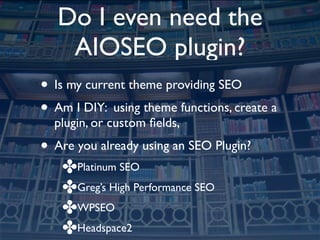
Do I even need the
    AIOSEO plugin?
• Is my current theme providing SEO
• Am I DIY: using theme functions, create a
  plugin, or custom fields,
• Are you already using an SEO Plugin?
   ✤Platinum SEO
   ✤Greg’s High Performance SEO
   ✤WPSEO
   ✤Headspace2
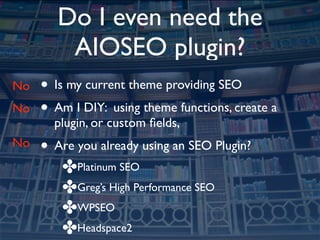
Do I even need the
         AIOSEO plugin?
No   • Is my current theme providing SEO
No   • Am I DIY: using theme functions, create a
       plugin, or custom fields,
No   • Are you already using an SEO Plugin?
        ✤Platinum SEO
        ✤Greg’s High Performance SEO
        ✤WPSEO
        ✤Headspace2
Okay, I want the
      AIOSEO plugin

• Download it and install it
• After you install it or update it, you need to
  enable it.
AIOSEO enabled, now
      what?

• Settings for each Post or Page
• Settings for the entire Site
DEMO: AIOSEO Post
    Settings
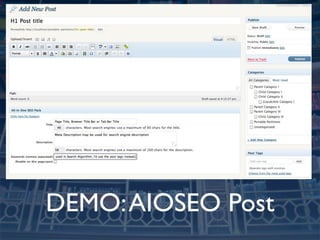
DEMO: AIOSEO Post
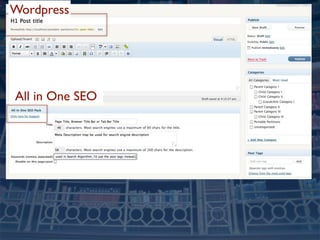
Wordpress


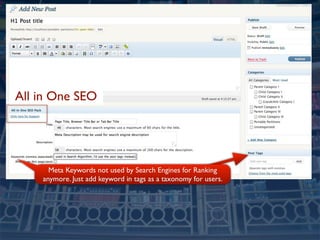
All in One SEO
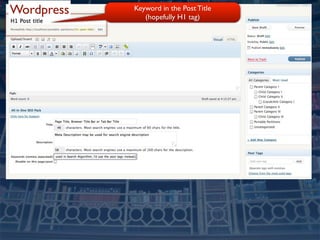
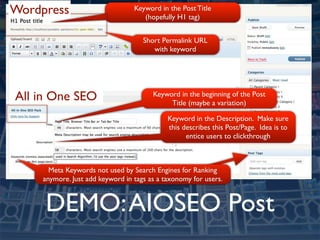
Wordpress   Keyword in the Post Title
               (hopefully H1 tag)
Wordpress

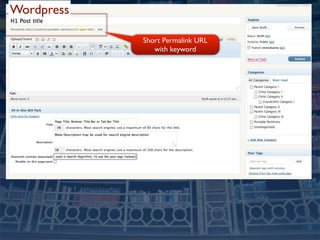
            Short Permalink URL
               with keyword
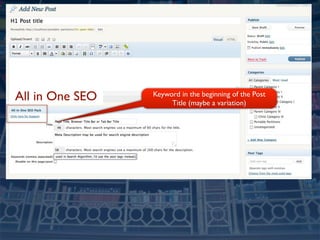
All in One SEO   Keyword in the beginning of the Post
                      Title (maybe a variation)
All in One SEO
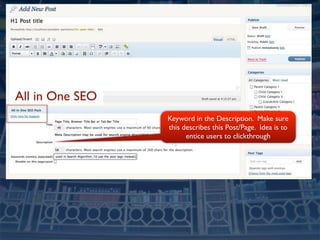
                 Keyword in the Description. Make sure
                 this describes this Post/Page. Idea is to
                       entice users to clickthrough
All in One SEO


      Meta Keywords not used by Search Engines for Ranking
    anymore. Just add keyword in tags as a taxonomy for users.
Wordpress                         Keyword in the Post Title
                                     (hopefully H1 tag)


                                     Short Permalink URL
                                        with keyword


All in One SEO                          Keyword in the beginning of the Post
                                             Title (maybe a variation)

                                             Keyword in the Description. Make sure
                                             this describes this Post/Page. Idea is to
                                                   entice users to clickthrough


       Meta Keywords not used by Search Engines for Ranking
     anymore. Just add keyword in tags as a taxonomy for users.


     DEMO: AIOSEO Post
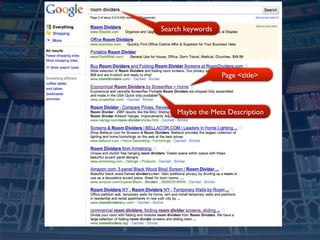
Search keywords


                  Page <title>


    Maybe the Meta Description
What Keywords to
         use?

• http://www.google.com/sktool/
• http://www.seomoz.org/blog/10-steps-to-
  advanced-keyword-research
Keyword Density Rules
according to SEOMOZ.com
•   Keyword in the beginning of the Title Tag and
    maybe a variation word.
•   Once in the H1 header tag
•   3X in the body copy
•   Once in bold <strong>
•   Once in the alt of an image.
•   Once in the URL slug
•   Once in the meta description tag
•   Don’t use the keyword in links on this page to other pages.
DEMO: AIOSEO Site
    Settings
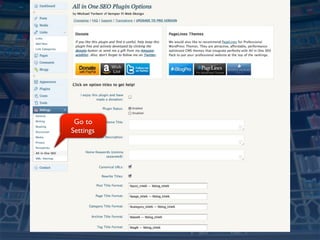
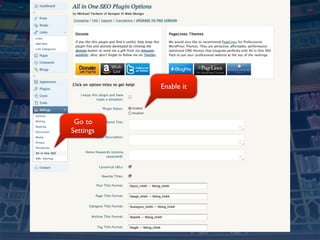
Go to
Settings
Enable it


 Go to
Settings
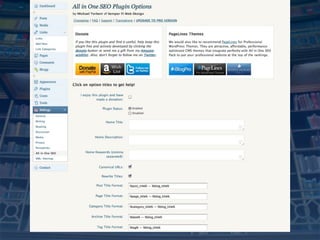
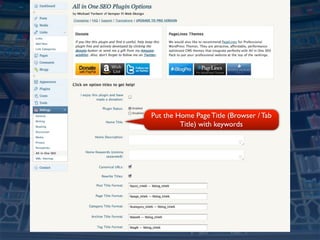
Put the Home Page Title (Browser / Tab
         Title) with keywords
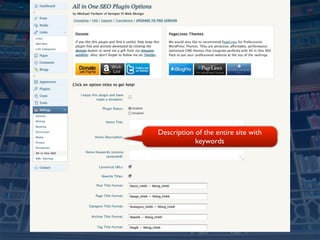
Description of the entire site with
            keywords
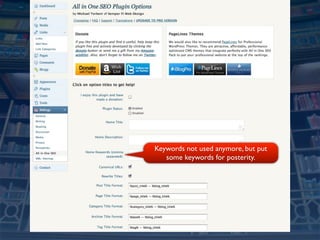
Keywords not used anymore, but put
   some keywords for posterity.
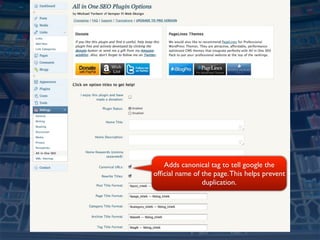
Adds canonical tag to tell google the
official name of the page. This helps prevent
                duplication.
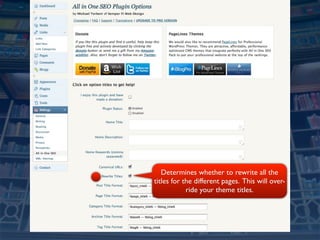
Determines whether to rewrite all the
titles for the different pages. This will over-
            ride your theme titles.
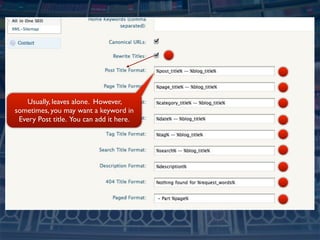
Usually, leaves alone. However,
sometimes, you may want a keyword in
 Every Post title. You can add it here.
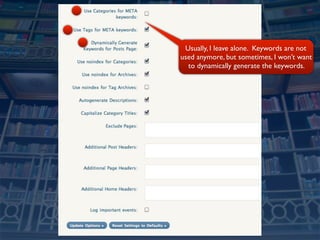
Usually, I leave alone. Keywords are not
used anymore, but sometimes, I won’t want
  to dynamically generate the keywords.
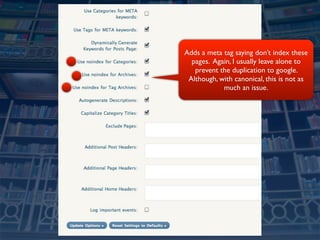
Adds a meta tag saying don’t index these
  pages. Again, I usually leave alone to
   prevent the duplication to google.
 Although, with canonical, this is not as
            much an issue.
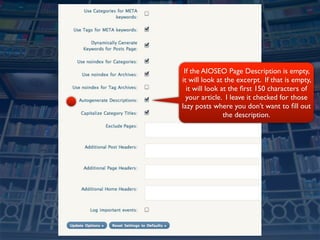
If the AIOSEO Page Description is empty,
it will look at the excerpt. If that is empty,
  it will look at the first 150 characters of
  your article. I leave it checked for those
lazy posts where you don’t want to fill out
                the description.
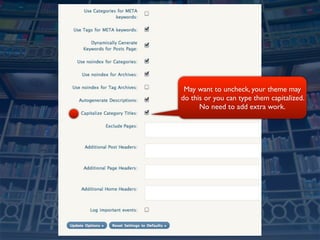
May want to uncheck, your theme may
do this or you can type them capitalized.
      No need to add extra work.
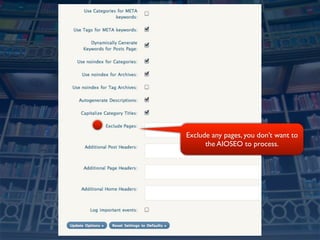
Exclude any pages, you don’t want to
      the AIOSEO to process.
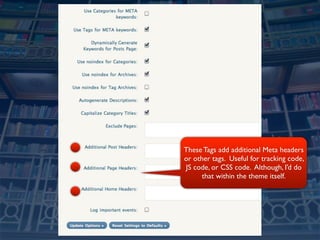
These Tags add additional Meta headers
or other tags. Useful for tracking code,
JS code, or CSS code. Although, I’d do
      that within the theme itself.
Practical Next Actions

• Spend 80% of your time on creating new
  content.
• Spend 20% of your time on SEO
• Spend 100% of your time helping others.
• Follow the Google SEO Guidelines
Next Actions
•   On page: According to Google Webmaster
    Guidelines:
    •   Identify keywords that your target audience
        will use to find you.
    •   Write Fantastic, Unique Content, Tell a Story.
    •   Use the Page Title, Headings, Alt attribute, title
        attribute.
•   Be Controversial, Be First, Be Unique, Be
    Creative, Be Useful, Be Yourself
Cool Down

• Do I need the AIOSEO Plugin?
• What tools does it provide?
• What are my next actions?
Follow up Resources

• Slides posted at http://octavity.com/
• twitter.com/scottstawarz
• scott@octavity.com
• http://delicious.com/sstawarz/SEO
• Any Questions?
Attribution
Flickr Photos Courtesy of:
★British Museum
   http://www.flickr.com/photos/agroffman/
   4258711212/
★Chicago Skyline 2008
   http://www.flickr.com/photos/carroll/
   2972076679/
Thank you,

  @scottstawarz
http://octavity.com/

Maximize the All In One SEO Wordpress Plugin

  • 1.
    Maximize the All InOne SEO Plugin Presented by: Scott Stawarz @scottstawarz http://octavity.com/
  • 2.
    Warm Up • Whatdoes the AIOSEO Plugin do for me? • Do I even need the AIOSEO Plugin? • Its enabled, What do i do for each post? • Its enabled, what are the initial settings? • Next Actions
  • 3.
    What does the AIOSEO do? • Provides us with tools to improve our Search Engine Ranking using on page techniques.
  • 4.
    AIOSEO Tools • Allowsyou to create keyword rich <titles> that differ from your <h1> post title • Create your own meta description to improve click-through rates • Create specific meta keywords. (not necessary anymore) • Prevents duplicate data (to a degree)
  • 5.
    What doesn’t the AIOSEOplugin do? If I give you hammer (tool), do you now have a house?
  • 6.
    What doesn’t the AIOSEO plugin do? • It will not do sitemaps, robots, or pinging search services. • Its not All In One. You, your theme, or other plugins are needed to maximize your Search Engine Optimization. • Does not do any OFF Page Techniques • It will not make you rank high. You still have to do the work.
  • 7.
    Do I evenneed the AIOSEO plugin? • Doesn’t Wordpress do that for me? • Doesn’t my theme do that for me?
  • 8.
    Do I evenneed the AIOSEO plugin? • Answer: It depends.
  • 9.
    Do I evenneed the AIOSEO plugin? • Is my current theme providing SEO • Am I DIY: using theme functions, create a plugin, or custom fields, • Are you already using an SEO Plugin? ✤Platinum SEO ✤Greg’s High Performance SEO ✤WPSEO ✤Headspace2
  • 10.
    Do I evenneed the AIOSEO plugin? No • Is my current theme providing SEO No • Am I DIY: using theme functions, create a plugin, or custom fields, No • Are you already using an SEO Plugin? ✤Platinum SEO ✤Greg’s High Performance SEO ✤WPSEO ✤Headspace2
  • 11.
    Okay, I wantthe AIOSEO plugin • Download it and install it • After you install it or update it, you need to enable it.
  • 12.
    AIOSEO enabled, now what? • Settings for each Post or Page • Settings for the entire Site
  • 13.
  • 14.
  • 15.
  • 16.
    Wordpress Keyword in the Post Title (hopefully H1 tag)
  • 17.
    Wordpress Short Permalink URL with keyword
  • 18.
    All in OneSEO Keyword in the beginning of the Post Title (maybe a variation)
  • 19.
    All in OneSEO Keyword in the Description. Make sure this describes this Post/Page. Idea is to entice users to clickthrough
  • 20.
    All in OneSEO Meta Keywords not used by Search Engines for Ranking anymore. Just add keyword in tags as a taxonomy for users.
  • 21.
    Wordpress Keyword in the Post Title (hopefully H1 tag) Short Permalink URL with keyword All in One SEO Keyword in the beginning of the Post Title (maybe a variation) Keyword in the Description. Make sure this describes this Post/Page. Idea is to entice users to clickthrough Meta Keywords not used by Search Engines for Ranking anymore. Just add keyword in tags as a taxonomy for users. DEMO: AIOSEO Post
  • 22.
    Search keywords Page <title> Maybe the Meta Description
  • 23.
    What Keywords to use? • http://www.google.com/sktool/ • http://www.seomoz.org/blog/10-steps-to- advanced-keyword-research
  • 24.
    Keyword Density Rules accordingto SEOMOZ.com • Keyword in the beginning of the Title Tag and maybe a variation word. • Once in the H1 header tag • 3X in the body copy • Once in bold <strong> • Once in the alt of an image. • Once in the URL slug • Once in the meta description tag • Don’t use the keyword in links on this page to other pages.
  • 25.
  • 27.
  • 28.
    Enable it Goto Settings
  • 29.
    Put the HomePage Title (Browser / Tab Title) with keywords
  • 30.
    Description of theentire site with keywords
  • 31.
    Keywords not usedanymore, but put some keywords for posterity.
  • 32.
    Adds canonical tagto tell google the official name of the page. This helps prevent duplication.
  • 33.
    Determines whether torewrite all the titles for the different pages. This will over- ride your theme titles.
  • 34.
    Usually, leaves alone.However, sometimes, you may want a keyword in Every Post title. You can add it here.
  • 35.
    Usually, I leavealone. Keywords are not used anymore, but sometimes, I won’t want to dynamically generate the keywords.
  • 36.
    Adds a metatag saying don’t index these pages. Again, I usually leave alone to prevent the duplication to google. Although, with canonical, this is not as much an issue.
  • 37.
    If the AIOSEOPage Description is empty, it will look at the excerpt. If that is empty, it will look at the first 150 characters of your article. I leave it checked for those lazy posts where you don’t want to fill out the description.
  • 38.
    May want touncheck, your theme may do this or you can type them capitalized. No need to add extra work.
  • 39.
    Exclude any pages,you don’t want to the AIOSEO to process.
  • 40.
    These Tags addadditional Meta headers or other tags. Useful for tracking code, JS code, or CSS code. Although, I’d do that within the theme itself.
  • 41.
    Practical Next Actions •Spend 80% of your time on creating new content. • Spend 20% of your time on SEO • Spend 100% of your time helping others. • Follow the Google SEO Guidelines
  • 42.
    Next Actions • On page: According to Google Webmaster Guidelines: • Identify keywords that your target audience will use to find you. • Write Fantastic, Unique Content, Tell a Story. • Use the Page Title, Headings, Alt attribute, title attribute. • Be Controversial, Be First, Be Unique, Be Creative, Be Useful, Be Yourself
  • 43.
    Cool Down • DoI need the AIOSEO Plugin? • What tools does it provide? • What are my next actions?
  • 44.
    Follow up Resources •Slides posted at http://octavity.com/ • twitter.com/scottstawarz • scott@octavity.com • http://delicious.com/sstawarz/SEO • Any Questions?
  • 45.
    Attribution Flickr Photos Courtesyof: ★British Museum http://www.flickr.com/photos/agroffman/ 4258711212/ ★Chicago Skyline 2008 http://www.flickr.com/photos/carroll/ 2972076679/
  • 46.
    Thank you, @scottstawarz http://octavity.com/

Editor's Notes

  • #43 Make a site with a clear hierarchy and text links. Every page should be reachable from at least one static text link. Offer a site map to your users with links that point to the important parts of your site. If the site map is larger than 100 or so links, you may want to break the site map into separate pages. Create a useful, information-rich site, and write pages that clearly and accurately describe your content. Think about the words users would type to find your pages, and make sure that your site actually includes those words within it. Try to use text instead of images to display important names, content, or links. The Google crawler doesn&apos;t recognize text contained in images. If you must use images for textual content, consider using the &quot;ALT&quot; attribute to include a few words of descriptive text. Make sure that your &lt;title&gt; elements and ALT attributes are descriptive and accurate. Check for broken links and correct HTML. If you decide to use dynamic pages (i.e., the URL contains a &quot;?&quot; character), be aware that not every search engine spider crawls dynamic pages as well as static pages. It helps to keep the parameters short and the number of them few. Keep the links on a given page to a reasonable number (fewer than 100). Review our image guidelines for best practices on publishing images.