WORD 2013 
WORKING WITH SHAPES AND PICTURES
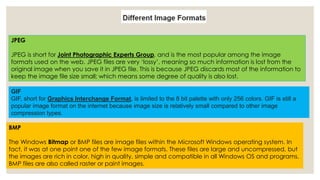
JPEG 
JPEG is short for Joint Photographic Experts Group, and is the most popular among the image 
formats used on the web. JPEG files are very ‘lossy’, meaning so much information is lost from the 
original image when you save it in JPEG file. This is because JPEG discards most of the information to 
keep the image file size small; which means some degree of quality is also lost. 
GIF 
GIF, short for Graphics Interchange Format, is limited to the 8 bit palette with only 256 colors. GIF is still a 
popular image format on the internet because image size is relatively small compared to other image 
compression types. 
BMP 
The Windows Bitmap or BMP files are image files within the Microsoft Windows operating system. In 
fact, it was at one point one of the few image formats. These files are large and uncompressed, but 
the images are rich in color, high in quality, simple and compatible in all Windows OS and programs. 
BMP files are also called raster or paint images.
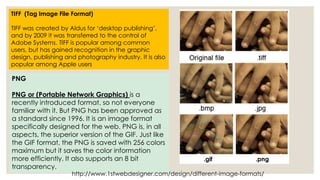
TIFF (Tag Image File Format) 
TIFF was created by Aldus for ‘desktop publishing’, 
and by 2009 it was transferred to the control of 
Adobe Systems. TIFF is popular among common 
users, but has gained recognition in the graphic 
design, publishing and photography industry. It is also 
popular among Apple users 
PNG 
PNG or (Portable Network Graphics) is a 
recently introduced format, so not everyone 
familiar with it. But PNG has been approved as 
a standard since 1996. It is an image format 
specifically designed for the web. PNG is, in all 
aspects, the superior version of the GIF. Just like 
the GIF format, the PNG is saved with 256 colors 
maximum but it saves the color information 
more efficiently. It also supports an 8 bit 
transparency. 
.gif .png 
http://www.1stwebdesigner.com/design/different-image-formats/
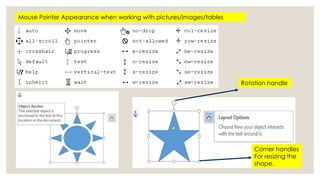
Mouse Pointer Appearance when working with pictures/images/tables 
Rotation handle 
Corner handles 
For resizing the 
shape.
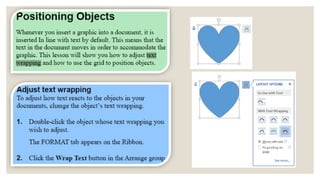
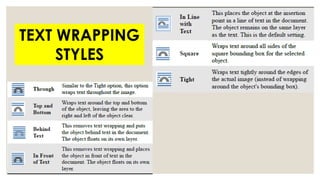
TEXT WRAPPING 
STYLES
Wrapping style: In line with 
text- default setting
Wrapping style: Through
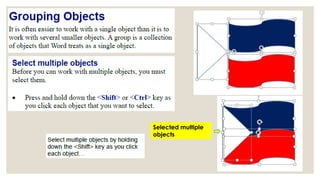
Selected multiple 
objects
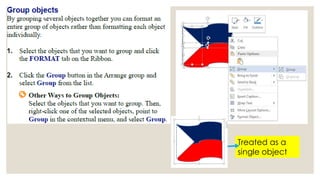
Treated as a 
single object
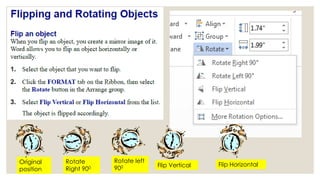
Original 
position 
Rotate 
Right 900 
Rotate left 
900 Flip Vertical Flip Horizontal
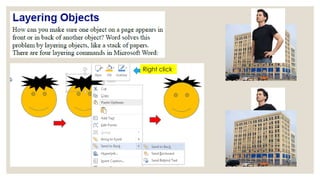
Right click
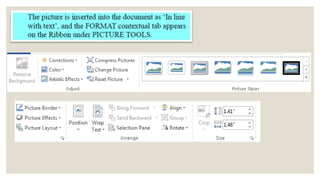
Word 2013 working with pictures

Word 2013 working with pictures

  • 1.
    WORD 2013 WORKINGWITH SHAPES AND PICTURES
  • 4.
    JPEG JPEG isshort for Joint Photographic Experts Group, and is the most popular among the image formats used on the web. JPEG files are very ‘lossy’, meaning so much information is lost from the original image when you save it in JPEG file. This is because JPEG discards most of the information to keep the image file size small; which means some degree of quality is also lost. GIF GIF, short for Graphics Interchange Format, is limited to the 8 bit palette with only 256 colors. GIF is still a popular image format on the internet because image size is relatively small compared to other image compression types. BMP The Windows Bitmap or BMP files are image files within the Microsoft Windows operating system. In fact, it was at one point one of the few image formats. These files are large and uncompressed, but the images are rich in color, high in quality, simple and compatible in all Windows OS and programs. BMP files are also called raster or paint images.
  • 5.
    TIFF (Tag ImageFile Format) TIFF was created by Aldus for ‘desktop publishing’, and by 2009 it was transferred to the control of Adobe Systems. TIFF is popular among common users, but has gained recognition in the graphic design, publishing and photography industry. It is also popular among Apple users PNG PNG or (Portable Network Graphics) is a recently introduced format, so not everyone familiar with it. But PNG has been approved as a standard since 1996. It is an image format specifically designed for the web. PNG is, in all aspects, the superior version of the GIF. Just like the GIF format, the PNG is saved with 256 colors maximum but it saves the color information more efficiently. It also supports an 8 bit transparency. .gif .png http://www.1stwebdesigner.com/design/different-image-formats/
  • 8.
    Mouse Pointer Appearancewhen working with pictures/images/tables Rotation handle Corner handles For resizing the shape.
  • 10.
  • 11.
    Wrapping style: Inline with text- default setting
  • 12.
  • 13.
  • 14.
    Treated as a single object
  • 15.
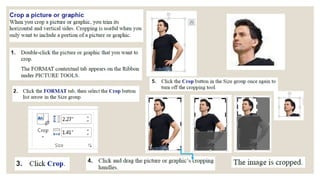
    Original position Rotate Right 900 Rotate left 900 Flip Vertical Flip Horizontal
  • 16.