
www.wpninjas.eu
Sensitivity: INTERNAL
Windows Autopilot
Don't let the perfect be the enemy of the better
Ronni Pedersen
Cloud Architect
APENTO
www.wpninjas.eu
Sensitivity: INTERNAL
V-Platin Sponsor V-Gold Sponsor
Event Sponsors
www.wpninjas.eu
Sensitivity: INTERNAL
3
Ronni Pedersen
Cloud Architect
• APENTO ApS
• Microsoft MVP: Enterprise Mobility (13 years)
• MCSE/MCSA/MCITP/MCTS (+75 certifications)
• ITIL Foundation Certified
• Microsoft Certified Trainer (MCT) since 2007
Contact Me
• Twitter: @ronnipedersen
• Website: https://www.apento.com/
• Blog: https://www.ronnipedersen.com/
• Mail: rop@apento.com
• Phone: +45 2085 9452
www.wpninjas.eu
Sensitivity: INTERNAL
Agenda
• Windows Autopilot Overview
• A successful Proof-Of-Concept
• Device Registration
• Working OEM / Partner
• Existing devices
• Apps and Policies
• Tip & Tricks
www.wpninjas.eu
Sensitivity: INTERNAL
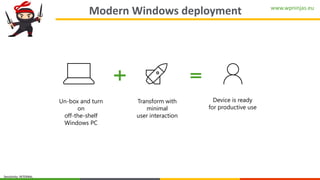
Modern Windows deployment
Un-box and turn
on
off-the-shelf
Windows PC
Device is ready
for productive use
Transform with
minimal
user interaction
www.wpninjas.eu
Sensitivity: INTERNAL
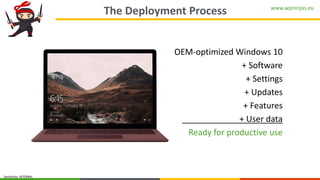
The Deployment Process
OEM-optimized Windows 10
+ Software
+ Settings
+ Updates
+ Features
+ User data
Ready for productive use
www.wpninjas.eu
Sensitivity: INTERNAL
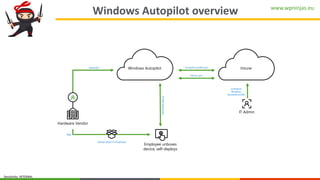
Windows Autopilot overview
Configure
Windows
Autopilot profile
Profiledownload
Device IDs
Hardware Vendor
IT Admin
Ship
Deliver direct to Employee
Employee unboxes
device, self-deploys
IntuneWindows Autopilot
Device sync
Autopilot profile sync
www.wpninjas.eu
Sensitivity: INTERNAL
DEMO
User-driven Deployment:
End User Experience
www.wpninjas.eu
Sensitivity: INTERNAL
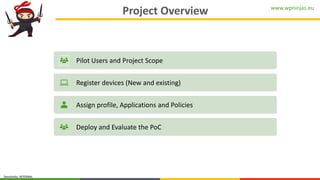
Project Overview
Pilot Users and Project Scope
Register devices (New and existing)
Assign profile, Applications and Policies
Deploy and Evaluate the PoC
www.wpninjas.eu
Sensitivity: INTERNAL
Pilot Users and Project Scope
Keep it simple…
www.wpninjas.eu
Sensitivity: INTERNAL
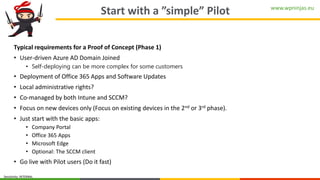
Start with a ”simple” Pilot
Typical requirements for a Proof of Concept (Phase 1)
• User-driven Azure AD Domain Joined
• Self-deploying can be more complex for some customers
• Deployment of Office 365 Apps and Software Updates
• Local administrative rights?
• Co-managed by both Intune and SCCM?
• Focus on new devices only (Focus on existing devices in the 2nd or 3rd phase).
• Just start with the basic apps:
• Company Portal
• Office 365 Apps
• Microsoft Edge
• Optional: The SCCM client
• Go live with Pilot users (Do it fast)
www.wpninjas.eu
Sensitivity: INTERNAL
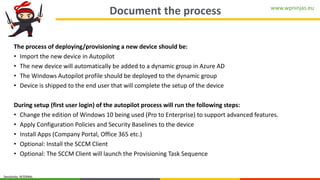
Document the process
The process of deploying/provisioning a new device should be:
• Import the new device in Autopilot
• The new device will automatically be added to a dynamic group in Azure AD
• The Windows Autopilot profile should be deployed to the dynamic group
• Device is shipped to the end user that will complete the setup of the device
During setup (first user login) of the autopilot process will run the following steps:
• Change the edition of Windows 10 being used (Pro to Enterprise) to support advanced features.
• Apply Configuration Policies and Security Baselines to the device
• Install Apps (Company Portal, Office 365 etc.)
• Optional: Install the SCCM Client
• Optional: The SCCM Client will launch the Provisioning Task Sequence
www.wpninjas.eu
Sensitivity: INTERNAL
Windows AutoPilot Best Practices
The ideal pilot user
• Users that only needs access to resources that can be accessed using
cloud-based services (like Office 365 and SalesForce).
• Users will be created and maintained in the on-prem Active Directory, and
then synced to Azure Active Directory.
Devices
• Use physical machines when required
• Self-deploying mode
• White glove (also requires Ethernet connection)
www.wpninjas.eu
Sensitivity: INTERNAL
Need on-prem access?
• Avoid the Hybrid AAD path if possible
• Move services to the cloud
• Office 365
• OneDrive / SharePoint / Teams
• Publish your internal services, so they work from any device and location
• Azure Application Proxy
• Windows Virtual Desktop
www.wpninjas.eu
Sensitivity: INTERNAL
Device Registration
www.wpninjas.eu
Sensitivity: INTERNAL
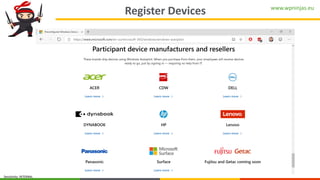
Register Devices
www.wpninjas.eu
Sensitivity: INTERNAL
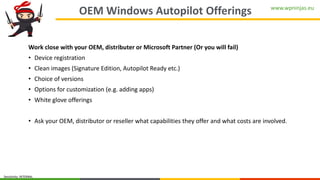
OEM Windows Autopilot Offerings
Work close with your OEM, distributer or Microsoft Partner (Or you will fail)
• Device registration
• Clean images (Signature Edition, Autopilot Ready etc.)
• Choice of versions
• Options for customization (e.g. adding apps)
• White glove offerings
• Ask your OEM, distributor or reseller what capabilities they offer and what costs are involved.
www.wpninjas.eu
Sensitivity: INTERNAL
DEMO
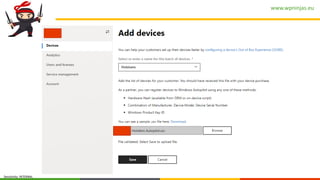
Microsoft Partner Experience
Importing new devices for your customers
www.wpninjas.eu
Sensitivity: INTERNAL
www.wpninjas.eu
Sensitivity: INTERNAL
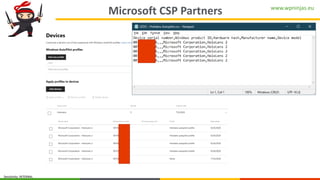
Microsoft CSP Partners
www.wpninjas.eu
Sensitivity: INTERNAL
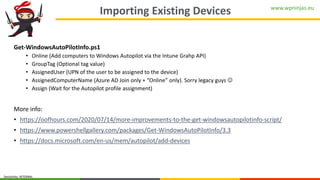
Importing Existing Devices
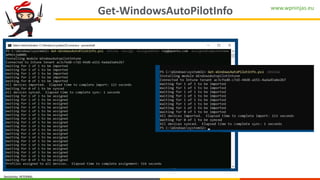
Get-WindowsAutoPilotInfo.ps1
• Online (Add computers to Windows Autopilot via the Intune Grahp API)
• GroupTag (Optional tag value)
• AssignedUser (UPN of the user to be assigned to the device)
• AssignedComputerName (Azure AD Join only + “Online” only). Sorry legacy guys ☺
• Assign (Wait for the Autopilot profile assignment)
More info:
• https://oofhours.com/2020/07/14/more-improvements-to-the-get-windowsautopilotinfo-script/
• https://www.powershellgallery.com/packages/Get-WindowsAutoPilotInfo/3.3
• https://docs.microsoft.com/en-us/mem/autopilot/add-devices
www.wpninjas.eu
Sensitivity: INTERNAL
DEMO
Get-WindowsAutoPilotInfo
Importing existing devices during setup
www.wpninjas.eu
Sensitivity: INTERNAL
Get-WindowsAutoPilotInfo
www.wpninjas.eu
Sensitivity: INTERNAL
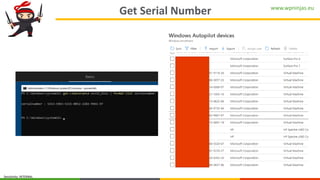
Get Serial Number
www.wpninjas.eu
Sensitivity: INTERNAL
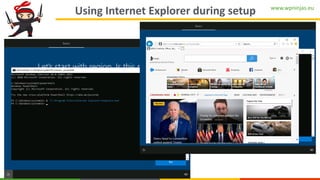
Using Internet Explorer during setup
www.wpninjas.eu
Sensitivity: INTERNAL
Device Registration
Re-image existing devices
www.wpninjas.eu
Sensitivity: INTERNAL
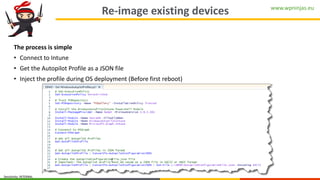
Re-image existing devices
The process is simple
• Connect to Intune
• Get the Autopilot Profile as a JSON file
• Inject the profile during OS deployment (Before first reboot)
www.wpninjas.eu
Sensitivity: INTERNAL
DEMO
Windows Autopilot
- Existing Devices
www.wpninjas.eu
Sensitivity: INTERNAL
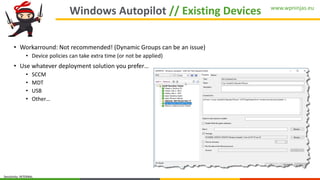
Windows Autopilot // Existing Devices
• Workarround: Not recommended! (Dynamic Groups can be an issue)
• Device policies can take extra time (or not be applied)
• Use whatever deployment solution you prefer…
• SCCM
• MDT
• USB
• Other…
www.wpninjas.eu
Sensitivity: INTERNAL
Applications & Policies
www.wpninjas.eu
Sensitivity: INTERNAL
Recommended order
• Install Office (and other intune apps) before installing the SCCM Client
• The workload will switch to SCCM
• Wont switch back until the sync is complete
• Scandalize on Win32Apps (use dependencies)
• Optional: Target all apps to device
• Target the SCCM client to the user (still in system context)
www.wpninjas.eu
Sensitivity: INTERNAL
SCCM Integration
www.wpninjas.eu
Sensitivity: INTERNAL
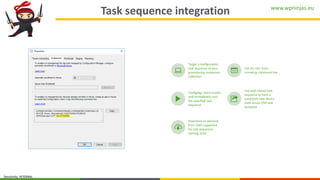
Task sequence integration
CCMSETUPCMD="CCMHOSTNAME=COMANCMG.CONTOSO.CO
M/CCM_Proxy_MutualAuth/72057594037928035
SMSSiteCode=CIT“ /ts:CIT20001
Target a configuration
task sequence to your
provisioning computers
collection
Call /ts:<ID> from
ccmsetup command line
ConfigMgr client installs
and immediately runs
the specified task
sequence
Use with nested task
sequence to have a
consistent new device
state across OSD and
Autopilot
Download on demand
from CMG supported
for task sequences
starting 1910
www.wpninjas.eu
Sensitivity: INTERNAL
Tips & tricks
www.wpninjas.eu
Sensitivity: INTERNAL
Disable Shift-F10 in OOBE
• Create a file named DisableCMDRequest.TAG in the C:WindowsSetupScripts folder.
• Then, Shift-F10 will be disabled.
• Ask your OEM to include that file in the preinstalled Windows 10 image that ships on the device.
• Or add the file as part of OS Imaging…
• Important: The file is removed any time you reset the device, so if you want that file to be persisted,
create a provisioning package that recreates it.
www.wpninjas.eu
Sensitivity: INTERNAL
Local Admin
• Add INTERACTICE to local administrators group
• Can be usefull in shared device scenarios (schools, labs etc.)
• Can be done by using Custom CSP or PowerShell script!
• But Proactive Remediations is so much better (Reporting etc.)
• Can be a security concern in some scenarios
www.wpninjas.eu
Sensitivity: INTERNAL
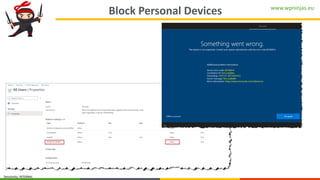
Block Personal Devices
www.wpninjas.eu
Sensitivity: INTERNAL
Thank You

Windows Autopilot - Workplace Nijna Summmit 2020