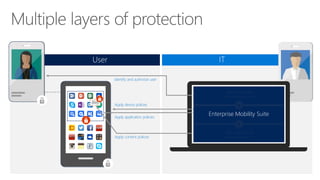
Identify and authorize user
Apply device policies
Apply application policies
Apply content policies
User IT
ActiveDirectoryPremium
RightsManagement
Enterprise Mobility Suite
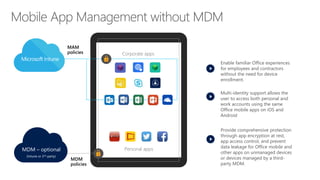
Provide comprehensive protection
through app encryption at rest,
app access control, and prevent
data leakage for Office mobile and
other apps on unmanaged devices
or devices managed by a third-
party MDM.
Enable familiar Office experiences
for employees and contractors
without the need for device
enrollment.
Personal apps
Corporate apps
MDM
policies
MAM
policies
MDM – optional
(Intune or 3rd-party)
Multi-identity support allows the
user to access both personal and
work accounts using the same
Office mobile apps on iOS and
Android
Personal apps
Managed apps
IT
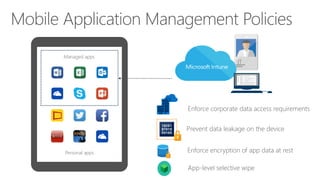
Enforce corporate data access requirements
Prevent data leakage on the device
Enforce encryption of app data at rest
App-level selective wipe
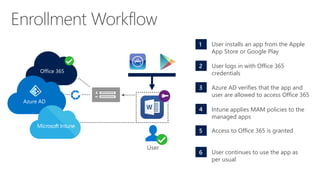
1 User installs an app from the Apple
App Store or Google Play
2 User logs in with Office 365
credentials
3 Azure AD verifies that the app and
user are allowed to access Office 365
4 Intune applies MAM policies to the
managed apps
5 Access to Office 365 is granted
6 User continues to use the app as
per usual
User
Office 365
Azure AD
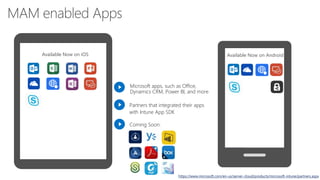
Available Now on iOS
https://www.microsoft.com/en-us/server-cloud/products/microsoft-intune/partners.aspx
Microsoft apps, such as Office,
Dynamics CRM, Power BI, and more
Partners that integrated their apps
with Intune App SDK
Coming Soon:
Available Now on Android
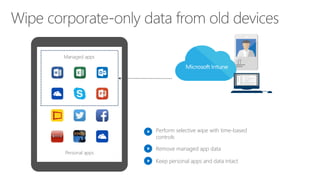
Personal apps
Managed apps
IT
Perform selective wipe with time-based
controls
Remove managed app data
Keep personal apps and data intact
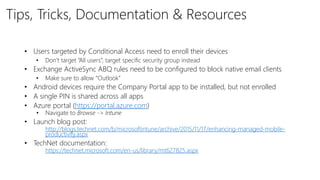
Tips, Tricks, Documentation & Resources
• Users targeted by Conditional Access need to enroll their devices
• Don’t target “All users”, target specific security group instead
• Exchange ActiveSync ABQ rules need to be configured to block native email clients
• Make sure to allow “Outlook”
• Android devices require the Company Portal app to be installed, but not enrolled
• A single PIN is shared across all apps
• Azure portal (https://portal.azure.com)
• Navigate to Browse -> Intune
• Launch blog post:
• http://blogs.technet.com/b/microsoftintune/archive/2015/11/17/enhancing-managed-mobile-
productivity.aspx
• TechNet documentation:
• https://technet.microsoft.com/en-us/library/mt627825.aspx
Intune Concept.pptx

Intune Concept.pptx

  • 2.
    Identify and authorizeuser Apply device policies Apply application policies Apply content policies User IT ActiveDirectoryPremium RightsManagement Enterprise Mobility Suite
  • 3.
    Provide comprehensive protection throughapp encryption at rest, app access control, and prevent data leakage for Office mobile and other apps on unmanaged devices or devices managed by a third- party MDM. Enable familiar Office experiences for employees and contractors without the need for device enrollment. Personal apps Corporate apps MDM policies MAM policies MDM – optional (Intune or 3rd-party) Multi-identity support allows the user to access both personal and work accounts using the same Office mobile apps on iOS and Android
  • 4.
    Personal apps Managed apps IT Enforcecorporate data access requirements Prevent data leakage on the device Enforce encryption of app data at rest App-level selective wipe
  • 5.
    1 User installsan app from the Apple App Store or Google Play 2 User logs in with Office 365 credentials 3 Azure AD verifies that the app and user are allowed to access Office 365 4 Intune applies MAM policies to the managed apps 5 Access to Office 365 is granted 6 User continues to use the app as per usual User Office 365 Azure AD
  • 6.
    Available Now oniOS https://www.microsoft.com/en-us/server-cloud/products/microsoft-intune/partners.aspx Microsoft apps, such as Office, Dynamics CRM, Power BI, and more Partners that integrated their apps with Intune App SDK Coming Soon: Available Now on Android
  • 9.
    Personal apps Managed apps IT Performselective wipe with time-based controls Remove managed app data Keep personal apps and data intact
  • 10.
    Tips, Tricks, Documentation& Resources • Users targeted by Conditional Access need to enroll their devices • Don’t target “All users”, target specific security group instead • Exchange ActiveSync ABQ rules need to be configured to block native email clients • Make sure to allow “Outlook” • Android devices require the Company Portal app to be installed, but not enrolled • A single PIN is shared across all apps • Azure portal (https://portal.azure.com) • Navigate to Browse -> Intune • Launch blog post: • http://blogs.technet.com/b/microsoftintune/archive/2015/11/17/enhancing-managed-mobile- productivity.aspx • TechNet documentation: • https://technet.microsoft.com/en-us/library/mt627825.aspx

Editor's Notes

  • #2 Enabling users to be productive is critical for organization to stay competitive in the modern world, but organizations also need to ensure that their corporate data is protected while their employees are on-the-go.