
Windows 10 Planning
Greg_Ramsey@dell.com | @ramseyg | www.ramseyg.com
Network Access Protection
•
•
•
•
Application Compatibility
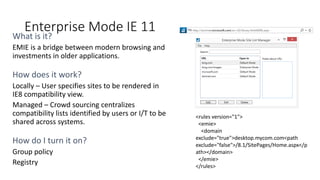
Enterprise Mode IE 11
What is it?
How does it work?
Locally – User specifies sites to be rendered in
IE8 compatibility view.
Managed – Crowd sourcing centralizes
compatibility lists identified by users or I/T to be
shared across systems.
How do I turn it on?
Group policy
Registry
<rules version="1">
<emie>
<domain
exclude="true">desktop.mycom.com<path
exclude="false">/8.1/SitePages/Home.aspx</p
ath></domain>
</emie>
</rules>
• Making it easier for Enterprise customers to upgrade to Internet Explorer 11
— and Windows 10 http://bit.ly/1AQN1nA
Enterprise Mode -2
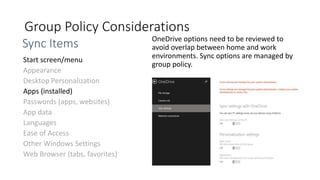
Group Policy Considerations
OneDrive options need to be reviewed to
avoid overlap between home and work
environments. Sync options are managed by
group policy.
Appearance
Desktop Personalization
Passwords (apps, websites)
App data
Languages
Ease of Access
Other Windows Settings
Web Browser (tabs, favorites)
Sync Items
•
•
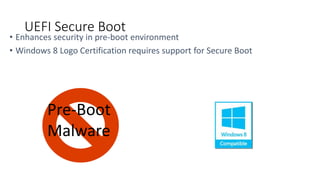
UEFI Secure Boot
•
•
•
•
•
•
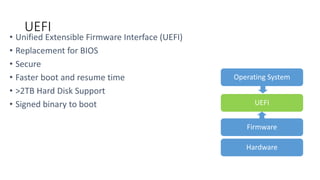
UEFI
•
•
• Deploying Windows 8 or newer on Windows 8 Compatible hardware
• Deploying Windows 7 on Windows 8 Compatible (proactive plan for upgrades)
Secure Boot
•
•
•
•
OSD Challenges with Secure Boot
•
• Deploy: Standard process to install applications – each user installs desired modern
app.
• Provision: Stage application so that when user logs on, application is installed
Deploying Modern Applications
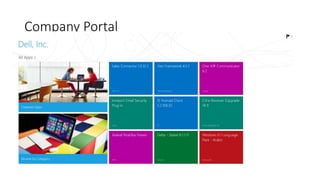
Company Portal
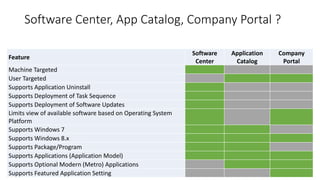
Software Center, App Catalog, Company Portal ?
Feature
Software
Center
Application
Catalog
Company
Portal
Machine Targeted
User Targeted
Supports Application Uninstall
Supports Deployment of Task Sequence
Supports Deployment of Software Updates
Limits view of available software based on Operating System
Platform
Supports Windows 7
Supports Windows 8.x
Supports Package/Program
Supports Applications (Application Model)
Supports Optional Modern (Metro) Applications
Supports Featured Application Setting
Questions?
Greg_Ramsey@dell.com | @ramseyg | www.ramseyg.com

SCUG.DK - Windows 10 Planning - April 2015

  • 1.
    Windows 10 Planning Greg_Ramsey@dell.com| @ramseyg | www.ramseyg.com
  • 2.
  • 3.
  • 4.
    Enterprise Mode IE11 What is it? How does it work? Locally – User specifies sites to be rendered in IE8 compatibility view. Managed – Crowd sourcing centralizes compatibility lists identified by users or I/T to be shared across systems. How do I turn it on? Group policy Registry <rules version="1"> <emie> <domain exclude="true">desktop.mycom.com<path exclude="false">/8.1/SitePages/Home.aspx</p ath></domain> </emie> </rules>
  • 5.
    • Making iteasier for Enterprise customers to upgrade to Internet Explorer 11 — and Windows 10 http://bit.ly/1AQN1nA Enterprise Mode -2
  • 6.
    Group Policy Considerations OneDriveoptions need to be reviewed to avoid overlap between home and work environments. Sync options are managed by group policy. Appearance Desktop Personalization Passwords (apps, websites) App data Languages Ease of Access Other Windows Settings Web Browser (tabs, favorites) Sync Items
  • 7.
  • 8.
  • 9.
    • • • Deploying Windows8 or newer on Windows 8 Compatible hardware • Deploying Windows 7 on Windows 8 Compatible (proactive plan for upgrades) Secure Boot
  • 10.
  • 11.
    • • Deploy: Standardprocess to install applications – each user installs desired modern app. • Provision: Stage application so that when user logs on, application is installed Deploying Modern Applications
  • 12.
  • 13.
    Software Center, AppCatalog, Company Portal ? Feature Software Center Application Catalog Company Portal Machine Targeted User Targeted Supports Application Uninstall Supports Deployment of Task Sequence Supports Deployment of Software Updates Limits view of available software based on Operating System Platform Supports Windows 7 Supports Windows 8.x Supports Package/Program Supports Applications (Application Model) Supports Optional Modern (Metro) Applications Supports Featured Application Setting
  • 14.

Editor's Notes

  • #4 AV and Encryption Work with Vendors early to set expectations for deliverables Test what works today using old test cases Be prepared to share your work through the process with app owners for their testing Set reasonable expectations and be prepared to explain your decisions Office http://office.microsoft.com/en-us/word-help/choose-the-32-bit-or-64-bit-version-of-office-HA010369476.aspx
  • #5 Logging sites in compatibility mode set by users. Discuss process, gp, etc. IE 8 still holds 20% market share. Enterprise Mode bridges the gap between modern browser and extended investments in older applications. Turned off by default – Enabled via Group Policy or registry edit. Compatible sites are managed centrally by IT using a centrally managed list OR locally as the user browses and discovers compatibility issues locally. Crowd sourcing pages that end users find need compatibility mode to operate effectively helps to decrease testing costs.
  • #7 Develop / review / revise policies with appropriate parties prior to deploying anything. Understand the behaviors of disabled items Still appear Cannot be removed Be prepared for exceptions and explanations
  • #8 UEFI provides advanced control and manageability over the system’s boot process. Microsoft mantra – ‘secure by default’ requires PC hardware manufacturers ship Win8 (and newer) systems with SecureBoot enabled Win8 logo requirement Windows 8 utilizes Secure Boot to ensure that the pre-OS environment is secure Booting – requires signed binary Learn more about UEFI here: http://www.uefi.org/learning_center/ - uefi forum http://blogs.msdn.com/b/b8/archive/2011/09/22/protecting-the-pre-os-environment-with-uefi.aspx
  • #9 Boot time improved by 7 seconds with UEFI enabled UEFI can access all of a computer's hardware: -Mouse -USB -Audio and Graphics -Network Adapters That means a UEFI-based system can also support Ethernet, Wi-Fi and Bluetooth network connectivity, allowing a device to be diagnosed and repaired remotely even if the OS won't boot. (depending implementation UEFI on x86 – mostly atom machines use a BIOS fallback mode ** Need to confirm Older stuff – ‘no reason to enable uefi if you can’t enable secureboot’ – unless you have perf benefits Up to 128 Primary Partitions, supports partitions totaling 9.4 ZB (Zetabytes) Bios Programmers can now use C instead of Assembly Language BIOS is mostly 16 Bit – UEFI supports 86- and 64-bit Boot time improved by 7 seconds with UEFI enabled: http://www.intel.com/content/dam/www/public/us/en/documents/white-papers/uefi-reducing-platform-boot-times.pdf Learn more about UEFI here: http://www.uefi.org/learning_center/ - uefi forum http://blogs.msdn.com/b/b8/archive/2011/09/22/protecting-the-pre-os-environment-with-uefi.aspx
  • #10  SecureBoot requires UEFI native (no legacy boot option ROMs) Booting – requires signed binary Microsoft mantra – ‘secure by default’ requires OEMs ship Win8 systems with SecureBoot enabled Win8 logo device – Older stuff – ‘no reason to enable uefi if you can’t enable secureboot’ – unless you have perf benefits Win7 to win8 logo device, enable now for future ease Learn more about UEFI here: http://www.uefi.org/learning_center/ - uefi forum http://blogs.msdn.com/b/b8/archive/2011/09/22/protecting-the-pre-os-environment-with-uefi.aspx
  • #11 x64 hardware requires x64 OS Boot Disk, and x64 OS x86 hardware requires x86 OS Boot Disk, and x86 OS Manual Touch to enable and configure, so work with your hardware manufacturer if you have company OS applied in factory. UEFI PXE required – (Windows Server 2008 and newer. Check with 3rd party PXE providers).
  • #12 Deploy = out of the box method for deploying apps with ConfigMgr. Provision = Install app so that it’s avail for all users (kind-of like runonce. . (in the user environment. . ))