Why (and how) to switch to
www.ba0sh1.com
2
Pronunciation
• Official: Kee-Cad, Most people: Kye-Cad
• Tribute to Chris Gammell
Why I choose KiCad
• I don’t want to be limited
• I can’t afford any paid software
• I want to share my design
www.ba0sh1.com
3
KiCad Myth Burst
KiCad is amateur software that is not meant for professional design
Check Michael Ossmann’s Daisho project
KiCad is into endless development
The recent “stable” version 4.0.2 is release on Feb. 2016 for
Win/Mac/Linux. http://kicad-pcb.org/download/
KiCad is not stable
KiCad crashes much less than Altium (for me, but still annoyances here
and there)
You get what you paid for
You get more than what you paid for because it is free!
www.ba0sh1.com
4
Compare with Eagle (Free edition)
Advantages:
Hierarchical schematics
No limitation on size/layers
3D view
Freedom of editing PCB footprints
Disadvantages:
Some UI annoyances
Not as huge library collections
www.ba0sh1.com
5
www.ba0sh1.com
6
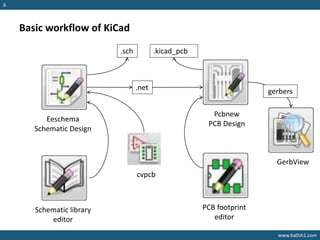
Basic workflow of KiCad
Eeschema
Schematic Design
Schematic library
editor
Pcbnew
PCB Design
PCB footprint
editor
cvpcb
.sch
.net
.kicad_pcb
gerbers
GerbView
www.ba0sh1.com
7
Demo
www.ba0sh1.com
8
Some UI tips
KiCad UI is a bit anti-human especially for those familiar with Eagle/Altium. It
is very normal to get frustrated at the beginning.
De-frustrating tips:
In Eeschema: Preferences->Hotkeys->List Current Keys
In Pcbnew: Preference->Hotkeys->List Current Keys
Remember Edit, Drag, Move, Delete hotkeys
Mouse context menu is very context sensitive:
Context menu is always depended on where the mouse pointer (not cross) is
pointing to
www.ba0sh1.com
9
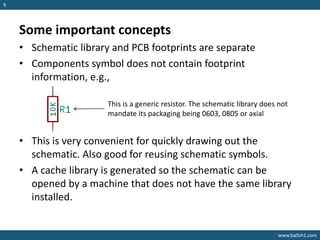
Some important concepts
• Schematic library and PCB footprints are separate
• Components symbol does not contain footprint
information, e.g.,
• This is very convenient for quickly drawing out the
schematic. Also good for reusing schematic symbols.
• A cache library is generated so the schematic can be
opened by a machine that does not have the same library
installed.
This is a generic resistor. The schematic library does not
mandate its packaging being 0603, 0805 or axial
www.ba0sh1.com
10
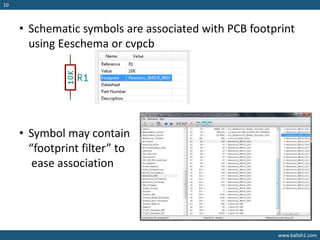
• Schematic symbols are associated with PCB footprint
using Eeschema or cvpcb
• Symbol may contain
“footprint filter” to
ease association
www.ba0sh1.com
11
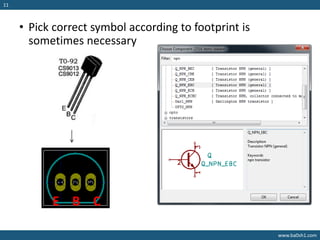
• Pick correct symbol according to footprint is
sometimes necessary
E B C
www.ba0sh1.com
12
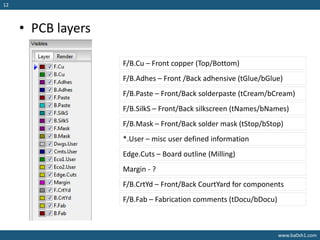
• PCB layers
F/B.Cu – Front copper (Top/Bottom)
F/B.Adhes – Front /Back adhensive (tGlue/bGlue)
F/B.Paste – Front/Back solderpaste (tCream/bCream)
F/B.SilkS – Front/Back silkscreen (tNames/bNames)
F/B.Mask – Front/Back solder mask (tStop/bStop)
*.User – misc user defined information
Edge.Cuts – Board outline (Milling)
Margin - ?
F/B.CrtYd – Front/Back CourtYard for components
F/B.Fab – Fabrication comments (tDocu/bDocu)
www.ba0sh1.com
13
Useful Resources
• Contextual Electronics
https://www.youtube.com/user/contextualelectronic
• KiCad Forum http://kicad.info/
• Lots of libraries https://github.com/cpavlina
• More 3D modules
http://smisioto.no-ip.org/elettronica/kicad/kicad-en.htm
• Tutorials http://kicad-pcb.org/help/tutorials/
• CircuitHub https://circuithub.com/

Why (and how) to switch to KiCad

  • 1.
    Why (and how)to switch to
  • 2.
    www.ba0sh1.com 2 Pronunciation • Official: Kee-Cad,Most people: Kye-Cad • Tribute to Chris Gammell Why I choose KiCad • I don’t want to be limited • I can’t afford any paid software • I want to share my design
  • 3.
    www.ba0sh1.com 3 KiCad Myth Burst KiCadis amateur software that is not meant for professional design Check Michael Ossmann’s Daisho project KiCad is into endless development The recent “stable” version 4.0.2 is release on Feb. 2016 for Win/Mac/Linux. http://kicad-pcb.org/download/ KiCad is not stable KiCad crashes much less than Altium (for me, but still annoyances here and there) You get what you paid for You get more than what you paid for because it is free!
  • 4.
    www.ba0sh1.com 4 Compare with Eagle(Free edition) Advantages: Hierarchical schematics No limitation on size/layers 3D view Freedom of editing PCB footprints Disadvantages: Some UI annoyances Not as huge library collections
  • 5.
  • 6.
    www.ba0sh1.com 6 Basic workflow ofKiCad Eeschema Schematic Design Schematic library editor Pcbnew PCB Design PCB footprint editor cvpcb .sch .net .kicad_pcb gerbers GerbView
  • 7.
  • 8.
    www.ba0sh1.com 8 Some UI tips KiCadUI is a bit anti-human especially for those familiar with Eagle/Altium. It is very normal to get frustrated at the beginning. De-frustrating tips: In Eeschema: Preferences->Hotkeys->List Current Keys In Pcbnew: Preference->Hotkeys->List Current Keys Remember Edit, Drag, Move, Delete hotkeys Mouse context menu is very context sensitive: Context menu is always depended on where the mouse pointer (not cross) is pointing to
  • 9.
    www.ba0sh1.com 9 Some important concepts •Schematic library and PCB footprints are separate • Components symbol does not contain footprint information, e.g., • This is very convenient for quickly drawing out the schematic. Also good for reusing schematic symbols. • A cache library is generated so the schematic can be opened by a machine that does not have the same library installed. This is a generic resistor. The schematic library does not mandate its packaging being 0603, 0805 or axial
  • 10.
    www.ba0sh1.com 10 • Schematic symbolsare associated with PCB footprint using Eeschema or cvpcb • Symbol may contain “footprint filter” to ease association
  • 11.
    www.ba0sh1.com 11 • Pick correctsymbol according to footprint is sometimes necessary E B C
  • 12.
    www.ba0sh1.com 12 • PCB layers F/B.Cu– Front copper (Top/Bottom) F/B.Adhes – Front /Back adhensive (tGlue/bGlue) F/B.Paste – Front/Back solderpaste (tCream/bCream) F/B.SilkS – Front/Back silkscreen (tNames/bNames) F/B.Mask – Front/Back solder mask (tStop/bStop) *.User – misc user defined information Edge.Cuts – Board outline (Milling) Margin - ? F/B.CrtYd – Front/Back CourtYard for components F/B.Fab – Fabrication comments (tDocu/bDocu)
  • 13.
    www.ba0sh1.com 13 Useful Resources • ContextualElectronics https://www.youtube.com/user/contextualelectronic • KiCad Forum http://kicad.info/ • Lots of libraries https://github.com/cpavlina • More 3D modules http://smisioto.no-ip.org/elettronica/kicad/kicad-en.htm • Tutorials http://kicad-pcb.org/help/tutorials/ • CircuitHub https://circuithub.com/