Innovative uses of smart boards in the classroom Lathania Angui ED480-01 Mr. John Jenkins NMC-SOE March 21, 2008
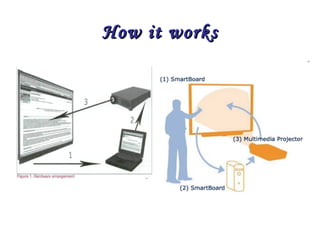
What are smart boards? SMART Boards (SMART-Technologies, 2003) are a brand of interactive whiteboards. Simply speaking it can be described as a whiteboard displaying the image from the computer monitor with the surface operating as a giant touch screen.
SMART Board Enables the teacher and/or student to perform a range of functions.  The user can  Write on the interactive whiteboard's large touch-sensitive surface with the electronic pen, drag and drop images or text Interact in many ways such as pressing icons to hear pre-recorded sounds Engage with educational multimedia activities Watch simulations and view graphics Capture text or areas of screen and annotate with the pen Save notes, drawing s or annotation for future use.
How it works
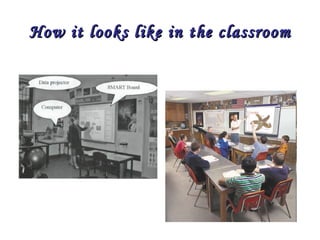
How it looks like in the classroom
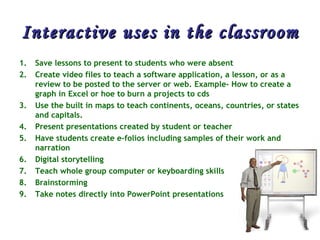
Interactive uses in the classroom Save lessons to present to students who were absent  Create video files to teach a software application, a lesson, or as a review to be posted to the server or web. Example- How to create a graph in Excel or hoe to burn a projects to cds  Use the built in maps to teach continents, oceans, countries, or states and capitals.  Present presentations created by student or teacher  Have students create e-folios including samples of their work and narration  Digital storytelling  Teach whole group computer or keyboarding skills  Brainstorming  Take notes directly into PowerPoint presentations
Continuation… Reinforce skills by using on-line interactive web sites  Creating a project calendar  Teach editing skills using editing marks  Use in the 6 trait writing process  Use highlighter tool to highlight nouns, verbs, adjectives, etc.  Use it with Kidspiration or Inspiration  Teaching students how to navigate the Internet  Illustrate and write a book as a class. Use the record feature to narrate the text.  Use the Interwrite software to create lessons in advance at home or at school. Then save them for future use or to be shared with other teachers  Diagramming activities  Teaching steps to a math problem.  Have students share projects during Parent/Teacher/Student conferences  Graphics and charts with ESL learners and special ed students.  Teaching vocabulary  Electronic Word Wall  End each day by having students write one thing that they learned
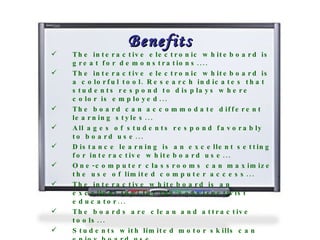
Benefits The interactive electronic whiteboard is great for demonstrations....  The interactive electronic whiteboard is a colorful tool. Research indicates that students respond to displays where color is employed...  The board can accommodate different learning styles...  All ages of students respond favorably to board use...  Distance learning is an excellent setting for interactive whiteboard use...  One-computer classrooms can maximize the use of limited computer access...  The interactive whiteboard is an excellent tool for the constructivist educator...  The boards are clean and attractive tools...  Students with limited motor skills can enjoy board use...  It is interactive...  It can interface well with other peripherals....  It is a kid magnet! ...
 
Tutorials SMART Tech Home Page http://library.uchc.edu/departm/cec/flash/sb_main.html
Lesson Plans with Smart boards http://www.scholastic.com/ interactivewhiteboards / http://eduscapes.com/sessions/smartboard/ http://www.education.smarttech.com/ste/en-US/Ed+Resource/ http://www.wacona.com/smartboard/smartboard.html http://www.waukesha.k12.wi.us/WIT/SmartBoard/specificapps.htm
Resources SMART Tech Home Page http://library. uchc . edu / departm / cec /flash/ sb _main.html http://www.scholastic.com/ interactivewhiteboards / http:// eduscapes .com/sessions/ smartboard / http://www.education. smarttech .com/ ste /en-US/Ed+Resource/ http://www. wacona .com/ smartboard / smartboard .html http://www. waukesha .k12. wi .us/WIT/ SmartBoard / specificapps . htm
In conclusion Smart-Boards are interactive and hold the attention of students.  Teachers are able to obtain Smart-Board lessons.  Having students have a visual, listen to the teacher and interact with the board and one another is an improvement in the way a teacher presents information.

smartboards

  • 1.
    Innovative uses ofsmart boards in the classroom Lathania Angui ED480-01 Mr. John Jenkins NMC-SOE March 21, 2008
  • 2.
    What are smartboards? SMART Boards (SMART-Technologies, 2003) are a brand of interactive whiteboards. Simply speaking it can be described as a whiteboard displaying the image from the computer monitor with the surface operating as a giant touch screen.
  • 3.
    SMART Board Enablesthe teacher and/or student to perform a range of functions. The user can Write on the interactive whiteboard's large touch-sensitive surface with the electronic pen, drag and drop images or text Interact in many ways such as pressing icons to hear pre-recorded sounds Engage with educational multimedia activities Watch simulations and view graphics Capture text or areas of screen and annotate with the pen Save notes, drawing s or annotation for future use.
  • 4.
  • 5.
    How it lookslike in the classroom
  • 6.
    Interactive uses inthe classroom Save lessons to present to students who were absent Create video files to teach a software application, a lesson, or as a review to be posted to the server or web. Example- How to create a graph in Excel or hoe to burn a projects to cds Use the built in maps to teach continents, oceans, countries, or states and capitals. Present presentations created by student or teacher Have students create e-folios including samples of their work and narration Digital storytelling Teach whole group computer or keyboarding skills Brainstorming Take notes directly into PowerPoint presentations
  • 7.
    Continuation… Reinforce skillsby using on-line interactive web sites Creating a project calendar Teach editing skills using editing marks Use in the 6 trait writing process Use highlighter tool to highlight nouns, verbs, adjectives, etc. Use it with Kidspiration or Inspiration Teaching students how to navigate the Internet Illustrate and write a book as a class. Use the record feature to narrate the text. Use the Interwrite software to create lessons in advance at home or at school. Then save them for future use or to be shared with other teachers Diagramming activities Teaching steps to a math problem. Have students share projects during Parent/Teacher/Student conferences Graphics and charts with ESL learners and special ed students. Teaching vocabulary Electronic Word Wall End each day by having students write one thing that they learned
  • 8.
    Benefits The interactiveelectronic whiteboard is great for demonstrations.... The interactive electronic whiteboard is a colorful tool. Research indicates that students respond to displays where color is employed... The board can accommodate different learning styles... All ages of students respond favorably to board use... Distance learning is an excellent setting for interactive whiteboard use... One-computer classrooms can maximize the use of limited computer access... The interactive whiteboard is an excellent tool for the constructivist educator... The boards are clean and attractive tools... Students with limited motor skills can enjoy board use... It is interactive... It can interface well with other peripherals.... It is a kid magnet! ...
  • 9.
  • 10.
    Tutorials SMART TechHome Page http://library.uchc.edu/departm/cec/flash/sb_main.html
  • 11.
    Lesson Plans withSmart boards http://www.scholastic.com/ interactivewhiteboards / http://eduscapes.com/sessions/smartboard/ http://www.education.smarttech.com/ste/en-US/Ed+Resource/ http://www.wacona.com/smartboard/smartboard.html http://www.waukesha.k12.wi.us/WIT/SmartBoard/specificapps.htm
  • 12.
    Resources SMART TechHome Page http://library. uchc . edu / departm / cec /flash/ sb _main.html http://www.scholastic.com/ interactivewhiteboards / http:// eduscapes .com/sessions/ smartboard / http://www.education. smarttech .com/ ste /en-US/Ed+Resource/ http://www. wacona .com/ smartboard / smartboard .html http://www. waukesha .k12. wi .us/WIT/ SmartBoard / specificapps . htm
  • 13.
    In conclusion Smart-Boardsare interactive and hold the attention of students. Teachers are able to obtain Smart-Board lessons. Having students have a visual, listen to the teacher and interact with the board and one another is an improvement in the way a teacher presents information.