The Experimenter
IntroductionThe Experimenter enables you to set up large-scale experiments, start them running, leave them, and come back when they have finished and analyze the performance statistics that have been collectedThey automate the experimental processThe statistics can be stored in ARFF formatIt allows users to distribute the computing load across multiple machines using Java RMI
Introduction
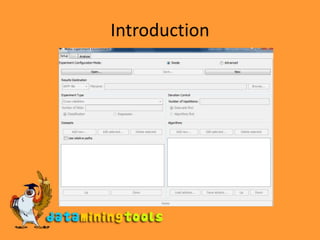
DemonstrationWe will compare the J48 decision tree method with the baseline methods OneRSteps:First click New to start a new experimentThen, on the line below, select the destination for the resultsUnderneath, select the datasetsTo the right of the datasets, select the algorithms to be tested. Click Add new to get a standard Weka object editor from which you can choose and configure a classifier. Repeat this operation to add the two classifiers
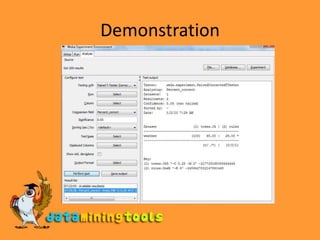
DemonstrationTo run the experiment click on the Run tab and then click on the Start button. The result will be stored on the output fileTo analyze the two selected classifiers , go to the Analyse tab and click   on ExperimentThe symbol placed beside a result indicates that it is statistically better (v) or worse (*) than the baseline schemeAt the bottom of column 2 are counts (x/y/z) of the number of times the scheme was better than (x), the same as (y), or worse than (z) the baseline scheme on the datasets used in the experiment
Demonstration
Visit more self help tutorialsPick a tutorial of your choice and browse through it at your own pace.The tutorials section is free, self-guiding and will not involve any additional support.Visit us at www.dataminingtools.net

WEKA: The Experimenter

  • 1.
  • 2.
    IntroductionThe Experimenter enablesyou to set up large-scale experiments, start them running, leave them, and come back when they have finished and analyze the performance statistics that have been collectedThey automate the experimental processThe statistics can be stored in ARFF formatIt allows users to distribute the computing load across multiple machines using Java RMI
  • 3.
  • 4.
    DemonstrationWe will comparethe J48 decision tree method with the baseline methods OneRSteps:First click New to start a new experimentThen, on the line below, select the destination for the resultsUnderneath, select the datasetsTo the right of the datasets, select the algorithms to be tested. Click Add new to get a standard Weka object editor from which you can choose and configure a classifier. Repeat this operation to add the two classifiers
  • 5.
    DemonstrationTo run theexperiment click on the Run tab and then click on the Start button. The result will be stored on the output fileTo analyze the two selected classifiers , go to the Analyse tab and click on ExperimentThe symbol placed beside a result indicates that it is statistically better (v) or worse (*) than the baseline schemeAt the bottom of column 2 are counts (x/y/z) of the number of times the scheme was better than (x), the same as (y), or worse than (z) the baseline scheme on the datasets used in the experiment
  • 6.
  • 7.
    Visit more selfhelp tutorialsPick a tutorial of your choice and browse through it at your own pace.The tutorials section is free, self-guiding and will not involve any additional support.Visit us at www.dataminingtools.net