VLAN Technology
F o l l o w m e t o t a k e t h e N A c e r t i fi c a t e
CCNA - VLAN Technology
Make no less effort than anyone else!
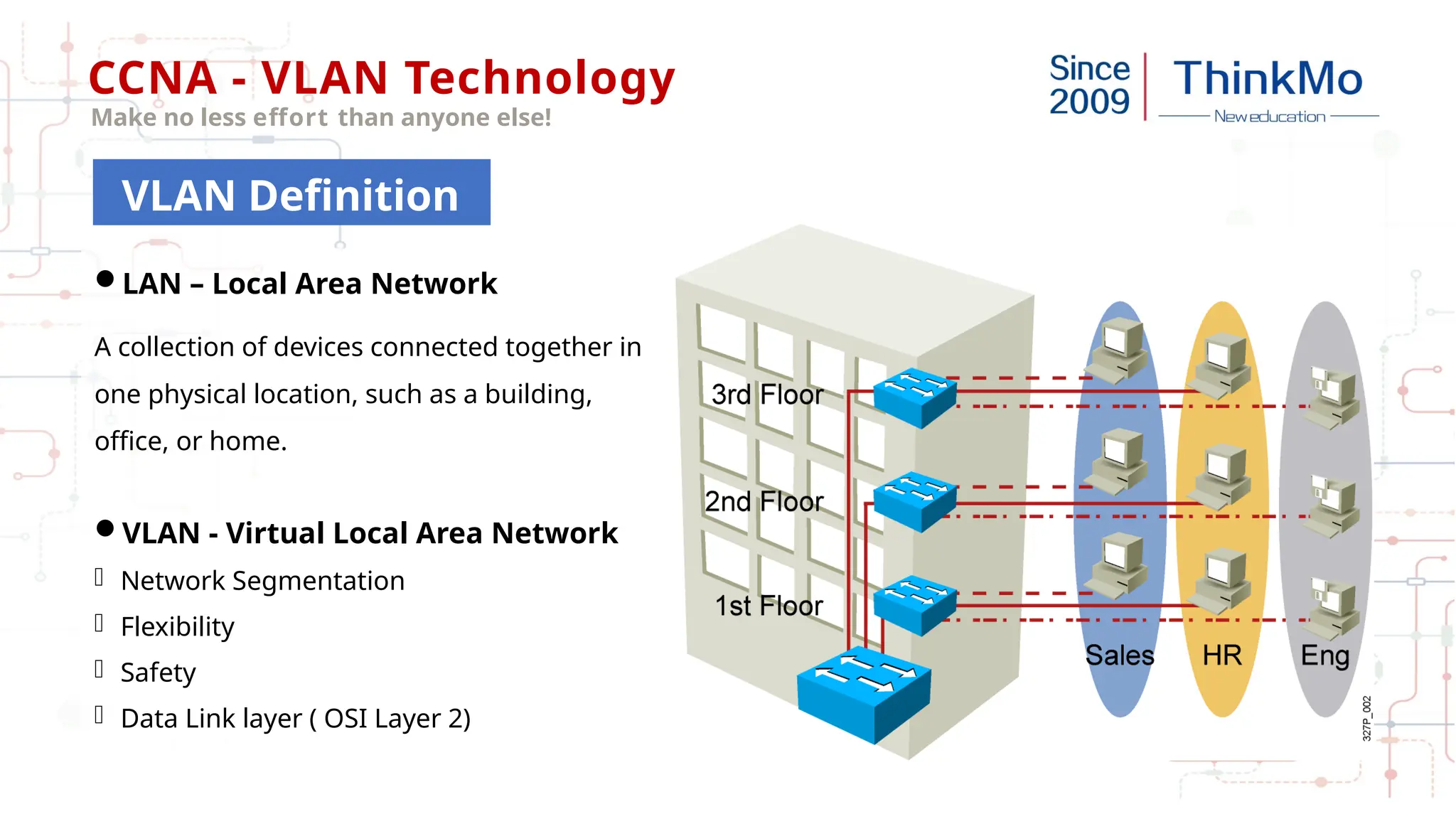
LAN – Local Area Network
A collection of devices connected together in
one physical location, such as a building,
office, or home.
VLAN - Virtual Local Area Network
- Network Segmentation
- Flexibility
- Safety
- Data Link layer ( OSI Layer 2)
VLAN Definition
CCNA - VLAN Technology
Make no less effort than anyone else!
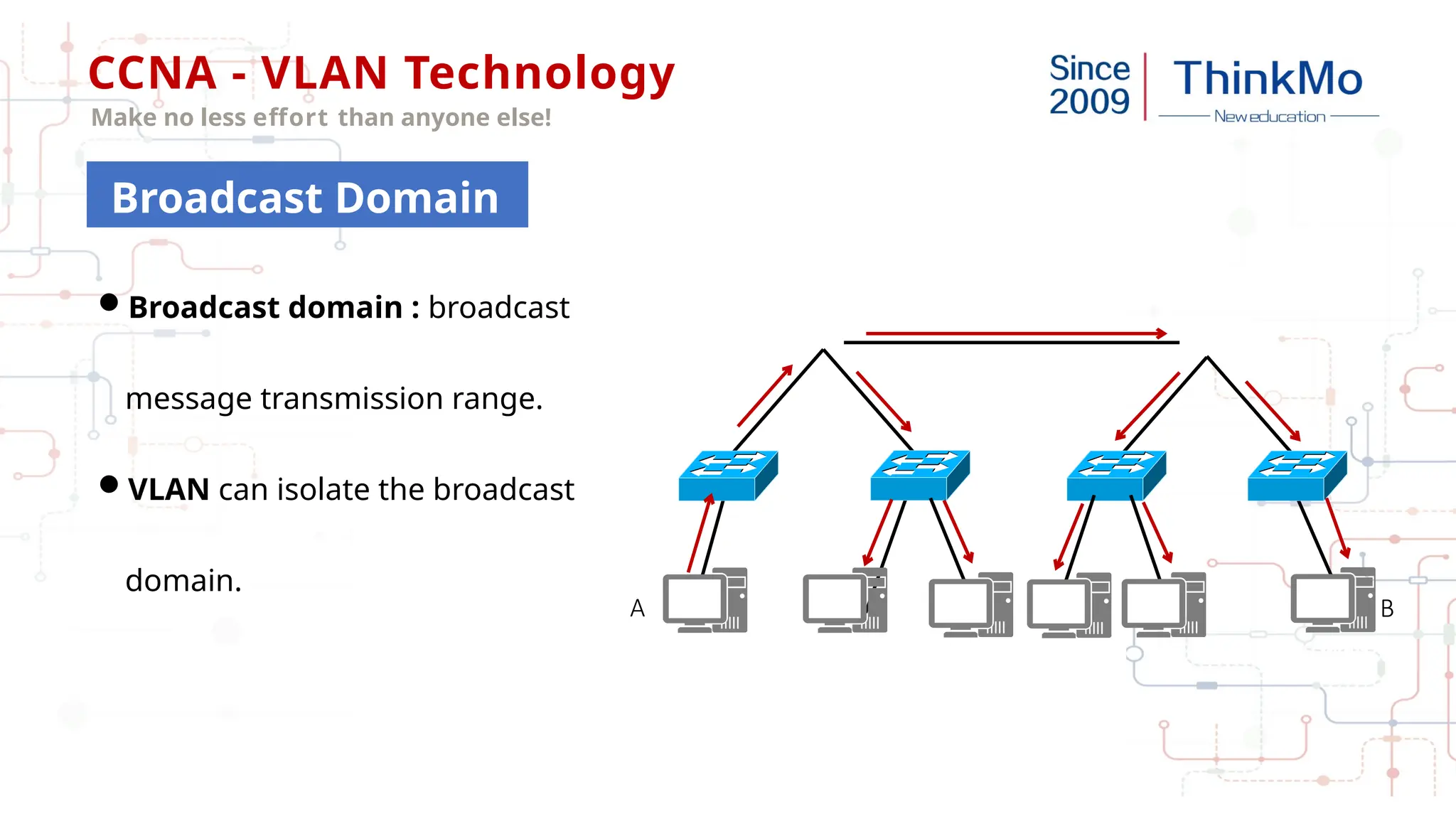
Broadcast domain : broadcast
message transmission range.
VLAN can isolate the broadcast
domain.
VLAN
10
VLAN
20 VLAN
20
A B
Broadcast Domain
CCNA - VLAN Technology
Make no less effort than anyone else!
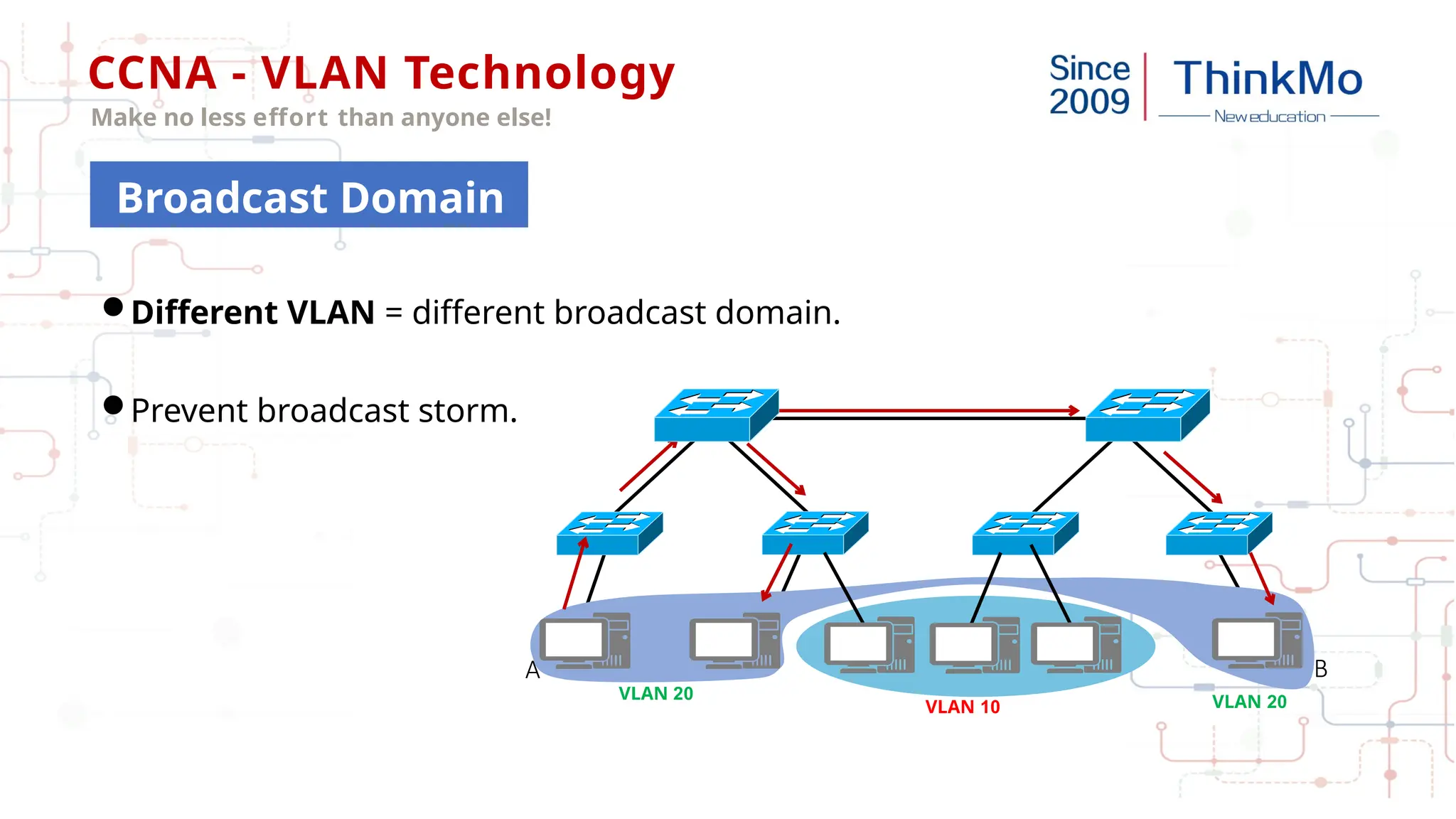
Different VLAN = different broadcast domain.
Prevent broadcast storm.
VLAN 10
VLAN 20 VLAN 20
A B
Broadcast Domain
CCNA - VLAN Technology
Make no less effort than anyone else!
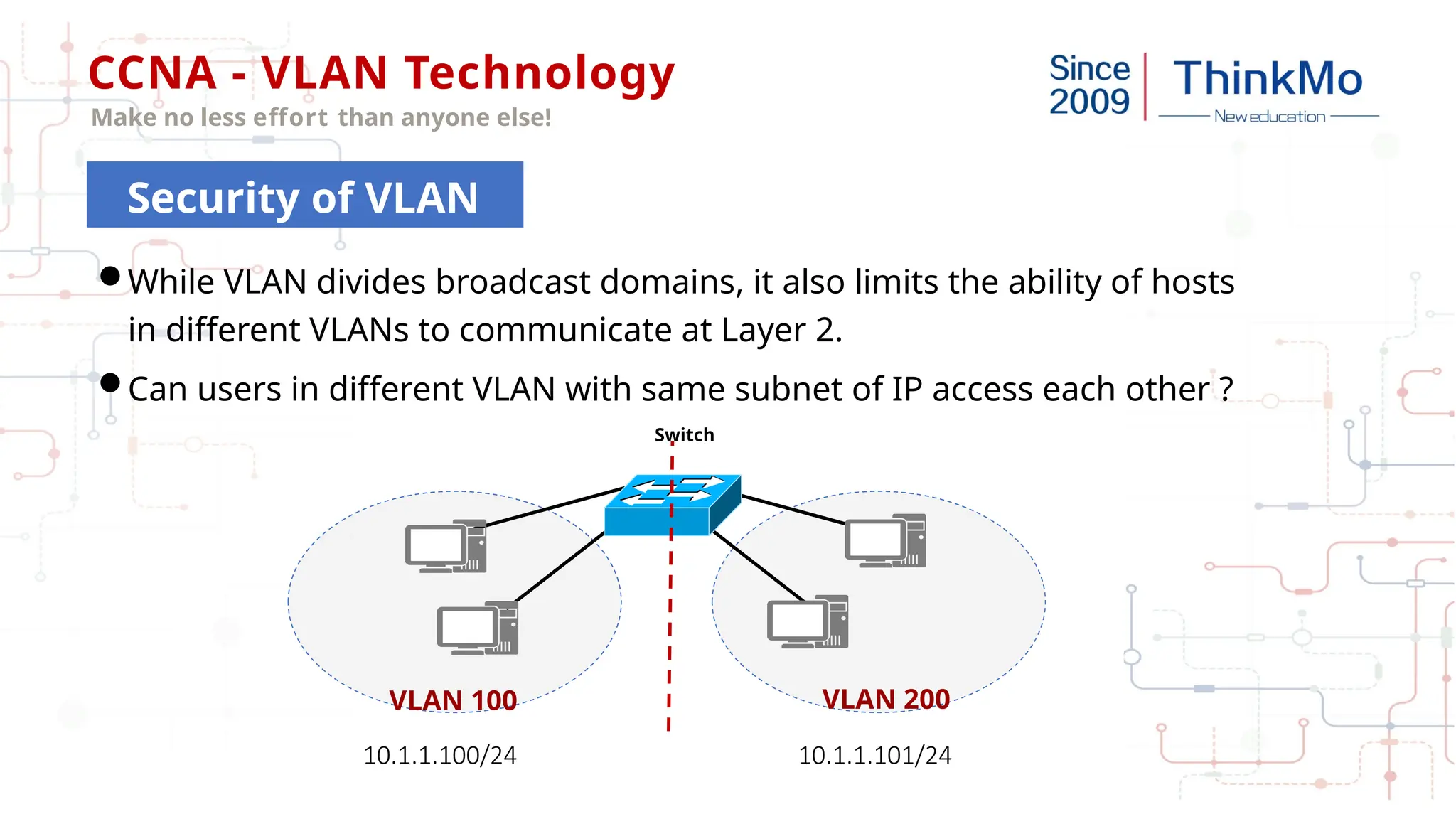
While VLAN divides broadcast domains, it also limits the ability of hosts
in different VLANs to communicate at Layer 2.
Can users in different VLAN with same subnet of IP access each other ?
VLAN 100
Switch
VLAN 200
10.1.1.100/24 10.1.1.101/24
Security of VLAN
CCNA - VLAN Technology
Make no less effort than anyone else!
Protect the network against dreaded insider attacks.
Example:
A malicious user on a given node can run a packet sniffer and begin capturing
all network traffic that traverses the switch to which he is physically connected.
Security of VLAN
CCNA - VLAN Technology
Make no less effort than anyone else!
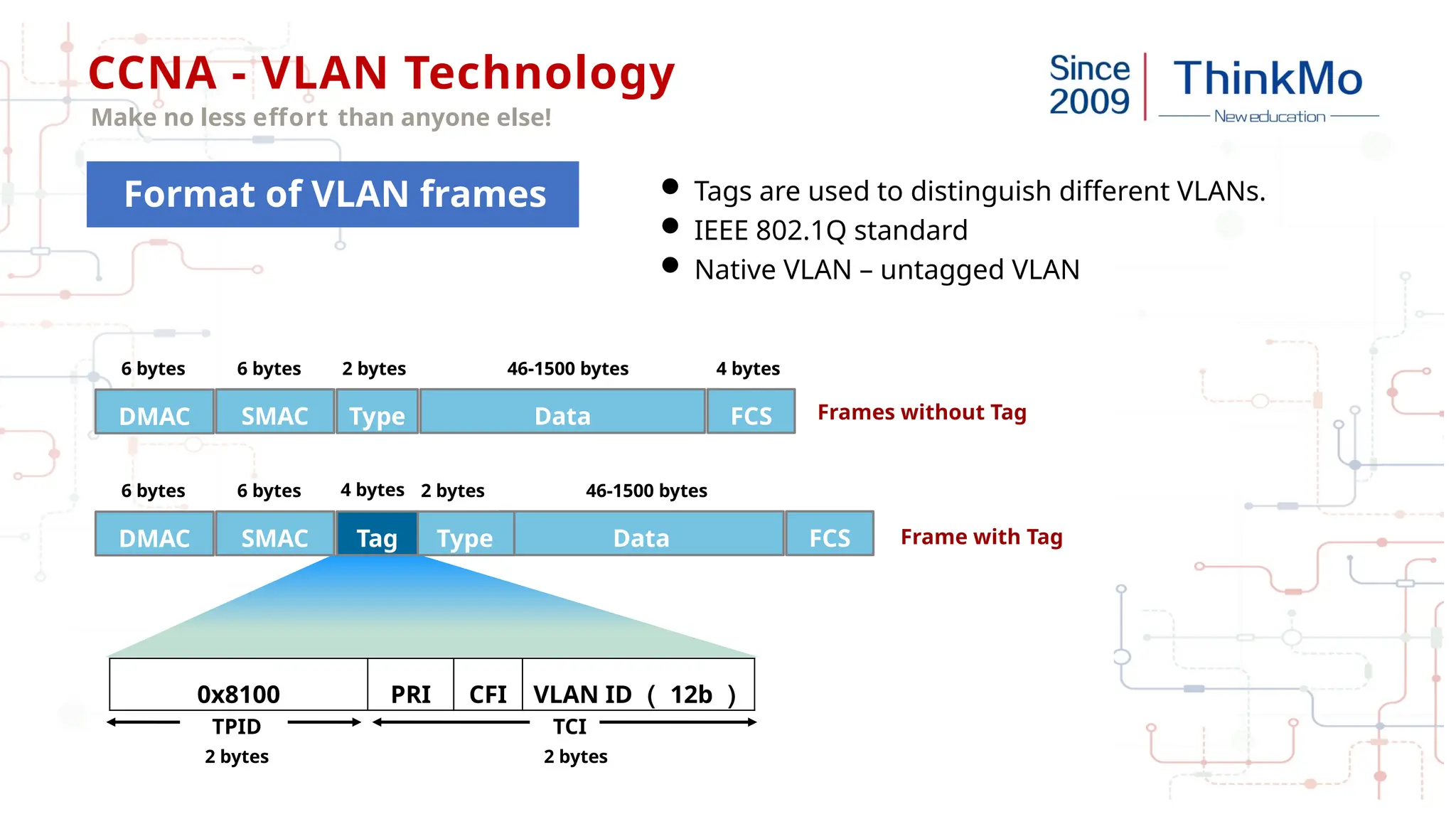
Frames without Tag
Frame with Tag
0x8100 PRI CFI VLAN ID ( 12b )
2 bytes
2 bytes
DMAC Data
SMAC Type FCS
6 bytes 6 bytes 2 bytes 46-1500 bytes 4 bytes
DMAC Data
SMAC Type FCS
6 bytes 6 bytes 2 bytes 46-1500 bytes
Tag
TPID TCI
4 bytes
 Tags are used to distinguish different VLANs.
 IEEE 802.1Q standard
 Native VLAN – untagged VLAN
Format of VLAN frames
CCNA - VLAN Technology
Make no less effort than anyone else!
 The data frame sent by PC is called "original frame" and "blank data frame" (without tag).
 For each interface, there is a data receiving direction and a sending direction.
Interface mode
 Access mode - Connect terminal devices (computers, servers, printers, cameras)
 trunk mode - trunk mode - switch to switch
Switch Interface Mode
CCNA - VLAN Technology
Make no less effort than anyone else!
Link Type
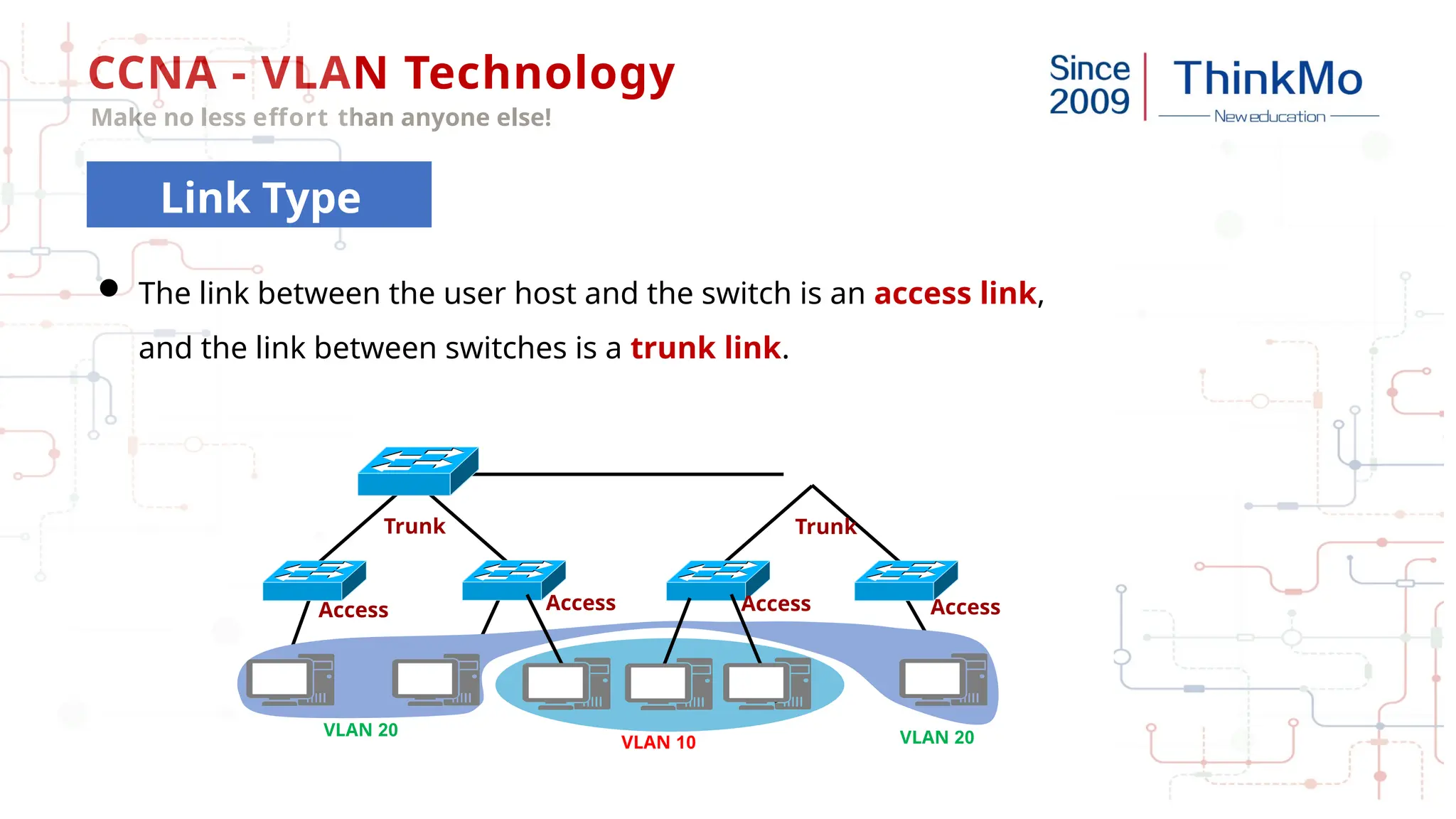
VLAN 10
VLAN 20 VLAN 20
Trunk Trunk
Access Access Access Access
 The link between the user host and the switch is an access link,
and the link between switches is a trunk link.
CCNA - VLAN Technology
Make no less effort than anyone else!
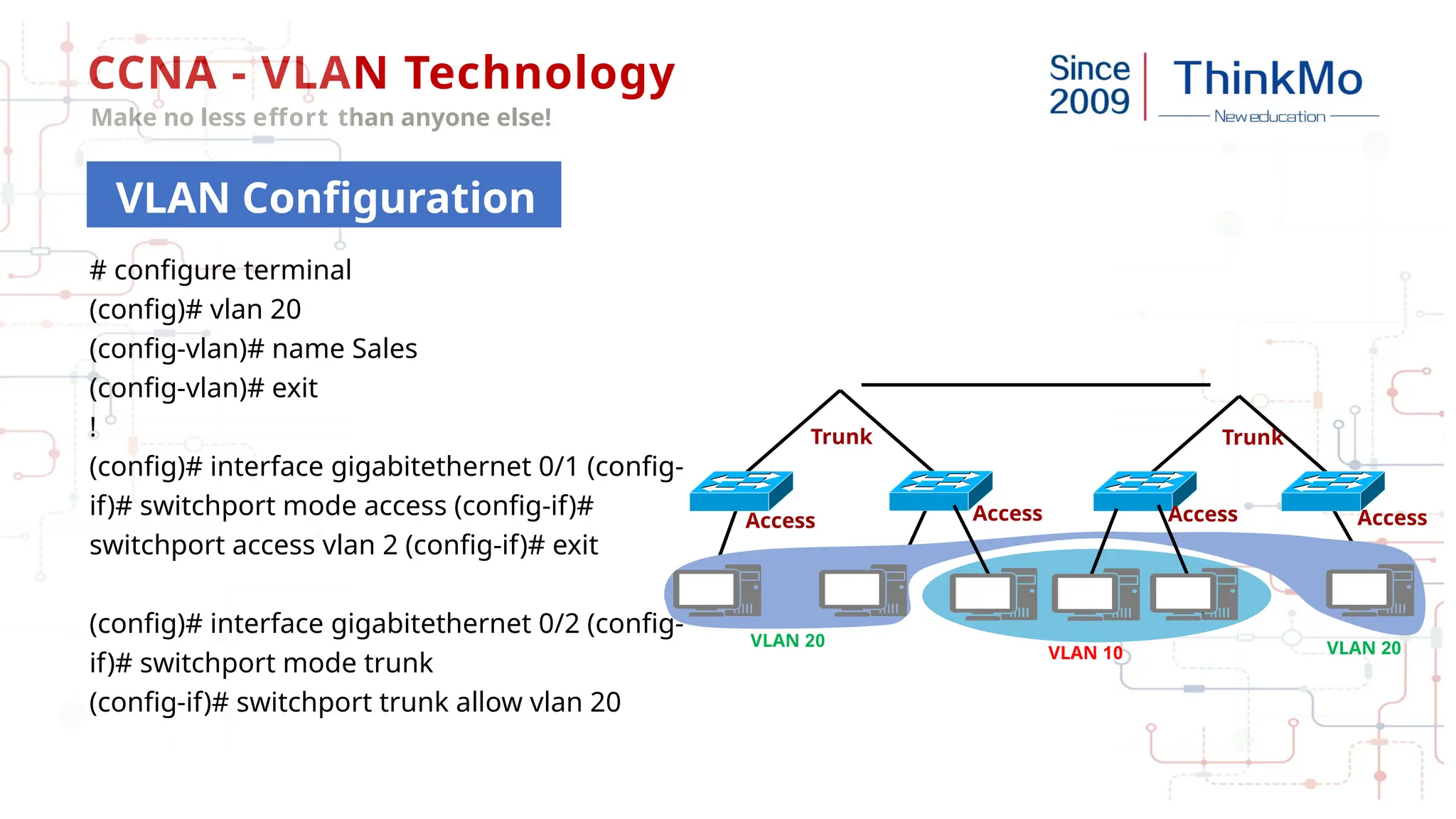
VLAN Configuration
VLAN 10
VLAN 20 VLAN 20
Trunk Trunk
Access Access Access Access
# configure terminal
(config)# vlan 20
(config-vlan)# name Sales
(config-vlan)# exit
!
(config)# interface gigabitethernet 0/1 (config-
if)# switchport mode access (config-if)#
switchport access vlan 2 (config-if)# exit
(config)# interface gigabitethernet 0/2 (config-
if)# switchport mode trunk
(config-if)# switchport trunk allow vlan 20
CCNA - VLAN Technology
Make no less effort than anyone else!
VLAN Configuration
Demo
CCNA - VLAN Technology
Make no less effort than anyone else!
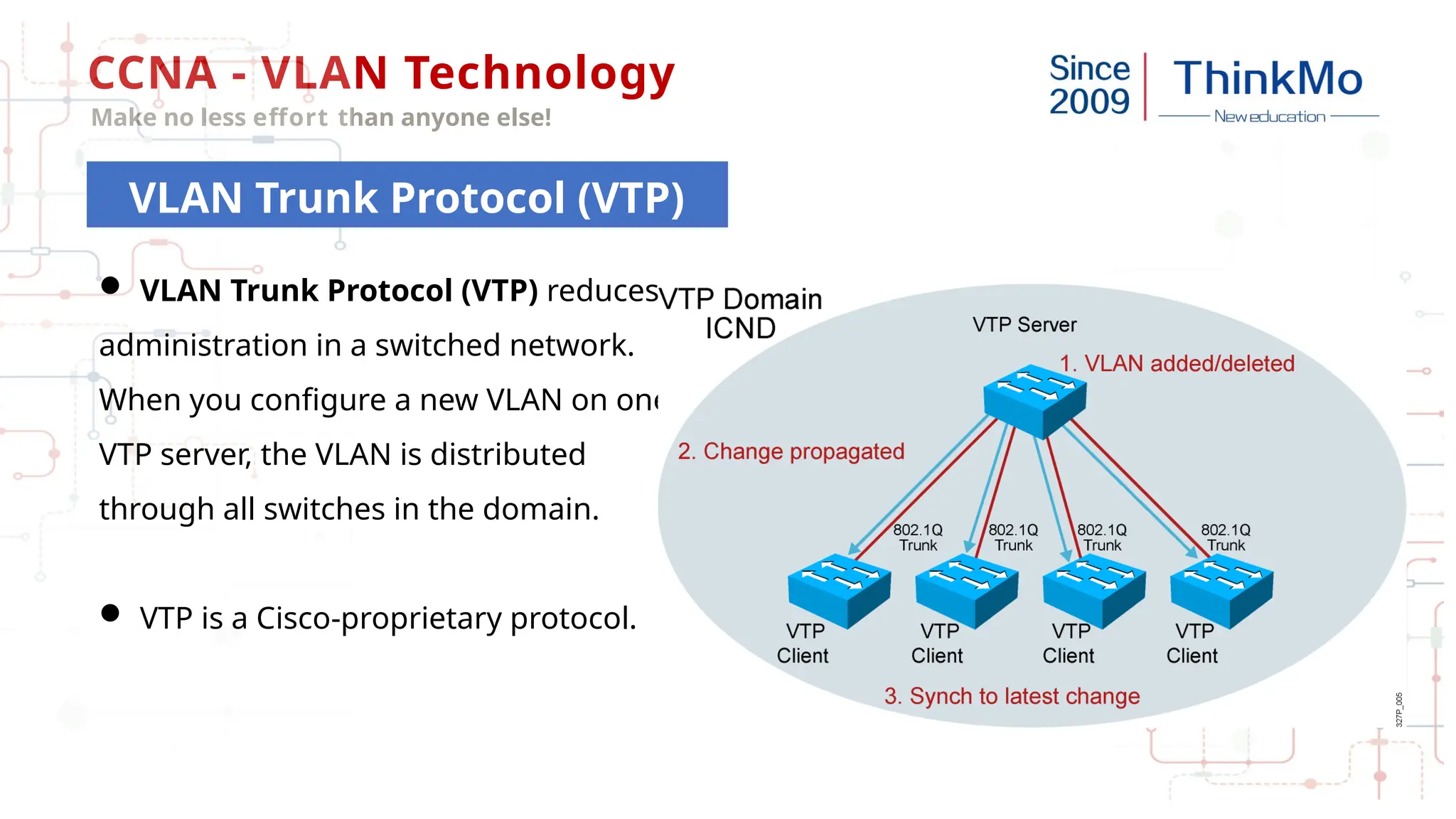
VLAN Trunk Protocol (VTP)
 VLAN Trunk Protocol (VTP) reduces
administration in a switched network.
When you configure a new VLAN on one
VTP server, the VLAN is distributed
through all switches in the domain.
 VTP is a Cisco-proprietary protocol.
CCNA - VLAN Technology
Make no less effort than anyone else!
VTP modes
 Server mode : Create, modify, and delete VLANs and specify other
configuration parameters, such as VTP version and VTP pruning, for the entire
VTP domain. (Default mode).
 Client mode : Synchronise VLAN configuration from VTP server.
 Transparent mode : VTP transparent switches do not participate in VTP.
CCNA - VLAN Technology
Make no less effort than anyone else!
Inter-VLAN Routing
 The purpose of dividing vlans : to make different vlans unreachable
The second layer is unreachable : the broadcast is based on the propagation of the LAN
Layer 2 communication : unicast communication is fine , broadcast is failure.
 Cross network segment - Layer 3 routing
After the deployment of VLAN, it can still communicate across network segments.
CCNA - VLAN Technology
Make no less effort than anyone else!
Inter-VLAN Routing
Host A
SWA
Host B
Trunk
G0/0/1.1 G0/0/1.2
VLAN 10 VLAN 20
GW:192.168.2.254 GW:192.168.3.254
192.168.2.254 192.168.3.254
Router
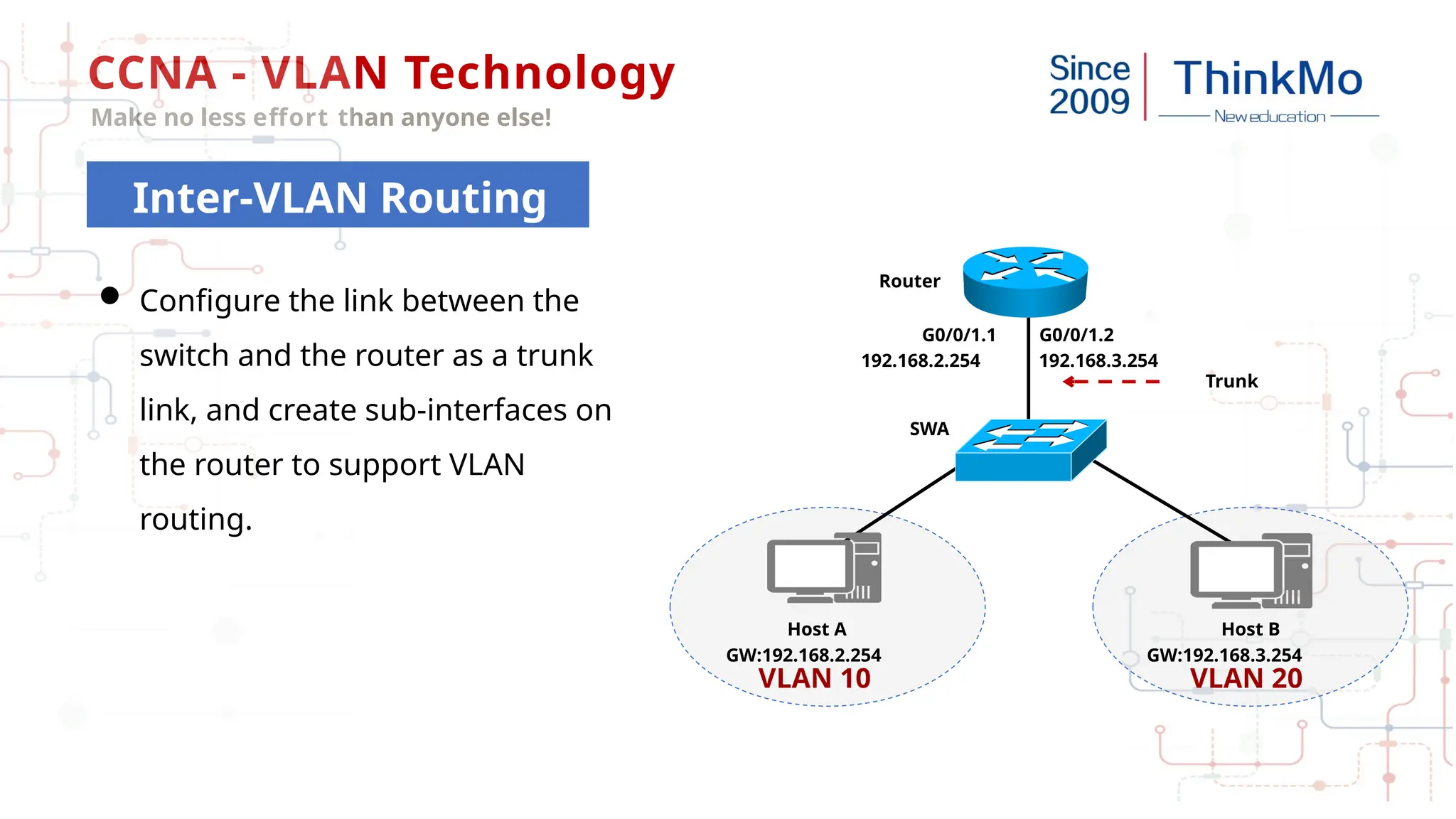
 Configure the link between the
switch and the router as a trunk
link, and create sub-interfaces on
the router to support VLAN
routing.
CCNA - VLAN Technology
Make no less effort than anyone else!
Thank You!

CCNA Explanation and application of vlan

  • 1.
    VLAN Technology F ol l o w m e t o t a k e t h e N A c e r t i fi c a t e
  • 2.
    CCNA - VLANTechnology Make no less effort than anyone else! LAN – Local Area Network A collection of devices connected together in one physical location, such as a building, office, or home. VLAN - Virtual Local Area Network - Network Segmentation - Flexibility - Safety - Data Link layer ( OSI Layer 2) VLAN Definition
  • 3.
    CCNA - VLANTechnology Make no less effort than anyone else! Broadcast domain : broadcast message transmission range. VLAN can isolate the broadcast domain. VLAN 10 VLAN 20 VLAN 20 A B Broadcast Domain
  • 4.
    CCNA - VLANTechnology Make no less effort than anyone else! Different VLAN = different broadcast domain. Prevent broadcast storm. VLAN 10 VLAN 20 VLAN 20 A B Broadcast Domain
  • 5.
    CCNA - VLANTechnology Make no less effort than anyone else! While VLAN divides broadcast domains, it also limits the ability of hosts in different VLANs to communicate at Layer 2. Can users in different VLAN with same subnet of IP access each other ? VLAN 100 Switch VLAN 200 10.1.1.100/24 10.1.1.101/24 Security of VLAN
  • 6.
    CCNA - VLANTechnology Make no less effort than anyone else! Protect the network against dreaded insider attacks. Example: A malicious user on a given node can run a packet sniffer and begin capturing all network traffic that traverses the switch to which he is physically connected. Security of VLAN
  • 7.
    CCNA - VLANTechnology Make no less effort than anyone else! Frames without Tag Frame with Tag 0x8100 PRI CFI VLAN ID ( 12b ) 2 bytes 2 bytes DMAC Data SMAC Type FCS 6 bytes 6 bytes 2 bytes 46-1500 bytes 4 bytes DMAC Data SMAC Type FCS 6 bytes 6 bytes 2 bytes 46-1500 bytes Tag TPID TCI 4 bytes  Tags are used to distinguish different VLANs.  IEEE 802.1Q standard  Native VLAN – untagged VLAN Format of VLAN frames
  • 8.
    CCNA - VLANTechnology Make no less effort than anyone else!  The data frame sent by PC is called "original frame" and "blank data frame" (without tag).  For each interface, there is a data receiving direction and a sending direction. Interface mode  Access mode - Connect terminal devices (computers, servers, printers, cameras)  trunk mode - trunk mode - switch to switch Switch Interface Mode
  • 9.
    CCNA - VLANTechnology Make no less effort than anyone else! Link Type VLAN 10 VLAN 20 VLAN 20 Trunk Trunk Access Access Access Access  The link between the user host and the switch is an access link, and the link between switches is a trunk link.
  • 10.
    CCNA - VLANTechnology Make no less effort than anyone else! VLAN Configuration VLAN 10 VLAN 20 VLAN 20 Trunk Trunk Access Access Access Access # configure terminal (config)# vlan 20 (config-vlan)# name Sales (config-vlan)# exit ! (config)# interface gigabitethernet 0/1 (config- if)# switchport mode access (config-if)# switchport access vlan 2 (config-if)# exit (config)# interface gigabitethernet 0/2 (config- if)# switchport mode trunk (config-if)# switchport trunk allow vlan 20
  • 11.
    CCNA - VLANTechnology Make no less effort than anyone else! VLAN Configuration Demo
  • 12.
    CCNA - VLANTechnology Make no less effort than anyone else! VLAN Trunk Protocol (VTP)  VLAN Trunk Protocol (VTP) reduces administration in a switched network. When you configure a new VLAN on one VTP server, the VLAN is distributed through all switches in the domain.  VTP is a Cisco-proprietary protocol.
  • 13.
    CCNA - VLANTechnology Make no less effort than anyone else! VTP modes  Server mode : Create, modify, and delete VLANs and specify other configuration parameters, such as VTP version and VTP pruning, for the entire VTP domain. (Default mode).  Client mode : Synchronise VLAN configuration from VTP server.  Transparent mode : VTP transparent switches do not participate in VTP.
  • 14.
    CCNA - VLANTechnology Make no less effort than anyone else! Inter-VLAN Routing  The purpose of dividing vlans : to make different vlans unreachable The second layer is unreachable : the broadcast is based on the propagation of the LAN Layer 2 communication : unicast communication is fine , broadcast is failure.  Cross network segment - Layer 3 routing After the deployment of VLAN, it can still communicate across network segments.
  • 15.
    CCNA - VLANTechnology Make no less effort than anyone else! Inter-VLAN Routing Host A SWA Host B Trunk G0/0/1.1 G0/0/1.2 VLAN 10 VLAN 20 GW:192.168.2.254 GW:192.168.3.254 192.168.2.254 192.168.3.254 Router  Configure the link between the switch and the router as a trunk link, and create sub-interfaces on the router to support VLAN routing.
  • 16.
    CCNA - VLANTechnology Make no less effort than anyone else! Thank You!