20 MARCH/APRIL 2016 INFORMATIONMANAGEMENT
Conducting a Business and Systems Analysis
to Protect Your ECM Investment
Cleaning, organizing, and classifying content in accordance with information governance
policies prior to migrating files to an enterprise content management system are essen-
tial to ensuring its successful implementation and adoption and to minimizing operational
risks and liability.
Mark Grysiuk, CRM, CIP
© 2016 Arma International
MARCH/APRIL 2016 INFORMATIONMANAGEMENT 21
T
o get the best “bang for their buck” from an en-
terprise content management (ECM) investment,
organizations must have or be implementing a for-
mal information governance (IG) program. It also
requires them to incorporate a thorough business
and systems analysis into the project plan, considering the
scope of the technology for the deployment and any third-
party applications that may be integrated in subsequent
project phases. Just as important, they must invest the
necessary time for training and awareness early to avoid
a catastrophe later.
If the deployment includes migrating documents from
network drives, local drives, and cloud-based e-mail provid-
ers, organizations must define the scope of the exercise and
assign a reasonable amount of time to the tasks required
prior to any migration efforts, including:
•• Preparing stakeholders for network drive migrations
•• Analyzing business processes
•• Assessing recordkeeping requirements
•• Preparing for document and e-mail migrations
•• Building a sustainable security management frame-
work
•• Preparing to go live
Some of these activities may be conducted concurrently,
using more than one information management specialist,
records analyst, and business analyst.
Preparing Stakeholders
Setting expectations with stakeholders well in advance
of the data migration is too important to overlook. Com-
municate early and often. Let them know a designated
analyst may be stopping by to observe how users interact
with applications and tools, including e-mail. Remind users
that as part of the change management initiative, the IG
team must thoroughly understand business requirements.
Keep users apprised of all activities and policy updates
that affect them – including those who are on leave – so
they will not be surprised by the transition that has taken
place when they return. The more transparent the process,
the greater the audience captured over the deployment
life cycle will be.
Build strong relationships with the IG stakeholders
in the business units. For example, work with human
resources and others to ensure that the IG stakeholders’
job descriptions and salaries are adjusted to reflect the
expertise and the level of responsibility they must have
to govern the organization’s information as the valuable
asset it is. Customize training to ensure that it fits each
department’s unique business processes.
Analyzing Business Processes
Be certain the project team thoroughly understands how
stakeholders interact with information. Pay special atten-
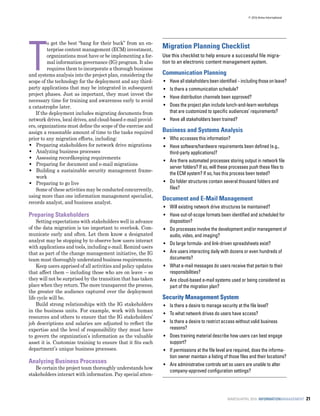
Migration Planning Checklist
Use this checklist to help ensure a successful file migra-
tion to an electronic content management system.
Communication Planning
•• 	Haveallstakeholdersbeenidentified–includingthoseonleave?
•• 	Is there a communication schedule?
•• 	Have distribution channels been approved?
•• 	Does the project plan include lunch-and-learn workshops
that are customized to specific audiences’ requirements?
•• 	Have all stakeholders been trained?
Business and Systems Analysis
•• 	Who accesses this information?
•• 	Have software/hardware requirements been defined (e.g.,
third-party applications)?
•• 	Are there automated processes storing output in network file
server folders? If so, will these processes push these files to
the ECM system? If so, has this process been tested?
•• 	Do folder structures contain several thousand folders and
files?
Document and E-Mail Management
•• Will existing network drive structures be maintained?
•• Have out-of-scope formats been identified and scheduled for
disposition?
•• Do processes involve the development and/or management of
audio, video, and imaging?
•• Do large formula- and link-driven spreadsheets exist?
•• Are users interacting daily with dozens or even hundreds of
documents?
•• What e-mail messages do users receive that pertain to their
responsibilities?
•• Are cloud-based e-mail systems used or being considered as
part of the migration plan?
Security Management System
•• Is there a desire to manage security at the file level?
•• To what network drives do users have access?
•• Is there a desire to restrict access without valid business
reasons?
•• Does training material describe how users can best engage
support?
•• If permissions at the file level are required, does the informa-
tion owner maintain a listing of those files and their locations?
•• Are administrative controls set so users are unable to alter
company-approved configuration settings?
© 2016 Arma International
22 MARCH/APRIL 2016 INFORMATIONMANAGEMENT
tion to who owns information, where the source electronic
records reside, security classifications, and vital record
status. Include electronic form submission processes that
notify stakeholders via e-mail alerts and the metadata
associated with those forms. Ask about reports delivered
electronically to designated network drive folder structures.
When observing stakeholders’ computing habits, ad-
dress these questions:
•• Will users require mapped network drives? If so, it will
require additional time for IT to visit workstations to
install third-party applications and do the mapping.
This activity should not be left to end users, who might
misconfigure settings and prevent some ECM function-
ality from working.
•• Do users work with large files? If a lot of large files are
being moved at the same time, the spike in traffic can
dramatically slow the system and frustrate end users.
•• Do file and folder names use special characters, such
as #, %, &, and *? Some ECM solutions do not allow
special characters, so they must be replaced.
•• Do users regularly interact with documents and folder
structures containing thousands of files and folders?
Because documents on a network drive are often linked
to other documents on the drive, there’s the risk of
breaking those links when migrating to an ECM sys-
tem. These living documents – those that are updated
regularly – can within a very short period acquire
thousands of versions in an ECM system. Therefore,
the organization must define the requirements for re-
taining versions for operational documents.
If e-mail migrations are in scope, identify stakeholders
who are active filers and those who are not, as a different
communications strategy will be required for the latter.
Assessing Recordkeeping Requirements
Resist any “just in case” business requirements. Point
stakeholders to the records series that align with their
departmental objectives. If stakeholders are storing tran-
sitory business information, determine the need for this
to continue. If it does, a secondary retention code with a
shorter retention period may be needed in the ECM system
to dispose of those files earlier than the official versions. A
more desirable practice is to create an appropriate secu-
rity group owned by the other business units so external
departmental stakeholders can access one version of the
truth. (See “Building a Sustainable Security Management
System” on page 23.)
Preparing for Document and E-Mail Migrations
ARMA International has published several resources
for managing electronic records, including Developing Elec-
tronic File Structures (ARMA International TR 23-2013).
Other standards that may be consulted are ISO-15489:2001
Information and documentation – Records management –
Part 1: General (which is scheduled to be superseded in
2016) and ISO 16175-2:2011: Information and documenta-
tion – Principles and functional requirements for records
in electronic office environments – Part 2: Guidelines and
functional requirements for digital records management
systems. (All of these publications are available for purchase
at www.arma.org/bookstore.)
Analyzing Network Drives	
Analyzing large, unstructured file repositories of dark
data – which Gartner defines as “the information assets
organizations collect, process and store during regular
business activities, but generally fail to use for other pur-
poses…” – can be a time-consuming activity.
If budgets permit it, engage a file analysis vendor. File
analysis tools can provide quick insight into large reposito-
ries by examining creation and modification dates, as well
as owner and content types. Other useful functionality in-
cludes, but is not limited to, applying security classification
to large directory structures and analyzing security groups.
If engaging a file analysis vendor isn’t an option, work
with IT to identify appropriate file analysis utilities avail-
able for free online that can provide some of the same
systems-related information. When in doubt, engage a
technical expert for assistance.
In partnership with stakeholders, decide whether ex-
isting folder structures will be maintained or modified to
accommodate IG policies.
Full access to the entire structure is required to under-
stand the existing security framework. Request a listing
of all security groups and members, and confirm with the
administrator how far down the folder hierarchy rights
have been assigned. Expect to see several nested structures
with branches extending in many directions, which is com-
mon for network drives that have been around for a while.
Deeply nested structures (e.g., mapped three or more
levels down from the root folder) can be challenging to
configure. Ideally, IT can make recommendations for an
ECM structure that resembles the network drive structure
users are familiar with already.
If a decision is made to migrate everything within a
specific time-frame – the last seven years, for example –
get approval to purge all files older than seven years (as
well as files with all out-of-scope file formats) before the
migration. Qualified ECM implementation developers can
map the last modified dates for active network drive files or
sent and received dates for source e-mail applications to the
record series status dates in the new system. Disposition
reports can be run at a pre-defined date on a regular basis.
If budgets permit it, engage a
file analysis vendor...
© 2016 Arma International
MARCH/APRIL 2016 INFORMATIONMANAGEMENT 23
Analyzing E-Mail	
Think strategically. E-mail is a smoking gun. Con-
duct as much cleanup as possible prior to any migration
from one system to another, including cloud-based e-mail
management systems.
Use a risk-based approach to identify stakeholders
whose e-mail accounts are more likely to contain business
records required for long-term preservation.
Also, consider the following:
•• Migrating a single e-mail account could take sever-
al hours or longer depending on factors that include
volume of e-mail and the source systems. Additional
fees may be required if the maximum transfer rate
threshold on some third-party cloud-based application
programming interfaces have been reached.
•• Viewer applications may be required. Depending on
the native e-mail application, additional licensing costs
might be associated with this requirement.
•• An e-mail account containing 50,000 e-mails may
double or triple the number of documents in the ECM
system if the destination system has been configured
to store attachments separately from the e-mail mes-
sage. E-mail files stored in their native format will keep
space requirements at a minimum.
•• Allot an appropriate amount of time to these tasks,
and set expectations with all relevant stakeholders.
For more information on e-mail management best prac-
tices, visit ARMA International’s bookstore for a variety
of resources, including E-Mail Retention and Archiving
by William Saffady and Best Practices for Managing Elec-
tronic Messages (ARMA International TR 24-2013).
Building a Sustainable Security
Management System
Thou shalt always comply with security management
best practices. Keep it simple. Use access control groups
to manage large document repositories. Full rights should
be granted only to designated data administrators. Avoid
assigning permissions using individual user profiles, and
even more so, avoid assigning permissions at the file level.
While there may be exceptions to these rules, they
should be few. An organization with thousands of employ-
ees requiring individualized permissions at the file level
will create an administrative nightmare. Left uncorrected,
there will be a lapse in policy adherence. Be sure a process
is in place for revoking access as requirements change.
Configure permissions prior to the migration. Post-
migration, assigning access rights down a structure contain-
ing several thousand files could be a resource-consuming
endeavor for some ECM systems. That’s because ECM
rules for some systems are applied to each object (e.g., files,
folders, task lists) one at a time. Depending on web server
traffic, it could take several minutes or even hours. Multiply
this number by several hundred employees with similar
access requirements and a system administrator will be
busy doing nothing but adding and revoking permissions
on top of the other responsibilities.
Always protect personally identifiable information and
other confidential information based on need-to-know prin-
ciples. Build file plans that factor in these requirements.
Be very careful to avoid creating barriers for users who
require access but can’t get it because the system is overly
protected. When push comes to shove, users will always
find a way to circumvent a policy if it disrupts the business
process. It’s easy for Alice to say that Bob’s department
cannot be trusted because of a recent incident involving
inappropriate exposure. Rather than locking the other
group out, a more appropriate solution may be to provide
mandatory ethics and security management training for
Bob’s team more than once per year.
Preparing to Go Live
Many organizations stack or layer applications, such
as web distributed authoring and versioning (also referred
to as WebDAV) client software and Windows Explorer, on
top of their ECM installations to promote user-friendly
work environments. If the applications are configured
correctly and used appropriately, employees can work in
an environment that resembles a network drive without
much change to how they do their work. Accessing content
is easy. Minimal training is required. Compliance objec-
tives are achieved.
When applications are layered, the number of server
requests has a tendency to grow at the bottom of the stack.
Add in the complexity of various client software packages,
such as Microsoft Office or Adobe Creative Suite, and the
quantity of requests can grow.
Without the proper infrastructure in place, a small group
of power users accessing and/or moving content frequently
from the same workspace can be a strain on systems’
operations. (See “Database Blocking” in More Resources).
To reduce operational risks, ECM project managers
must ensure enough time is set aside for testing layered
deployments to determine:
•• If there is an increase in requests to the database server
in comparison to accessing content directly in the ECM
application
•• Whether Microsoft Office’s Temp File Management
will be an issue for preserving versions
•• Whether audit history and other mandatory ECM
metadata requirements are impacted
•• If locked files are intuitive for other users (i.e., is there
a prompt advising that the file is locked and can be
Conduct as much cleanup as
possible prior to any migration...
© 2016 Arma International
24 MARCH/APRIL 2016 INFORMATIONMANAGEMENT
viewed only as read only?) 		
•• If custom software coding aligns with best practices
and coding standards
Finally, develop training and/or best practices documen-
tation that conforms to the approved deployment. Review
these documents regularly or whenever applications are
added to the ECM installation. Always remember the need
to understand business processes, the uniqueness of added
application layers, and the vulnerabilities that may be cre-
ated if systems aren’t tested against approved standards.
Getting it Right
Cleaning, organizing, and classifying content in accor-
dance with IG policies prior to a migration to a new system
can be cumbersome tasks. They are, however, necessary
tasks. Without them, the result may be, for example:
•• A poorly implemented communications strategy that
impedes adoption rates
•• An undefined and haphazardly deployed security
framework that creates a liability risk
•• Operational risks associated with noncompliance to
information management best practices that will im-
pact the availability and integrity of important busi-
ness records
•• Liability risks if users decide to circumvent policies to
prevent disruptions to their business processes
Get it right or pay the price. END
MarkGrysiuk,CRM,CIP,canbecontactedatmgrysiuk@gmail.com.
See his bio on page 47.
Read More About It:
BeyondRecognition. “Email Remediation Step 1: Faceted
Deduplication.” http://beyondrecognition.net/email-reme-
diation-step-1-faceted-deduplication
Broadcast Software International. “Why Nested Folders
Should Be Avoided.” www.bsiusa.com/support/FAQ/nested/
nested.php
Download.com. “File List Generator” Download. download.
cnet.com/File-List-Generator/3000-2248_4-10921000.html
Exterro. “File Analysis Software” Demo. www.exterro.com/
information-governance-software/file-analysis-software/
Gartner. “Market Guide for File Analysis Software.” www.
gartner.com/doc/2853417/market-guide-file-analysis-soft-
ware
Gizmo’s freeware. “Use the Command Line to Easily Create
a List of Your Personal Files – Your Music, Your Pictures
or Whatever.” www.techsupportalert.com/content/use-
command-line-easily-create-list-your-personal-files-your-
music-your-pictures-or-whatever
IBM. “Database Blocking and Deadlocks.” http://publib.
boulder.ibm.com/tividd/td/BSM/SC32-9084-00/en_US/HTML/
bsmd240.htm
Infostor. “Manage Unstructured Data: File Analysis at Scale.”
www.infostor.com/storage-management/manage-unstruc-
tured-data-file-analysis-at-scale.html
International Software Testing Qualifications Board. “What
are the Software Development Life Cycle (SDLC) phases?”
http://istqbexamcertification.com/what-are-the-software-
development-life-cycle-sdlc-phases/
Jam Software. “Create Lists of Director Contents and File
Properties. www.jam-software.com/filelist/
Javelin. “Easily find the character length of particular file
paths.” www.javelin-tech.com/blog/2011/08/file-path-length/
Micro Focus. “How can I create a hierarchy in MS Excel
using “Group and Outline” when importing requirements
using the Office import tool?” http://community.microfocus.
com/borland/test/silk_central/w/knowledge_base/16603.
how-can-i-create-a-hierarchy-in-ms-excel-using-group-
and-outline-when-importing-requirements-using-the-office-
import-tool.aspx
Microsoft. “Naming Files, Paths, and Namespaces.” https://
msdn.microsoft.com/en-ca/library/windows/desktop/
aa365247(v=vs.85).aspx#maxpath
Microsoft. “Understanding and Avoiding Blocking.” https://
technet.microsoft.com/en-us/library/aa178087(v=sql.80).aspx
SharePointGeoff. “How to quickly list documents and sub
folders from a Document Library in SharePoint to a file.”www.
sharepointgeoff.com/how-to-quickly-list-documents-and-
sub-folders-from-a-document-library-in-sharepoint-to-a-file
Smallwood, Robert. Managing Electronic Records: Methods,
Best Practices and Technologies. Hoboken, NJ: Wiley, 2013.
Softonic. “JDiskReport” Download. http://jdiskreport.
en.softonic.com
Windows Club, The. “How to print list of files in folder in
Windows 8.”www.thewindowsclub.com/print-list-of-files-
in-folder-windows
South River Technologies. www.southrivertech.com/
WebDAV. www.webdav.org
Webopedia. “client-server architecture.” www.webopedia.
com/TERM/C/client_server_architecture.html
© 2016 Arma International

Conducting_a_Business_and_Systems_Analysis

  • 1.
    20 MARCH/APRIL 2016INFORMATIONMANAGEMENT Conducting a Business and Systems Analysis to Protect Your ECM Investment Cleaning, organizing, and classifying content in accordance with information governance policies prior to migrating files to an enterprise content management system are essen- tial to ensuring its successful implementation and adoption and to minimizing operational risks and liability. Mark Grysiuk, CRM, CIP © 2016 Arma International
  • 2.
    MARCH/APRIL 2016 INFORMATIONMANAGEMENT21 T o get the best “bang for their buck” from an en- terprise content management (ECM) investment, organizations must have or be implementing a for- mal information governance (IG) program. It also requires them to incorporate a thorough business and systems analysis into the project plan, considering the scope of the technology for the deployment and any third- party applications that may be integrated in subsequent project phases. Just as important, they must invest the necessary time for training and awareness early to avoid a catastrophe later. If the deployment includes migrating documents from network drives, local drives, and cloud-based e-mail provid- ers, organizations must define the scope of the exercise and assign a reasonable amount of time to the tasks required prior to any migration efforts, including: •• Preparing stakeholders for network drive migrations •• Analyzing business processes •• Assessing recordkeeping requirements •• Preparing for document and e-mail migrations •• Building a sustainable security management frame- work •• Preparing to go live Some of these activities may be conducted concurrently, using more than one information management specialist, records analyst, and business analyst. Preparing Stakeholders Setting expectations with stakeholders well in advance of the data migration is too important to overlook. Com- municate early and often. Let them know a designated analyst may be stopping by to observe how users interact with applications and tools, including e-mail. Remind users that as part of the change management initiative, the IG team must thoroughly understand business requirements. Keep users apprised of all activities and policy updates that affect them – including those who are on leave – so they will not be surprised by the transition that has taken place when they return. The more transparent the process, the greater the audience captured over the deployment life cycle will be. Build strong relationships with the IG stakeholders in the business units. For example, work with human resources and others to ensure that the IG stakeholders’ job descriptions and salaries are adjusted to reflect the expertise and the level of responsibility they must have to govern the organization’s information as the valuable asset it is. Customize training to ensure that it fits each department’s unique business processes. Analyzing Business Processes Be certain the project team thoroughly understands how stakeholders interact with information. Pay special atten- Migration Planning Checklist Use this checklist to help ensure a successful file migra- tion to an electronic content management system. Communication Planning •• Haveallstakeholdersbeenidentified–includingthoseonleave? •• Is there a communication schedule? •• Have distribution channels been approved? •• Does the project plan include lunch-and-learn workshops that are customized to specific audiences’ requirements? •• Have all stakeholders been trained? Business and Systems Analysis •• Who accesses this information? •• Have software/hardware requirements been defined (e.g., third-party applications)? •• Are there automated processes storing output in network file server folders? If so, will these processes push these files to the ECM system? If so, has this process been tested? •• Do folder structures contain several thousand folders and files? Document and E-Mail Management •• Will existing network drive structures be maintained? •• Have out-of-scope formats been identified and scheduled for disposition? •• Do processes involve the development and/or management of audio, video, and imaging? •• Do large formula- and link-driven spreadsheets exist? •• Are users interacting daily with dozens or even hundreds of documents? •• What e-mail messages do users receive that pertain to their responsibilities? •• Are cloud-based e-mail systems used or being considered as part of the migration plan? Security Management System •• Is there a desire to manage security at the file level? •• To what network drives do users have access? •• Is there a desire to restrict access without valid business reasons? •• Does training material describe how users can best engage support? •• If permissions at the file level are required, does the informa- tion owner maintain a listing of those files and their locations? •• Are administrative controls set so users are unable to alter company-approved configuration settings? © 2016 Arma International
  • 3.
    22 MARCH/APRIL 2016INFORMATIONMANAGEMENT tion to who owns information, where the source electronic records reside, security classifications, and vital record status. Include electronic form submission processes that notify stakeholders via e-mail alerts and the metadata associated with those forms. Ask about reports delivered electronically to designated network drive folder structures. When observing stakeholders’ computing habits, ad- dress these questions: •• Will users require mapped network drives? If so, it will require additional time for IT to visit workstations to install third-party applications and do the mapping. This activity should not be left to end users, who might misconfigure settings and prevent some ECM function- ality from working. •• Do users work with large files? If a lot of large files are being moved at the same time, the spike in traffic can dramatically slow the system and frustrate end users. •• Do file and folder names use special characters, such as #, %, &, and *? Some ECM solutions do not allow special characters, so they must be replaced. •• Do users regularly interact with documents and folder structures containing thousands of files and folders? Because documents on a network drive are often linked to other documents on the drive, there’s the risk of breaking those links when migrating to an ECM sys- tem. These living documents – those that are updated regularly – can within a very short period acquire thousands of versions in an ECM system. Therefore, the organization must define the requirements for re- taining versions for operational documents. If e-mail migrations are in scope, identify stakeholders who are active filers and those who are not, as a different communications strategy will be required for the latter. Assessing Recordkeeping Requirements Resist any “just in case” business requirements. Point stakeholders to the records series that align with their departmental objectives. If stakeholders are storing tran- sitory business information, determine the need for this to continue. If it does, a secondary retention code with a shorter retention period may be needed in the ECM system to dispose of those files earlier than the official versions. A more desirable practice is to create an appropriate secu- rity group owned by the other business units so external departmental stakeholders can access one version of the truth. (See “Building a Sustainable Security Management System” on page 23.) Preparing for Document and E-Mail Migrations ARMA International has published several resources for managing electronic records, including Developing Elec- tronic File Structures (ARMA International TR 23-2013). Other standards that may be consulted are ISO-15489:2001 Information and documentation – Records management – Part 1: General (which is scheduled to be superseded in 2016) and ISO 16175-2:2011: Information and documenta- tion – Principles and functional requirements for records in electronic office environments – Part 2: Guidelines and functional requirements for digital records management systems. (All of these publications are available for purchase at www.arma.org/bookstore.) Analyzing Network Drives Analyzing large, unstructured file repositories of dark data – which Gartner defines as “the information assets organizations collect, process and store during regular business activities, but generally fail to use for other pur- poses…” – can be a time-consuming activity. If budgets permit it, engage a file analysis vendor. File analysis tools can provide quick insight into large reposito- ries by examining creation and modification dates, as well as owner and content types. Other useful functionality in- cludes, but is not limited to, applying security classification to large directory structures and analyzing security groups. If engaging a file analysis vendor isn’t an option, work with IT to identify appropriate file analysis utilities avail- able for free online that can provide some of the same systems-related information. When in doubt, engage a technical expert for assistance. In partnership with stakeholders, decide whether ex- isting folder structures will be maintained or modified to accommodate IG policies. Full access to the entire structure is required to under- stand the existing security framework. Request a listing of all security groups and members, and confirm with the administrator how far down the folder hierarchy rights have been assigned. Expect to see several nested structures with branches extending in many directions, which is com- mon for network drives that have been around for a while. Deeply nested structures (e.g., mapped three or more levels down from the root folder) can be challenging to configure. Ideally, IT can make recommendations for an ECM structure that resembles the network drive structure users are familiar with already. If a decision is made to migrate everything within a specific time-frame – the last seven years, for example – get approval to purge all files older than seven years (as well as files with all out-of-scope file formats) before the migration. Qualified ECM implementation developers can map the last modified dates for active network drive files or sent and received dates for source e-mail applications to the record series status dates in the new system. Disposition reports can be run at a pre-defined date on a regular basis. If budgets permit it, engage a file analysis vendor... © 2016 Arma International
  • 4.
    MARCH/APRIL 2016 INFORMATIONMANAGEMENT23 Analyzing E-Mail Think strategically. E-mail is a smoking gun. Con- duct as much cleanup as possible prior to any migration from one system to another, including cloud-based e-mail management systems. Use a risk-based approach to identify stakeholders whose e-mail accounts are more likely to contain business records required for long-term preservation. Also, consider the following: •• Migrating a single e-mail account could take sever- al hours or longer depending on factors that include volume of e-mail and the source systems. Additional fees may be required if the maximum transfer rate threshold on some third-party cloud-based application programming interfaces have been reached. •• Viewer applications may be required. Depending on the native e-mail application, additional licensing costs might be associated with this requirement. •• An e-mail account containing 50,000 e-mails may double or triple the number of documents in the ECM system if the destination system has been configured to store attachments separately from the e-mail mes- sage. E-mail files stored in their native format will keep space requirements at a minimum. •• Allot an appropriate amount of time to these tasks, and set expectations with all relevant stakeholders. For more information on e-mail management best prac- tices, visit ARMA International’s bookstore for a variety of resources, including E-Mail Retention and Archiving by William Saffady and Best Practices for Managing Elec- tronic Messages (ARMA International TR 24-2013). Building a Sustainable Security Management System Thou shalt always comply with security management best practices. Keep it simple. Use access control groups to manage large document repositories. Full rights should be granted only to designated data administrators. Avoid assigning permissions using individual user profiles, and even more so, avoid assigning permissions at the file level. While there may be exceptions to these rules, they should be few. An organization with thousands of employ- ees requiring individualized permissions at the file level will create an administrative nightmare. Left uncorrected, there will be a lapse in policy adherence. Be sure a process is in place for revoking access as requirements change. Configure permissions prior to the migration. Post- migration, assigning access rights down a structure contain- ing several thousand files could be a resource-consuming endeavor for some ECM systems. That’s because ECM rules for some systems are applied to each object (e.g., files, folders, task lists) one at a time. Depending on web server traffic, it could take several minutes or even hours. Multiply this number by several hundred employees with similar access requirements and a system administrator will be busy doing nothing but adding and revoking permissions on top of the other responsibilities. Always protect personally identifiable information and other confidential information based on need-to-know prin- ciples. Build file plans that factor in these requirements. Be very careful to avoid creating barriers for users who require access but can’t get it because the system is overly protected. When push comes to shove, users will always find a way to circumvent a policy if it disrupts the business process. It’s easy for Alice to say that Bob’s department cannot be trusted because of a recent incident involving inappropriate exposure. Rather than locking the other group out, a more appropriate solution may be to provide mandatory ethics and security management training for Bob’s team more than once per year. Preparing to Go Live Many organizations stack or layer applications, such as web distributed authoring and versioning (also referred to as WebDAV) client software and Windows Explorer, on top of their ECM installations to promote user-friendly work environments. If the applications are configured correctly and used appropriately, employees can work in an environment that resembles a network drive without much change to how they do their work. Accessing content is easy. Minimal training is required. Compliance objec- tives are achieved. When applications are layered, the number of server requests has a tendency to grow at the bottom of the stack. Add in the complexity of various client software packages, such as Microsoft Office or Adobe Creative Suite, and the quantity of requests can grow. Without the proper infrastructure in place, a small group of power users accessing and/or moving content frequently from the same workspace can be a strain on systems’ operations. (See “Database Blocking” in More Resources). To reduce operational risks, ECM project managers must ensure enough time is set aside for testing layered deployments to determine: •• If there is an increase in requests to the database server in comparison to accessing content directly in the ECM application •• Whether Microsoft Office’s Temp File Management will be an issue for preserving versions •• Whether audit history and other mandatory ECM metadata requirements are impacted •• If locked files are intuitive for other users (i.e., is there a prompt advising that the file is locked and can be Conduct as much cleanup as possible prior to any migration... © 2016 Arma International
  • 5.
    24 MARCH/APRIL 2016INFORMATIONMANAGEMENT viewed only as read only?) •• If custom software coding aligns with best practices and coding standards Finally, develop training and/or best practices documen- tation that conforms to the approved deployment. Review these documents regularly or whenever applications are added to the ECM installation. Always remember the need to understand business processes, the uniqueness of added application layers, and the vulnerabilities that may be cre- ated if systems aren’t tested against approved standards. Getting it Right Cleaning, organizing, and classifying content in accor- dance with IG policies prior to a migration to a new system can be cumbersome tasks. They are, however, necessary tasks. Without them, the result may be, for example: •• A poorly implemented communications strategy that impedes adoption rates •• An undefined and haphazardly deployed security framework that creates a liability risk •• Operational risks associated with noncompliance to information management best practices that will im- pact the availability and integrity of important busi- ness records •• Liability risks if users decide to circumvent policies to prevent disruptions to their business processes Get it right or pay the price. END MarkGrysiuk,CRM,CIP,canbecontactedatmgrysiuk@gmail.com. See his bio on page 47. Read More About It: BeyondRecognition. “Email Remediation Step 1: Faceted Deduplication.” http://beyondrecognition.net/email-reme- diation-step-1-faceted-deduplication Broadcast Software International. “Why Nested Folders Should Be Avoided.” www.bsiusa.com/support/FAQ/nested/ nested.php Download.com. “File List Generator” Download. download. cnet.com/File-List-Generator/3000-2248_4-10921000.html Exterro. “File Analysis Software” Demo. www.exterro.com/ information-governance-software/file-analysis-software/ Gartner. “Market Guide for File Analysis Software.” www. gartner.com/doc/2853417/market-guide-file-analysis-soft- ware Gizmo’s freeware. “Use the Command Line to Easily Create a List of Your Personal Files – Your Music, Your Pictures or Whatever.” www.techsupportalert.com/content/use- command-line-easily-create-list-your-personal-files-your- music-your-pictures-or-whatever IBM. “Database Blocking and Deadlocks.” http://publib. boulder.ibm.com/tividd/td/BSM/SC32-9084-00/en_US/HTML/ bsmd240.htm Infostor. “Manage Unstructured Data: File Analysis at Scale.” www.infostor.com/storage-management/manage-unstruc- tured-data-file-analysis-at-scale.html International Software Testing Qualifications Board. “What are the Software Development Life Cycle (SDLC) phases?” http://istqbexamcertification.com/what-are-the-software- development-life-cycle-sdlc-phases/ Jam Software. “Create Lists of Director Contents and File Properties. www.jam-software.com/filelist/ Javelin. “Easily find the character length of particular file paths.” www.javelin-tech.com/blog/2011/08/file-path-length/ Micro Focus. “How can I create a hierarchy in MS Excel using “Group and Outline” when importing requirements using the Office import tool?” http://community.microfocus. com/borland/test/silk_central/w/knowledge_base/16603. how-can-i-create-a-hierarchy-in-ms-excel-using-group- and-outline-when-importing-requirements-using-the-office- import-tool.aspx Microsoft. “Naming Files, Paths, and Namespaces.” https:// msdn.microsoft.com/en-ca/library/windows/desktop/ aa365247(v=vs.85).aspx#maxpath Microsoft. “Understanding and Avoiding Blocking.” https:// technet.microsoft.com/en-us/library/aa178087(v=sql.80).aspx SharePointGeoff. “How to quickly list documents and sub folders from a Document Library in SharePoint to a file.”www. sharepointgeoff.com/how-to-quickly-list-documents-and- sub-folders-from-a-document-library-in-sharepoint-to-a-file Smallwood, Robert. Managing Electronic Records: Methods, Best Practices and Technologies. Hoboken, NJ: Wiley, 2013. Softonic. “JDiskReport” Download. http://jdiskreport. en.softonic.com Windows Club, The. “How to print list of files in folder in Windows 8.”www.thewindowsclub.com/print-list-of-files- in-folder-windows South River Technologies. www.southrivertech.com/ WebDAV. www.webdav.org Webopedia. “client-server architecture.” www.webopedia. com/TERM/C/client_server_architecture.html © 2016 Arma International