Website Development
Accessibility
By : Ilesh Mistry
Introduction to some of the Accessibility Standards
Accessibility consideration
Ways to make the site accessible
HTML
ALT and TITLE
Links
CSS
Colour Contrast
Forms
Media
ARIA
Third Party widgets/content
Accessibility Checking / Testing
Website Development Accessibility
WAI (Web Accessibility Initiative) accessibility guidelines
Developed by the W3C (World Wide Web Consortium)
Community Input
Globally recognised
WCAG (Web Accessibility Content Guidelines)
Globally recognised standard for web content accessibility
Made into an ISO standard (40500:2012)
For designers, developers and authors
Crossover into other mediums (mobile)
Introduction to some of the
Accessibility Standards
WCAG P.O.U.R Principles
Perceivable (text alternatives, captions)
Operable (keyboard, moving content)
Understandable (readable, predictable)
Robust (compatible with current and future tools)
Introduction to some of the
Accessibility Standards
Stay with me! 
That was just some of the
standards we should consider.
Introduction to some of the
Accessibility Standards
Disability Types
Blindness or Low Vision
Deaf/Hard-of-Hearing
Learning Disabilities
Physical Disabilities
There are lots more
But that shouldn’t stop them from using your web site
One web site for ALL
Accessibility consideration
When you hear the word 'disabled,' people immediately think about
people who can't walk or talk or do everything that people take for
granted. Now, I take nothing for granted. But I find the real disability
is people who can't find joy in life and are bitter.
- Teri Garr
The only disability in life is a bad attitude.
- Scott Hamilton
The world worries about disability more than disabled people do.
- Warwick Davis
Accessibility consideration
The issues disabled people face everyday using web sites
Alternative text for graphics not supplied or inappropriate
Video/Audio no transcript and captions provided
Focus highlighting – I don’t know where I am!
Increasing font size does not change anything for me
I can’t click on that button using my keyboard
Has something changed on the page?
I can’t see that text on that background
What’s that area to do with?
Why is everything mixed up?
Clicked on a link and where did it go?
Accessibility consideration
If we don’t have this, it will
drive people mad!
Accessibility consideration
HTML Semantics and HMTL language
HTML5, use sections, articles, asides, nav as appropriate
Make sure the HTML Language is set <html lang="en">
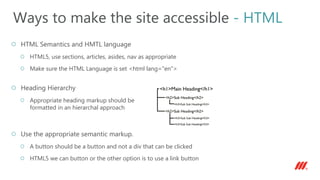
Heading Hierarchy
Appropriate heading markup should be
formatted in an hierarchal approach
Use the appropriate semantic markup.
A button should be a button and not a div that can be clicked
HTML5 we can button or the other option is to use a link button
Ways to make the site accessible - HTML
Accessibility basic standards should be followed
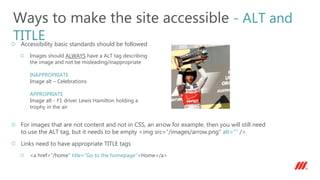
Images should ALWAYS have a ALT tag describing
the image and not be misleading/inappropriate
INAPPROPRIATE
Image alt – Celebrations
APPROPRIATE
Image alt - F1 driver Lewis Hamilton holding a
trophy in the air
For images that are not content and not in CSS, an arrow for example, then you will still need
to use the ALT tag, but it needs to be empty <img src=“/images/arrow.png” alt=“” />
Links need to have appropriate TITLE tags
<a href=“/home” title=“Go to the homepage”>Home</a>
Ways to make the site accessible - ALT and
TITLE
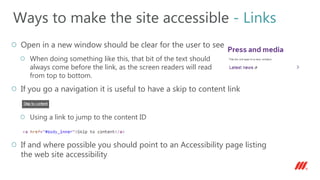
Open in a new window should be clear for the user to see
When doing something like this, that bit of the text should
always come before the link, as the screen readers will read
from top to bottom.
If you go a navigation it is useful to have a skip to content link
Using a link to jump to the content ID
If and where possible you should point to an Accessibility page listing
the web site accessibility
Ways to make the site accessible - Links
Font sizes should be created using relative units
EM, REM, %
h2 {font-size: 2.2em;}
CSS focus highlighting is essential to a site and can be created using the following
a:focus {
outline-width: 4px;
outline-style: solid;
outline-color: green;
}
Add the focus to anything that needs tabbing on to, which includes forms as well
a:focus,
input:focus,
input:active,
input[type=text]:focus,
input[type=password]:focus,
input[type=checkbox]:focus,
textarea:focus,
select:focus {
outline-width: 4px;
outline-style: solid;
outline-color: green;
}
Ways to make the site accessible - CSS
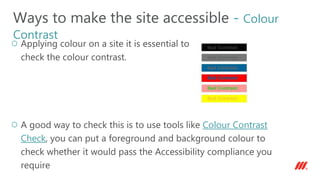
Applying colour on a site it is essential to
check the colour contrast.
A good way to check this is to use tools like Colour Contrast
Check, you can put a foreground and background colour to
check whether it would pass the Accessibility compliance you
require
Ways to make the site accessible - Colour
Contrast
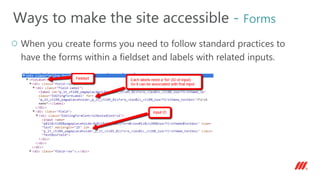
When you create forms you need to follow standard practices to
have the forms within a fieldset and labels with related inputs.
Ways to make the site accessible - Forms
Some more examples are shown on this page with other
form controls like radio buttons and check boxes
http://www.scope.org.uk/get-involved/challenge-
events/event-registration-form
Ways to make the site accessible - Forms
Some more examples are shown on this page with
other form controls like radio buttons and check
boxes
http://www.scope.org.uk/get-involved/challenge-
events/event-registration-form
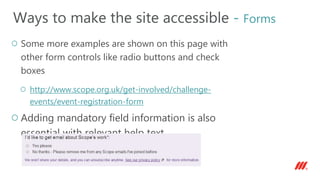
Adding mandatory field information is also
essential with relevant help text
Ways to make the site accessible - Forms
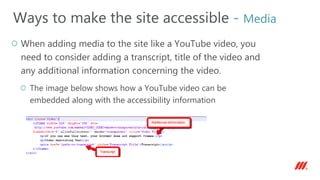
When adding media to the site like a YouTube video, you
need to consider adding a transcript, title of the video and
any additional information concerning the video.
The image below shows how a YouTube video can be
embedded along with the accessibility information
Ways to make the site accessible - Media
Accessible Rich Internet Applications (ARIA)
Defines way to make your web dynamic content/applications more
accessible
WAI-ARIA attributes
Roles –
<form role=”search”>
purpose of element
States –
<button aria-pressed=”true”>
provides more information
Properties –
<input aria-required=”true”>
provides more information
Ways to make the site accessible - ARIA
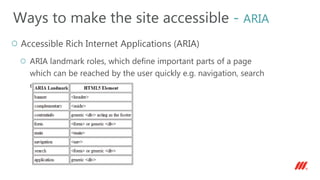
Accessible Rich Internet Applications (ARIA)
ARIA landmark roles, which define important parts of a page
which can be reached by the user quickly e.g. navigation, search
etc…
Ways to make the site accessible - ARIA
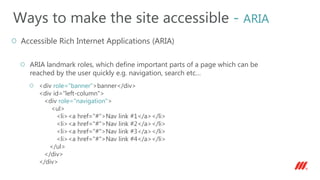
Accessible Rich Internet Applications (ARIA)
ARIA landmark roles, which define important parts of a page which can be
reached by the user quickly e.g. navigation, search etc…
<div role="banner">banner</div>
<div id="left-column">
<div role="navigation">
<ul>
<li><a href="#">Nav link #1</a></li>
<li><a href="#">Nav link #2</a></li>
<li><a href="#">Nav link #3</a></li>
<li><a href="#">Nav link #4</a></li>
</ul>
</div>
</div>
Ways to make the site accessible - ARIA
Accessible Rich Internet Applications (ARIA)
Live Regions – update the user that dynamic content has
changed e.g. JS or AJAX calls that change content
Dynamic content
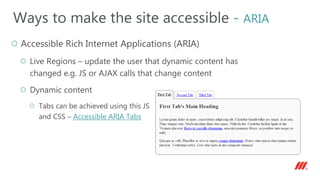
Tabs can be achieved using this JS
and CSS – Accessible ARIA Tabs
Ways to make the site accessible - ARIA
Accessible Rich Internet Applications (ARIA)
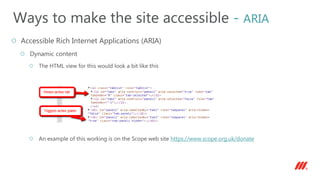
Dynamic content
The HTML view for this would look a bit like this
An example of this working is on the Scope web site https://www.scope.org.uk/donate
Ways to make the site accessible - ARIA
What happens when you use third party widgets/content,
which you can’t make accessible?
Please don’t CRY!
Third Party widgets/content
Add some text to the Accessibility page saying the third party widget/content will
not be accessible.
Add some text off screen to inform the screen reader that the content is not
accessible e.g. for the Twitter widget
<div class=‘accessibility-information'>
This text is attached to a Twitter widget. Users of screen readers will not
be able to easily access the Twitter widget content. This widget is
following posts that belong to the user/hashtag.
</div>
Remember this text needs to placed before the widget
So position the information text off screen using CSS
.accessibility-information {text-indent: -9999px; height: 1px;}
Third Party widgets/content
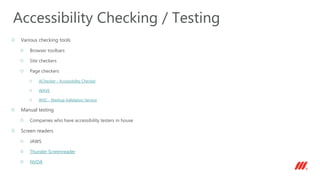
Various checking tools
Browser toolbars
Site checkers
Page checkers
AChecker - Accessibility Checker
WAVE
W3C - Markup Validation Service
Manual testing
Companies who have accessibility testers in house
Screen readers
JAWS
Thunder Screenreader
NVDA
Accessibility Checking / Testing
Questions?
mmtdigital.co.uk/Ilesh-Mistry
ilesh.m@mmtdigital.co.uk
twitter.com/ileshmistry
facebook.com/ilesh.mistry
linkedin.com/in/ileshmistry
plus.google.com/+IleshMistry
mmtdigital.co.uk
hello@mmtdigital.co.uk
twitter.com/mmt_digital
facebook.com/mmtdigital
linkedin.com/company/mmt-digital

Website development accessibility

  • 1.
  • 2.
    Introduction to someof the Accessibility Standards Accessibility consideration Ways to make the site accessible HTML ALT and TITLE Links CSS Colour Contrast Forms Media ARIA Third Party widgets/content Accessibility Checking / Testing Website Development Accessibility
  • 3.
    WAI (Web AccessibilityInitiative) accessibility guidelines Developed by the W3C (World Wide Web Consortium) Community Input Globally recognised WCAG (Web Accessibility Content Guidelines) Globally recognised standard for web content accessibility Made into an ISO standard (40500:2012) For designers, developers and authors Crossover into other mediums (mobile) Introduction to some of the Accessibility Standards
  • 4.
    WCAG P.O.U.R Principles Perceivable(text alternatives, captions) Operable (keyboard, moving content) Understandable (readable, predictable) Robust (compatible with current and future tools) Introduction to some of the Accessibility Standards
  • 5.
    Stay with me! That was just some of the standards we should consider. Introduction to some of the Accessibility Standards
  • 6.
    Disability Types Blindness orLow Vision Deaf/Hard-of-Hearing Learning Disabilities Physical Disabilities There are lots more But that shouldn’t stop them from using your web site One web site for ALL Accessibility consideration
  • 7.
    When you hearthe word 'disabled,' people immediately think about people who can't walk or talk or do everything that people take for granted. Now, I take nothing for granted. But I find the real disability is people who can't find joy in life and are bitter. - Teri Garr The only disability in life is a bad attitude. - Scott Hamilton The world worries about disability more than disabled people do. - Warwick Davis Accessibility consideration
  • 8.
    The issues disabledpeople face everyday using web sites Alternative text for graphics not supplied or inappropriate Video/Audio no transcript and captions provided Focus highlighting – I don’t know where I am! Increasing font size does not change anything for me I can’t click on that button using my keyboard Has something changed on the page? I can’t see that text on that background What’s that area to do with? Why is everything mixed up? Clicked on a link and where did it go? Accessibility consideration
  • 9.
    If we don’thave this, it will drive people mad! Accessibility consideration
  • 10.
    HTML Semantics andHMTL language HTML5, use sections, articles, asides, nav as appropriate Make sure the HTML Language is set <html lang="en"> Heading Hierarchy Appropriate heading markup should be formatted in an hierarchal approach Use the appropriate semantic markup. A button should be a button and not a div that can be clicked HTML5 we can button or the other option is to use a link button Ways to make the site accessible - HTML
  • 11.
    Accessibility basic standardsshould be followed Images should ALWAYS have a ALT tag describing the image and not be misleading/inappropriate INAPPROPRIATE Image alt – Celebrations APPROPRIATE Image alt - F1 driver Lewis Hamilton holding a trophy in the air For images that are not content and not in CSS, an arrow for example, then you will still need to use the ALT tag, but it needs to be empty <img src=“/images/arrow.png” alt=“” /> Links need to have appropriate TITLE tags <a href=“/home” title=“Go to the homepage”>Home</a> Ways to make the site accessible - ALT and TITLE
  • 12.
    Open in anew window should be clear for the user to see When doing something like this, that bit of the text should always come before the link, as the screen readers will read from top to bottom. If you go a navigation it is useful to have a skip to content link Using a link to jump to the content ID If and where possible you should point to an Accessibility page listing the web site accessibility Ways to make the site accessible - Links
  • 13.
    Font sizes shouldbe created using relative units EM, REM, % h2 {font-size: 2.2em;} CSS focus highlighting is essential to a site and can be created using the following a:focus { outline-width: 4px; outline-style: solid; outline-color: green; } Add the focus to anything that needs tabbing on to, which includes forms as well a:focus, input:focus, input:active, input[type=text]:focus, input[type=password]:focus, input[type=checkbox]:focus, textarea:focus, select:focus { outline-width: 4px; outline-style: solid; outline-color: green; } Ways to make the site accessible - CSS
  • 14.
    Applying colour ona site it is essential to check the colour contrast. A good way to check this is to use tools like Colour Contrast Check, you can put a foreground and background colour to check whether it would pass the Accessibility compliance you require Ways to make the site accessible - Colour Contrast
  • 15.
    When you createforms you need to follow standard practices to have the forms within a fieldset and labels with related inputs. Ways to make the site accessible - Forms
  • 16.
    Some more examplesare shown on this page with other form controls like radio buttons and check boxes http://www.scope.org.uk/get-involved/challenge- events/event-registration-form Ways to make the site accessible - Forms
  • 17.
    Some more examplesare shown on this page with other form controls like radio buttons and check boxes http://www.scope.org.uk/get-involved/challenge- events/event-registration-form Adding mandatory field information is also essential with relevant help text Ways to make the site accessible - Forms
  • 18.
    When adding mediato the site like a YouTube video, you need to consider adding a transcript, title of the video and any additional information concerning the video. The image below shows how a YouTube video can be embedded along with the accessibility information Ways to make the site accessible - Media
  • 19.
    Accessible Rich InternetApplications (ARIA) Defines way to make your web dynamic content/applications more accessible WAI-ARIA attributes Roles – <form role=”search”> purpose of element States – <button aria-pressed=”true”> provides more information Properties – <input aria-required=”true”> provides more information Ways to make the site accessible - ARIA
  • 20.
    Accessible Rich InternetApplications (ARIA) ARIA landmark roles, which define important parts of a page which can be reached by the user quickly e.g. navigation, search etc… Ways to make the site accessible - ARIA
  • 21.
    Accessible Rich InternetApplications (ARIA) ARIA landmark roles, which define important parts of a page which can be reached by the user quickly e.g. navigation, search etc… <div role="banner">banner</div> <div id="left-column"> <div role="navigation"> <ul> <li><a href="#">Nav link #1</a></li> <li><a href="#">Nav link #2</a></li> <li><a href="#">Nav link #3</a></li> <li><a href="#">Nav link #4</a></li> </ul> </div> </div> Ways to make the site accessible - ARIA
  • 22.
    Accessible Rich InternetApplications (ARIA) Live Regions – update the user that dynamic content has changed e.g. JS or AJAX calls that change content Dynamic content Tabs can be achieved using this JS and CSS – Accessible ARIA Tabs Ways to make the site accessible - ARIA
  • 23.
    Accessible Rich InternetApplications (ARIA) Dynamic content The HTML view for this would look a bit like this An example of this working is on the Scope web site https://www.scope.org.uk/donate Ways to make the site accessible - ARIA
  • 24.
    What happens whenyou use third party widgets/content, which you can’t make accessible? Please don’t CRY! Third Party widgets/content
  • 25.
    Add some textto the Accessibility page saying the third party widget/content will not be accessible. Add some text off screen to inform the screen reader that the content is not accessible e.g. for the Twitter widget <div class=‘accessibility-information'> This text is attached to a Twitter widget. Users of screen readers will not be able to easily access the Twitter widget content. This widget is following posts that belong to the user/hashtag. </div> Remember this text needs to placed before the widget So position the information text off screen using CSS .accessibility-information {text-indent: -9999px; height: 1px;} Third Party widgets/content
  • 26.
    Various checking tools Browsertoolbars Site checkers Page checkers AChecker - Accessibility Checker WAVE W3C - Markup Validation Service Manual testing Companies who have accessibility testers in house Screen readers JAWS Thunder Screenreader NVDA Accessibility Checking / Testing
  • 27.
  • 28.

Editor's Notes

  • #4 WAI (Web Accessibility WCAG (Web Accessibility Content Guidelines) Initiative)
  • #5 WCAG P.O.U.R Principles
  • #6 These standards are important to follow
  • #7 Low vision Voice commanding screen Keyboard access
  • #8 Quotes http://www.brainyquote.com/quotes/keywords/disability.html
  • #9 Carousels Page/Panel Reload Colour contrast ARIA roles and landmarks HTML5 Semantics
  • #10 Drives people mad!
  • #11 HTML
  • #12 ALT and TITLE
  • #13 Links
  • #14 CSS
  • #15 Colour Contrast http://snook.ca/technical/colour_contrast/colour.html
  • #16 Forms
  • #17 Forms
  • #18 Forms
  • #19 Media
  • #20 ARIA Web Accessibility Initiative - ARIA
  • #21 ARIA Recommended HTML5 Elements to use Landmark roles
  • #22 ARIA
  • #23 ARIA Live Regions http://accessibleculture.org/research-files/aria-tabs/version3b.php Show JS and CSS
  • #24 ARIA Live Regions https://www.scope.org.uk/donate http://accessibility.athena-ict.com/aria/ARIA-accessibility-home.shtml
  • #27 http://achecker.ca/checker/index.php http://wave.webaim.org/ http://validator.w3.org/ http://www.screenreader.net/