




How Websites and Search Engines Work
Last Lesson What People Do Online How they consume, create and share information How they socialise and interact in online communities How they do research and make buying decisions What Businesses Do Online They drive traffic to websites that sell effectively They use social media to deliver value and build relationships with customers Online Business Models Brochure sites, Merchant sites, Blogs, Mailing Lists, Affiliate Programs, Advertising, Subscriptions
How the Web Works
The 3 things that make up a web site: The domain name The web-hosting, or server The site files themselves
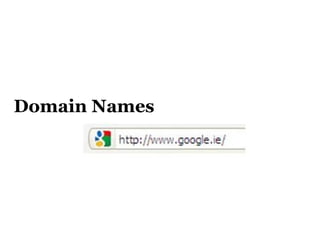
Domain Names
Domain Names The real address of a website is looks like 216.239.59.99 When you setup a hosting account you get an address like this You need a name people can remember (i.e. a domain name) You can point your domain name to any website you have  on any host .
More on Domain Names You can register any domain that’s not already taken Domains do not have to point anywhere (it’s like having a phone number without having a phone) You can have multiple domains pointing to one site
Domain Name Breakdown A domain name breaks down into two parts:  The Domain Name The Domain Suffix Example: For the web address  www.example.com   – the domain name is ‘example’ and the suffix is ‘.com’.
Choosing a Domain – Basics  Choose a domain name that’s relatively easy to remember avoid using words that are commonly misspelled or confused with something else.  Use hyphens sparingly (or not at all)  If your domain contains your primary keywords you will do better in search engine rankings for those keywords.
Example If you sell  brass door handles  and the domain name  www.brassdoorhandles.com  is not already taken – then I suggest you grab it. When anyone searches Google for the keywords “brass door handles” you will have a far better chance of being listed on the front page of results than a website called  www.bdh.com .
Domain Suffixes  the suffix of the domain (i.e the bit on the end – e.g. .com) affects how the search engines rank your site.  An ‘.ie’ domain will rank  slightly  higher for Irish-based searches and will assure Irish visitors that your business is registered in Ireland.  Drawbacks with ‘.ie’ domains are:  More Costly than .com More red-tape Not recognised internationally
Domain Suffixes  ‘ .ie’ is Irish (€25 per year) ‘ .com’ is commercial and is recognised internationally ($10 per year) ‘ .net’ is an option if the ‘.com’ is unavailable ‘ .org’ is often used by organisations ‘ .edu’ is often used by educational bodies
Choosing a Domain Name Try to get your keywords in the domain Find a domain that is unique Either get the dot com, or your counties suffix Make it easy to type and remember Try to make it clear what your websites does Consider Branding Make a List and Get Some Opinions Check Availability on sites such as  www.checkdomain.com
Protecting Your Domain Set your domain to renew automatically Rather than registering just  www.yoursite.ie , you may also want to register  www.yoursite.com ,  www.your-site.com  and  www.yoursite.co.uk .  People often use Google even when they know your domain name. Your domain name is your online brand –you don’t want to get outranked by some other business on your own brand name.
Hosting
Web Hosting A web hosting service allows individuals and organizations to make their own website accessible via the World Wide Web.  Web hosting companies enables businesses to outsource for the hardware and software they need to run a website You could host your own website but it is a complicated task which requires specialised training
Choosing a Hosting Provider 99% Uptime Guarantee Technical support  SimpleScripts or Fantistico Full Email Support and Mail Forwarding Data Transfer (Bandwidth) SSL Secure server  Cost
How  Webpages  Are Made
How webpages are   made Web pages consist of a small number of elements.  These elements are the basic building blocks of all web pages and include: paragraphs (normal text) headings and sub-headings (big, bold text) lists (i.e. bullet point and numbered lists) links tables (for presenting other elements) images videos
How webpages are made everyone agreed on a standard way of representing webpage elements so that webpages always look the same to everybody This standard was called HTML. HTML is a straightforward and logical way of defining each of these elements that they can be understood by all types of computer.
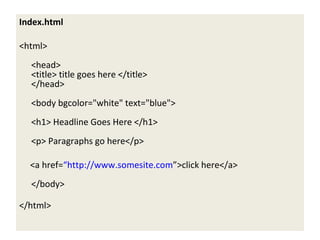
Index.html <html>  <head>  <title> title goes here </title> </head> <body bgcolor=&quot;white&quot; text=&quot;blue&quot;> <h1> Headline Goes Here </h1> <p> Paragraphs go here</p> <a href= “http://www.somesite.com ”>click here</a> </body> </html>
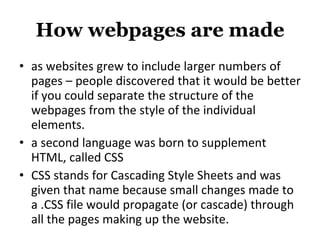
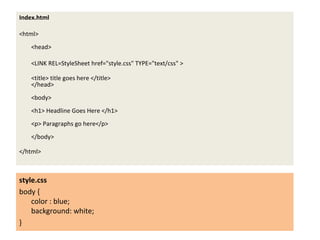
How webpages are made as websites grew to include larger numbers of pages – people discovered that it would be better if you could separate the structure of the webpages from the style of the individual elements. a second language was born to supplement HTML, called CSS CSS stands for Cascading Style Sheets and was given that name because small changes made to a .CSS file would propagate (or cascade) through all the pages making up the website.
Index.html <html>  <head>  <LINK REL=StyleSheet href=&quot;style.css&quot; TYPE=&quot;text/css&quot; > <title> title goes here </title> </head> <body> <h1> Headline Goes Here </h1> <p> Paragraphs go here</p> </body> </html> style.css body { color : blue; background: white; }
Learn HTML & CSS You don’t need to – but if you want to.. http://www.w3schools.com/html/  http://www.w3schools.com/css/default.asp
Other Web Technologies; Flash Flash can create visually stunning websites (or elements within websites) but has some significant drawbacks Can’t be read by Search Engines (bad for SEO) Requires a plugin to be installed on a users browser Not supported by iPhones / iPads
Javascript Javascript (AJAX/JQuery) allows user to interact with websites without communicating with the server Javascript runs on the client computer after the webpage has been download Great for things like slideshows, form verification, zooming in on images etc
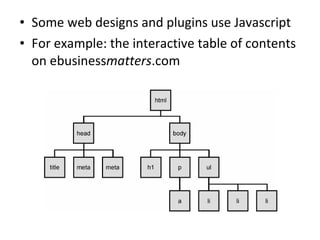
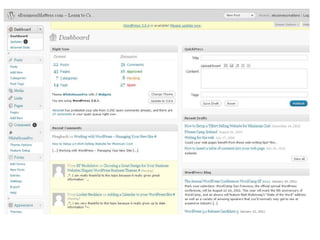
Some web designs and plugins use Javascript For example: the interactive table of contents on ebusiness matters .com
Browsers
Web Browsers A web browser is simply the software your computer uses to read HTML / CSS  and  send out messages across the Internet requesting webpages. Web Designs (and new plugins) should always be tested on all major browsers
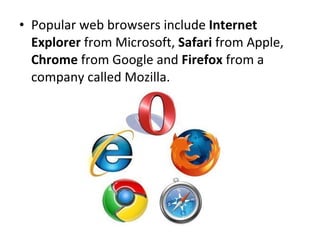
Popular web browsers include  Internet Explorer  from Microsoft,  Safari  from Apple,  Chrome  from Google and  Firefox  from a company called Mozilla.
How Websites Are Made
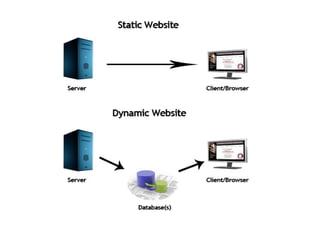
Static Websites Traditionally, a website consisted of a number of separate files (i.e. webpages) all linked together Each webpage was hard-coded (static) Creating a website by manually creating each individual web page was  painful Even with html editors it was still difficult, slow and error prone
Static Websites With static websites you needed to create or modify pages on your local computer Then use special software to upload the file to the host server Problems include: Broken links Identical content on multiple pages needs to be modified for every occurrence
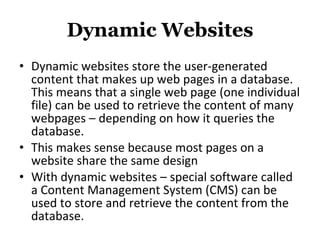
Dynamic Websites Dynamic websites store the user-generated content that makes up web pages in a database. This means that a single web page (one individual file) can be used to retrieve the content of many webpages – depending on how it queries the database. This makes sense because most pages on a website share the same design With dynamic websites – special software called a Content Management System (CMS) can be used to store and retrieve the content from the database.
 
Why it’s now easy for you to manage your own site
The Benefits of Using a CMS Setting up a website can be done with one click Creating Pages is easy Editing / Modifying Pages is easy Extending the functionality of your website is easy Changing the look and feel can be changed with a single click by installing a ‘theme’ Writing Blog Articles is easy No more FTP Software No more broken links
 
Choosing a CMS Pros and Cons of Paid Solutions Instant Support if you have a problem Cost Slow to add new features Pros and Cons of Open Source Solutions Community Support  Very popular which means well tested Free New Features added regularly Extremely cheap themes / web designs widely available
The Top Open Source CMS General Drupal  Joomla WordPress Shopping Cart Magento osCommerce Plugins exist for Drupal, Joomla and WordPress
Why WordPress is the Best WordPress is the most user-friendly of the free CMS  Lots of great, plugins available (for cheap) WordPress has a large community of users and developers (Over 25 million people have chosen WordPress to power the place on the web ) More, high-quality WordPress themes exist than for the other open source CMS Blogging, RSS and SEO are built-in No HTML knowledge required to create or edit content Transferring WordPress between hosts is straightforward WordPress won best CMS award 2009 and the Hall of Fame CMS Award in 2010 (beating Drupal and Joomla)


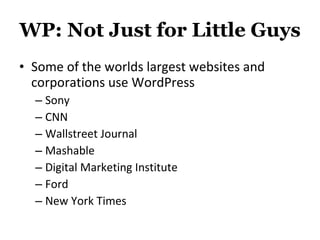
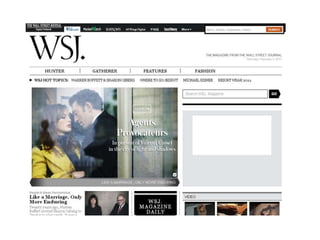
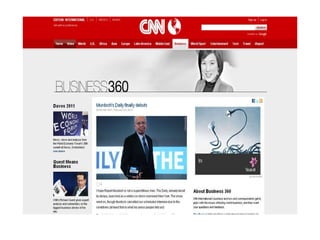
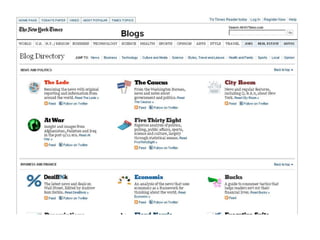
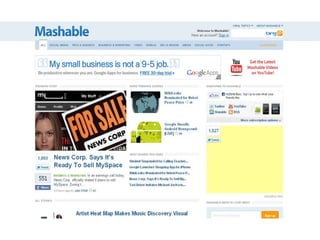
WP: Not Just for Little Guys Some of the worlds largest websites and corporations use WordPress Sony CNN Wallstreet Journal Mashable Digital Marketing Institute Ford New York Times


How You Can Accept  Payments Online
Accepting Payments Setup a merchant account with your bank receive credit card details and process them yourself Requires an SSL certificate, a security policy and special hosting Authorize.net  Receive credit card details and use another company to process them Requires an SSL certificate and special hosting PayPal PayPal handles everything. You don’t receive credit card details so don’t have to worry about security
How Search Engines Work
Search Results Analysis
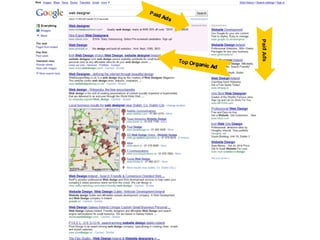
3 Types of Google Search Result Organic Listings (these are websites that are listed for free because Google considers them the most relevant) Paid Listings (these are websites that pay Google each time someone clicks on their ad) Google Local Business Listing (Google Maps)
 
Individual Search  Result Analysis
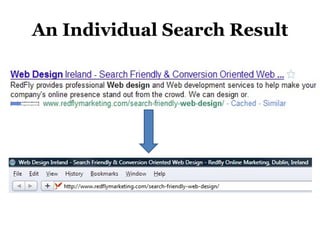
An Individual Search Result
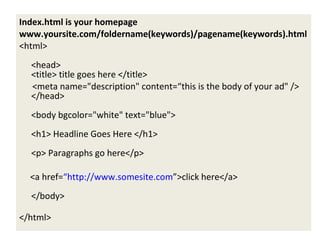
Your Free Google Advert You Control the Headline (it’s the title of your webpage) Your Control the Body (or Description) of the ad (it’s your meta description tag) You Control the URL of your webpage
Index.html is your homepage www.yoursite.com/foldername(keywords)/pagename(keywords).html <html>  <head>  <title> title goes here </title> <meta name=&quot;description&quot; content=“this is the body of your ad&quot; /> </head> <body bgcolor=&quot;white&quot; text=&quot;blue&quot;> <h1> Headline Goes Here </h1> <p> Paragraphs go here</p> <a href= “http://www.somesite.com ”>click here</a> </body> </html>
Overview of Getting Found on Google
What Google Likes Google likes websites that are updated regularly (that’s one good reason to blog) Google likes sites with lots of related pages Google likes websites with lots of links from other websites Google only understands text, and likes to see keywords peppered throughout your pages (especially in the title, headings, lists and paragraphs)
Search Engines Optimization Consider what keywords you are going after The more specific your keywords are the better your shot at getting to #1 E.g. ‘dentist Dublin’ could be difficult, while ‘teeth whitening Dublin’ or ‘cheap dentist Dublin city’ might be easier Optimise your page by including your keywords in the page title, headings etc Get links from other relevant sites containing those keywords E.g. ‘ click here for dentist dublin ’ is better than ‘ click here ’
Next Lesson Learn  exactly  which keywords your potential customers are searching for Measure the competitiveness of those keywords Identify niche keywords that give you the best chance at getting to #1 on the search results quickly Identify competitors and/or similar sites to yours  learn about where they get visitors, what keywords drive them traffic and who their target demographics are Learn how to analyse their internet marketing strategies

How websites and search engines work

  • 1.
    How Websites andSearch Engines Work
  • 2.
    Last Lesson WhatPeople Do Online How they consume, create and share information How they socialise and interact in online communities How they do research and make buying decisions What Businesses Do Online They drive traffic to websites that sell effectively They use social media to deliver value and build relationships with customers Online Business Models Brochure sites, Merchant sites, Blogs, Mailing Lists, Affiliate Programs, Advertising, Subscriptions
  • 3.
  • 4.
    The 3 thingsthat make up a web site: The domain name The web-hosting, or server The site files themselves
  • 5.
  • 6.
    Domain Names Thereal address of a website is looks like 216.239.59.99 When you setup a hosting account you get an address like this You need a name people can remember (i.e. a domain name) You can point your domain name to any website you have on any host .
  • 7.
    More on DomainNames You can register any domain that’s not already taken Domains do not have to point anywhere (it’s like having a phone number without having a phone) You can have multiple domains pointing to one site
  • 8.
    Domain Name BreakdownA domain name breaks down into two parts: The Domain Name The Domain Suffix Example: For the web address www.example.com – the domain name is ‘example’ and the suffix is ‘.com’.
  • 9.
    Choosing a Domain– Basics Choose a domain name that’s relatively easy to remember avoid using words that are commonly misspelled or confused with something else. Use hyphens sparingly (or not at all) If your domain contains your primary keywords you will do better in search engine rankings for those keywords.
  • 10.
    Example If yousell brass door handles and the domain name www.brassdoorhandles.com is not already taken – then I suggest you grab it. When anyone searches Google for the keywords “brass door handles” you will have a far better chance of being listed on the front page of results than a website called www.bdh.com .
  • 11.
    Domain Suffixes the suffix of the domain (i.e the bit on the end – e.g. .com) affects how the search engines rank your site. An ‘.ie’ domain will rank slightly higher for Irish-based searches and will assure Irish visitors that your business is registered in Ireland. Drawbacks with ‘.ie’ domains are: More Costly than .com More red-tape Not recognised internationally
  • 12.
    Domain Suffixes ‘ .ie’ is Irish (€25 per year) ‘ .com’ is commercial and is recognised internationally ($10 per year) ‘ .net’ is an option if the ‘.com’ is unavailable ‘ .org’ is often used by organisations ‘ .edu’ is often used by educational bodies
  • 13.
    Choosing a DomainName Try to get your keywords in the domain Find a domain that is unique Either get the dot com, or your counties suffix Make it easy to type and remember Try to make it clear what your websites does Consider Branding Make a List and Get Some Opinions Check Availability on sites such as www.checkdomain.com
  • 14.
    Protecting Your DomainSet your domain to renew automatically Rather than registering just www.yoursite.ie , you may also want to register www.yoursite.com , www.your-site.com and www.yoursite.co.uk . People often use Google even when they know your domain name. Your domain name is your online brand –you don’t want to get outranked by some other business on your own brand name.
  • 15.
  • 16.
    Web Hosting Aweb hosting service allows individuals and organizations to make their own website accessible via the World Wide Web. Web hosting companies enables businesses to outsource for the hardware and software they need to run a website You could host your own website but it is a complicated task which requires specialised training
  • 17.
    Choosing a HostingProvider 99% Uptime Guarantee Technical support SimpleScripts or Fantistico Full Email Support and Mail Forwarding Data Transfer (Bandwidth) SSL Secure server Cost
  • 18.
    How Webpages Are Made
  • 19.
    How webpages are made Web pages consist of a small number of elements. These elements are the basic building blocks of all web pages and include: paragraphs (normal text) headings and sub-headings (big, bold text) lists (i.e. bullet point and numbered lists) links tables (for presenting other elements) images videos
  • 20.
    How webpages aremade everyone agreed on a standard way of representing webpage elements so that webpages always look the same to everybody This standard was called HTML. HTML is a straightforward and logical way of defining each of these elements that they can be understood by all types of computer.
  • 21.
    Index.html <html> <head> <title> title goes here </title> </head> <body bgcolor=&quot;white&quot; text=&quot;blue&quot;> <h1> Headline Goes Here </h1> <p> Paragraphs go here</p> <a href= “http://www.somesite.com ”>click here</a> </body> </html>
  • 22.
    How webpages aremade as websites grew to include larger numbers of pages – people discovered that it would be better if you could separate the structure of the webpages from the style of the individual elements. a second language was born to supplement HTML, called CSS CSS stands for Cascading Style Sheets and was given that name because small changes made to a .CSS file would propagate (or cascade) through all the pages making up the website.
  • 23.
    Index.html <html> <head> <LINK REL=StyleSheet href=&quot;style.css&quot; TYPE=&quot;text/css&quot; > <title> title goes here </title> </head> <body> <h1> Headline Goes Here </h1> <p> Paragraphs go here</p> </body> </html> style.css body { color : blue; background: white; }
  • 24.
    Learn HTML &CSS You don’t need to – but if you want to.. http://www.w3schools.com/html/ http://www.w3schools.com/css/default.asp
  • 25.
    Other Web Technologies;Flash Flash can create visually stunning websites (or elements within websites) but has some significant drawbacks Can’t be read by Search Engines (bad for SEO) Requires a plugin to be installed on a users browser Not supported by iPhones / iPads
  • 26.
    Javascript Javascript (AJAX/JQuery)allows user to interact with websites without communicating with the server Javascript runs on the client computer after the webpage has been download Great for things like slideshows, form verification, zooming in on images etc
  • 27.
    Some web designsand plugins use Javascript For example: the interactive table of contents on ebusiness matters .com
  • 28.
  • 29.
    Web Browsers Aweb browser is simply the software your computer uses to read HTML / CSS and send out messages across the Internet requesting webpages. Web Designs (and new plugins) should always be tested on all major browsers
  • 30.
    Popular web browsersinclude Internet Explorer from Microsoft, Safari from Apple, Chrome from Google and Firefox from a company called Mozilla.
  • 31.
  • 32.
    Static Websites Traditionally,a website consisted of a number of separate files (i.e. webpages) all linked together Each webpage was hard-coded (static) Creating a website by manually creating each individual web page was painful Even with html editors it was still difficult, slow and error prone
  • 33.
    Static Websites Withstatic websites you needed to create or modify pages on your local computer Then use special software to upload the file to the host server Problems include: Broken links Identical content on multiple pages needs to be modified for every occurrence
  • 34.
    Dynamic Websites Dynamicwebsites store the user-generated content that makes up web pages in a database. This means that a single web page (one individual file) can be used to retrieve the content of many webpages – depending on how it queries the database. This makes sense because most pages on a website share the same design With dynamic websites – special software called a Content Management System (CMS) can be used to store and retrieve the content from the database.
  • 35.
  • 36.
    Why it’s noweasy for you to manage your own site
  • 37.
    The Benefits ofUsing a CMS Setting up a website can be done with one click Creating Pages is easy Editing / Modifying Pages is easy Extending the functionality of your website is easy Changing the look and feel can be changed with a single click by installing a ‘theme’ Writing Blog Articles is easy No more FTP Software No more broken links
  • 38.
  • 39.
    Choosing a CMSPros and Cons of Paid Solutions Instant Support if you have a problem Cost Slow to add new features Pros and Cons of Open Source Solutions Community Support Very popular which means well tested Free New Features added regularly Extremely cheap themes / web designs widely available
  • 40.
    The Top OpenSource CMS General Drupal Joomla WordPress Shopping Cart Magento osCommerce Plugins exist for Drupal, Joomla and WordPress
  • 41.
    Why WordPress isthe Best WordPress is the most user-friendly of the free CMS Lots of great, plugins available (for cheap) WordPress has a large community of users and developers (Over 25 million people have chosen WordPress to power the place on the web ) More, high-quality WordPress themes exist than for the other open source CMS Blogging, RSS and SEO are built-in No HTML knowledge required to create or edit content Transferring WordPress between hosts is straightforward WordPress won best CMS award 2009 and the Hall of Fame CMS Award in 2010 (beating Drupal and Joomla)
  • 42.
  • 43.
  • 44.
  • 45.
  • 46.
  • 47.
  • 48.
  • 49.
  • 50.
  • 51.
  • 52.
  • 53.
  • 54.
  • 55.
  • 56.
  • 57.
    WP: Not Justfor Little Guys Some of the worlds largest websites and corporations use WordPress Sony CNN Wallstreet Journal Mashable Digital Marketing Institute Ford New York Times
  • 58.
  • 59.
  • 60.
  • 61.
  • 62.
  • 63.
  • 64.
    How You CanAccept Payments Online
  • 65.
    Accepting Payments Setupa merchant account with your bank receive credit card details and process them yourself Requires an SSL certificate, a security policy and special hosting Authorize.net Receive credit card details and use another company to process them Requires an SSL certificate and special hosting PayPal PayPal handles everything. You don’t receive credit card details so don’t have to worry about security
  • 66.
  • 67.
  • 68.
    3 Types ofGoogle Search Result Organic Listings (these are websites that are listed for free because Google considers them the most relevant) Paid Listings (these are websites that pay Google each time someone clicks on their ad) Google Local Business Listing (Google Maps)
  • 69.
  • 70.
    Individual Search Result Analysis
  • 71.
  • 72.
    Your Free GoogleAdvert You Control the Headline (it’s the title of your webpage) Your Control the Body (or Description) of the ad (it’s your meta description tag) You Control the URL of your webpage
  • 73.
    Index.html is yourhomepage www.yoursite.com/foldername(keywords)/pagename(keywords).html <html> <head> <title> title goes here </title> <meta name=&quot;description&quot; content=“this is the body of your ad&quot; /> </head> <body bgcolor=&quot;white&quot; text=&quot;blue&quot;> <h1> Headline Goes Here </h1> <p> Paragraphs go here</p> <a href= “http://www.somesite.com ”>click here</a> </body> </html>
  • 74.
    Overview of GettingFound on Google
  • 75.
    What Google LikesGoogle likes websites that are updated regularly (that’s one good reason to blog) Google likes sites with lots of related pages Google likes websites with lots of links from other websites Google only understands text, and likes to see keywords peppered throughout your pages (especially in the title, headings, lists and paragraphs)
  • 76.
    Search Engines OptimizationConsider what keywords you are going after The more specific your keywords are the better your shot at getting to #1 E.g. ‘dentist Dublin’ could be difficult, while ‘teeth whitening Dublin’ or ‘cheap dentist Dublin city’ might be easier Optimise your page by including your keywords in the page title, headings etc Get links from other relevant sites containing those keywords E.g. ‘ click here for dentist dublin ’ is better than ‘ click here ’
  • 77.
    Next Lesson Learn exactly which keywords your potential customers are searching for Measure the competitiveness of those keywords Identify niche keywords that give you the best chance at getting to #1 on the search results quickly Identify competitors and/or similar sites to yours learn about where they get visitors, what keywords drive them traffic and who their target demographics are Learn how to analyse their internet marketing strategies