

1
SM
February 24th, 2021
Webinar:
Securing Remote Workforce on the
Microsoft Cloud
2
SM
Withum | BE IN A POSITION OF STRENGTH
Housekeeping
• Webinar is being recorded
• 50 minute session
• 10 minute Q&A session at the end
• Send in your questions!
• Type your questions in the Questions Pane
of the GotoWebinar Panel
• Slides and recording will be emailed after
the webinar
3
SM
About Daniel
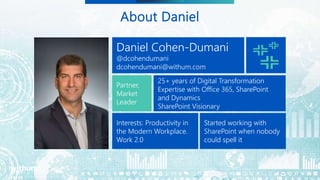
Daniel Cohen-Dumani
@dcohendumani
dcohendumani@withum.com
Partner,
Market
Leader
25+ years of Digital Transformation
Expertise with Office 365, SharePoint
and Dynamics
SharePoint Visionary
Interests: Productivity in
the Modern Workplace.
Work 2.0
Started working with
SharePoint when nobody
could spell it
4
SM
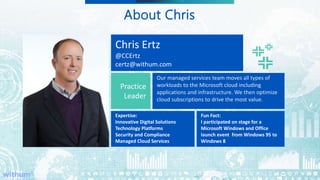
About Chris
Chris Ertz
@CCErtz
certz@withum.com
Practice
Leader
Our managed services team moves all types of
workloads to the Microsoft cloud including
applications and infrastructure. We then optimize
cloud subscriptions to drive the most value.
Expertise:
Innovative Digital Solutions
Technology Platforms
Security and Compliance
Managed Cloud Services
Fun Fact:
I participated on stage for a
Microsoft Windows and Office
launch event from Windows 95 to
Windows 8
5
SM
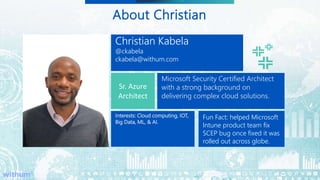
About Christian
Christian Kabela
@ckabela
ckabela@withum.com
Sr. Azure
Architect
Microsoft Security Certified Architect
with a strong background on
delivering complex cloud solutions.
Interests: Cloud computing, IOT,
Big Data, ML, & AI.
Alumni
Fun Fact: helped Microsoft
Intune product team fix
SCEP bug once fixed it was
rolled out across globe.
6
SM
Withum | BE IN A POSITION OF STRENGTH
What to Expect From Today’s
Webinar:
Securing Remote Workforce on the Microsoft Cloud
• Identity Security
• Device Management
• Windows Virtual Desktop
• Application Security
CE
7
SM
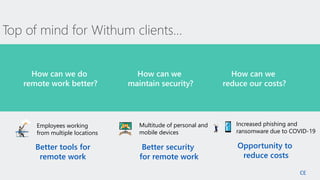
Top of mind for Withum clients…
How can we do
remote work better?
How can we
maintain security?
How can we
reduce our costs?
Better tools for
remote work
Better security
for remote work
Opportunity to
reduce costs
Multitude of personal and
mobile devices
Increased phishing and
ransomware due to COVID-19
Employees working
from multiple locations
CE
8
SM
Department of Homeland Security, April 8, 2020, CISA Alert (AA20-099A)
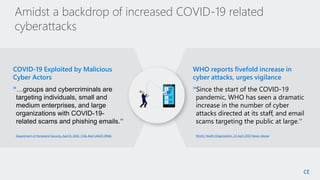
COVID-19 Exploited by Malicious
Cyber Actors
“…groups and cybercriminals are
targeting individuals, small and
medium enterprises, and large
organizations with COVID-19-
related scams and phishing emails.”
World, Health Organization, 23 April 2020 News release
WHO reports fivefold increase in
cyber attacks, urges vigilance
“Since the start of the COVID-19
pandemic, WHO has seen a dramatic
increase in the number of cyber
attacks directed at its staff, and email
scams targeting the public at large.”
Amidst a backdrop of increased COVID-19 related
cyberattacks
CE
9
SM
POLL #1
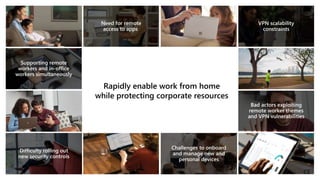
Rapidly enable work from home
while protecting corporate resources
CE
11
SM
Identity Security
12
SM
POLL #2
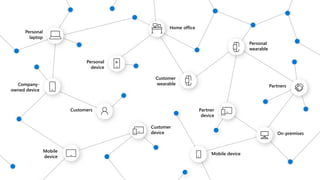
Personal
laptop
Home office
Personal
wearable
Personal
device
Customer
wearable
Company-
owned device
Partners
Customers Partner
device
Customer
device On-premises
Mobile
device
Mobile device
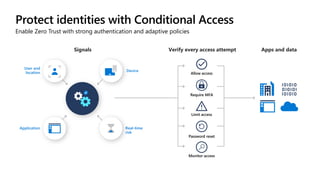
Protect identities with Conditional Access
Enable Zero Trust with strong authentication and adaptive policies
Require MFA
Allow access
Limit access
Application
User and
location Device
Real-time
risk
Password reset
Monitor access
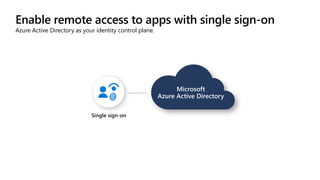
Enable remote access to apps with single sign-on
Azure Active Directory as your identity control plane.
Single sign-on
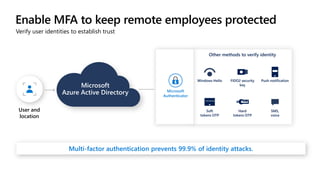
Enable MFA to keep remote employees protected
Verify user identities to establish trust
Other methods to verify identity
Windows Hello FIDO2 security
key
Push notification
Soft
tokens OTP
Hard
tokens OTP
SMS,
voice
Microsoft
Authenticator
Multi-factor authentication prevents 99.9% of identity attacks.
User and
location
Demo
Conditional Access
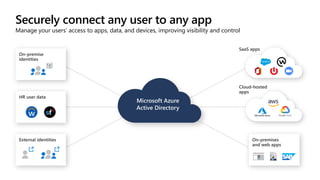
Securely connect any user to any app
Manage your users’ access to apps, data, and devices, improving visibility and control
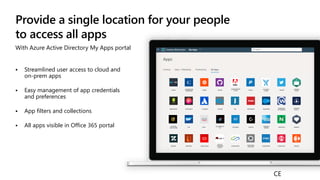
Provide a single location for your people
to access all apps
With Azure Active Directory My Apps portal
 Streamlined user access to cloud and
on-prem apps
 Easy management of app credentials
and preferences
 App filters and collections
 All apps visible in Office 365 portal
CE
Demo
My App Portal
CE
21
SM
Device
Management
22
SM
POLL #3
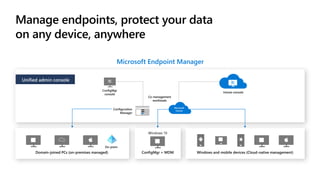
Manage endpoints, protect your data
on any device, anywhere
Microsoft Endpoint Manager
Configuration
Manager
ConfigMgr
console
Windows and mobile devices (Cloud-native management)
Domainjoined PCs
Domain-joined PCs (on-premises managed)
Co-management
workloads
Intune console
Unified admin console
ConfigMgr + MDM
Windows 10
On-prem
Microsoft
Intune
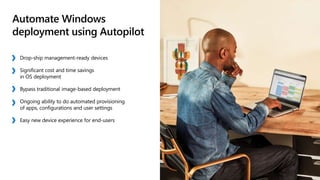
Automate Windows
deployment using Autopilot
Drop-ship management-ready devices
Significant cost and time savings
in OS deployment
Bypass traditional image-based deployment
Ongoing ability to do automated provisioning
of apps, configurations and user settings
Easy new device experience for end-users
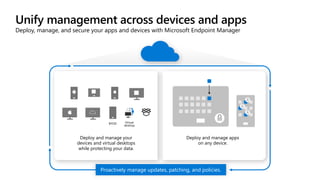
Deploy and manage apps
on any device.
Deploy and manage your
devices and virtual desktops
while protecting your data.
Virtual
desktop
BYOD
Unify management across devices and apps
Deploy, manage, and secure your apps and devices with Microsoft Endpoint Manager
Proactively manage updates, patching, and policies.
Deploy and manage apps
on any device.
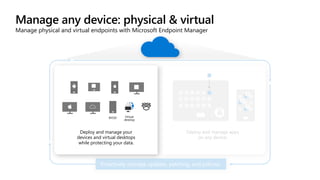
Manage any device: physical & virtual
Manage physical and virtual endpoints with Microsoft Endpoint Manager
Proactively manage updates, patching, and policies.
Deploy and manage your
devices and virtual desktops
while protecting your data.
Virtual
desktop
BYOD
Deploy and manage your
devices and virtual desktops
while protecting your data.
Virtual
desktop
BYOD
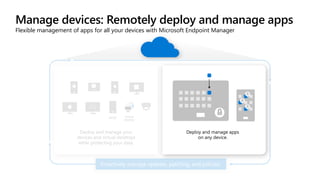
Manage devices: Remotely deploy and manage apps
Flexible management of apps for all your devices with Microsoft Endpoint Manager
Proactively manage updates, patching, and policies.
Deploy and manage apps
on any device.
Demo
 Device & app management
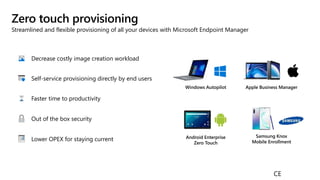
Zero touch provisioning
Streamlined and flexible provisioning of all your devices with Microsoft Endpoint Manager
Android Enterprise
Zero Touch
Samsung Knox
Mobile Enrollment
Apple Business Manager
Windows Autopilot
Out of the box security
Self-service provisioning directly by end users
Decrease costly image creation workload
Lower OPEX for staying current
Faster time to productivity
CE
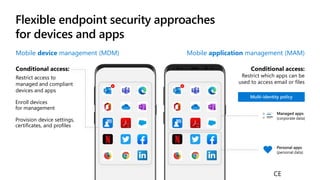
Flexible endpoint security approaches
for devices and apps
Mobile application management (MAM)
Conditional access:
Restrict which apps can be
used to access email or files
Mobile device management (MDM)
Conditional access:
Restrict access to
managed and compliant
devices and apps
Enroll devices
for management
Provision device settings,
certificates, and profiles
Managed apps
(corporate data)
Personal apps
(personal data)
CE
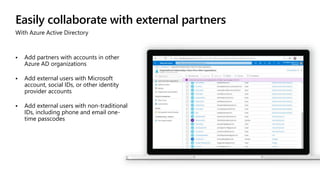
Easily collaborate with external partners
With Azure Active Directory
 Add partners with accounts in other
Azure AD organizations
 Add external users with Microsoft
account, social IDs, or other identity
provider accounts
 Add external users with non-traditional
IDs, including phone and email one-
time passcodes
Demo
33
SM
Application
Security
34
SM
POLL #4
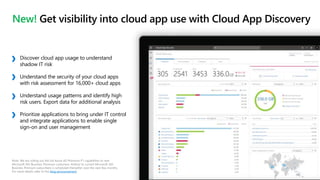
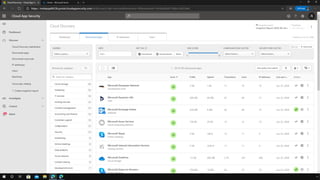
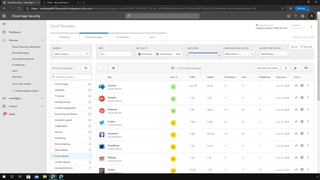
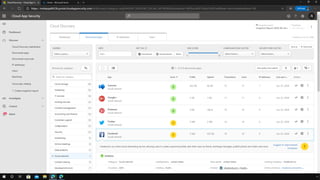
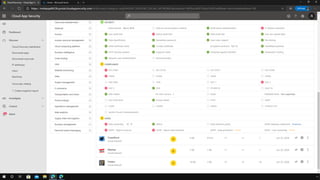
New! Get visibility into cloud app use with Cloud App Discovery
Note: We are rolling out the full Azure AD Premium P1 capabilities to new
Microsoft 365 Business Premium customers. Rollout to current Microsoft 365
Business Premium subscribers is scheduled thereafter over the next few months.
For more details refer to the blog announcement.
Discover cloud app usage to understand
shadow IT risk
Understand the security of your cloud apps
with risk assessment for 16,000+ cloud apps
Understand usage patterns and identify high
risk users. Export data for additional analysis
Prioritize applications to bring under IT control
and integrate applications to enable single
sign-on and user management
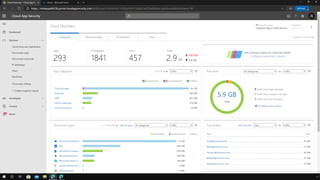
Demo
Cloud App Discovery
CE
42
SM
Windows Virtual
Desktop
DCD
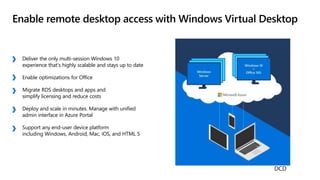
Deliver the only multi-session Windows 10
experience that’s highly scalable and stays up to date
Enable optimizations for Office
Migrate RDS desktops and apps and
simplify licensing and reduce costs
Deploy and scale in minutes. Manage with ​unified
admin interface in Azure Portal
Support any end-user device platform
including Windows, Android, Mac, iOS, and HTML 5
Enable remote desktop access with Windows Virtual Desktop
DCD
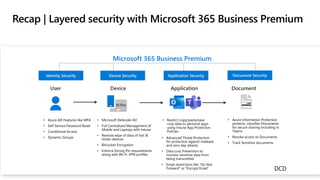
• Azure AD Features like MFA
• Self Service Password Reset
• Conditional Access
• Dynamic Groups
• Microsoft Defender AV
• Full Centralized Management of
Mobile and Laptops with Intune
• Remote wipe of data of lost &
stolen devices
• BitLocker Encryption
• Enforce Strong Pin requirements
along with Wi-Fi, VPN profiles
• Restrict copy/paste/save
corp data to personal apps
using Intune App Protection
Policies
• Advanced Threat Protection
for protection against malware
and zero day attacks
• Data Loss Prevention to
monitor sensitive data from
being transmitted
• Email restrictions like “Do Not
Forward” or “Encrypt Email”
• Azure Information Protection
protects, classifies Documents
for secure sharing including in
Teams
• Revoke access to Documents
• Track Sensitive documents
Identity Security Device Security Application Security Document Security
Microsoft 365 Business Premium
Recap | Layered security with Microsoft 365 Business Premium
10 Pro
DCD
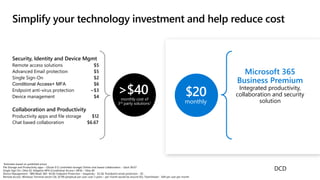
Simplify your technology investment and help reduce cost
$20
monthly
Microsoft 365
Business Premium
Integrated productivity,
collaboration and security
solution
Security, Identity and Device Mgmt
Remote access solutions $5
Advanced Email protection $5
Single Sign-On $2
Conditional Access+ MFA $6
Endpoint anti-virus protection ~$3
Device management $4
Collaboration and Productivity
Productivity apps and file storage $12
Chat based collaboration $6.67
>$40
monthly cost of
3rd party solutions1
1Estimates based on published prices
File Storage and Productivity apps – GSuite $12 (unlimited storage) Online chat based collaboration – Slack $6.67
Single Sign On– Okta $2; Adaptive MFA (Conditional Access+ MFA) – Okta $6
Device Management - IBM MaaS 360- $4.00, Endpoint Protection – Kaspersky - $3.38, Proofpoint email protection - $5
Remote Access: Windows Terminal server CAL ($199 perpetual per user; over 3 years – per month would be around $5); TeamViewer - $49 per user per month
DCD
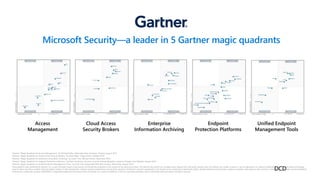
Access
Management
Cloud Access
Security Brokers
Enterprise
Information Archiving
Endpoint
Protection Platforms
Unified Endpoint
Management Tools
*Gartner “Magic Quadrant for Access Management,” by Michael Kelley, Abhyuday Data, Henrique, Teixeira, August 2019
*Gartner “Magic Quadrant for Cloud Access Security Brokers,” by Steve Riley, Craig Lawson, October 2019
*Gartner “Magic Quadrant for Enterprise Information Archiving,” by Julian Tirsu, Michael Hoech, November 2019
*Gartner “Magic Quadrant for Endpoint Protection Platforms,” by Peter Firstbrook, Dionisio Zumerle, Prateek Bhajanka, Lawrence Pingree, Paul Webber, August 2019
*Gartner “Magic Quadrant for Unified Endpoint Management Tools,” by Chris Silva, Manjunath Bhat, Rich Doheny, Rob Smith, August 2019
These graphics were published by Gartner, Inc. as part of larger research documents and should be evaluated in the context of the entire documents. The Gartner documents are available upon request from Microsoft. Gartner does not endorse any vendor, product or service depicted in its research publications, and does not advise technology
users to select only those vendors with the highest ratings or other designation. Gartner research publications consist of the opinions of Gartner’s research organization and should not be construed as statements of fact. Gartner disclaims all warranties, express or implied, with respect to this research, including any warranties of merchantability
or fitness for a particular purpose. GARTNER is a registered trademark and service mark of Gartner, Inc. and/or its affiliates in the U.S. and internationally, and is used herein with permission. All rights reserved.
Microsoft Security—a leader in 5 Gartner magic quadrants
DCD
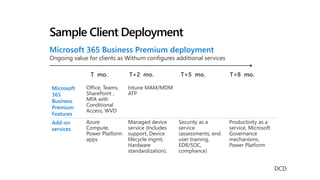
Sample Client Deployment
Microsoft 365 Business Premium deployment
Ongoing value for clients as Withum configures additional services
Microsoft
365
Business
Premium
Features
Office, Teams,
SharePoint ,
MFA with
Conditional
Access, WVD
Intune MAM/MDM
ATP
Add-on
services
Azure
Compute,
Power Platform
apps
Managed device
service (Includes
support, Device
lifecycle mgmt,
Hardware
standardization).
Security as a
service
(assessments, end
user training,
EDR/SOC,
compliance)
Productivity as a
service, Microsoft
Governance
mechanisms,
Power Platform
T+2 mo. T+5 mo. T+8 mo.
T mo.
DCD
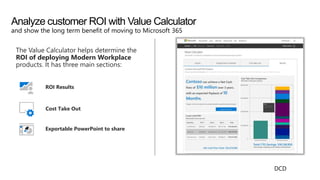
The Value Calculator helps determine the
ROI of deploying Modern Workplace
products. It has three main sections:
ROI Results
Cost Take Out
Exportable PowerPoint to share
Analyze customer ROI with Value Calculator
and show the long term benefit of moving to Microsoft 365
DCD
49
SM
Questions?
50
SM
SUBSCRIBE TO US
Get a weekly dose of the latest digital
transformation
trends and insights delivered to your inbox.
No Junk - Just What Matters Most to You

Webinar: Securing Remote Workforce on the Microsoft Cloud

  • 1.
    1 SM February 24th, 2021 Webinar: SecuringRemote Workforce on the Microsoft Cloud
  • 2.
    2 SM Withum | BEIN A POSITION OF STRENGTH Housekeeping • Webinar is being recorded • 50 minute session • 10 minute Q&A session at the end • Send in your questions! • Type your questions in the Questions Pane of the GotoWebinar Panel • Slides and recording will be emailed after the webinar
  • 3.
    3 SM About Daniel Daniel Cohen-Dumani @dcohendumani dcohendumani@withum.com Partner, Market Leader 25+years of Digital Transformation Expertise with Office 365, SharePoint and Dynamics SharePoint Visionary Interests: Productivity in the Modern Workplace. Work 2.0 Started working with SharePoint when nobody could spell it
  • 4.
    4 SM About Chris Chris Ertz @CCErtz certz@withum.com Practice Leader Ourmanaged services team moves all types of workloads to the Microsoft cloud including applications and infrastructure. We then optimize cloud subscriptions to drive the most value. Expertise: Innovative Digital Solutions Technology Platforms Security and Compliance Managed Cloud Services Fun Fact: I participated on stage for a Microsoft Windows and Office launch event from Windows 95 to Windows 8
  • 5.
    5 SM About Christian Christian Kabela @ckabela ckabela@withum.com Sr.Azure Architect Microsoft Security Certified Architect with a strong background on delivering complex cloud solutions. Interests: Cloud computing, IOT, Big Data, ML, & AI. Alumni Fun Fact: helped Microsoft Intune product team fix SCEP bug once fixed it was rolled out across globe.
  • 6.
    6 SM Withum | BEIN A POSITION OF STRENGTH What to Expect From Today’s Webinar: Securing Remote Workforce on the Microsoft Cloud • Identity Security • Device Management • Windows Virtual Desktop • Application Security CE
  • 7.
    7 SM Top of mindfor Withum clients… How can we do remote work better? How can we maintain security? How can we reduce our costs? Better tools for remote work Better security for remote work Opportunity to reduce costs Multitude of personal and mobile devices Increased phishing and ransomware due to COVID-19 Employees working from multiple locations CE
  • 8.
    8 SM Department of HomelandSecurity, April 8, 2020, CISA Alert (AA20-099A) COVID-19 Exploited by Malicious Cyber Actors “…groups and cybercriminals are targeting individuals, small and medium enterprises, and large organizations with COVID-19- related scams and phishing emails.” World, Health Organization, 23 April 2020 News release WHO reports fivefold increase in cyber attacks, urges vigilance “Since the start of the COVID-19 pandemic, WHO has seen a dramatic increase in the number of cyber attacks directed at its staff, and email scams targeting the public at large.” Amidst a backdrop of increased COVID-19 related cyberattacks CE
  • 9.
  • 10.
    Rapidly enable workfrom home while protecting corporate resources CE
  • 11.
  • 12.
  • 13.
  • 14.
    Protect identities withConditional Access Enable Zero Trust with strong authentication and adaptive policies Require MFA Allow access Limit access Application User and location Device Real-time risk Password reset Monitor access
  • 15.
    Enable remote accessto apps with single sign-on Azure Active Directory as your identity control plane. Single sign-on
  • 16.
    Enable MFA tokeep remote employees protected Verify user identities to establish trust Other methods to verify identity Windows Hello FIDO2 security key Push notification Soft tokens OTP Hard tokens OTP SMS, voice Microsoft Authenticator Multi-factor authentication prevents 99.9% of identity attacks. User and location
  • 17.
  • 18.
    Securely connect anyuser to any app Manage your users’ access to apps, data, and devices, improving visibility and control
  • 19.
    Provide a singlelocation for your people to access all apps With Azure Active Directory My Apps portal  Streamlined user access to cloud and on-prem apps  Easy management of app credentials and preferences  App filters and collections  All apps visible in Office 365 portal CE
  • 20.
  • 21.
  • 22.
  • 23.
    Manage endpoints, protectyour data on any device, anywhere Microsoft Endpoint Manager Configuration Manager ConfigMgr console Windows and mobile devices (Cloud-native management) Domainjoined PCs Domain-joined PCs (on-premises managed) Co-management workloads Intune console Unified admin console ConfigMgr + MDM Windows 10 On-prem Microsoft Intune
  • 24.
    Automate Windows deployment usingAutopilot Drop-ship management-ready devices Significant cost and time savings in OS deployment Bypass traditional image-based deployment Ongoing ability to do automated provisioning of apps, configurations and user settings Easy new device experience for end-users
  • 25.
    Deploy and manageapps on any device. Deploy and manage your devices and virtual desktops while protecting your data. Virtual desktop BYOD Unify management across devices and apps Deploy, manage, and secure your apps and devices with Microsoft Endpoint Manager Proactively manage updates, patching, and policies.
  • 26.
    Deploy and manageapps on any device. Manage any device: physical & virtual Manage physical and virtual endpoints with Microsoft Endpoint Manager Proactively manage updates, patching, and policies. Deploy and manage your devices and virtual desktops while protecting your data. Virtual desktop BYOD
  • 27.
    Deploy and manageyour devices and virtual desktops while protecting your data. Virtual desktop BYOD Manage devices: Remotely deploy and manage apps Flexible management of apps for all your devices with Microsoft Endpoint Manager Proactively manage updates, patching, and policies. Deploy and manage apps on any device.
  • 28.
    Demo  Device &app management
  • 29.
    Zero touch provisioning Streamlinedand flexible provisioning of all your devices with Microsoft Endpoint Manager Android Enterprise Zero Touch Samsung Knox Mobile Enrollment Apple Business Manager Windows Autopilot Out of the box security Self-service provisioning directly by end users Decrease costly image creation workload Lower OPEX for staying current Faster time to productivity CE
  • 30.
    Flexible endpoint securityapproaches for devices and apps Mobile application management (MAM) Conditional access: Restrict which apps can be used to access email or files Mobile device management (MDM) Conditional access: Restrict access to managed and compliant devices and apps Enroll devices for management Provision device settings, certificates, and profiles Managed apps (corporate data) Personal apps (personal data) CE
  • 31.
    Easily collaborate withexternal partners With Azure Active Directory  Add partners with accounts in other Azure AD organizations  Add external users with Microsoft account, social IDs, or other identity provider accounts  Add external users with non-traditional IDs, including phone and email one- time passcodes
  • 32.
  • 33.
  • 34.
  • 35.
    New! Get visibilityinto cloud app use with Cloud App Discovery Note: We are rolling out the full Azure AD Premium P1 capabilities to new Microsoft 365 Business Premium customers. Rollout to current Microsoft 365 Business Premium subscribers is scheduled thereafter over the next few months. For more details refer to the blog announcement. Discover cloud app usage to understand shadow IT risk Understand the security of your cloud apps with risk assessment for 16,000+ cloud apps Understand usage patterns and identify high risk users. Export data for additional analysis Prioritize applications to bring under IT control and integrate applications to enable single sign-on and user management
  • 36.
  • 42.
  • 43.
    Deliver the onlymulti-session Windows 10 experience that’s highly scalable and stays up to date Enable optimizations for Office Migrate RDS desktops and apps and simplify licensing and reduce costs Deploy and scale in minutes. Manage with ​unified admin interface in Azure Portal Support any end-user device platform including Windows, Android, Mac, iOS, and HTML 5 Enable remote desktop access with Windows Virtual Desktop DCD
  • 44.
    • Azure ADFeatures like MFA • Self Service Password Reset • Conditional Access • Dynamic Groups • Microsoft Defender AV • Full Centralized Management of Mobile and Laptops with Intune • Remote wipe of data of lost & stolen devices • BitLocker Encryption • Enforce Strong Pin requirements along with Wi-Fi, VPN profiles • Restrict copy/paste/save corp data to personal apps using Intune App Protection Policies • Advanced Threat Protection for protection against malware and zero day attacks • Data Loss Prevention to monitor sensitive data from being transmitted • Email restrictions like “Do Not Forward” or “Encrypt Email” • Azure Information Protection protects, classifies Documents for secure sharing including in Teams • Revoke access to Documents • Track Sensitive documents Identity Security Device Security Application Security Document Security Microsoft 365 Business Premium Recap | Layered security with Microsoft 365 Business Premium 10 Pro DCD
  • 45.
    Simplify your technologyinvestment and help reduce cost $20 monthly Microsoft 365 Business Premium Integrated productivity, collaboration and security solution Security, Identity and Device Mgmt Remote access solutions $5 Advanced Email protection $5 Single Sign-On $2 Conditional Access+ MFA $6 Endpoint anti-virus protection ~$3 Device management $4 Collaboration and Productivity Productivity apps and file storage $12 Chat based collaboration $6.67 >$40 monthly cost of 3rd party solutions1 1Estimates based on published prices File Storage and Productivity apps – GSuite $12 (unlimited storage) Online chat based collaboration – Slack $6.67 Single Sign On– Okta $2; Adaptive MFA (Conditional Access+ MFA) – Okta $6 Device Management - IBM MaaS 360- $4.00, Endpoint Protection – Kaspersky - $3.38, Proofpoint email protection - $5 Remote Access: Windows Terminal server CAL ($199 perpetual per user; over 3 years – per month would be around $5); TeamViewer - $49 per user per month DCD
  • 46.
    Access Management Cloud Access Security Brokers Enterprise InformationArchiving Endpoint Protection Platforms Unified Endpoint Management Tools *Gartner “Magic Quadrant for Access Management,” by Michael Kelley, Abhyuday Data, Henrique, Teixeira, August 2019 *Gartner “Magic Quadrant for Cloud Access Security Brokers,” by Steve Riley, Craig Lawson, October 2019 *Gartner “Magic Quadrant for Enterprise Information Archiving,” by Julian Tirsu, Michael Hoech, November 2019 *Gartner “Magic Quadrant for Endpoint Protection Platforms,” by Peter Firstbrook, Dionisio Zumerle, Prateek Bhajanka, Lawrence Pingree, Paul Webber, August 2019 *Gartner “Magic Quadrant for Unified Endpoint Management Tools,” by Chris Silva, Manjunath Bhat, Rich Doheny, Rob Smith, August 2019 These graphics were published by Gartner, Inc. as part of larger research documents and should be evaluated in the context of the entire documents. The Gartner documents are available upon request from Microsoft. Gartner does not endorse any vendor, product or service depicted in its research publications, and does not advise technology users to select only those vendors with the highest ratings or other designation. Gartner research publications consist of the opinions of Gartner’s research organization and should not be construed as statements of fact. Gartner disclaims all warranties, express or implied, with respect to this research, including any warranties of merchantability or fitness for a particular purpose. GARTNER is a registered trademark and service mark of Gartner, Inc. and/or its affiliates in the U.S. and internationally, and is used herein with permission. All rights reserved. Microsoft Security—a leader in 5 Gartner magic quadrants DCD
  • 47.
    Sample Client Deployment Microsoft365 Business Premium deployment Ongoing value for clients as Withum configures additional services Microsoft 365 Business Premium Features Office, Teams, SharePoint , MFA with Conditional Access, WVD Intune MAM/MDM ATP Add-on services Azure Compute, Power Platform apps Managed device service (Includes support, Device lifecycle mgmt, Hardware standardization). Security as a service (assessments, end user training, EDR/SOC, compliance) Productivity as a service, Microsoft Governance mechanisms, Power Platform T+2 mo. T+5 mo. T+8 mo. T mo. DCD
  • 48.
    The Value Calculatorhelps determine the ROI of deploying Modern Workplace products. It has three main sections: ROI Results Cost Take Out Exportable PowerPoint to share Analyze customer ROI with Value Calculator and show the long term benefit of moving to Microsoft 365 DCD
  • 49.
  • 50.
    50 SM SUBSCRIBE TO US Geta weekly dose of the latest digital transformation trends and insights delivered to your inbox. No Junk - Just What Matters Most to You