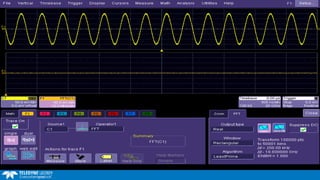
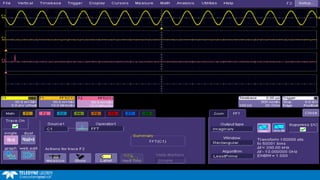
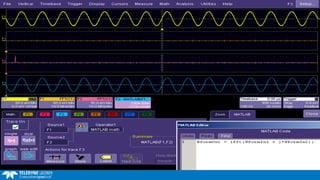
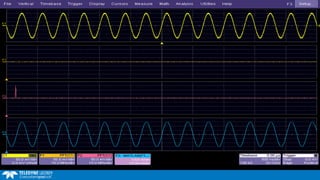
Making Custom Oscilloscope Measurements
Using MATLAB and VB
April 22nd, 2015
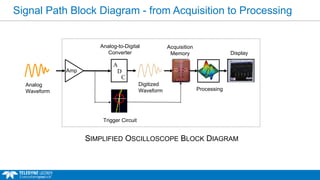
Signal Path Block Diagram - from Acquisition to Processing
Amp
Digitized
Waveform
A
D
C
Analog-to-Digital
Converter Display
Processing
Acquisition
Memory
Trigger Circuit
SIMPLIFIED OSCILLOSCOPE BLOCK DIAGRAM
Analog
Waveform
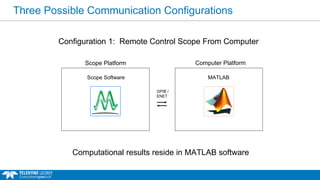
Three Possible Communication Configurations
Configuration 1: Remote Control Scope From Computer
Computational results reside in MATLAB software
Scope Platform
GPIB /
ENET
Computer Platform
Scope Software MATLAB
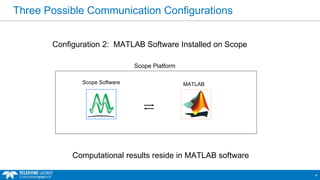
Three Possible Communication Configurations
4
Configuration 2: MATLAB Software Installed on Scope
Scope Platform
Scope Software MATLAB
Computational results reside in MATLAB software
Three Possible Communication Configurations
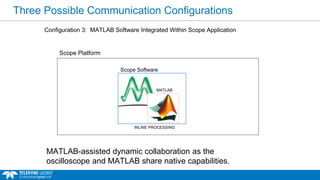
Configuration 3: MATLAB Software Integrated Within Scope Application
MATLAB-assisted dynamic collaboration as the
oscilloscope and MATLAB share native capabilities.

Scope Platform
DRIVER
Scope Software
MATLAB
INLINE PROCESSING
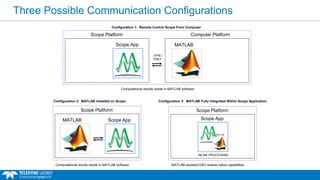
Three Possible Communication Configurations
Scope Platform
Scope App
Computer Platform
Configuration 1: Remote Control Scope From Computer
GPIB /
ENET
Scope Platform
Scope AppMATLAB
Configuration 2: MATLAB Installed on Scope
Scope Platform
Scope App
Configuration 3: MATLAB Fully Integrated Within Scope Application
Computational results reside in MATLAB software
INLINE PROCESSING
MATLAB-assisted DSO shares native capabilities
Computational results reside in MATLAB software
MATLAB
MATLAB
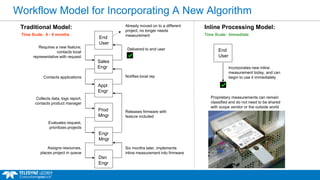
Workflow Model for Incorporating A New Algorithm
Appl
Engr
Prod
Mngr
Contacts applications
Collects data, logs report,
contacts product manager
Engr
Mngr
Dsn
Engr
Evaluates request,
prioritizes projects
Assigns resources,
places project in queue
Already moved on to a different
project, no longer needs
measurement
Six months later, implements
inline measurement into firmware
Releases firmware with
feature included
Notifies local rep
Delivered to end user
End
User
Traditional Model:
Sales
Engr
Requires a new feature;
contacts local
representative with request
Time Scale: 6 - 9 months
Inline Processing Model:
End
User
Incorporates new inline
measurement today, and can
begin to use it immediately
Time Scale: Immediate
Proprietary measurements can remain
classified and do not need to be shared
with scope vendor or the outside world
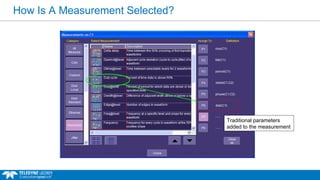
How Is A Measurement Selected?
Traditional parameters
added to the measurement
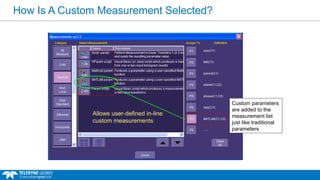
How Is A Custom Measurement Selected?
Allows user-defined in-line
custom measurements
Custom parameters
are added to the
measurement list
just like traditional
parameters
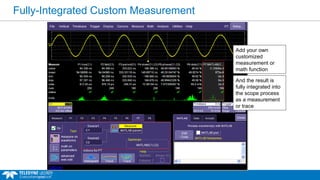
Fully-Integrated Custom Measurement
Add your own
customized
measurement or
math function
And the result is
fully integrated into
the scope process
as a measurement
or trace
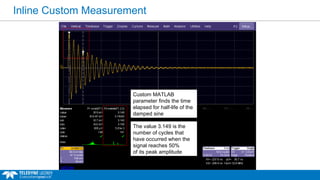
Inline Custom Measurement
Custom MATLAB
parameter finds the time
elapsed for half-life of the
damped sine
The value 3.149 is the
number of cycles that
have occurred when the
signal reaches 50%
of its peak amplitude
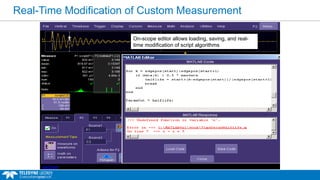
Real-Time Modification of Custom Measurement
MATLAB dialog box displays MATLAB responses
On-scope editor allows loading, saving, and real-
time modification of script algorithms
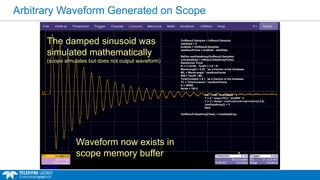
Arbitrary Waveform Generated on Scope
OutResult.Samples = InResult.Samples
startData = 0
endData = OutResult.Samples
newNumPoints = endData - startData
ReDim newDataArray(OutResult.Samples)
unscaledData = InResult.DataArray(False)
Randomize Timer
Pi = 3.14159 : TwoPi = 2.0 * Pi
WaveLength = 0.02 ' as a fraction of the timebase
WL = WaveLength * newNumPoints
WN = TwoPi / WL
TimeConstant = 0.1 ' as a fraction of the timebase
TC = TimeConstant * newNumPoints
A = 30000
Noise = 100.0
For i = WL To endData - 1
Y = A * (exp(-i/TC)) * sin(WN * i)
Y = Y + Noise * (rnd+rnd+rnd+rnd+rnd+rnd-3.0)
newDataArray(i) = Y
Next
OutResult.DataArray(False) = newDataArray
The damped sinusoid was
simulated mathematically
(scope simulates but does not output waveform)
Waveform now exists in
scope memory buffer
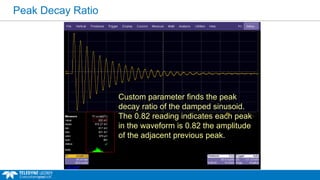
Peak Decay Ratio
Custom parameter finds the peak
decay ratio of the damped sinusoid.
The 0.82 reading indicates each peak
in the waveform is 0.82 the amplitude
of the adjacent previous peak.
Application Example:
MATLAB Digital Filtering
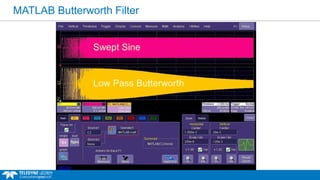
MATLAB Butterworth Filter
Swept Sine
Low Pass Butterworth
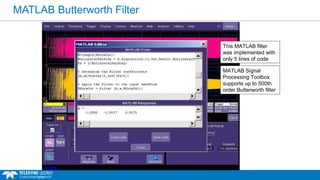
MATLAB Butterworth Filter
MATLAB Signal
Processing Toolbox
supports up to 500th
order Butterworth filter
This MATLAB filter
was implemented with
only 5 lines of code
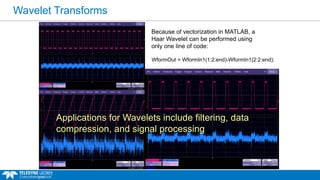
Wavelet Transforms
WformOut = WformIn1(1:2:end)-WformIn1(2:2:end);
Because of vectorization in MATLAB, a
Haar Wavelet can be performed using
only one line of code:
Applications for Wavelets include filtering, data
compression, and signal processing
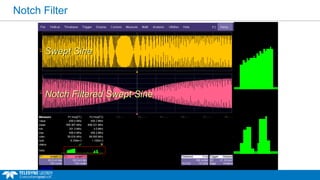
Notch Filter
Swept Sine
Notch Filtered Swept Sine
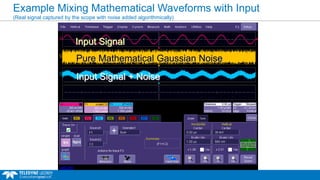
Example Mixing Mathematical Waveforms with Input
(Real signal captured by the scope with noise added algorithmically)
Pure Mathematical Gaussian Noise
Input Signal
Input Signal + Noise
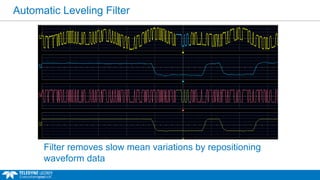
Automatic Leveling Filter
Filter removes slow mean variations by repositioning
waveform data
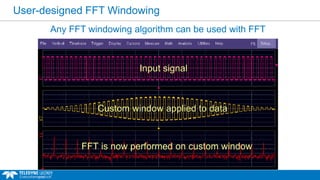
User-designed FFT Windowing
Input signal
Custom window applied to data
FFT is now performed on custom window
Any FFT windowing algorithm can be used with FFT
Application Example:
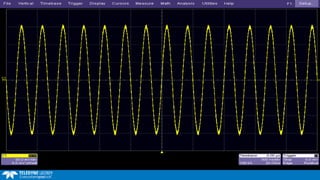
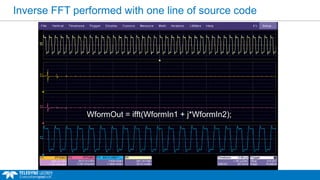
MATLAB Inverse FFT
Inverse FFT performed with one line of source code
WformOut = ifft(WformIn1 + j*WformIn2);
Application Example:
Graphic Programming with MATLAB
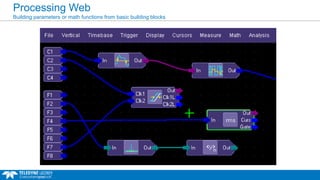
Processing Web
Building parameters or math functions from basic building blocks
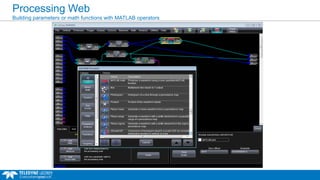
Processing Web
Building parameters or math functions with MATLAB operators
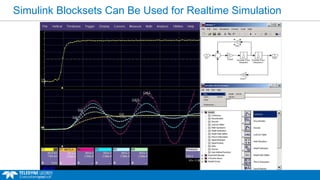
Simulink Blocksets Can Be Used for Realtime Simulation
Application Example:
Display Techniques
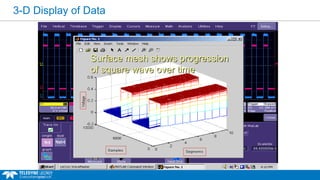
3-D Display of Data
Surface mesh shows progression
of square wave over time
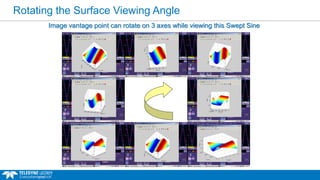
Rotating the Surface Viewing Angle
Image vantage point can rotate on 3 axes while viewing this Swept Sine
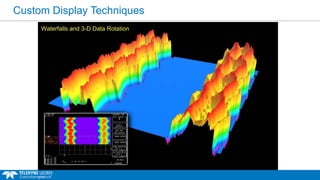
Custom Display Techniques
Waterfalls and 3-D Data Rotation
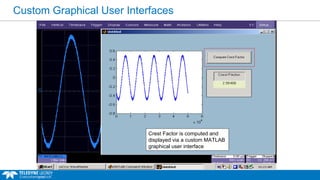
Custom Graphical User Interfaces
Crest Factor is computed and
displayed via a custom MATLAB
graphical user interface
Application Examples:
Custom Timing Measurements
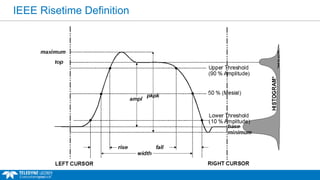
IEEE Risetime Definition
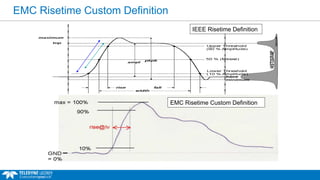
EMC Risetime Custom Definition
IEEE Risetime Definition
EMC Risetime Custom Definition
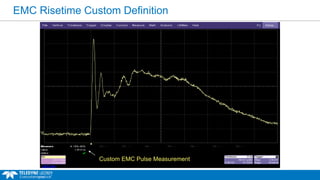
Custom EMC Pulse Measurement
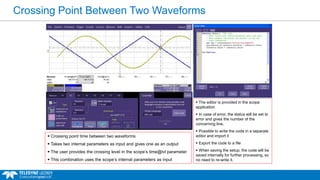
Crossing Point Between Two Waveforms
 The editor is provided in the scope
application
 In case of error, the status will be set to
error and gives the number of the
concerning line.
 Possible to write the code in a separate
editor and import it
 Export the code to a file
 When saving the setup, the code will be
saved internally for further processing, so
no need to re-write it.
 Crossing point time between two waveforms
 Takes two internal parameters as input and gives one as an output
 The user provides the crossing level in the scope’s time@lvl parameter
 This combination uses the scope’s internal parameters as input
Application Example:
Waveform Correlation
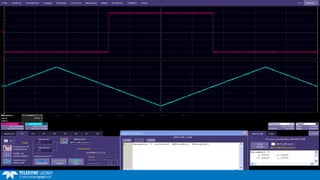
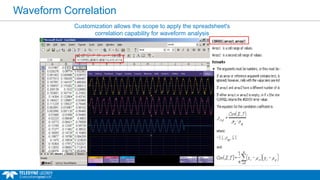
Customization allows the scope to apply the spreadsheet's
correlation capability for waveform analysis
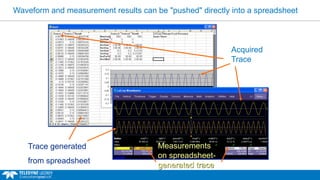
Waveform and measurement results can be "pushed" directly into a spreadsheet
Measurements
on spreadsheet-
generated trace
Trace generated
from spreadsheet
Acquired
Trace
Application Example:
Decision Process Math Operators
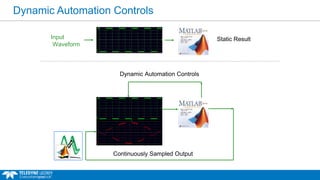
Dynamic Automation Controls
Input
Waveform
Static Result
Continuously Sampled Output
Dynamic Automation Controls
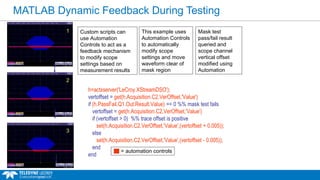
MATLAB Dynamic Feedback During Testing
h=actxserver('LeCroy.XStreamDSO');
vertoffset = get(h.Acquisition.C2.VerOffset,'Value')
if (h.PassFail.Q1.Out.Result.Value) == 0 %% mask test fails
vertoffset = get(h.Acquisition.C2.VerOffset,'Value')
if (vertoffset > 0) %% trace offset is positive
set(h.Acquisition.C2.VerOffset,'Value',(vertoffset + 0.005));
else
set(h.Acquisition.C2.VerOffset,'Value',(vertoffset - 0.005));
end
end
3
2
1 Custom scripts can
use Automation
Controls to act as a
feedback mechanism
to modify scope
settings based on
measurement results
This example uses
Automation Controls
to automatically
modify scope
settings and move
waveform clear of
mask region
= automation controls
Mask test
pass/fail result
queried and
scope channel
vertical offset
modified using
Automation
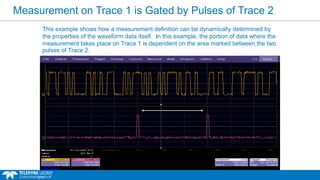
Measurement on Trace 1 is Gated by Pulses of Trace 2
This example shows how a measurement definition can be dynamically determined by
the properties of the waveform data itself. In this example, the portion of data where the
measurement takes place on Trace 1 is dependent on the area marked between the two
pulses of Trace 2.
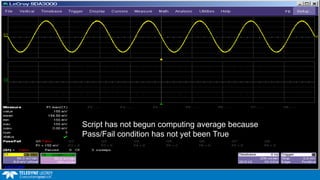
Script has not begun computing average because
Pass/Fail condition has not yet been True
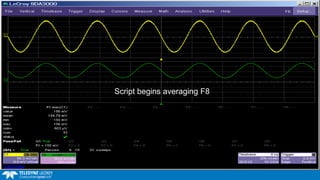
Script begins averaging F8
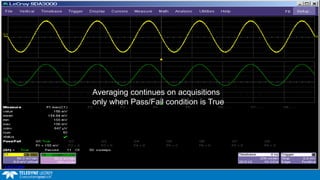
Averaging continues on acquisitions
only when Pass/Fail condition is True
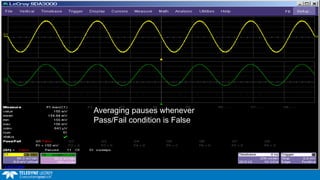
Averaging pauses whenever
Pass/Fail condition is False
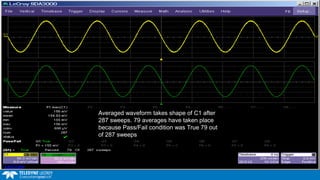
Averaged waveform takes shape of C1 after
287 sweeps. 79 averages have taken place
because Pass/Fail condition was True 79 out
of 287 sweeps
Application Example:
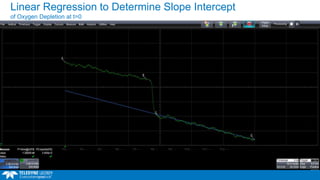
Linear Regression / Slope Intercept
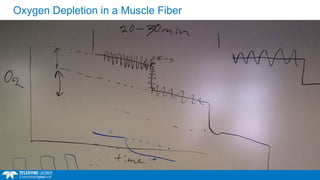
Oxygen Depletion in a Muscle Fiber
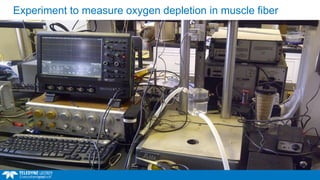
Experiment to measure oxygen depletion in muscle fiber
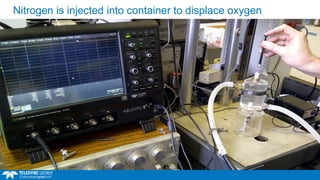
Nitrogen is injected into container to displace oxygen
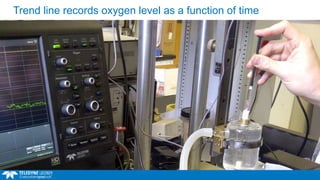
Trend line records oxygen level as a function of time
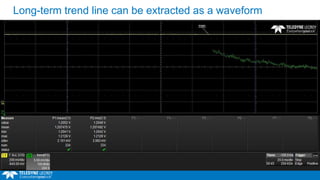
Long-term trend line can be extracted as a waveform
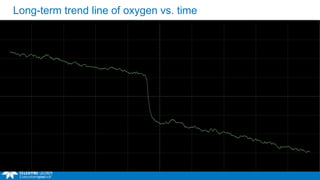
Long-term trend line of oxygen vs. time
Linear Regression to Determine Slope Intercept
of Oxygen Depletion at t=0
Application Example:
Precision Burst Timing
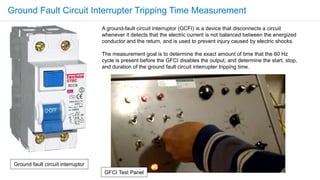
A ground-fault circuit interruptor (GCFI) is a device that disconnects a circuit
whenever it detects that the electric current is not balanced between the energized
conductor and the return, and is used to prevent injury caused by electric shocks.
The measurement goal is to determine the exact amount of time that the 60 Hz
cycle is present before the GFCI disables the output, and determine the start, stop,
and duration of the ground fault circuit interrupter tripping time.
Ground fault circuit interruptor
GFCI Test Panel
Ground Fault Circuit Interrupter Tripping Time Measurement
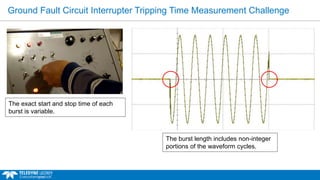
The exact start and stop time of each
burst is variable.
The burst length includes non-integer
portions of the waveform cycles.
Ground Fault Circuit Interrupter Tripping Time Measurement Challenge
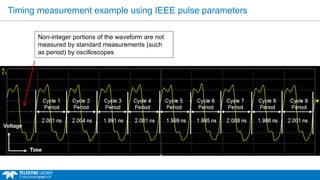
Non-integer portions of the waveform are not
measured by standard measurements (such
as period) by oscilloscopes
Timing measurement example using IEEE pulse parameters
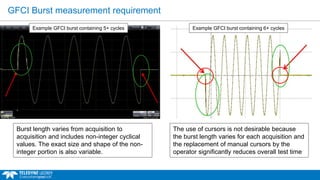
GFCI Burst measurement requirement
The use of cursors is not desirable because
the burst length varies for each acquisition and
the replacement of manual cursors by the
operator significantly reduces overall test time
Burst length varies from acquisition to
acquisition and includes non-integer cyclical
values. The exact size and shape of the non-
integer portion is also variable.
Example GFCI burst containing 6+ cyclesExample GFCI burst containing 5+ cycles
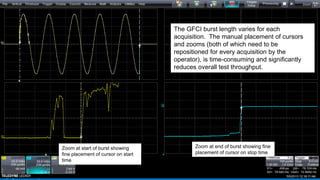
Zoom at start of burst showing
fine placement of cursor on start
time
Zoom at end of burst showing fine
placement of cursor on stop time
The GFCI burst length varies for each
acquisition. The manual placement of cursors
and zooms (both of which need to be
repositioned for every acquisition by the
operator), is time-consuming and significantly
reduces overall test throughput.
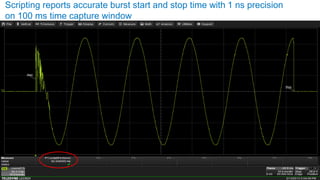
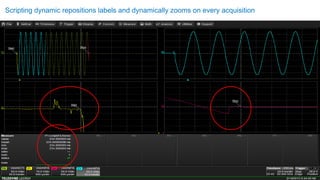
Scripting reports accurate burst start and stop time with 1 ns precision
on 100 ms time capture window
Scripting dynamic repositions labels and dynamically zooms on every acquisition
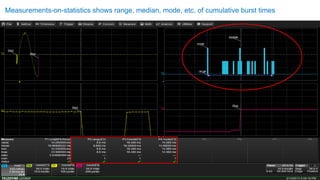
Measurements-on-statistics shows range, median, mode, etc. of cumulative burst times
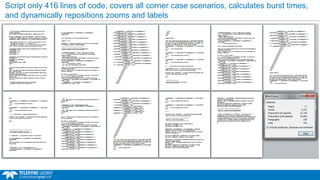
Script only 416 lines of code, covers all corner case scenarios, calculates burst times,
and dynamically repositions zooms and labels
Application Example:
RF Signal Processing
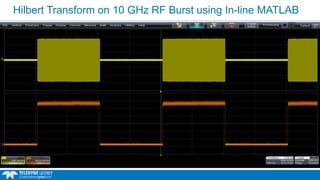
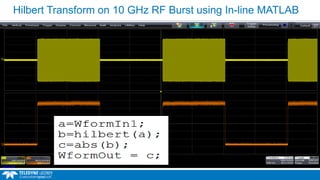
Hilbert Transform on 10 GHz RF Burst using In-line MATLAB
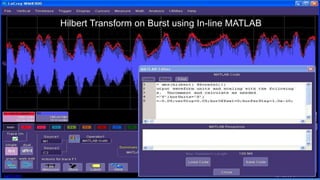
Hilbert Transform on Burst using In-line MATLAB
Getting Started Resources
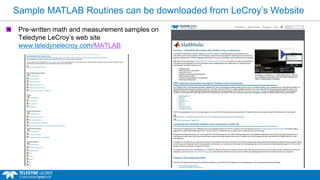
Sample MATLAB Routines can be downloaded from LeCroy’s Website
Pre-written math and measurement samples on
Teledyne LeCroy’s web site
www.teledynelecroy.com/MATLAB
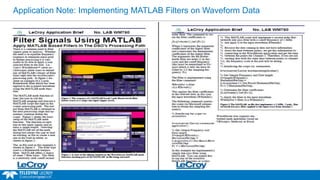
Application Note: Implementing MATLAB Filters on Waveform Data
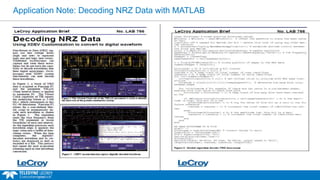
Application Note: Decoding NRZ Data with MATLAB
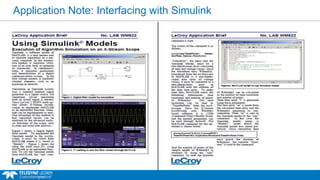
Application Note: Interfacing with Simulink
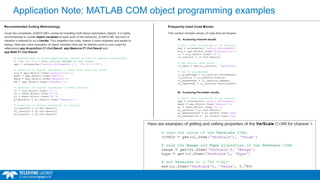
Application Note: MATLAB COM object programming examples
Making Custom Oscilloscope Measurements
Questions?

Making Custom Oscilloscope Measurements

  • 1.
    Making Custom OscilloscopeMeasurements Using MATLAB and VB April 22nd, 2015
  • 2.
    Signal Path BlockDiagram - from Acquisition to Processing Amp Digitized Waveform A D C Analog-to-Digital Converter Display Processing Acquisition Memory Trigger Circuit SIMPLIFIED OSCILLOSCOPE BLOCK DIAGRAM Analog Waveform
  • 3.
    Three Possible CommunicationConfigurations Configuration 1: Remote Control Scope From Computer Computational results reside in MATLAB software Scope Platform GPIB / ENET Computer Platform Scope Software MATLAB
  • 4.
    Three Possible CommunicationConfigurations 4 Configuration 2: MATLAB Software Installed on Scope Scope Platform Scope Software MATLAB Computational results reside in MATLAB software
  • 5.
    Three Possible CommunicationConfigurations Configuration 3: MATLAB Software Integrated Within Scope Application MATLAB-assisted dynamic collaboration as the oscilloscope and MATLAB share native capabilities. Scope Platform DRIVER Scope Software MATLAB INLINE PROCESSING
  • 6.
    Three Possible CommunicationConfigurations Scope Platform Scope App Computer Platform Configuration 1: Remote Control Scope From Computer GPIB / ENET Scope Platform Scope AppMATLAB Configuration 2: MATLAB Installed on Scope Scope Platform Scope App Configuration 3: MATLAB Fully Integrated Within Scope Application Computational results reside in MATLAB software INLINE PROCESSING MATLAB-assisted DSO shares native capabilities Computational results reside in MATLAB software MATLAB MATLAB
  • 7.
    Workflow Model forIncorporating A New Algorithm Appl Engr Prod Mngr Contacts applications Collects data, logs report, contacts product manager Engr Mngr Dsn Engr Evaluates request, prioritizes projects Assigns resources, places project in queue Already moved on to a different project, no longer needs measurement Six months later, implements inline measurement into firmware Releases firmware with feature included Notifies local rep Delivered to end user End User Traditional Model: Sales Engr Requires a new feature; contacts local representative with request Time Scale: 6 - 9 months Inline Processing Model: End User Incorporates new inline measurement today, and can begin to use it immediately Time Scale: Immediate Proprietary measurements can remain classified and do not need to be shared with scope vendor or the outside world
  • 8.
    How Is AMeasurement Selected? Traditional parameters added to the measurement
  • 9.
    How Is ACustom Measurement Selected? Allows user-defined in-line custom measurements Custom parameters are added to the measurement list just like traditional parameters
  • 10.
    Fully-Integrated Custom Measurement Addyour own customized measurement or math function And the result is fully integrated into the scope process as a measurement or trace
  • 11.
    Inline Custom Measurement CustomMATLAB parameter finds the time elapsed for half-life of the damped sine The value 3.149 is the number of cycles that have occurred when the signal reaches 50% of its peak amplitude
  • 12.
    Real-Time Modification ofCustom Measurement MATLAB dialog box displays MATLAB responses On-scope editor allows loading, saving, and real- time modification of script algorithms
  • 13.
    Arbitrary Waveform Generatedon Scope OutResult.Samples = InResult.Samples startData = 0 endData = OutResult.Samples newNumPoints = endData - startData ReDim newDataArray(OutResult.Samples) unscaledData = InResult.DataArray(False) Randomize Timer Pi = 3.14159 : TwoPi = 2.0 * Pi WaveLength = 0.02 ' as a fraction of the timebase WL = WaveLength * newNumPoints WN = TwoPi / WL TimeConstant = 0.1 ' as a fraction of the timebase TC = TimeConstant * newNumPoints A = 30000 Noise = 100.0 For i = WL To endData - 1 Y = A * (exp(-i/TC)) * sin(WN * i) Y = Y + Noise * (rnd+rnd+rnd+rnd+rnd+rnd-3.0) newDataArray(i) = Y Next OutResult.DataArray(False) = newDataArray The damped sinusoid was simulated mathematically (scope simulates but does not output waveform) Waveform now exists in scope memory buffer
  • 14.
    Peak Decay Ratio Customparameter finds the peak decay ratio of the damped sinusoid. The 0.82 reading indicates each peak in the waveform is 0.82 the amplitude of the adjacent previous peak.
  • 15.
  • 16.
    MATLAB Butterworth Filter SweptSine Low Pass Butterworth
  • 17.
    MATLAB Butterworth Filter MATLABSignal Processing Toolbox supports up to 500th order Butterworth filter This MATLAB filter was implemented with only 5 lines of code
  • 18.
    Wavelet Transforms WformOut =WformIn1(1:2:end)-WformIn1(2:2:end); Because of vectorization in MATLAB, a Haar Wavelet can be performed using only one line of code: Applications for Wavelets include filtering, data compression, and signal processing
  • 19.
    Notch Filter Swept Sine NotchFiltered Swept Sine
  • 20.
    Example Mixing MathematicalWaveforms with Input (Real signal captured by the scope with noise added algorithmically) Pure Mathematical Gaussian Noise Input Signal Input Signal + Noise
  • 21.
    Automatic Leveling Filter Filterremoves slow mean variations by repositioning waveform data
  • 22.
    User-designed FFT Windowing Inputsignal Custom window applied to data FFT is now performed on custom window Any FFT windowing algorithm can be used with FFT
  • 23.
  • 32.
    Inverse FFT performedwith one line of source code WformOut = ifft(WformIn1 + j*WformIn2);
  • 33.
  • 34.
    Processing Web Building parametersor math functions from basic building blocks
  • 35.
    Processing Web Building parametersor math functions with MATLAB operators
  • 36.
    Simulink Blocksets CanBe Used for Realtime Simulation
  • 37.
  • 38.
    3-D Display ofData Surface mesh shows progression of square wave over time
  • 39.
    Rotating the SurfaceViewing Angle Image vantage point can rotate on 3 axes while viewing this Swept Sine
  • 40.
  • 41.
    Custom Graphical UserInterfaces Crest Factor is computed and displayed via a custom MATLAB graphical user interface
  • 42.
  • 43.
  • 44.
    EMC Risetime CustomDefinition EMC Risetime Custom Definition IEEE Risetime Definition
  • 45.
    EMC Risetime CustomDefinition Custom EMC Pulse Measurement
  • 46.
    Crossing Point BetweenTwo Waveforms  The editor is provided in the scope application  In case of error, the status will be set to error and gives the number of the concerning line.  Possible to write the code in a separate editor and import it  Export the code to a file  When saving the setup, the code will be saved internally for further processing, so no need to re-write it.  Crossing point time between two waveforms  Takes two internal parameters as input and gives one as an output  The user provides the crossing level in the scope’s time@lvl parameter  This combination uses the scope’s internal parameters as input
  • 47.
  • 49.
    Waveform Correlation Customization allowsthe scope to apply the spreadsheet's correlation capability for waveform analysis
  • 50.
    Waveform and measurementresults can be "pushed" directly into a spreadsheet Measurements on spreadsheet- generated trace Trace generated from spreadsheet Acquired Trace
  • 51.
  • 52.
    Dynamic Automation Controls Input Waveform StaticResult Continuously Sampled Output Dynamic Automation Controls
  • 53.
    MATLAB Dynamic FeedbackDuring Testing h=actxserver('LeCroy.XStreamDSO'); vertoffset = get(h.Acquisition.C2.VerOffset,'Value') if (h.PassFail.Q1.Out.Result.Value) == 0 %% mask test fails vertoffset = get(h.Acquisition.C2.VerOffset,'Value') if (vertoffset > 0) %% trace offset is positive set(h.Acquisition.C2.VerOffset,'Value',(vertoffset + 0.005)); else set(h.Acquisition.C2.VerOffset,'Value',(vertoffset - 0.005)); end end 3 2 1 Custom scripts can use Automation Controls to act as a feedback mechanism to modify scope settings based on measurement results This example uses Automation Controls to automatically modify scope settings and move waveform clear of mask region = automation controls Mask test pass/fail result queried and scope channel vertical offset modified using Automation
  • 54.
    Measurement on Trace1 is Gated by Pulses of Trace 2 This example shows how a measurement definition can be dynamically determined by the properties of the waveform data itself. In this example, the portion of data where the measurement takes place on Trace 1 is dependent on the area marked between the two pulses of Trace 2.
  • 55.
    Script has notbegun computing average because Pass/Fail condition has not yet been True
  • 56.
  • 57.
    Averaging continues onacquisitions only when Pass/Fail condition is True
  • 58.
  • 59.
    Averaged waveform takesshape of C1 after 287 sweeps. 79 averages have taken place because Pass/Fail condition was True 79 out of 287 sweeps
  • 60.
  • 61.
    Oxygen Depletion ina Muscle Fiber
  • 62.
    Experiment to measureoxygen depletion in muscle fiber
  • 63.
    Nitrogen is injectedinto container to displace oxygen
  • 64.
    Trend line recordsoxygen level as a function of time
  • 65.
    Long-term trend linecan be extracted as a waveform
  • 66.
    Long-term trend lineof oxygen vs. time
  • 67.
    Linear Regression toDetermine Slope Intercept of Oxygen Depletion at t=0
  • 68.
  • 69.
    A ground-fault circuitinterruptor (GCFI) is a device that disconnects a circuit whenever it detects that the electric current is not balanced between the energized conductor and the return, and is used to prevent injury caused by electric shocks. The measurement goal is to determine the exact amount of time that the 60 Hz cycle is present before the GFCI disables the output, and determine the start, stop, and duration of the ground fault circuit interrupter tripping time. Ground fault circuit interruptor GFCI Test Panel Ground Fault Circuit Interrupter Tripping Time Measurement
  • 70.
    The exact startand stop time of each burst is variable. The burst length includes non-integer portions of the waveform cycles. Ground Fault Circuit Interrupter Tripping Time Measurement Challenge
  • 71.
    Non-integer portions ofthe waveform are not measured by standard measurements (such as period) by oscilloscopes Timing measurement example using IEEE pulse parameters
  • 72.
    GFCI Burst measurementrequirement The use of cursors is not desirable because the burst length varies for each acquisition and the replacement of manual cursors by the operator significantly reduces overall test time Burst length varies from acquisition to acquisition and includes non-integer cyclical values. The exact size and shape of the non- integer portion is also variable. Example GFCI burst containing 6+ cyclesExample GFCI burst containing 5+ cycles
  • 73.
    Zoom at startof burst showing fine placement of cursor on start time Zoom at end of burst showing fine placement of cursor on stop time The GFCI burst length varies for each acquisition. The manual placement of cursors and zooms (both of which need to be repositioned for every acquisition by the operator), is time-consuming and significantly reduces overall test throughput.
  • 74.
    Scripting reports accurateburst start and stop time with 1 ns precision on 100 ms time capture window
  • 75.
    Scripting dynamic repositionslabels and dynamically zooms on every acquisition
  • 76.
    Measurements-on-statistics shows range,median, mode, etc. of cumulative burst times
  • 77.
    Script only 416lines of code, covers all corner case scenarios, calculates burst times, and dynamically repositions zooms and labels
  • 78.
  • 79.
    Hilbert Transform on10 GHz RF Burst using In-line MATLAB
  • 80.
    Hilbert Transform on10 GHz RF Burst using In-line MATLAB
  • 81.
    Hilbert Transform onBurst using In-line MATLAB
  • 82.
  • 83.
    Sample MATLAB Routinescan be downloaded from LeCroy’s Website Pre-written math and measurement samples on Teledyne LeCroy’s web site www.teledynelecroy.com/MATLAB
  • 84.
    Application Note: ImplementingMATLAB Filters on Waveform Data
  • 85.
    Application Note: DecodingNRZ Data with MATLAB
  • 86.
  • 87.
    Application Note: MATLABCOM object programming examples
  • 88.
    Making Custom OscilloscopeMeasurements Questions?