INTRODUCTION TO
WEBQUESTS
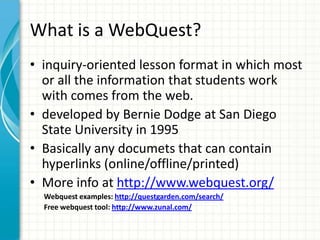
What is a WebQuest?
• inquiry-oriented lesson format in which most
or all the information that students work
with comes from the web.
• developed by Bernie Dodge at San Diego
State University in 1995
• Basically any documets that can contain
hyperlinks (online/offline/printed)
• More info at http://www.webquest.org/
Webquest examples: http://questgarden.com/search/
Free webquest tool: http://www.zunal.com/
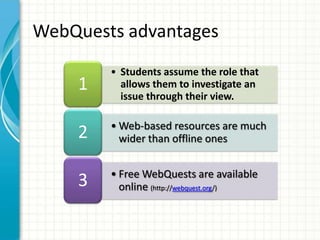
• Students assume the role that
allows them to investigate an
issue through their view.
1
• Web-based resources are much
wider than offline ones2
• Free WebQuests are available
online (http://webquest.org/)
3
WebQuests advantages
Before you begin…
• Your WebQuest should be an enhancement
or culmination of a unit of study, not the
entire unit itself
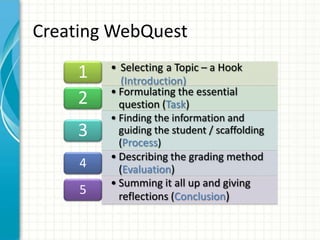
• Selecting a Topic – a Hook
(Introduction)
1
• Formulating the essential
question (Task)2
• Finding the information and
guiding the student / scaffolding
(Process)
3
• Describing the grading method
(Evaluation)4
• Summing it all up and giving
reflections (Conclusion)5
Creating WebQuest
Introducing the subject matter to the
student
• Identify “roles” (e.g. “You are an
archaeologist who must report to his boss
about an amazing new discovery…”)
• Remember, you are addressing the student
directly, so use the second person: “You will
be researching the Egiptian Pyramids”
Formulating the Essential Question
(TASK)
• The task is the most important part of your
WebQuest
• It must be achievable with the resources the
students have available
• Decide how you want your students to
complete the WebQuest: Individually, in
pairs, or in a small group of three to four
students
• http://webquest.sdsu.edu/taskonomy.html
The Task
• With the task decided upon, write a
paragraph or a bulleted list that clearly states
in the second person voice what you expect
the student to accomplish, create, or present.
• If the final product requires student to use
any specific software, be sure to mention it in
this section
Finding the Information
• The most crucial element of writing a good
WebQuest is researching appropriate and
helpful online resources. (use google or local
search engines, wikipedia)
• As you find sites, be sure to save them or
bookmark them
• Include a short description of the site so your
students as well as yourself will have a
synopsis of the resource.
Guiding the Student
• Outline the steps that the students will go
through in order to complete the task.
• Clearly state these steps in a logical, sequential
order.
• Make a list of websites you developed
previously.
• If the students will be working in groups, you
may want to discuss how they are to divide the
responsibilities.
• Again, the student is the audience, so use the
second person voice
The Final Analysis (Evaluation)
• Formulate a method for evaluating the
student’s progress and performance.
• Possibly use a rubric – a scoring tool that
employs a graduated point scale for each of
the tasks.
• Share the rubric with the students prior to
the start of the WebQuest.
(http://www.schrockguide.net/assessment-
and-rubrics.html)
Summing it all up
• At the end of the WebQuest, it is necessary
to include a few sentences that tell what it is
you hope they will have learned or
demonstrated upon completion.
• To encourage further exploration, its often
helpful to insert rhetorical question or two
and a few mor links to websites containing
extension materials.

Web quests

  • 1.
  • 2.
    What is aWebQuest? • inquiry-oriented lesson format in which most or all the information that students work with comes from the web. • developed by Bernie Dodge at San Diego State University in 1995 • Basically any documets that can contain hyperlinks (online/offline/printed) • More info at http://www.webquest.org/ Webquest examples: http://questgarden.com/search/ Free webquest tool: http://www.zunal.com/
  • 3.
    • Students assumethe role that allows them to investigate an issue through their view. 1 • Web-based resources are much wider than offline ones2 • Free WebQuests are available online (http://webquest.org/) 3 WebQuests advantages
  • 4.
    Before you begin… •Your WebQuest should be an enhancement or culmination of a unit of study, not the entire unit itself
  • 5.
    • Selecting aTopic – a Hook (Introduction) 1 • Formulating the essential question (Task)2 • Finding the information and guiding the student / scaffolding (Process) 3 • Describing the grading method (Evaluation)4 • Summing it all up and giving reflections (Conclusion)5 Creating WebQuest
  • 6.
    Introducing the subjectmatter to the student • Identify “roles” (e.g. “You are an archaeologist who must report to his boss about an amazing new discovery…”) • Remember, you are addressing the student directly, so use the second person: “You will be researching the Egiptian Pyramids”
  • 7.
    Formulating the EssentialQuestion (TASK) • The task is the most important part of your WebQuest • It must be achievable with the resources the students have available • Decide how you want your students to complete the WebQuest: Individually, in pairs, or in a small group of three to four students • http://webquest.sdsu.edu/taskonomy.html
  • 8.
    The Task • Withthe task decided upon, write a paragraph or a bulleted list that clearly states in the second person voice what you expect the student to accomplish, create, or present. • If the final product requires student to use any specific software, be sure to mention it in this section
  • 9.
    Finding the Information •The most crucial element of writing a good WebQuest is researching appropriate and helpful online resources. (use google or local search engines, wikipedia) • As you find sites, be sure to save them or bookmark them • Include a short description of the site so your students as well as yourself will have a synopsis of the resource.
  • 10.
    Guiding the Student •Outline the steps that the students will go through in order to complete the task. • Clearly state these steps in a logical, sequential order. • Make a list of websites you developed previously. • If the students will be working in groups, you may want to discuss how they are to divide the responsibilities. • Again, the student is the audience, so use the second person voice
  • 11.
    The Final Analysis(Evaluation) • Formulate a method for evaluating the student’s progress and performance. • Possibly use a rubric – a scoring tool that employs a graduated point scale for each of the tasks. • Share the rubric with the students prior to the start of the WebQuest. (http://www.schrockguide.net/assessment- and-rubrics.html)
  • 12.
    Summing it allup • At the end of the WebQuest, it is necessary to include a few sentences that tell what it is you hope they will have learned or demonstrated upon completion. • To encourage further exploration, its often helpful to insert rhetorical question or two and a few mor links to websites containing extension materials.

Editor's Notes

  • #3 Sdělte stručný přehled prezentace. Popište hlavní záměr prezentace a v čem spočívá její důležitost.Uveďte každé z hlavních témat.Aby se posluchači dokázali v prezentaci orientovat, můžete tento snímek s přehledem opakovat během celé prezentace vždy se zdůrazněním konkrétního tématu, které se chystáte probírat jako další.
  • #4 Toto je další možnost. pro snímek s přehledem.
  • #5 Sdělte stručný přehled prezentace. Popište hlavní záměr prezentace a v čem spočívá její důležitost.Uveďte každé z hlavních témat.Aby se posluchači dokázali v prezentaci orientovat, můžete tento snímek s přehledem opakovat během celé prezentace vždy se zdůrazněním konkrétního tématu, které se chystáte probírat jako další.
  • #6 Toto je další možnost. pro snímek s přehledem.
  • #9 Sdělte stručný přehled prezentace. Popište hlavní záměr prezentace a v čem spočívá její důležitost.Uveďte každé z hlavních témat.Aby se posluchači dokázali v prezentaci orientovat, můžete tento snímek s přehledem opakovat během celé prezentace vždy se zdůrazněním konkrétního tématu, které se chystáte probírat jako další.
  • #10 Sdělte stručný přehled prezentace. Popište hlavní záměr prezentace a v čem spočívá její důležitost.Uveďte každé z hlavních témat.Aby se posluchači dokázali v prezentaci orientovat, můžete tento snímek s přehledem opakovat během celé prezentace vždy se zdůrazněním konkrétního tématu, které se chystáte probírat jako další.
  • #11 Sdělte stručný přehled prezentace. Popište hlavní záměr prezentace a v čem spočívá její důležitost.Uveďte každé z hlavních témat.Aby se posluchači dokázali v prezentaci orientovat, můžete tento snímek s přehledem opakovat během celé prezentace vždy se zdůrazněním konkrétního tématu, které se chystáte probírat jako další.
  • #12 Sdělte stručný přehled prezentace. Popište hlavní záměr prezentace a v čem spočívá její důležitost.Uveďte každé z hlavních témat.Aby se posluchači dokázali v prezentaci orientovat, můžete tento snímek s přehledem opakovat během celé prezentace vždy se zdůrazněním konkrétního tématu, které se chystáte probírat jako další.
  • #13 Sdělte stručný přehled prezentace. Popište hlavní záměr prezentace a v čem spočívá její důležitost.Uveďte každé z hlavních témat.Aby se posluchači dokázali v prezentaci orientovat, můžete tento snímek s přehledem opakovat během celé prezentace vždy se zdůrazněním konkrétního tématu, které se chystáte probírat jako další.