Introduction to Web Quests
What is a Web quest A  WebQuest  is an inquiry-oriented online tool for learning.  It is a classroom-based lesson in which most or all of the information that students explore and evaluate comes from the World Wide Web.
WebQuests … Can be as short as a single class period or as long as a month-long unit; Can involve group work, with division of labor among students who take on specific roles or perspectives; Are built around resources that are preselected by the teacher.  Therefore students spend their time USING information, not LOOKING for it.
What are the benefits of Webquests ? Web quest encourage critical thinking, cooperative  learning, authentic assessment, and technology  integration.  When students are asked to understand,  hypothesize or problem-solve an issue that  confronts the real world, they face an authentic  task.  Students are given real resources to work with.  Rather than turn to a dated textbook, filtered  encyclopedias or middle-of-the-road magazines
Benefits of WebQuests kids have to make sense of what they are reading. They have to learn how to learn, learn how to work with each other, and to work with information that isn't, at first, clear.  Bernie Dodge   “ while it is true that many of our kids have developed tremendous technological skills, (they know how to turn the equipment on, they know how to gain access), it doesn't mean that they have the research skills or the wisdom to know how to make meaning out of the stuff that they're finding. “ David Thornburg
Parts of a True Webquest Introduction Task Process Resources Evaluation
 
Introduction The introduction section provides background information and motivational scenarios  The goal of the introduction is to make the activity desirable and fun for students. The goal of the motivational component is to engage and excite students at the beginning of each WebQuest.
 
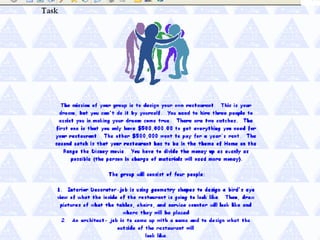
Task  The task is a formal description of what students will have accomplished by the end of the WebQuest.  This task should be doable and interesting.
 
Process This is a description of the steps learners should go through in accomplishing the task, with links embedded in each step.
 
Resources This section of the WebQuest consists of a list of the resources (bookmarked Web sites, print resources, etc.) that your students will need to complete the task  It's important to remember that non-Web resources can also be used. WebQuests are enhanced by materials that supplement the online resources.


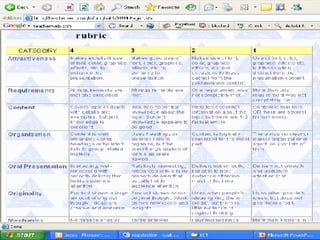
Evaluation  Each WebQuest needs a  rubric   for evaluating students' work. The standards should be fair, clear, consistent, and specific to the tasks set.  Clear goals, matching assessments to specific tasks, and involving the learners in the process of evaluation are all important.
 
Does my Webquest need to  involve all of these steps?  NO These are the steps outlined by Bernie Dodge who was the inventor of Webquests, but there have been many people since who have adapted the process and produced variations such as mini quests and internet activity pages which although on a much smaller scale still develop the skills of filtering, verifying and critically assessing information,
What about MiniQuests? Mini quests are a simplified version of a web quest.  They tend to have less complex task activities and less web sites associated with them. Mini quest take less time to construct Mini quests are usually designed to last one to two one hour sessions and are good for small groups.
Where do I start  if I want to make my own  ? Identify your topic Check out some of the existing webquest that others have built Decide what type of web based activity you want to use with your students Choose the programme you are comfortable using to build the quest –  PowerPoint , FrontPage, Publisher …. Consider using a template
Building the quest  Draft a task  Find suitable sites to use for information  Develop a resources page  Refine the task to match the resources Outline the process students are to go through to complete the task Develop or use an existing rubric to evaluate the task Write the introduction ensuring it will hook students into the quest.
Activity Take the next  20 mins to look through some of the following sites and consider how you could use or adapt these quest ideas to suit your own needs Report back to the group sharing 1 WebQuest you have found that you could use with your class next term http://english.unitecnology.ac.nz/resources/links/resource_query.html?type=Individual+Webquests&sitearea=Classroom   http://bestwebquests.com/ http://webquest.org/ http://www.tki.org.nz/r/wick_ed/themes/index.php http://www.techtrekers.com/webquests/

Webquests

  • 1.
  • 2.
    What is aWeb quest A WebQuest is an inquiry-oriented online tool for learning. It is a classroom-based lesson in which most or all of the information that students explore and evaluate comes from the World Wide Web.
  • 3.
    WebQuests … Canbe as short as a single class period or as long as a month-long unit; Can involve group work, with division of labor among students who take on specific roles or perspectives; Are built around resources that are preselected by the teacher. Therefore students spend their time USING information, not LOOKING for it.
  • 4.
    What are thebenefits of Webquests ? Web quest encourage critical thinking, cooperative learning, authentic assessment, and technology integration. When students are asked to understand, hypothesize or problem-solve an issue that confronts the real world, they face an authentic task. Students are given real resources to work with. Rather than turn to a dated textbook, filtered encyclopedias or middle-of-the-road magazines
  • 5.
    Benefits of WebQuestskids have to make sense of what they are reading. They have to learn how to learn, learn how to work with each other, and to work with information that isn't, at first, clear. Bernie Dodge “ while it is true that many of our kids have developed tremendous technological skills, (they know how to turn the equipment on, they know how to gain access), it doesn't mean that they have the research skills or the wisdom to know how to make meaning out of the stuff that they're finding. “ David Thornburg
  • 6.
    Parts of aTrue Webquest Introduction Task Process Resources Evaluation
  • 7.
  • 8.
    Introduction The introductionsection provides background information and motivational scenarios The goal of the introduction is to make the activity desirable and fun for students. The goal of the motivational component is to engage and excite students at the beginning of each WebQuest.
  • 9.
  • 10.
    Task Thetask is a formal description of what students will have accomplished by the end of the WebQuest. This task should be doable and interesting.
  • 11.
  • 12.
    Process This isa description of the steps learners should go through in accomplishing the task, with links embedded in each step.
  • 13.
  • 14.
    Resources This sectionof the WebQuest consists of a list of the resources (bookmarked Web sites, print resources, etc.) that your students will need to complete the task It's important to remember that non-Web resources can also be used. WebQuests are enhanced by materials that supplement the online resources.
  • 15.
  • 16.
  • 17.
  • 18.
    Evaluation EachWebQuest needs a rubric for evaluating students' work. The standards should be fair, clear, consistent, and specific to the tasks set. Clear goals, matching assessments to specific tasks, and involving the learners in the process of evaluation are all important.
  • 19.
  • 20.
    Does my Webquestneed to involve all of these steps? NO These are the steps outlined by Bernie Dodge who was the inventor of Webquests, but there have been many people since who have adapted the process and produced variations such as mini quests and internet activity pages which although on a much smaller scale still develop the skills of filtering, verifying and critically assessing information,
  • 21.
    What about MiniQuests?Mini quests are a simplified version of a web quest. They tend to have less complex task activities and less web sites associated with them. Mini quest take less time to construct Mini quests are usually designed to last one to two one hour sessions and are good for small groups.
  • 22.
    Where do Istart if I want to make my own ? Identify your topic Check out some of the existing webquest that others have built Decide what type of web based activity you want to use with your students Choose the programme you are comfortable using to build the quest – PowerPoint , FrontPage, Publisher …. Consider using a template
  • 23.
    Building the quest Draft a task Find suitable sites to use for information Develop a resources page Refine the task to match the resources Outline the process students are to go through to complete the task Develop or use an existing rubric to evaluate the task Write the introduction ensuring it will hook students into the quest.
  • 24.
    Activity Take thenext 20 mins to look through some of the following sites and consider how you could use or adapt these quest ideas to suit your own needs Report back to the group sharing 1 WebQuest you have found that you could use with your class next term http://english.unitecnology.ac.nz/resources/links/resource_query.html?type=Individual+Webquests&sitearea=Classroom http://bestwebquests.com/ http://webquest.org/ http://www.tki.org.nz/r/wick_ed/themes/index.php http://www.techtrekers.com/webquests/