Keeping Your Library on the Edge:
Online Tools Not to Overlook
Emily Barry
Old Dominion University
Media Assistant
Sparrow Road Intermediate School,
Chesapeake, Virginia
So…
Why should you be listening to me?
I’m not even a real school librarian yet?
I’m almost there though..
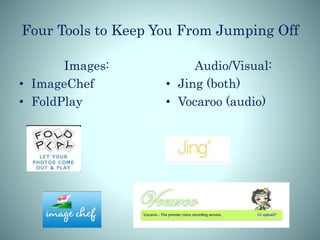
Four Tools to Keep You From Jumping Off
Images:
• ImageChef
• FoldPlay
Audio/Visual:
• Jing (both)
• Vocaroo (audio)
What is ImageChef?
• Website that contains templates to help
you create unique images containing
your own pictures and text.
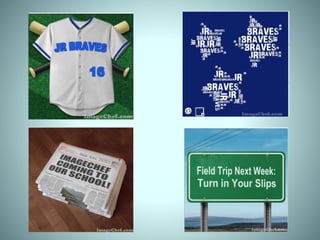
• Stamps, memes, signs, photo frames,
etc.
• http://www.imagechef.com/
ImageChef Ideas For School
Supports Virginia SOL C/T 6-8.14: Apply
knowledge and skills to generate
innovative ideas, products, processes,
and solutions.
A. Independently use technology
tools to create and communicate for
individual and/or collaborative projects.
Practical Uses For ImageChef
• Students introducing themselves during
the first week
• Creating word clouds
• Re-creating News headlines (altering
history)
• Creating advertisements for school events
Play with Foldables with FoldPlay
• Hands on study aids are scarce with the
increased use of technology.
• Students can create study aids of all
types
• Used for study tools like vocabulary or
fun like origami
• http://foldplay.com/foldplay.action
FoldPlay
Supports Virginia English SOL 4.4
The student will expand vocabulary
when reading.
(a)Use context to clarify meanings of
unfamiliar words.
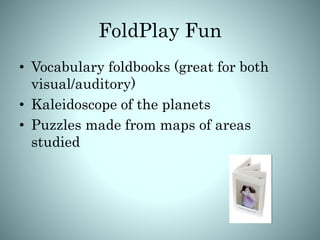
FoldPlay Fun
• Vocabulary foldbooks (great for both
visual/auditory)
• Kaleidoscope of the planets
• Puzzles made from maps of areas
studied
An Out of this World Example
Jing: Photo and Video
• Downloadable program used to create screenshots and
videos
• Used for academia and fun
• Sits on computer hard drive until opened and ready to
use
• https://www.techsmith.com/jing.html.
Jing For Education
Supports Virginia SOL AI.6 ~ The
student will use a variety of
traditional and contemporary
media (e.g., two-dimensional,
three-dimensional,
multidimensional) to create
works of art.
Take A Shot with Jing!
• Capture maps from lectures to help
study
• Shoot tutorial videos to help classmates
• Transfer photograph of artwork directly
to hard drive and post to blog/social
media
• Save images that you can’t cut/paste
into projects/papers
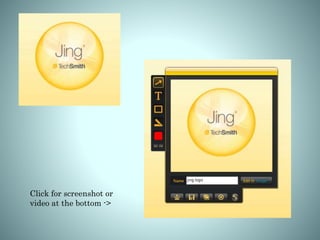
Click for screenshot or
video at the bottom ->
Online Video Recorder
• Small excerpts of recorded audio that
can be embedded into blogs, websites, or
emails
• Take 2: record your message as many
times as needed until you are satisfied
• http://vocaroo.com/.
Can you hear me?
• Supports Virginia SOL 9.2 -> The student will
produce, analyze, and evaluate auditory, visual, and
written media messages.
Good, You Heard Me..
• Great for reciting poetry to the class
• Present morning announcements
without having to repeat yourself
• Provide feedback to students after
recording them reading or reciting aloud
• Send a voice message or greeting when
not together (e.g. to assist a substitute
or to a student home sick)
http://vocaroo.com/i/s1qrLzG16P2U.
So I’m not even a librarian yet,
but I can use more than these.
Expanding Your Personal Edge
Use these four tools to expand your skills to
the leading edge of media for librarians.
Blend technology and creativity to enhance
your students’ skills as they gaze out and see
what they can accomplish.
Share your own experience with colleagues
who may be looking for an edge of their own
Any questions?

LIBS 602

  • 1.
    Keeping Your Libraryon the Edge: Online Tools Not to Overlook Emily Barry Old Dominion University Media Assistant Sparrow Road Intermediate School, Chesapeake, Virginia
  • 2.
    So… Why should yoube listening to me? I’m not even a real school librarian yet?
  • 3.
  • 4.
    Four Tools toKeep You From Jumping Off Images: • ImageChef • FoldPlay Audio/Visual: • Jing (both) • Vocaroo (audio)
  • 6.
    What is ImageChef? •Website that contains templates to help you create unique images containing your own pictures and text. • Stamps, memes, signs, photo frames, etc. • http://www.imagechef.com/
  • 7.
    ImageChef Ideas ForSchool Supports Virginia SOL C/T 6-8.14: Apply knowledge and skills to generate innovative ideas, products, processes, and solutions. A. Independently use technology tools to create and communicate for individual and/or collaborative projects.
  • 8.
    Practical Uses ForImageChef • Students introducing themselves during the first week • Creating word clouds • Re-creating News headlines (altering history) • Creating advertisements for school events
  • 11.
    Play with Foldableswith FoldPlay • Hands on study aids are scarce with the increased use of technology. • Students can create study aids of all types • Used for study tools like vocabulary or fun like origami • http://foldplay.com/foldplay.action
  • 12.
    FoldPlay Supports Virginia EnglishSOL 4.4 The student will expand vocabulary when reading. (a)Use context to clarify meanings of unfamiliar words.
  • 13.
    FoldPlay Fun • Vocabularyfoldbooks (great for both visual/auditory) • Kaleidoscope of the planets • Puzzles made from maps of areas studied
  • 14.
    An Out ofthis World Example
  • 16.
    Jing: Photo andVideo • Downloadable program used to create screenshots and videos • Used for academia and fun • Sits on computer hard drive until opened and ready to use • https://www.techsmith.com/jing.html.
  • 17.
    Jing For Education SupportsVirginia SOL AI.6 ~ The student will use a variety of traditional and contemporary media (e.g., two-dimensional, three-dimensional, multidimensional) to create works of art.
  • 18.
    Take A Shotwith Jing! • Capture maps from lectures to help study • Shoot tutorial videos to help classmates • Transfer photograph of artwork directly to hard drive and post to blog/social media • Save images that you can’t cut/paste into projects/papers
  • 19.
    Click for screenshotor video at the bottom ->
  • 21.
    Online Video Recorder •Small excerpts of recorded audio that can be embedded into blogs, websites, or emails • Take 2: record your message as many times as needed until you are satisfied • http://vocaroo.com/.
  • 22.
    Can you hearme? • Supports Virginia SOL 9.2 -> The student will produce, analyze, and evaluate auditory, visual, and written media messages.
  • 23.
    Good, You HeardMe.. • Great for reciting poetry to the class • Present morning announcements without having to repeat yourself • Provide feedback to students after recording them reading or reciting aloud • Send a voice message or greeting when not together (e.g. to assist a substitute or to a student home sick)
  • 24.
  • 25.
    So I’m noteven a librarian yet, but I can use more than these.
  • 26.
    Expanding Your PersonalEdge Use these four tools to expand your skills to the leading edge of media for librarians. Blend technology and creativity to enhance your students’ skills as they gaze out and see what they can accomplish. Share your own experience with colleagues who may be looking for an edge of their own
  • 27.