Creating a webpage – Basic HTMLMatthew Mobbse: mjm33@le.ac.ukweb: http://www2.le.ac.uk/Members/mjm33twitter: mjmobbs
HTMLHyperTextMarkup LanguageThe code used to write all websitesFunctions instruct web browsers what to showA little understanding will always help
Your first webpageOpen Notepad<HTML>HTML always works in pairs! Open and close!</HTML>This mean it is a WWW page
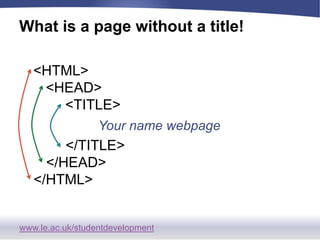
What is a page without a title!<HTML>	<HEAD>		<TITLE>	Your name webpage		</TITLE>	</HEAD></HTML>
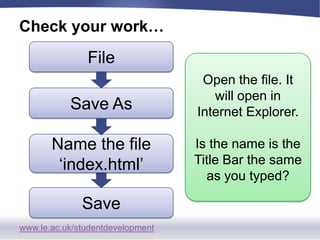
Check your work…FileOpen the file. It will open in Internet Explorer.Is the name is the Title Bar the same as you typed?Save AsName the file ‘index.html’Save
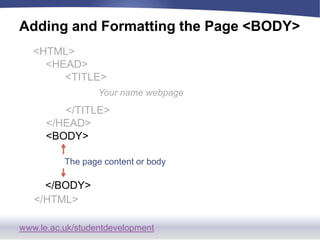
Adding and Formatting the Page <BODY><HTML>	<HEAD>		<TITLE>	Your name webpage		</TITLE>	</HEAD>	<BODY>The page content or body	</BODY></HTML>
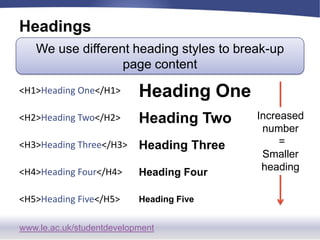
HeadingsWe use different heading styles to break-up page contentIncreased number = Smaller heading
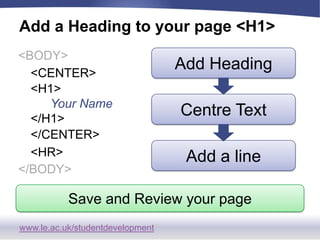
Add a Heading to your page <H1><BODY>Add Heading	<CENTER>	<H1>Your Name	</H1>Centre Text	</CENTER>Add a line	<HR></BODY>Save and Review your page
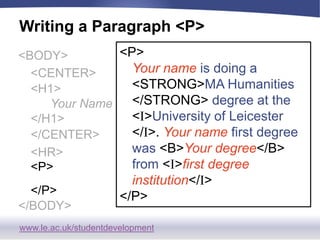
Writing a Paragraph <P> <P>Your name is doing a <STRONG>MA Humanities</STRONG> degree at the <I>University of Leicester</I>. Your name first degree was <B>Your degree</B> from <I>first degree institution</I></P><BODY>	<CENTER>	<H1>Your Name	</H1>	</CENTER>	<HR>	<P>	</P></BODY>
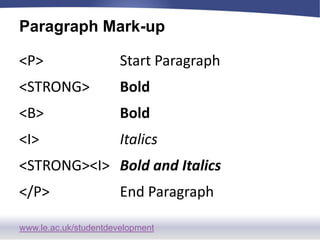
Paragraph Mark-up
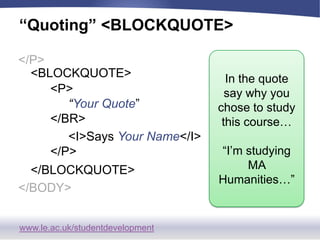
“Quoting” <BLOCKQUOTE></P>In the quote say why you chose to study this course…“I’m studying MA Humanities…”  	<BLOCKQUOTE>		<P>“Your Quote”		</BR>		<I>Says Your Name</I>		</P>	</BLOCKQUOTE></BODY>
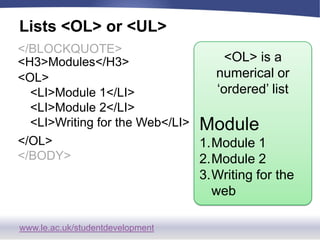
Lists <OL> or <UL></BLOCKQUOTE><OL> is a numerical or ‘ordered’ listModuleModule 1Module 2Writing for the web<H3>Modules</H3><OL>	<LI>Module 1</LI>	<LI>Module 2</LI>	<LI>Writing for the Web</LI></OL></BODY>
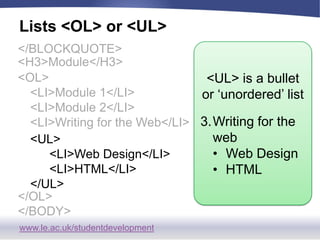
Lists <OL> or <UL></BLOCKQUOTE><UL> is a bullet or ‘unordered’ listWriting for the webWeb Design
HTML<H3>Module</H3><OL>	<LI>Module 1</LI>	<LI>Module 2</LI>	<LI>Writing for the Web</LI>	<UL>		<LI>Web Design</LI>		<LI>HTML</LI>	</UL></OL></BODY>
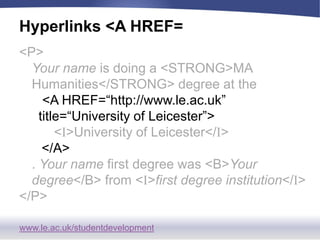
Hyperlinks <A HREF=<P>Your name is doing a <STRONG>MA Humanities</STRONG> degree at the<A HREF=“http://www.le.ac.uk” title=“University of Leicester”><I>University of Leicester</I></A>. Your name first degree was <B>Your degree</B> from <I>first degree institution</I></P>
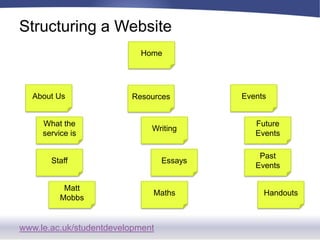
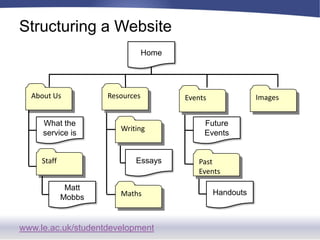
Structuring a WebsiteHomeAbout UsEventsResourcesWhat the service isWritingFuture EventsStaffEssaysPast EventsMatt MobbsMathsHandouts
Structuring a WebsiteHomeAbout UsResourcesImagesEventsWritingWhat the service isFuture EventsStaffPast EventsEssaysMatt MobbsHandoutsMaths
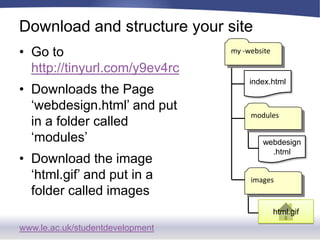
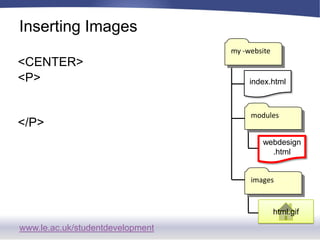
Download and structure your sitemy -websiteGo to http://tinyurl.com/y9ev4rcDownloads the Page ‘webdesign.html’ and put in a folder called ‘modules’ Download the image ‘html.gif’ and put in a folder called imagesindex.htmlmoduleswebdesign.htmlimageshtml.gif
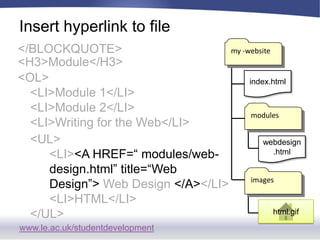
Insert hyperlink to filemy -website</BLOCKQUOTE><H3>Module</H3><OL>	<LI>Module 1</LI>	<LI>Module 2</LI>	<LI>Writing for the Web</LI>index.htmlmodules<UL>		<LI><AHREF=“ modules/web-		design.html” title=“Web 			Design”> Web Design </A></LI>		<LI>HTML</LI>	</UL>webdesign.htmlimageshtml.gif
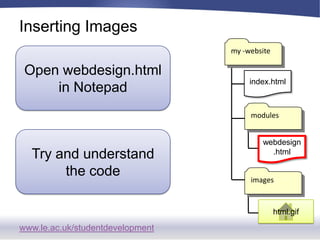
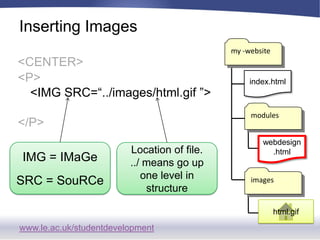
Inserting Imagesmy -websiteOpen webdesign.html in Notepadindex.htmlmodulesTry and understand the codewebdesign.htmlimageshtml.gif
Inserting Imagesmy -website<CENTER><P></P>index.htmlmoduleswebdesign.htmlimageshtml.gif
Inserting Imagesmy -website<CENTER><P><IMG SRC=“../images/html.gif ”></P>index.htmlmoduleswebdesign.htmlIMG = IMaGeSRC = SouRCeLocation of file.../ means go up one level in structureimageshtml.gif
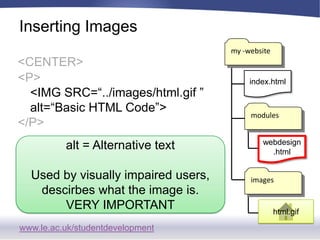
Inserting Imagesmy -website<CENTER><P><IMG SRC=“../images/html.gif ” 	alt=“Basic HTML Code”></P>index.htmlmoduleswebdesign.htmlalt = Alternative textUsed by visually impaired users, descirbes what the image is.VERY IMPORTANTimageshtml.gif
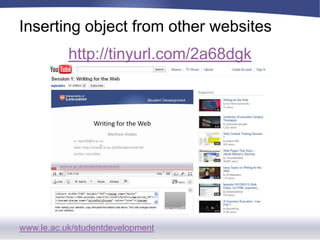
Inserting object from other websiteshttp://tinyurl.com/2a68dgk
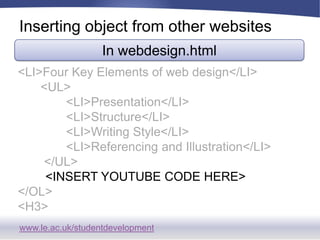
Inserting object from other websitesIn webdesign.html<LI>Four Key Elements of web design</LI>	   <UL>              <LI>Presentation</LI>              <LI>Structure</LI>              <LI>Writing Style</LI>              <LI>Referencing and Illustration</LI>   	    </UL><INSERT YOUTUBE CODE HERE></OL><H3>
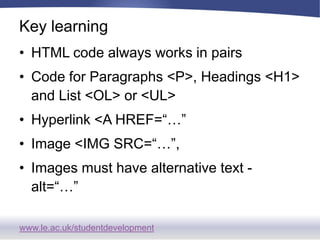
Key learningHTML code always works in pairsCode for Paragraphs <P>, Headings <H1> and List <OL> or <UL>Hyperlink <A HREF=“…”Image <IMG SRC=“…”, Images must have alternative text - alt=“…”

Web design 2 - Basic HTML 2010

  • 1.
    Creating a webpage– Basic HTMLMatthew Mobbse: mjm33@le.ac.ukweb: http://www2.le.ac.uk/Members/mjm33twitter: mjmobbs
  • 2.
    HTMLHyperTextMarkup LanguageThe codeused to write all websitesFunctions instruct web browsers what to showA little understanding will always help
  • 3.
    Your first webpageOpenNotepad<HTML>HTML always works in pairs! Open and close!</HTML>This mean it is a WWW page
  • 4.
    What is apage without a title!<HTML> <HEAD> <TITLE> Your name webpage </TITLE> </HEAD></HTML>
  • 5.
    Check your work…FileOpenthe file. It will open in Internet Explorer.Is the name is the Title Bar the same as you typed?Save AsName the file ‘index.html’Save
  • 6.
    Adding and Formattingthe Page <BODY><HTML> <HEAD> <TITLE> Your name webpage </TITLE> </HEAD> <BODY>The page content or body </BODY></HTML>
  • 7.
    HeadingsWe use differentheading styles to break-up page contentIncreased number = Smaller heading
  • 8.
    Add a Headingto your page <H1><BODY>Add Heading <CENTER> <H1>Your Name </H1>Centre Text </CENTER>Add a line <HR></BODY>Save and Review your page
  • 9.
    Writing a Paragraph<P> <P>Your name is doing a <STRONG>MA Humanities</STRONG> degree at the <I>University of Leicester</I>. Your name first degree was <B>Your degree</B> from <I>first degree institution</I></P><BODY> <CENTER> <H1>Your Name </H1> </CENTER> <HR> <P> </P></BODY>
  • 10.
  • 11.
    “Quoting” <BLOCKQUOTE></P>In thequote say why you chose to study this course…“I’m studying MA Humanities…” <BLOCKQUOTE> <P>“Your Quote” </BR> <I>Says Your Name</I> </P> </BLOCKQUOTE></BODY>
  • 12.
    Lists <OL> or<UL></BLOCKQUOTE><OL> is a numerical or ‘ordered’ listModuleModule 1Module 2Writing for the web<H3>Modules</H3><OL> <LI>Module 1</LI> <LI>Module 2</LI> <LI>Writing for the Web</LI></OL></BODY>
  • 13.
    Lists <OL> or<UL></BLOCKQUOTE><UL> is a bullet or ‘unordered’ listWriting for the webWeb Design
  • 14.
    HTML<H3>Module</H3><OL> <LI>Module 1</LI> <LI>Module 2</LI> <LI>Writingfor the Web</LI> <UL> <LI>Web Design</LI> <LI>HTML</LI> </UL></OL></BODY>
  • 15.
    Hyperlinks <A HREF=<P>Yourname is doing a <STRONG>MA Humanities</STRONG> degree at the<A HREF=“http://www.le.ac.uk” title=“University of Leicester”><I>University of Leicester</I></A>. Your name first degree was <B>Your degree</B> from <I>first degree institution</I></P>
  • 16.
    Structuring a WebsiteHomeAboutUsEventsResourcesWhat the service isWritingFuture EventsStaffEssaysPast EventsMatt MobbsMathsHandouts
  • 17.
    Structuring a WebsiteHomeAboutUsResourcesImagesEventsWritingWhat the service isFuture EventsStaffPast EventsEssaysMatt MobbsHandoutsMaths
  • 18.
    Download and structureyour sitemy -websiteGo to http://tinyurl.com/y9ev4rcDownloads the Page ‘webdesign.html’ and put in a folder called ‘modules’ Download the image ‘html.gif’ and put in a folder called imagesindex.htmlmoduleswebdesign.htmlimageshtml.gif
  • 19.
    Insert hyperlink tofilemy -website</BLOCKQUOTE><H3>Module</H3><OL> <LI>Module 1</LI> <LI>Module 2</LI> <LI>Writing for the Web</LI>index.htmlmodules<UL> <LI><AHREF=“ modules/web- design.html” title=“Web Design”> Web Design </A></LI> <LI>HTML</LI> </UL>webdesign.htmlimageshtml.gif
  • 20.
    Inserting Imagesmy -websiteOpenwebdesign.html in Notepadindex.htmlmodulesTry and understand the codewebdesign.htmlimageshtml.gif
  • 21.
  • 22.
    Inserting Imagesmy -website<CENTER><P><IMGSRC=“../images/html.gif ”></P>index.htmlmoduleswebdesign.htmlIMG = IMaGeSRC = SouRCeLocation of file.../ means go up one level in structureimageshtml.gif
  • 23.
    Inserting Imagesmy -website<CENTER><P><IMGSRC=“../images/html.gif ” alt=“Basic HTML Code”></P>index.htmlmoduleswebdesign.htmlalt = Alternative textUsed by visually impaired users, descirbes what the image is.VERY IMPORTANTimageshtml.gif
  • 24.
    Inserting object fromother websiteshttp://tinyurl.com/2a68dgk
  • 25.
    Inserting object fromother websitesIn webdesign.html<LI>Four Key Elements of web design</LI> <UL> <LI>Presentation</LI> <LI>Structure</LI> <LI>Writing Style</LI> <LI>Referencing and Illustration</LI> </UL><INSERT YOUTUBE CODE HERE></OL><H3>
  • 26.
    Key learningHTML codealways works in pairsCode for Paragraphs <P>, Headings <H1> and List <OL> or <UL>Hyperlink <A HREF=“…”Image <IMG SRC=“…”, Images must have alternative text - alt=“…”