Muhammad Yahya
Roll # : 23BSMET007
A student of Mehran University of Engineering
and Technology.
‫ال‬ ِ‫ن‬َ‫م‬ْ‫ح‬‫ه‬‫الر‬ ِ ‫ه‬
‫َّللا‬ ِ‫م‬ْ‫س‬ِ‫ب‬
‫يم‬ ِ‫ح‬‫ه‬‫ر‬
Why Create a College
Website Page?
1 Attract Prospective
Students
An engaging and well-
designed web page can
attract more students to
your college.
2 Showcase Your College
Provide a glimpse of your
college to prospective
students. Share information
about activities, student
life, and facilities.
3 Build Credibility
A modern website page offers legitimacy to your college and
conveys a sense of professionalism.
Introduction to HTML
(Hypertext Markup Language)
and Its Significance
HTML, the language of the web, plays a
crucial role in creating college website
pages. Learn the importance of HTML, its
basic syntax, and how it enables web
development.
How to Create a College
Website Page Using
HTML
In this presentation, we will guide you through the
process of creating a college website page using
HTML. Discover the fundamental concepts, tools,
and techniques required.
by Yahya Memon
The Basic Structure of HTML
The HTML Doctype
Declaration
The doctype
declaration defines the
version of HTML used
on the page. This is
the first line of your
HTML code.
The HTML Head
Section
The head section
contains information
about the page, such
as its title and any
scripts or styles it uses.
The HTML Body
Section
The body section is
where the visible
content of your page
goes.
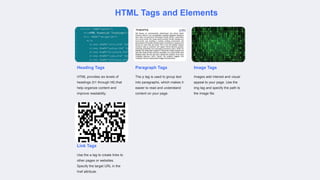
HTML Tags and Elements
Heading Tags
HTML provides six levels of
headings (h1 through h6) that
help organize content and
improve readability.
Paragraph Tags
The p tag is used to group text
into paragraphs, which makes it
easier to read and understand
content on your page.
Image Tags
Images add interest and visual
appeal to your page. Use the
img tag and specify the path to
the image file.
Link Tags
Use the a tag to create links to
other pages or websites.
Specify the target URL in the
href attribute.
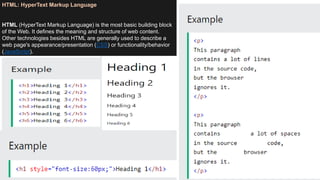
HTML: HyperText Markup Language
HTML (HyperText Markup Language) is the most basic building block
of the Web. It defines the meaning and structure of web content.
Other technologies besides HTML are generally used to describe a
web page's appearance/presentation (CSS) or functionality/behavior
(JavaScript).
Creating a basic website using HTML (Hypertext Markup Language) is relatively straightforward. HTML is the foundation of web development
and is used to structure the content of web pages. Here are the steps to create a simple HTML website:
1.Plan Your Website: Before you start coding, it's essential to plan your website's structure and content. Decide what pages you want (e.g.,
home, about, contact) and what content you'll include on each page.
2.Set Up Your Development Environment: You need a text editor to write your HTML code. Common text editors for web development
include Visual Studio Code, Sublime Text, Atom, or even a simple Notepad. Choose the one that suits you best.
3.Create an HTML Document:
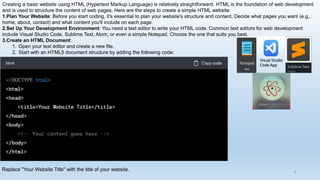
1. Open your text editor and create a new file.
2. Start with an HTML5 document structure by adding the following code:
Replace "Your Website Title" with the title of your website.
Visual Studio
Code App
8
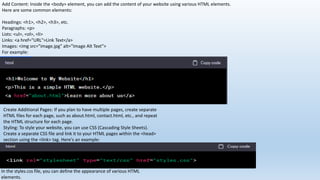
Add Content: Inside the <body> element, you can add the content of your website using various HTML elements.
Here are some common elements:
Headings: <h1>, <h2>, <h3>, etc.
Paragraphs: <p>
Lists: <ul>, <ol>, <li>
Links: <a href="URL">Link Text</a>
Images: <img src="image.jpg" alt="Image Alt Text">
For example:
Create Additional Pages: If you plan to have multiple pages, create separate
HTML files for each page, such as about.html, contact.html, etc., and repeat
the HTML structure for each page.
Styling: To style your website, you can use CSS (Cascading Style Sheets).
Create a separate CSS file and link it to your HTML pages within the <head>
section using the <link> tag. Here's an example:
In the styles.css file, you can define the appearance of various HTML
elements.
1.Testing: To preview your website, open your
HTML file in a web browser. Make sure everything
looks as expected.
2.Hosting: To make your website accessible online,
you'll need a web hosting service. There are both
free and paid hosting options available. Once you
have a hosting provider, upload your HTML and
CSS files to the server.
3.Domain Name: Consider registering a domain
name for your website to make it easier for users to
access.
4.Publish: After completing the above steps, your
website should be live and accessible on the
internet.
Remember that this is a basic overview of creating
a static website using HTML. For more complex and
dynamic websites, you might need to learn
additional technologies like JavaScript for
interactivity and server-side scripting languages like
PHP or Python for server-side functionality.
Creating a Responsive Layout
Using CSS Grid or Flexbox
Grid and Flexbox are two popular layout
techniques. The former is great for creating
complex layouts, while the latter is more suited
for simple ones.
Designing Mobile and Desktop Views
With more and more people accessing the web
through their mobile devices, it's essential to
design your page for various screen sizes. Test
your layout on different devices.
References
Websites:
Mozilla Developer Network (MDN): https://developer.mozilla.org/en-US/docs/Web/HTML
MDN is an excellent resource with detailed documentation on HTML and its various elements.
W3 School: https://www.w3schools.com/html/
HTML Dog: https://www.htmldog.com/
HTML Dog provides beginner-friendly tutorials and guides on HTML, CSS, and JavaScript.
Codecademy: https://www.codecademy.com/learn/learn-html
Codecademy offers interactive HTML courses for beginners.
HTML Cheat Sheet by Digital.com: https://digital.com/tools/html-cheatsheet/
A handy reference for HTML tags and attributes.
AI Website:
https://chat.openai.com
Key Takeaways
Creating an HTML page for your college website is easy once you understand the basic structure and
elements. Using CSS, you can add interest and styling to your page. Designing for different screen sizes
ensures your page is accessible to all.
Thank you!
16

How to Create a College Website Page Using HTML

  • 1.
    Muhammad Yahya Roll #: 23BSMET007 A student of Mehran University of Engineering and Technology. ‫ال‬ ِ‫ن‬َ‫م‬ْ‫ح‬‫ه‬‫الر‬ ِ ‫ه‬ ‫َّللا‬ ِ‫م‬ْ‫س‬ِ‫ب‬ ‫يم‬ ِ‫ح‬‫ه‬‫ر‬
  • 2.
    Why Create aCollege Website Page? 1 Attract Prospective Students An engaging and well- designed web page can attract more students to your college. 2 Showcase Your College Provide a glimpse of your college to prospective students. Share information about activities, student life, and facilities. 3 Build Credibility A modern website page offers legitimacy to your college and conveys a sense of professionalism.
  • 3.
    Introduction to HTML (HypertextMarkup Language) and Its Significance HTML, the language of the web, plays a crucial role in creating college website pages. Learn the importance of HTML, its basic syntax, and how it enables web development.
  • 4.
    How to Createa College Website Page Using HTML In this presentation, we will guide you through the process of creating a college website page using HTML. Discover the fundamental concepts, tools, and techniques required. by Yahya Memon
  • 5.
    The Basic Structureof HTML The HTML Doctype Declaration The doctype declaration defines the version of HTML used on the page. This is the first line of your HTML code. The HTML Head Section The head section contains information about the page, such as its title and any scripts or styles it uses. The HTML Body Section The body section is where the visible content of your page goes.
  • 6.
    HTML Tags andElements Heading Tags HTML provides six levels of headings (h1 through h6) that help organize content and improve readability. Paragraph Tags The p tag is used to group text into paragraphs, which makes it easier to read and understand content on your page. Image Tags Images add interest and visual appeal to your page. Use the img tag and specify the path to the image file. Link Tags Use the a tag to create links to other pages or websites. Specify the target URL in the href attribute.
  • 7.
    HTML: HyperText MarkupLanguage HTML (HyperText Markup Language) is the most basic building block of the Web. It defines the meaning and structure of web content. Other technologies besides HTML are generally used to describe a web page's appearance/presentation (CSS) or functionality/behavior (JavaScript).
  • 8.
    Creating a basicwebsite using HTML (Hypertext Markup Language) is relatively straightforward. HTML is the foundation of web development and is used to structure the content of web pages. Here are the steps to create a simple HTML website: 1.Plan Your Website: Before you start coding, it's essential to plan your website's structure and content. Decide what pages you want (e.g., home, about, contact) and what content you'll include on each page. 2.Set Up Your Development Environment: You need a text editor to write your HTML code. Common text editors for web development include Visual Studio Code, Sublime Text, Atom, or even a simple Notepad. Choose the one that suits you best. 3.Create an HTML Document: 1. Open your text editor and create a new file. 2. Start with an HTML5 document structure by adding the following code: Replace "Your Website Title" with the title of your website. Visual Studio Code App 8
  • 9.
    Add Content: Insidethe <body> element, you can add the content of your website using various HTML elements. Here are some common elements: Headings: <h1>, <h2>, <h3>, etc. Paragraphs: <p> Lists: <ul>, <ol>, <li> Links: <a href="URL">Link Text</a> Images: <img src="image.jpg" alt="Image Alt Text"> For example: Create Additional Pages: If you plan to have multiple pages, create separate HTML files for each page, such as about.html, contact.html, etc., and repeat the HTML structure for each page. Styling: To style your website, you can use CSS (Cascading Style Sheets). Create a separate CSS file and link it to your HTML pages within the <head> section using the <link> tag. Here's an example: In the styles.css file, you can define the appearance of various HTML elements.
  • 10.
    1.Testing: To previewyour website, open your HTML file in a web browser. Make sure everything looks as expected. 2.Hosting: To make your website accessible online, you'll need a web hosting service. There are both free and paid hosting options available. Once you have a hosting provider, upload your HTML and CSS files to the server. 3.Domain Name: Consider registering a domain name for your website to make it easier for users to access. 4.Publish: After completing the above steps, your website should be live and accessible on the internet. Remember that this is a basic overview of creating a static website using HTML. For more complex and dynamic websites, you might need to learn additional technologies like JavaScript for interactivity and server-side scripting languages like PHP or Python for server-side functionality.
  • 14.
    Creating a ResponsiveLayout Using CSS Grid or Flexbox Grid and Flexbox are two popular layout techniques. The former is great for creating complex layouts, while the latter is more suited for simple ones. Designing Mobile and Desktop Views With more and more people accessing the web through their mobile devices, it's essential to design your page for various screen sizes. Test your layout on different devices.
  • 15.
    References Websites: Mozilla Developer Network(MDN): https://developer.mozilla.org/en-US/docs/Web/HTML MDN is an excellent resource with detailed documentation on HTML and its various elements. W3 School: https://www.w3schools.com/html/ HTML Dog: https://www.htmldog.com/ HTML Dog provides beginner-friendly tutorials and guides on HTML, CSS, and JavaScript. Codecademy: https://www.codecademy.com/learn/learn-html Codecademy offers interactive HTML courses for beginners. HTML Cheat Sheet by Digital.com: https://digital.com/tools/html-cheatsheet/ A handy reference for HTML tags and attributes. AI Website: https://chat.openai.com Key Takeaways Creating an HTML page for your college website is easy once you understand the basic structure and elements. Using CSS, you can add interest and styling to your page. Designing for different screen sizes ensures your page is accessible to all.
  • 16.