Learn HTML5/CSS3 By:-AhmedYousef Co-founder DEVMIX team BY:-AhmedYousef
let's Start…… We will start with HTML5 and will continue with CSS3. BY:-AhmedYousef
Previous knowledge  Before start you should know :- HTML .  CSS . Java Script  . Why??????? New features should be based on HTML, CSS, DOM, and JavaScript BY:-AhmedYousef
Today, We Will Cover... What is HTML5? HTML5 is the next generation of HTML. What I gain from Learning it? HTML5 ~= HTML + CSS + JS. You can work offline . You can draw online.!! You can develop a mobile Apps!!!!!!!!!?? Windows 8 Apps!!!??? BY:-AhmedYousef
Introduction  in details…. What is HTML5? HTML5 will be the new standard for HTML, XHTML, and the HTML DOM. HTML5 is still a work in progress. However, most modern browsers have some HTML5 support. How Did HTML5 Get Started? HTML5 is a cooperation between the World Wide Web Consortium (W3C) and the Web Hypertext Application Technology Working Group (WHATWG). BY:-AhmedYousef
Some rules for HTML5 were established…. New features should be based on HTML, CSS, DOM, and JavaScript Reduce the need for external plugins (like Flash) Better error handling More markup to replace scripting HTML5 should be device independent The development process should be visible to the public. BY:-AhmedYousef
Why I should learn HTML5…. Some of the most interesting new features in HTML5: The canvas element for drawing The video and audio elements for media playback Better support for local offline storage New content specific elements, like article, footer, header, nav, section New form controls, like calendar, date, time, email, url . BY:-AhmedYousef
So how …? How can I know if my browser support HTML5??!!! http://www.html5test.com/ all major browsers (Safari, Chrome, Firefox, Opera, Internet Explorer) continue to add new HTML5 features to their latest versions. BY:-AhmedYousef
So what is new?? The internet has changed a lot since HTML 4.01 became a standard in 1999. Today, some elements in HTML 4.01 are obsolete, never used, or not used the way they were intended to. These elements are deleted or re-written in HTML5. To better handle today's internet use, HTML5 also includes new elements for better structure, drawing, media content, and better form handling. BY:-AhmedYousef
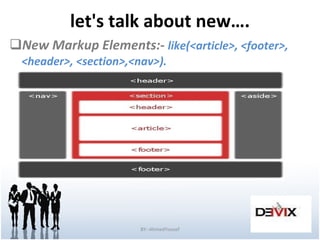
let's talk about new…. New Markup Elements:-  like(<article>, <footer>, <header>, <section>,<nav>). BY:-AhmedYousef
And new… New Media Elements :- like(<audio>, <video>, <source>,<embed>). The Canvas Element:- it is a mazing tag??!! New Form Elements:- like(<datalist>,<Date pickers>,<keygen>, <email>, <url>,<number>, <search>,<datalist>).  BY:-AhmedYousef
After this boring intro. let's go to work  …. BY:-AhmedYousef
HTMl5 Basics Video ,Audio ,Canvas………,…….. And so on:- BY:-AhmedYousef
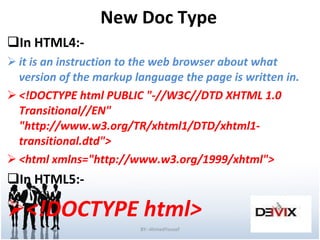
New Doc Type In HTML4:- it is an instruction to the web browser about what version of the markup language the page is written in. <!DOCTYPE html PUBLIC &quot;-//W3C//DTD XHTML 1.0 Transitional//EN&quot; &quot;http://www.w3.org/TR/xhtml1/DTD/xhtml1-transitional.dtd&quot;>  <html xmlns=&quot;http://www.w3.org/1999/xhtml&quot;> In HTML5:- <!DOCTYPE html> BY:-AhmedYousef
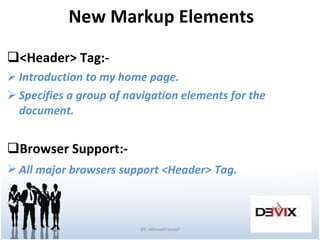
New Markup Elements <Header> Tag:-  Introduction to my home page. Specifies a group of navigation elements for the document. Browser Support:-  All major browsers support <Header>   Tag. BY:-AhmedYousef
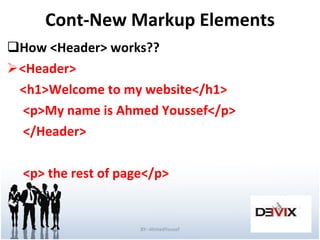
Cont-New Markup Elements How <Header> works?? <Header> <h1>Welcome to my website</h1> <p>My name is Ahmed Youssef</p> </Header> <p> the rest of page</p> BY:-AhmedYousef
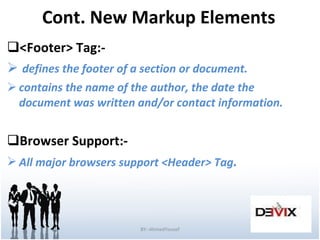
Cont. New Markup Elements <Footer> Tag:- defines the footer of a section or document. contains the name of the author, the date the  document was written and/or contact information. Browser Support:- All major browsers support <Header>   Tag . BY:-AhmedYousef
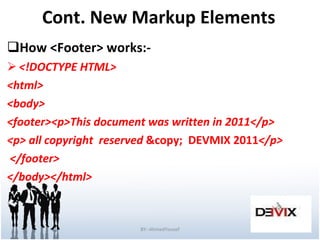
Cont. New Markup Elements How <Footer> works:- <!DOCTYPE HTML> <html> <body> <footer><p>This document was written in 2011</p> <p> all copyright  reserved  &copy;  DEVMIX 2011 </p> </footer> </body></html> BY:-AhmedYousef
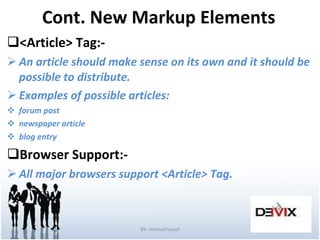
Cont. New Markup Elements <Article> Tag:- An article should make sense on its own and it should be possible to distribute. Examples of possible articles: forum post newspaper article blog entry Browser Support:- All major browsers support <Article>   Tag. BY:-AhmedYousef
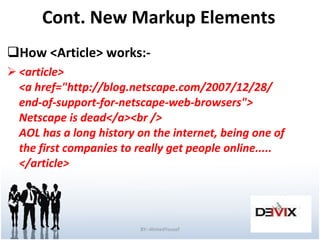
Cont. New Markup Elements How <Article> works:- <article> <a href=&quot;http://blog.netscape.com/2007/12/28/ end-of-support-for-netscape-web-browsers&quot;> Netscape is dead</a><br /> AOL has a long history on the internet, being one of the first companies to really get people online..... </article>  BY:-AhmedYousef
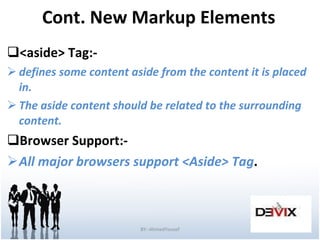
Cont. New Markup Elements <aside> Tag:- defines some content aside from the content it is placed in. The aside content should be related to the surrounding content. Browser Support:- All major browsers support <Aside>   Tag . BY:-AhmedYousef
Cont. New Markup Elements How <Aside> works:- <p>My family and I visited Cairo  this summer.</p> <aside> <h4>Tahrir Square</h4> Cairo is the biggest city in Egypt . </aside>  BY:-AhmedYousef
Cont. New Markup Elements <section> tag:- defines sections in a document like :- Chapters. Browser Support:- All major browsers support <Section>   Tag BY:-AhmedYousef
HTML5 Video Video on the Web:-  Until now, there has never been a standard for showing video on a web page. Today, most videos are shown through a plugin (like flash). However, not all browsers have the same plugins. HTML5 specifies a standard way to include video, with the video element. Video Formats:-  (Ogg , MPEG 4 , WebM). Hint ( all works in chrome). BY:-AhmedYousef
Cont. HTML5 Video How can I use it?? <video src=&quot;movie.ogg&quot; width=&quot;320&quot; height=&quot;240&quot; controls=&quot;controls&quot;> Your browser does not support the video tag. </video> <video width=&quot;320&quot; height=&quot;240&quot; controls=&quot;controls&quot;>   <source src=&quot;movie.ogg&quot; type=&quot;video/ogg&quot; />   <source src=&quot;movie.mp4&quot; type=&quot;video/mp4&quot; />   <source src=&quot;movie.webm&quot; type=&quot;video/webm&quot; /> Your browser does not support the video tag. </video>(use more formats). BY:-AhmedYousef
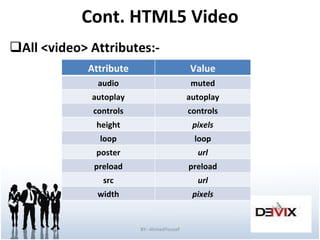
Cont. HTML5 Video All <video> Attributes:- BY:-AhmedYousef Value Attribute muted audio autoplay autoplay controls controls pixels height loop loop url poster preload preload url src pixels width
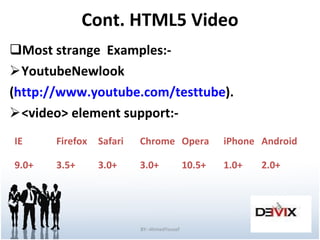
Cont. HTML5 Video Most strange  Examples:- YoutubeNewlook ( http://www.youtube.com/testtube ). <video> element support:- BY:-AhmedYousef IE Firefox Safari Chrome Opera iPhone Android 9.0+ 3.5+ 3.0+ 3.0+ 10.5+ 1.0+ 2.0+
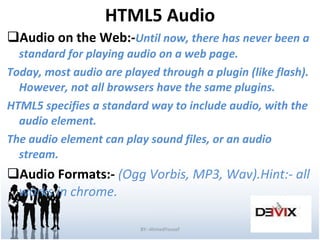
HTML5 Audio Audio on the Web:- Until now, there has never been a standard for playing audio on a web page. Today, most audio are played through a plugin (like flash). However, not all browsers have the same plugins. HTML5 specifies a standard way to include audio, with the audio element. The audio element can play sound files, or an audio stream. Audio Formats:-  (Ogg Vorbis, MP3, Wav).Hint:- all works in chrome. BY:-AhmedYousef
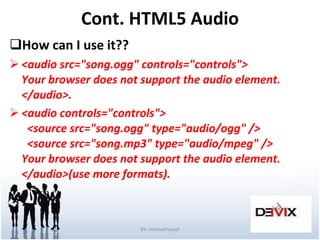
Cont. HTML5 Audio How can I use it?? <audio src=&quot;song.ogg&quot; controls=&quot;controls&quot;> Your browser does not support the audio element. </audio>. <audio controls=&quot;controls&quot;>   <source src=&quot;song.ogg&quot; type=&quot;audio/ogg&quot; />   <source src=&quot;song.mp3&quot; type=&quot;audio/mpeg&quot; /> Your browser does not support the audio element. </audio>(use more formats).  BY:-AhmedYousef
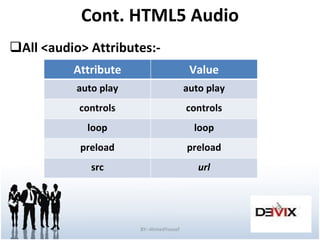
Cont. HTML5 Audio All <audio> Attributes:- BY:-AhmedYousef Value Attribute auto play auto play controls controls loop loop preload preload url src
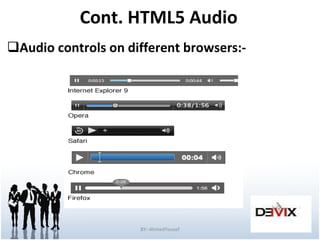
Cont. HTML5 Audio Audio controls on different browsers:- BY:-AhmedYousef
HTML5 <canvas> What is Canvas?? <canvas> tag is used to display graphics. it is only a container for graphics, you must use a script to actually paint graphics. Browser Support:- All major browsers support <Canvas>   Tag. BY:-AhmedYousef
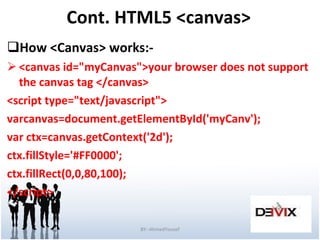
Cont. HTML5 <canvas> How <Canvas> works:- <canvas id=&quot;myCanvas&quot;>your browser does not support the canvas tag </canvas> <script type=&quot;text/javascript&quot;> varcanvas=document.getElementById('myCanv'); var ctx=canvas.getContext('2d'); ctx.fillStyle='#FF0000'; ctx.fillRect(0,0,80,100); </script> BY:-AhmedYousef
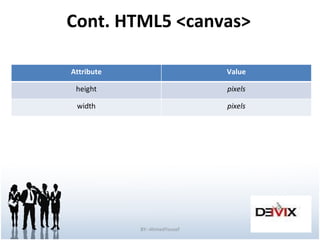
Cont. HTML5 <canvas> BY:-AhmedYousef Value Attribute pixels height pixels width
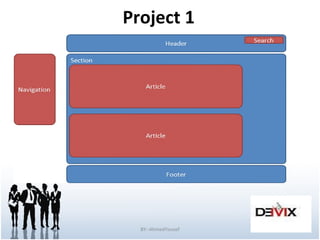
Project 1 BY:-AhmedYousef

#1 of HTML and CSS3

  • 1.
    Learn HTML5/CSS3 By:-AhmedYousefCo-founder DEVMIX team BY:-AhmedYousef
  • 2.
    let's Start…… Wewill start with HTML5 and will continue with CSS3. BY:-AhmedYousef
  • 3.
    Previous knowledge Before start you should know :- HTML . CSS . Java Script . Why??????? New features should be based on HTML, CSS, DOM, and JavaScript BY:-AhmedYousef
  • 4.
    Today, We WillCover... What is HTML5? HTML5 is the next generation of HTML. What I gain from Learning it? HTML5 ~= HTML + CSS + JS. You can work offline . You can draw online.!! You can develop a mobile Apps!!!!!!!!!?? Windows 8 Apps!!!??? BY:-AhmedYousef
  • 5.
    Introduction indetails…. What is HTML5? HTML5 will be the new standard for HTML, XHTML, and the HTML DOM. HTML5 is still a work in progress. However, most modern browsers have some HTML5 support. How Did HTML5 Get Started? HTML5 is a cooperation between the World Wide Web Consortium (W3C) and the Web Hypertext Application Technology Working Group (WHATWG). BY:-AhmedYousef
  • 6.
    Some rules forHTML5 were established…. New features should be based on HTML, CSS, DOM, and JavaScript Reduce the need for external plugins (like Flash) Better error handling More markup to replace scripting HTML5 should be device independent The development process should be visible to the public. BY:-AhmedYousef
  • 7.
    Why I shouldlearn HTML5…. Some of the most interesting new features in HTML5: The canvas element for drawing The video and audio elements for media playback Better support for local offline storage New content specific elements, like article, footer, header, nav, section New form controls, like calendar, date, time, email, url . BY:-AhmedYousef
  • 8.
    So how …?How can I know if my browser support HTML5??!!! http://www.html5test.com/ all major browsers (Safari, Chrome, Firefox, Opera, Internet Explorer) continue to add new HTML5 features to their latest versions. BY:-AhmedYousef
  • 9.
    So what isnew?? The internet has changed a lot since HTML 4.01 became a standard in 1999. Today, some elements in HTML 4.01 are obsolete, never used, or not used the way they were intended to. These elements are deleted or re-written in HTML5. To better handle today's internet use, HTML5 also includes new elements for better structure, drawing, media content, and better form handling. BY:-AhmedYousef
  • 10.
    let's talk aboutnew…. New Markup Elements:- like(<article>, <footer>, <header>, <section>,<nav>). BY:-AhmedYousef
  • 11.
    And new… NewMedia Elements :- like(<audio>, <video>, <source>,<embed>). The Canvas Element:- it is a mazing tag??!! New Form Elements:- like(<datalist>,<Date pickers>,<keygen>, <email>, <url>,<number>, <search>,<datalist>). BY:-AhmedYousef
  • 12.
    After this boringintro. let's go to work  …. BY:-AhmedYousef
  • 13.
    HTMl5 Basics Video,Audio ,Canvas………,…….. And so on:- BY:-AhmedYousef
  • 14.
    New Doc TypeIn HTML4:- it is an instruction to the web browser about what version of the markup language the page is written in. <!DOCTYPE html PUBLIC &quot;-//W3C//DTD XHTML 1.0 Transitional//EN&quot; &quot;http://www.w3.org/TR/xhtml1/DTD/xhtml1-transitional.dtd&quot;> <html xmlns=&quot;http://www.w3.org/1999/xhtml&quot;> In HTML5:- <!DOCTYPE html> BY:-AhmedYousef
  • 15.
    New Markup Elements<Header> Tag:- Introduction to my home page. Specifies a group of navigation elements for the document. Browser Support:- All major browsers support <Header> Tag. BY:-AhmedYousef
  • 16.
    Cont-New Markup ElementsHow <Header> works?? <Header> <h1>Welcome to my website</h1> <p>My name is Ahmed Youssef</p> </Header> <p> the rest of page</p> BY:-AhmedYousef
  • 17.
    Cont. New MarkupElements <Footer> Tag:- defines the footer of a section or document. contains the name of the author, the date the document was written and/or contact information. Browser Support:- All major browsers support <Header> Tag . BY:-AhmedYousef
  • 18.
    Cont. New MarkupElements How <Footer> works:- <!DOCTYPE HTML> <html> <body> <footer><p>This document was written in 2011</p> <p> all copyright reserved &copy; DEVMIX 2011 </p> </footer> </body></html> BY:-AhmedYousef
  • 19.
    Cont. New MarkupElements <Article> Tag:- An article should make sense on its own and it should be possible to distribute. Examples of possible articles: forum post newspaper article blog entry Browser Support:- All major browsers support <Article> Tag. BY:-AhmedYousef
  • 20.
    Cont. New MarkupElements How <Article> works:- <article> <a href=&quot;http://blog.netscape.com/2007/12/28/ end-of-support-for-netscape-web-browsers&quot;> Netscape is dead</a><br /> AOL has a long history on the internet, being one of the first companies to really get people online..... </article> BY:-AhmedYousef
  • 21.
    Cont. New MarkupElements <aside> Tag:- defines some content aside from the content it is placed in. The aside content should be related to the surrounding content. Browser Support:- All major browsers support <Aside> Tag . BY:-AhmedYousef
  • 22.
    Cont. New MarkupElements How <Aside> works:- <p>My family and I visited Cairo this summer.</p> <aside> <h4>Tahrir Square</h4> Cairo is the biggest city in Egypt . </aside> BY:-AhmedYousef
  • 23.
    Cont. New MarkupElements <section> tag:- defines sections in a document like :- Chapters. Browser Support:- All major browsers support <Section> Tag BY:-AhmedYousef
  • 24.
    HTML5 Video Videoon the Web:- Until now, there has never been a standard for showing video on a web page. Today, most videos are shown through a plugin (like flash). However, not all browsers have the same plugins. HTML5 specifies a standard way to include video, with the video element. Video Formats:- (Ogg , MPEG 4 , WebM). Hint ( all works in chrome). BY:-AhmedYousef
  • 25.
    Cont. HTML5 VideoHow can I use it?? <video src=&quot;movie.ogg&quot; width=&quot;320&quot; height=&quot;240&quot; controls=&quot;controls&quot;> Your browser does not support the video tag. </video> <video width=&quot;320&quot; height=&quot;240&quot; controls=&quot;controls&quot;>   <source src=&quot;movie.ogg&quot; type=&quot;video/ogg&quot; />   <source src=&quot;movie.mp4&quot; type=&quot;video/mp4&quot; />   <source src=&quot;movie.webm&quot; type=&quot;video/webm&quot; /> Your browser does not support the video tag. </video>(use more formats). BY:-AhmedYousef
  • 26.
    Cont. HTML5 VideoAll <video> Attributes:- BY:-AhmedYousef Value Attribute muted audio autoplay autoplay controls controls pixels height loop loop url poster preload preload url src pixels width
  • 27.
    Cont. HTML5 VideoMost strange Examples:- YoutubeNewlook ( http://www.youtube.com/testtube ). <video> element support:- BY:-AhmedYousef IE Firefox Safari Chrome Opera iPhone Android 9.0+ 3.5+ 3.0+ 3.0+ 10.5+ 1.0+ 2.0+
  • 28.
    HTML5 Audio Audioon the Web:- Until now, there has never been a standard for playing audio on a web page. Today, most audio are played through a plugin (like flash). However, not all browsers have the same plugins. HTML5 specifies a standard way to include audio, with the audio element. The audio element can play sound files, or an audio stream. Audio Formats:- (Ogg Vorbis, MP3, Wav).Hint:- all works in chrome. BY:-AhmedYousef
  • 29.
    Cont. HTML5 AudioHow can I use it?? <audio src=&quot;song.ogg&quot; controls=&quot;controls&quot;> Your browser does not support the audio element. </audio>. <audio controls=&quot;controls&quot;>   <source src=&quot;song.ogg&quot; type=&quot;audio/ogg&quot; />   <source src=&quot;song.mp3&quot; type=&quot;audio/mpeg&quot; /> Your browser does not support the audio element. </audio>(use more formats). BY:-AhmedYousef
  • 30.
    Cont. HTML5 AudioAll <audio> Attributes:- BY:-AhmedYousef Value Attribute auto play auto play controls controls loop loop preload preload url src
  • 31.
    Cont. HTML5 AudioAudio controls on different browsers:- BY:-AhmedYousef
  • 32.
    HTML5 <canvas> Whatis Canvas?? <canvas> tag is used to display graphics. it is only a container for graphics, you must use a script to actually paint graphics. Browser Support:- All major browsers support <Canvas> Tag. BY:-AhmedYousef
  • 33.
    Cont. HTML5 <canvas>How <Canvas> works:- <canvas id=&quot;myCanvas&quot;>your browser does not support the canvas tag </canvas> <script type=&quot;text/javascript&quot;> varcanvas=document.getElementById('myCanv'); var ctx=canvas.getContext('2d'); ctx.fillStyle='#FF0000'; ctx.fillRect(0,0,80,100); </script> BY:-AhmedYousef
  • 34.
    Cont. HTML5 <canvas>BY:-AhmedYousef Value Attribute pixels height pixels width
  • 35.