Dr B T Sampath Kumar
Professor
Department of Library and Information Science
Tumkur University, Tumakuru, INDIA
www.sampathkumar.info
Web browsers
Web browser
• A web browser is a software application for
accessing information on the Web.
• It is used for retrieving, presenting, and
navigating information resources on the web.
• An information resource is identified by a
Universal resource Locator (URL) on the web.
Cont..
• A web browser allows a user to enter the
address of a website and then visit it.
• It allows users to surf internet.
• Browsing means searching for something
specific while surfing means randomly
searching for something.
Different Web browsers
The various web browsers are:
– Google Chrome
– Internet Explorer
– Mozilla Firefox
– Netscape navigator
– Opera
– Mosaic
– Safari
– UC browser
– Microsoft Edge
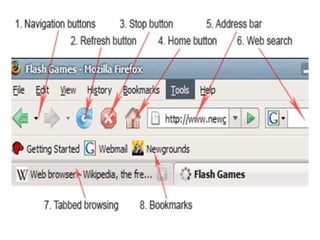
Features of web browser
• Navigation buttons
• Refresh button
• Stop button
• Home button
• Web browser's address bar
• Tabbed browsing
• Bookmark
Navigation buttons
• Navigation button is used to go back and
forward while browsing.
• If you are in a home page of some site, then
you go to contact page – Back
button would bring you back to the home
page.
• If you click forward button it would bring
you again to the contact page.
Refresh button
• Refresh buttons is used to force web
browser to reload webpage.
• Most of the web browsers use caching
mechanism (store local copies of visited pages
to speed up performance) that
sometimes prevents seeing the most updated
information.
• By clicking refresh button, latest version of the
page is forcefully reloaded.
Home button
• Loads predefined home page.
• You can select any page as browser's home by
clicking on tools menu and selecting options.
Address bar
• Address bar is used to enter website address.
• It works as a dropdown menu showing all
previously visited sites.
Tabbed browsing
• Browser tabs allow opening many websites on
a single web browser's window.
• It is very helpful when reading several
websites at the same time.
Bookmark
• A bookmark or electronic bookmark is a
method of saving a web page's address.
• While using most browsers, pressing Ctrl+D
will bookmark the page you are viewing.
• A bookmark is very useful when you find a
web page that you want to remember and be
able to look at another day.
Cont..
• When you bookmark a web page, you are
creating a shortcut for quick access to that
web page.
• You can access that bookmark at any time and
view the web page as many times as you want
without having to search the Internet to find it
again.
Google Chrome
• This is developed by Google and its beta version
was first released on September 2, 2008 for
Microsoft Windows.
• Google Chrome is a cross-platform web
browser developed by Google.
Cont..
• The browser is also the main component
of Chrome OS, where it serves as the platform
for web apps.
• As of April 2020, StatCounter estimates that
Chrome has a 68% worldwide browser market
share (after peaking at 72.36%) on traditional
PCs and 64% across all platforms.
Internet Explorer
• Internet Explorer is a graphical web
browsers developed by Microsoft and
included in the Microsoft Windows line
of operating systems, starting in 1995.
• It was first released as part of the add-on
package Plus! for Windows 95 that year.
Cont..
• Later versions were available as free
downloads, or in service packs, and included
in the original equipment manufacturer (OEM)
service releases of Windows 95 and later
versions of Windows.
• Internet Explorer was once the most widely
used web browser, attaining a peak of about
95% usage share by 2003.
Mozilla Firefox
• Mozilla Firefox is a free and open-source web
browser developed by the Mozilla
Foundation and its subsidiary, Mozilla
Corporation.
• In 2017, Firefox began incorporating new
technology under the code name Quantum to
promote parallelism and a more intuitive user
interface.
• Firefox is officially available for Windows 7 or
newer, macOS and Linux.
Safari
• Safari is a web browser developed by Apple
Inc. and included in Mac OS.
• It was first released as a public beta in January
2003
Opera
• Opera is a freeware web
browser for Microsoft
Windows, Android, iOS, macOS
and Linux operating systems, developed
by Opera Software.
• Opera is a Chromium-based browser using
the Blink layout engine.
• It differentiates itself because of a
distinct user interface and other features.

Web browser

  • 1.
    Dr B TSampath Kumar Professor Department of Library and Information Science Tumkur University, Tumakuru, INDIA www.sampathkumar.info Web browsers
  • 2.
    Web browser • Aweb browser is a software application for accessing information on the Web. • It is used for retrieving, presenting, and navigating information resources on the web. • An information resource is identified by a Universal resource Locator (URL) on the web.
  • 3.
    Cont.. • A webbrowser allows a user to enter the address of a website and then visit it. • It allows users to surf internet. • Browsing means searching for something specific while surfing means randomly searching for something.
  • 4.
    Different Web browsers Thevarious web browsers are: – Google Chrome – Internet Explorer – Mozilla Firefox – Netscape navigator – Opera – Mosaic – Safari – UC browser – Microsoft Edge
  • 5.
    Features of webbrowser • Navigation buttons • Refresh button • Stop button • Home button • Web browser's address bar • Tabbed browsing • Bookmark
  • 7.
    Navigation buttons • Navigationbutton is used to go back and forward while browsing. • If you are in a home page of some site, then you go to contact page – Back button would bring you back to the home page. • If you click forward button it would bring you again to the contact page.
  • 8.
    Refresh button • Refreshbuttons is used to force web browser to reload webpage. • Most of the web browsers use caching mechanism (store local copies of visited pages to speed up performance) that sometimes prevents seeing the most updated information. • By clicking refresh button, latest version of the page is forcefully reloaded.
  • 9.
    Home button • Loadspredefined home page. • You can select any page as browser's home by clicking on tools menu and selecting options.
  • 10.
    Address bar • Addressbar is used to enter website address. • It works as a dropdown menu showing all previously visited sites.
  • 11.
    Tabbed browsing • Browsertabs allow opening many websites on a single web browser's window. • It is very helpful when reading several websites at the same time.
  • 12.
    Bookmark • A bookmarkor electronic bookmark is a method of saving a web page's address. • While using most browsers, pressing Ctrl+D will bookmark the page you are viewing. • A bookmark is very useful when you find a web page that you want to remember and be able to look at another day.
  • 13.
    Cont.. • When youbookmark a web page, you are creating a shortcut for quick access to that web page. • You can access that bookmark at any time and view the web page as many times as you want without having to search the Internet to find it again.
  • 14.
    Google Chrome • Thisis developed by Google and its beta version was first released on September 2, 2008 for Microsoft Windows. • Google Chrome is a cross-platform web browser developed by Google.
  • 15.
    Cont.. • The browseris also the main component of Chrome OS, where it serves as the platform for web apps. • As of April 2020, StatCounter estimates that Chrome has a 68% worldwide browser market share (after peaking at 72.36%) on traditional PCs and 64% across all platforms.
  • 16.
    Internet Explorer • InternetExplorer is a graphical web browsers developed by Microsoft and included in the Microsoft Windows line of operating systems, starting in 1995. • It was first released as part of the add-on package Plus! for Windows 95 that year.
  • 17.
    Cont.. • Later versionswere available as free downloads, or in service packs, and included in the original equipment manufacturer (OEM) service releases of Windows 95 and later versions of Windows. • Internet Explorer was once the most widely used web browser, attaining a peak of about 95% usage share by 2003.
  • 18.
    Mozilla Firefox • MozillaFirefox is a free and open-source web browser developed by the Mozilla Foundation and its subsidiary, Mozilla Corporation. • In 2017, Firefox began incorporating new technology under the code name Quantum to promote parallelism and a more intuitive user interface. • Firefox is officially available for Windows 7 or newer, macOS and Linux.
  • 19.
    Safari • Safari isa web browser developed by Apple Inc. and included in Mac OS. • It was first released as a public beta in January 2003
  • 20.
    Opera • Opera isa freeware web browser for Microsoft Windows, Android, iOS, macOS and Linux operating systems, developed by Opera Software. • Opera is a Chromium-based browser using the Blink layout engine. • It differentiates itself because of a distinct user interface and other features.