Unit Title
TEACHERS SLIDE
The
Web
In this lesson, we will learn about the different concepts involved
in the study of the web. This involve learning the various types of
browsers used to search the internet, how to access the web tool
called Notepad++, differentiating the different types of websites,
and understanding the significance of the most common
acronyms used on the web.
The Web :
INTRODUCTION:
At the end of this lesson, the students should be able to learn:
1. Identify the various styles of browser
2. Show how Notepad++ operates as a code editor.
3. Describes the types of websites
Understand the significance of the common acronyms used on
the internet
The Web : Unit
UNIT OBJECTIVES:
The Web: Lesson1: Web
Lesson 1: Web
Browser
The Web: Lesson1: Web
A web browser is a software program to access information on
the world wide web (usually referred to as a browser). Upon
requests by a user of a website a web page is downloaded
from a database server by the web client and the link on the
screen is shown.
A web browser is not the same as a search engine, although it
is often frustrating in both. A user is a search engine that only
contains information about other websites, including Google
Search, Bing or DuckDuckGo. Nonetheless, a user must have
a web browser installed to connect to the website server and to
view their web pages.
Web Browser
The Web: Lesson1: Web
The aim of a web browser is to collector and display information
resources on the Web on the device of the user.
This cycle starts when a Uniform Resource Locator (URL),
such as https:/en.wikipedia.org, is entered by the user into the
web browser. Nearly all web-based URLs start with either http:
or https: which means the Hypertext Transference Protocol
(HTTP) is used to access the URLs. For HTTPS: the browser-
web server contact is encrypted for security and privacy
purposes.
The Web: Lesson1: Web
The rendering engine of the browser displays it on the user's
device once a Web page has been found. This includes
browser-supported picture and video formats.
Hyperlinks to other pages and services are usually found in
websites. Each link has a URL and the browser navigates to the
new source when it is clicked or tapped. This restarts the
process of bringing the user content.
The Web: Lesson1: Web
For later visits to the same website, most browsers use an
internal web-page cache to improve their loading times. Many
things like big images can be stored in the cache to avoid being
downloaded from the server. Cached items are usually only
stored until the HTTP reply messages of the web server.
A number of features are common to the most popular browsers.
Users can set and browse in private mode by using bookmarks.
Extensions can also be personalized and some of them provide
a sync feature.
The Web: Lesson1: Web
Most browsers have these user interface features:
• Enable the user to open multiple pages simultaneously, either in
different browser windows or in various tabs in the same window.
• Go back and forth to the last page you visited or to the next one.
• Refreshing or reloading the current page button.
• To avoid loading the page with a stop button. (The pause button
is combined with the reload button in some browsers.)
• A click back to the homepage of the app.
• An address bar for entering and displaying the URL of a
website.
• A search bar for entering search engine terms. (The search bar
is fusioned with the address bar in some browsers.)
The Web: Lesson1: Web
Niche browsers with different features are also available. One
example is text-only browsers that can help people with poor
Internet connections or visually disabled individuals.
A web browser is a computer-based software program that
allows users to visit their favorite websites on the Internet.
Mozilla Firefox, Google Chrome, Microsoft Edge, Apple Safari
and the Opera browsers are among the most popular browsers
today.
The Web: Lesson1: Web
Mozilla Firefox is a free, open-source web
browser developed by Mozilla Foundation
and its Mozilla Corporation subsidiary (the
Mozilla Firefox Quantum or simply Firefox).
It operates on common systems like
Windows, MacOS, Linux and Android.
Firefox can add or remove browsing
features and allows users to tailor Firefox to
their needs. This has been done to make it
safe and easy to use Firefox.
Mozilla Firefox
The Web: Lesson1: Web
Features such as tabbed browsing, spell
checking, gradual searching, live-
bookmarking, Smart Bookmarks, a
download manager, private browsing,
Google-based location-ware browsing, and
a built-in search feature.
Mozilla Firefox
The Web: Lesson1: Web
Extensions allow the user to add or change
new things to the browser. They have been
created by other users. Because extensions
can access all parts of Firefox 's computer,
extensions could be created which could
harm a computer. However, only if you have
administrator privileges can the extension
change system settings.
Mozilla Firefox
The Web: Lesson1: Web
Firefox also has topics or skins that alter the
browser's user appearance. Some themes,
such as Internet Explorer and Netscape, can
make Firefox look like other browsers.
Browsing tabbed is a browser feature used
by many webpages, where labelled tabs top
up to the webpage can be opened in a
window. Type control-T to make a new blank
tab.
Mozilla Firefox
The Web: Lesson1: Web
In the top right corner of the window there is
a search box in Firefox that can be seen.
The browser uses a search engine, such as
Google or Yahoo, when someone with
Mozilla Firefox types something into the
search box and presses enter. Firefox 2
contains "search recommendations." The
suggested words will be displayed when
words are entered in the search box. The
browser suggests for example, "Wikipedia,"
if "wiki" is typed.
Mozilla Firefox
The Web: Lesson1: Web
If a word is wrong in a text box, like the one
in which someone changes a Wikipedia
page, Firefox can use the spell check, the
program emphasizes the word wrongly
spelled on a red line. Mozilla Firefox will list
words using the right orthographer when you
scroll over that word and copy the right one.
For instance, "chekc" would have a
suggestion for the wrong word "checkc."
Mozilla Firefox
The Web: Lesson1: Web
Google Chrome is a Google-developed
cross-platform web browser. It was released
for Microsoft Windows in 2008, and later
ported to Linux, MacOS, Android and iOS.
The browser is also Chrome OS's main
component, and is used as an applications
portal.
Google Chrome
The Web: Lesson1: Web
Most of the source code for Chrome comes
from the free open-source Chromium
software project, but it is licensed to Chrome
as a proprietary freeware. WebKit was the
original renderer, but eventually Google
forced the renderer to build the Blink motor;
all Chrome versions except the iOS now use
Blink.
Google Chrome
The Web: Lesson1: Web
Google Chrome has a simple user interface,
which is later introduced in other browsers
using its user interface concepts. The fusion
of the address bar in the omnibox, for
example. Chrome also has a good browser
reputation.
• Bookmarks and settings synchronization
• Web standards support
• Security
Google Chrome
The Web: Lesson1: Web
• Password management
• Security vulnerabilities
• Malware blocking and ad blocking
• Plugins
• Privacy
• Speed
• Stability
• User interface
Google Chrome
The Web: Lesson1: Web
• Desktop shortcuts and apps
• Extensions
• Themes
• Automatic web page translation
• Release channels, cycles and
updates
• Color management
• T-Rex
Google Chrome
The Web: Lesson1: Web
Microsoft Edge is a web browser that has
been created by Microsoft. It was first
released on Windows 10 in 2015. It
replaces Internet Explorer (IE), a browser
that was originally created on Windows 95
and which for two decades was part of
Windows operating systems.
Microsoft Edge
The Web: Lesson1: Web
Edge is a smaller browser optimized for
Web service and based on web standards.
Microsoft does not currently plan to add
Edge to previous Windows versions, or to
supply versions of non-Windows operating
systems.
Microsoft Edge
The Web: Lesson1: Web
Edge has reduced the bloat that most
modern browsers, including IE, have had;
Active-X support has also been reduced.
Edge was called the code in development
"Spartan," which refers to a lightweight
browser structure designed to make Edge
work on multiple device platforms, often
mobile.
Microsoft Edge
The Web: Lesson1: Web
The same way Internet Explorer did in
earlier releases, Edge installs together with
Windows 10. However, IE for
communication compatibility is also
included in Windows 10 especially within
the company.
Microsoft Edge
The Web: Lesson1: Web
Edge’s features include:
• Inking - an annotation tool that allows
users to write or draw on Web pages.
• Cortana - a personal virtual assistant from
Halo, a popular video game.
• Private browsing.
• Security features such as Microsoft
Passport and asymmetric cryptography to
deter phishing and other social engineering
attacks.
Microsoft Edge
The Web: Lesson1: Web
• Support for Firefox and Chrome add-ons.
• Faster overall page rendering.
• Integration with social media.
• Automatic form fill.
• Uncluttered interface.
• Reduced resource consumption to
optimize for low-power devices.
Microsoft Edge
The Web: Lesson1: Web
Safari is a Web browser based on the
WebKit engine, created by Apple. A
smartphone edition has been paired with ioS
devices since the iPhone was introduced in
2007, and first published on desktop in 2003
with the Mac OS X Panther. The default
Apple mobile browser is Safari. A version of
Windows from 2007 to 2012 was available.
Apple Safari
The Web: Lesson1: Web
Starting with Mac OS but has been ported to
iOS and Windows since then. Safari was
released for the Windows XP SP2 release
for the first time on June 11, 2007. As for the
iOS safari version, it's slightly different from
the OS X version as it uses a different GUI,
Webkit and an API.
Apple Safari
The Web: Lesson1: Web
Safari is an OS X Cocoa framework and
uses a rendering WebKit. WebKit itself
consists of the GNU GPL free software,
WebCore and JavaScriptCore, which also
make Safari free. In addition, Apple releases
the code under a 2-clause BSD open-source
permit.
Apple Safari
The Web: Lesson1: Web
Opera is the free web browser developed
by Opera Software for Microsoft Windows,
Android, iOS, macOS, and Linux. Opera
uses Blink layout engine as a Chromium
based browser. The user interface and other
features make it distinctive.
Opera
The Web: Lesson1: Web
Opera was designed as a research project
at Telenor in 1994 and purchased in 1995
from Opera Software. For the first ten years
it had been a commercial software and had
a proprietary Presto layout engine. The
Opera version of Presto received a number
of prizes, but the production of Presto ended
in 2013 following a significant Chromium
transition.
Opera
The Web: Lesson1: Web
Three mobile versions, Opera Mobile,
Opera Touch and Opera Mini, are also
available. On 11 June 2019, a gaming
browser was launched called Opera GX.
Opera
The Web: Lesson1: Web
Opera created features which other web
browsers have later adopted, such as:
speed dialing, pop-up blocking, newly
opened shut-off pages, browsing privileging
and tabs. Opera features a bookmarks bar
and a manager for downloads. Opera also
has "Call rates" enabling the user to connect
an infinite number of thumbnail pages to a
page shown during the opening of a new
window. Speed Dial makes navigating to the
selected web pages simpler for your app.
Opera
The Web: Lesson1: Web
• Usability and accessibility
• Privacy and security
• Crypto wallet support
• Standards support
Opera
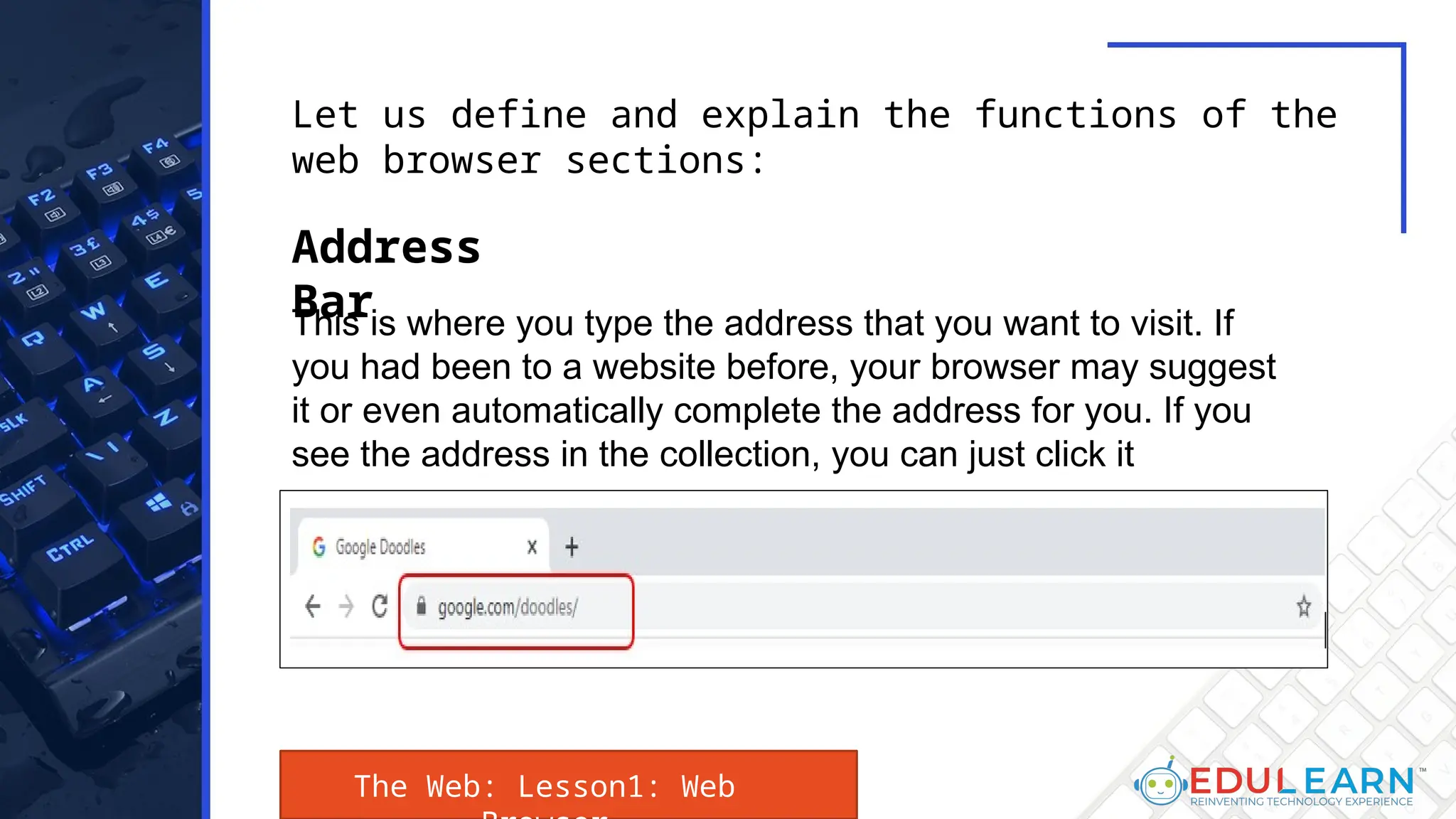
This is where you type the address that you want to visit. If
you had been to a website before, your browser may suggest
it or even automatically complete the address for you. If you
see the address in the collection, you can just click it
Let us define and explain the functions of the
web browser sections:
Address
Bar
The Web: Lesson1: Web
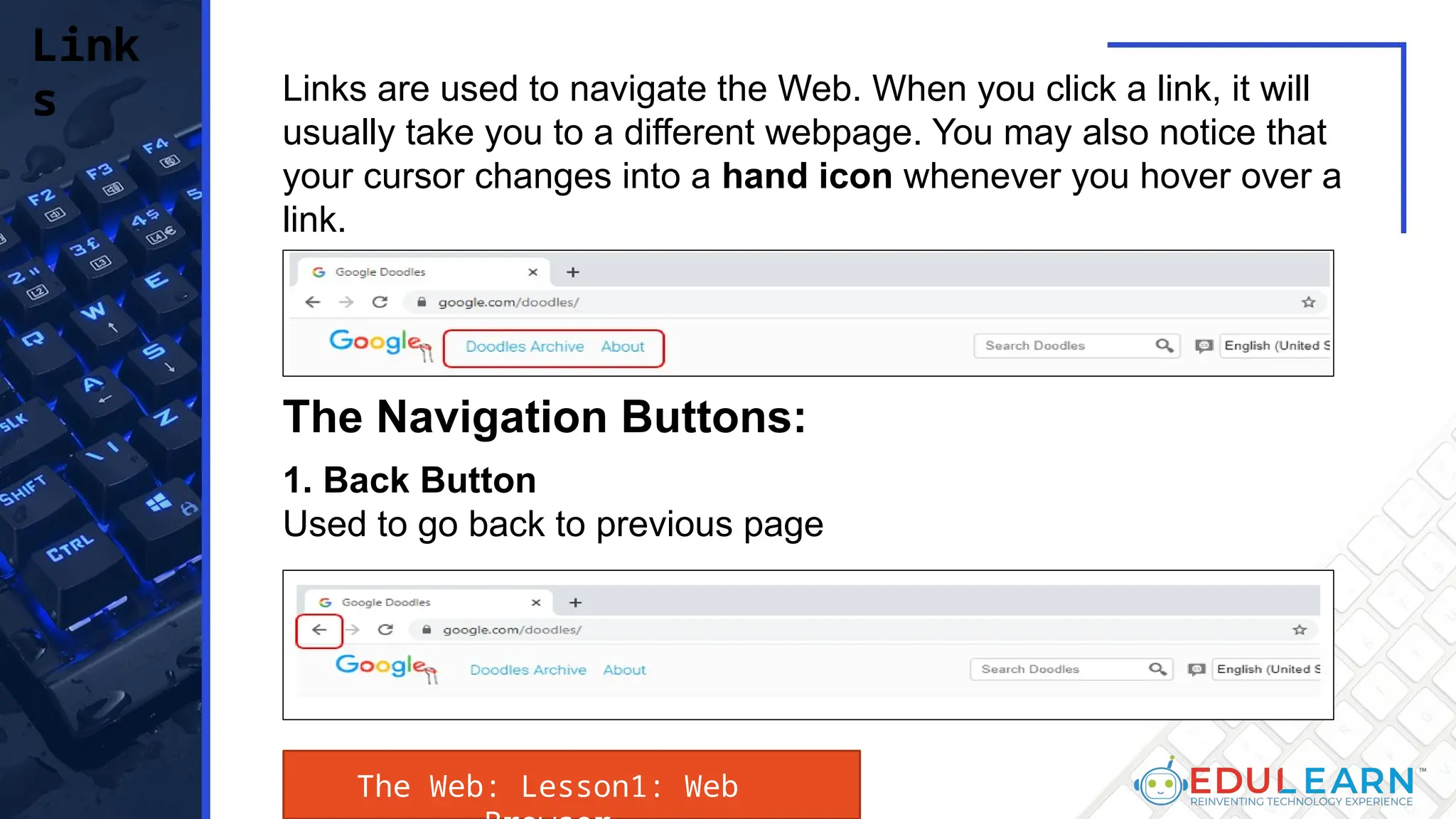
Links are used to navigate the Web. When you click a link, it will
usually take you to a different webpage. You may also notice that
your cursor changes into a hand icon whenever you hover over a
link.
Link
s
The Navigation Buttons:
1. Back Button
Used to go back to previous page
The Web: Lesson1: Web
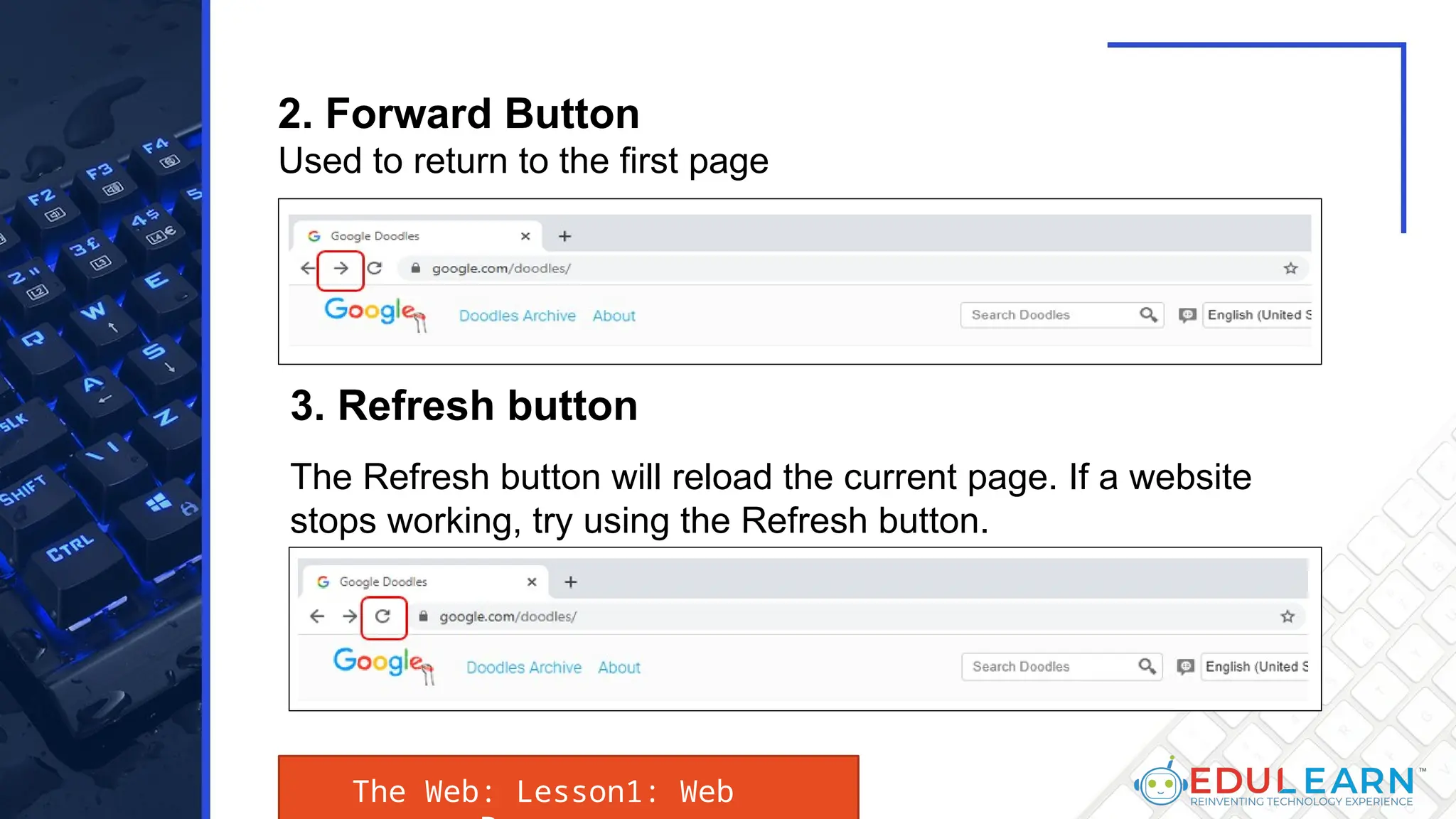
2. Forward Button
Used to return to the first page
3. Refresh button
The Refresh button will reload the current page. If a website
stops working, try using the Refresh button.
The Web: Lesson1: Web
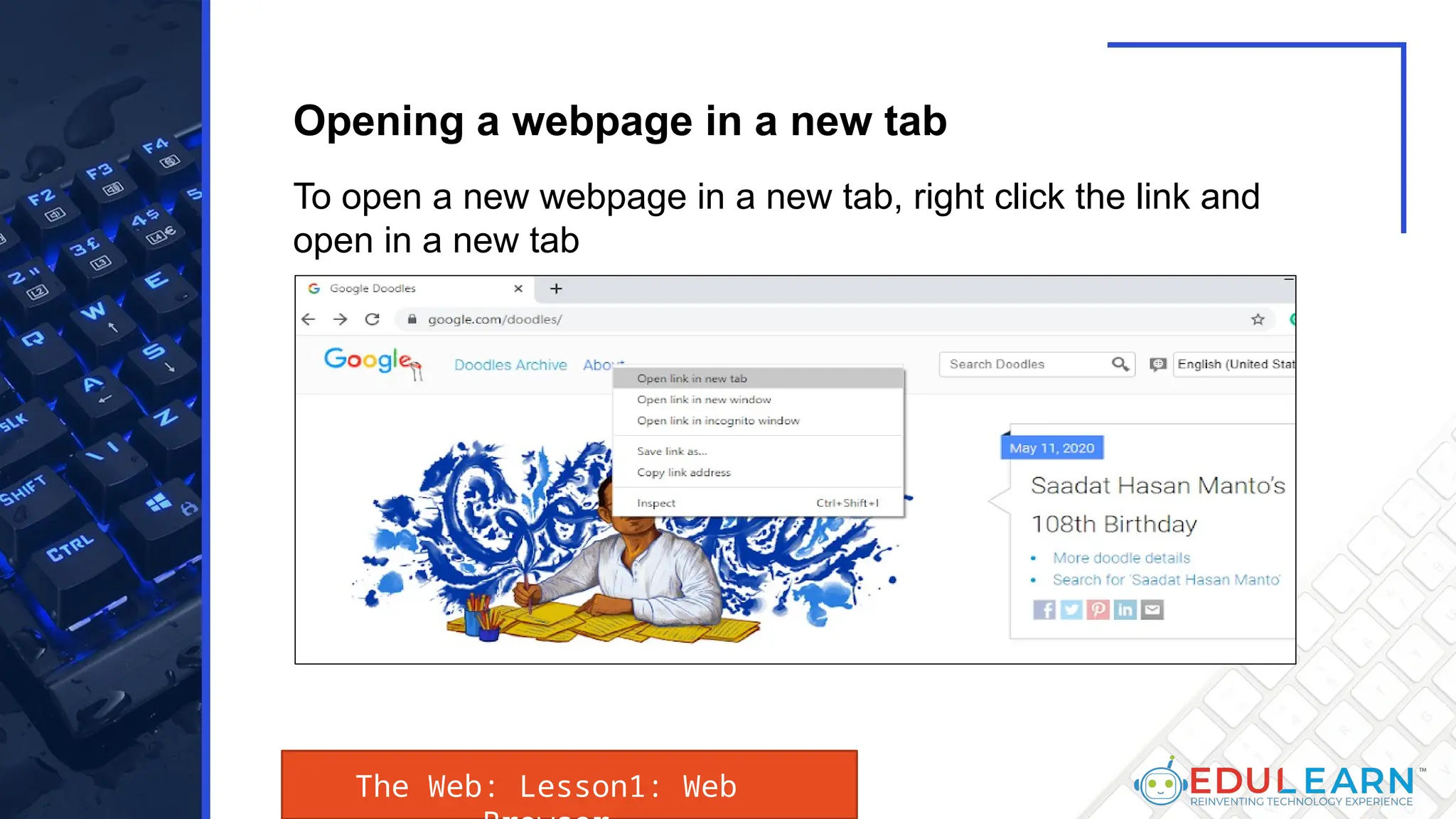
To open a new webpage in a new tab, right click the link and
open in a new tab
Opening a webpage in a new tab
The Web: Lesson1: Web
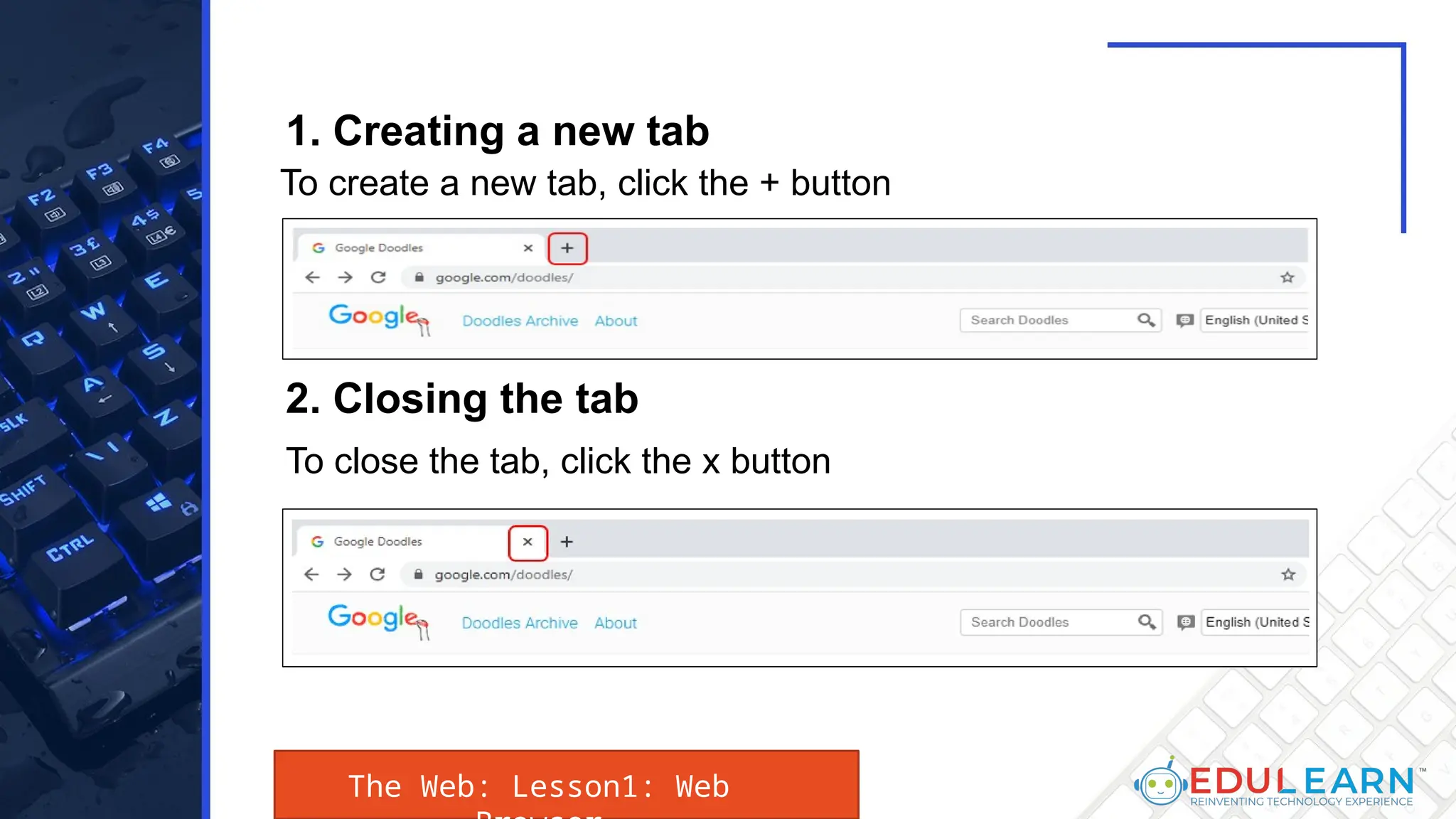
1. Creating a new tab
To close the tab, click the x button
2. Closing the tab
To create a new tab, click the + button
The Web: Lesson1: Web
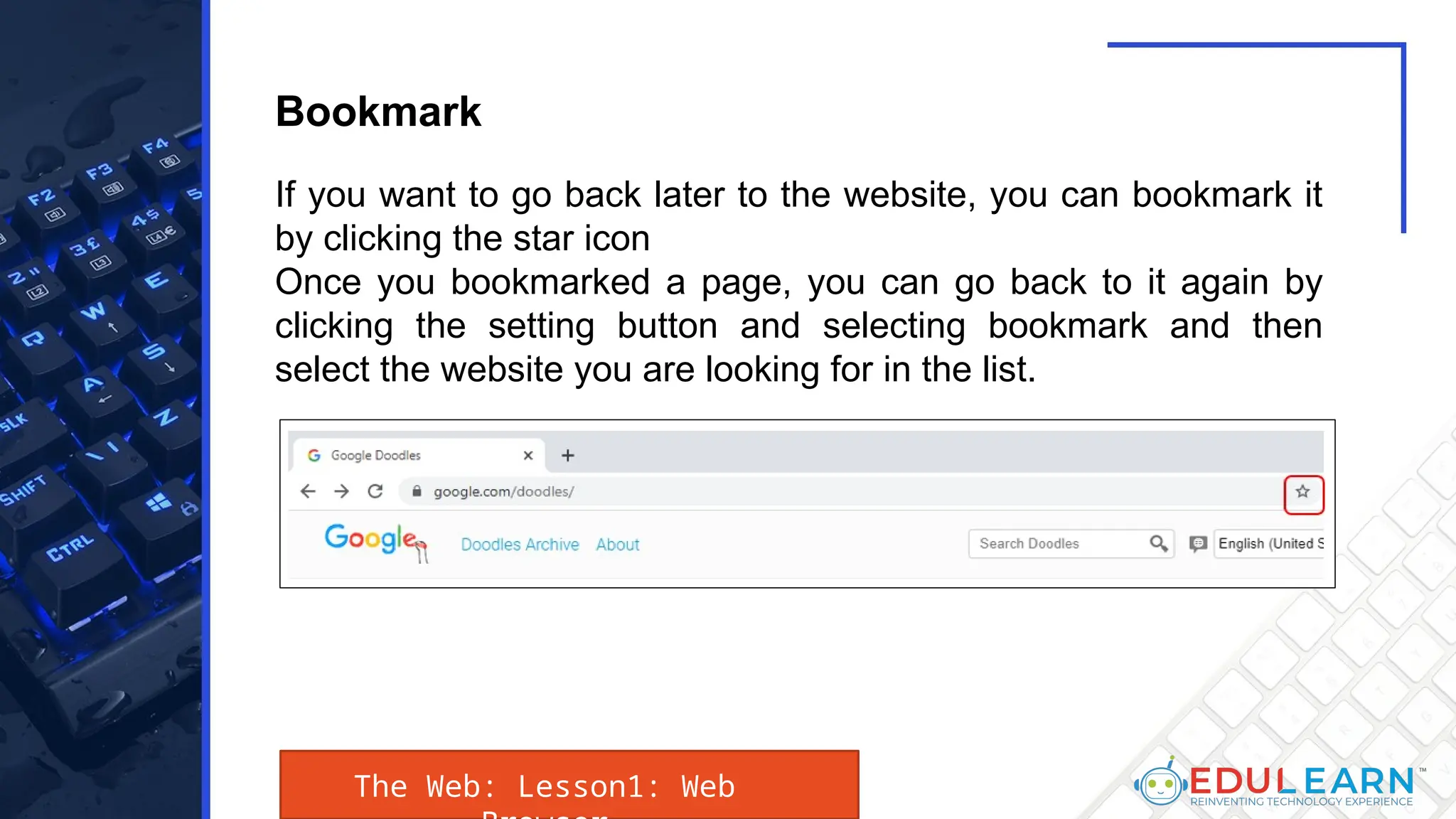
If you want to go back later to the website, you can bookmark it
by clicking the star icon
Once you bookmarked a page, you can go back to it again by
clicking the setting button and selecting bookmark and then
select the website you are looking for in the list.
Bookmark
The Web: Lesson1: Web
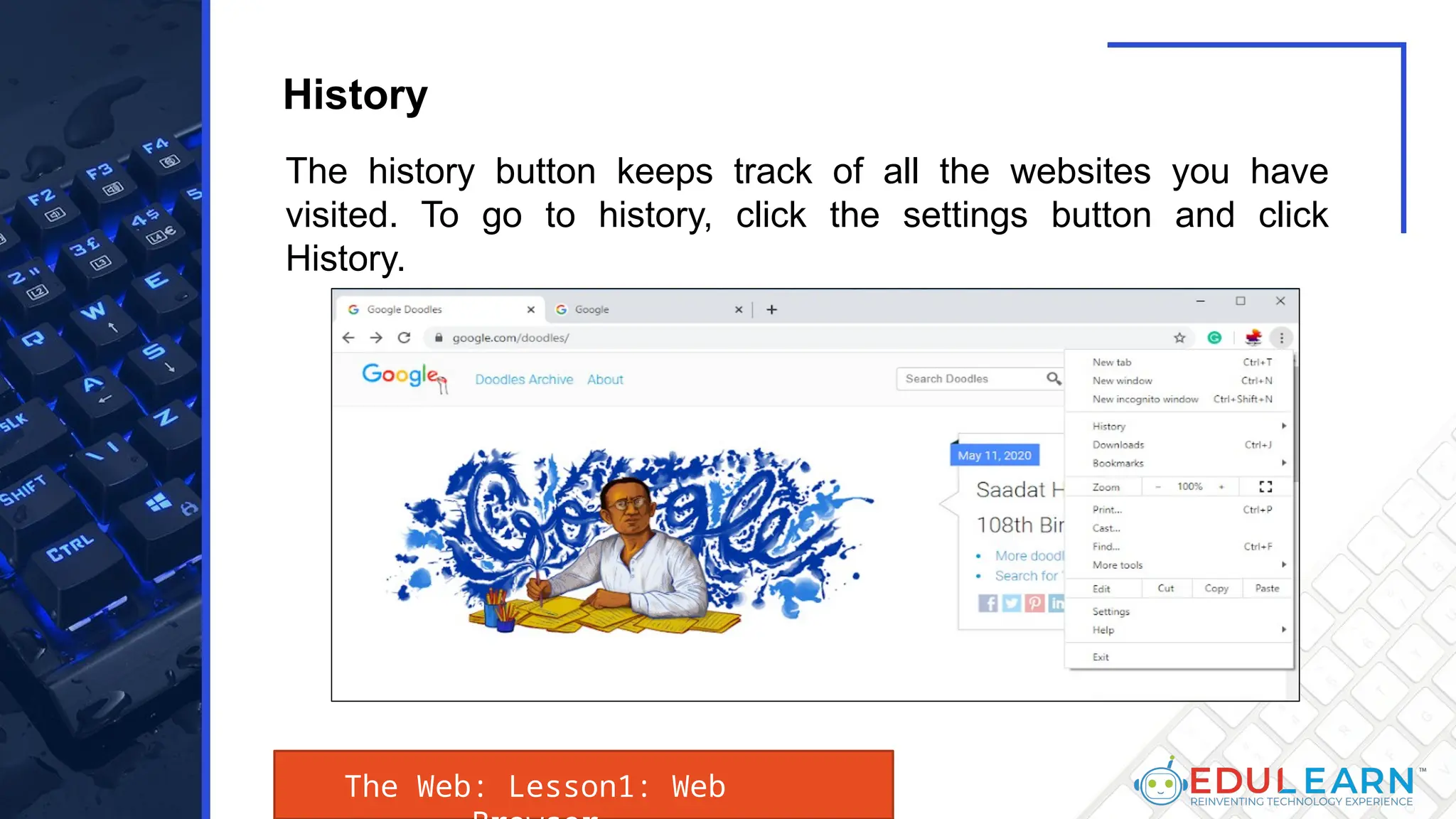
The history button keeps track of all the websites you have
visited. To go to history, click the settings button and click
History.
History
The Web: Lesson1: Web
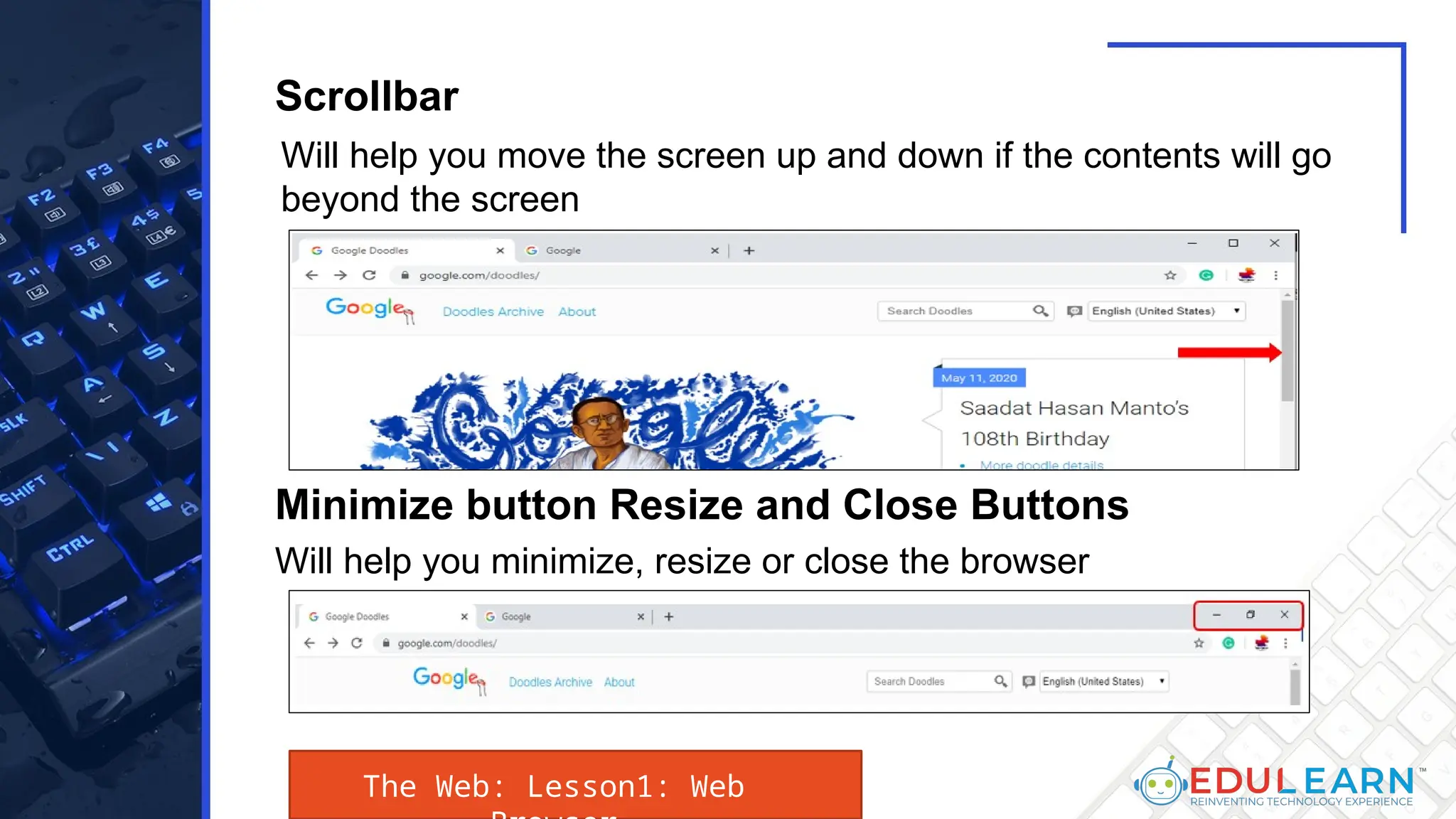
Will help you move the screen up and down if the contents will go
beyond the screen
Will help you minimize, resize or close the browser
Minimize button Resize and Close Buttons
Scrollbar
The Web: Lesson1: Web
End
Topic

Presentation _ Unit no. 1_ Lesson No. 1_ Grade 8.pptx

  • 1.
  • 2.
    In this lesson,we will learn about the different concepts involved in the study of the web. This involve learning the various types of browsers used to search the internet, how to access the web tool called Notepad++, differentiating the different types of websites, and understanding the significance of the most common acronyms used on the web. The Web : INTRODUCTION:
  • 3.
    At the endof this lesson, the students should be able to learn: 1. Identify the various styles of browser 2. Show how Notepad++ operates as a code editor. 3. Describes the types of websites Understand the significance of the common acronyms used on the internet The Web : Unit UNIT OBJECTIVES:
  • 4.
    The Web: Lesson1:Web Lesson 1: Web Browser
  • 5.
    The Web: Lesson1:Web A web browser is a software program to access information on the world wide web (usually referred to as a browser). Upon requests by a user of a website a web page is downloaded from a database server by the web client and the link on the screen is shown. A web browser is not the same as a search engine, although it is often frustrating in both. A user is a search engine that only contains information about other websites, including Google Search, Bing or DuckDuckGo. Nonetheless, a user must have a web browser installed to connect to the website server and to view their web pages. Web Browser
  • 6.
    The Web: Lesson1:Web The aim of a web browser is to collector and display information resources on the Web on the device of the user. This cycle starts when a Uniform Resource Locator (URL), such as https:/en.wikipedia.org, is entered by the user into the web browser. Nearly all web-based URLs start with either http: or https: which means the Hypertext Transference Protocol (HTTP) is used to access the URLs. For HTTPS: the browser- web server contact is encrypted for security and privacy purposes.
  • 7.
    The Web: Lesson1:Web The rendering engine of the browser displays it on the user's device once a Web page has been found. This includes browser-supported picture and video formats. Hyperlinks to other pages and services are usually found in websites. Each link has a URL and the browser navigates to the new source when it is clicked or tapped. This restarts the process of bringing the user content.
  • 8.
    The Web: Lesson1:Web For later visits to the same website, most browsers use an internal web-page cache to improve their loading times. Many things like big images can be stored in the cache to avoid being downloaded from the server. Cached items are usually only stored until the HTTP reply messages of the web server. A number of features are common to the most popular browsers. Users can set and browse in private mode by using bookmarks. Extensions can also be personalized and some of them provide a sync feature.
  • 9.
    The Web: Lesson1:Web Most browsers have these user interface features: • Enable the user to open multiple pages simultaneously, either in different browser windows or in various tabs in the same window. • Go back and forth to the last page you visited or to the next one. • Refreshing or reloading the current page button. • To avoid loading the page with a stop button. (The pause button is combined with the reload button in some browsers.) • A click back to the homepage of the app. • An address bar for entering and displaying the URL of a website. • A search bar for entering search engine terms. (The search bar is fusioned with the address bar in some browsers.)
  • 10.
    The Web: Lesson1:Web Niche browsers with different features are also available. One example is text-only browsers that can help people with poor Internet connections or visually disabled individuals. A web browser is a computer-based software program that allows users to visit their favorite websites on the Internet. Mozilla Firefox, Google Chrome, Microsoft Edge, Apple Safari and the Opera browsers are among the most popular browsers today.
  • 11.
    The Web: Lesson1:Web Mozilla Firefox is a free, open-source web browser developed by Mozilla Foundation and its Mozilla Corporation subsidiary (the Mozilla Firefox Quantum or simply Firefox). It operates on common systems like Windows, MacOS, Linux and Android. Firefox can add or remove browsing features and allows users to tailor Firefox to their needs. This has been done to make it safe and easy to use Firefox. Mozilla Firefox
  • 12.
    The Web: Lesson1:Web Features such as tabbed browsing, spell checking, gradual searching, live- bookmarking, Smart Bookmarks, a download manager, private browsing, Google-based location-ware browsing, and a built-in search feature. Mozilla Firefox
  • 13.
    The Web: Lesson1:Web Extensions allow the user to add or change new things to the browser. They have been created by other users. Because extensions can access all parts of Firefox 's computer, extensions could be created which could harm a computer. However, only if you have administrator privileges can the extension change system settings. Mozilla Firefox
  • 14.
    The Web: Lesson1:Web Firefox also has topics or skins that alter the browser's user appearance. Some themes, such as Internet Explorer and Netscape, can make Firefox look like other browsers. Browsing tabbed is a browser feature used by many webpages, where labelled tabs top up to the webpage can be opened in a window. Type control-T to make a new blank tab. Mozilla Firefox
  • 15.
    The Web: Lesson1:Web In the top right corner of the window there is a search box in Firefox that can be seen. The browser uses a search engine, such as Google or Yahoo, when someone with Mozilla Firefox types something into the search box and presses enter. Firefox 2 contains "search recommendations." The suggested words will be displayed when words are entered in the search box. The browser suggests for example, "Wikipedia," if "wiki" is typed. Mozilla Firefox
  • 16.
    The Web: Lesson1:Web If a word is wrong in a text box, like the one in which someone changes a Wikipedia page, Firefox can use the spell check, the program emphasizes the word wrongly spelled on a red line. Mozilla Firefox will list words using the right orthographer when you scroll over that word and copy the right one. For instance, "chekc" would have a suggestion for the wrong word "checkc." Mozilla Firefox
  • 17.
    The Web: Lesson1:Web Google Chrome is a Google-developed cross-platform web browser. It was released for Microsoft Windows in 2008, and later ported to Linux, MacOS, Android and iOS. The browser is also Chrome OS's main component, and is used as an applications portal. Google Chrome
  • 18.
    The Web: Lesson1:Web Most of the source code for Chrome comes from the free open-source Chromium software project, but it is licensed to Chrome as a proprietary freeware. WebKit was the original renderer, but eventually Google forced the renderer to build the Blink motor; all Chrome versions except the iOS now use Blink. Google Chrome
  • 19.
    The Web: Lesson1:Web Google Chrome has a simple user interface, which is later introduced in other browsers using its user interface concepts. The fusion of the address bar in the omnibox, for example. Chrome also has a good browser reputation. • Bookmarks and settings synchronization • Web standards support • Security Google Chrome
  • 20.
    The Web: Lesson1:Web • Password management • Security vulnerabilities • Malware blocking and ad blocking • Plugins • Privacy • Speed • Stability • User interface Google Chrome
  • 21.
    The Web: Lesson1:Web • Desktop shortcuts and apps • Extensions • Themes • Automatic web page translation • Release channels, cycles and updates • Color management • T-Rex Google Chrome
  • 22.
    The Web: Lesson1:Web Microsoft Edge is a web browser that has been created by Microsoft. It was first released on Windows 10 in 2015. It replaces Internet Explorer (IE), a browser that was originally created on Windows 95 and which for two decades was part of Windows operating systems. Microsoft Edge
  • 23.
    The Web: Lesson1:Web Edge is a smaller browser optimized for Web service and based on web standards. Microsoft does not currently plan to add Edge to previous Windows versions, or to supply versions of non-Windows operating systems. Microsoft Edge
  • 24.
    The Web: Lesson1:Web Edge has reduced the bloat that most modern browsers, including IE, have had; Active-X support has also been reduced. Edge was called the code in development "Spartan," which refers to a lightweight browser structure designed to make Edge work on multiple device platforms, often mobile. Microsoft Edge
  • 25.
    The Web: Lesson1:Web The same way Internet Explorer did in earlier releases, Edge installs together with Windows 10. However, IE for communication compatibility is also included in Windows 10 especially within the company. Microsoft Edge
  • 26.
    The Web: Lesson1:Web Edge’s features include: • Inking - an annotation tool that allows users to write or draw on Web pages. • Cortana - a personal virtual assistant from Halo, a popular video game. • Private browsing. • Security features such as Microsoft Passport and asymmetric cryptography to deter phishing and other social engineering attacks. Microsoft Edge
  • 27.
    The Web: Lesson1:Web • Support for Firefox and Chrome add-ons. • Faster overall page rendering. • Integration with social media. • Automatic form fill. • Uncluttered interface. • Reduced resource consumption to optimize for low-power devices. Microsoft Edge
  • 28.
    The Web: Lesson1:Web Safari is a Web browser based on the WebKit engine, created by Apple. A smartphone edition has been paired with ioS devices since the iPhone was introduced in 2007, and first published on desktop in 2003 with the Mac OS X Panther. The default Apple mobile browser is Safari. A version of Windows from 2007 to 2012 was available. Apple Safari
  • 29.
    The Web: Lesson1:Web Starting with Mac OS but has been ported to iOS and Windows since then. Safari was released for the Windows XP SP2 release for the first time on June 11, 2007. As for the iOS safari version, it's slightly different from the OS X version as it uses a different GUI, Webkit and an API. Apple Safari
  • 30.
    The Web: Lesson1:Web Safari is an OS X Cocoa framework and uses a rendering WebKit. WebKit itself consists of the GNU GPL free software, WebCore and JavaScriptCore, which also make Safari free. In addition, Apple releases the code under a 2-clause BSD open-source permit. Apple Safari
  • 31.
    The Web: Lesson1:Web Opera is the free web browser developed by Opera Software for Microsoft Windows, Android, iOS, macOS, and Linux. Opera uses Blink layout engine as a Chromium based browser. The user interface and other features make it distinctive. Opera
  • 32.
    The Web: Lesson1:Web Opera was designed as a research project at Telenor in 1994 and purchased in 1995 from Opera Software. For the first ten years it had been a commercial software and had a proprietary Presto layout engine. The Opera version of Presto received a number of prizes, but the production of Presto ended in 2013 following a significant Chromium transition. Opera
  • 33.
    The Web: Lesson1:Web Three mobile versions, Opera Mobile, Opera Touch and Opera Mini, are also available. On 11 June 2019, a gaming browser was launched called Opera GX. Opera
  • 34.
    The Web: Lesson1:Web Opera created features which other web browsers have later adopted, such as: speed dialing, pop-up blocking, newly opened shut-off pages, browsing privileging and tabs. Opera features a bookmarks bar and a manager for downloads. Opera also has "Call rates" enabling the user to connect an infinite number of thumbnail pages to a page shown during the opening of a new window. Speed Dial makes navigating to the selected web pages simpler for your app. Opera
  • 35.
    The Web: Lesson1:Web • Usability and accessibility • Privacy and security • Crypto wallet support • Standards support Opera
  • 36.
    This is whereyou type the address that you want to visit. If you had been to a website before, your browser may suggest it or even automatically complete the address for you. If you see the address in the collection, you can just click it Let us define and explain the functions of the web browser sections: Address Bar The Web: Lesson1: Web
  • 37.
    Links are usedto navigate the Web. When you click a link, it will usually take you to a different webpage. You may also notice that your cursor changes into a hand icon whenever you hover over a link. Link s The Navigation Buttons: 1. Back Button Used to go back to previous page The Web: Lesson1: Web
  • 38.
    2. Forward Button Usedto return to the first page 3. Refresh button The Refresh button will reload the current page. If a website stops working, try using the Refresh button. The Web: Lesson1: Web
  • 39.
    To open anew webpage in a new tab, right click the link and open in a new tab Opening a webpage in a new tab The Web: Lesson1: Web
  • 40.
    1. Creating anew tab To close the tab, click the x button 2. Closing the tab To create a new tab, click the + button The Web: Lesson1: Web
  • 41.
    If you wantto go back later to the website, you can bookmark it by clicking the star icon Once you bookmarked a page, you can go back to it again by clicking the setting button and selecting bookmark and then select the website you are looking for in the list. Bookmark The Web: Lesson1: Web
  • 42.
    The history buttonkeeps track of all the websites you have visited. To go to history, click the settings button and click History. History The Web: Lesson1: Web
  • 43.
    Will help youmove the screen up and down if the contents will go beyond the screen Will help you minimize, resize or close the browser Minimize button Resize and Close Buttons Scrollbar The Web: Lesson1: Web
  • 44.