What is NAP
Microsoft Network Access Protection (NAP) is a
Policy-based management feature of windows Server
2008 that allows a network administrator to control
access to Network resources.
NAP policies define the required configuration and
update status for a client computer operating system
and critical software.
Security Enhancements in Windows Server 2008
Reduced attack surface of the kernel through Server
Core
Expanded group policy
Windows Firewall
Network Access Protection
BitLocker Drive Encryption
3
Benefits of NAP
Protect the network:-
Network health analysis
Policy validation
Identify risks
Enhanced network health
Policy compliance
Access control
NAP Authentication methods
Password-based Point-to-Point Protocol (PPP)
authentication protocols.
Extensible Authentication Protocol (EAP) and
Protected EAP (PEAP)
Authorization methods
Dialed Number Identification Service (DNIS).
Automatic Number Identification/Calling Line
Identification (ANI/CLI)
Guest authorization
Why Use Network Access
Protection?
Private
Network
Unhealthy
computer
Healthy
computer
8
Network Access Protection
enforcement methods
Internet Protocol security (IPsec)-protected
communications
IEEE 802.1X-authenticated network connections
Remote access virtual private network (VPN)
connections
Dynamic Host Configuration Protocol (DHCP)
configuration
9
NAP client with limited access
DHCP server
Remediation
servers
VPN server
Network Policy Server
(NPS)
Active Directory
Intranet
Restricted network
Perimeter
network
Health certificate
server (HCS)
IEEE 802.1X devices
Internet
Policy
servers
Components of the Network Access
Protection platform
10
Network infrastructure for Network
Access Protection
Health policy validation
Determines whether the computers are compliant with
health policy requirements
Network access limitation
Limits access for noncompliant computers
Automatic remediation
Provides necessary updates to allow a noncompliant
computer to become compliant
Ongoing compliance
Automatically updates compliant computers so that they
adhere to ongoing changes in health policy requirements
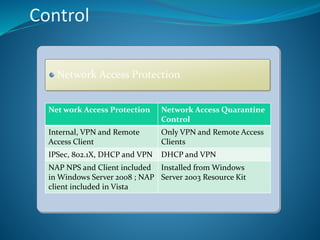
Control
Network Access Protection
Net work Access Protection Network Access Quarantine
Control
Internal, VPN and Remote
Access Client
Only VPN and Remote Access
Clients
IPSec, 802.1X, DHCP and VPN DHCP and VPN
NAP NPS and Client included
in Windows Server 2008 ; NAP
client included in Vista
Installed from Windows
Server 2003 Resource Kit
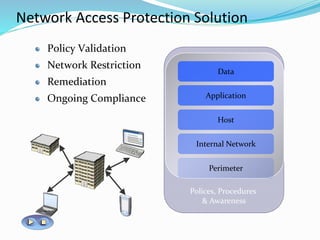
Network Access Protection Solution
Polices, Procedures
& Awareness
Data
Application
Host
Internal Network
Perimeter
Policy Validation
Network Restriction
Remediation
Ongoing Compliance
According to
policy, the client
is not up to date.
Quarantine
client, request it
to update.
Should this client
be restricted
based
on its health?
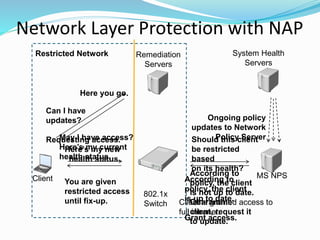
Network Layer Protection with NAP
Requesting access.
Here’s my new
health status.
MS NPSClient
802.1x
Switch
Remediation
Servers
May I have access?
Here’s my current
health status.
Ongoing policy
updates to Network
Policy Server
You are given
restricted access
until fix-up.
Can I have
updates?
Here you go.
Restricted Network
Client is granted access to
full intranet.
System Health
Servers
According to
policy, the client
is up to date.
Grant access.
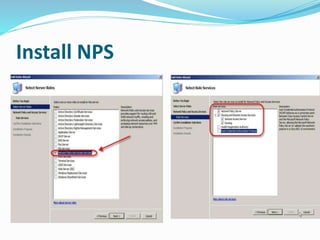
Install NPS
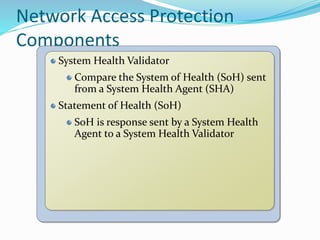
Network Access Protection
Components
System Health Validator
Compare the System of Health (SoH) sent
from a System Health Agent (SHA)
Statement of Health (SoH)
SoH is response sent by a System Health
Agent to a System Health Validator
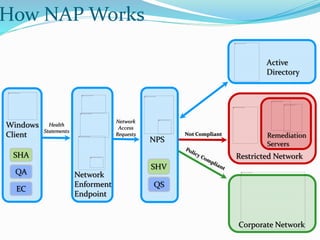
Network
Access
Requests Not Compliant
How NAP Works
Corporate Network
Restricted Network
Windows
Client
Network
Enforment
Endpoint
NPS
Active
Directory
Remediation
Servers
Health
Statements
QA
SHA
EC
QS
SHV
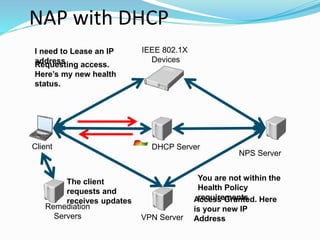
NAP with DHCP
NPS Server
DHCP Server
Requesting access.
Here’s my new health
status.
The client
requests and
receives updates
I need to Lease an IP
address
You are not within the
Health Policy
requirementsAccess Granted. Here
is your new IP
AddressVPN Server
Client
IEEE 802.1X
Devices
Remediation
Servers
NAP Enforcement Client
802.1X
VPN
IPSec
DHCP
NPS
RADIUS
19
DHCP Enforcement
For noncompliant computers, prevents unlimited
access to a network through a limited DHCP address
configuration
Network Access Protection-capable DHCP clients use
their list of SoHs as proof of their health compliance
20
VPN enforcement
For noncompliant computers, prevents unlimited
access to a network through a remote access VPN
connection
Network Access Protection-capable VPN clients use
their list of SoHs as proof of their health compliance
NAP Infrastructure
Health Policy Validation
Health Policy Compliance
Automatic Remediation
Limited Access
DHCP
DHCP with NAP
Secure the DHCP process
Configured through a Network Policy Server
Issues different information depending on compliance
Remediation server
Provides updates and security policy changes to the
client
Brings client into compliance
DHCP issues noncompliant computer IP address of
remediation server
Manage NPS on DHCP
Configuring Custom NPS Policies
Per DHCP scope
Policy validation
System health validators (SHVs) are used by NPS to
analyze the health status of client computers.
Health status is monitored by client-side NAP
components called system health agents (SHAs)
NAP enforcement
NAP enforcement settings allow you to limit network
access of noncompliant clients to a restricted network,
to defer restriction to a later date, or to merely observe
and log the health status of NAP-capable client
computers.
Allow full network access
Allow limited access
Allow full network access
for a limited time.
Remediation
Remediation is the process of updating a client
computer so that it meets current health
requirements.
NAP health policy server
System Health Validators
Health Policies
Network Policies
Connection Request Policies
RADIUS Clients and Servers
Remediation Server Groups
Active Directory Domain Services
NAP enforcement points
Health requirement servers
Health Policy Options
Windows Security Center
Firewall on/off
Anti-virus installed & up to date
Anti-spyware installed & up to date
Automatic updates enabled
System Center Configuration Manager
Required software patches are installed
Automatic patch installation to remediate
Forefront Client Security
Malware signature definition files up to date
State of system services
system health validator
WSHV(Windows Security Health
Validator) Properties
System Health Validator Template
Verifying NAP functionality
Verification of NAP auto-remediation. CLIENT1 is
automatically remediated when Windows Firewall is
turned off, causing Windows Firewall to be turned
back on.
Verification of NAP policy enforcement. NAP policy is
revised to be more restrictive, causing CLIENT1 to be
noncompliant with policy and unable to remediate
itself. When CLIENT1 is in a noncompliant state, its
network access will be restricted.
Review NAP client events in Event
Viewer
Click Start, point to All Programs, click Accessories,
and then click Run.
2. Type eventvwr.msc, and press ENTER.
3. In the left tree, navigate to Event
Viewer(Local)Applications and Services
LogsMicrosoftWindowsNetwork Access
ProtectionOperational.
4. Click an event in the middle pane.
5. By default, the General tab is displayed. Click the
Details tab to view additional information.

Network access protection ppt

  • 2.
    What is NAP MicrosoftNetwork Access Protection (NAP) is a Policy-based management feature of windows Server 2008 that allows a network administrator to control access to Network resources. NAP policies define the required configuration and update status for a client computer operating system and critical software.
  • 3.
    Security Enhancements inWindows Server 2008 Reduced attack surface of the kernel through Server Core Expanded group policy Windows Firewall Network Access Protection BitLocker Drive Encryption 3
  • 4.
    Benefits of NAP Protectthe network:- Network health analysis Policy validation Identify risks Enhanced network health Policy compliance Access control
  • 5.
    NAP Authentication methods Password-basedPoint-to-Point Protocol (PPP) authentication protocols. Extensible Authentication Protocol (EAP) and Protected EAP (PEAP)
  • 6.
    Authorization methods Dialed NumberIdentification Service (DNIS). Automatic Number Identification/Calling Line Identification (ANI/CLI) Guest authorization
  • 7.
    Why Use NetworkAccess Protection? Private Network Unhealthy computer Healthy computer
  • 8.
    8 Network Access Protection enforcementmethods Internet Protocol security (IPsec)-protected communications IEEE 802.1X-authenticated network connections Remote access virtual private network (VPN) connections Dynamic Host Configuration Protocol (DHCP) configuration
  • 9.
    9 NAP client withlimited access DHCP server Remediation servers VPN server Network Policy Server (NPS) Active Directory Intranet Restricted network Perimeter network Health certificate server (HCS) IEEE 802.1X devices Internet Policy servers Components of the Network Access Protection platform
  • 10.
    10 Network infrastructure forNetwork Access Protection Health policy validation Determines whether the computers are compliant with health policy requirements Network access limitation Limits access for noncompliant computers Automatic remediation Provides necessary updates to allow a noncompliant computer to become compliant Ongoing compliance Automatically updates compliant computers so that they adhere to ongoing changes in health policy requirements
  • 11.
    Control Network Access Protection Network Access Protection Network Access Quarantine Control Internal, VPN and Remote Access Client Only VPN and Remote Access Clients IPSec, 802.1X, DHCP and VPN DHCP and VPN NAP NPS and Client included in Windows Server 2008 ; NAP client included in Vista Installed from Windows Server 2003 Resource Kit
  • 12.
    Network Access ProtectionSolution Polices, Procedures & Awareness Data Application Host Internal Network Perimeter Policy Validation Network Restriction Remediation Ongoing Compliance
  • 13.
    According to policy, theclient is not up to date. Quarantine client, request it to update. Should this client be restricted based on its health? Network Layer Protection with NAP Requesting access. Here’s my new health status. MS NPSClient 802.1x Switch Remediation Servers May I have access? Here’s my current health status. Ongoing policy updates to Network Policy Server You are given restricted access until fix-up. Can I have updates? Here you go. Restricted Network Client is granted access to full intranet. System Health Servers According to policy, the client is up to date. Grant access.
  • 14.
  • 15.
    Network Access Protection Components SystemHealth Validator Compare the System of Health (SoH) sent from a System Health Agent (SHA) Statement of Health (SoH) SoH is response sent by a System Health Agent to a System Health Validator
  • 16.
    Network Access Requests Not Compliant HowNAP Works Corporate Network Restricted Network Windows Client Network Enforment Endpoint NPS Active Directory Remediation Servers Health Statements QA SHA EC QS SHV
  • 17.
    NAP with DHCP NPSServer DHCP Server Requesting access. Here’s my new health status. The client requests and receives updates I need to Lease an IP address You are not within the Health Policy requirementsAccess Granted. Here is your new IP AddressVPN Server Client IEEE 802.1X Devices Remediation Servers
  • 18.
  • 19.
    19 DHCP Enforcement For noncompliantcomputers, prevents unlimited access to a network through a limited DHCP address configuration Network Access Protection-capable DHCP clients use their list of SoHs as proof of their health compliance
  • 20.
    20 VPN enforcement For noncompliantcomputers, prevents unlimited access to a network through a remote access VPN connection Network Access Protection-capable VPN clients use their list of SoHs as proof of their health compliance
  • 21.
    NAP Infrastructure Health PolicyValidation Health Policy Compliance Automatic Remediation Limited Access
  • 22.
    DHCP DHCP with NAP Securethe DHCP process Configured through a Network Policy Server Issues different information depending on compliance Remediation server Provides updates and security policy changes to the client Brings client into compliance DHCP issues noncompliant computer IP address of remediation server
  • 23.
  • 24.
    Configuring Custom NPSPolicies Per DHCP scope
  • 25.
    Policy validation System healthvalidators (SHVs) are used by NPS to analyze the health status of client computers. Health status is monitored by client-side NAP components called system health agents (SHAs)
  • 26.
    NAP enforcement NAP enforcementsettings allow you to limit network access of noncompliant clients to a restricted network, to defer restriction to a later date, or to merely observe and log the health status of NAP-capable client computers. Allow full network access Allow limited access Allow full network access for a limited time.
  • 27.
    Remediation Remediation is theprocess of updating a client computer so that it meets current health requirements.
  • 28.
    NAP health policyserver System Health Validators Health Policies Network Policies Connection Request Policies RADIUS Clients and Servers Remediation Server Groups Active Directory Domain Services NAP enforcement points Health requirement servers
  • 29.
    Health Policy Options WindowsSecurity Center Firewall on/off Anti-virus installed & up to date Anti-spyware installed & up to date Automatic updates enabled System Center Configuration Manager Required software patches are installed Automatic patch installation to remediate Forefront Client Security Malware signature definition files up to date State of system services
  • 30.
  • 31.
  • 32.
  • 33.
    Verifying NAP functionality Verificationof NAP auto-remediation. CLIENT1 is automatically remediated when Windows Firewall is turned off, causing Windows Firewall to be turned back on. Verification of NAP policy enforcement. NAP policy is revised to be more restrictive, causing CLIENT1 to be noncompliant with policy and unable to remediate itself. When CLIENT1 is in a noncompliant state, its network access will be restricted.
  • 34.
    Review NAP clientevents in Event Viewer Click Start, point to All Programs, click Accessories, and then click Run. 2. Type eventvwr.msc, and press ENTER. 3. In the left tree, navigate to Event Viewer(Local)Applications and Services LogsMicrosoftWindowsNetwork Access ProtectionOperational. 4. Click an event in the middle pane. 5. By default, the General tab is displayed. Click the Details tab to view additional information.