Mythbusting Goes Virtual
What’s new in vSphere 5.1

      By Eric Sloof
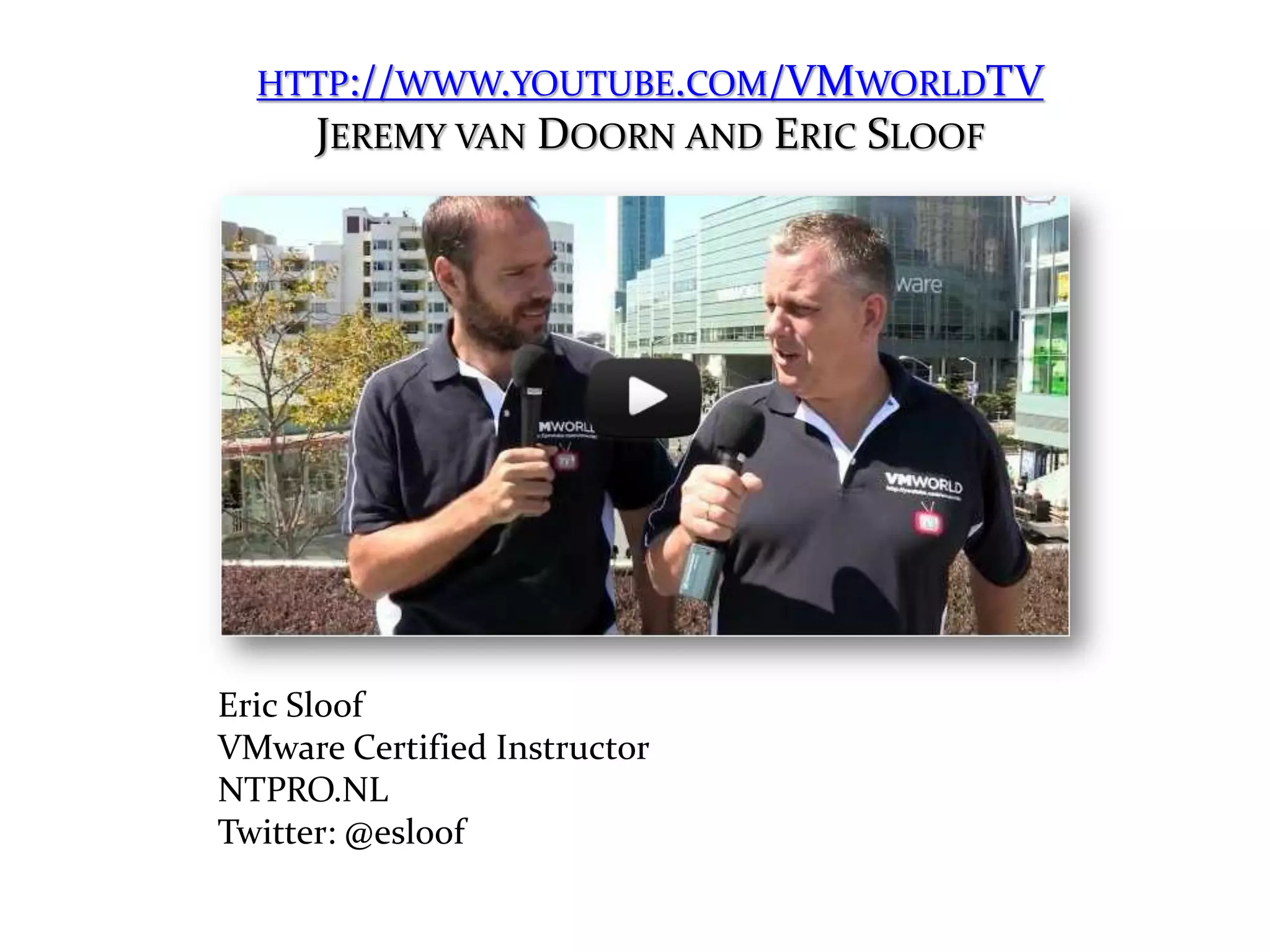
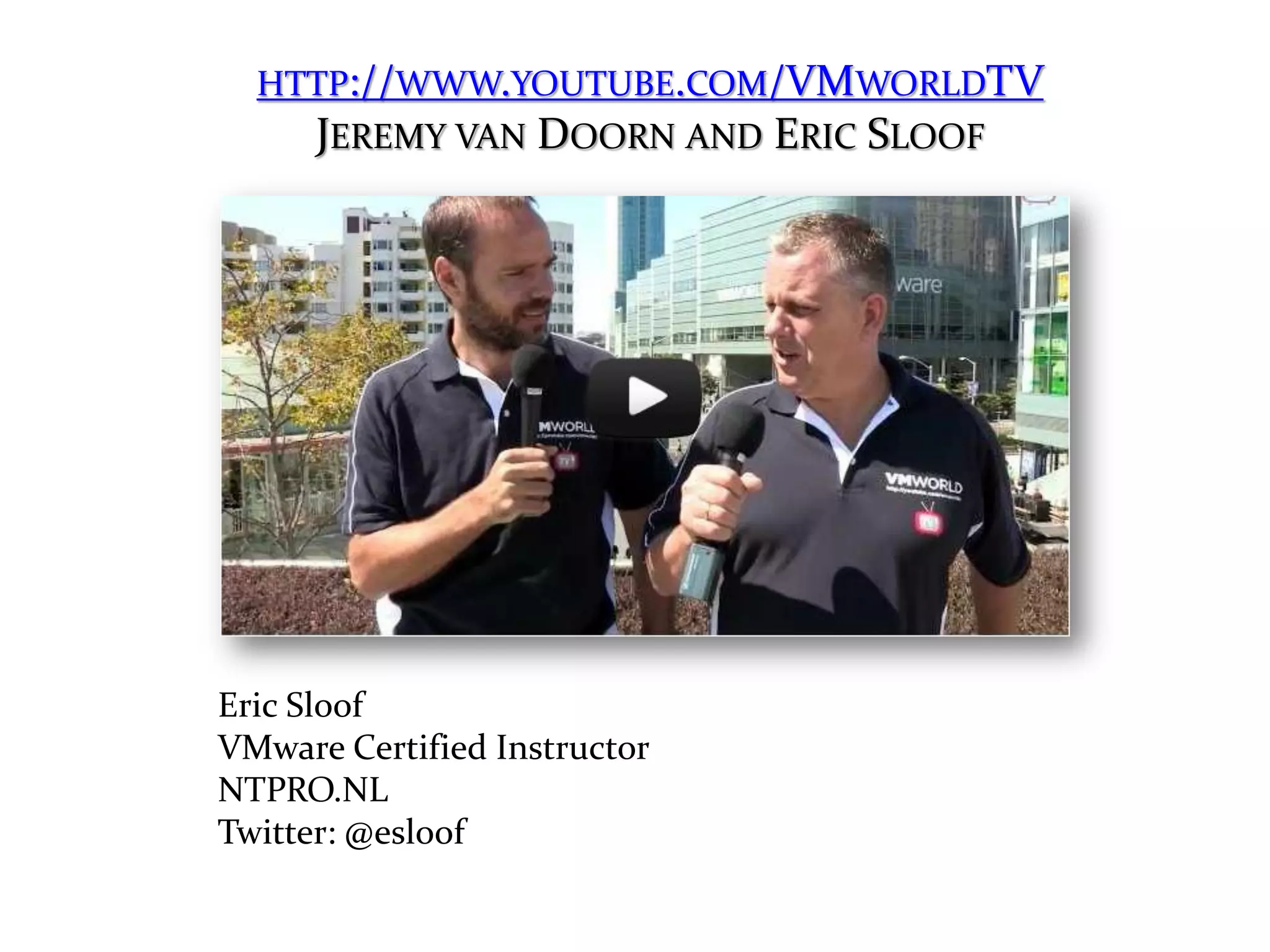
HTTP://WWW.YOUTUBE.COM/VMWORLDTV
    JEREMY VAN DOORN AND ERIC SLOOF


Eric Sloof
VMware Certified Instructor
NTPRO.NL
Twitter: @esloof
Agenda/Myths

1) vMotion is only possible with shared storage.
2) You have to run Windows to manage vSphere.
3) You need Site Recovery Manager to protect your
   virtual machines from a complete site loss.
4) Due to VMFS, the maximum number of host in a
   cluster with linked clones is 8.
5) It’s not possible to backup or restore a
   Distributed vSwitch configuration.
Myth 1

vMotion is only possible with shared storage
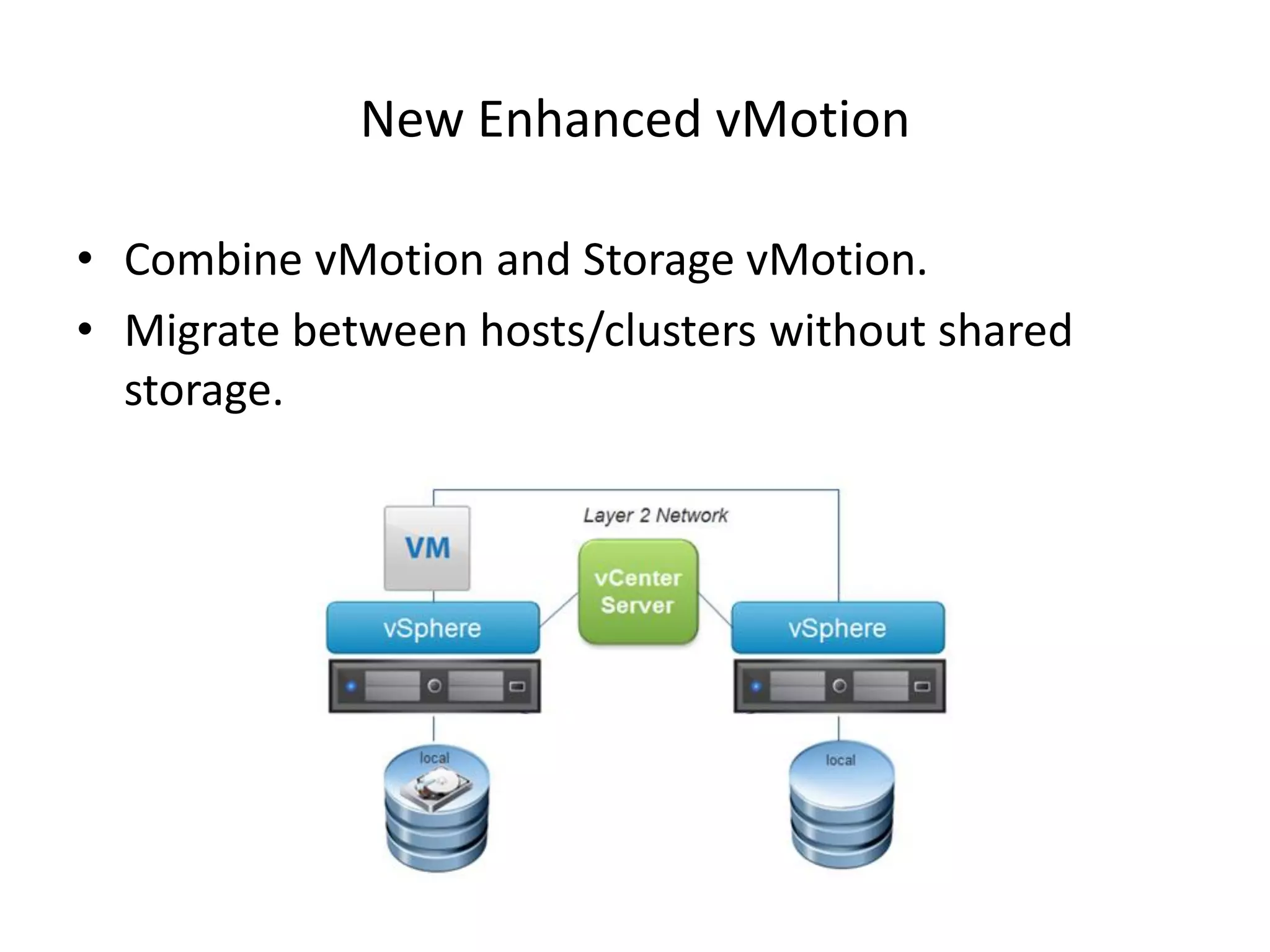
New Enhanced vMotion

• Combine vMotion and Storage vMotion.
• Migrate between hosts/clusters without shared
  storage.
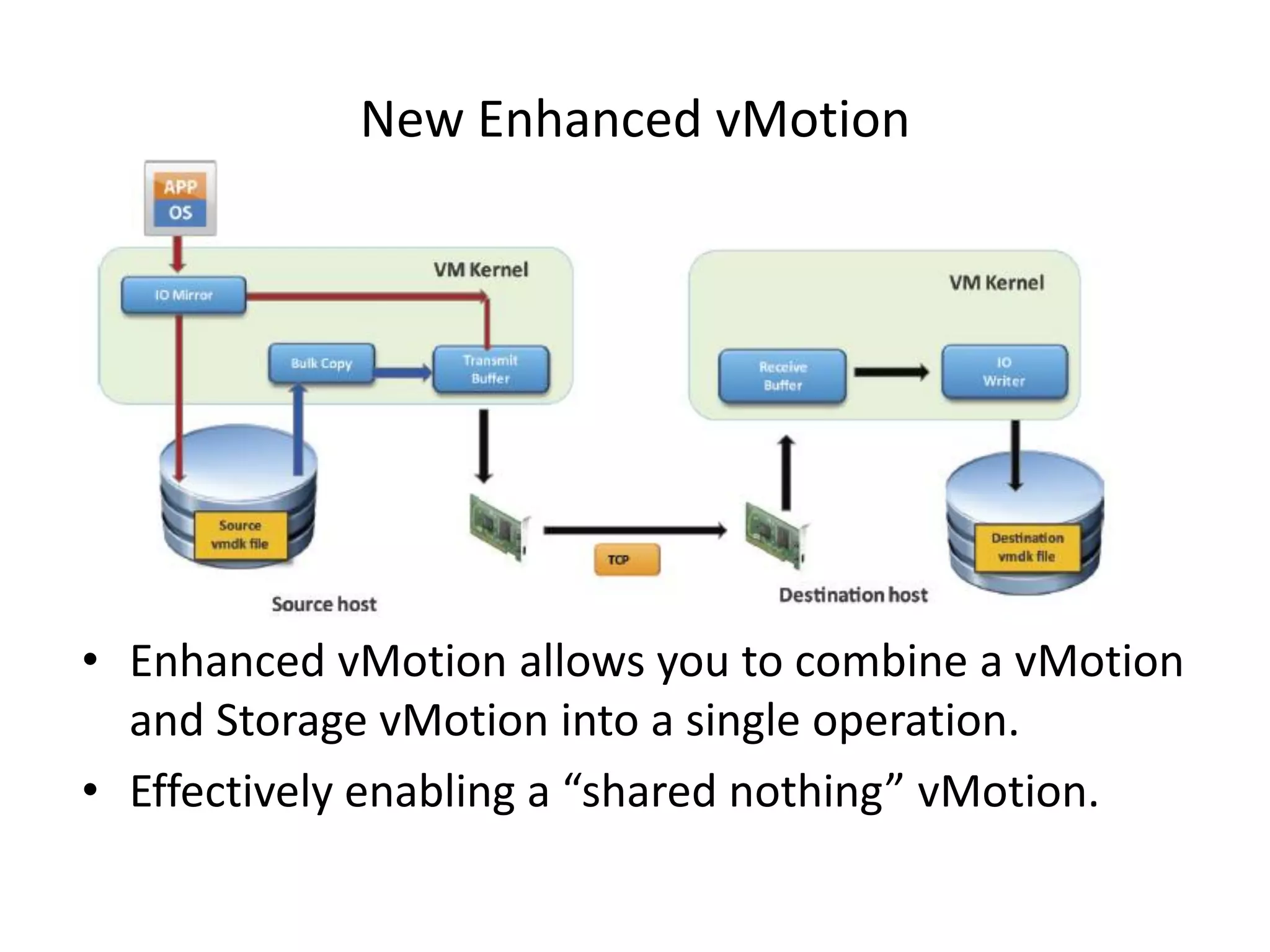
New Enhanced vMotion


• Enhanced vMotion allows you to combine a vMotion
  and Storage vMotion into a single operation.
• Effectively enabling a “shared nothing” vMotion.
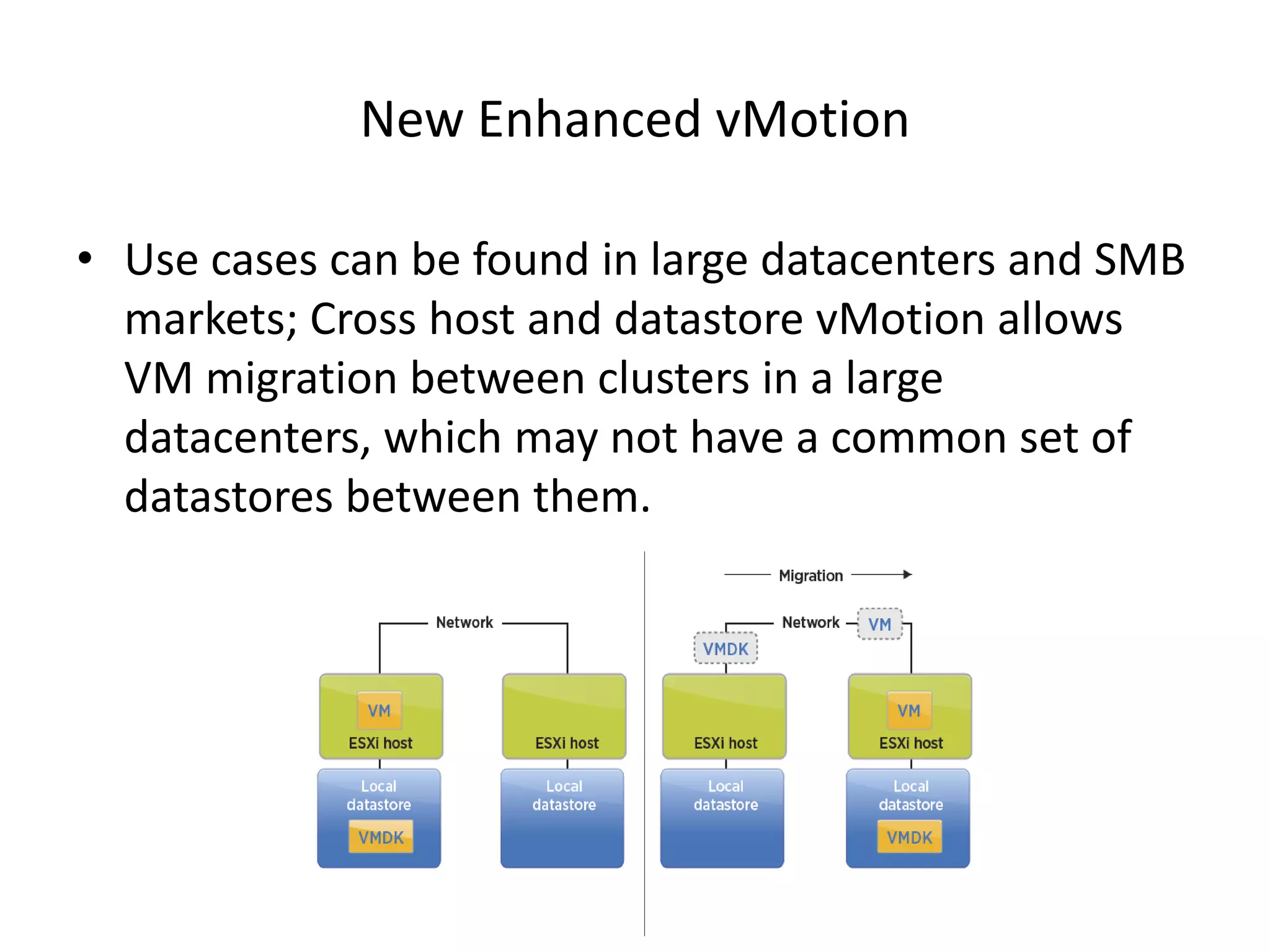
New Enhanced vMotion

• Use cases can be found in large datacenters and SMB
  markets; Cross host and datastore vMotion allows
  VM migration between clusters in a large
  datacenters, which may not have a common set of
  datastores between them.
Myth Busted

• Two Enhanced vMotion + 6 vMotions at the same
  time or two Enhanced vMotions + Zero svMotions at
  the same time.
• DRS or sDRS don’t use Enhanced vMotion
  technology.
• Leverage the advantages of vMotion (zero-downtime
  migration) without the need for shared storage
  configurations.
Myth 2

You need Windows to manage vSphere
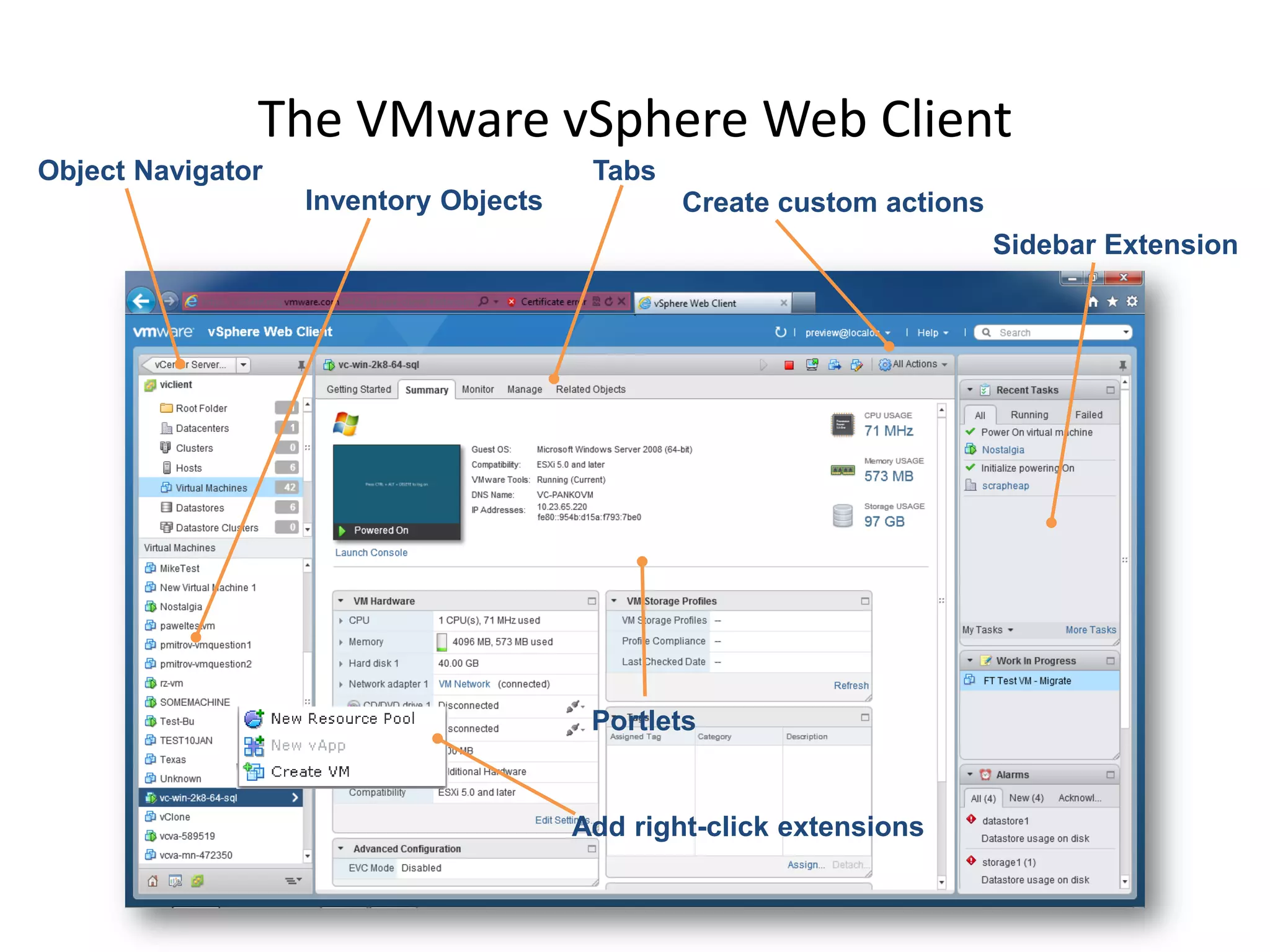
The VMware vSphere Web Client

• In vSphere 5.1, the VMware vSphere Web Client is
  the new primary point for vSphere management.

• It has several advantages over the previous Microsoft
  Windows–based VMware vSphere Client.
The VMware vSphere Web Client
Object Navigator                        Tabs
                   Inventory Objects           Create custom actions
                                                                       Sidebar Extension


                                        Portlets


                                       Add right-click extensions
The VMware vSphere Web Client

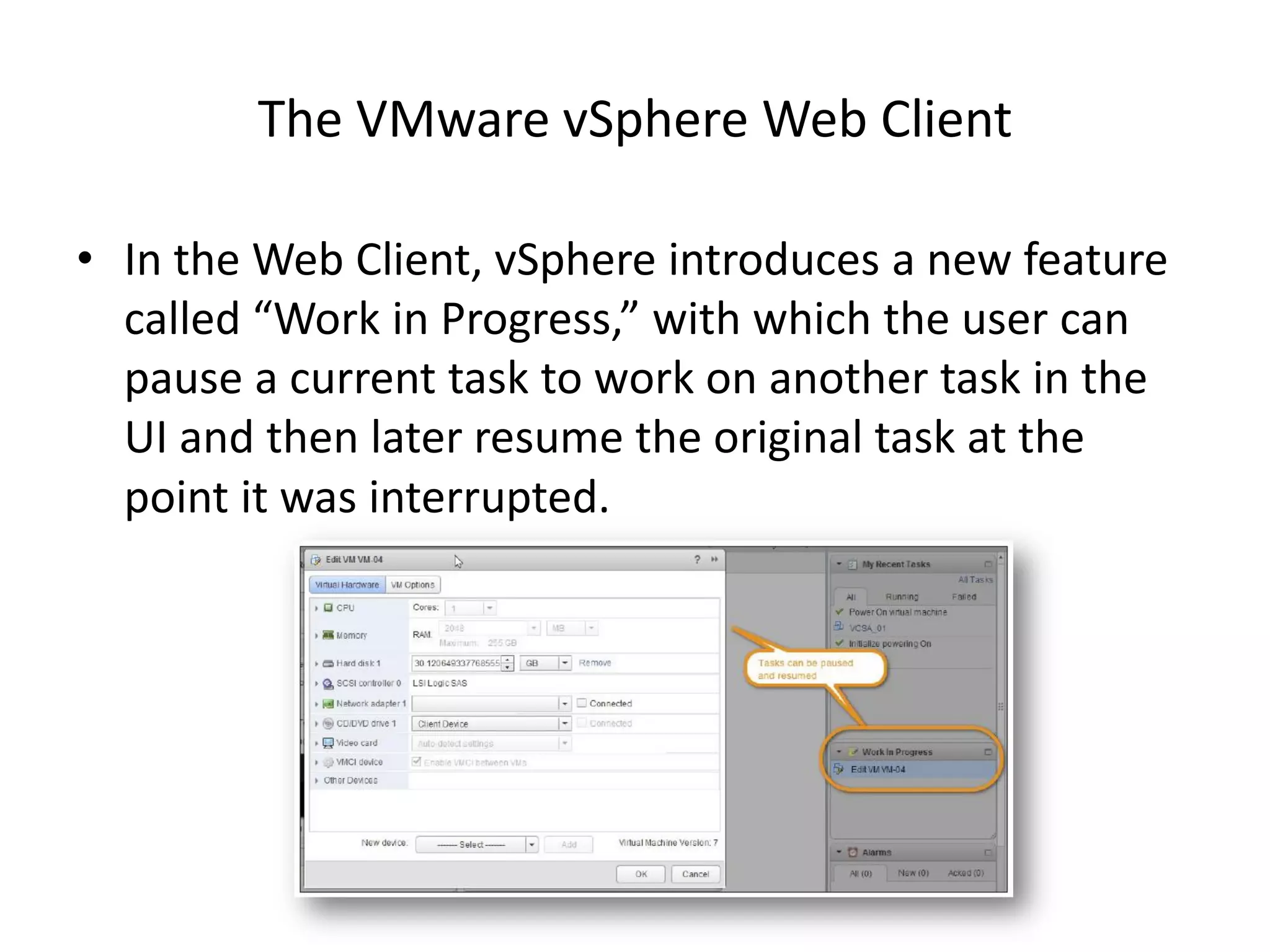
• In the Web Client, vSphere introduces a new feature
  called “Work in Progress,” with which the user can
  pause a current task to work on another task in the
  UI and then later resume the original task at the
  point it was interrupted.
Myth Busted

• All new vSphere 5.1 features are only available from
  the Web Client.
• With the improvements added to VMware vSphere
  5.1, the VMware vCenter Server architecture,
  VMware vCenter Single Sign-On, VMware vCenter
  Inventory Service and the VMware vSphere Web
  Client, VMware has released a formidable collection
  of tools for the administrator of a virtualized
  environment.
MYTH 3
You need SRM to protect your virtual machines from
               a complete site loss
vSphere Replication

• vSphere Replication is now a feature of the
  vSphere platform.

• It copies a virtual machine to another location,
  within or between clusters, and makes that
  copy available for restoration through the
  VMware vCenter Server Web Client.
vSphere Replication


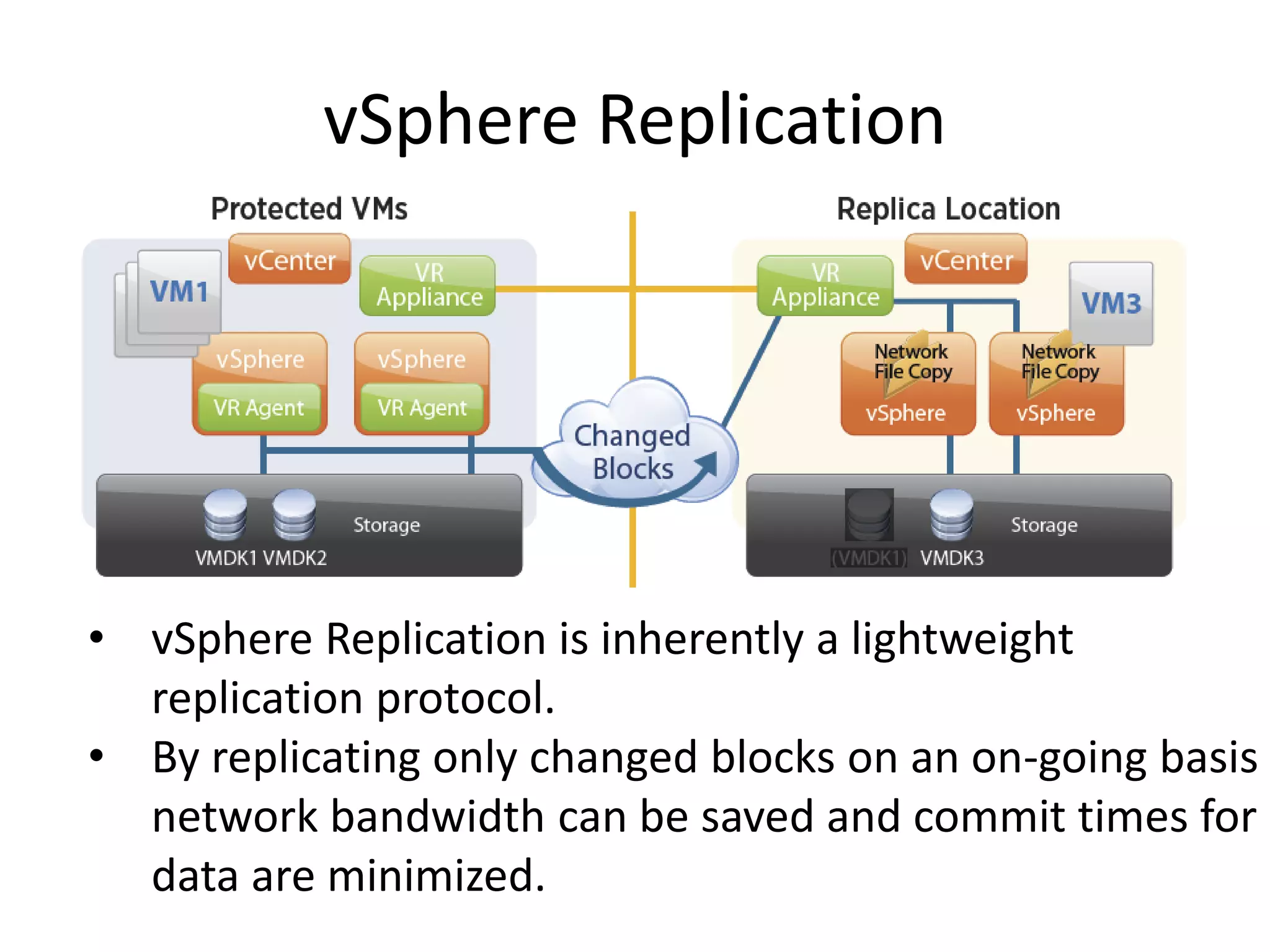
• vSphere Replication is inherently a lightweight
  replication protocol.
• By replicating only changed blocks on an on-going basis
  network bandwidth can be saved and commit times for
  data are minimized.
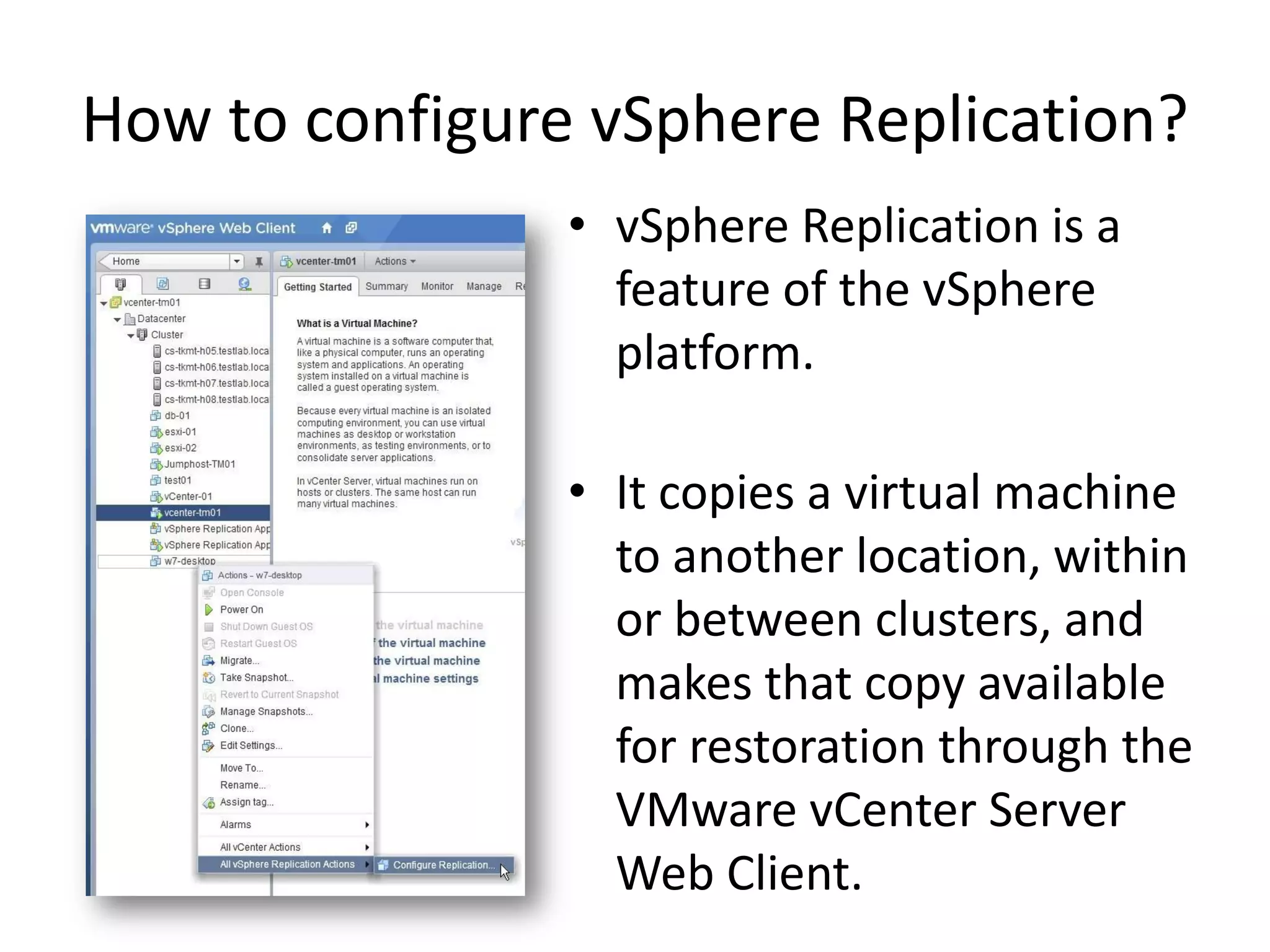
How to configure vSphere Replication?
                • vSphere Replication is a
                  feature of the vSphere
                  platform.

                • It copies a virtual machine
                  to another location, within
                  or between clusters, and
                  makes that copy available
                  for restoration through the
                  VMware vCenter Server
                  Web Client.
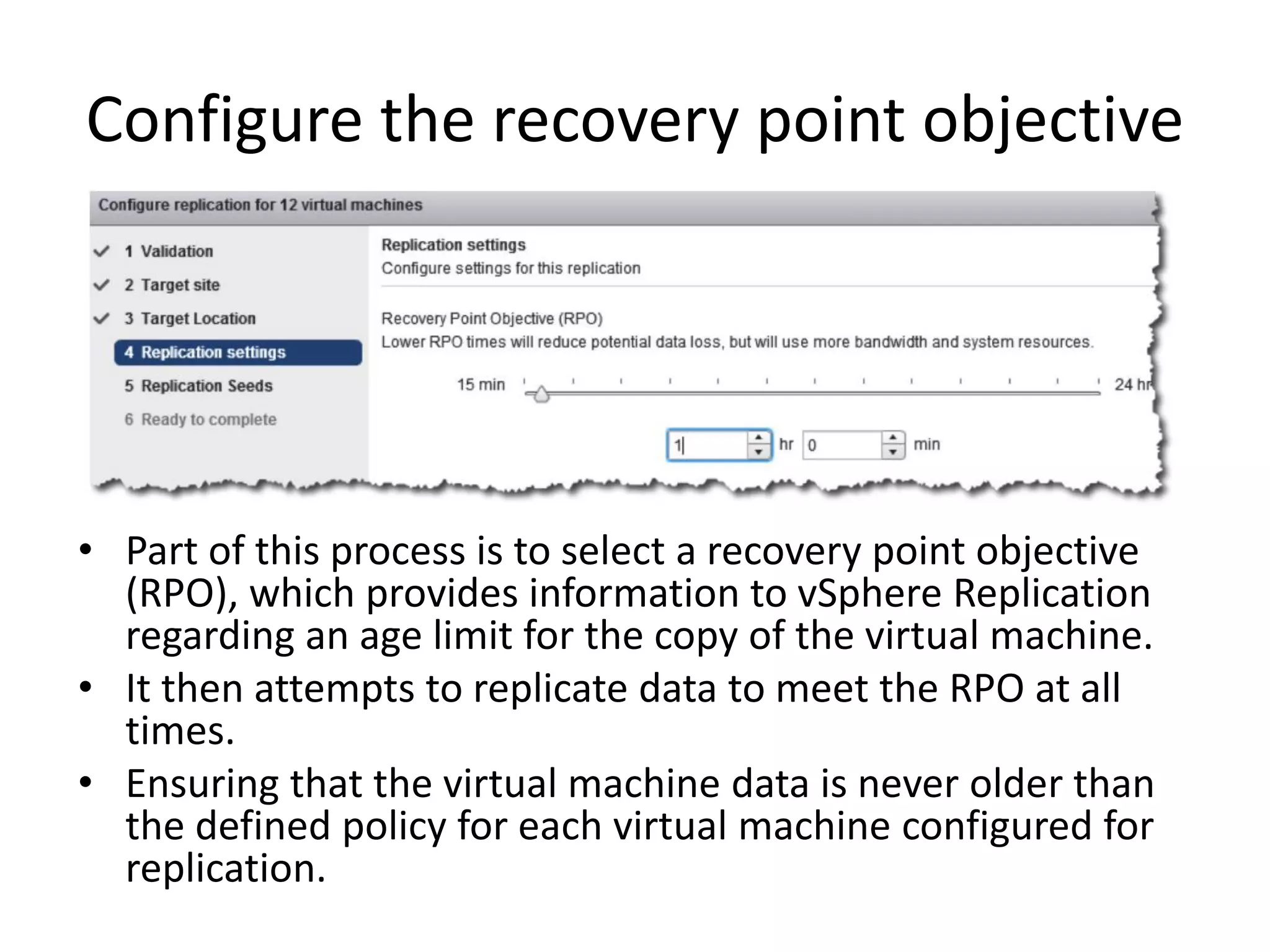
Configure the recovery point objective


• Part of this process is to select a recovery point objective
  (RPO), which provides information to vSphere Replication
  regarding an age limit for the copy of the virtual machine.
• It then attempts to replicate data to meet the RPO at all
  times.
• Ensuring that the virtual machine data is never older than
  the defined policy for each virtual machine configured for
  replication.
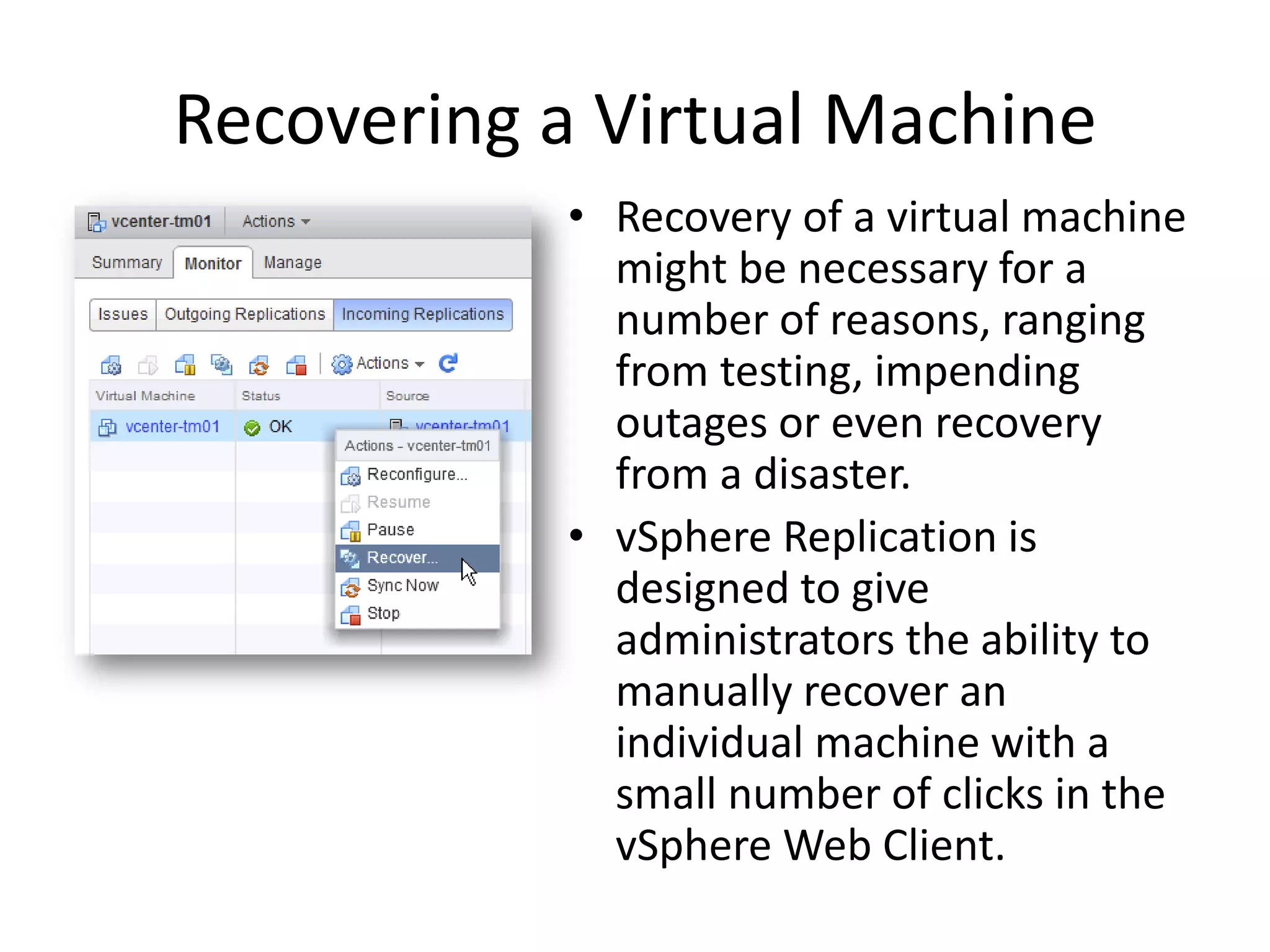
Recovering a Virtual Machine
           • Recovery of a virtual machine
             might be necessary for a
             number of reasons, ranging
             from testing, impending
             outages or even recovery
             from a disaster.
           • vSphere Replication is
             designed to give
             administrators the ability to
             manually recover an
             individual machine with a
             small number of clicks in the
             vSphere Web Client.
Myth Busted
• vSphere Replication enables efficient array-agnostic
  replication of virtual machine data over the LAN or
  WAN.
• vSphere Replication simplifies management enabling
  replication at the virtual machine level and enables
  RPOs as low as 15 minutes.
• Make vSphere Replication a part of your vSphere 5.1
  deployment and improve your virtual machine
  availability without introducing risk.
Myth 4
Due to VMFS the maximum number of host in a cluster is 8
VMware vSphere VMFS-5 file-sharing
          enhancements
• Prior to vSphere 5.1, the maximum number of hosts
  that could share a read-only file on a Virtual Machine
  File System (VMFS) was 8.
• This is a limiting factor for virtual desktop
  infrastructure (VDI) deployments using View.
• Because the maximum number of hosts in a cluster
  that could share the same desktop base disk image file
  was also 8.
• It is also a limiting factor for deployments of vCloud
  Director, which uses linked clones for the fast
  provisioning of VMware vCloud Director vApps.
VMware vSphere VMFS-5 file-sharing
           enhancements
• In vSphere 5.1, the maximum number of hosts
  that can share a read-only file on a VMFS is
  increased to 32.
• This means that linked clones deployed from a
  base image now can be hosted on any one of the
  32 hosts sharing the datastore.
• This provides significant scalability for both View
  and vCloud Director. This feature applies only to
  hosts running vSphere 5.1 and higher on VMFS-5.
Myth Busted
• With vSphere 5.1 you’re able to Increase the
  file share limit on VMFS-5 from 8 to 32,
  making VMFS as scalable a storage solution as
  NFS.
Myth 5
It’s not possible to backup or restore a distributed vSwitch
                        configuration.
DvSwitch Configuration
          Backup and Restore
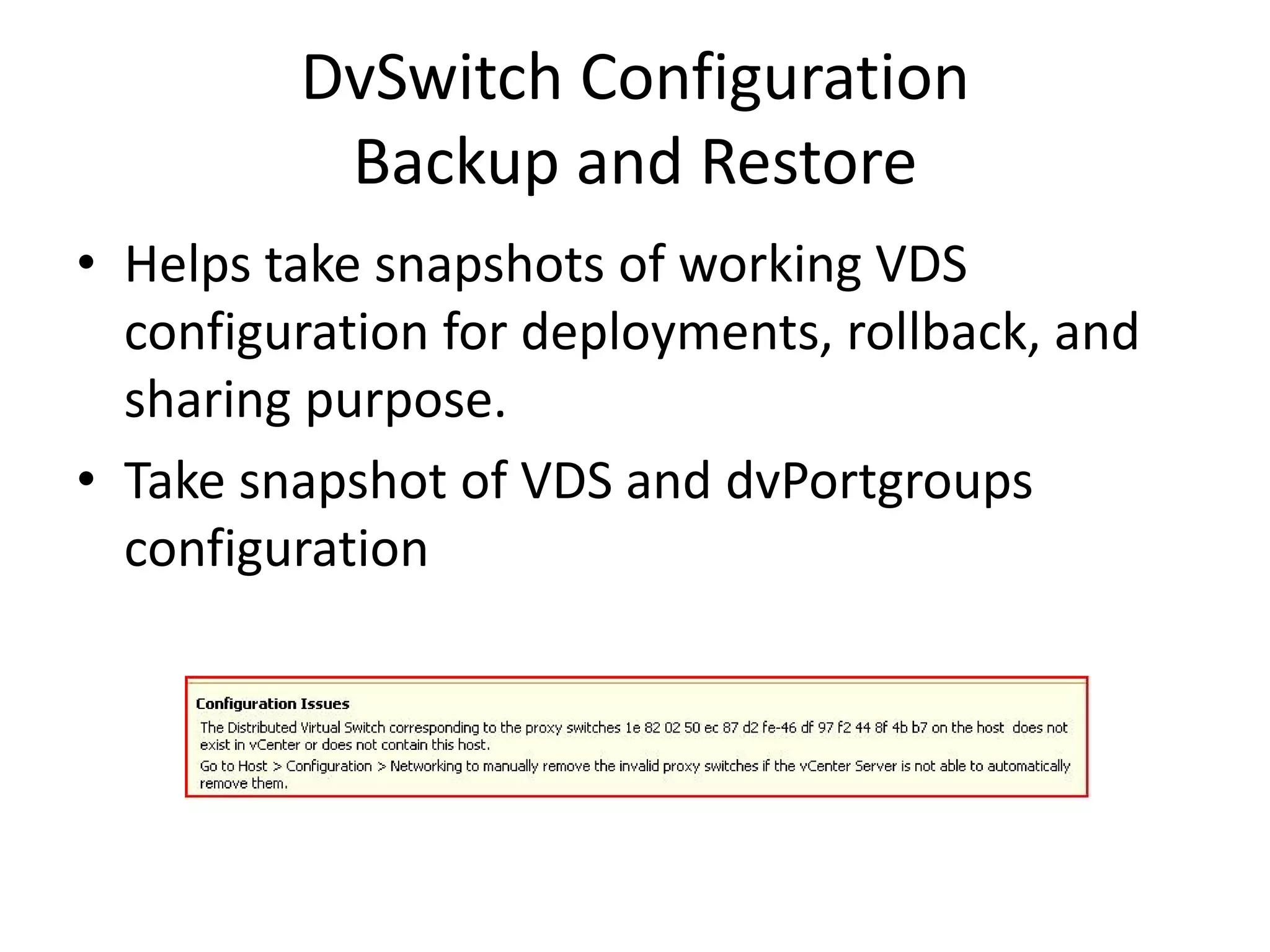
• Helps take snapshots of working VDS
  configuration for deployments, rollback, and
  sharing purpose.
• Take snapshot of VDS and dvPortgroups
  configuration
DvSwitch Configuration
           Backup and Restore
The Following operations are supported:

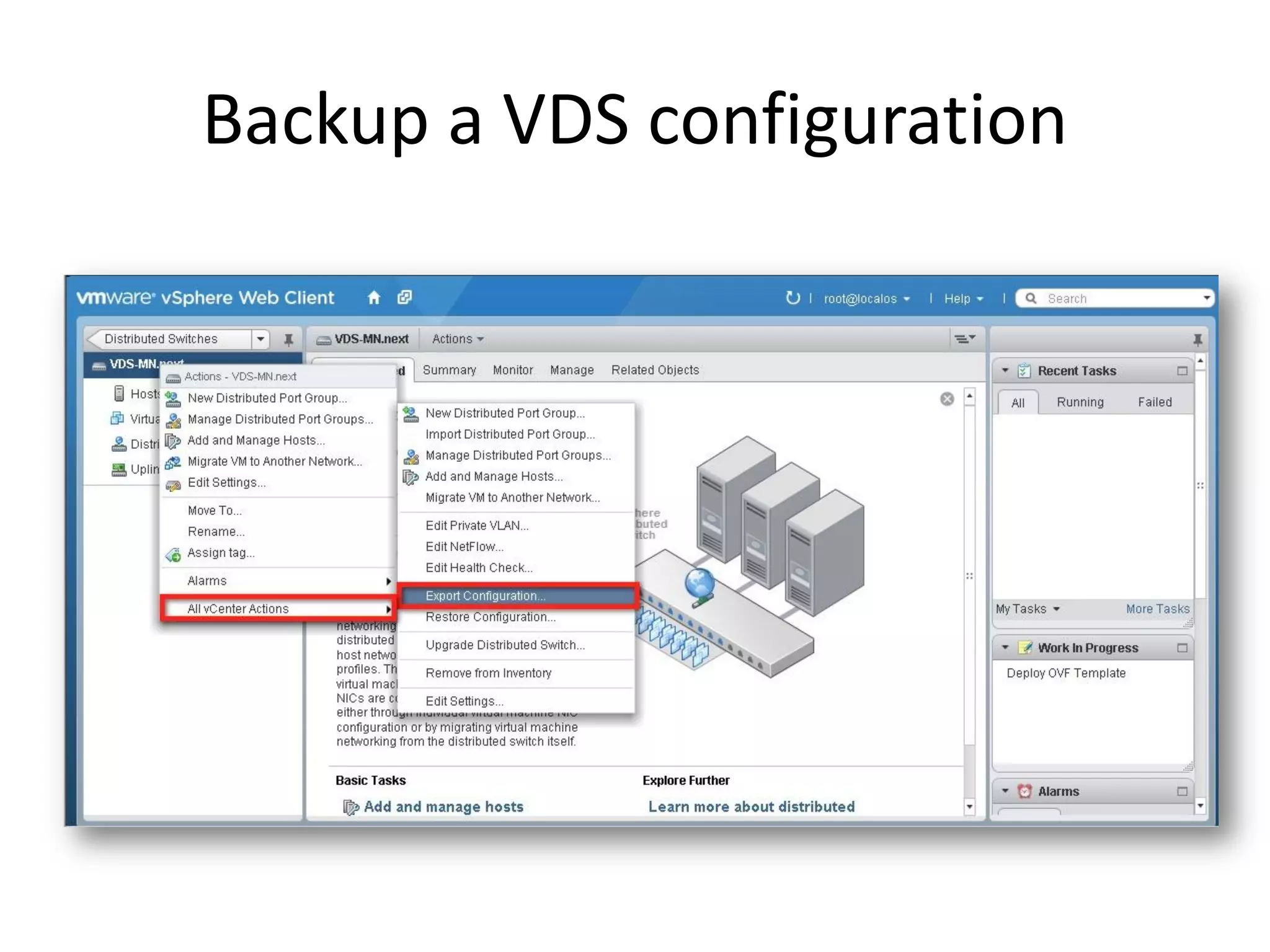
• Backup VDS/dvPortgroup configuration on
  disk (Export).
• Restore VDS/dvPortgroup from a backup
  (Restore).
• Create new entity from backup (Import).
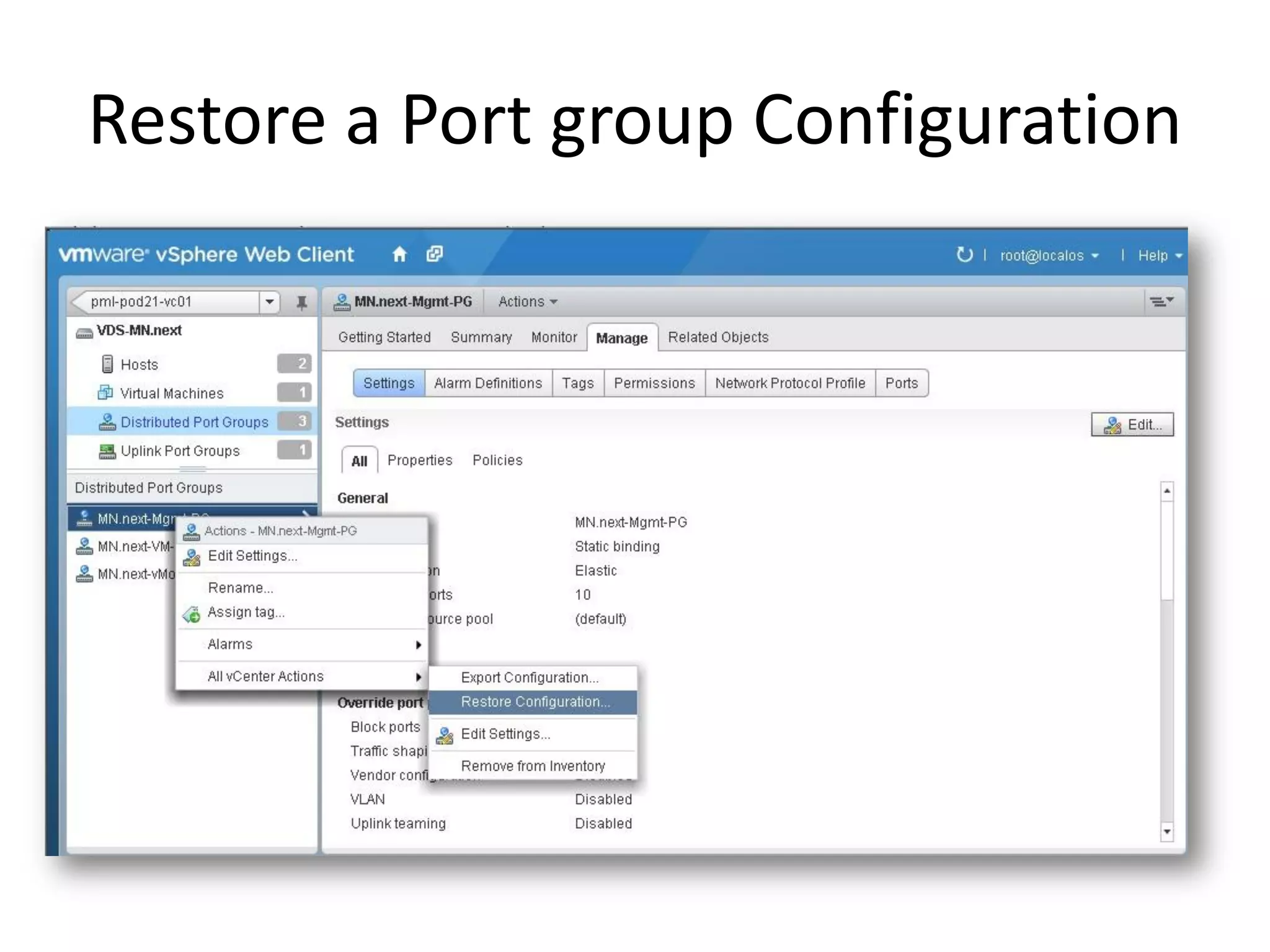
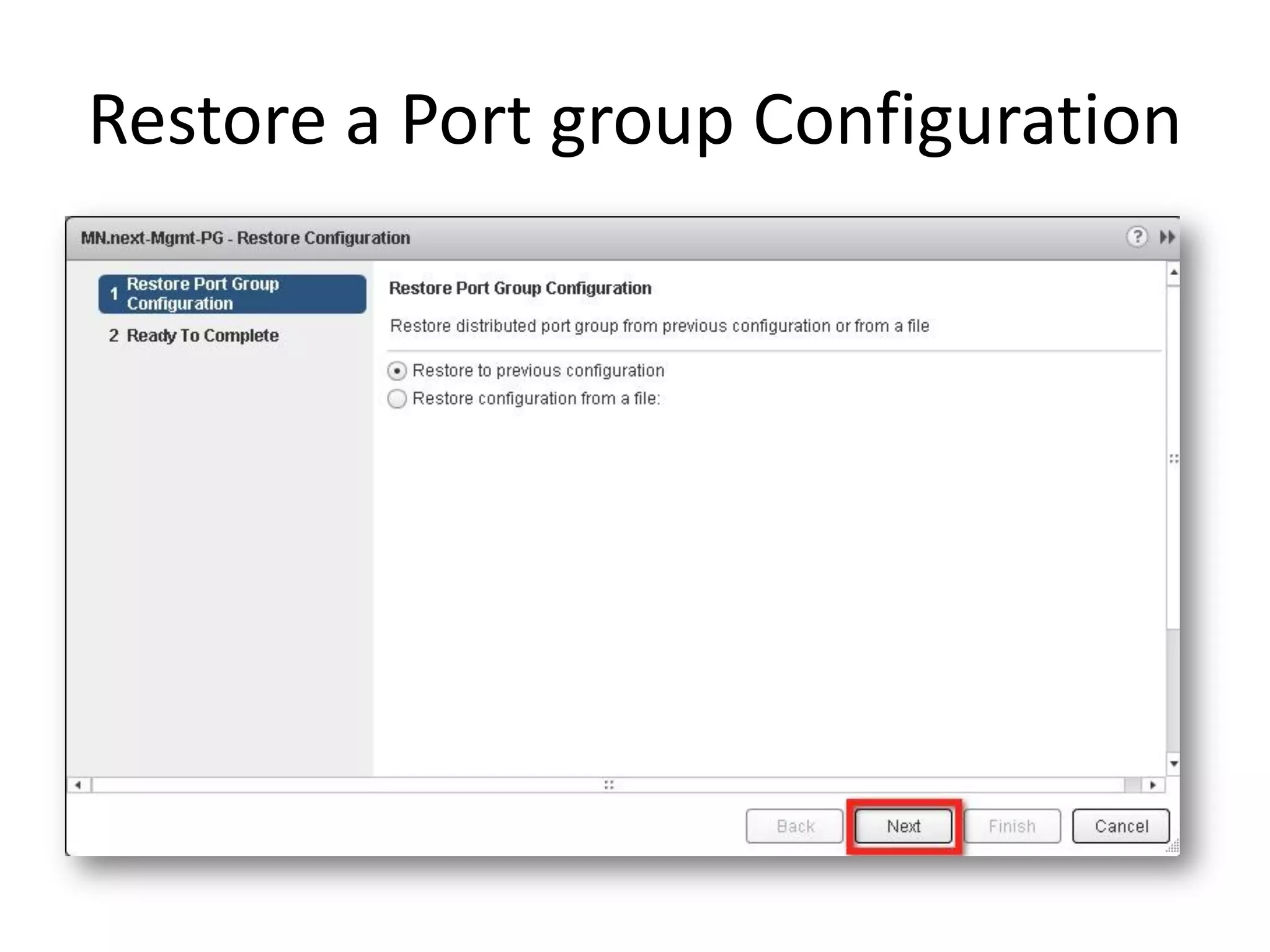
• Revert to the previous dvPortgroup
  configuration after changes are made.
Backup a VDS configuration
Restore a Port group Configuration
vSphere Distributed Switch
• Administrators can now save the VDS configurations
  and use it to restore the exact same VDS setup after
  any vCenter Server DB failure Scenario

• Network admins can also build a revision control
  system over VDS configuration by saving configurations
  after each change and use this to restore to any older
  configuration

• Saved VDS configuration can be used as template to
  create similar other VDS in any other deployment.
Myth Busted
• vSphere Distributed Switch – Enhancements
  such as Network Health Check, Configuration
  Backup and Restore, Roll Back and Recovery,
  and Link Aggregation Control Protocol support
  and deliver more enterprise-class networking
  functionality and a more robust foundation for
  cloud computing.
Free self-paced training - vSphere
       What's New [V5.1]
HTTP://WWW.YOUTUBE.COM/VMWORLDTV
    JEREMY VAN DOORN AND ERIC SLOOF


Eric Sloof
VMware Certified Instructor
NTPRO.NL
Twitter: @esloof

Mythbusting goes virtual What's new in vSphere 5.1

  • 1.
    Mythbusting Goes Virtual What’snew in vSphere 5.1 By Eric Sloof
  • 2.
    HTTP://WWW.YOUTUBE.COM/VMWORLDTV JEREMY VAN DOORN AND ERIC SLOOF Eric Sloof VMware Certified Instructor NTPRO.NL Twitter: @esloof
  • 3.
    Agenda/Myths 1) vMotion isonly possible with shared storage. 2) You have to run Windows to manage vSphere. 3) You need Site Recovery Manager to protect your virtual machines from a complete site loss. 4) Due to VMFS, the maximum number of host in a cluster with linked clones is 8. 5) It’s not possible to backup or restore a Distributed vSwitch configuration.
  • 4.
    Myth 1 vMotion isonly possible with shared storage
  • 5.
    New Enhanced vMotion •Combine vMotion and Storage vMotion. • Migrate between hosts/clusters without shared storage.
  • 6.
    New Enhanced vMotion •Enhanced vMotion allows you to combine a vMotion and Storage vMotion into a single operation. • Effectively enabling a “shared nothing” vMotion.
  • 7.
    New Enhanced vMotion •Use cases can be found in large datacenters and SMB markets; Cross host and datastore vMotion allows VM migration between clusters in a large datacenters, which may not have a common set of datastores between them.
  • 8.
    Myth Busted • TwoEnhanced vMotion + 6 vMotions at the same time or two Enhanced vMotions + Zero svMotions at the same time. • DRS or sDRS don’t use Enhanced vMotion technology. • Leverage the advantages of vMotion (zero-downtime migration) without the need for shared storage configurations.
  • 9.
    Myth 2 You needWindows to manage vSphere
  • 10.
    The VMware vSphereWeb Client • In vSphere 5.1, the VMware vSphere Web Client is the new primary point for vSphere management. • It has several advantages over the previous Microsoft Windows–based VMware vSphere Client.
  • 11.
    The VMware vSphereWeb Client Object Navigator Tabs Inventory Objects Create custom actions Sidebar Extension Portlets Add right-click extensions
  • 12.
    The VMware vSphereWeb Client • In the Web Client, vSphere introduces a new feature called “Work in Progress,” with which the user can pause a current task to work on another task in the UI and then later resume the original task at the point it was interrupted.
  • 13.
    Myth Busted • Allnew vSphere 5.1 features are only available from the Web Client. • With the improvements added to VMware vSphere 5.1, the VMware vCenter Server architecture, VMware vCenter Single Sign-On, VMware vCenter Inventory Service and the VMware vSphere Web Client, VMware has released a formidable collection of tools for the administrator of a virtualized environment.
  • 14.
    MYTH 3 You needSRM to protect your virtual machines from a complete site loss
  • 15.
    vSphere Replication • vSphereReplication is now a feature of the vSphere platform. • It copies a virtual machine to another location, within or between clusters, and makes that copy available for restoration through the VMware vCenter Server Web Client.
  • 16.
    vSphere Replication • vSphereReplication is inherently a lightweight replication protocol. • By replicating only changed blocks on an on-going basis network bandwidth can be saved and commit times for data are minimized.
  • 17.
    How to configurevSphere Replication? • vSphere Replication is a feature of the vSphere platform. • It copies a virtual machine to another location, within or between clusters, and makes that copy available for restoration through the VMware vCenter Server Web Client.
  • 18.
    Configure the recoverypoint objective • Part of this process is to select a recovery point objective (RPO), which provides information to vSphere Replication regarding an age limit for the copy of the virtual machine. • It then attempts to replicate data to meet the RPO at all times. • Ensuring that the virtual machine data is never older than the defined policy for each virtual machine configured for replication.
  • 19.
    Recovering a VirtualMachine • Recovery of a virtual machine might be necessary for a number of reasons, ranging from testing, impending outages or even recovery from a disaster. • vSphere Replication is designed to give administrators the ability to manually recover an individual machine with a small number of clicks in the vSphere Web Client.
  • 20.
    Myth Busted • vSphereReplication enables efficient array-agnostic replication of virtual machine data over the LAN or WAN. • vSphere Replication simplifies management enabling replication at the virtual machine level and enables RPOs as low as 15 minutes. • Make vSphere Replication a part of your vSphere 5.1 deployment and improve your virtual machine availability without introducing risk.
  • 21.
    Myth 4 Due toVMFS the maximum number of host in a cluster is 8
  • 22.
    VMware vSphere VMFS-5file-sharing enhancements • Prior to vSphere 5.1, the maximum number of hosts that could share a read-only file on a Virtual Machine File System (VMFS) was 8. • This is a limiting factor for virtual desktop infrastructure (VDI) deployments using View. • Because the maximum number of hosts in a cluster that could share the same desktop base disk image file was also 8. • It is also a limiting factor for deployments of vCloud Director, which uses linked clones for the fast provisioning of VMware vCloud Director vApps.
  • 23.
    VMware vSphere VMFS-5file-sharing enhancements • In vSphere 5.1, the maximum number of hosts that can share a read-only file on a VMFS is increased to 32. • This means that linked clones deployed from a base image now can be hosted on any one of the 32 hosts sharing the datastore. • This provides significant scalability for both View and vCloud Director. This feature applies only to hosts running vSphere 5.1 and higher on VMFS-5.
  • 24.
    Myth Busted • WithvSphere 5.1 you’re able to Increase the file share limit on VMFS-5 from 8 to 32, making VMFS as scalable a storage solution as NFS.
  • 25.
    Myth 5 It’s notpossible to backup or restore a distributed vSwitch configuration.
  • 26.
    DvSwitch Configuration Backup and Restore • Helps take snapshots of working VDS configuration for deployments, rollback, and sharing purpose. • Take snapshot of VDS and dvPortgroups configuration
  • 27.
    DvSwitch Configuration Backup and Restore The Following operations are supported: • Backup VDS/dvPortgroup configuration on disk (Export). • Restore VDS/dvPortgroup from a backup (Restore). • Create new entity from backup (Import). • Revert to the previous dvPortgroup configuration after changes are made.
  • 28.
    Backup a VDSconfiguration
  • 29.
    Restore a Portgroup Configuration
  • 30.
    Restore a Portgroup Configuration
  • 31.
    vSphere Distributed Switch •Administrators can now save the VDS configurations and use it to restore the exact same VDS setup after any vCenter Server DB failure Scenario • Network admins can also build a revision control system over VDS configuration by saving configurations after each change and use this to restore to any older configuration • Saved VDS configuration can be used as template to create similar other VDS in any other deployment.
  • 32.
    Myth Busted • vSphereDistributed Switch – Enhancements such as Network Health Check, Configuration Backup and Restore, Roll Back and Recovery, and Link Aggregation Control Protocol support and deliver more enterprise-class networking functionality and a more robust foundation for cloud computing.
  • 33.
    Free self-paced training- vSphere What's New [V5.1]
  • 34.
    HTTP://WWW.YOUTUBE.COM/VMWORLDTV JEREMY VAN DOORN AND ERIC SLOOF Eric Sloof VMware Certified Instructor NTPRO.NL Twitter: @esloof