Amrita
School
of
Engineering,
Bangalore
Ms. Harika Pudugosula
Lecturer
Department of Electronics & Communication Engineering
• Background
• Demand Paging
• Copy-on-Write
• Page Replacement
• Allocation of Frames
• Thrashing
2
Copy-on-Write
• The fork() system call creates a child process that is a duplicate of its parent, i.e.,
duplicating the pages belonging to the parent
• When parent process creates child process, the address space of the parent process
is copied for the child process. It means the pages of the parent proess is duplicated.
• How the child process can overwrite the address space copied from parent process?
By invoking exec() system call.
• Immediately after the child process is created, if we call exec(), dont you think that
the copying of parent's address is unnecessary?
• Copy-on-Write -
• Allows the parent and child processes initially to share the same pages
• These shared pages are marked as copy-on-write pages, meaning that if either
process writes to a shared page, a copy of the shared page is created
3
Copy-on-Write
4
Figure. Before process 1 modifies page C
Figure. After process 1 modifies page C
Copy-on-Write
• Operating systems typically allocate these pages using a technique known as zero-fill-
on-demand
• Zero-fill-on-demand pages have been zeroed-out before being allocated, thus
erasing the previous contents
• vfork()
• Several versions of UNIX (including Solaris and Linux) provide a variation of the
fork() system call—vfork() (virtual memory fork)—that operates differently from
fork() with copy-on-write
• With vfork(), the parent process is suspended, and the child process uses the
address space of the parent
• vfork() does not use copy-on-write, if the child process changes any pages of the
parent’s address space, the altered pages will be visible to the parent once it
resumes
5
Copy-on-Write
• vfork()
• Therefore, vfork() must be used with caution to ensure that the child process
does not modify the address space of the parent
• vfork() is intended to be used when the child process calls exec() immediately
after creation
• Because no copying of pages takes place, vfork() is an extremely efficient method
of process creation and is sometimes used to implement UNIX command-line
shell interfaces
6
Page Replacement
• Page replacement - It is a technique in which OS decides which memory pages to
swap out, write to disk when a page of memory needs to be allocated
• Consider a situation in which a process with 5 pages(0,1,2,3,4). As of now, main
memory is free to accomodate only 3 pages. So, it accomodates page number 0,2,3
• So, pages 0,2,3 are in main memory and pages 1 and 4 are in harddisk
• Now, CPU needs to execute an instruction which is available in page1. So, it will
generate the logical address of this instruction. Then, page table is searched for
finding the frame number of this page. But,as this page doesn’t exist in main
memory, page fault occurs
• What to do in this situation?
• While a user process is executing, a page fault occurs
• The operating system determines where the desired page is residing on the disk
but then finds that there are no free frames on the free-frame list; all memory is
in use
7
Page Replacement
• The operating system has several options -
• It could terminate the user process
• Instead swap out a process, freeing all its frames and reducing the level of
multiprogramming
• Demand paging is the operating system’s attempt to improve the computer system’s
utilization and throughput
8
Basic Page Replacement
9
• Basic Page replacement takes the following approach -
• If no frame is free, we find one that is not currently being used and free it
• We can free a frame by writing its contents to swap space and changing the page
table (and all other tables) to indicate that the page is no longer in memory
• We can now use the freed frame to hold the page for which the process faulted
• We modify the page-fault service routine to include page replacement -
1. Find the location of the desired page on the disk
2. Find a free frame:
a. If there is a free frame, use it.
b. If there is no free frame, use a page-replacement algorithm to select a victim
frame
c. Write the victim frame to the disk; change the page and frame tables
accordingly
Basic Page Replacement
10
3. Read the desired page into
the newly freed frame;
change the page and frame
tables
4. Continue the user process
from where the page fault
occurred
• Notice that, if no frames are
free, two page transfers (one
out and one in) are required
• This situation effectively
doubles the page-fault service
time and increases the
effective access time
accordingly
Basic Page Replacement
11
• Reduce this overhead by using a modify bit / dirty bit
• Modify bit -
• When this scheme is used, each page or frame has a modify bit associated with it
in the hardware
• The modify bit for a page is set by the hardware whenever any byte in the page is
written into, indicating that the page has been modified
• When we select a page for replacement, we examine its modify bit
• If the bit is set, we know that the page has been modified since it was read in
from the disk, we must write the page to the disk
• If the modify bit is not set, however, the page has not been modified since it was
read into memory, we need not write the memory page to the disk as it is
already there
Basic Page Replacement
12
• Frame-allocation algorithm determines
• How many frames to give to each process
• Page-replacement algorithm
• Want lowest page-fault rate
• Evaluate algorithm by running it on a particular string of memory references
(reference string) and computing the number of page faults on that string
• Reference string - The string of memory references is called a reference string
• We can generate reference strings artificially (by using a random-number
generator, for example), or we can trace a given system and record the address of
each memory reference
• The latter choice produces a large number of data
• To reduce the number of data, we use two facts
Basic Page Replacement
13
• First, for a given page size, we need to consider only the page number, rather than
the entire address
• Second, if we have a reference to a page p, then any references to page p that
immediately follow will never cause a page fault
• Page p will be in memory after the first reference, so the immediately following
references will not fault
• For example, if we trace a particular process, we might record the following
address sequence -
• 0100, 0432, 0101, 0612, 0102, 0103, 0104, 0101, 0611, 0102, 0103, 0104, 0101,
0610, 0102, 0103, 0104, 0101, 0609, 0102, 0105
• At 100 bytes per page, this sequence is reduced to the following reference
string: 1, 4, 1, 6, 1, 6, 1, 6, 1, 6, 1
Basic Page Replacement
14
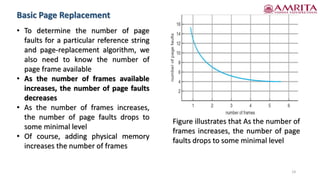
• To determine the number of page
faults for a particular reference string
and page-replacement algorithm, we
also need to know the number of
page frame available
• As the number of frames available
increases, the number of page faults
decreases
• As the number of frames increases,
the number of page faults drops to
some minimal level
• Of course, adding physical memory
increases the number of frames
Figure illustrates that As the number of
frames increases, the number of page
faults drops to some minimal level
FIFO Page Replacement
15
• Reference string: 7,0,1,2,0,3,0,4,2,3,0,3,0,3,2,1,2,0,1,7,0,1
• 3 frames (3 pages can be in memory at a time per process)
• How to track ages of pages?
• Just use a FIFO queue
• FIFO performance is not always good
• The page replaced may be an initialization module that was used a long time ago and
is no longer needed or could contain a heavily used variable that was initialized early
and is in constant use
FIFO Page Replacement
16
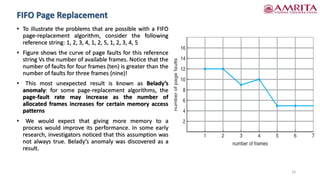
• To illustrate the problems that are possible with a FIFO
page-replacement algorithm, consider the following
reference string: 1, 2, 3, 4, 1, 2, 5, 1, 2, 3, 4, 5
• Figure shows the curve of page faults for this reference
string Vs the number of available frames. Notice that the
number of faults for four frames (ten) is greater than the
number of faults for three frames (nine)!
• This most unexpected result is known as Belady’s
anomaly: for some page-replacement algorithms, the
page-fault rate may increase as the number of
allocated frames increases for certain memory access
patterns
• We would expect that giving more memory to a
process would improve its performance. In some early
research, investigators noticed that this assumption was
not always true. Belady’s anomaly was discovered as a
result.
17
References
1. Silberscatnz and Galvin, “Operating System Concepts,” Ninth Edition,
John Wiley and Sons, 2012.
18
Thank you

Virtual Memory Management Part - II.pdf

  • 1.
  • 2.
    • Background • DemandPaging • Copy-on-Write • Page Replacement • Allocation of Frames • Thrashing 2
  • 3.
    Copy-on-Write • The fork()system call creates a child process that is a duplicate of its parent, i.e., duplicating the pages belonging to the parent • When parent process creates child process, the address space of the parent process is copied for the child process. It means the pages of the parent proess is duplicated. • How the child process can overwrite the address space copied from parent process? By invoking exec() system call. • Immediately after the child process is created, if we call exec(), dont you think that the copying of parent's address is unnecessary? • Copy-on-Write - • Allows the parent and child processes initially to share the same pages • These shared pages are marked as copy-on-write pages, meaning that if either process writes to a shared page, a copy of the shared page is created 3
  • 4.
    Copy-on-Write 4 Figure. Before process1 modifies page C Figure. After process 1 modifies page C
  • 5.
    Copy-on-Write • Operating systemstypically allocate these pages using a technique known as zero-fill- on-demand • Zero-fill-on-demand pages have been zeroed-out before being allocated, thus erasing the previous contents • vfork() • Several versions of UNIX (including Solaris and Linux) provide a variation of the fork() system call—vfork() (virtual memory fork)—that operates differently from fork() with copy-on-write • With vfork(), the parent process is suspended, and the child process uses the address space of the parent • vfork() does not use copy-on-write, if the child process changes any pages of the parent’s address space, the altered pages will be visible to the parent once it resumes 5
  • 6.
    Copy-on-Write • vfork() • Therefore,vfork() must be used with caution to ensure that the child process does not modify the address space of the parent • vfork() is intended to be used when the child process calls exec() immediately after creation • Because no copying of pages takes place, vfork() is an extremely efficient method of process creation and is sometimes used to implement UNIX command-line shell interfaces 6
  • 7.
    Page Replacement • Pagereplacement - It is a technique in which OS decides which memory pages to swap out, write to disk when a page of memory needs to be allocated • Consider a situation in which a process with 5 pages(0,1,2,3,4). As of now, main memory is free to accomodate only 3 pages. So, it accomodates page number 0,2,3 • So, pages 0,2,3 are in main memory and pages 1 and 4 are in harddisk • Now, CPU needs to execute an instruction which is available in page1. So, it will generate the logical address of this instruction. Then, page table is searched for finding the frame number of this page. But,as this page doesn’t exist in main memory, page fault occurs • What to do in this situation? • While a user process is executing, a page fault occurs • The operating system determines where the desired page is residing on the disk but then finds that there are no free frames on the free-frame list; all memory is in use 7
  • 8.
    Page Replacement • Theoperating system has several options - • It could terminate the user process • Instead swap out a process, freeing all its frames and reducing the level of multiprogramming • Demand paging is the operating system’s attempt to improve the computer system’s utilization and throughput 8
  • 9.
    Basic Page Replacement 9 •Basic Page replacement takes the following approach - • If no frame is free, we find one that is not currently being used and free it • We can free a frame by writing its contents to swap space and changing the page table (and all other tables) to indicate that the page is no longer in memory • We can now use the freed frame to hold the page for which the process faulted • We modify the page-fault service routine to include page replacement - 1. Find the location of the desired page on the disk 2. Find a free frame: a. If there is a free frame, use it. b. If there is no free frame, use a page-replacement algorithm to select a victim frame c. Write the victim frame to the disk; change the page and frame tables accordingly
  • 10.
    Basic Page Replacement 10 3.Read the desired page into the newly freed frame; change the page and frame tables 4. Continue the user process from where the page fault occurred • Notice that, if no frames are free, two page transfers (one out and one in) are required • This situation effectively doubles the page-fault service time and increases the effective access time accordingly
  • 11.
    Basic Page Replacement 11 •Reduce this overhead by using a modify bit / dirty bit • Modify bit - • When this scheme is used, each page or frame has a modify bit associated with it in the hardware • The modify bit for a page is set by the hardware whenever any byte in the page is written into, indicating that the page has been modified • When we select a page for replacement, we examine its modify bit • If the bit is set, we know that the page has been modified since it was read in from the disk, we must write the page to the disk • If the modify bit is not set, however, the page has not been modified since it was read into memory, we need not write the memory page to the disk as it is already there
  • 12.
    Basic Page Replacement 12 •Frame-allocation algorithm determines • How many frames to give to each process • Page-replacement algorithm • Want lowest page-fault rate • Evaluate algorithm by running it on a particular string of memory references (reference string) and computing the number of page faults on that string • Reference string - The string of memory references is called a reference string • We can generate reference strings artificially (by using a random-number generator, for example), or we can trace a given system and record the address of each memory reference • The latter choice produces a large number of data • To reduce the number of data, we use two facts
  • 13.
    Basic Page Replacement 13 •First, for a given page size, we need to consider only the page number, rather than the entire address • Second, if we have a reference to a page p, then any references to page p that immediately follow will never cause a page fault • Page p will be in memory after the first reference, so the immediately following references will not fault • For example, if we trace a particular process, we might record the following address sequence - • 0100, 0432, 0101, 0612, 0102, 0103, 0104, 0101, 0611, 0102, 0103, 0104, 0101, 0610, 0102, 0103, 0104, 0101, 0609, 0102, 0105 • At 100 bytes per page, this sequence is reduced to the following reference string: 1, 4, 1, 6, 1, 6, 1, 6, 1, 6, 1
  • 14.
    Basic Page Replacement 14 •To determine the number of page faults for a particular reference string and page-replacement algorithm, we also need to know the number of page frame available • As the number of frames available increases, the number of page faults decreases • As the number of frames increases, the number of page faults drops to some minimal level • Of course, adding physical memory increases the number of frames Figure illustrates that As the number of frames increases, the number of page faults drops to some minimal level
  • 15.
    FIFO Page Replacement 15 •Reference string: 7,0,1,2,0,3,0,4,2,3,0,3,0,3,2,1,2,0,1,7,0,1 • 3 frames (3 pages can be in memory at a time per process) • How to track ages of pages? • Just use a FIFO queue • FIFO performance is not always good • The page replaced may be an initialization module that was used a long time ago and is no longer needed or could contain a heavily used variable that was initialized early and is in constant use
  • 16.
    FIFO Page Replacement 16 •To illustrate the problems that are possible with a FIFO page-replacement algorithm, consider the following reference string: 1, 2, 3, 4, 1, 2, 5, 1, 2, 3, 4, 5 • Figure shows the curve of page faults for this reference string Vs the number of available frames. Notice that the number of faults for four frames (ten) is greater than the number of faults for three frames (nine)! • This most unexpected result is known as Belady’s anomaly: for some page-replacement algorithms, the page-fault rate may increase as the number of allocated frames increases for certain memory access patterns • We would expect that giving more memory to a process would improve its performance. In some early research, investigators noticed that this assumption was not always true. Belady’s anomaly was discovered as a result.
  • 17.
    17 References 1. Silberscatnz andGalvin, “Operating System Concepts,” Ninth Edition, John Wiley and Sons, 2012.
  • 18.