Amrita
School
of
Engineering,
Bangalore
Ms. Harika Pudugosula
Lecturer
Department of Electronics & Communication Engineering
• Background
• Swapping
• Contiguous Memory Allocation
• Segmentation
• Paging
• Structure of the Page Table
2
Swapping
• A process must be in memory to be executed
• A process can be swapped temporarily out of memory to a backing store and then
brought back into memory for continued execution
• Swapping makes it possible for the total physical address space of all processes to
exceed the real physical memory of the system, thus increasing the degree of
multiprogramming in a system
3
4
Swapping
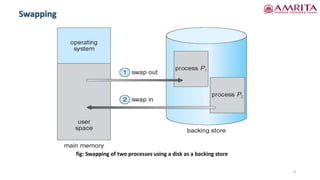
fig: Swapping of two processes using a disk as a backing store
• Standard swapping involves moving processes between main memory and a backing
store
• The backing store is commonly a fast disk
• Backing store
• It must be large enough to accommodate copies of all memory images(data
stored on the database resides in memory) for all users, and it must provide
direct access to these memory images
• The system maintains a ready queue consisting of all processes whose memory
images are on the backing store or in memory and are ready to run
• Whenever the CPU scheduler decides to execute a process, it calls the dispatcher
• The dispatcher checks to see whether the next process in the queue is in memory
• If it is not, and if there is no free memory region, the dispatcher swaps out a
process currently in memory and swaps in the desired process
• It then reloads registers and transfers control to the selected process
• The context-switch time in such a swapping system is fairly high 5
Standard Swapping
• Let’s assume that the user process is 100 MB in size and the backing store is a
standard hard disk with a transfer rate of 50 MB per second
• The actual transfer of the 100-MB process to or from main memory takes
100 MB/50 MB per second = 2 seconds
• The swap time is 2000 millisecond
• Since we must swap both out and in, the total swap time is about 4,000 milliseconds
• In priority algorithm, in RR algorithm, swapping is used to swap process
• Usually swapped out process will be brought to same memory space previously
occupied if binding done during load time
• If binding done during execution time, the process can be moved to different places,
and hence physical address's are computed
• The major part of the swap time is transfer time
• The total transfer time is directly proportional to the amount of memory swapped
6
Standard Swapping
• Swapping is constrained by the following factors as well
• If we want to swap a process, we must be sure that it is completely idle. if a process
is waiting for an I/O operation when we want to swap that process to free up
memory, what will happens?
• Two options -
1. never swap a process with pending I/O
2. execute I/O operations only into operating-system buffers
• Double buffering -
• Copy the I/O data from a process's buffer to kernel memory before swapping
out the process and then copying the same data from kernel memory to user
memory, before the user process can access it
• Standard swapping is not used in modern OS as it requires too much swapping
time and provides too little execution time to be a reasonable memory-
management solution
7
Standard Swapping
• Modified versions of swapping, the following variants are used -
1. Common version
• Swapping is normally disabled but will start if the amount of free memory falls
below a threshold amount(basically low)
• Swapping is halted when the amount of free memory increases
2. Another variation
• It involves swapping portions of processes—rather than entire processes—to
decrease swap time
8
Standard Swapping
• Most operating systems for PCs and servers support some modified version of
swapping
• Mobile systems typically do not support swapping in any form
• Mobile devices generally use flash memory rather than more spacious hard disks
as their persistent storage
• Reasons why mobile operating-system designers avoid swapping -
• space constraint is one reason
• the limited number of writes that flash memory can tolerate before it becomes
unreliable
• the poor throughput between main memory and flash memory in the mobile
devices
• Instead of using swapping, use other methods to free memory if low -
• iOS asks apps to voluntarily relinquish allocated memory
• Read-only data thrown out and reloaded from flash if needed
9
Swapping on Mobile Systems
• Instead of using swapping, use other methods to free memory if low -
• iOS asks apps to voluntarily relinquish allocated memory
• Read-only data thrown out and reloaded from flash if needed
• Failure to free can result in termination
• Android terminates apps if low free memory, but first writes application state to
flash for fast restart
• So, developers for mobile systems must carefully allocate and release memory to
ensure that their applications do not use too much memory or suffer from memory
leaks
10
Swapping on Mobile Systems
Contiguous Memory Allocation
• The main memory must accommodate both the operating system and the various
user processes - need to allocate main memory in the most efficient way possible
• The memory is usually divided into two partitions:
• one for the resident operating system
• one for the user processes
• Operating System may be in either low memory or high memory
• The major factor affecting this decision is the location of the interrupt vector
• Since the interrupt vector is often in low memory, programmers usually place the
operating system in low memory
• How to allocate available memory to the processes that are in the input queue
waiting to be brought into memory?
11
Contiguous Memory Allocation
• How to allocate available memory to the processes that are in the input queue
waiting to be brought into memory?
12
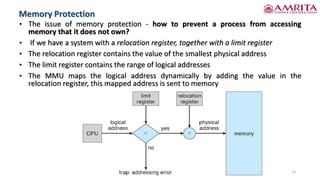
• The issue of memory protection - how to prevent a process from accessing
memory that it does not own?
• If we have a system with a relocation register, together with a limit register
• The relocation register contains the value of the smallest physical address
• The limit register contains the range of logical addresses
• The MMU maps the logical address dynamically by adding the value in the
relocation register, this mapped address is sent to memory
13
Memory Protection
• When the CPU scheduler selects a process for execution, the dispatcher loads the
relocation and limit registers with the correct values as part of the context switch
• Because every address generated by a CPU is checked against these registers, we can
protect both the operating system and the other users’ programs and data from
being modified by this running process
• The relocation-register scheme provides an effective way to allow the operating
system’s size to change dynamically
• Example -
• The operating system contains code and buffer space for device drivers
• If a device driver is not commonly used, we do not want to keep the code and
data in memory, as we might be able to use that space for other purposes
• Such code is sometimes called transient operating-system code, it comes and
goes as needed. Thus, using this code changes the size of the operating system
during program execution
14
Memory Protection
• The simplest methods for allocating memory is to divide memory into several fixed-
sized partitions. Each partition may contain exactly one process, the degree of
multiprogramming is bound by the number of partitions
• Multiple partition method
• When a partition is free, a process is selected from the input queue and is
loaded into the free partition
• When the process terminates, the partition becomes available for another
process
• This method was originally used by the IBM OS/360 operating system (called MFT
- Multiprogramming with Fixed Tasks )but is no longer in use
• Fixed-partition scheme
• It is used primarily in batch environments - (called MVT - Multiprogramming with
Variable Tasks)
• Many of the ideas presented here are also applicable to a time-sharing
environment in which pure segmentation is used for memory management
15
Memory Allocation
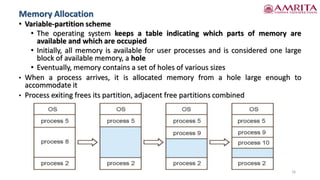
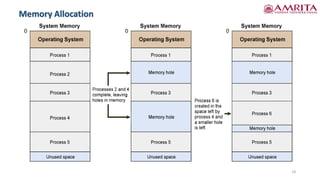
• Variable-partition scheme
• The operating system keeps a table indicating which parts of memory are
available and which are occupied
• Initially, all memory is available for user processes and is considered one large
block of available memory, a hole
• Eventually, memory contains a set of holes of various sizes
• When a process arrives, it is allocated memory from a hole large enough to
accommodate it
• Process exiting frees its partition, adjacent free partitions combined
16
Memory Allocation
• As processes enter the system, they are put into an input queue
• OS takes into account the memory requirements of each process and the amount of
available memory space in determining which processes are allocated memory
• When a process is allocated space, it is loaded into memory, and it can then
compete for CPU time
• When a process terminates, it releases its memory, which the operating system may
then fill with another process from the input queue
• At any given time, we have a list of available block sizes and an input queue
• Memory is allocated to processes until, the memory requirements of the next
process cannot be satisfied—that is, no available block of memory is large enough
to hold that process
• The operating system can then wait until a large enough block is available, or it can
skip down the input queue to see whether the smaller memory requirements of
some other process can be met.
17
Memory Allocation
18
Memory Allocation
• A set of holes of various sizes scattered throughout memory
• When a process arrives and needs memory, OS searches the set for a hole that is
large enough for this process
• If the hole is too large, it is split into two parts.
• One part is allocated to the arriving process, the other is returned to the set of holes
• When a process terminates, it releases its block of memory, which is then placed
back in the set of holes
• If the new hole is adjacent to other holes, these adjacent holes are merged to form
one larger hole
• At this point, the system may need to check whether there are processes waiting for
memory and whether this newly freed and recombined memory could satisfy the
demands of any of these waiting processes
• This procedure is a particular instance of the general dynamic storage allocation
problem, which concerns how to satisfy a request of size n from a list of free holes
19
Memory Allocation
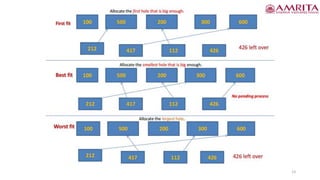
• Solution to dynamic storage allocation problem -
• The first-fit, best-fit, and worst-fit strategies are the ones most commonly used to
select a free hole from the set of available holes
• First fit -
• Allocate the first hole that is big enough
• Searching can start either at the beginning of the set of holes or at the location
where the previous first-fit search ended
• We can stop searching as soon as we find a free hole that is large enough
• Best fit -
• Allocate the smallest hole that is big enough
• We must search the entire list, unless the list is ordered by size
• This strategy produces the smallest leftover hole
• Worst fit -
• Allocate the largest hole
• We must search the entire list, unless it is sorted by size
• This strategy produces the largest leftover hole, which may be more useful than
the smaller leftover hole from a best-fit approach
20
Memory Allocation
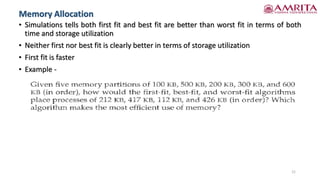
• Simulations tells both first fit and best fit are better than worst fit in terms of both
time and storage utilization
• Neither first nor best fit is clearly better in terms of storage utilization
• First fit is faster
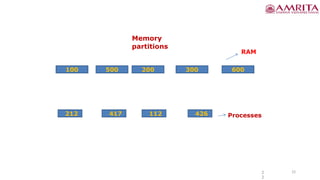
• Example -
21
Memory Allocation
Memory
partitions
100 500 200 300 600
RAM
212 426
417 112 Processes
2
2
22
23
• Both the first-fit and best-fit strategies for memory allocation suffer from external
fragmentation
• As processes are loaded and removed from memory, the free memory space is
broken into little pieces
• External fragmentation -
• When there is enough total memory space to satisfy a request but the available
spaces are not contiguous
• Storage is fragmented into a large number of small holes
• This fragmentation problem can be severe, have a block of free (or wasted)
memory between every two processes
• Another factor is which end of a free block is allocated
• No matter which algorithm is used, however, external fragmentation will be a
problem
• Given N allocated blocks, another 0.5 N blocks will be lost to fragmentation. That is,
one-third of memory may be unusable! This property is known as the 50-percent
rule 24
Fragmentation
• Memory fragmentation can be internal as well as external
• Internal fragmentation -
• Consider a multiple-partition allocation scheme with a hole of 18,464 bytes.
Suppose that the next process requests 18,462 bytes
• If we allocate exactly the requested block, we are left with a hole of 2 bytes
• The overhead to keep track of this hole will be substantially larger than the hole
itself
• The general approach to avoiding this problem is to break the physical memory
into fixed-sized blocks and allocate memory in units based on block size
• With this approach, the memory allocated to a process may be slightly larger
than the requested memory
• The difference between these two numbers is internal fragmentation—unused
memory that is internal to a partition
25
Fragmentation
• Solutions to the problem of external fragmentation -
• Compaction -
• To shuffle the memory contents so as to place all free memory together in one
large block
• Compaction is possible only when the process can move anywhere in the
memory from the address where it is loaded first (Here, relocation is dynamic)
• The simplest compaction algorithm moves all processes toward one end of
memory, all holes move in the other direction, producing one large hole of
available memory
• Non contiguous memory allocation -
• To permit the logical address space of the processes to be noncontiguous, thus
allowing a process to be allocated physical memory wherever such memory is
available
• Two complementary techniques achieve this solution - segmentation and paging
26
Fragmentation
27
References
1. Silberscatnz and Galvin, “Operating System Concepts,” Ninth Edition,
John Wiley and Sons, 2012.
28
Thank you

Memory Management Strategies - II.pdf

  • 1.
  • 2.
    • Background • Swapping •Contiguous Memory Allocation • Segmentation • Paging • Structure of the Page Table 2
  • 3.
    Swapping • A processmust be in memory to be executed • A process can be swapped temporarily out of memory to a backing store and then brought back into memory for continued execution • Swapping makes it possible for the total physical address space of all processes to exceed the real physical memory of the system, thus increasing the degree of multiprogramming in a system 3
  • 4.
    4 Swapping fig: Swapping oftwo processes using a disk as a backing store
  • 5.
    • Standard swappinginvolves moving processes between main memory and a backing store • The backing store is commonly a fast disk • Backing store • It must be large enough to accommodate copies of all memory images(data stored on the database resides in memory) for all users, and it must provide direct access to these memory images • The system maintains a ready queue consisting of all processes whose memory images are on the backing store or in memory and are ready to run • Whenever the CPU scheduler decides to execute a process, it calls the dispatcher • The dispatcher checks to see whether the next process in the queue is in memory • If it is not, and if there is no free memory region, the dispatcher swaps out a process currently in memory and swaps in the desired process • It then reloads registers and transfers control to the selected process • The context-switch time in such a swapping system is fairly high 5 Standard Swapping
  • 6.
    • Let’s assumethat the user process is 100 MB in size and the backing store is a standard hard disk with a transfer rate of 50 MB per second • The actual transfer of the 100-MB process to or from main memory takes 100 MB/50 MB per second = 2 seconds • The swap time is 2000 millisecond • Since we must swap both out and in, the total swap time is about 4,000 milliseconds • In priority algorithm, in RR algorithm, swapping is used to swap process • Usually swapped out process will be brought to same memory space previously occupied if binding done during load time • If binding done during execution time, the process can be moved to different places, and hence physical address's are computed • The major part of the swap time is transfer time • The total transfer time is directly proportional to the amount of memory swapped 6 Standard Swapping
  • 7.
    • Swapping isconstrained by the following factors as well • If we want to swap a process, we must be sure that it is completely idle. if a process is waiting for an I/O operation when we want to swap that process to free up memory, what will happens? • Two options - 1. never swap a process with pending I/O 2. execute I/O operations only into operating-system buffers • Double buffering - • Copy the I/O data from a process's buffer to kernel memory before swapping out the process and then copying the same data from kernel memory to user memory, before the user process can access it • Standard swapping is not used in modern OS as it requires too much swapping time and provides too little execution time to be a reasonable memory- management solution 7 Standard Swapping
  • 8.
    • Modified versionsof swapping, the following variants are used - 1. Common version • Swapping is normally disabled but will start if the amount of free memory falls below a threshold amount(basically low) • Swapping is halted when the amount of free memory increases 2. Another variation • It involves swapping portions of processes—rather than entire processes—to decrease swap time 8 Standard Swapping
  • 9.
    • Most operatingsystems for PCs and servers support some modified version of swapping • Mobile systems typically do not support swapping in any form • Mobile devices generally use flash memory rather than more spacious hard disks as their persistent storage • Reasons why mobile operating-system designers avoid swapping - • space constraint is one reason • the limited number of writes that flash memory can tolerate before it becomes unreliable • the poor throughput between main memory and flash memory in the mobile devices • Instead of using swapping, use other methods to free memory if low - • iOS asks apps to voluntarily relinquish allocated memory • Read-only data thrown out and reloaded from flash if needed 9 Swapping on Mobile Systems
  • 10.
    • Instead ofusing swapping, use other methods to free memory if low - • iOS asks apps to voluntarily relinquish allocated memory • Read-only data thrown out and reloaded from flash if needed • Failure to free can result in termination • Android terminates apps if low free memory, but first writes application state to flash for fast restart • So, developers for mobile systems must carefully allocate and release memory to ensure that their applications do not use too much memory or suffer from memory leaks 10 Swapping on Mobile Systems
  • 11.
    Contiguous Memory Allocation •The main memory must accommodate both the operating system and the various user processes - need to allocate main memory in the most efficient way possible • The memory is usually divided into two partitions: • one for the resident operating system • one for the user processes • Operating System may be in either low memory or high memory • The major factor affecting this decision is the location of the interrupt vector • Since the interrupt vector is often in low memory, programmers usually place the operating system in low memory • How to allocate available memory to the processes that are in the input queue waiting to be brought into memory? 11
  • 12.
    Contiguous Memory Allocation •How to allocate available memory to the processes that are in the input queue waiting to be brought into memory? 12
  • 13.
    • The issueof memory protection - how to prevent a process from accessing memory that it does not own? • If we have a system with a relocation register, together with a limit register • The relocation register contains the value of the smallest physical address • The limit register contains the range of logical addresses • The MMU maps the logical address dynamically by adding the value in the relocation register, this mapped address is sent to memory 13 Memory Protection
  • 14.
    • When theCPU scheduler selects a process for execution, the dispatcher loads the relocation and limit registers with the correct values as part of the context switch • Because every address generated by a CPU is checked against these registers, we can protect both the operating system and the other users’ programs and data from being modified by this running process • The relocation-register scheme provides an effective way to allow the operating system’s size to change dynamically • Example - • The operating system contains code and buffer space for device drivers • If a device driver is not commonly used, we do not want to keep the code and data in memory, as we might be able to use that space for other purposes • Such code is sometimes called transient operating-system code, it comes and goes as needed. Thus, using this code changes the size of the operating system during program execution 14 Memory Protection
  • 15.
    • The simplestmethods for allocating memory is to divide memory into several fixed- sized partitions. Each partition may contain exactly one process, the degree of multiprogramming is bound by the number of partitions • Multiple partition method • When a partition is free, a process is selected from the input queue and is loaded into the free partition • When the process terminates, the partition becomes available for another process • This method was originally used by the IBM OS/360 operating system (called MFT - Multiprogramming with Fixed Tasks )but is no longer in use • Fixed-partition scheme • It is used primarily in batch environments - (called MVT - Multiprogramming with Variable Tasks) • Many of the ideas presented here are also applicable to a time-sharing environment in which pure segmentation is used for memory management 15 Memory Allocation
  • 16.
    • Variable-partition scheme •The operating system keeps a table indicating which parts of memory are available and which are occupied • Initially, all memory is available for user processes and is considered one large block of available memory, a hole • Eventually, memory contains a set of holes of various sizes • When a process arrives, it is allocated memory from a hole large enough to accommodate it • Process exiting frees its partition, adjacent free partitions combined 16 Memory Allocation
  • 17.
    • As processesenter the system, they are put into an input queue • OS takes into account the memory requirements of each process and the amount of available memory space in determining which processes are allocated memory • When a process is allocated space, it is loaded into memory, and it can then compete for CPU time • When a process terminates, it releases its memory, which the operating system may then fill with another process from the input queue • At any given time, we have a list of available block sizes and an input queue • Memory is allocated to processes until, the memory requirements of the next process cannot be satisfied—that is, no available block of memory is large enough to hold that process • The operating system can then wait until a large enough block is available, or it can skip down the input queue to see whether the smaller memory requirements of some other process can be met. 17 Memory Allocation
  • 18.
  • 19.
    • A setof holes of various sizes scattered throughout memory • When a process arrives and needs memory, OS searches the set for a hole that is large enough for this process • If the hole is too large, it is split into two parts. • One part is allocated to the arriving process, the other is returned to the set of holes • When a process terminates, it releases its block of memory, which is then placed back in the set of holes • If the new hole is adjacent to other holes, these adjacent holes are merged to form one larger hole • At this point, the system may need to check whether there are processes waiting for memory and whether this newly freed and recombined memory could satisfy the demands of any of these waiting processes • This procedure is a particular instance of the general dynamic storage allocation problem, which concerns how to satisfy a request of size n from a list of free holes 19 Memory Allocation
  • 20.
    • Solution todynamic storage allocation problem - • The first-fit, best-fit, and worst-fit strategies are the ones most commonly used to select a free hole from the set of available holes • First fit - • Allocate the first hole that is big enough • Searching can start either at the beginning of the set of holes or at the location where the previous first-fit search ended • We can stop searching as soon as we find a free hole that is large enough • Best fit - • Allocate the smallest hole that is big enough • We must search the entire list, unless the list is ordered by size • This strategy produces the smallest leftover hole • Worst fit - • Allocate the largest hole • We must search the entire list, unless it is sorted by size • This strategy produces the largest leftover hole, which may be more useful than the smaller leftover hole from a best-fit approach 20 Memory Allocation
  • 21.
    • Simulations tellsboth first fit and best fit are better than worst fit in terms of both time and storage utilization • Neither first nor best fit is clearly better in terms of storage utilization • First fit is faster • Example - 21 Memory Allocation
  • 22.
    Memory partitions 100 500 200300 600 RAM 212 426 417 112 Processes 2 2 22
  • 23.
  • 24.
    • Both thefirst-fit and best-fit strategies for memory allocation suffer from external fragmentation • As processes are loaded and removed from memory, the free memory space is broken into little pieces • External fragmentation - • When there is enough total memory space to satisfy a request but the available spaces are not contiguous • Storage is fragmented into a large number of small holes • This fragmentation problem can be severe, have a block of free (or wasted) memory between every two processes • Another factor is which end of a free block is allocated • No matter which algorithm is used, however, external fragmentation will be a problem • Given N allocated blocks, another 0.5 N blocks will be lost to fragmentation. That is, one-third of memory may be unusable! This property is known as the 50-percent rule 24 Fragmentation
  • 25.
    • Memory fragmentationcan be internal as well as external • Internal fragmentation - • Consider a multiple-partition allocation scheme with a hole of 18,464 bytes. Suppose that the next process requests 18,462 bytes • If we allocate exactly the requested block, we are left with a hole of 2 bytes • The overhead to keep track of this hole will be substantially larger than the hole itself • The general approach to avoiding this problem is to break the physical memory into fixed-sized blocks and allocate memory in units based on block size • With this approach, the memory allocated to a process may be slightly larger than the requested memory • The difference between these two numbers is internal fragmentation—unused memory that is internal to a partition 25 Fragmentation
  • 26.
    • Solutions tothe problem of external fragmentation - • Compaction - • To shuffle the memory contents so as to place all free memory together in one large block • Compaction is possible only when the process can move anywhere in the memory from the address where it is loaded first (Here, relocation is dynamic) • The simplest compaction algorithm moves all processes toward one end of memory, all holes move in the other direction, producing one large hole of available memory • Non contiguous memory allocation - • To permit the logical address space of the processes to be noncontiguous, thus allowing a process to be allocated physical memory wherever such memory is available • Two complementary techniques achieve this solution - segmentation and paging 26 Fragmentation
  • 27.
    27 References 1. Silberscatnz andGalvin, “Operating System Concepts,” Ninth Edition, John Wiley and Sons, 2012.
  • 28.