Amrita
School
of
Engineering,
Bangalore
Ms. Harika Pudugosula
Teaching Assistant
Department of Electronics & Communication Engineering
• Basic Concepts
• Scheduling Criteria
• Scheduling Algorithms
• Thread Scheduling
• Multiple-Processor Scheduling
• Real-Time CPU Scheduling
• Operating Systems Examples
• Algorithm Evaluation
2
Objectives
CPU scheduling is the basis of multiprogrammed operating systems. By
switching the CPU among processes, the operating system can make the
computer more productive
• To introduce CPU scheduling, which is the basis for multiprogrammed
operating systems
• To describe various CPU-scheduling algorithms
• To discuss evaluation criteria for selecting a CPU-scheduling algorithm for
a particular system
• To examine the scheduling algorithms of several operating systems
3
Basic Concepts
• In a single-processor system, only one process can run at a time
• Others must wait until the CPU is free and can be rescheduled
• The objective of multiprogramming is to have some process running at
all times, to maximize CPU utilization
• A process is executed until it must wait, typically for the completion of
some I/O request
• In a simple computer system, the CPU then just sits idle. All this waiting
time is wasted; no useful work is accomplished
• With multiprogramming, we try to use this time productively, maximum
CPU utilization
4
Basic Concepts
• With multiprogramming, we try to use this time productively
• Several processes are kept in memory at one time
• When one process has to wait, the operating system takes the CPU
away from that process and gives the CPU to another process
• This pattern continues...
5
Basic Concepts
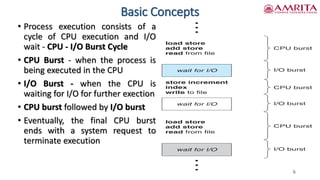
• Process execution consists of a
cycle of CPU execution and I/O
wait - CPU - I/O Burst Cycle
• CPU Burst - when the process is
being executed in the CPU
• I/O Burst - when the CPU is
waiting for I/O for further exection
• CPU burst followed by I/O burst
• Eventually, the final CPU burst
ends with a system request to
terminate execution
6
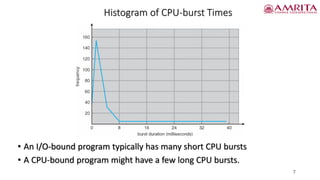
Histogram of CPU-burst Times
7
• An I/O-bound program typically has many short CPU bursts
• A CPU-bound program might have a few long CPU bursts.
CPU Scheduler
• Short-term/CPU scheduler selects from among the processes in ready
queue, and allocates the CPU to one of them
• Queue may be ordered in various ways
• CPU scheduling decisions may take place when a process:
1. Switches from running to waiting state
2. Switches from running to ready state
3. Switches from waiting to ready
4. Terminates
• For situations 1 and 4, there is no choice in terms of scheduling
A new process (if one exists in the ready queue) must be selected for
execution
• However, there is a choice for situations 2 and 3
8
CPU Scheduler
• When scheduling takes place only under circumstances 1 and 4, we say
that the scheduling scheme is nonpreemptive or cooperative
• Otherwise, it is preemptive
• Under nonpreemptive scheduling, once the CPU has been allocated to
a process, the process keeps the CPU until it releases the CPU either by
terminating or by switching to the waiting state
• Under preemptive scheduling, CPU has been taken away from a
process, before the process has completed its execution or before it is
swicting to the waiting state
• Scheduling under 1 and 4 is nonpreemptive
• All other scheduling is preemptive
• Consider access to shared data
• Consider preemption while in kernel mode
• Consider interrupts occurring during crucial OS activities
9
Dispatcher
• Dispatcher module gives control of the CPU to the process selected by
the short-term scheduler; this involves:
• switching context
• switching to user mode
• jumping to the proper location in the user program to restart that
program
• Dispatch latency – time it takes for the dispatcher to stop one process
and start another running
10
Scheduling Criteria
• CPU utilization –
• keep the CPU as busy as possible
• Conceptually, CPU utilization can range from 0 to 100 percent
• In a real system, it should range from 40 percent (for a lightly loaded
system) to 90 percent (for a heavily loaded system).
• Throughput –
• Number of processes that complete their execution per time unit
• For long processes, this rate may be one process per hour
• For short transactions, it may be ten processes per second
• Turnaround time –
• amount of time to execute a particular process
• The interval from the time of submission of a process to the time of
completion is the turnaround time
11
Scheduling Criteria
• Turnaround time –
• Turnaround time is the sum of the periods spent waiting to get into
memory, waiting in the ready queue, executing on the CPU, and doing
I/O
• Waiting time –
• The CPU-scheduling algorithm does not affect the amount of time
during which a process executes or does I/O
• It affects only the amount of time that a process spends waiting in the
ready queue
• Waiting time is the sum of the periods spent waiting in the ready
queue
• Response time –
• amount of time it takes from when a request was submitted until the
first response is produced, not output (for time-sharing environment)
12
Scheduling Algorithm Optimization Criteria
• Max CPU utilization
• Max throughput
• Min turnaround time
• Min waiting time
• Min response time
13
14
References
1. Silberscatnz and Galvin, “Operating System Concepts,” Ninth Edition, John
Wiley and Sons, 2012.
15
Thank you

CPU Scheduling Part-I.pdf

  • 1.
    Amrita School of Engineering, Bangalore Ms. Harika Pudugosula TeachingAssistant Department of Electronics & Communication Engineering
  • 2.
    • Basic Concepts •Scheduling Criteria • Scheduling Algorithms • Thread Scheduling • Multiple-Processor Scheduling • Real-Time CPU Scheduling • Operating Systems Examples • Algorithm Evaluation 2
  • 3.
    Objectives CPU scheduling isthe basis of multiprogrammed operating systems. By switching the CPU among processes, the operating system can make the computer more productive • To introduce CPU scheduling, which is the basis for multiprogrammed operating systems • To describe various CPU-scheduling algorithms • To discuss evaluation criteria for selecting a CPU-scheduling algorithm for a particular system • To examine the scheduling algorithms of several operating systems 3
  • 4.
    Basic Concepts • Ina single-processor system, only one process can run at a time • Others must wait until the CPU is free and can be rescheduled • The objective of multiprogramming is to have some process running at all times, to maximize CPU utilization • A process is executed until it must wait, typically for the completion of some I/O request • In a simple computer system, the CPU then just sits idle. All this waiting time is wasted; no useful work is accomplished • With multiprogramming, we try to use this time productively, maximum CPU utilization 4
  • 5.
    Basic Concepts • Withmultiprogramming, we try to use this time productively • Several processes are kept in memory at one time • When one process has to wait, the operating system takes the CPU away from that process and gives the CPU to another process • This pattern continues... 5
  • 6.
    Basic Concepts • Processexecution consists of a cycle of CPU execution and I/O wait - CPU - I/O Burst Cycle • CPU Burst - when the process is being executed in the CPU • I/O Burst - when the CPU is waiting for I/O for further exection • CPU burst followed by I/O burst • Eventually, the final CPU burst ends with a system request to terminate execution 6
  • 7.
    Histogram of CPU-burstTimes 7 • An I/O-bound program typically has many short CPU bursts • A CPU-bound program might have a few long CPU bursts.
  • 8.
    CPU Scheduler • Short-term/CPUscheduler selects from among the processes in ready queue, and allocates the CPU to one of them • Queue may be ordered in various ways • CPU scheduling decisions may take place when a process: 1. Switches from running to waiting state 2. Switches from running to ready state 3. Switches from waiting to ready 4. Terminates • For situations 1 and 4, there is no choice in terms of scheduling A new process (if one exists in the ready queue) must be selected for execution • However, there is a choice for situations 2 and 3 8
  • 9.
    CPU Scheduler • Whenscheduling takes place only under circumstances 1 and 4, we say that the scheduling scheme is nonpreemptive or cooperative • Otherwise, it is preemptive • Under nonpreemptive scheduling, once the CPU has been allocated to a process, the process keeps the CPU until it releases the CPU either by terminating or by switching to the waiting state • Under preemptive scheduling, CPU has been taken away from a process, before the process has completed its execution or before it is swicting to the waiting state • Scheduling under 1 and 4 is nonpreemptive • All other scheduling is preemptive • Consider access to shared data • Consider preemption while in kernel mode • Consider interrupts occurring during crucial OS activities 9
  • 10.
    Dispatcher • Dispatcher modulegives control of the CPU to the process selected by the short-term scheduler; this involves: • switching context • switching to user mode • jumping to the proper location in the user program to restart that program • Dispatch latency – time it takes for the dispatcher to stop one process and start another running 10
  • 11.
    Scheduling Criteria • CPUutilization – • keep the CPU as busy as possible • Conceptually, CPU utilization can range from 0 to 100 percent • In a real system, it should range from 40 percent (for a lightly loaded system) to 90 percent (for a heavily loaded system). • Throughput – • Number of processes that complete their execution per time unit • For long processes, this rate may be one process per hour • For short transactions, it may be ten processes per second • Turnaround time – • amount of time to execute a particular process • The interval from the time of submission of a process to the time of completion is the turnaround time 11
  • 12.
    Scheduling Criteria • Turnaroundtime – • Turnaround time is the sum of the periods spent waiting to get into memory, waiting in the ready queue, executing on the CPU, and doing I/O • Waiting time – • The CPU-scheduling algorithm does not affect the amount of time during which a process executes or does I/O • It affects only the amount of time that a process spends waiting in the ready queue • Waiting time is the sum of the periods spent waiting in the ready queue • Response time – • amount of time it takes from when a request was submitted until the first response is produced, not output (for time-sharing environment) 12
  • 13.
    Scheduling Algorithm OptimizationCriteria • Max CPU utilization • Max throughput • Min turnaround time • Min waiting time • Min response time 13
  • 14.
    14 References 1. Silberscatnz andGalvin, “Operating System Concepts,” Ninth Edition, John Wiley and Sons, 2012.
  • 15.