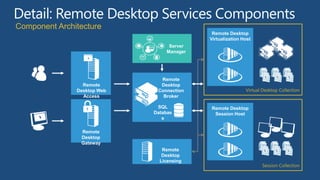
Component Architecture
                                            Remote Desktop
                                           Virtualization Host
                                  Server
                                 Manager


                               Remote
                 Remote        Desktop
               Desktop Web    Connection
                 Access         Broker

                              SQL          Remote Desktop
                             Databas        Session Host
                                e

                Remote
                Desktop
                Gateway
                                Remote
                                Desktop
                               Licensing
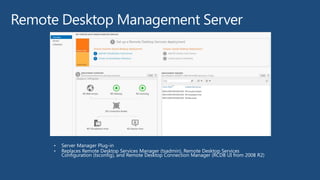
Remote Desktop Management Server
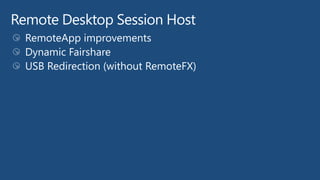
Remote Desktop Session Host
Remote Desktop Connection Broker
Remote Desktop Web Access
Remote Desktop Gateway
User Profile Disks
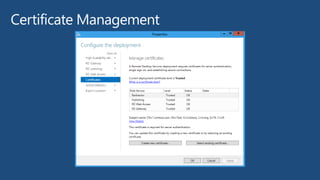
Certificate Management
Remote
                        Remote
                         Desktop           Remote Desktop
                       Remote
                        Desktop          Remote Desktop
                        Connection
                      Desktop          Remote DesktopHost
                                          Virtualization
                      Connection        Virtualization Host
                          Broker
                     Connection       Virtualization Host
     Remote              Broker
    Remote Web
   Desktop             Broker
  Remote
 Desktop Web           Remote
     Access
Desktop Web
    Access             Desktop
  Access             Connection
                 SQL Cluster
                       Broker

                   Databas
                      e
                                      Remote Desktop
                                       Session Desktop
                                       Remote Host
                                        Session Desktop
                                        Remote Host
                                          Session Host
 Remote
   Remote
 Desktop
    Remote
  Desktop              Remote
 Gateway
    Desktop
  Gateway                Remote
                       Desktop
    Gateway                Remote
                         Desktop
                      Licensing
                           Desktop
                        Licensing
                          Licensing
An example configuration
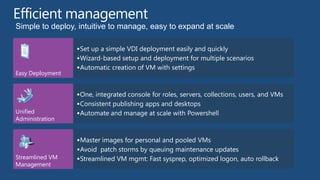
Simple to deploy, intuitive to manage, easy to expand at scale

                   Set up a simple VDI deployment easily and quickly
                   Wizard-based setup and deployment for multiple scenarios
                   Automatic creation of VM with settings
Easy Deployment


                   One, integrated console for roles, servers, collections, users, and VMs
                   Consistent publishing apps and desktops
Unified            Automate and manage at scale with Powershell
Administration


                   Master images for personal and pooled VMs
                   Avoid patch storms by queuing maintenance updates
Streamlined VM     Streamlined VM mgmt: Fast sysprep, optimized logon, auto rollback
Management
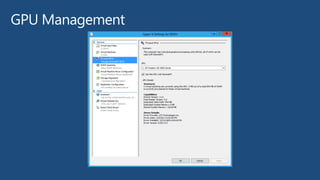
GPU Management
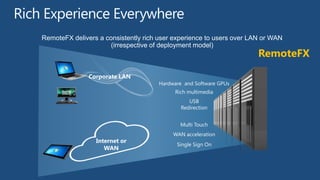
RemoteFX delivers a consistently rich user experience to users over LAN or WAN
                      (irrespective of deployment model)
                                                                      RemoteFX

               Corporate LAN
                                      Hardware and Software GPUs
                                           Rich multimedia
                                                 USB
                                              Redirection


                                             Multi Touch
                                           WAN acceleration
                 Internet or
                                            Single Sign On
                    WAN
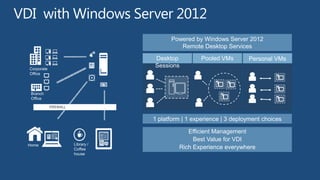
Powered by Windows Server 2012
                                            Remote Desktop Services
                                   Desktop           Pooled VMs       Personal VMs
Corporate
                                   Sessions
Office


 Branch
 Office

            FIREWALL


                                   1 platform | 1 experience | 3 deployment choices

                                               Efficient Management
                                                 Best Value for VDI
Home                   Library /
                       Coffee               Rich Experience everywhere
                       house
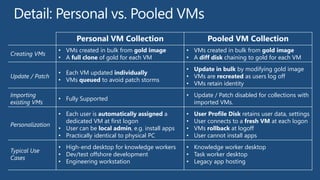
Personal VM Collection                            Pooled VM Collection
                  • VMs created in bulk from gold image          • VMs created in bulk from gold image
Creating VMs
                  • A full clone of gold for each VM             • A diff disk chaining to gold for each VM
                                                                 • Update in bulk by modifying gold image
                  • Each VM updated individually
Update / Patch                                                   • VMs are recreated as users log off
                  • VMs queued to avoid patch storms
                                                                 • VMs retain identity
Importing                                                        • Update / Patch disabled for collections with
                  • Fully Supported
existing VMs                                                       imported VMs.
                  • Each user is automatically assigned a        •   User Profile Disk retains user data, settings
                    dedicated VM at first logon                  •   User connects to a fresh VM at each logon
Personalization
                  • User can be local admin, e.g. install apps   •   VMs rollback at logoff
                  • Practically identical to physical PC         •   User cannot install apps
                  • High-end desktop for knowledge workers       • Knowledge worker desktop
Typical Use
                  • Dev/test offshore development                • Task worker desktop
Cases
                  • Engineering workstation                      • Legacy app hosting
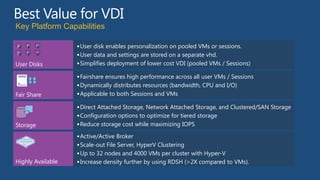
Key Platform Capabilities

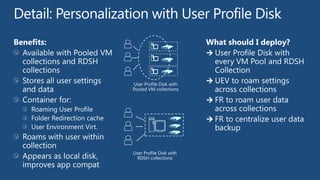
A   B     C         User disk enables personalization on pooled VMs or sessions.
D   E     F
                    User data and settings are stored on a separate vhd.
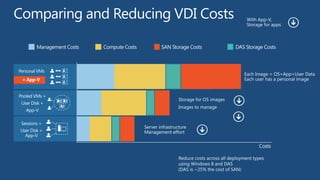
User Disks          Simplifies deployment of lower cost VDI (pooled VMs / Sessions)

                    Fairshare ensures high performance across all user VMs / Sessions
                    Dynamically distributes resources (bandwidth, CPU and I/O)
Fair Share          Applicable to both Sessions and VMs

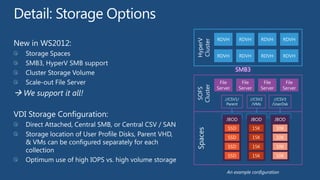
                    Direct Attached Storage, Network Attached Storage, and Clustered/SAN Storage
                    Configuration options to optimize for tiered storage
Storage             Reduce storage cost while maximizing IOPS

                    Active/Active Broker
                    Scale-out File Server, HyperV Clustering
                    Up to 32 nodes and 4000 VMs per cluster with Hyper-V
Highly Available    Increase density further by using RDSH (>2X compared to VMs).
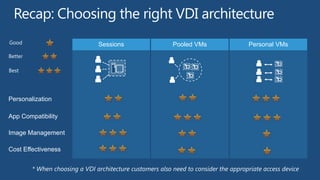
Good                 Sessions   Pooled VMs   Personal VMs
Better

Best


Personalization

App Compatibility

Image Management

Cost Effectiveness
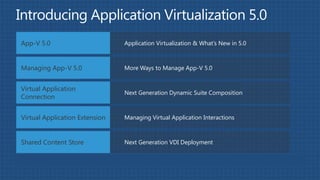
App-V 5.0                       Application Virtualization & What’s New in 5.0


Managing App-V 5.0              More Ways to Manage App-V 5.0


Virtual Application
                                Next Generation Dynamic Suite Composition
Connection


Virtual Application Extension   Managing Virtual Application Interactions


Shared Content Store            Next Generation VDI Deployment
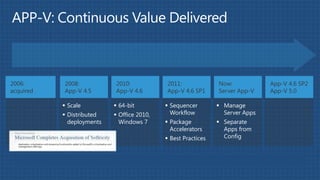
2006:      2008:           2010:            2011:              Now:            App-V 4.6 SP2
acquired   App-V 4.5       App-V 4.6        App-V 4.6 SP1      Server App-V    App-V 5.0

            Scale          64-bit          Sequencer         Manage
            Distributed    Office 2010,     Workflow           Server Apps
             deployments     Windows 7       Package           Separate
                                              Accelerators       Apps from
                                             Best Practices     Config
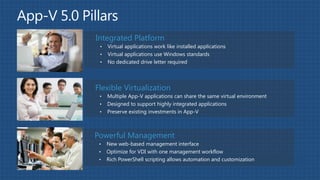
Integrated Platform
 •   Virtual applications work like installed applications
 •   Virtual applications use Windows standards
 •   No dedicated drive letter required


Flexible Virtualization
 •   Multiple App-V applications can share the same virtual environment
 •   Designed to support highly integrated applications
 •   Preserve existing investments in App-V


Powerful Management
 •   New web-based management interface
 •   Optimize for VDI with one management workflow
 •   Rich PowerShell scripting allows automation and customization
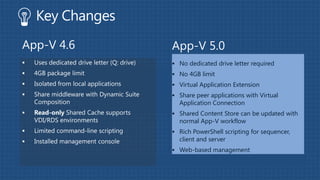
App-V 4.6   App-V 5.0
             No dedicated drive letter required
             No 4GB limit
             Virtual Application Extension
             Share peer applications with Virtual
              Application Connection
             Shared Content Store can be updated with
              normal App-V workflow
             Rich PowerShell scripting for sequencer,
              client and server
             Web-based management
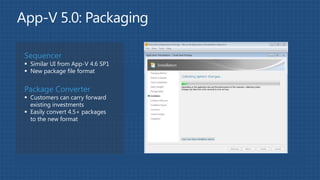
Sequencer
 Similar UI from App-V 4.6 SP1
 New package file format


Package Converter
 Customers can carry forward
  existing investments
 Easily convert 4.5+ packages
  to the new format
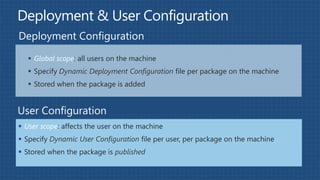
 Global scope: all users on the machine
    Specify Dynamic Deployment Configuration file per package on the machine
    Stored when the package is added


 User scope: affects the user on the machine
 Specify Dynamic User Configuration file per user, per package on the machine
 Stored when the package is published
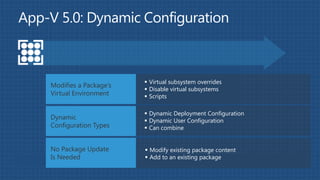
 Virtual subsystem overrides
Modifies a Package’s
                        Disable virtual subsystems
Virtual Environment     Scripts

                        Dynamic Deployment Configuration
Dynamic                 Dynamic User Configuration
Configuration Types     Can combine


No Package Update       Modify existing package content
Is Needed               Add to an existing package
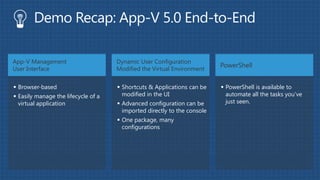
App-V Management                     Dynamic User Configuration
                                                                          PowerShell
User Interface                       Modified the Virtual Environment


 Browser-based                       Shortcuts & Applications can be     PowerShell is available to
 Easily manage the lifecycle of a     modified in the UI                   automate all the tasks you’ve
  virtual application                 Advanced configuration can be        just seen.
                                       imported directly to the console
                                      One package, many
                                       configurations
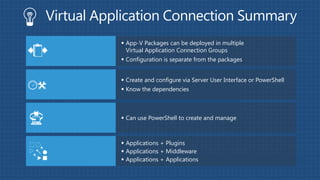
 App-V Packages can be deployed in multiple
Next Generation DSC      Virtual Application Connection Groups
                        Configuration is separate from the packages

Integrated with App-    Create and configure via Server User Interface or PowerShell
V Management
                        Know the dependencies
Server


Manage in
                        Can use PowerShell to create and manage
Standalone Mode


                        Applications + Plugins
Supported
                        Applications + Middleware
Configurations
                        Applications + Applications
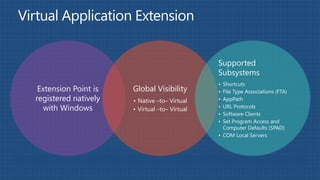
Supported
                                               Subsystems
                                               • Shortcuts
 Extension Point is   Global Visibility        • File Type Associations (FTA)
registered natively   • Native –to– Virtual    • AppPath
  with Windows        • Virtual –to– Virtual   • URL Protocols
                                               • Software Clients
                                               • Set Program Access and
                                                 Computer Defaults (SPAD)
                                               • COM Local Servers
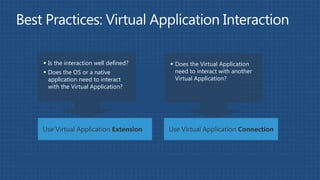
 Is the interaction well defined?    Does the Virtual Application
 Does the OS or a native              need to interact with another
  application need to interact         Virtual Application?
  with the Virtual Application?


Use Virtual Application Extension    Use Virtual Application Connection
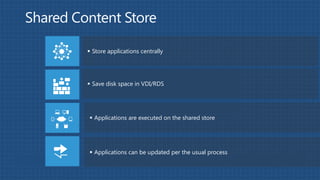
 Store applications centrally


 Save disk space in VDI/RDS


 Applications are executed on the shared store


 Applications can be updated per the usual process
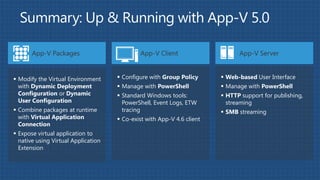
App-V Packages                         App-V Client                    App-V Server


 Modify the Virtual Environment      Configure with Group Policy       Web-based User Interface
  with Dynamic Deployment             Manage with PowerShell            Manage with PowerShell
  Configuration or Dynamic            Standard Windows tools:           HTTP support for publishing,
  User Configuration                   PowerShell, Event Logs, ETW        streaming
 Combine packages at runtime          tracing                           SMB streaming
  with Virtual Application            Co-exist with App-V 4.6 client
  Connection
 Expose virtual application to
  native using Virtual Application
  Extension

Презентация RDS & App-V, VDI

  • 2.
    Component Architecture Remote Desktop Virtualization Host Server Manager Remote Remote Desktop Desktop Web Connection Access Broker SQL Remote Desktop Databas Session Host e Remote Desktop Gateway Remote Desktop Licensing
  • 3.
  • 4.
  • 5.
  • 6.
  • 7.
  • 8.
  • 9.
  • 10.
    Remote Remote Desktop Remote Desktop Remote Desktop Remote Desktop Connection Desktop Remote DesktopHost Virtualization Connection Virtualization Host Broker Connection Virtualization Host Remote Broker Remote Web Desktop Broker Remote Desktop Web Remote Access Desktop Web Access Desktop Access Connection SQL Cluster Broker Databas e Remote Desktop Session Desktop Remote Host Session Desktop Remote Host Session Host Remote Remote Desktop Remote Desktop Remote Gateway Desktop Gateway Remote Desktop Gateway Remote Desktop Licensing Desktop Licensing Licensing
  • 12.
  • 13.
    Simple to deploy,intuitive to manage, easy to expand at scale  Set up a simple VDI deployment easily and quickly  Wizard-based setup and deployment for multiple scenarios  Automatic creation of VM with settings Easy Deployment  One, integrated console for roles, servers, collections, users, and VMs  Consistent publishing apps and desktops Unified  Automate and manage at scale with Powershell Administration  Master images for personal and pooled VMs  Avoid patch storms by queuing maintenance updates Streamlined VM  Streamlined VM mgmt: Fast sysprep, optimized logon, auto rollback Management
  • 14.
  • 16.
    RemoteFX delivers aconsistently rich user experience to users over LAN or WAN (irrespective of deployment model) RemoteFX Corporate LAN Hardware and Software GPUs Rich multimedia USB Redirection Multi Touch WAN acceleration Internet or Single Sign On WAN
  • 18.
    Powered by WindowsServer 2012 Remote Desktop Services Desktop Pooled VMs Personal VMs Corporate Sessions Office Branch Office FIREWALL 1 platform | 1 experience | 3 deployment choices Efficient Management Best Value for VDI Home Library / Coffee Rich Experience everywhere house
  • 19.
    Personal VM Collection Pooled VM Collection • VMs created in bulk from gold image • VMs created in bulk from gold image Creating VMs • A full clone of gold for each VM • A diff disk chaining to gold for each VM • Update in bulk by modifying gold image • Each VM updated individually Update / Patch • VMs are recreated as users log off • VMs queued to avoid patch storms • VMs retain identity Importing • Update / Patch disabled for collections with • Fully Supported existing VMs imported VMs. • Each user is automatically assigned a • User Profile Disk retains user data, settings dedicated VM at first logon • User connects to a fresh VM at each logon Personalization • User can be local admin, e.g. install apps • VMs rollback at logoff • Practically identical to physical PC • User cannot install apps • High-end desktop for knowledge workers • Knowledge worker desktop Typical Use • Dev/test offshore development • Task worker desktop Cases • Engineering workstation • Legacy app hosting
  • 20.
    Key Platform Capabilities A B C  User disk enables personalization on pooled VMs or sessions. D E F  User data and settings are stored on a separate vhd. User Disks  Simplifies deployment of lower cost VDI (pooled VMs / Sessions)  Fairshare ensures high performance across all user VMs / Sessions  Dynamically distributes resources (bandwidth, CPU and I/O) Fair Share  Applicable to both Sessions and VMs  Direct Attached Storage, Network Attached Storage, and Clustered/SAN Storage  Configuration options to optimize for tiered storage Storage  Reduce storage cost while maximizing IOPS  Active/Active Broker  Scale-out File Server, HyperV Clustering  Up to 32 nodes and 4000 VMs per cluster with Hyper-V Highly Available  Increase density further by using RDSH (>2X compared to VMs).
  • 21.
    Good Sessions Pooled VMs Personal VMs Better Best Personalization App Compatibility Image Management Cost Effectiveness
  • 23.
    App-V 5.0 Application Virtualization & What’s New in 5.0 Managing App-V 5.0 More Ways to Manage App-V 5.0 Virtual Application Next Generation Dynamic Suite Composition Connection Virtual Application Extension Managing Virtual Application Interactions Shared Content Store Next Generation VDI Deployment
  • 24.
    2006: 2008: 2010: 2011: Now: App-V 4.6 SP2 acquired App-V 4.5 App-V 4.6 App-V 4.6 SP1 Server App-V App-V 5.0  Scale  64-bit  Sequencer  Manage  Distributed  Office 2010, Workflow Server Apps deployments Windows 7  Package  Separate Accelerators Apps from  Best Practices Config
  • 25.
    Integrated Platform • Virtual applications work like installed applications • Virtual applications use Windows standards • No dedicated drive letter required Flexible Virtualization • Multiple App-V applications can share the same virtual environment • Designed to support highly integrated applications • Preserve existing investments in App-V Powerful Management • New web-based management interface • Optimize for VDI with one management workflow • Rich PowerShell scripting allows automation and customization
  • 26.
    App-V 4.6 App-V 5.0  No dedicated drive letter required  No 4GB limit  Virtual Application Extension  Share peer applications with Virtual Application Connection  Shared Content Store can be updated with normal App-V workflow  Rich PowerShell scripting for sequencer, client and server  Web-based management
  • 27.
    Sequencer  Similar UIfrom App-V 4.6 SP1  New package file format Package Converter  Customers can carry forward existing investments  Easily convert 4.5+ packages to the new format
  • 28.
     Global scope:all users on the machine  Specify Dynamic Deployment Configuration file per package on the machine  Stored when the package is added  User scope: affects the user on the machine  Specify Dynamic User Configuration file per user, per package on the machine  Stored when the package is published
  • 29.
     Virtual subsystemoverrides Modifies a Package’s  Disable virtual subsystems Virtual Environment  Scripts  Dynamic Deployment Configuration Dynamic  Dynamic User Configuration Configuration Types  Can combine No Package Update  Modify existing package content Is Needed  Add to an existing package
  • 30.
    App-V Management Dynamic User Configuration PowerShell User Interface Modified the Virtual Environment  Browser-based  Shortcuts & Applications can be  PowerShell is available to  Easily manage the lifecycle of a modified in the UI automate all the tasks you’ve virtual application  Advanced configuration can be just seen. imported directly to the console  One package, many configurations
  • 31.
     App-V Packagescan be deployed in multiple Next Generation DSC Virtual Application Connection Groups  Configuration is separate from the packages Integrated with App-  Create and configure via Server User Interface or PowerShell V Management  Know the dependencies Server Manage in  Can use PowerShell to create and manage Standalone Mode  Applications + Plugins Supported  Applications + Middleware Configurations  Applications + Applications
  • 32.
    Supported Subsystems • Shortcuts Extension Point is Global Visibility • File Type Associations (FTA) registered natively • Native –to– Virtual • AppPath with Windows • Virtual –to– Virtual • URL Protocols • Software Clients • Set Program Access and Computer Defaults (SPAD) • COM Local Servers
  • 33.
     Is theinteraction well defined?  Does the Virtual Application  Does the OS or a native need to interact with another application need to interact Virtual Application? with the Virtual Application? Use Virtual Application Extension Use Virtual Application Connection
  • 34.
     Store applicationscentrally  Save disk space in VDI/RDS  Applications are executed on the shared store  Applications can be updated per the usual process
  • 35.
    App-V Packages App-V Client App-V Server  Modify the Virtual Environment  Configure with Group Policy  Web-based User Interface with Dynamic Deployment  Manage with PowerShell  Manage with PowerShell Configuration or Dynamic  Standard Windows tools:  HTTP support for publishing, User Configuration PowerShell, Event Logs, ETW streaming  Combine packages at runtime tracing  SMB streaming with Virtual Application  Co-exist with App-V 4.6 client Connection  Expose virtual application to native using Virtual Application Extension