White paper VDI Performance of PRIMERGY S7 Server Generation


White paper
VDI Performance of PRIMERGY
S7 Server Generation


                                                               Content
                                                               Tasks                                                         2
                                                               Use of terms and names                                        2
                                                               Introduction                                                  3
                                                               Market observation and product selection                      5
                                                               Description of load test environment                          6
                                                                  Structure of load environment                              6
                                                                  Description of Medium Workload                             6
                                                                  Description of Heavy Workload                              6
                                                                  Measurements Citrix XenDesktop 5.5 and Machine
                                                                  Creation Services (MCS)                                   7
                                                                  Measurements VMware View 5.0                              7
                                                                  Hardware of the test environment                          7
                                                                  Infrastructure VMs of the Test environment                7
                                                                  Description of Citrix XenDesktop 5.5 VMs                  8
                                                                  Description of VMware View 5.0 VMs                        9
                                                               Load testing results – VM density                           10
                                                                  Maximum VM density per hypervisor host                   10
                                                               Summary                                                     11
                                                                  Hardware recommendations for VDI scenarios               11
                                                                  Results - higher VM density                              11
                                                                  Dependencies of VM density and memory configuration      11


Page 1 of 11                                                                                            http://www.fujitsu.com/fts
White paper VDI Performance of PRIMERGY S7 Server Generation


Tasks
■ Develop and set up a PoC (Proof-of-Concept) in order to simulate a standard user operations load on Windows 7 (x64) based VMs.
■ Focus on the technologies “VMware View with Linked Clones" and Citrix "XenDesktop Machine Creation Services".
■ Use of state-of-the-art local storage based on enterprise SSD technology.
■ Figure out VM density on PRIMERGY S7 generation based on Intel Romley-EP server architecture.

Use of terms and names
Hyperlinks as footnotes are included in the text for more information about specific products or manufacturers. Recurring abbreviations or terms
are explained in the Appendix, together with a hyperlink to the source. The abbreviations and terms when first appearing in the text are linked
to the glossary. Product and trade names are usually abbreviated:

          Microsoft® Corporation:             Microsoft
          Windows® 7:                         Windows 7
          Citrix® Systems, Inc.:              Citrix
          Citrix® XenApp™:                    XenApp
          Citrix® XenDesktop®:                XenDesktop
          Citrix® XenServer®:                 XenServer
          VMware™:                            VMware
          VMware™ View™:                      View
          VMware™ vCenter™:                   vCenter
          VMware™ vSphere™:                   vSphere
          VMware™ ESXi™:                      ESXi
          Intel®:                             Intel
          Xeon®:                              Xeon
          Sandy Bridge™:                      Sandy Bridge
          Romley-EP™:                         Romley-EP

The Microsoft trademarks can be seen at: http://www.microsoft.com/library/toolbar/3.0/trademarks/de-de.mspx.
The Citrix trademarks as well as the regulations for the correct name and identification can be found here:
http://www.citrix.com/English/aboutCitrix/legal/secondLevel.asp?level2ID=2210.
Cisco trademarks are listed here: http://www.cisco.com/web/siteassets/legal/trademark.html.
All other products named in this document are trademarks of the respective manufacturer.


Page 2 of 11                                                                                                         http://www.fujitsu.com/fts
White paper VDI Performance of PRIMERGY S7 Server Generation


Introduction
This document is designed to illustrate the performance of the current PRIMERGY S7 product line within a virtual desktop infrastructure (VDI).
The focus lies on the CPU and RAM requirements. Storage, network and bandwidth requirements are not part of this White Paper. The results can
be used as a basis for sizing a corresponding VDI environment based on Citrix XenDesktop 5.5 and VMware View 5.0.

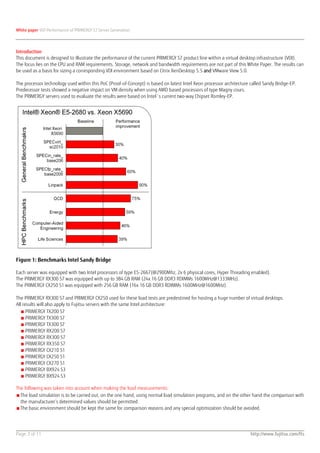
The processor technology used within this PoC (Proof-of-Concept) is based on latest Intel Xeon processor architecture called Sandy Bridge-EP.
Predecessor tests showed a negative impact on VM density when using AMD based processors of type Magny cours.
The PRIMERGY servers used to evaluate the results were based on Intel´s current two-way Chipset Romley-EP.


Figure 1: Benchmarks Intel Sandy Bridge

Each server was equipped with two Intel processors of type E5-2667(@2900Mhz, 2x 6 physical cores, Hyper Threading enabled).
The PRIMERGY RX300 S7 was equipped with up to 384 GB RAM (24x 16 GB DDR3 RDIMMs 1600MHz@1333MHz).
The PRIMERGY CX250 S1 was equipped with 256 GB RAM (16x 16 GB DDR3 RDIMMs 1600MHz@1600MHz).

The PRIMERGY RX300 S7 and PRIMERGY CX250 used for these load tests are predestined for hosting a huge number of virtual desktops.
All results will also apply to Fujitsu servers with the same Intel architecture:
   ■ PRIMERGY TX200 S7
   ■ PRIMERGY TX300 S7
   ■ PRIMERGY TX300 S7
   ■ PRIMERGY RX200 S7
   ■ PRIMERGY RX300 S7
   ■ PRIMERGY RX350 S7
   ■ PRIMERGY CX210 S1
   ■ PRIMERGY CX250 S1
   ■ PRIMERGY CX270 S1
   ■ PRIMERGY BX924 S3
   ■ PRIMERGY BX924 S3

The following was taken into account when making the load measurements:
■ The load simulation is to be carried out, on the one hand, using normal load simulation programs, and on the other hand the comparison with
  the manufacturer’s determined values should be permitted.
■ The basic environment should be kept the same for comparison reasons and any special optimization should be avoided.


Page 3 of 11                                                                                                          http://www.fujitsu.com/fts
White paper VDI Performance of PRIMERGY S7 Server Generation


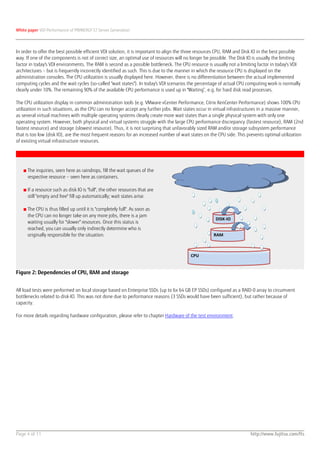
In order to offer the best possible efficient VDI solution, it is important to align the three resources CPU, RAM and Disk IO in the best possible
way. If one of the components is not of correct size, an optimal use of resources will no longer be possible. The Disk IO is usually the limiting
factor in today's VDI environments. The RAM is second as a possible bottleneck. The CPU resource is usually not a limiting factor in today's VDI
architectures – but is frequently incorrectly identified as such. This is due to the manner in which the resource CPU is displayed on the
administration consoles. The CPU utilization is usually displayed here. However, there is no differentiation between the actual implemented
computing cycles and the wait cycles (so-called "wait states"). In today's VDI scenarios the percentage of actual CPU computing work is normally
clearly under 10%. The remaining 90% of the available CPU performance is used up in "Waiting“, e.g. for hard disk read processes.

The CPU utilization display in common administration tools (e.g. VMware vCenter Performance, Citrix XenCenter Performance) shows 100% CPU
utilization in such situations, as the CPU can no longer accept any further jobs. Wait states occur in virtual infrastructures in a massive manner,
as several virtual machines with multiple operating systems clearly create more wait states than a single physical system with only one
operating system. However, both physical and virtual systems struggle with the large CPU performance discrepancy (fastest resource), RAM (2nd
fastest resource) and storage (slowest resource). Thus, it is not surprising that unfavorably sized RAM and/or storage subsystem performance
that is too low (disk IO), are the most frequent reasons for an increased number of wait states on the CPU side. This prevents optimal utilization
of existing virtual infrastructure resources.


   ■ The inquiries, seen here as raindrops, fill the wait queues of the
     respective resource – seen here as containers.

   ■ If a resource such as disk IO is "full", the other resources that are
     still "empty and free" fill up automatically; wait states arise.

   ■ The CPU is thus filled up until it is "completely full". As soon as
     the CPU can no longer take on any more jobs, there is a jam
                                                                                                      DISK-IO
     waiting usually for "slower" resources. Once this status is
     reached, you can usually only indirectly determine who is
     originally responsible for the situation.                                                       RAM


                                                                                         CPU


Figure 2: Dependencies of CPU, RAM and storage


All load tests were performed on local storage based on Enterprise SSDs (up to 6x 64 GB EP SSDs) configured as a RAID-0 array to circumvent
bottlenecks related to disk-IO. This was not done due to performance reasons (3 SSDs would have been sufficient), but rather because of
capacity.

For more details regarding hardware configuration, please refer to chapter Hardware of the test environment.


Page 4 of 11                                                                                                            http://www.fujitsu.com/fts
White paper VDI Performance of PRIMERGY S7 Server Generation


Market observation and product selection
As a basis for this document, the following Hypervisor and management solutions were chosen:
  ■ Citrix XenServer 6.0 and XenCenter 6.0
  ■ VMware ESXi 5.0 and vCenter 5.0

1
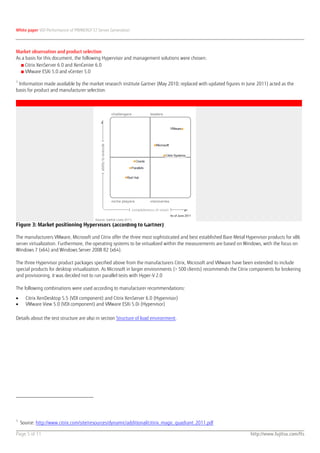
 Information made available by the market research institute Gartner (May 2010; replaced with updated figures in June 2011) acted as the
basis for product and manufacturer selection.


Figure 3: Market positioning Hypervisors (according to Gartner)

The manufacturers VMware, Microsoft und Citrix offer the three most sophisticated and best established Bare Metal Hypervisor products for x86
server virtualization. Furthermore, the operating systems to be virtualized within the measurements are based on Windows, with the focus on
Windows 7 (x64) and Windows Server 2008 R2 (x64).

The three Hypervisor product packages specified above from the manufacturers Citrix, Microsoft and VMware have been extended to include
special products for desktop virtualization. As Microsoft in larger environments (> 500 clients) recommends the Citrix components for brokering
and provisioning, it was decided not to run parallel tests with Hyper-V 2.0

The following combinations were used according to manufacturer recommendations:

      Citrix XenDesktop 5.5 (VDI component) and Citrix XenServer 6.0 (Hypervisor)
      VMware View 5.0 (VDI component) and VMware ESXi 5.0i (Hypervisor)

Details about the test structure are also in section Structure of load environment.


1
    Source: http://www.citrix.com/site/resources/dynamic/additional/citirix_magic_quadrant_2011.pdf

Page 5 of 11                                                                                                         http://www.fujitsu.com/fts
White paper VDI Performance of PRIMERGY S7 Server Generation


Description of load test environment

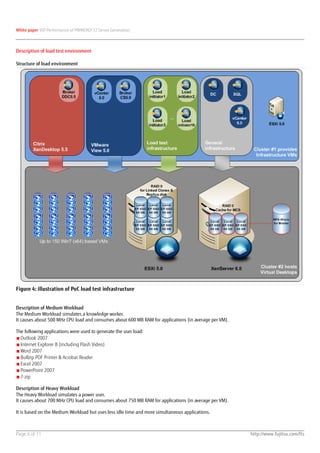
Structure of load environment


Figure 4: illustration of PoC load test infrastructure


Description of Medium Workload
The Medium Workload simulates a knowledge worker.
It causes about 500 MHz CPU load and consumes about 600 MB RAM for applications (in average per VM).

The following applications were used to generate the user load:
■ Outlook 2007
■ Internet Explorer 8 (including Flash Video)
■ Word 2007
■ Bullzip PDF Printer & Acrobat Reader
■ Excel 2007
■ PowerPoint 2007
■ 7-zip

Description of Heavy Workload
The Heavy Workload simulates a power user.
It causes about 700 MHz CPU load and consumes about 750 MB RAM for applications (in average per VM).

It is based on the Medium Workload but uses less idle time and more simultaneous applications.


Page 6 of 11                                                                                           http://www.fujitsu.com/fts
White paper VDI Performance of PRIMERGY S7 Server Generation


Measurements Citrix XenDesktop 5.5 and Machine Creation Services (MCS)
■ Maximum number of VMs with load profile "Medium"
■ Maximum number of VMs with load profile "Heavy"

Measurements VMware View 5.0
■ Maximum number of VMs with load profile "Medium"
■ Maximum number of VMs with load profile "Heavy"

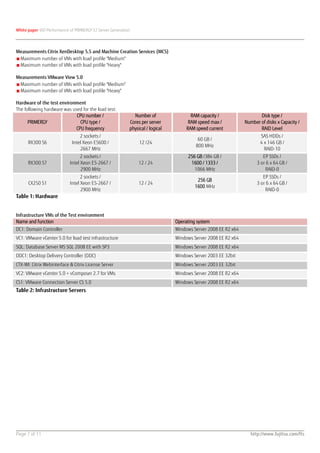
Hardware of the test environment
The following hardware was used for the load test:
                             CPU number /                    Number of                 RAM capacity /                  Disk type /
      PRIMERGY                 CPU type /                  Cores per server           RAM speed max /           Number of disks x Capacity /
                             CPU frequency                 physical / logical        RAM speed current                 RAID Level
                                 2 sockets /                                                                           SAS HDDs /
                                                                                          60 GB /
      RX300 S6               Intel Xeon E5600 /                 12 /24                                                 4 x 146 GB /
                                                                                         800 MHz
                                 2667 MHz                                                                                RAID-10
                                  2 sockets /                                        256 GB /384 GB /                    EP SSDs /
      RX300 S7              Intel Xeon E5-2667 /                12 / 24               1600 / 1333 /                   3 or 6 x 64 GB /
                                  2900 MHz                                              1066 MHz                          RAID-0
                                  2 sockets /                                                                            EP SSDs /
                                                                                          256 GB
      CX250 S1              Intel Xeon E5-2667 /                12 / 24                                               3 or 6 x 64 GB /
                                                                                         1600 MHz
                                  2900 MHz                                                                                RAID-0
Table 1: Hardware


Infrastructure VMs of the Test environment
Name and function                                                               Operating system
DC1: Domain Controller                                                          Windows Server 2008 EE R2 x64
VC1: VMware vCenter 5.0 for load test infrastructure                            Windows Server 2008 EE R2 x64
SQL: Database Server MS SQL 2008 EE with SP3                                    Windows Server 2008 EE R2 x64
DDC1: Desktop Delivery Controller (DDC)                                         Windows Server 2003 EE 32bit
CTX-WI: Citrix Webinterface & Citrix License Server                             Windows Server 2003 EE 32bit
VC2: VMware vCenter 5.0 + vComposer 2.7 for VMs                                 Windows Server 2008 EE R2 x64
CS1: VMware Connection Server CS 5.0                                            Windows Server 2008 EE R2 x64
Table 2: Infrastructure Servers


Page 7 of 11                                                                                                       http://www.fujitsu.com/fts
White paper VDI Performance of PRIMERGY S7 Server Generation


Description of Citrix XenDesktop 5.5 VMs
All load tests were performed via a single Pooled Desktop Group with dedicated user allocation.
All virtual machines were created via the Machine Creation Services (MCS).

MCS requires a NFS File Share which was provided by a NetApp FAS2020 storage subsystem. The NFS File Share need not provide high
performance, since MCS will just use the NFS File Share as central repository for the master image. As soon as the first VM boots from the NFS File
Share, the data will be copied to the pre-configured local storage. All blocks which will consequently be requested by (other) VMs will then be
taken from the local storage. The local storage only acts as a cache, which means that even transferring VMs to different hosts is possible.
Within our load tests the local storage consisted of 3x 64 GB EP SSDs (RAID-0) to get the required capacity.
In a practical environment it might make sense to use bigger SSDs.

Please also refer to the previously published white paper Sizing of Virtual Desktop Infrastructures for additional information about different
provisioning types (Provisioning Server) and storage sizing (calculator for needed IOps).

Configuration of XenDesktop Master
■ OS:      Windows 7 (x64)
■ CPU:     1 vCPU (installation was conducted using 2 vCPUs)
■ RAM:     1536 MB2
                             3
■ HDD:     30 GB vDisk (Thin )

To perform load tests as well as for productive use of Windows 7 based VMs, it is highly recommended to perform several optimizations regarding
operating system as well as for the protocol (ICA / PCoIP) used to access the VM. Furthermore there are some modifications regarding hypervisor
which can positively affect user density. All these optimizations were implemented according to best practices and took place in close contact
with the corresponding vendors - VMware and Citrix.

For further information about these optimizations please feel free to contact your local sales person.


2
 Citrix sets the minimum RAM size recommended by Microsoft for all templates to 2 GB for Windows 7 (x64). As we wanted to use less RAM within
our load tests, this lower limit can thus be changed via the Dynamic Memory Control Feature. This happens via the following commands within the
XenServer console:
1)   xe vm-list
     a)   Note uuid of the VM to be modified
2)   xe vm-memory-static-range-set uuid=db5d28e6-039a-d10e-e38e-9550c1c32678 min=1024MiB max=2048MiB
3)   xe vm-memory-dynamic-range-set uuid=db5d28e6-039a-d10e-e38e-9550c1c32678 min=1024MiB max=2048MiB
3
  There are always two modes when assigning storage capacity:
Thick = the entire allocated capacity is already initially reserved on storage for the VM, irrespective of how much actual data is in the VM partition;
optimal performance
Fast or Thin = the assigned capacity is always available for the VM, but on storage only the capacity is used, which is filled with data;
optimal capacity usage but reduced performance

Page 8 of 11                                                                                                              http://www.fujitsu.com/fts
White paper VDI Performance of PRIMERGY S7 Server Generation


Description of VMware View 5.0 VMs
All load tests were performed in an “Automated Pool” with Floating (= non-persistent) Desktops. Dedicated users were allocated due to load test
requirements.
All virtual machines were created via Linked Clone mechanisms out of a single master image. As provisioning method only one replica disk was
chosen located on the same LUN as the Linked Clones. This was done to save capacity.

No SAN or NAS storage was used during the tests. Within our load tests the local storage consisted of 6x 64 GB EP SSDs (RAID-0) to get the
required capacity for up to 170 VMs. In a practical environment it might make sense to use only two but bigger sized SSDs.

Please also refer to the previously published white paper Sizing of Virtual Desktop Infrastructures for additional information about different
provisioning types (Provisioning Server) and storage sizing (calculator for needed IOPs).

Configuration of View Master
■ OS:      Windows 7 (x64)
■ CPU:     1 vCPU
■ RAM:     1536 MB
■ HDD:     30 GB vDisk (Thick4)

To perform load tests as well as for productive use of Windows 7 based VMs, it is highly recommended to perform several optimizations regarding
operating system as well as for the protocol (ICA / PCoIP) used to access the VM. Furthermore there are some modifications regarding hypervisor
which can positively affect user density. All these optimizations were implemented according to best practices and took place in close contact
with the corresponding vendors - VMware and Citrix.

For further information about these optimizations please feel free to contact your local sales person.


4
  There are always two modes when assigning storage capacity:
Thick = the entire allocated memory is already initially reserved on storage for the VM, irrespective of how much actual data is in the VM partition;
optimal performance
Fast or Thin = the assigned memory is always available for the VM, but on storage only the capacity is used which is filled with data;
optimal capacity usage but reduced performance

Page 9 of 11                                                                                                             http://www.fujitsu.com/fts
White paper VDI Performance of PRIMERGY S7 Server Generation


Load testing results – VM density

Maximum VM density per hypervisor host


                                              XEON X5650              XEON X5650               XEON E5-2667          XEON E5-2667
      Solution Hypervisor &
                                             max VM density          max VM density            max VM density       max VM density
           Provisioning
                                           "Medium" workload        "Heavy" workload         "Medium" workload     "Heavy" workload
Citrix XenServer 6.0 and
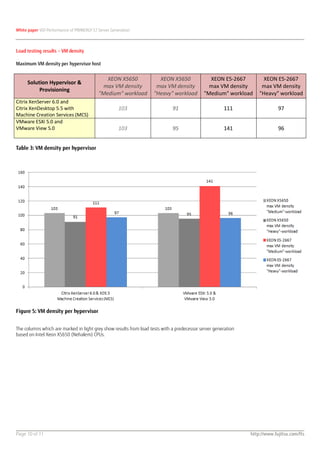
Citrix XenDesktop 5.5 with                           103                     91                       111                   97
Machine Creation Services (MCS)
VMware ESXi 5.0 and
VMware View 5.0                                      103                     95                       141                   96


Table 3: VM density per hypervisor


Figure 5: VM density per hypervisor


The columns which are marked in light grey show results from load tests with a predecessor server generation
based on Intel Xeon X5650 (Nehalem) CPUs.


Page 10 of 11                                                                                                  http://www.fujitsu.com/fts
White paper VDI Performance of PRIMERGY S7 Server Generation


Summary

Hardware recommendations for VDI scenarios
The new Intel Chipset Romley EP which supports the new Intel Sandy Bridge processors comes along with some new technologies, which help
customers to further improve the VM density in VDI scenarios.

Fujitsu’s two-way PRIMERGY models based on this new architecture – such as RX300 S7 - will provide up to 8 physical cores per CPU and
increased memory bandwidth and speed through 4 memory channels per CPU at a maximum speed of 1600 MHz.

Recommendation CPU
We recommend you to equip all two-way servers based on Romley EP with 2 processors.
A good price performance ratio for VDI scenarios can probably be achieved by using 8 core CPUs of type E5-2650 or higher.

Recommendation RAM
Furthermore, it is recommended to always use a multiple of 8 DIMM modules @ 1600MHz to benefit from the full memory bandwidth and
speed. Since memory is very vital for VDI scenarios, we recommend you to start with 16x 16 GB DDR3 DIMMs @ 1600MHz (= 256 GB RAM).

Results - higher VM density
The VM density with Heavy workload increased only slightly on Intel Xeon E5-2667 processors, although the new processor architecture should
provide a performance increase of ~50%. Future load test and BIOS patches might also lead to increased overall performance.

In contrast to the Heavy workload, the Medium workload – especially on VMware ESXi 5.0 - really rocks on the new Intel Chipset and CPU Sandy
Bridge architecture with a higher VM density of 37% compared to the predecessor Nehalem architecture:
         Citrix Heavy:                      +9%
         Citrix Medium:                     +8%
         VMware Heavy:                      +1%
         VMware Medium:                     +37%

Dependencies of VM density and memory configuration
During our load tests we also did some tests using different speeds of the RAM modules (either through different BIOS versions and/or number
of equipped modules). The practical influence of memory speed configurations on the VM density were:
         RAM modules @ 1066 MHz:            0% - basis
         RAM modules @ 1333 MHz:            +8% compared to 1066 MHz
         RAM modules @ 1600 MHz:            +8% compared to 1333 MHz
Each memory speed step provided about 8% more VMs on a single hypervisor host.
An optimal memory speed configuration was about 16% faster than using a memory configuration with only 1066 MHz.


Contact                                               ƒCopyright 2012 Fujitsu, the Fujitsu logo are trademarks or registered trademarks of Fujitsu Limited in Japan
FUJITSU Technology Solutions GmbH                     and other countries. Other company, product and service names may be trademarks or registered trademarks
Address: Mies-van-der-Rohe-Strasse 8,                 of their respective owners. Technical data subject to modifications and delivery subject to availability. Any
80807 Munich, Germany                                 liability that the data and illustrations are complete, actual or correct is excluded. Designations may be
Website: www.fujitsu.com/fts                          trademarks and/or copyrights of the respective manufacturer, the use of which by third parties for their own
2012-03-26EN                                          purposes may infringe the rights of such owner.

VDI Performance of PRIMERGY S7 Server Generation

  • 1.
    White paper VDIPerformance of PRIMERGY S7 Server Generation White paper VDI Performance of PRIMERGY S7 Server Generation Content Tasks 2 Use of terms and names 2 Introduction 3 Market observation and product selection 5 Description of load test environment 6 Structure of load environment 6 Description of Medium Workload 6 Description of Heavy Workload 6 Measurements Citrix XenDesktop 5.5 and Machine Creation Services (MCS) 7 Measurements VMware View 5.0 7 Hardware of the test environment 7 Infrastructure VMs of the Test environment 7 Description of Citrix XenDesktop 5.5 VMs 8 Description of VMware View 5.0 VMs 9 Load testing results – VM density 10 Maximum VM density per hypervisor host 10 Summary 11 Hardware recommendations for VDI scenarios 11 Results - higher VM density 11 Dependencies of VM density and memory configuration 11 Page 1 of 11 http://www.fujitsu.com/fts
  • 2.
    White paper VDIPerformance of PRIMERGY S7 Server Generation Tasks ■ Develop and set up a PoC (Proof-of-Concept) in order to simulate a standard user operations load on Windows 7 (x64) based VMs. ■ Focus on the technologies “VMware View with Linked Clones" and Citrix "XenDesktop Machine Creation Services". ■ Use of state-of-the-art local storage based on enterprise SSD technology. ■ Figure out VM density on PRIMERGY S7 generation based on Intel Romley-EP server architecture. Use of terms and names Hyperlinks as footnotes are included in the text for more information about specific products or manufacturers. Recurring abbreviations or terms are explained in the Appendix, together with a hyperlink to the source. The abbreviations and terms when first appearing in the text are linked to the glossary. Product and trade names are usually abbreviated:  Microsoft® Corporation: Microsoft  Windows® 7: Windows 7  Citrix® Systems, Inc.: Citrix  Citrix® XenApp™: XenApp  Citrix® XenDesktop®: XenDesktop  Citrix® XenServer®: XenServer  VMware™: VMware  VMware™ View™: View  VMware™ vCenter™: vCenter  VMware™ vSphere™: vSphere  VMware™ ESXi™: ESXi  Intel®: Intel  Xeon®: Xeon  Sandy Bridge™: Sandy Bridge  Romley-EP™: Romley-EP The Microsoft trademarks can be seen at: http://www.microsoft.com/library/toolbar/3.0/trademarks/de-de.mspx. The Citrix trademarks as well as the regulations for the correct name and identification can be found here: http://www.citrix.com/English/aboutCitrix/legal/secondLevel.asp?level2ID=2210. Cisco trademarks are listed here: http://www.cisco.com/web/siteassets/legal/trademark.html. All other products named in this document are trademarks of the respective manufacturer. Page 2 of 11 http://www.fujitsu.com/fts
  • 3.
    White paper VDIPerformance of PRIMERGY S7 Server Generation Introduction This document is designed to illustrate the performance of the current PRIMERGY S7 product line within a virtual desktop infrastructure (VDI). The focus lies on the CPU and RAM requirements. Storage, network and bandwidth requirements are not part of this White Paper. The results can be used as a basis for sizing a corresponding VDI environment based on Citrix XenDesktop 5.5 and VMware View 5.0. The processor technology used within this PoC (Proof-of-Concept) is based on latest Intel Xeon processor architecture called Sandy Bridge-EP. Predecessor tests showed a negative impact on VM density when using AMD based processors of type Magny cours. The PRIMERGY servers used to evaluate the results were based on Intel´s current two-way Chipset Romley-EP. Figure 1: Benchmarks Intel Sandy Bridge Each server was equipped with two Intel processors of type E5-2667(@2900Mhz, 2x 6 physical cores, Hyper Threading enabled). The PRIMERGY RX300 S7 was equipped with up to 384 GB RAM (24x 16 GB DDR3 RDIMMs 1600MHz@1333MHz). The PRIMERGY CX250 S1 was equipped with 256 GB RAM (16x 16 GB DDR3 RDIMMs 1600MHz@1600MHz). The PRIMERGY RX300 S7 and PRIMERGY CX250 used for these load tests are predestined for hosting a huge number of virtual desktops. All results will also apply to Fujitsu servers with the same Intel architecture: ■ PRIMERGY TX200 S7 ■ PRIMERGY TX300 S7 ■ PRIMERGY TX300 S7 ■ PRIMERGY RX200 S7 ■ PRIMERGY RX300 S7 ■ PRIMERGY RX350 S7 ■ PRIMERGY CX210 S1 ■ PRIMERGY CX250 S1 ■ PRIMERGY CX270 S1 ■ PRIMERGY BX924 S3 ■ PRIMERGY BX924 S3 The following was taken into account when making the load measurements: ■ The load simulation is to be carried out, on the one hand, using normal load simulation programs, and on the other hand the comparison with the manufacturer’s determined values should be permitted. ■ The basic environment should be kept the same for comparison reasons and any special optimization should be avoided. Page 3 of 11 http://www.fujitsu.com/fts
  • 4.
    White paper VDIPerformance of PRIMERGY S7 Server Generation In order to offer the best possible efficient VDI solution, it is important to align the three resources CPU, RAM and Disk IO in the best possible way. If one of the components is not of correct size, an optimal use of resources will no longer be possible. The Disk IO is usually the limiting factor in today's VDI environments. The RAM is second as a possible bottleneck. The CPU resource is usually not a limiting factor in today's VDI architectures – but is frequently incorrectly identified as such. This is due to the manner in which the resource CPU is displayed on the administration consoles. The CPU utilization is usually displayed here. However, there is no differentiation between the actual implemented computing cycles and the wait cycles (so-called "wait states"). In today's VDI scenarios the percentage of actual CPU computing work is normally clearly under 10%. The remaining 90% of the available CPU performance is used up in "Waiting“, e.g. for hard disk read processes. The CPU utilization display in common administration tools (e.g. VMware vCenter Performance, Citrix XenCenter Performance) shows 100% CPU utilization in such situations, as the CPU can no longer accept any further jobs. Wait states occur in virtual infrastructures in a massive manner, as several virtual machines with multiple operating systems clearly create more wait states than a single physical system with only one operating system. However, both physical and virtual systems struggle with the large CPU performance discrepancy (fastest resource), RAM (2nd fastest resource) and storage (slowest resource). Thus, it is not surprising that unfavorably sized RAM and/or storage subsystem performance that is too low (disk IO), are the most frequent reasons for an increased number of wait states on the CPU side. This prevents optimal utilization of existing virtual infrastructure resources. ■ The inquiries, seen here as raindrops, fill the wait queues of the respective resource – seen here as containers. ■ If a resource such as disk IO is "full", the other resources that are still "empty and free" fill up automatically; wait states arise. ■ The CPU is thus filled up until it is "completely full". As soon as the CPU can no longer take on any more jobs, there is a jam DISK-IO waiting usually for "slower" resources. Once this status is reached, you can usually only indirectly determine who is originally responsible for the situation. RAM CPU Figure 2: Dependencies of CPU, RAM and storage All load tests were performed on local storage based on Enterprise SSDs (up to 6x 64 GB EP SSDs) configured as a RAID-0 array to circumvent bottlenecks related to disk-IO. This was not done due to performance reasons (3 SSDs would have been sufficient), but rather because of capacity. For more details regarding hardware configuration, please refer to chapter Hardware of the test environment. Page 4 of 11 http://www.fujitsu.com/fts
  • 5.
    White paper VDIPerformance of PRIMERGY S7 Server Generation Market observation and product selection As a basis for this document, the following Hypervisor and management solutions were chosen: ■ Citrix XenServer 6.0 and XenCenter 6.0 ■ VMware ESXi 5.0 and vCenter 5.0 1 Information made available by the market research institute Gartner (May 2010; replaced with updated figures in June 2011) acted as the basis for product and manufacturer selection. Figure 3: Market positioning Hypervisors (according to Gartner) The manufacturers VMware, Microsoft und Citrix offer the three most sophisticated and best established Bare Metal Hypervisor products for x86 server virtualization. Furthermore, the operating systems to be virtualized within the measurements are based on Windows, with the focus on Windows 7 (x64) and Windows Server 2008 R2 (x64). The three Hypervisor product packages specified above from the manufacturers Citrix, Microsoft and VMware have been extended to include special products for desktop virtualization. As Microsoft in larger environments (> 500 clients) recommends the Citrix components for brokering and provisioning, it was decided not to run parallel tests with Hyper-V 2.0 The following combinations were used according to manufacturer recommendations: Citrix XenDesktop 5.5 (VDI component) and Citrix XenServer 6.0 (Hypervisor) VMware View 5.0 (VDI component) and VMware ESXi 5.0i (Hypervisor) Details about the test structure are also in section Structure of load environment. 1 Source: http://www.citrix.com/site/resources/dynamic/additional/citirix_magic_quadrant_2011.pdf Page 5 of 11 http://www.fujitsu.com/fts
  • 6.
    White paper VDIPerformance of PRIMERGY S7 Server Generation Description of load test environment Structure of load environment Figure 4: illustration of PoC load test infrastructure Description of Medium Workload The Medium Workload simulates a knowledge worker. It causes about 500 MHz CPU load and consumes about 600 MB RAM for applications (in average per VM). The following applications were used to generate the user load: ■ Outlook 2007 ■ Internet Explorer 8 (including Flash Video) ■ Word 2007 ■ Bullzip PDF Printer & Acrobat Reader ■ Excel 2007 ■ PowerPoint 2007 ■ 7-zip Description of Heavy Workload The Heavy Workload simulates a power user. It causes about 700 MHz CPU load and consumes about 750 MB RAM for applications (in average per VM). It is based on the Medium Workload but uses less idle time and more simultaneous applications. Page 6 of 11 http://www.fujitsu.com/fts
  • 7.
    White paper VDIPerformance of PRIMERGY S7 Server Generation Measurements Citrix XenDesktop 5.5 and Machine Creation Services (MCS) ■ Maximum number of VMs with load profile "Medium" ■ Maximum number of VMs with load profile "Heavy" Measurements VMware View 5.0 ■ Maximum number of VMs with load profile "Medium" ■ Maximum number of VMs with load profile "Heavy" Hardware of the test environment The following hardware was used for the load test: CPU number / Number of RAM capacity / Disk type / PRIMERGY CPU type / Cores per server RAM speed max / Number of disks x Capacity / CPU frequency physical / logical RAM speed current RAID Level 2 sockets / SAS HDDs / 60 GB / RX300 S6 Intel Xeon E5600 / 12 /24 4 x 146 GB / 800 MHz 2667 MHz RAID-10 2 sockets / 256 GB /384 GB / EP SSDs / RX300 S7 Intel Xeon E5-2667 / 12 / 24 1600 / 1333 / 3 or 6 x 64 GB / 2900 MHz 1066 MHz RAID-0 2 sockets / EP SSDs / 256 GB CX250 S1 Intel Xeon E5-2667 / 12 / 24 3 or 6 x 64 GB / 1600 MHz 2900 MHz RAID-0 Table 1: Hardware Infrastructure VMs of the Test environment Name and function Operating system DC1: Domain Controller Windows Server 2008 EE R2 x64 VC1: VMware vCenter 5.0 for load test infrastructure Windows Server 2008 EE R2 x64 SQL: Database Server MS SQL 2008 EE with SP3 Windows Server 2008 EE R2 x64 DDC1: Desktop Delivery Controller (DDC) Windows Server 2003 EE 32bit CTX-WI: Citrix Webinterface & Citrix License Server Windows Server 2003 EE 32bit VC2: VMware vCenter 5.0 + vComposer 2.7 for VMs Windows Server 2008 EE R2 x64 CS1: VMware Connection Server CS 5.0 Windows Server 2008 EE R2 x64 Table 2: Infrastructure Servers Page 7 of 11 http://www.fujitsu.com/fts
  • 8.
    White paper VDIPerformance of PRIMERGY S7 Server Generation Description of Citrix XenDesktop 5.5 VMs All load tests were performed via a single Pooled Desktop Group with dedicated user allocation. All virtual machines were created via the Machine Creation Services (MCS). MCS requires a NFS File Share which was provided by a NetApp FAS2020 storage subsystem. The NFS File Share need not provide high performance, since MCS will just use the NFS File Share as central repository for the master image. As soon as the first VM boots from the NFS File Share, the data will be copied to the pre-configured local storage. All blocks which will consequently be requested by (other) VMs will then be taken from the local storage. The local storage only acts as a cache, which means that even transferring VMs to different hosts is possible. Within our load tests the local storage consisted of 3x 64 GB EP SSDs (RAID-0) to get the required capacity. In a practical environment it might make sense to use bigger SSDs. Please also refer to the previously published white paper Sizing of Virtual Desktop Infrastructures for additional information about different provisioning types (Provisioning Server) and storage sizing (calculator for needed IOps). Configuration of XenDesktop Master ■ OS: Windows 7 (x64) ■ CPU: 1 vCPU (installation was conducted using 2 vCPUs) ■ RAM: 1536 MB2 3 ■ HDD: 30 GB vDisk (Thin ) To perform load tests as well as for productive use of Windows 7 based VMs, it is highly recommended to perform several optimizations regarding operating system as well as for the protocol (ICA / PCoIP) used to access the VM. Furthermore there are some modifications regarding hypervisor which can positively affect user density. All these optimizations were implemented according to best practices and took place in close contact with the corresponding vendors - VMware and Citrix. For further information about these optimizations please feel free to contact your local sales person. 2 Citrix sets the minimum RAM size recommended by Microsoft for all templates to 2 GB for Windows 7 (x64). As we wanted to use less RAM within our load tests, this lower limit can thus be changed via the Dynamic Memory Control Feature. This happens via the following commands within the XenServer console: 1) xe vm-list a) Note uuid of the VM to be modified 2) xe vm-memory-static-range-set uuid=db5d28e6-039a-d10e-e38e-9550c1c32678 min=1024MiB max=2048MiB 3) xe vm-memory-dynamic-range-set uuid=db5d28e6-039a-d10e-e38e-9550c1c32678 min=1024MiB max=2048MiB 3 There are always two modes when assigning storage capacity: Thick = the entire allocated capacity is already initially reserved on storage for the VM, irrespective of how much actual data is in the VM partition; optimal performance Fast or Thin = the assigned capacity is always available for the VM, but on storage only the capacity is used, which is filled with data; optimal capacity usage but reduced performance Page 8 of 11 http://www.fujitsu.com/fts
  • 9.
    White paper VDIPerformance of PRIMERGY S7 Server Generation Description of VMware View 5.0 VMs All load tests were performed in an “Automated Pool” with Floating (= non-persistent) Desktops. Dedicated users were allocated due to load test requirements. All virtual machines were created via Linked Clone mechanisms out of a single master image. As provisioning method only one replica disk was chosen located on the same LUN as the Linked Clones. This was done to save capacity. No SAN or NAS storage was used during the tests. Within our load tests the local storage consisted of 6x 64 GB EP SSDs (RAID-0) to get the required capacity for up to 170 VMs. In a practical environment it might make sense to use only two but bigger sized SSDs. Please also refer to the previously published white paper Sizing of Virtual Desktop Infrastructures for additional information about different provisioning types (Provisioning Server) and storage sizing (calculator for needed IOPs). Configuration of View Master ■ OS: Windows 7 (x64) ■ CPU: 1 vCPU ■ RAM: 1536 MB ■ HDD: 30 GB vDisk (Thick4) To perform load tests as well as for productive use of Windows 7 based VMs, it is highly recommended to perform several optimizations regarding operating system as well as for the protocol (ICA / PCoIP) used to access the VM. Furthermore there are some modifications regarding hypervisor which can positively affect user density. All these optimizations were implemented according to best practices and took place in close contact with the corresponding vendors - VMware and Citrix. For further information about these optimizations please feel free to contact your local sales person. 4 There are always two modes when assigning storage capacity: Thick = the entire allocated memory is already initially reserved on storage for the VM, irrespective of how much actual data is in the VM partition; optimal performance Fast or Thin = the assigned memory is always available for the VM, but on storage only the capacity is used which is filled with data; optimal capacity usage but reduced performance Page 9 of 11 http://www.fujitsu.com/fts
  • 10.
    White paper VDIPerformance of PRIMERGY S7 Server Generation Load testing results – VM density Maximum VM density per hypervisor host XEON X5650 XEON X5650 XEON E5-2667 XEON E5-2667 Solution Hypervisor & max VM density max VM density max VM density max VM density Provisioning "Medium" workload "Heavy" workload "Medium" workload "Heavy" workload Citrix XenServer 6.0 and Citrix XenDesktop 5.5 with 103 91 111 97 Machine Creation Services (MCS) VMware ESXi 5.0 and VMware View 5.0 103 95 141 96 Table 3: VM density per hypervisor Figure 5: VM density per hypervisor The columns which are marked in light grey show results from load tests with a predecessor server generation based on Intel Xeon X5650 (Nehalem) CPUs. Page 10 of 11 http://www.fujitsu.com/fts
  • 11.
    White paper VDIPerformance of PRIMERGY S7 Server Generation Summary Hardware recommendations for VDI scenarios The new Intel Chipset Romley EP which supports the new Intel Sandy Bridge processors comes along with some new technologies, which help customers to further improve the VM density in VDI scenarios. Fujitsu’s two-way PRIMERGY models based on this new architecture – such as RX300 S7 - will provide up to 8 physical cores per CPU and increased memory bandwidth and speed through 4 memory channels per CPU at a maximum speed of 1600 MHz. Recommendation CPU We recommend you to equip all two-way servers based on Romley EP with 2 processors. A good price performance ratio for VDI scenarios can probably be achieved by using 8 core CPUs of type E5-2650 or higher. Recommendation RAM Furthermore, it is recommended to always use a multiple of 8 DIMM modules @ 1600MHz to benefit from the full memory bandwidth and speed. Since memory is very vital for VDI scenarios, we recommend you to start with 16x 16 GB DDR3 DIMMs @ 1600MHz (= 256 GB RAM). Results - higher VM density The VM density with Heavy workload increased only slightly on Intel Xeon E5-2667 processors, although the new processor architecture should provide a performance increase of ~50%. Future load test and BIOS patches might also lead to increased overall performance. In contrast to the Heavy workload, the Medium workload – especially on VMware ESXi 5.0 - really rocks on the new Intel Chipset and CPU Sandy Bridge architecture with a higher VM density of 37% compared to the predecessor Nehalem architecture:  Citrix Heavy: +9%  Citrix Medium: +8%  VMware Heavy: +1%  VMware Medium: +37% Dependencies of VM density and memory configuration During our load tests we also did some tests using different speeds of the RAM modules (either through different BIOS versions and/or number of equipped modules). The practical influence of memory speed configurations on the VM density were:  RAM modules @ 1066 MHz: 0% - basis  RAM modules @ 1333 MHz: +8% compared to 1066 MHz  RAM modules @ 1600 MHz: +8% compared to 1333 MHz Each memory speed step provided about 8% more VMs on a single hypervisor host. An optimal memory speed configuration was about 16% faster than using a memory configuration with only 1066 MHz. Contact ƒCopyright 2012 Fujitsu, the Fujitsu logo are trademarks or registered trademarks of Fujitsu Limited in Japan FUJITSU Technology Solutions GmbH and other countries. Other company, product and service names may be trademarks or registered trademarks Address: Mies-van-der-Rohe-Strasse 8, of their respective owners. Technical data subject to modifications and delivery subject to availability. Any 80807 Munich, Germany liability that the data and illustrations are complete, actual or correct is excluded. Designations may be Website: www.fujitsu.com/fts trademarks and/or copyrights of the respective manufacturer, the use of which by third parties for their own 2012-03-26EN purposes may infringe the rights of such owner.