WordPress  Maintenance
Software updates - WhyCore software – WordpressNew functionalitySecurity fixesKeep up with PHP and mySql upgrades – Hosting providers constantly upgrade the software versions being used. Backward compatibility may be lost Plugins and ThemesNew functionalityCompatibility with core software
Software updates - HowNo rush. Wait at least a week after a core software release before you install the new version. ( Let others find the bugs )Backup before you upgradeCheck plugins compatibilityCheck minimum requirements are still met by your serverIf you have many sites you may want to look at ManageWP
WordPress OptimizationPage load speed impacts user experiencePage load speed impacts Google rankingIf you run a high traffic WordPress installation you will want to optimize WordPress and your server to run as efficiently as possible.
Tools for checking the speedhttp://www.iwebtool.com/speed_test
Firefox/Chrome + Firebug + Yahoo! Yslow
Pingdom
Firefox + Firebug + Google Page Speed
Google Chrome + Google Speed TracerWhat impacts your website load speedImages sizeDatabase size Amount of calls to data base – depends on theme and plugins codeHosting server
Optimizing ImagesShould be optimized before images are even loaded into the server. Pixel size should be same as the target screen pixel sizJPEG images quality can be reduced the medium and reduce the image file size significantly. If you do not have image editing software, use online free tools instead. (sumopaint.com )Use wp-smush.it plugin to further optimize your images. ( Typically reduces size by 10% )
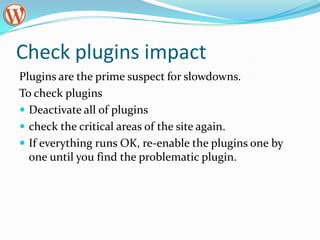
Check plugins impactPlugins are the prime suspect for slowdowns. To check pluginsDeactivate all of plugins check the critical areas of the site again. If everything runs OK, re-enable the plugins one by one until you find the problematic plugin.
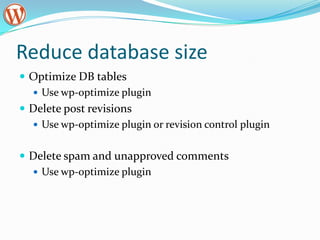
Reduce database sizeOptimize DB tablesUse wp-optimize pluginDelete post revisionsUse wp-optimize plugin or revision control pluginDelete spam and unapproved commentsUse wp-optimize plugin
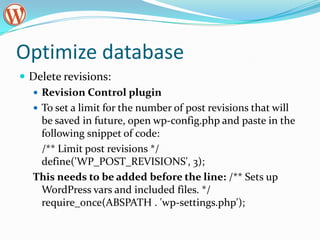
Optimize databaseDelete revisions:Revision Control pluginTo set a limit for the number of post revisions that will be saved in future, open wp-config.php and paste in the following snippet of code:	/** Limit post revisions */ define('WP_POST_REVISIONS', 3);This needs to be added before the line: /** Sets up WordPress vars and included files. */ require_once(ABSPATH . 'wp-settings.php');
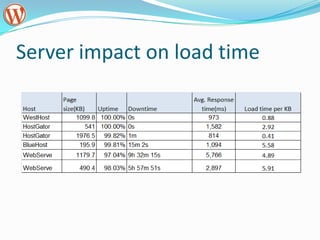
Server impact on load time
Further Speed Up you siteCaching your wordpress websiteUse CDN (Content Distribution Network) - CDN is a technique where you serve content of your website(mostly multimedia items) from different servers around the world instead of a single webhost. This helps in distributing the load on your website equally among lot more servers and helps in loading your website at much faster speed than normal.

Word press sites maintenanace

  • 1.
  • 2.
    Software updates -WhyCore software – WordpressNew functionalitySecurity fixesKeep up with PHP and mySql upgrades – Hosting providers constantly upgrade the software versions being used. Backward compatibility may be lost Plugins and ThemesNew functionalityCompatibility with core software
  • 3.
    Software updates -HowNo rush. Wait at least a week after a core software release before you install the new version. ( Let others find the bugs )Backup before you upgradeCheck plugins compatibilityCheck minimum requirements are still met by your serverIf you have many sites you may want to look at ManageWP
  • 4.
    WordPress OptimizationPage loadspeed impacts user experiencePage load speed impacts Google rankingIf you run a high traffic WordPress installation you will want to optimize WordPress and your server to run as efficiently as possible.
  • 5.
    Tools for checkingthe speedhttp://www.iwebtool.com/speed_test
  • 6.
  • 7.
  • 8.
  • 9.
    Google Chrome + Google SpeedTracerWhat impacts your website load speedImages sizeDatabase size Amount of calls to data base – depends on theme and plugins codeHosting server
  • 10.
    Optimizing ImagesShould beoptimized before images are even loaded into the server. Pixel size should be same as the target screen pixel sizJPEG images quality can be reduced the medium and reduce the image file size significantly. If you do not have image editing software, use online free tools instead. (sumopaint.com )Use wp-smush.it plugin to further optimize your images. ( Typically reduces size by 10% )
  • 11.
    Check plugins impactPluginsare the prime suspect for slowdowns. To check pluginsDeactivate all of plugins check the critical areas of the site again. If everything runs OK, re-enable the plugins one by one until you find the problematic plugin.
  • 12.
    Reduce database sizeOptimizeDB tablesUse wp-optimize pluginDelete post revisionsUse wp-optimize plugin or revision control pluginDelete spam and unapproved commentsUse wp-optimize plugin
  • 13.
    Optimize databaseDelete revisions:RevisionControl pluginTo set a limit for the number of post revisions that will be saved in future, open wp-config.php and paste in the following snippet of code: /** Limit post revisions */ define('WP_POST_REVISIONS', 3);This needs to be added before the line: /** Sets up WordPress vars and included files. */ require_once(ABSPATH . 'wp-settings.php');
  • 14.
  • 15.
    Further Speed Upyou siteCaching your wordpress websiteUse CDN (Content Distribution Network) - CDN is a technique where you serve content of your website(mostly multimedia items) from different servers around the world instead of a single webhost. This helps in distributing the load on your website equally among lot more servers and helps in loading your website at much faster speed than normal.