Boost your JAVA Code with the OpenNTF API
Oliver Busse
We4IT GmbH, Germany
March 17, 2016
Oliver Busse
• „Bleeding Yellow“ since R4.5
• Software Architect at We4IT
• Member of the development team of
Aveedo® Application Framework
• IBM Champion for ICS in 2015 + 2016
• OpenNTF Member Director
• XPages Advocate
• IBM Bluemix curious
@zeromancer1972
www.oliverbusse.com
Agenda
• What is the OpenNTF Domino API?
• Setup and Implementation
• Other Considerations
• Tons of examples
What is the OpenNTF Domino API?
• It‘s an open source project on OpenNTF
• It‘s was started in April 2013
• It‘s maintained by generous developers you may know
• It fills the gaps and gives the power you always wanted in Java for
Domino
• It‘s often refered to as „ODA“
What is the OpenNTF Domino API? (cont‘d)
• The ODA consists of several packages
• core
• formula
• rest
• xsp
• …
• It‘s an OSGi plugin
• It‘s designed for running on the Domino server (9.0.x+)
• It‘s designed for XPages (Java, SSJS) and Plugins
• It can‘t be used in Java Agents 
Key developers of the ODA
• Nathan T. Freeman
• Paul S. Withers
• Jesse Gallagher
• Roland Praml
• Martin Jinoch
• René Winkelmeyer
• Tim Tripcony (never forgotten)
Setup and Implementation
Resources
• Grab it from OpenNTF (recommended)
• http://www.openntf.org/main.nsf/project.xsp?r=project/OpenNTF%20Domino%20
API
• Grab it from the Git-Repo
• https://github.com/OpenNTF/org.openntf.domino
• Grab it from the OpenNTF Stash
• https://stash.openntf.org/projects/ODA
System Logging
• Since the ODA is an OSGi plugin you can install it via the update site
mechanism
• It runs as an extension to the XSP runtime on the HTTP server JVM
• It comes with it‘s own logger
Setup: prepare the server
• Set the signer of the NSF as „Sign or run…“ in server
document‘s security section
Setup: prepare the updatesite
• Create an updatesite NSF
• Name it whatever you
want
• Make sure you set ACL to
let the server READ
documents
Setup: import ODA into update site
• Find the site.xml file to import it as a local update site
into your NSF
• After import goto „Actions, Sign all Content“
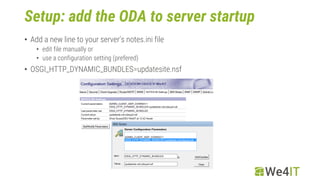
Setup: add the ODA to server startup
• Add a new line to your server‘s notes.ini file
• edit file manually or
• use a configuration setting (prefered)
• OSGI_HTTP_DYNAMIC_BUNDLES=updatesite.nsf
Setup: add the ODA to server startup
• This is what you should see when the server starts:
HTTP JVM: CLFAD0330I: NSF Based plugins are being installed
in the OSGi runtime. For more information please consult the
log
• Check the plugins with
– tell http osgi ss openntf
Setup: prepare Domino Designer
• Open DDE‘s preferences
• Goto „Domino Designer“ section
• Activate „Enable Eclipse plug-in install“
• Open the update site NSF you just created
• Goto „Actions, Show URLs“
• Copy one of the two URLs to clipboard
• Goto „File, Application, Install“
• Choose „Search for new features to install“
• On the next screen „Add (a) Remote Location“
• Enter a name for it and paste the URL in the clipboard
• On the next screen check the ODA entry and click next/yes if you are asked to
Other Considerations
• ODA utilizes the OpenLog project
• XspOpenLogUtil.logEvent(…)
• XspOpenLogUtil.logError(…)
• Get familiar with the OpenLog project from OpenNTF
• Create a new OpenLog.nsf file in your server‘s root (if you haven‘t
already)
Examples
Examples
• Session handling
• View handling (loops)
• Document & Field handling
• DateTime enhancements
• Transactions
• Xots
• Graphs
Session handling
Session handling: different approaches
• Extension Library
• ExtlibUtil.getCurrentSession();
• ExtlibUtil.getCurrentSessionAsSigner();
• ExtlibUtil.getCurrentSessionAsSignerWithFullAccess();
• needs exception handling
• XSPUtil
• like ExtlibUtil
• needs exception handling
• Factory
• Factory.getSession();
• uses enums for different session types
• no exception handling needed!
View handling
View handling: what you are used to (1)
View handling: what you are used to (2)
What you now are able to do
Document handling
Safe lines of code by using new methods
• New creation methods
• Database.createDocument(String, Object, …)
• Database.createDocument(HashMap fields)
• Alternatives to replaceItemValue
• Document.put(String field, Object o)
• Document.putAll(HashMap fields)
• Alternatives to getItemValueXXX
• Document.get(Object o) // document acts like a Map<?>
• Document.getItemValue(String field, Class type)
getItemValue: what you are used to
• getItemValue returns a Vector
• Vectors are not type save
• editor / compiler complains non-type-safety
• they can contain „anything“
• you have to check what is inside
• if the item does not exist you are running into trouble…
getItemValue: what you can do now
• cast to a type of your choice
• ArrayList<?> values = doc.getItemValue(„foo", ArrayList.class);
• forget type safety
• define your own!
• a non existing item is returned as null, not as empty Vector
• can be handled
DateTime enhancements
• Session.createDateTime(y,m,d,hh,mm,ss)
• uses int values
• conversion toJavaDate() not necessary
• DateTime.isBefore();
• DateTime.isAfter();
• useful comparisons
• DateTime.equalsIgnoreDate();
• DateTime.equalsIgnoreTime();
Transactions
Transactions
• ODA adds transactional capabilities to your Notes data
• You can modify documents without saving them
individually (e.g. in a loop)
• You can also rollback every modification if you need to
(e.g. when you run into an error)
Transactions (cont‘d)
• Create a new DatabaseTransaction object from the database
• DatabaseTransaction txn = db.startTransaction();
• Perform your modifications
• Decide whether to commit or rollback
• txn.commit();
• txn.rollback();
Xots
Xots
• Xots = XPages OSGi Tasklet Service
• It‘s the extended version of DOTS (Domino Tasklet Service)
• Use cases
• Can be coded inside the NSF, no plugin project needed
• Multi-threaded tasks like Runnable, but you can return values
• Bulk execution of time consuming code
• very new feature (alpha)
Xots (cont‘d)
• Advantages
• More granular time and event triggering than in Agents
• Can run with server-side permissions
• Runs in a shared container (JVM) unlikely of an Agent which runs in a dedicated
JVM
• you can exchange data between tasklets
• It‘s coded in a plain Java class and not in an Agent design element
• You can use SCM systems
Xots (cont‘d)
• Core elements of tasklet
• Interface Callable<?>
• Interface Future<?>
• get() method to get the return value(s)
• only if you are interested in a return value
• Class Xots from the ODA
• submit() method to create a tasklet
• schedule() methods to create a periodic tasklet
• use the PeriodicScheduler!
„Graphs“
http://whatis.techtarget.com/definition/graph-database
Graph DB
A graph database, also called a graph-oriented database, is a type of NoSQL database
that uses graph theory to store, map and query relationships.
A graph database is essentially a collection of nodes and edges. Each node represents
an entity (such as a person or business) and each edge represents a connection or
relationship between two nodes.
http://whatis.techtarget.com/definition/graph-database
Graphs – terminology
• Vertices (Nodes)
• Properties (Key-Value pairs)
• Edges
• Connections, Relations between Vertices
• ElementStores
• for us: NSF databases
• MetaverseIDs
• Replica + UNID (hashed)
• internal use only (don‘t care about them)
Graph DB – in Domino?
• Vertices and Edges are stored as Documents
• The data container is a NSF
• The ElementStore defines the filepath to the NSF
• An ElementStore can hold different types of Vertices
• Usually you create one ElementStore for each Vertice type
Let‘s see the demo &
some code
Resources
• The XPages demo application
• https://bitbucket.org/zeromancer1972/sutol-2015-oda-graph-demo
• A nice glossary
• http://www.intec.co.uk/from-xpages-to-web-app-glossary/
• OpenNTF Domino API
• http://www.openntf.org/main.nsf/project.xsp?r=project/OpenNTF%20Domino%20API
• http://www.openntf.org/main.nsf/project.xsp?r=project/OpenNTF%20Domino%20API%20Demo%20Database
• Xots
• http://www.intec.co.uk/xots-background-and-multithreaded-tasks-the-openntf-domino-api-way-part-one/
• http://www.intec.co.uk/xots-background-and-multithreaded-tasks-the-openntf-domino-api-way-part-two/
• http://www.intec.co.uk/xots-background-and-multithreaded-tasks-the-openntf-domino-api-way-part-three/
• Graphs
• http://de.slideshare.net/ktree19/the-graph-revolution
Q & A
Thank you!
www.we4it.com

Utilizing the open ntf domino api

  • 1.
    Boost your JAVACode with the OpenNTF API Oliver Busse We4IT GmbH, Germany March 17, 2016
  • 2.
    Oliver Busse • „BleedingYellow“ since R4.5 • Software Architect at We4IT • Member of the development team of Aveedo® Application Framework • IBM Champion for ICS in 2015 + 2016 • OpenNTF Member Director • XPages Advocate • IBM Bluemix curious @zeromancer1972 www.oliverbusse.com
  • 3.
    Agenda • What isthe OpenNTF Domino API? • Setup and Implementation • Other Considerations • Tons of examples
  • 4.
    What is theOpenNTF Domino API?
  • 5.
    What is theOpenNTF Domino API? • It‘s an open source project on OpenNTF • It‘s was started in April 2013 • It‘s maintained by generous developers you may know • It fills the gaps and gives the power you always wanted in Java for Domino • It‘s often refered to as „ODA“
  • 6.
    What is theOpenNTF Domino API? (cont‘d) • The ODA consists of several packages • core • formula • rest • xsp • … • It‘s an OSGi plugin • It‘s designed for running on the Domino server (9.0.x+) • It‘s designed for XPages (Java, SSJS) and Plugins • It can‘t be used in Java Agents 
  • 7.
    Key developers ofthe ODA • Nathan T. Freeman • Paul S. Withers • Jesse Gallagher • Roland Praml • Martin Jinoch • René Winkelmeyer • Tim Tripcony (never forgotten)
  • 8.
  • 9.
    Resources • Grab itfrom OpenNTF (recommended) • http://www.openntf.org/main.nsf/project.xsp?r=project/OpenNTF%20Domino%20 API • Grab it from the Git-Repo • https://github.com/OpenNTF/org.openntf.domino • Grab it from the OpenNTF Stash • https://stash.openntf.org/projects/ODA
  • 10.
    System Logging • Sincethe ODA is an OSGi plugin you can install it via the update site mechanism • It runs as an extension to the XSP runtime on the HTTP server JVM • It comes with it‘s own logger
  • 11.
    Setup: prepare theserver • Set the signer of the NSF as „Sign or run…“ in server document‘s security section
  • 12.
    Setup: prepare theupdatesite • Create an updatesite NSF • Name it whatever you want • Make sure you set ACL to let the server READ documents
  • 13.
    Setup: import ODAinto update site • Find the site.xml file to import it as a local update site into your NSF • After import goto „Actions, Sign all Content“
  • 14.
    Setup: add theODA to server startup • Add a new line to your server‘s notes.ini file • edit file manually or • use a configuration setting (prefered) • OSGI_HTTP_DYNAMIC_BUNDLES=updatesite.nsf
  • 15.
    Setup: add theODA to server startup • This is what you should see when the server starts: HTTP JVM: CLFAD0330I: NSF Based plugins are being installed in the OSGi runtime. For more information please consult the log • Check the plugins with – tell http osgi ss openntf
  • 16.
    Setup: prepare DominoDesigner • Open DDE‘s preferences • Goto „Domino Designer“ section • Activate „Enable Eclipse plug-in install“ • Open the update site NSF you just created • Goto „Actions, Show URLs“ • Copy one of the two URLs to clipboard • Goto „File, Application, Install“ • Choose „Search for new features to install“ • On the next screen „Add (a) Remote Location“ • Enter a name for it and paste the URL in the clipboard • On the next screen check the ODA entry and click next/yes if you are asked to
  • 17.
  • 18.
    Other Considerations • ODAutilizes the OpenLog project • XspOpenLogUtil.logEvent(…) • XspOpenLogUtil.logError(…) • Get familiar with the OpenLog project from OpenNTF • Create a new OpenLog.nsf file in your server‘s root (if you haven‘t already)
  • 19.
  • 20.
    Examples • Session handling •View handling (loops) • Document & Field handling • DateTime enhancements • Transactions • Xots • Graphs
  • 21.
  • 22.
    Session handling: differentapproaches • Extension Library • ExtlibUtil.getCurrentSession(); • ExtlibUtil.getCurrentSessionAsSigner(); • ExtlibUtil.getCurrentSessionAsSignerWithFullAccess(); • needs exception handling • XSPUtil • like ExtlibUtil • needs exception handling • Factory • Factory.getSession(); • uses enums for different session types • no exception handling needed!
  • 23.
  • 24.
    View handling: whatyou are used to (1)
  • 25.
    View handling: whatyou are used to (2)
  • 26.
    What you noware able to do
  • 27.
  • 28.
    Safe lines ofcode by using new methods • New creation methods • Database.createDocument(String, Object, …) • Database.createDocument(HashMap fields) • Alternatives to replaceItemValue • Document.put(String field, Object o) • Document.putAll(HashMap fields) • Alternatives to getItemValueXXX • Document.get(Object o) // document acts like a Map<?> • Document.getItemValue(String field, Class type)
  • 29.
    getItemValue: what youare used to • getItemValue returns a Vector • Vectors are not type save • editor / compiler complains non-type-safety • they can contain „anything“ • you have to check what is inside • if the item does not exist you are running into trouble…
  • 30.
    getItemValue: what youcan do now • cast to a type of your choice • ArrayList<?> values = doc.getItemValue(„foo", ArrayList.class); • forget type safety • define your own! • a non existing item is returned as null, not as empty Vector • can be handled
  • 31.
  • 32.
    DateTime enhancements • Session.createDateTime(y,m,d,hh,mm,ss) •uses int values • conversion toJavaDate() not necessary • DateTime.isBefore(); • DateTime.isAfter(); • useful comparisons • DateTime.equalsIgnoreDate(); • DateTime.equalsIgnoreTime();
  • 33.
  • 34.
    Transactions • ODA addstransactional capabilities to your Notes data • You can modify documents without saving them individually (e.g. in a loop) • You can also rollback every modification if you need to (e.g. when you run into an error)
  • 35.
    Transactions (cont‘d) • Createa new DatabaseTransaction object from the database • DatabaseTransaction txn = db.startTransaction(); • Perform your modifications • Decide whether to commit or rollback • txn.commit(); • txn.rollback();
  • 36.
  • 37.
    Xots • Xots =XPages OSGi Tasklet Service • It‘s the extended version of DOTS (Domino Tasklet Service) • Use cases • Can be coded inside the NSF, no plugin project needed • Multi-threaded tasks like Runnable, but you can return values • Bulk execution of time consuming code • very new feature (alpha)
  • 38.
    Xots (cont‘d) • Advantages •More granular time and event triggering than in Agents • Can run with server-side permissions • Runs in a shared container (JVM) unlikely of an Agent which runs in a dedicated JVM • you can exchange data between tasklets • It‘s coded in a plain Java class and not in an Agent design element • You can use SCM systems
  • 39.
    Xots (cont‘d) • Coreelements of tasklet • Interface Callable<?> • Interface Future<?> • get() method to get the return value(s) • only if you are interested in a return value • Class Xots from the ODA • submit() method to create a tasklet • schedule() methods to create a periodic tasklet • use the PeriodicScheduler!
  • 40.
  • 41.
    Graph DB A graphdatabase, also called a graph-oriented database, is a type of NoSQL database that uses graph theory to store, map and query relationships. A graph database is essentially a collection of nodes and edges. Each node represents an entity (such as a person or business) and each edge represents a connection or relationship between two nodes. http://whatis.techtarget.com/definition/graph-database
  • 42.
    Graphs – terminology •Vertices (Nodes) • Properties (Key-Value pairs) • Edges • Connections, Relations between Vertices • ElementStores • for us: NSF databases • MetaverseIDs • Replica + UNID (hashed) • internal use only (don‘t care about them)
  • 43.
    Graph DB –in Domino? • Vertices and Edges are stored as Documents • The data container is a NSF • The ElementStore defines the filepath to the NSF • An ElementStore can hold different types of Vertices • Usually you create one ElementStore for each Vertice type
  • 44.
    Let‘s see thedemo & some code
  • 45.
    Resources • The XPagesdemo application • https://bitbucket.org/zeromancer1972/sutol-2015-oda-graph-demo • A nice glossary • http://www.intec.co.uk/from-xpages-to-web-app-glossary/ • OpenNTF Domino API • http://www.openntf.org/main.nsf/project.xsp?r=project/OpenNTF%20Domino%20API • http://www.openntf.org/main.nsf/project.xsp?r=project/OpenNTF%20Domino%20API%20Demo%20Database • Xots • http://www.intec.co.uk/xots-background-and-multithreaded-tasks-the-openntf-domino-api-way-part-one/ • http://www.intec.co.uk/xots-background-and-multithreaded-tasks-the-openntf-domino-api-way-part-two/ • http://www.intec.co.uk/xots-background-and-multithreaded-tasks-the-openntf-domino-api-way-part-three/ • Graphs • http://de.slideshare.net/ktree19/the-graph-revolution
  • 46.
  • 47.
  • 48.