JavaScript
Get acquainted
TargetProcess
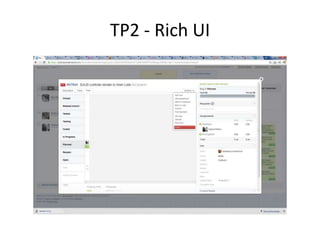
TP2 - Rich UI
TP2 - Rich UI
TP3 - high-performance UI
Goals
• JS popularization
• JS as engineering tool
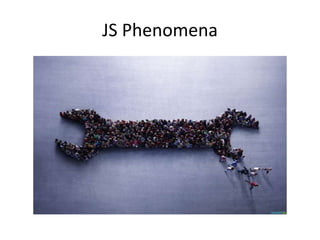
JS Phenomena
Roadmap
• Embedded JS issues:
  - bad parts, good parts
  - imperative skin upon functional nature
  - misunderstanding of prototype inheritance
  - missing modules support
  - performance issues
Bad parts, good parts
Bad parts
•   global variables
•   eval
•   a++
•   math
•   with
•   new (Number | String | Boolean)
•   == vs ===
Good parts
•   ===      : type safe vs (==)
•   []       : new Array()
•   {}       : new Object()
•   a && b : if (a) b else a
•   a || b : if (a) a else b
•   closures (~ lambda curring)
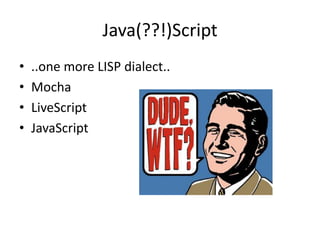
Java(??!)Script
Java(??!)Script
•   ..one more LISP dialect..
•   Mocha
•   LiveScript
•   JavaScript
Programming paradigms
Functional nature
• functions are the 1-st class objects:
  - assign to variables
  - pass as an argument
  - return as a result
Inheritance?


Why?
OOP in JavaScript
• Объект_о-ориентированный
• Объектно-ориентированный
Prototype chain
Classical OOP simulation
• Classical OOP inheritance can be simulated:
  > I would recommend John Resig’s “Class”
  object
    http://ejohn.org/blog/simple-javascript-inheritance/
Classical OOP simulation
Class.extend({
    init: function(a, b) {
          // .ctor
          this._super(a, b);
    },
    method1: function() {
          // do something
    }
});
Inheritance examples
• Some examples
Inheritance examples
var F = function(n) {
  this.name = n;
}
var a = new F(“a”);
var b = new F(“b”);
Inheritance examples
var F = function(n) {
  this.name = n;
}
F.prototype = , root: “hello world!” -;
var a = new F(“a”);
var b = new F(“b”);
a.root // ???
b.root // ???
Inheritance examples
var F = function(n) {
   this.name = n;
}
F.prototype = , root: “hello world!” -;
var a = new F(“a”);
var b = new F(“b”);

a.root = “Prototype inheritance magic”;
b.root // ???
Inheritance examples
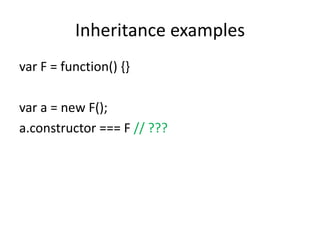
var F = function() {}

var a = new F();
a.constructor === F // ???
Inheritance examples
var F = function() {}
F.prototype = , root: “hello world!” -;
var a = new F();
a.constructor === F // ???
Dynamic inheritance
var F = function() {};
F.prototype = {
    count: 0,
    augment: function() {
            ++F.prototype.count;
            F.prototype.test = function() { alert(this.count) }
    }
};
var a = new F();
var b = new F();

a. augment();

a.test() // ???
b.test() // ???
Functions
• apply
• call
Modules
Modules simulation
• No modules. Global variables RULEZZZ!!11
Modules simulation
• No modules. Global variables RULEZZZ!!11


                 BAD!
Modules simulation
• No named modules. BUT functional context

       (function(global) { . . .})(window)
Modules simulation
• No named modules. BUT functional context

       (function(global) { . . .})(window)
Modules simulation
• No named modules. BUT functional context

       (function(global) { . . .})(window)

       var myJQueryVar = $.noConflict()
Modules simulation
• Namespacing as global variables chains
    newsite.common.utils
    newsite.common.services

  var newsite = newsite || {};
  newsite.common = newsite.common || {};
  newsite.common.utils = function() , … -;
Modules simulation
• Namespacing as global variables chains
     newsite.common.utils
     newsite.common.services
• $LAB
     .script(“newsite.core.js").wait()
     .script(“newsite.common.utils.js")
     .script(“newsite.common.services.js“)
     .wait(function() { /* ready */ })
Modules simulation


   RequireJS
  http://requirejs.org/
Modules simulation - RequireJS
<!DOCTYPE html>
<html>
  <head>
    <title>My Sample Project</title>
    <script
         src="path_to/require.js“
         data-main="entry_points/main">
    </script>
  </head>
  <body>
    <h1>My Sample Project</h1>
  </body>
</html>
entry_points/main.js
require(
   *“dir/module1“, “dir/module2“+,
   function(m1, m2) { /* to do: … */ }
);
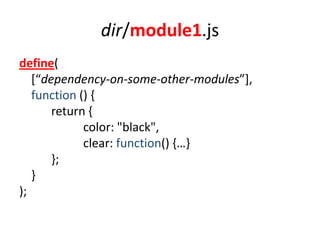
dir/module1.js
define(
   *“dependency-on-some-other-modules”+,
   function () {
       return {
             color: "black",
             clear: function() ,…-
       };
   }
);
Performance
IE6?!
Performance - prologue
• It’s still possible to write slow JavaScript on
  the new fast JavaScript engines

• JavaScript performance directly affects user
  experience
High Performance JavaScript
Performance
• Loading & execution
• DOM scripting
Loading and execution
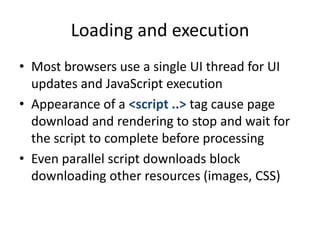
• Most browsers use a single UI thread for UI
  updates and JavaScript execution
• Appearance of a <script ..> tag cause page
  download and rendering to stop and wait for
  the script to complete before processing
• Even parallel script downloads block
  downloading other resources (images, CSS)
Loading and execution
• Put <script> tags as close to the bottom of the
  <body> as possible
• Load scripts in groups
  (100 kb faster than 4 x 25kb)
• Minify your scripts
• Optimize your stylesheets
Non-blocking loading
• <script defer> (IE 4+, FF 3.5+)
• Dynamic <script> elements
  – Parallel non-blocking loading
  – Put into <head> to prevent “operation aborted”
  – Remember of ordering (cross-browser variation)
• XMLHttpRequest injection
  – Inline <script> vs eval()
  – Downloading from CDNs impossible
RequireJS DO all the job!
DOM Scripting
• Live DOM collections
• Repaint and Reflow
• Handling DOM events
What is DOM?
• Document Object Model – language
  independent application interface (API) for
  working with XML and HTML documents
• Browsers keep DOM and JavaScript
  implementations independent of each other
Toll bridge
• Touch the DOM lightly
• Stay within ECMAScript as much as possible
HTML collections
• Expensive live collections
• Use local variables when accessing collection
  elements
Repaints and reflows
• DOM tree
• Render tree
Reflow process
When a DOM tree change affects element
geometry – browser recalculate geometry and
position of elements that could have been
affected by the change and reconstructs the
Render tree
Redraw process
Once the reflow is complete, the browser
redraws the affected parts of the screen
When does a reflow happen?
• Page renders initially
• Visible DOM elements are added or removed
• Elements change position
• Element change size
  (margin, padding, border, width, height)
• Content is changed (text or image with
  different size)
• Browser window is resized
Queuing and flushing reflows
• Browsers optimize reflow by queuing changes
  and performing them in batches
• Never request layout information while it’s
  being changed
Queuing and flushing reflows
•   offsetX
•   scrollX
•   clientX
•   getComputedStyle (currentStyle in IE)

* X – Top, Left, Width, Height
Minimizing repaints and reflows
• Combine multiple DOM and style changes into
  a batch and apply them once
Batching DOM changes
• Take the element off of the document flow
• Apply multiply changes
• Bring the element back to the document
Ways to modify the DOM off the
            document
• Hide, apply changes and show again
• Use document fragment to build subtree
  outside of the live DOM and then copy it to
  the document
• Copy the original element into an off-
  document node, modify the copy and replace
  original element when done
Take elements out of the flow for
             animation
1. Use absolute positioning
2. Animate the element
3. When the animation is done, restore the
   positioning

          JQuery DO this job for you!
Event delegation
• A lot of event handlers affects
  memory, performance and useless since user
  clicks 1 button of 100 for example
• Set event handler for container element and
  use event delegation
Performance essence
• http://jsperf.com/

• http://www.developer.nokia.com/Community
  /Wiki/JavaScript_Performance_Best_Practices
Patterns
• http://www.addyosmani.com/resources/esse
  ntialjsdesignpatterns/book/
How to move next
• Primary
• Advanced
• Meta-level
How to move next
• http://habrahabr.ru/post/117838/

JS Essence

  • 1.
  • 2.
  • 3.
  • 4.
  • 5.
  • 6.
  • 7.
    Goals • JS popularization •JS as engineering tool
  • 8.
  • 9.
    Roadmap • Embedded JSissues: - bad parts, good parts - imperative skin upon functional nature - misunderstanding of prototype inheritance - missing modules support - performance issues
  • 10.
  • 11.
    Bad parts • global variables • eval • a++ • math • with • new (Number | String | Boolean) • == vs ===
  • 12.
    Good parts • === : type safe vs (==) • [] : new Array() • {} : new Object() • a && b : if (a) b else a • a || b : if (a) a else b • closures (~ lambda curring)
  • 13.
  • 14.
    Java(??!)Script • ..one more LISP dialect.. • Mocha • LiveScript • JavaScript
  • 15.
  • 16.
    Functional nature • functionsare the 1-st class objects: - assign to variables - pass as an argument - return as a result
  • 17.
  • 18.
    OOP in JavaScript •Объект_о-ориентированный • Объектно-ориентированный
  • 19.
  • 20.
    Classical OOP simulation •Classical OOP inheritance can be simulated: > I would recommend John Resig’s “Class” object http://ejohn.org/blog/simple-javascript-inheritance/
  • 21.
    Classical OOP simulation Class.extend({ init: function(a, b) { // .ctor this._super(a, b); }, method1: function() { // do something } });
  • 22.
  • 23.
    Inheritance examples var F= function(n) { this.name = n; } var a = new F(“a”); var b = new F(“b”);
  • 24.
    Inheritance examples var F= function(n) { this.name = n; } F.prototype = , root: “hello world!” -; var a = new F(“a”); var b = new F(“b”); a.root // ??? b.root // ???
  • 25.
    Inheritance examples var F= function(n) { this.name = n; } F.prototype = , root: “hello world!” -; var a = new F(“a”); var b = new F(“b”); a.root = “Prototype inheritance magic”; b.root // ???
  • 26.
    Inheritance examples var F= function() {} var a = new F(); a.constructor === F // ???
  • 27.
    Inheritance examples var F= function() {} F.prototype = , root: “hello world!” -; var a = new F(); a.constructor === F // ???
  • 28.
    Dynamic inheritance var F= function() {}; F.prototype = { count: 0, augment: function() { ++F.prototype.count; F.prototype.test = function() { alert(this.count) } } }; var a = new F(); var b = new F(); a. augment(); a.test() // ??? b.test() // ???
  • 29.
  • 30.
  • 31.
    Modules simulation • Nomodules. Global variables RULEZZZ!!11
  • 32.
    Modules simulation • Nomodules. Global variables RULEZZZ!!11 BAD!
  • 33.
    Modules simulation • Nonamed modules. BUT functional context (function(global) { . . .})(window)
  • 34.
    Modules simulation • Nonamed modules. BUT functional context (function(global) { . . .})(window)
  • 35.
    Modules simulation • Nonamed modules. BUT functional context (function(global) { . . .})(window) var myJQueryVar = $.noConflict()
  • 36.
    Modules simulation • Namespacingas global variables chains newsite.common.utils newsite.common.services var newsite = newsite || {}; newsite.common = newsite.common || {}; newsite.common.utils = function() , … -;
  • 37.
    Modules simulation • Namespacingas global variables chains newsite.common.utils newsite.common.services • $LAB .script(“newsite.core.js").wait() .script(“newsite.common.utils.js") .script(“newsite.common.services.js“) .wait(function() { /* ready */ })
  • 38.
    Modules simulation RequireJS http://requirejs.org/
  • 39.
    Modules simulation -RequireJS <!DOCTYPE html> <html> <head> <title>My Sample Project</title> <script src="path_to/require.js“ data-main="entry_points/main"> </script> </head> <body> <h1>My Sample Project</h1> </body> </html>
  • 40.
    entry_points/main.js require( *“dir/module1“, “dir/module2“+, function(m1, m2) { /* to do: … */ } );
  • 41.
    dir/module1.js define( *“dependency-on-some-other-modules”+, function () { return { color: "black", clear: function() ,…- }; } );
  • 42.
  • 43.
  • 44.
    Performance - prologue •It’s still possible to write slow JavaScript on the new fast JavaScript engines • JavaScript performance directly affects user experience
  • 45.
  • 46.
    Performance • Loading &execution • DOM scripting
  • 47.
    Loading and execution •Most browsers use a single UI thread for UI updates and JavaScript execution • Appearance of a <script ..> tag cause page download and rendering to stop and wait for the script to complete before processing • Even parallel script downloads block downloading other resources (images, CSS)
  • 48.
    Loading and execution •Put <script> tags as close to the bottom of the <body> as possible • Load scripts in groups (100 kb faster than 4 x 25kb) • Minify your scripts • Optimize your stylesheets
  • 49.
    Non-blocking loading • <scriptdefer> (IE 4+, FF 3.5+) • Dynamic <script> elements – Parallel non-blocking loading – Put into <head> to prevent “operation aborted” – Remember of ordering (cross-browser variation) • XMLHttpRequest injection – Inline <script> vs eval() – Downloading from CDNs impossible
  • 50.
  • 51.
    DOM Scripting • LiveDOM collections • Repaint and Reflow • Handling DOM events
  • 52.
    What is DOM? •Document Object Model – language independent application interface (API) for working with XML and HTML documents • Browsers keep DOM and JavaScript implementations independent of each other
  • 53.
    Toll bridge • Touchthe DOM lightly • Stay within ECMAScript as much as possible
  • 54.
    HTML collections • Expensivelive collections • Use local variables when accessing collection elements
  • 55.
    Repaints and reflows •DOM tree • Render tree
  • 56.
    Reflow process When aDOM tree change affects element geometry – browser recalculate geometry and position of elements that could have been affected by the change and reconstructs the Render tree
  • 57.
    Redraw process Once thereflow is complete, the browser redraws the affected parts of the screen
  • 58.
    When does areflow happen? • Page renders initially • Visible DOM elements are added or removed • Elements change position • Element change size (margin, padding, border, width, height) • Content is changed (text or image with different size) • Browser window is resized
  • 59.
    Queuing and flushingreflows • Browsers optimize reflow by queuing changes and performing them in batches • Never request layout information while it’s being changed
  • 60.
    Queuing and flushingreflows • offsetX • scrollX • clientX • getComputedStyle (currentStyle in IE) * X – Top, Left, Width, Height
  • 61.
    Minimizing repaints andreflows • Combine multiple DOM and style changes into a batch and apply them once
  • 62.
    Batching DOM changes •Take the element off of the document flow • Apply multiply changes • Bring the element back to the document
  • 63.
    Ways to modifythe DOM off the document • Hide, apply changes and show again • Use document fragment to build subtree outside of the live DOM and then copy it to the document • Copy the original element into an off- document node, modify the copy and replace original element when done
  • 64.
    Take elements outof the flow for animation 1. Use absolute positioning 2. Animate the element 3. When the animation is done, restore the positioning JQuery DO this job for you!
  • 65.
    Event delegation • Alot of event handlers affects memory, performance and useless since user clicks 1 button of 100 for example • Set event handler for container element and use event delegation
  • 66.
    Performance essence • http://jsperf.com/ •http://www.developer.nokia.com/Community /Wiki/JavaScript_Performance_Best_Practices
  • 67.
  • 68.
    How to movenext • Primary • Advanced • Meta-level
  • 69.
    How to movenext • http://habrahabr.ru/post/117838/