

The 12 step guide to
LotusScript
Bill Buchan
hadsl
2
#1: How to Code
• How to code
• Code for maintenance
• Code updates cost more than new code
• Architect well. Get the data model right to start with.
• Only code for performance, if required
• Get it working before getting it working for speed
• Why?
• The highest cost in development is software maintenance
• Make it easier for the person maintaining the app
• It could beYOU
3
#2: How to Test
• Test soon, test often, test completely
• Look at test-driven development
• Write the specification
• Write the structure
• Write the tests
• Write the code
• Automatic testing means:
• Far easier to regression test all the time
• Minimize run-time errors by:
• Always assuming that data operations outside the
current database may fail
• Trapping all run-time errors and providing an execution
path that fails safely
4
#2: How to Test (cont.)
• Why test early?
• Costs rise as the tests fail further away from development
• Cheapest to most expensive are:
• Unit tests — by the developer
• User acceptance tests (UATs) — by the tester
• End-user failure — by the user
• The more tests you perform in unit testing:
• The cheaper your development will be
• The more professional your colleagues will think you are
• The more your boss will like you
5
#3: “Measure Twice, Cut Once”
• Spend more time thinking and less time coding
• Think of at least TWO methods of solving a problem
• The best approach is usually a blend of the two
• Think about the data model!
• Why?
• More planning, less work
• “You know it’s been a rough night
when you wake up next to some
code you don’t recognize.”
	

 – Bob Balaban
6
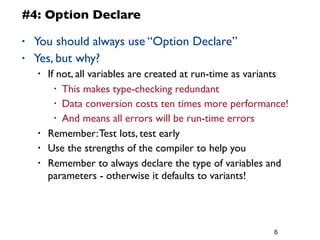
#4: Option Declare
• You should always use “Option Declare”
• Yes, but why?
• If not, all variables are created at run-time as variants
• This makes type-checking redundant
• Data conversion costs ten times more performance!
• And means all errors will be run-time errors
• Remember:Test lots, test early
• Use the strengths of the compiler to help you
• Remember to always declare the type of variables and
parameters - otherwise it defaults to variants!
7
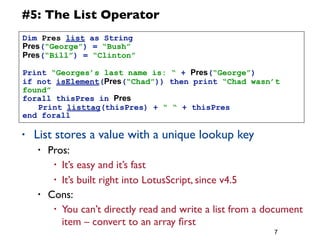
#5: The List Operator
• List stores a value with a unique lookup key
• Pros:
• It’s easy and it’s fast
• It’s built right into LotusScript, since v4.5
• Cons:
• You can’t directly read and write a list from a document
item – convert to an array first
Dim Pres list as String
Pres(“George”) = “Bush”
Pres(“Bill”) = “Clinton”
Print “Georges’s last name is: “ + Pres(“George”)
if not isElement(Pres(“Chad”)) then print “Chad wasn’t
found”
forall thisPres in Pres
	
  Print listtag(thisPres) + “ “ + thisPres
end forall
8
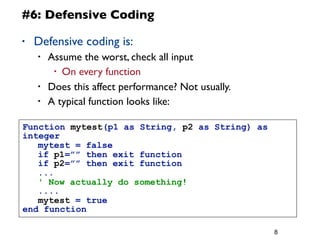
#6: Defensive Coding
• Defensive coding is:
• Assume the worst, check all input
• On every function
• Does this affect performance? Not usually.
• A typical function looks like:
Function mytest(p1 as String, p2 as String) as
integer
	
  mytest = false
	
  if p1=”” then exit function
	
  if p2=”” then exit function
	
  ...
	
  ' Now actually do something!
	
  ....
	
  mytest = true
end function
9
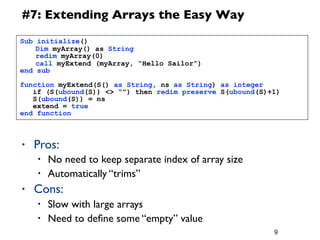
#7: Extending Arrays the Easy Way
• Pros:
• No need to keep separate index of array size
• Automatically “trims”
• Cons:
• Slow with large arrays
• Need to define some “empty” value
Sub initialize()
	
  Dim myArray() as String
	
  redim myArray(0)
	
  call myExtend (myArray, “Hello Sailor”)
end sub
function myExtend(S() as String, ns as String) as integer
if (S(ubound(S)) <> “”) then redim preserve S(ubound(S)+1)
S(ubound(S)) = ns
extend = true
end function
• If you have applications with scheduled Agents
• Or, if you have a diverse range of clients
• Then, you need to log your Agent (both client and
scheduled) run-time status
• Why?
• Applications will break
• You need to know when they break
• Timing metrics for performance testing
• Beware!
• Don’t make the logging
so slow that it affects
application performance!
10
#8: Logging
11
#8: Logging (cont.)
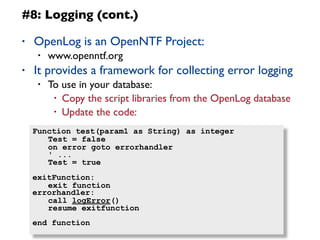
• OpenLog is an OpenNTF Project:
• www.openntf.org
• It provides a framework for collecting error logging
• To use in your database:
• Copy the script libraries from the OpenLog database
• Update the code:
Function test(param1 as String) as integer
	
  Test = false
	
  on error goto errorhandler
	
  ' ...
	
  Test = true
exitFunction:
	
  exit function
errorhandler:
	
  call logError()
	
  resume exitfunction
end function
12
#8: Logging (cont.)
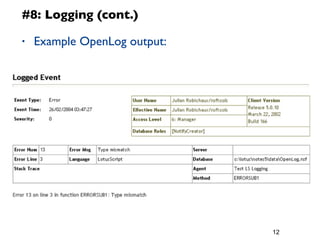
• Example OpenLog output:
13
#9: Use NotesDateTime Instead of Strings!
• Don’t store date/time values as Strings
• Use NotesDateTime structures, and save them
• Why?
• You don’t know how the client will interpret dates
• Is it dd/mm/yyyy or mm/dd/yyyy?
• It means that views will be able to sort on dates
• This happens more often than you think!
• And things always break on the 13th of the month
14
#10: Always use full canonical names in
reader/author fields!
• Common names assume the same hierarchy as the
server in use
• Abbreviated names dont work
• Always use multi-values for multiple names - sticking ‘;’
between names wont work
• And always set the field to reader/author in
LotusScript!
15
#11: Evaluate
• Evaluate allows you to run @Functions within
LotusScript
• Sometimes faster, easier
• Example:	


 evaluate(|@unique|)
• DON’T:
• Overuse it. Lots of LotusScript functions mimic @functions
• strRight == @StrRight
16
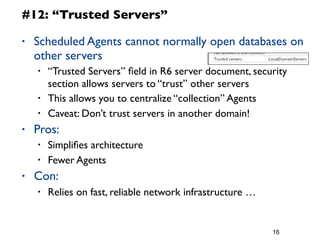
#12: “Trusted Servers”
• Scheduled Agents cannot normally open databases on
other servers
• “Trusted Servers” field in R6 server document, security
section allows servers to “trust” other servers
• This allows you to centralize “collection” Agents
• Caveat: Don’t trust servers in another domain!
• Pros:
• Simplifies architecture
• Fewer Agents
• Con:
• Relies on fast, reliable network infrastructure …
17
#13: LSI_Info()/GetThreadInfo
• LSI_INFO() gives some run-time information
• Superceded by GetThreadInfo
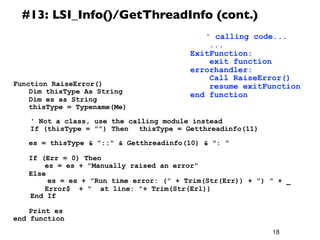
• GetThreadInfo(11) gives calling class
• GetThreadInfo(10) gives function name
• And lots more
• Why?
• Error trapping:We can track where we came from
• We don’t have to pass lists of parameters to error
trapping code
• Prevents “cut-n-paste coding” errors ...
18
#13: LSI_Info()/GetThreadInfo (cont.)
Function RaiseError()
	
  Dim thisType As String
	
  Dim es as String
	
  thisType = Typename(Me)


' Not a class, use the calling module instead
If (thisType = "") Then 	
  thisType = Getthreadinfo(11)


  es = thisType & "::" & Getthreadinfo(10) & ": "
	
  If (Err = 0) Then
	
  	
  es = es + "Manually raised an error"
	
  Else
es = es + "Run time error: (" + Trim(Str(Err)) + ") " + _
	
  	
  Error$ + " at line: "+ Trim(Str(Erl))
End If
	
  Print es
end function
	
  ' calling code...
...
ExitFunction:
exit function
errorhandler:
Call RaiseError()
resume exitFunction
end function
19
Okay
I added a new step
20
Done!

12 Step Guide to Lotuscript

  • 1.
    The 12 stepguide to LotusScript Bill Buchan hadsl
  • 2.
    2 #1: How toCode • How to code • Code for maintenance • Code updates cost more than new code • Architect well. Get the data model right to start with. • Only code for performance, if required • Get it working before getting it working for speed • Why? • The highest cost in development is software maintenance • Make it easier for the person maintaining the app • It could beYOU
  • 3.
    3 #2: How toTest • Test soon, test often, test completely • Look at test-driven development • Write the specification • Write the structure • Write the tests • Write the code • Automatic testing means: • Far easier to regression test all the time • Minimize run-time errors by: • Always assuming that data operations outside the current database may fail • Trapping all run-time errors and providing an execution path that fails safely
  • 4.
    4 #2: How toTest (cont.) • Why test early? • Costs rise as the tests fail further away from development • Cheapest to most expensive are: • Unit tests — by the developer • User acceptance tests (UATs) — by the tester • End-user failure — by the user • The more tests you perform in unit testing: • The cheaper your development will be • The more professional your colleagues will think you are • The more your boss will like you
  • 5.
    5 #3: “Measure Twice,Cut Once” • Spend more time thinking and less time coding • Think of at least TWO methods of solving a problem • The best approach is usually a blend of the two • Think about the data model! • Why? • More planning, less work • “You know it’s been a rough night when you wake up next to some code you don’t recognize.” – Bob Balaban
  • 6.
    6 #4: Option Declare •You should always use “Option Declare” • Yes, but why? • If not, all variables are created at run-time as variants • This makes type-checking redundant • Data conversion costs ten times more performance! • And means all errors will be run-time errors • Remember:Test lots, test early • Use the strengths of the compiler to help you • Remember to always declare the type of variables and parameters - otherwise it defaults to variants!
  • 7.
    7 #5: The ListOperator • List stores a value with a unique lookup key • Pros: • It’s easy and it’s fast • It’s built right into LotusScript, since v4.5 • Cons: • You can’t directly read and write a list from a document item – convert to an array first Dim Pres list as String Pres(“George”) = “Bush” Pres(“Bill”) = “Clinton” Print “Georges’s last name is: “ + Pres(“George”) if not isElement(Pres(“Chad”)) then print “Chad wasn’t found” forall thisPres in Pres Print listtag(thisPres) + “ “ + thisPres end forall
  • 8.
    8 #6: Defensive Coding •Defensive coding is: • Assume the worst, check all input • On every function • Does this affect performance? Not usually. • A typical function looks like: Function mytest(p1 as String, p2 as String) as integer mytest = false if p1=”” then exit function if p2=”” then exit function ... ' Now actually do something! .... mytest = true end function
  • 9.
    9 #7: Extending Arraysthe Easy Way • Pros: • No need to keep separate index of array size • Automatically “trims” • Cons: • Slow with large arrays • Need to define some “empty” value Sub initialize() Dim myArray() as String redim myArray(0) call myExtend (myArray, “Hello Sailor”) end sub function myExtend(S() as String, ns as String) as integer if (S(ubound(S)) <> “”) then redim preserve S(ubound(S)+1) S(ubound(S)) = ns extend = true end function
  • 10.
    • If youhave applications with scheduled Agents • Or, if you have a diverse range of clients • Then, you need to log your Agent (both client and scheduled) run-time status • Why? • Applications will break • You need to know when they break • Timing metrics for performance testing • Beware! • Don’t make the logging so slow that it affects application performance! 10 #8: Logging
  • 11.
    11 #8: Logging (cont.) •OpenLog is an OpenNTF Project: • www.openntf.org • It provides a framework for collecting error logging • To use in your database: • Copy the script libraries from the OpenLog database • Update the code: Function test(param1 as String) as integer Test = false on error goto errorhandler ' ... Test = true exitFunction: exit function errorhandler: call logError() resume exitfunction end function
  • 12.
    12 #8: Logging (cont.) •Example OpenLog output:
  • 13.
    13 #9: Use NotesDateTimeInstead of Strings! • Don’t store date/time values as Strings • Use NotesDateTime structures, and save them • Why? • You don’t know how the client will interpret dates • Is it dd/mm/yyyy or mm/dd/yyyy? • It means that views will be able to sort on dates • This happens more often than you think! • And things always break on the 13th of the month
  • 14.
    14 #10: Always usefull canonical names in reader/author fields! • Common names assume the same hierarchy as the server in use • Abbreviated names dont work • Always use multi-values for multiple names - sticking ‘;’ between names wont work • And always set the field to reader/author in LotusScript!
  • 15.
    15 #11: Evaluate • Evaluateallows you to run @Functions within LotusScript • Sometimes faster, easier • Example: evaluate(|@unique|) • DON’T: • Overuse it. Lots of LotusScript functions mimic @functions • strRight == @StrRight
  • 16.
    16 #12: “Trusted Servers” •Scheduled Agents cannot normally open databases on other servers • “Trusted Servers” field in R6 server document, security section allows servers to “trust” other servers • This allows you to centralize “collection” Agents • Caveat: Don’t trust servers in another domain! • Pros: • Simplifies architecture • Fewer Agents • Con: • Relies on fast, reliable network infrastructure …
  • 17.
    17 #13: LSI_Info()/GetThreadInfo • LSI_INFO()gives some run-time information • Superceded by GetThreadInfo • GetThreadInfo(11) gives calling class • GetThreadInfo(10) gives function name • And lots more • Why? • Error trapping:We can track where we came from • We don’t have to pass lists of parameters to error trapping code • Prevents “cut-n-paste coding” errors ...
  • 18.
    18 #13: LSI_Info()/GetThreadInfo (cont.) FunctionRaiseError() Dim thisType As String Dim es as String thisType = Typename(Me) ' Not a class, use the calling module instead If (thisType = "") Then thisType = Getthreadinfo(11) es = thisType & "::" & Getthreadinfo(10) & ": " If (Err = 0) Then es = es + "Manually raised an error" Else es = es + "Run time error: (" + Trim(Str(Err)) + ") " + _ Error$ + " at line: "+ Trim(Str(Erl)) End If Print es end function ' calling code... ... ExitFunction: exit function errorhandler: Call RaiseError() resume exitFunction end function
  • 19.
  • 20.